Do We Really Need a Home Security Network Device ?


A friend of mine sent me a note this morning, asking if our bandwidth shaping device could provide the same type of service as this new DoJo application. Their niche is basically that you cannot trust third-party devices in your home network from being hijacked. For example, the software engineers writing the code that allows you to remote control your dishwasher from your iPhone, are likely not security experts. It is a reasonable assertion that a hacker might exploit a security hole in their software.  The Dojo will detect any smart device breaches and take action, a good idea for sure.

I spent about 20 minutes reading  and thinking about their specification and what value that provides to the home user.  And then it hit me, there is a more obvious precaution to  secure your home network that you might be overlooking.

IN 2016 and going forward THERE SHOULD BE NO REASON TO STORE ANY PERSONAL DATA ON  YOUR HOME NETWORK.

  • Gmail in the cloud
  • Quick books in the cloud
  • Banking in the cloud
  • Facebook in the cloud
  • Google Docs in the cloud
  • Stock Trading in the Cloud

No, nothing is ever completely  secure, and certainly anything you put in the cloud can be hacked, but in my opinion, the level of security afforded by the cloud is far better than anything you can rig together on your home network.

Think about it…

Your bank spends hundreds of millions on staying ahead of hackers. You have secret pictures, secret questions that  challenge you about your second cousin’s favorite hobby.  They know when you coming from new or different IP address.

Gmail now tells you when there is a login from a non standard computer.

These modern cloud applications are about as secure as a consumer could hope for. For the same reason you should not keep wads of cash in a safe in your house, you should not keep any personal information on storage devices in your house. Let your dishwasher go hog wild, who cares. I catch hackers on my network all the time, they have hijacked a few servers to send spam and attack other consumers (my bad), but there is really nothing of interest laying around on any of my devices other than some geezer MP3 music, and my vacation photos on my iPad that nobody else wants to look at anyway.

But if you must secure important data in your home network yes go ahead and invest in a device like the Dojo, it can’t hurt, but before you do that change your habits and use the cloud whenever possible.

Art Reisman

CTO http://www.netequalizer.com

Speed up Your Browser, Free Yourself From Java Script


This morning I read an article by Klint Finley about his experience with disabling Java Script.  I am about 8 hours into my experiment now, and here is what I have found so far.

The results were amazing for the on-line periodicals (traditional newspapers) that I like to browse through. Even with my 20 megabit Internet connection, some of these sites are just endless piles of garbage with advertisements and videos popping up, forcing screen refreshes, and making the content unreadable.  Some of them take so long to load, I just give up and get back to work. With Java script turned off, all that changed.   I have not tested the limits on this yet, but I was able to get through a couple of these sites clicking to various articles and my delays were about 1/10 of normal, which is a significant improvement.

On the downside I found some of  the web-based applications that I depend on to be nonfunctional.  Klint mentions issues with Google Docs, but it goes farther than that. My Google Calendar did not work and neither did my WordPress or Cisco Webex. What I am doing now on my MAC laptop is keeping two browsers active.  Firefox with Java Script disabled, and Safari with it enabled.  I feel that this is a good compromise and worth the effort of switching.

Editors Note: Turning off Java Script is only going to impact things that you launch from a traditional browser. The pre- loaded applications on your devices do not use Java Script.


Comcast at It Again, Shaping Amazon Content


Sunday night I decided I would finally try watching the Sopranos.  Amazon offers Sopranos content for $1.99 an episode, which saves me the hassle of getting a full year HBO subscription to get episodes.  First pass on my smart internet connected TV,  I could not get the Amazon stream to run at all, and so I reverted to watching it on my laptop.  It came up on the laptop, but the video was choppy and constantly breaking up, stalling etc.   In other words it was being throttled by Comcast.  Solution?

I just fired up my IPvanish which hides the source of the video from Comcast, and presto, I was able to watch the whole episode without an issue.   If you experience content streaming problems with your National ISP try using a VPN tunnel, it has worked for me quite well.

There are other posts about this practice.

There is something rotten in the state of online streaming.

How to get access to blocked Internet Sites.

Editors Note: I completely understand why they throttle content, and have covered the economics behind this before. I just don’t like the secrecy  and deception around it, hence I will continue to publish articles when I find it.

Art Reisman
CTO, http://www.netequalizer.com

NetEqualizer News: November 2015


November 2015

Greetings!

Enjoy another issue of NetEqualizer News! This month, we officially release the NE5000, help you out with RTR best practices, feature a live customer NetEqualizer installation and Case Study, and ask for your assistance in our 2016 planning. As always, feel free to pass this along to others who might be interested in NetEqualizer News.

A message from Art…
Art Reisman, CTO – APconnections

We are awaiting our first snow here in Colorado, with our first really cold night killing off the last of the garden this past week (22F/-5C). While the garden goes to sleep, we are laying plans for next year, both in the garden and with the NetEqualizer!art

There is still time to give us feedback for 2016. If you would like to contribute to the 2016 NetEqualizer Roadmap, we welcome your ideas. Call or email us with your suggestions. And, for those of you that have already responded, THANK YOU!

This month make it official – our NE5000 powerhouse solution is ready for primetime! If you are thinking of taking your NetEqualizer solution to the next level, read more below.

twitterAnd remember we are now on Twitter! You can now follow us @NetEqualizer.

We love it when we hear back from you – so if you have a story you would like to share with us of how we have helped you, let us know.

Email me directly at art@apconnections.net. I would love to hear from you!

NE5000: Official Release

We often get quizzical looks from customers when they see our price performance numbers. Now pushing 10 Gbps line speeds and the ability to shape 60,000 users, we have heard rumblings that some analysts don’t believe our product can perform at this price point. We just ignore them, as they are mostly in the pocket of our competitors anyway.

With a list price of $22,000 USD, our new NE5000 brings bandwidth control pricing back to Earth.

How do we do it?NE5000_data_sheet
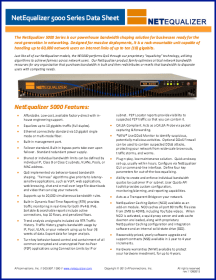
Really, it’s just old-fashioned hard work! At the core of our NetEqualizer technology lies a team of computer scientists that spend their days optimizing the algorithms and techniques to ensure high reliability and performance.

We also go against the conventional wisdom of packet classification – that is our other advantage. Packet Classification is on the way out, and there is no ignoring it any longer.

If you have not had a chance to work with us before, we encourage you to check out our new high-end model and set up a WebEx with our technical team for a demo. Click the button below to contact us!

Here is a link to our NE5000 data sheet to get you started:

The NE5000 Data Sheet

contact_us_box-1


Real World RTR: Live at Morrisville State CollegeMorrisville Logo #3

When developing RTR and other NetEqualizer features, we are often using simulated data – real system testing occurs near the end of the cycle. During a recent Technical Refresh session with Rob Gaudreau of Morrisville State College, however, we got to see some exciting results from a live NetEqualizer that we wanted to share.

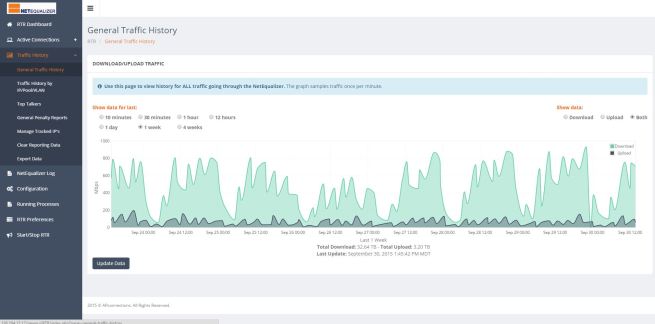
The first interesting graph is their General Traffic History:
GeneralTrafficHistory-1

This is a graph of bandwidth usage for the previous week. It’s great to see how predictable the traffic patterns are, and how useful RTR can be in seeing what occurred historically and how you can use that data to plan for the future.

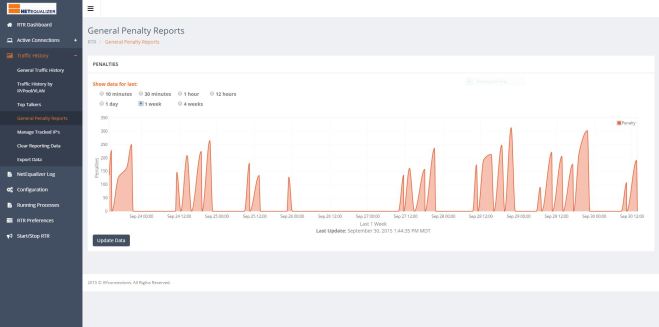
The second interesting graph is their General Penalty History:
GeneralPenalty-1

This is a graph of the number of penalties that were occurring over the previous week – the same time period used to generate the General Traffic History graph. Notice how the penalty count directly correlates with the busy times.

Those penalties are the NetEqualizer hard at work, shaping the largest connections during congested hours of the day, and letting traffic through untouched during less busy times – all without IT administrator intervention.morrisville_case_study

Morrisville State College – Case Study
We enjoyed talking to Rob so much and hearing about his experience with NetEqualizer, that we decided to turn it into a full case study so that others could hear their story. Check it out, here:

Morrisville State College Case Study

Schedule your Technical Refresh Today!
Our Technical Refreshes have been a huge success! These walkthroughs have proven valuable to both new and experienced customers. We are always enhancing our technology and interfaces, so it’s easy to get to the point where features are new and unfamiliar.

If you are current on NetEqualizer Software and Support (NSS), and you are interested in a 30-minute WebEx to see the newest interfaces and learn more about RTR, click the link below!

contact_us_box-1


How Can RTR Help You? Check Out RTR Best Practices (Part 1)

RTR is great as a simple reporting tool, but it can also be much more! Below we share some helpful ways to utilize the different reports in RTR to better configure your NetEqualizer and understand your network. This is Part 1 of a two-part series – look for Part 2 next month!

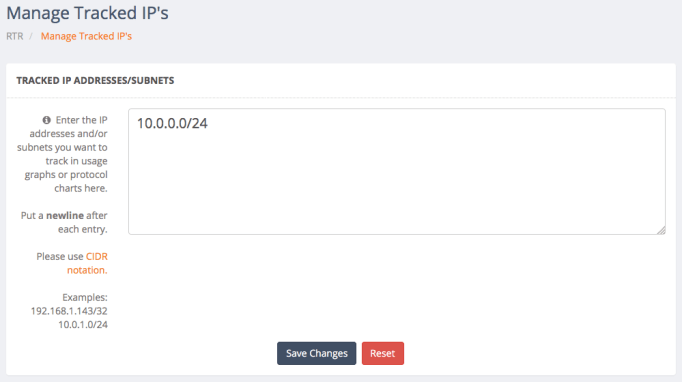
1) Set up Traffic History IPs for Graphing
Use Traffic History->Manage Tracked IPs to add your internal IPs (or any other IP you care about) to the tracking system. The first step in getting the most out of RTR is telling it which IP addresses you want to track.
managetrackedips

2) Figure out your Top Users by Monitoring Real-Time Connections
Use Active Connections->View Active Connections and sort by the Wavg column to see your top bandwidth users. Use the C and DNS options below the external IP address to learn more about the connected host (C for Country Code and DNS for NS Lookup). Use the AR and T options below the internal IPs to view rules associated with the IP (AR) and its historical bandwidth usage (T).

unnamed (1)

3) See if P2P is an Issue on your Network
Use Active Connections->View Connection Counts to see the IP addresses of users with lots of concurrent connections.

This data can help you determine any P2P users on your network and can also help you establish a baseline for implementing system-wide connection count limits.

Look for outliers and then set a limit such that almost all of your users fall below it with normal network usage. You can also copy the IP of the user with the most connections, filter the Active Connections table for that user, and then view all the different external IP addresses they are connected to.

unnamed (2)

4) See What your Bandwidth Pools are Doing Right Now
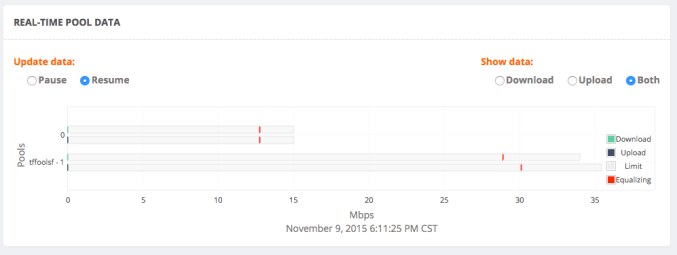
Use the RTR Dashboard to view real-time pool data. Remember, all traffic falls under “Pool 0,” so even if you don’t use pools in your network, you can use this horizontal bar graph to see when your network is Equalizing (when it passes the red line).
realtimepool

If you are current on NetEqualizer Software and Support (NSS), and have a question about RTR or would like a walk through, click the button below!

contact_us_box-1


Help Us Set The 2016 NetEqualizer Roadmap

We have finalized our Winter Release (8.4), but there is still time to influence our 2016 Roadmap. We will start planning our Fall Release soon, and we would love to add your ideas to the release.

If you have a great idea for us, please let us know!

No idea is too “out there” – we want to solve your crunchiest, toughest networking issues. Click on the button below to email us your idea.

If you have already responded, rest assured that we have collected your feedback and added it to our Feature Request List.


Best Of The Blog

A Cure for Electronic Theft?

By Art Reisman – CTO – APconnections

What if we created a new electronic currency, a-la Bitcoin, with a twist. Let’s start by taking an idea from the Federal Government, and put a watermark on our personal funds – something unique that signifies who legally possesses the currency. Cattle ranchers do this with a brand so nobody steals their cattle. This has worked pretty well for a few hundred years, right?

With our new personal watermark, suppose somebody breaks into our bank, and wires all your money to some idiot in Russia. In today’s world, the only way to find that money is to follow the trail, and that takes a huge effort from a banking forensics person, working with International governments. The money may travel so fast it may not be possible to recover. Now, suppose the funds had an electronic tag that could not be altered by a criminal. For example currency in your possession has a public private encryption key, and only you can authorize a change in possession…

Photo Of The Month
picture
Where was this picture taken?
Tell us and you could win a $25 gift card.
This picture was taken by a staff member during a recent college customer site visit at a cathedral. The first four people to email sales@apconnections.net with the name of the college where this cathedral is located get a $25 gift card!

What is Your True Internet Speed? Are those Speed Tests Telling the Truth?


When the consumer Internet came of age back in 1990, there was never any grand plan to insure a consistent speed from one point to another. Somewhere along the line, as the Internet went from an academic tool to an essential consumer device, providers in their effort to “out market” one another began to focus on speed as their primary differentiator. By definition, the Internet is a “best effort” corroboration between providers to move your data. No one provider can guarantee a consistent Internet speed for everything you do.  They only have control over their own physical lines, and even then, there are variables beyond their control (which I will address shortly).

Let’s take a look at the speed of wired networks common to most consumers, Cable and DSL.

The physical line into your house is generally what your cable or DSL provider is talking about when they advertise your Internet speed. Essentially, how fast is the link between the providers NOC and your house. Generally you will have a dedicated line for this, and so your speed on this last mile link does not vary.

The good news is that most consumers are more concerned with watching movies, video, listening to music, etc. than they are about pulling research data of some obscure server in Serbia. Given this reality, the Industry has gotten very smart, and popular content is not hosted at some distant server, but is usually distributed locally to each provider. The best example of this is Netflix. Your Netflix content is most likely coming from a server hosted a few miles from your house in your providers NOC, and not from some grand Netflix central location.

Why is Netflix data hosted locally ?

The dirty industry secret is that your provider pays a fee when you go off their network for data. There are also potential capacity problems when you go off their network.  Is this a bad thing? No not really, it is just a matter of efficiency. We see similar practices in other product distribution models. You don’t drive to New York to pick up a toaster, there is usually one waiting for you at your nearest discount store. For the some of the same reasons, that you don’t go to New York to pick up a toaster, your provider tries to host your digital data locally when possible.

What does this mean for your Internet Speed?

It means that when you retrieve content that your provider hosts locally you are likely going to get your advertised speed. This also holds true for some speed test sites, if they are hosted within your providers network they are going to register a constantly higher speed.

What happens to your Internet speed when you go off your providers network? 

There are several factors that will effect your speed.

The main governing factor affecting speed is the capacity the of your providers exchange point.  This is a switching point where your provider exchanges data with other networks.  Depending on how much investment your provider put into this infrastructure this switching point can back up when there is more data being moved than it has capacity to handle. When this happens you get gridlock at the exchange point, and  your Internet speed can plummet.  Gridlock is always a real possibility because your provider just cannot anticipate all the content you are retrieving and sometimes it is not hosted locally.

What does my provider to to alleviate gridlock not their exchange point?

Some providers will actually lower your Internet speed when you are crossing an exchange point.  Or if their circuits are overloaded in general. I experienced this effect which I described in detail a few months ago when I was updating my IPAD.

After the exchange point the speed at which you get your data external to your providers network depends on the whims of every provider and back bone along the route. That obscure research paper from that server in Serbia , may have to make multiple hops to get out of Serbia and then onto some international back bone, and finally to your providers exchange point. There is no way anyone can anticipate at what rate this data will arrive.

How can I run a speed test that better reflects my speed out to the real Internet, by passing locally hosted speed test servers?

A few years ago we ran into this tool set that deliberately tries to retrieve all kinds of remote data to measure your true internet speed. You can also search out files hosted on obscure servers and try to download them.  Perhaps I’ll run a follow up article documenting some of my experiences.