The Evolution of P2P and Behavior-Based Blocking


By Art Reisman

CTO – APconnections

www.netequalizer.com

I’ll get to behavior-based blocking soon, but before I do that, I encourage anybody dealing with P2P on their network to read about the evolution of P2P outlined below. Most of the methods historically used to thwart P2P, are short lived pesticides, and resistance is common. Behavior-based control is a natural wholesome predator of P2P which has proved to be cost effective over the past 10 years.

The evolution of P2P

P2P as it exists today is a classic example of Darwinian evolution.

In the beginning there was Napster. Napster was a centralized depository for files of all types. It also happened to be a convenient place to distribute unauthorized, copyrighted material. And so, the music industry, unable to work out a licensing distribution agreement with Napster basically closed it down. So now, you had all these consumers used to getting free music, and like a habituated wild animal, they were in no mood to pay 15.99 per CD from their local retailer.

P2P technology was already in existence when Napster was closed down; however until that time, it was intended to be a distribution system for legitimate content which came out of academia. By decentralizing the content to many multiple distribution points, the cost of distribution was much less than hosting content distribution on a private server. Decentralized content, good for legitimate distribution of academic content, quickly became a nightmare for the Music Industry.  Instead of having one cockroach of illegal content to deal with, they now had millions of little P2P cockroaches all over the world to contend with.

The Music industry had a multi-billion dollar leak in their revenue stream and went after enforcing copyright policy by harassing ISPs and threatening consumers with jail time. For the ISP, the legal liability of having copyrighted material on your network was a hassle, but the bigger problem was the congestion. When content was distributed by a single point supplier, there were natural cost barriers to prevent bandwidth utilization from rising unchecked. For example, when you buy a music file from Amazon or iTunes, both ends of the transaction require some form of payment. The supplier pays for a large bandwidth pipe, and the consumer pays money for the file. With P2P, the distributors and the clients are all consumers with essentially unlimited data usage on their home accounts, and the content is free. As P2P file sharing rose, ISPs had no easy way of changing their pricing model to deal with the orgy of file sharing. Although invisible to the public, it was a cyber party that rivaled 10 cent beer night fiasco of the 1970’s.

Resistant P2P pesticides

In order to thwart p2p usage, ISPs and businesses started spending hundreds of millions of dollars in technology that tracked specific P2P applications and blocked those streams. This technology is referred to as layer 7 blocking. Layer 7 blocking involves looking at the specific content traversing the Internet and identifying P2P applications by their specific footprint. Intuitively, this solution was a no-brainer* – spot P2P and block it. Most of these installations with layer 7 blocking showed some initial promise, however, as was the case with the previous cockroach infestation, P2P again evolved to meet the challenge and then some.

How does newer evolved P2P thwart layer 7 shaping?

1) There are now encrypted P2P clients where their footprint is hidden, and thus all the investment in the layer 7 shaper can go up in smoke once encrypted P2P infects your network. It can’t be spotted.

2) P2P clients open and close connections much faster than their first generation of the early 2000’s. To keep up with a the flurry of connections over a short time, the layer 7 engine must have many times the processing power of a traditional router, and must do the analysis quickly. The cost of layer 7 shaping is rising much faster than the cost of adding additional bandwidth to a circuit.

Also: Legally there also problems with eavesdropping on customer data without authorization.

How does behavior-based shaping P2P blocking keep up?

1) It uses a progressive rate limit on suspected P2P users.

P2P has the footprint of creating many simultaneous connections to move data across the internet. When behavior-based shaping is in effect, it detects these high connection count users, and slowly implements a progressive rate limit on all their data. This does not completely cut them off per se, but it punishes the speeds of the consumer using p2p and does so progressively as they use more p2p connections. This may seem a bit non specific in target, but when done correctly it rarely affects non P2P users, and even if it does, the behavior of using a large number of downloads is considered rude and abhorrent, and is most like a virus if not a P2P application.

2) It limits the user to a fixed number of simultaneous connections.

Also: It does not violate any privacy policies.

That covers the basics of P2P behavior-based shaping. In practice, we have developed our techniques with a bit of intelligence and do not wish to give away all of our fine tuning secrets, but suffice it to say, I have been implementing behavior-based shaping for 10 years and have empirically seen its effectiveness over time. The cost remains low with respect to licensing (very stable solution), and the results remain consistent.

* Although in some cases there was very little information about how effective the solution was working, companies and ISPs shelled out license fees year after year.

Are You Unknowingly Sharing Bandwidth with Your Neighbors?


Editor’s Note: The following is a revised and update version of our original article from April 2007.

In a recent article titled, “The White Lies ISPs Tell about Broadband Speeds,” we discussed some of the methods ISPs use when overselling their bandwidth in order to put on their best face for their customers. To recap a bit, oversold bandwidth is a condition that occurs when an ISP promises more bandwidth to its users than it can actually deliver hence, during peak hours you may actually be competing with your neighbor for bandwidth. Since the act of “overselling” is a relative term, with some ISPs pushing the limit to greater extremes than others, we thought it a good idea to do a quick follow-up and define some parameters for measuring the oversold condition.

For this purpose we use the term contention ratio. A contention ratio is simply the size of an Internet trunk divided by the number of users. We normally think of Internet trunks in units of megabits. For example, 10 users sharing a one megabit trunk would have a 10-to-1 contention ratio. If sharing the bandwidth on the trunk equally and simultaneously, each user could sustain a constant feed of 100kbs, which is exactly 1/10 of the overall bandwidth.

So what is an acceptable contention ratio?

From a business standpoint, it is whatever a customer will put up with and pay for without canceling their service. This definition may seem ethically suspect, but whether in the bygone days of telecommunications phone service or contemporary Internet bandwidth business, there are long-standing precedents for overselling. What do you think a circuit busy signal is caused by? Or a dropped cell phone call? It’s best to leave the moral debate to a university assignment or a Sunday sermon.

So, without pulling any punches, what exactly will a customer tolerate before pulling the plug?
Here are some basic unofficial observations:
  • Rural customers in the US and Canada: Contention ratios of 10 to 1 are common (2007 this was 20 to 1)
  • International customers in remote areas of the world: Contention ratios of 20 to 1 are common (2007 was 80 to 1)
  • Internet providers in urban areas: Contention ratios of 5 to 1 are to be expected (2007 this was 10 to 1) *

* Larger cable operators have extremely fast last mile connections, most of their speed claims are based on the speed of their last mile connection and not their Internet Exchange point thresholds. The numbers cited are related to their connection to the broader Internet and not the last mile from their office (NOC) to your home. Admittedly, the lines of what is the Internet can be blurred as many cable operators cache popular local content (NetFlix Movies, for example). The movie is delivered from a server at their local office direct to your home, hence technically we would not consider this related to your contention ratio to the Internet.

The numbers above are a good, rough starting point, but things are not as simple as they look. There is a statistical twist as bandwidth amounts get higher.

From the customers perspective of speed, contention ratios can actually increase as the overall Internet trunk size gets larger. For example, if 50 people can share one megabit without mutiny, it should follow that 100 people can share two megabits without mutiny as the ratio has not changed. It is still 50 to 1.

However, from observations of hundreds of ISPs, we can easily conclude that perhaps 110 people can share two megabits with the same tolerance as 50 people sharing one megabit. What this means is that the larger the ISP, the more bandwidth at a fixed cost per megabit, and thus the larger the contention ratios you can get away with.

Is this really true? And if so, what are its implications for your business?

This is simply an empirical observation, backed up by talking to literally thousands of ISPs over the course of four years and noticing how their over subscription ratios increase with the size of their trunk while customer perception of speed remains about the same.

A conservative estimate is that, starting with the baseline ratio listed above, you can safely add 10 percent more subscribers above and beyond the original contention ratio for each megabit of trunk they share.

Related Articles

How to speed up access on your iPhone

How to determine the true speed of video over your Internet Connection

Network Bottlenecks – When Your Router Drops Packets, Things Can Get Ugly


By Art Reisman

CTO – APconnections

As a general rule, when a network router sees more packets than it can send or receive on a link, it will drop the extra  packets. Intuitively, when your router is dropping packets, one would assume that the perceived slow down, per user, would be just a gradual shift slower.

What happens in reality is far worse…

1) Distant users get spiraling slower responses.

Martin Roth, a colleague of ours who founded one of the top performance analysis companies in the world, provided this explanation:

“Any device which is dropping packets “favors” streams with the shortest round trip time, because (according to the TCP protocol) the time after which a lost packet is recovered is depending on the round trip time. So when a company in Copenhagen/Denmark has a line to Australia and a line to Germany on the same internet router, and this router is discarding packets because of bandwidth limits/policing, the stream to Australia is getting much bigger “holes” per lost packet (up to 3 seconds) than the stream to Germany or another office in Copenhagen. This effect then increases when the TCP window size to Australia is reduced (because of the retransmissions), so there are fewer bytes per round trip and more holes between to round trips.”

In the screen shot above (courtesy of avenida.dk), the Bandwidth limit is 10 Mbit (= 1 Mbyte/s net traffic), so everything on top of that will get discarded. The problem is not the discards, this is standard TCP behaviour, but the connections that are forcefully closed because of the discards. After the peak in closed connections, there is a “dip” in bandwidth utilization, because we cut too many connections.

2) Once you hit a congestion point, where your router is forced to drop packets, overall congestion actually gets worse before it gets better.

When applications don’t get a response due to a dropped packet, instead of backing off and waiting, they tend to start sending re-tries, and this is why you may have noticed prolonged periods (3o seconds or more) of no service on a congested network. We call this the rolling brown out. Think of this situation as sort of a doubling down on bandwidth at the moment of congestion. Instead of easing into a full network and lightly bumping your head, all the devices demanding bandwidth ramp up their requests at precisely the moment when your network is congested, resulting in an explosion of packet dropping until everybody finally gives up.

How do you remedy outages caused by Congestion?

We have written extensively about solutions to prevent bottlenecks. Here is a quick summary with links:

1) The most obvious being to increase the size of your link.

2) Enforce rate limits per user.

3) Wse something more sophisticated like a Netequalizer, a device that is designed to specifically counter the effects of congestion.

From Martin Roth of Avenida.dk

“With NetEqualizer we may get the same number of discards, but we get fewer connections closed, because we “kick” the few connections with the high bandwidth, so we do not get the “dip” in bandwidth utilization.

The graphs (above) were recorded using 1 second intervals, so here you can see the bandwidth is reached. In a standard SolarWinds graph with 10 minute averages the bandwidth utilization would be under 20% and the customer would not know they are hitting the limit.”

———————————————————————-

The excerpt below was a message from a reseller who had been struggling with congestion issues at a hotel, he tried basic rate limits on his router first. Rate Limits will buy you some time , but on an oversold network you can still hit the congestion point, and for this you need a smarter device.

“…NetEq delivered a 500% gain in available bandwidth by eliminating rate caps, possible through a mix of connection limits and Equalization.  Both are necessary.  The hotel went from 750 Kbit max per accesspoint (entire hotel lobby fights over 750Kbit; divided between who knows how many users) to 7Mbit or more available bandwidth for single users with heavy needs.

The ability to fully load the pipe, then reach out and instantly take back up to a third of it for an immediate need like a speedtest was also really eye-opening.  The pipe is already maxed out, but there is always a third of it that can be immediately cleared in time to perform something new and high-priority like a speed test.”
 
Rate Caps: nobody ever gets a fast Internet connection.
Equalized: the pipe stays as full as possible, yet anybody with a business-class need gets served a major portion of the pipe on demand. “
– Ben Whitaker – jetsetnetworks.com

Are those rate limits on your router good enough?

Except for Equalizing, All Other WAN Optimizers Fall Short When You Need Them Most!


Wouldn’t it be nice to get help when you’re in trouble such that you never suffer the effects?

Like the secret service whose job it is to protect the President. They stay out of the way and remain indiscreet and unnoticeable until danger approaches – then they spring into action like a well choreographed army geared to destroy the threat. If they do their jobs right, trouble has been averted and things continue on without any calamity.

When it comes to bandwidth contention, saturation and blackout threats is there any technology whose only mission is to spring into action to avoid this situation? Yes, but as far as I know, only one – Equalizing!

But first, let’s briefly review the many technologies that are marketed and sold under the banner “WAN Optimization” – what do they really do? Most of the time, what they do is try and prioritize one thing over the other – thus accelerating a subset of your applications. In some other cases, they take a XMbs pipe and try to make it feel like a X+YMbs pipe. But what do they do if the majority of applications causing the peak are “high priority,” or what if demand is such that you peak at X+YMbs bandwidth?

In a previous blog article, we wrote about various WAN Optimization technologies and their pro’s and con’s. It’s a great read if you would like more general details about the variety of specific WAN Optimization technologies.

Yet, which of these WAN Optimization technologies only help during peak bandwidth Periods? Do any of them help to manage through those peak periods – by kicking-in to provide relief, and then kicking-out once it’s no longer needed? Isn’t that the time when you need help most and isn’t that the type of help you need?

I get asked the question to describe the differences between the NetEqualizer and other products/technologies all the time. These are good and fair questions, and I like answering them. However, it does demonstrate that product and technology differences are not widely understood by the market place. Not all “WAN Optimization” technologies operate the same way, or solve the same problems.

With each of the non-Equalizing technologies, you can still suffer from peak load problems because, by definition, the other technologies do nothing to dynamically change the bandwidth demand that’s causing the peak load. When using non-Equalizer based technology bandwidth demand is still allowed to increase until the network can’t deal with it anymore. With these technologies the only thing you’ve achieved is extending the point at which the peak may happen, but you’ve done nothing to remove the fundamentals of the peak bandwidth demand. After saturation has occurred, you end up in the same place with the same problems and complaints. That’s not relief and that’s not a solution! More or less, it’s the same thing as buying a little more bandwidth, it may provide some additional breathing room at first, but it really doesn’t solve the problem especially long term.

While most “Wan Optimization” approaches extend or “stretch” bandwidth, ONLY Equalizing dynamically optimizes QoS during peak periods and can “stretch” the effective bandwidth almost indefinitely. To do this, a few applications will be slowed down, but if properly tuned these applications will represent less than 10% of all applications, and frankly, they’re the ones that are the reason for the peak problem anyway – so it’s fair and appropriate.

The fundamental principle of Equalizing is to optimize the WAN by behavior, and only during impacted conditions. An Equalizer will provide all applications the bandwidth they need, until the equalizer senses that there is a peak condition occurring at which time it “kicks” in by slowing down the largest flows while still allowing the smaller flows to pass through the network as a priority and without any delay. When correctly set, large flows should constitute 5-10% of all flows, and by slowing this small percentage of flows to the advantage of all others, the equalizer leverages bandwidth to the benefit of 90-95% of everything else.  Since decisions on what to slowdown is done by flow size, and not by port, protocol or content, it is effective on 100% of all flows – including those that are encrypted or otherwise “cloaked.” Most importantly, during peak periods, it will dynamically react by fairly slowing down only the “hogging” applications.

When the peak period ends, the delays are removed, and all traffic resumes in its natural order. This type of WAN optimization is specifically geared towards peak period management, and is highly effective. Furthermore, since it’s driven by a few key parameters – it is a “set-and-forget” product that requires zero ongoing maintenance and doesn’t require any foreknowledge of the types of users, devices or applications that will be confronting the network. That’s a perfect fit for networks that have unpredictable uses like those administered by: ISPs, Schools, Business Centers, Hotels, Libraries, Convention Centers, any public WiFi Network, etc… Wherever you have an unpredictable application load to manage, Equalizing is a far superior method than any other.

It is true peak contention management like no other – and the only technology that helps at the time when you need it most!

Please comment – we’d love to hear your opinions.

How to Determine the True Speed of Video over Your Internet Connection


Art Reisman CTO www.netequalizer.com

Editor’s note: Art Reisman is the CTO of APconnections. APconnections designs and manufactures the popular NetEqualizer bandwidth shaper.

More and more, Internet Service Providers are using caching techniques on a large scale to store local copies of Netflix Movies and YouTube videos. There is absolutely nothing wrong with this technology. In fact, without it, your video service would likely be very sporadic. When a video originates on your local provider’s caching server, it only has to make a single hop to get to your doorstep. Many cable operators now have dedicated wires from their office to your neighborhood, and hence very little variability in the speed of your service on this last mile.

So how fast can you receive video over the Internet? (Video that is not stored on your local providers caching servers.) I suppose this question would be moot if all video known to mankind was available from your ISP. In reality, they only store a tiny fraction of what is available on their caching servers. The reason why caching can be so effective is that, most consumers only watch a tiny fraction of what is available, and they tend to watch what is popular. To determine how fast you can receive video over the Internet you must by-pass your providers cache.

To insure that you are running a video from beyond your providers cache, google something really obscure. Like “Chinese language YouTube on preparing flowers.” Don’t use this search term if you are in a Chinese neighborhood, but you get the picture right? Search for something obscure that is likely never watched near you. Pick a video 10 minutes or longer, and then watch it. The video may get broken up, or more subtly you may notice the buffer bar falls behind or barely keeps up with the playing of the video. In any case, if you see a big difference watching an obscure video over a popular one, this will be one of the best ways to analyze your true Internet speed.

Note: Do not watch the same video twice in a row when doing this test. The second time you watch an obscure video from China, it will likely run from the your provider’s cache, thus skewing the experiment.

How to Speed Up Data Access on Your iPhone


By Art Reisman

Art Reisman CTO www.netequalizer.com

Editor’s note: Art Reisman is the CTO of APconnections. APconnections designs and manufactures the popular NetEqualizer bandwidth shaper.

Ever wonder if there was anything you can do to make your iPhone access a little bit faster?

When on Your Provider’s 4g Network and Data Access is Slow.

The most likely reason for slow data access is congestion on the provider line. 3g and 4g networks all have a limited sized pipe from the nearest tower back to the Internet. It really does not matter what your theoretical data speed is, when there are more people using the tower than the back-haul pipe can handle, you can temporarily lose service, even when your phone is showing three or four bars.

The other point of contention can be the amount of users connected to a tower exceeds the the towers carrying capacity in terms of frequency.  If this occurs you likely will not only lose data connectivity but also the ability to make and receive phone calls.

Unfortunately, you only have a couple of options in this situation.

– If you are in a stadium with a large crowd, your best bet is to text during the action. Pick a time when you know the majority of people are not trying to send data. If you wait for a timeout or end of the game, you’ll find this corresponds to the times when the network slows to a crawl, so try to finish your access before the last out of the game or the end of the quarter.

Get away from the area of congestion. I have experienced complete lockout of up to 30 minutes, when trying to text, as a sold out stadium emptied out. In this situation my only chance was to walk about 1/2 mile or so from the venue to get a text out. Once away from the main stadium, my iPhone connected to a tower with a different back haul away from the congested stadium towers.

When connected to a local wireless network and access is slow.

Get close to the nearest access point.

Oftentimes, on a wireless network, the person with the strongest signal wins. Unlike the cellular data network , 802.11  protocols used by public wireless access points have no way to time-slice data access. Basically, this means the device that talks the loudest will get all the bandwidth. In order to talk the loudest, you need to be closest to the access point.

On a relatively uncrowded network you might have noticed that you get fairly good speed even on a moderate or weak signal.  However, when there are a large number of users competing for the attention of a local access point, the loudest have the ability to dominate all the bandwidth, leaving nothing for the weaker iPhones. The phenomenon of the loudest talker getting all the bandwidth is called the hidden node problem. For a good explanation of the hidden node issue you can reference our white paper on the problem.

Shameless plug: If you happen to be a provider or know somebody that works for a provider please tell them to call us and we’d be glad to explain the simplicity of equalizing and how it can restore sanity to a congested network.

How to Block Frostwire, utorrent and Other P2P Protocols


By Art Reisman, CTO, http://www.netequalizer.com

Art Reisman CTO www.netequalizer.com

Disclaimer: It is considered controversial and by some definitions illegal for a US-based ISP to use deep packet inspection on the public Internet.

At APconnections, we subscribe to the philosophy that there is more to be gained by explaining your technology secrets than by obfuscating them with marketing babble. Read on to learn how I hunt down aggressive P2P traffic.

In order to create a successful tool for blocking a P2P application, you must first figure out how to identify P2P traffic. I do this by looking at the output data dump from a P2P session.

To see what is inside the data packets I use a custom sniffer that we developed. Then to create a traffic load, I use a basic Windows computer loaded up with the latest utorrent client.

Editors Note: The last time I used a P2P engine on a Windows computer, I ended up reloading my Windows OS once a week. Downloading random P2P files is sure to bring in the latest viruses, and unimaginable filth will populate your computer.

The custom sniffer is built into our NetGladiator device, and it does several things:

1) It detects and dumps the data inside packets as they cross the wire to a file that I can look at later.

2) It maps non printable ASCII characters to printable ASCII characters. In this way, when I dump the contents of an IP packet to a file, I don’t get all kinds of special characters embedded in the file. Since P2P data is encoded random music files and video, you can’t view data without this filter. If you try, you’ll get all kinds of garbled scrolling on the screen when you look at the raw data with a text editor.

So what does the raw data output dump of a P2P client look like ?

Here is a snippet of some of the utorrent raw data I was looking at just this morning. The sniffer has converted the non printable characters to “x”.
You can clearly see some repeating data patterns forming below. That is the key to identifying anything with layer 7. Sometimes it is obvious, while sometimes you really have work to find a pattern.

Packet 1 exx_0ixx`12fb*!s[`|#l0fwxkf)d1:ad2:id20:c;&h45h”2x#5wg;|l{j{e1:q4:ping1:t4:ka 31:v4:utk21:y1:qe
Packet 2 exx_0jxx`1kmb*!su,fsl0’_xk<)d1:ad2:id20:c;&h45h”2x#5wg;|l{j{e1:q4:ping1:t4:xv4^1:v4:utk21:y1:qe
Packet 3 exx_0kxx`1exb*!sz{)8l0|!xkvid1:ad2:id20:c;&h45h”2x#5wg;|l{j{e1:q4:ping1:t4:09hd1:v4:utk21:y1:qe
Packet 4 exx_0lxx`19-b*!sq%^:l0tpxk-ld1:ad2:id20:c;&h45h”2x#5wg;|l{j{e1:q4:ping1:t4:=x{j1:v4:utk21:y1:qe

The next step is to develop a layer 7 regular expression to identify the patterns in the data. In the output you’ll notice the string “exx” appears in line, and that is what you look for. A repeating pattern is a good place to start.

The regular expression I decided to use looks something like:

exx.0.xx.*qe

This translates to: match any string starting with “exx” followed, by any character “.” followed by “0”, followed by “xx”, followed by any sequence of characters ending with “qe”.

Note: When I tested this regular expression it turns out to only catch a fraction of the Utorrent, but it is a start. What you don’t want to do is make your regular expression so simple that you get false positives. A layer 7 product that creates a high degree of false positives is pretty useless.

The next thing I do with my new regular expression is a test for accuracy of target detection and false positives.

Accuracy of detection is done by clearing your test network of everything except the p2p target you are trying to catch, and then running your layer 7 device with your new regular expression and see how well it does.

Below is an example from my NetGladiator in a new sniffer mode. In this mode I have the layer 7 detection on, and I can analyze the detection accuracy. In the output below, the sniffer puts a tag on every connection that matches my utorrent regular expression. In this case, my tag is indicated by the word “dad” at the end of the row. Notice how every connection is tagged. This means I am getting 100 percent hit rate for utorrent. Obviously I doctored the output for this post :)

ndex SRCP DSTP Wavg Avg IP1 IP2 Ptcl Port Pool TOS
0 0 0 17 53 255.255.255.255 95.85.150.34 — 2 99 dad
1 0 0 16 48 255.255.255.255 95.82.250.60 — 2 99 dad
2 0 0 16 48 255.255.255.255 95.147.1.179 — 2 99 dad
3 0 0 18 52 255.255.255.255 95.252.60.94 — 2 99 dad
4 0 0 12 24 255.255.255.255 201.250.236.194 — 2 99 dad
5 0 0 18 52 255.255.255.255 2.3.200.165 — 2 99 dad
6 0 0 10 0 255.255.255.255 99.251.180.164 — 2 99 dad
7 0 0 88 732 255.255.255.255 95.146.136.13 — 2 99 dad
8 0 0 12 0 255.255.255.255 189.202.6.133 — 2 99 dad
9 0 0 12 24 255.255.255.255 79.180.76.172 — 2 99 dad
10 0 0 16 48 255.255.255.255 95.96.179.38 — 2 99 dad
11 0 0 11 16 255.255.255.255 189.111.5.238 — 2 99 dad
12 0 0 17 52 255.255.255.255 201.160.220.251 — 2 99 dad
13 0 0 27 54 255.255.255.255 95.73.104.105 — 2 99 dad
14 0 0 10 0 255.255.255.255 95.83.176.3 — 2 99 dad
15 0 0 14 28 255.255.255.255 123.193.132.219 — 2 99 dad
16 0 0 14 32 255.255.255.255 188.191.192.157 — 2 99 dad
17 0 0 10 0 255.255.255.255 95.83.132.169 — 2 99 dad
18 0 0 24 33 255.255.255.255 99.244.128.223 — 2 99 dad
19 0 0 17 53 255.255.255.255 97.90.124.181 — 2 99 dad

A bit more on reading this sniffer output…

Notice columns 4 and 5, which indicate data transfer rates in bytes per second. These columns contain numbers that are less than 100 bytes per second – Very small data transfers. This is mostly because as soon as that connection is identified as utorrent, the NetGladiator drops all future packets on the connection and it never really gets going. One thing I did notice is that the modern utorrent protocol hops around very quickly from connection to connection. It attempts not to show it’s cards. Why do I mention this? Because in layer 7 shaping of P2P, speed of detection is everything. If you wait a few milliseconds too long to analyze and detect a torrent, it is already too late because the torrent has transferred enough data to keep it going. It’s just a conjecture, but I suspect this is one of the main reasons why this utorrent is so popular. By hopping from source to source, it is very hard for an ISP to block this one without the latest equipment. I recently wrote a companion article regarding the speed of the technology behind a good layer 7 device.

The last part of testing a regular expression involves looking for false positives. For this we use a commercial grade simulator. Our simulator uses a series of pre-programmed web crawlers that visit tens of thousands of web pages an hour at our test facility. We then take our layer 7 device with our new regular expression and make sure that none of the web crawlers accidentally get blocked while reading thousands of web pages. If this test passes we are good to go with our new regular expression.

Editors Note: Our primary bandwidth shaping product manages P2P without using deep packet inspection.
The following layer 7 techniques can be run on our NetGladiator Intrusion Prevention System. We also advise that public ISPs check their country regulations before deploying a deep packet inspection device on a public network.

A Smarter Way to Limit P2P Traffic


By Art Reisman

Art Reisman CTO www.netequalizer.com

Editor’s note: Art Reisman is the CTO of APconnections. APconnections designs and manufactures the popular NetEqualizer bandwidth shaper.

If you are an IT professional interested in the ethical treatment of P2P (which we define as keeping it in check without invading the privacy of your customers by looking at their private data), you’ll appreciate our next generation approach to containing P2P usage. Thanks to some key input by a leading-edge ISP in South Africa, we have developed a next-generation P2P control that balances the resources of an ISP, and yet allows their end customers to use Bittorent without bringing down the network.

First a quick review of how P2P affects a network

A signature of a typical P2P user is that they can open hundreds of small connections while downloading files. A P2P client, such as Kazaa, is designed to find as many sources to a file as possible. For efficiency and speed, P2P clients operate as multi-threaded download engines, where each download stream captures a different segment of the requested file. When all the segments are complete they are re-assembled into a complete usable media file on your hard drive. The multiple downloads cause a strain on network bandwidth resources. They also create extreme overhead on wireless routers. Extreme P2P usage by just a subset of users can crowd out web pages, VoIP, YouTube and many other less aggressive applications.

Current P2P Limiting Solution: Connection Limits

Our current generation of P2P control involves intelligently looking at the number of connections generated from a user on your network. Based on the persistence and number of connections, we can reliably tell if a user is currently using P2P. The current P2P remedy, deployed on our NetEqualizer equipment, involves limiting the number of connections of suspected P2P users; this works well to limit p2p usage.  Thus, it keeps the P2P users from overwhelming a shared network.

Next-Generation P2P Limiting: Smart Connection Limits

While we have retained the connection-limiting aspects of our current P2P limiting technology, our new technology goes a step further. With Smart Connection Limits, limiting is done by also slowly starving the P2P connections for bandwidth. The bandwidth reduction is based on a formula which takes into a account two main factors:

1) the number of connections a user has open.
2) the load on the network.

I like to think of this technology as more of a “reward system”, resulting in a higher quality of service for non-P2P users.  In this case, the reward is that non-P2P users’ connections are not experiencing this reduction in bandwidth (although they may get equalized on any connection that is hogging bandwidth).  P2P users will slowly see less bandwidth allocated to their P2P traffic, which should discourage them from using P2P on your network.  Basically, this helps to train them to use better behavior – sharing the network resource more fairly with others.

This philosophyof fairness is aligned with the primary goal of the NetEqualizer – to ensure fairness for all network users. It follows that if a user has 20 concurrent streams and another user only has 5, to ensure equal  use of bandwidth under network load, the user with 20 streams should have his streams operate at 1/4 the speed of the user that has 5. While you may configure Smart Connection Limits at various levels, you could enforce the example indicated above.

The reason this technology is important is that, on a network pressed for bandwidth, the P2P users are often taking an unfair share. Even with basic rate caps per user in place, you often must augment that restriction by limiting the total number of connections per user. And now with our latest technology, we also temporarily restrict the bandwidth per connection (only applied to the P2P users).

If you are interested in learning more about Smart Connection Limits, to see if they are a fit for your network, contact us.

Some common questions and answers:

Is it possible to completely block P2P?

It is never safe to try to completely block p2p for a couple of reasons.

1) Although it is always possible to identify P2P, it is often expensive and not foolproof. To block it based on hearsay will cause problems. Our solution, although targeted on limiting P2P, focuses on the resource footprint of the P2P user, and does not attempt to outright block types of traffic. In other words, whether or not the traffic is actually P2P is not the issue. The issue is, is this user abusing resources? If yes, they get punished.

2) Devices that attempt to identify P2P traffic often use a technique called deep packet inspection (DPI), which is frowned upon as an invasion of privacy.  Additionally, we are finding that the latest P2P tools (such as utorrent) encrypt P2P streams as their default behavior, which defeats deep packet inspection.  Not so with our solutions; both Connection Limits and Smart Connection Limits will throttle encrypted P2P traffic.

Who do we recommend move from Connection Limits to Smart Connection Limits ?

If you are in a business where you charge for bandwidth usage (ISP, WISP, satellite provider), you should consider implementing Smart Connection Limits.  We also recommend looking at Smart Connection Limits if you have repeat offenders – basically, the same users are consistently running P2P traffic on your network and you want to change their behavior.

Can I continue using the Connection Limits or do I need to move to Smart Connection Limits?

Both solutions to Limit P2P traffic are being supported. If you do not have a lot of P2P traffic on your network, you may opt to stay with Connection Limits, as a quick-and-easy implementation. Smart Connection Limits take a little more thought to implement and have additional complexity, which you may not wish to take on at this point.

Case Study: A Simple Solution to Relieve Congestion on Your MPLS Network


Summary: In the last few months, we have set up several NetEqualizer systems on hub and spoke MPLS networks. Our solution is very cost effective because it differs from many TOS/Compression-based WAN optimization products that require multiple pieces of hardware.  Normally, for WAN optimization, a device is placed at the HUB and a partner device is placed at each remote location. With the NetEqualizer technology, we have been able to simply and elegantly solve contention issues with a single device at the central hub.

The problem:

A customer has a hub and spoke MPLS network where remote sites get their public Internet and corporate data by coming in on a spoke to a central site.  Although the network at the host site has plenty of bandwidth, the spokes have a fixed allocation over the MPLS and are experiencing contention issues (e.g. slow response times to corporate sales data, etc.).

The solution:

By placing a NetEqualizer at a central location, so that all the remote spokes come in through the NetEqualizer, we are able to sense when a remote spoke has reached its contention level. We then perform prioritization on all the competing applications and user streams coming in over the congested link.

Why it works:

QoS and priority is really quite simple: it is always the case where some large selfish application is dominating a shared link. The NetEqualizer is able to spot these selfish applications and scale them back using a technique called Equalizing. QoS and priority are just a matter of taking away bandwidth from somebody else. See our related article: QOS is a matter of sacrifice.

Okay, but how does it really work?

How does NetEqualizer solve the congested MPLS link issue?

The NetEqualizer solution, which is completely compatible with MPLS, works by taking advantage of the natural inclination of applications to back off when artificially restrained. We’ll get back to this key point in a moment.

NetEqualizer will adjust selfish application streams by adding latency, forcing them to back off and allow potentially starved data applications to establish communications – thus eliminating any disruption.

Once you have determined the peak capacity of an MPLS spoke (if you don’t know for sure it can be determined empirically through busy hour observation), you then tell the centralized NetEqualizer the throughput of the spoke through its defined subnet range or VLAN identification tag. This tells the NetEqualizer to kick into gear when that upper limit on the spoke is reached.

Once configured, the NetEqualizer constantly (every second) measures the total aggregate bandwidth throughput traversing every spoke on your network. If it senses the upper limit is being reached, NetEqualizer will then isolate the dominating flows and encourage them to back off.

Each connection between a user on your network and the Internet constitutes a traffic flow. Flows vary widely from short dynamic bursts, which occur, for example, when searching a small Web site, to large persistent flows, as when performing peer-to-peer file sharing or downloading a large file.

By keeping track of every flow going through each MPLS spoke, the NetEqualizer can make a determination of which ones are getting an unequal share of bandwidth and thus crowding out flows from weaker applications.

NetEqualizer determines detrimental flows from normal ones by taking the following questions into consideration:

  1. How persistent is the flow?
  2. How many active flows are there?
  3. How long has the flow been active?
  4. How much total congestion is currently on the link?
  5. How much bandwidth is the flow using relative to the link size?

Once the answers to these questions are known, NetEqualizer will adjust offending flows by adding latency, forcing them to back off and allow potentially starved applications to establish communications – thus eliminating any disruption. Selfish Applications with more aggressive bandwidth needs will be throttled back during peak contention. This is done automatically by the NetEqualizer, without requiring any additional programming by administrators.

The key to making this happen over an MPLS link relies on the fact that if you slow a down a selfish application it will back off. This can be done via the NetEqualizer without any changes to the topology of your MPLS network, since the throttling is done independent of the network.

Questions and Answers

How do you know congestion is caused by a heavy stream?

We have years of experience optimizing networks with this technology. It is safe to say that on any congested network, roughly five percent of users are responsible for 80 percent of Internet traffic. This seems to be a law of Internet usage.2

Can certain applications be given priority?

NetEqualizer can give priority by IP address, for video streams, and in its default mode it naturally gives priority to VoIP, thus addressing a common need for commercial operators.

———————————————————————————————————————————————–

2Randy Barrett, “Putting the Squeeze on Internet Hogs: How Operators Deal with Their Greediest Users.” Multichannel News. 7 Mar. 2007. Retrieved 1 Aug. 2007 http://www.multichannel.com/article/CA6439454.html

Ten Things You Can Do With Our $999 Bandwidth Controller


Why are we doing this?

In the last few years, bulk bandwidth prices have plummeted. The fundamentals for managing bandwidth have also changed. Many of our smaller customers, businesses with 50 to 300 employees, are upgrading their old 10 megabit circuits with 50 Megabit  links at no extra cost. There seems to be some sort of bandwidth fire sale going on…

Is there a catch?

The only restriction on the Lite unit (when compared to the NE2000) is the number of users it can handle at one time. It is designed for smaller networks. It has all the features and support of the higher-end NE2000. For those familiar with our full-featured product, you do not lose anything.

Here are ten things you can still do with our $999 Bandwidth Controller

1) Provide priority for VOIP and Skype on an MPLS link.

2) Full use of Bandwidth Pools. This is our bandwidth restriction by subnet feature and can be used to ease congestion on remote Access Points.

3) Implement bandwidth restrictions by quota.

4) Have full graphical reporting via NTOP reporting integration.

5) Automated priority via equalizing for low-bandwidth activities such as web browsing, using Citrix terminal emulation, and web applications (database queries).

6) Priority for selected video stations.

7) Basic Rate limits by IP, or MAC address.

8) Limit P2P traffic.

9) Automatically email customers on bandwidth overages.

10) Sleep well at night knowing your network will run smoothly during peak usage.

Are Bandwidth Controllers still relevant?

Dirt cheap bandwidth upgrades are good for consumers, but not for expensive bandwidth controllers on the market. For some products in excess of  $50,000, this might be the beginning of the end. We are fortunate to have built a lean company with low overhead. We rely mostly on a manufacturer-direct market channel, and this is greatly reduces our cost of sale. From experience, we know that even with higher bandwidth amounts, letting your customers run wide-open is still going to lead to trouble in the form of congested links and brownouts. 

As bandwidth costs drop, the Bandwidth Controller component of your network is not going to go away, but it must also make sense in terms of cost and ease of use. The next generation bandwidth controller must be full-featured while also competing with lower bandwidth prices. With our new low-end models, we will continue to make the purchase of our equipment a “no brainer” in value offered for your dollar spent.

There is nothing like our Lite Unit on the market delivered with support and this feature set at this price point. Read more about the features and specifications of our NetEqualizer Lite in our  NetEqualizer Lite Data Sheet.

Are Those Bandwidth Limits on Your Router Good Enough?


Many routers and firewalls offer the ability to set rate limits  per user by IP. On a congested network, simple rate limits are certainly much better than doing nothing at all. Rate limits will force a more orderly distribution of bandwidth; however, if you really want to stretch your bandwidth, and  thus the number of users that can share a link, some form of dynamic fairness will outperform simple rate limits every time.

To visualize the point I’ll use the following analogy:

Suppose you ran an emergency room in a small town of  several hundred people. In order to allocate emergency room resources, you decide to allocate 1 hour, in each 24 hour day, for each person in the town to come to the emergency room. So essentially you have double/triple booked every hour in the day, and scheduled everybody regardless of whether or not they have a medical emergency. You also must hope that people will hold off on their emergency until their allotted time slot. I suppose you can see the absurdity in this model? Obviously an emergency room must take cases as they come in, and when things are busy, a screening nurse will decide who gets priority – most likely the sickest first.

Dividing up your bandwidth equally between all your users with some form of rate limit per user, although not exactly the same as our emergency room analogy, makes about as much sense.

The two methods used in the simple set rate limit model are to equally divide the bandwidth among users, or the more common, which is some form of over subscription.

So, for example, if you had 500 users sharing a 50 megabit trunk, you could:

1) Divide the 50 megabits equally, give all your users 100kbs, and thus if every user was on at the same time you would ensure that their sum total did not exceed 50 megabits.

The problem with this method is that 100kbs is a really slow connection – not much faster than dial up.

2) Oversubscribe, give them all 2 megabit caps – this is more typical. The assumption here is that on average not all users will be drawing their full allotment all the time, hence each user will get a reasonable speed most of the time.

This may work for a while, but as usage increases during busy times you will run into the rolling brown out. This is the term we use to describe the chaotic jerky slow network the typifies peak periods on an over subscribed network.

3) The smart thing to do is go ahead and set some sort of rate cap per user, perhaps 4 or 5 megabits, and combine that with something similar to our NetEqualizer technology.

Equalizing allows users to make use of all the bandwidth that is on the trunk and only slows down large streams (NOT the user) when the trunk is full. This follows more closely what the triage nurse does in the emergency room, and is far more effective at making good use of your Internet pipe.

Related Article using your router as a bandwidth controller

I believe this excerpt from the Resnet discussion group last year exemplifies the point:

You have stated your reservations, but I am still going to have to recommend the NetEqualizer. Carving up the bandwidth equally will mean that the user perception of the Internet connection will be poor even when you have bandwidth to spare. It makes more sense to have a device that can maximise the users perception of a connection. Here are some example scenarios.

NetEQ when utilization is low, and it is not doing anything:
User perception of Skype like services: Good
User perception of Netflix like services: Good
User perception of large file downloads: Good
User perception of “ajaxie” webpages that constantly update some doodad on the page: Good
User Perception of games: Good

Equally allocated bandwidth when utilization is low:
User perception of Skype like services: OK as long as the user is not doing anything else.
User perception of Netflix like services: OK as long as long as the user is not doing anything else.
User perception of large file downloads: Slow all of the time regardless of where the user is downloading the file from.
User perception of “ajaxie” webpages that constantly update some doodad on the page: OK
User perception of games: OK as long as the user is not doing anything else. That is until the game needs to download custom content from a server, then the user has to wait to enter the next round because of the hard rate limit.

NetEQ when utilization is high and penalizing the top flows:
User perception of Skype like services: Good
User perception of Netflix like services: Good – The caching bar at the bottom should be slightly delayed, but the video shouldn’t skip.  The user is unlikely to notice.
User perception of large file downloads: Good – The file is delayed a bit, but will still download relatively quickly compared to a hard bandwidth cap.  The user is unlikely to notice.
User perception of “ajaxie” webpages that constantly update some doodad on the page: Good
User perception of games: Good – downloading content between rounds might be a tiny bit slower, but fast compared to a hard rate limit.

Equally allocated bandwidth when utilization is high:
User perception of Skype like services: OK as long as the user is not doing anything else.
User perception of Netflix like services: OK as long as long as the user is not doing anything else.
User perception of large file downloads: Slow all of the time regardless of where the user is downloading the file from.
User perception of “ajaxie” webpages that constantly update some doodad on the page: OK as long as the user is not doing anything else.
User perception of games: OK as long as the user is not doing anything else. That is until the game needs to download custom content from a server, then the user has to wait to enter the next round because of the hard rate limit.

As far as the P2P thing is concerned, while I too realized that theoretically P2P would be favored, in practice it wasn’t really noticeable. If you wish, you can use connection limits to deal with this.  

One last thing to note: On Obama’s Inauguration Day, the NetEQ at PLU was able to tame the ridiculous number of live streams of the event without me intervening to change settings.  The only problems reported turned out to be bandwidth problems on the other end.  

I hope you find this useful.

Network Engineer
Information & Technology Services
Pacific Lutheran University

Update: Bandwidth Consumption and the IT Professionals that are Tasked to Preserve It


“What is the Great Bandwidth Arms Race? Simply put, it is the sole reason my colleague gets up and goes to work each day. It is perhaps the single most important aspect of his job—the one issue that is always on his mind, from the moment he pulls into the campus parking lot in the morning to the moment he pulls into his driveway at home at night. In an odd way, the Great Bandwidth Arms Race is the exact opposite of the “Prime Directive” from Star Trek: rather than a mandate of noninterference, it is one of complete and intentional interference. In short, my colleague’s job is to effectively manage bandwidth consumption at our university. He is a technological gladiator, and the Great Bandwidth Arms Race is his arena, his coliseum in which he regularly battles conspicuous bandwidth consumption.”

The excerpt above is from an article written by Paul Cesarini, a Professor at Bowling Green University back 2007. It would be interesting to get some comments and updates from Paul at some point, but for now, I’ll provide an update from the vendor perspective.

Since 2007, we have seen a big drop in P2P traffic that formerly dominated most networks. A report from bandwidth control vendor Sandvine tends to agree with our observations.

Sandvine Report
— The growth of Netflix, the decline of P2P traffic, and the end of the PC era are three notable aspects of a new report by network equipment company Sandvine. Netflix accounted for 27.6% of downstream U.S. Internet traffic in the third quarter, according to Sandvine’s “Global Internet Phenomena Report” for Fall 2011. YouTube accounted for 10 percent of downstream traffic and BitTorrent, the file-sharing protocol, accounted for 9 percent.”

We also agree with Sandvine’s current findings that video is driving bandwidth consumption; however, for the network professionals entrenched in the battle of bandwidth consumption, there is another factor at play which may indicate some hope on the horizon.

There has been a precipitous drop on raw bandwidth costs over the past 10 years. Commercial bandwidth rates have dropped from around $100 or more per megabit to as little as $10 per megabit. So the question now is: Will the availability of lower-cost bandwidth catch up to the demand curve? In other words, will the tools and human effort put into the fight against managing bandwidth become moot? And if so, what is the time frame?

I am going to go out halfway on limb and claim we are seeing bandwidth catch up with demand and hence the battle for the IT professional is going to subside over the coming years.

The reason for my statement is that once we get to a price point where most consumers can truly send and receive interactive video (note this is the not the same as ISPs using caching tricks), we will see some of the pressure spent on micro-managing bandwidth consumption with human labor ease up. Yes, there will be consumers that want HD video all the time, but with a few rules in your bandwidth control device you will be able allow certain levels of bandwidth consumption through, including low resolution video for Skype and YouTube, without crashing your network. Once we are at this point, the pressure for making trade-offs on specific kinds of consumption will ease off a bit.  What this implies is that the cost of human labor to balance bandwidth needs will be relegated to dumb devices and perhaps obsolete this one aspect of the job for an IT professional.

Ever Wonder Why Your Video (YouTube) Over the Internet is Slow Sometimes?


By: Art Reisman

Art Reisman CTO www.netequalizer.com

Art Reisman is the CTO of APconnections. He is Chief Architect on the NetGladiator and NetEqualizer product lines.

I live in a nice suburban neighborhood with both DSL and Cable service options for my Internet. My speed tests always show better than 10 megabits of download speed, and yet sometimes, a basic YouTube or iTunes download just drags on forever. Calling my provider to complain about broken promises of Internet speed is futile. Their call center people in India have the patience of saints; they will wear me down with politeness despite my rudeness and screaming. Although I do want to believe in some kind of Internet Santa Claus, I know first hand that streaming unfettered video for all is just not going to happen. Below I’ll break down some of the limitations for video over the Internet, and explain some of the seemingly strange anomalies for various video performance problems.

The factors dictating the quality of video over the Internet are:

1) How many customers are sharing the link between your provider and the rest of the Internet

Believe it or not, your provider pays a fee to connect up to the Internet. Perhaps not in the same exact way a consumer does, but the more traffic they connect up to the rest of the Internet the more it costs them. There are times when their connection to the Internet is saturated, at which point all of their customers will experience slower service of some kind.

2) The server(s) where the video is located

It is possible that the content hosted site has overloaded servers and their disk drives are just not fast enough to maintain decent quality. This is usually what your operator will claim regardless if it is their fault or not. :)

3) The link from the server to the Internet location of your provider

Somewhere between the content video server and your provider there could be a bottleneck.

4) The “last mile”  link between you and your provider (is it dedicated or shared?)

For most cable and DSL customers, you have a direct wire back to your provider. For wireless broadband, it is a completely different story. You are likely sharing the airwaves to your nearest tower with many customers.

So why is my video slow sometimes for YouTube but not for NetFlix?

The reason why I can watch some NetFlix movies, and a good number of popular YouTube videos without any issues on my home system is that my provider uses a trick called caching to host some content locally. By hosting the video content locally, the provider can insure that items 2 and 3 (above) are not an issue. Many urban cable operators also have a dedicated wire from their office to your residence which eliminates issues with item 4 (above).

Basically, caching is nothing new for a cable operator. Even before the Internet, cable operators had movies on demand that you could purchase. With movies on demand, cable operators maintained a server with local copies of popular movies in their main office, and when you called them they would actually throw a switch of some kind and send the movie down the coaxial cable from their office to your house. Caching today is a bit more sophisticated than that but follows the same principles. When you watch a NetFlix movie, or YouTube video that is hosted on your provider’s local server (cache),  the cable company can send the video directly down the wire to your house. In most setups, you don’t share your local last mile wire, and hence the movie plays without contention.

Caching is great, and through predictive management (guessing what is going to be used the most), your provider often has the content you want in a local copy and so it downloads quickly.  However, should you truly surf around to get random or obscure YouTube videos, your chances of a slower video will increase dramatically, as it is not likely to be stored in your provider’s cache.

Try This: The next time you watch a (not popular) YouTube video that is giving your problems, kill it, and try a popular trending video. More often than not, the popular trending video will run without interruption. If you repeat this experiment a few times and get the same results, you can be certain that your provider is caching some video to speed up your experience.

In case you need more proof that this is “top of mind” for Internet Providers, check out the January 1st 2012, CED Magazine article on the Top Broadband 50 for 2011 (read the whole article here).  #25 (enclosed below) is tied to improving video over the Internet.

#25: Feeding the video frenzy with CDNs

So everyone wants their video anywhere, anytime and on any device. One way of making sure that video is poised for rapid deployment is through content delivery networks. The prime example of a cable CDN is the Comcast Content Distribution Network (CCDN), which allows Comcast to use its national backbone to tie centralized storage libraries to regional and local cache servers.

Of course, not every cable operator can afford the grand-scale CDN build-out that Comcast is undertaking, but smaller MSOs can enjoy some of the same benefits through partnerships. – MR

What Does it Cost You Per Mbs for Bandwidth Shaping?


Sometimes by using a cost metric you can distill a relatively complicated thing down to a simple number for comparison. For example, we can compare housing costs by Dollars Per Square Foot or the fuel efficiency of cars by using the Miles Per Gallon (MPG) metric.  There are a number of factors that go into buying a house, or a car, and a compelling cost metric like those above may be one factor.   Nevertheless, if you decide to buy something that is more expensive to operate than a less expensive alternative, you are probably aware of the cost differences and justify those with some good reasons.

Clearly this makes sense for bandwidth shaping now more than ever, because the cost of bandwidth continues to decline and as the cost of bandwidth declines, the cost of shaping the bandwidth should decline as well.  After all, it wouldn’t be logical to spend a lot of money to manage a resource that’s declining in value.

With that in mind, I thought it might be interesting to looking at bandwidth shaping on a cost per Mbs basis. Alternatively, I could look at bandwidth shaping on a cost per user basis, but that metric fails to capture the declining cost of a Mbs of bandwidth. So, cost per Mbs it is.

As we’ve pointed out before in previous articles, there are two kinds of costs that are typically associated with bandwidth shapers:

1) Upfront costs (these are for the equipment and setup)

2) Ongoing costs (these are for annual renewals, upgrades, license updates, labor for maintenance, etc…)

Upfront, or equipment costs, are usually pretty easy to get.  You just call the vendor and ask for the price of their product (maybe not so easy in some cases).  In the case of the NetEqualizer, you don’t even have to do that – we publish our prices here.

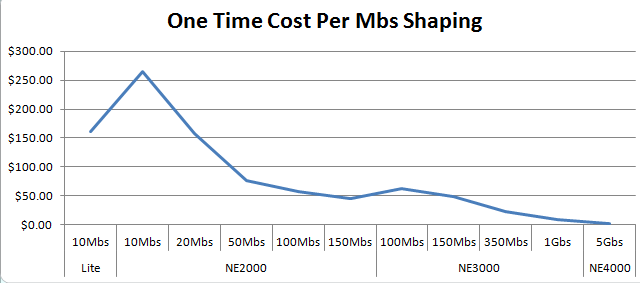
With the NetEqualizer, setup time is normally less than an hour and is thus negligible, so we’ll just divide the unit price by the throughput level, and here’s the result:

I think this is what you would expect to see.

For ongoing costs you would need to add all the mandatory per year costs and divide by throughput, and the metric would be an ongoing “yearly” per Mbs cost.

Again, if we take the NetEqualizer as an example, the ongoing costs are almost zero.  This is because it’s a turn-key appliance and it requires no time from the customer for bandwidth analysis, nor does it require any policy setup/maintenance to effectively run (it doesn’t use policies). In fact, it’s a true zero maintenance product and that yields zero labor costs. Besides no labor, there’s no updates or licenses required (an optional service contract is available if you want ongoing access to technical support, or software upgrades).

Frankly, it’s not worth the effort of graphing this one. The ongoing cost of a NetEqualizer Support Agreement ranges from $29 (dollars) – $.20 (cents) per Mbs per year. Yet, this isn’t the case for many other products and this number should be evaluated carefully. In fact, in some cases the ongoing costs of some products exceed the upfront cost of a new NetEqualizer!

Again, it may not be the case that the lowest cost per Mbs of bandwidth shaping is the best solution for you – but, if it’s not, you should have some good reasons.

If you shape bandwidth now, what is your cost per Mbs of bandwidth shaping? We’d be interested to know.

If your ongoing costs are higher than the upfront costs of a new NetEqualizer and you’re open to a discussion, you should drop us a note at sales@apconnections.net.

Is Equalizing Technology the Same as Bandwidth Fairness?


Editors Note:

The following was posted in a popular forum in response to the assumption that the NetEqualizer is a simple fairness engine. We can certainly understand how our technology can be typecast in the same bucket with simple fairness techniques; however, equalizing provides a much more sophisticated solution as the poster describes in detail below.

You have stated your reservations, but I am still going to have to recommend the NetEqualizer. Carving up the bandwidth equally will mean that the user perception of the Internet connection will be poor even when you have bandwidth to spare. It makes more sense to have a device that can maximize the user’s perception of a connection. Here are some example scenarios.

NetEQ when utilization is low, and it is not doing anything:
User perception of Skype like services: Good
User perception of Netflix like services: Good
User perception of large file downloads: Good
User perception of “ajaxie” webpages that constantly update some doodad on the page: Good
User perception of games: Good

Equally allocated bandwidth when utilization is low:
User perception of Skype like services: OK as long as the user is not doing anything else.
User perception of Netflix like services: OK as long as long as the user is not doing anything else.
User perception of large file downloads: Slow all of the time regardless of where the user is downloading the file from.
User perception of “ajaxie” webpages that constantly update some doodad on the page: OK
User perception of games: OK as long as the user is not doing anything else. That is until the game needs to download custom content from a server, then the user has to wait to enter the next round because of the hard rate limit.

NetEQ when utilization is high and penalizing the top flows:
User perception of Skype like services: Good
User perception of Netflix like services: Good – The caching bar at the bottom should be slightly delayed, but the video shouldn’t skip. The user is unlikely to notice.
User perception of large file downloads: Good – The file is delayed a bit, but will still download relatively quickly compared to a hard bandwidth cap. The user is unlikely to notice.
User perception of “ajaxie” webpages that constantly update some doodad on the page: Good
User perception of games: Good downloading content between rounds might be a tiny bit slower, but fast compared to a hard rate limit.

Equally allocated bandwidth when utilization is high:
User perception of Skype like services: OK as long as the user is not doing anything else.
User perception of Netflix like services: OK as long as long as the user is not doing anything else.
User perception of large file downloads: Slow all of the time regardless of where the user is downloading the file from.
User perception of “ajaxie” webpages that constantly update some doodad on the page: OK as long as the user is not doing anything else.
User perception of games: OK as long as the user is not doing anything else. That is until the game needs to download custom content from a server, then the user has to wait to enter the next round because of the hard rate limit.

As far as the P2P thing is concerned. While I too realized that theoretically P2P would be favored, in practice it wasn’t really noticeable.  If you wish, you can use connection limits to deal with this.

One last thing to note:  On Obama’s inauguration day, the NetEQ at our University was able to tame the ridiculous number of live streams of the event without me intervening to change settings.  The only problems reported turned out to be bandwidth problems on the other end.