A Tiered Internet – Penny Wise or Pound Foolish


With the debate over net neutrality raging in the background, Internet suppliers are preparing their strategies to bridge the divide between bandwidth consumption and costs. This topic is coming to a head now largely because of the astonishing growth-rate of streaming video from the likes of YouTube, NetFlix, and others.

The issue recently took a new turn and emerged front and center during a webinar when Allot Communications and Openet presented its new product features, including its approach of integrating policy control and charging for wireless access to certain websites.

On the surface, this may seem like a potential solution to the bandwidth problem. Basic economic theory will tell you that if you increase the cost of a product or service, the demand will eventually decrease. In this case, charging for bandwidth will not only increase revenues, but the demand will ultimately drop until a point of equilibrium is reached. Problem solved, right? Wrong!

While the short-term benefits are obviously appealing for some, this is a slippery slope that will lead to further inequality in Internet access (You can easily find many articles and blogs regarding Net Neutrality including those referencing Vinton Cerf and Tim Berners-Lee — two of the founding fathers of the Internet — clearly supporting a free and equal Internet). Despite these arguments, we believe that Deep Packet Inspection (DPI) equipment makers such as Allot will continue to promote and support a charge system since it is in their best business interests to do so. After all, a pay-for-access approach requires DPI as the basis for determining what content to charge.

However, there are better and more cost-effective ways to control bandwidth consumption while protecting the interests of net neutrality. For example, fairness-based bandwidth control intrinsically provides equality and fairness to all users without targeting specific content or websites. With this approach, when the network is busy small bandwidth consumers are guaranteed access to the Internet while large bandwidth users are throttled back but not charged or blocked completely. Everyone lives within their means and gets an equal share. If large bandwidth consumers want access to more bandwidth, they can purchase a higher level of service from their provider. But let’s be clear, this is very different from charging for access to a particular website!

Although this content-neutral approach has repeatedly proved successful for NetEqualizer users, we’re now taking an additional step at mitigating bandwidth congestion while respecting network neutrality through video caching (the largest growth segment of bandwidth consumption). So, keep an eye out for the YouTube caching feature to be available in our new NetEqualizer release early next year.

The 10-Gigabit Barrier for Bandwidth Controllers and Intel-Based Routers


By Art Reisman

Editor’s note: This article was adapted from our answer to a NetEqualizer pre-sale question asked by an ISP that was concerned with its upgrade path. We realized the answer was useful in a broader sense and decided to post it here.

Any router, bandwidth controller, or firewall that is based on Intel architecture and buses will never be able to go faster than about about 7 gigabits sustained. (This includes our NE4000 bandwidth controller. While the NE4000 can actually reach speeds close to 10 gigabits, we rate our equipment for five gigabits because we don’t like quoting best-case numbers to our customers.) The limiting factor in Intel architecture is that to expand beyond 10-gigabit speeds you cannot be running with a central clock. Therefore, with a central clock controlling the show, it is practically impossible to move data around much faster than 10 gigabits.

The alternative is to use a specialized asynchronous design, which is what faster switches and hardware do. They have no clock or centralized multiprocessor/bus. However, the price point for such hardware quickly jumps to 5-10 times the Intel architecture because it must be custom designed. It is also quite limited in function once released.

Obviously, vendors can stack a bunch of 10-gig fiber bandwidth controllers behind a switch and call it something faster, but this is no different from dividing up your network paths and using multiple bandwidth controllers yourself.  So, be careful when assessing the claims of other manufacturers in this space.

Considering these limitations, many cable operators here in the US have embraced the 10-gigabit barrier. At some point you must divide and conquer using multiple 10-gig fiber links and multiple NE4000 type boxes, which we believe is really the only viable plan — that is if you want any sort of sophistication in your bandwidth controller.

While there are some that will keep requesting giant centralized boxes, and paying a premium for them (it’s in their blood to think single box, central location), when you think about the Internet, it only works because it is made of many independent paths. There is no centralized location by design. However, as you approach 10-gigabit speeds in your organization, it might be time to stop thinking “single box.”

I went through this same learning curve as a system architect at AT&T Bell Labs back in the 1990s.  The sales team was constantly worried about how many telephone ports we could support in one box because that is what operators were asking for.  It shot the price per port through the roof with some of our designs. So, in our present case, we (NetEqualizer) decided not to get into that game because we believe that price per megabit of shaping will likely win out in the end.

Art Reisman is currently CTO and co-founder of APconnections, creator of the NetEqualizer. He  has worked at several start-up companies over the years and has invented and brought several technology products to market, both on his own and with the backing of larger corporations. This includes tools for the automotive industry.

The Facts and Myths of Network Latency


There are many good references that explain how some applications such as VoIP are sensitive to network latency, but there is also some confusion as to what latency actually is as well as perhaps some misinformation about the causes. In the article below, we’ll separate the facts from the myths and also provide some practical analogies to help paint a clear picture of latency and what may be behind it.

Fact or Myth?

Network latency is caused by too many switches and routers in your network.

This is mostly a myth.

Yes, an underpowered router can introduce latency, but most local network switches add minimal latency — a few milliseconds at most. Anything under about 10 milliseconds is, for practical purposes, not humanly detectable. A router or switch (even a low-end one) may add about 1 millisecond of latency. To get to 10 milliseconds you would need eight or more hops, and even then you wouldn’t be near anything noticeable.

The faster your link (Internet) speed, the less latency you have.

This is a myth.

The speed of your network is measured by how fast IP packets arrive. Latency is the measure of how long they took to get there. So, it’s basically speed vs. time. An example of latency is when NASA sends commands to a Mars orbiter. The information travels at the speed of light, but it takes several minutes or longer for commands sent from earth to get to the orbiter. This is an example of data moving at high speed with extreme latency.

VoIP is very sensitive to network latency.

This is a fact.

Can you imagine talking in real time to somebody on the moon? Your voice would take about eight seconds to get there. For VoIP networks, it is generally accepted that anything over about 150 milliseconds of latency can be a problem. When latency gets higher than 150 milliseconds, issues will emerge — especially for fast talkers and rapid conversations.

Xbox games are sensitive to latency.

This is another fact.

For example, in may collaborative combat games, participants are required to battle players from other locations. Low latency on your network is everything when it comes to beating the opponent to the draw. If you and your opponent shoot your weapons at the exact same time, but your shot takes 200 milliseconds to register at the host server and your opponent’s shot gets there in 100 milliseconds, you die.

Does a bandwidth shaping device such as NetEqualizer increase latency on a network ?

This is true, but only for the “bad” traffic that’s slowing the rest of your network down anyway.

Ever hear of the firefighting technique where you light a back fire to slow the fire down? This is similar to the NetEqualizer approach. NetEqualizer deliberately adds latency to certain bandwidth intensive applications, such as large downloads and p2p traffic, so that chat, email, VoIP, and gaming get the bandwidth they need. The “back fire” (latency) is used to choke off the unwanted, or non-time sensitive, applications. (For more information on how the NetEqualizer works, click here.)

Video is sensitive to latency.

This is a myth.

Video is sensitive to the speed of the connection but not the latency. Let’s go back to our man on the moon example where data takes eight seconds to travel from the earth to the moon. Latency creates a problem with two-way voice communication because in normal conversion, an eight second delay in hearing what was said makes it difficult to carry a conversion. What generally happens with voice and long latency is that both parties start talking at the same time and then eight seconds later you experience two people talking over each other. You see this happening a lot with on television with interviews done via satellite. However most video is one way. For example, when watching a Netflix movie, you’re not communicating video back to Netflix. In fact, almost all video transmissions are on delay and nobody notices since it is usually a one way transmission.

Analyzing the cost of Layer 7 Packet Shaping


November, 2010

By Eli RIles

For most IT administrators layer 7 packet shaping involves two actions.

Action 1:  Involves inspecting and analyzing data to determine what types of traffic are on your network.

Action 2: Involves taking action by adjusting application  flows on your network .

Without  the layer 7 visibility and actions,  an administrator’s job would degrade into a quagmire of random guesswork. Or would it?

Layer 7 monitoring and shaping is intuitively appealing , but it is a good idea to take a step back and break down examine the full life cycle costs of your methodology .

In an ironic inverse correlation, we assert that costs increase with the complexity of the monitoring tool.

1) Obviously, the more detailed the reporting tool (layer 7 ) , the more expensive its initial price tag.

2)  The kicker comes with part two. The more expensive the tool, the more  detail  it will provide, and the more time an administrator is likely to spend adjusting and mucking, looking for optimal performance.

But, is it a fair to assume higher labor costs with  more advanced monitoring and information?

Well, obviously it would not make sense to pay more for an advanced tool if there was no intention of doing anything with the detailed information it provides. Why have the reporting tool in the first place if the only output was to stare at reports and do nothing? Typically, the more information an admin has about a network, the more inclined he might be to spend time making adjustments.

On a similar note, an oversight often made with labor costs is the belief  that when  the work needed to adjust the network comes to fruition, the associated adjustments can remain statically in place. However, in reality, network traffic changes constantly, and thus the tuning so meticulously performed on Monday may be obsolete by Friday.

Does this mean that the overall productivity of using a bandwidth tool is a loss? Not at all. Bandwidth monitoring and network mucking can certainly result in a cost-effective solution. But, where is the tipping point? When does a monitoring solution create more costs than it saves?

A review of recent history reveals that technologies with a path similar to bandwidth monitoring have become commodities and shunned the overhead of most human intervention.  For example, computer operators disappeared off the face of the earth with the invention of cheaper computing in the late 1980′s.  The function of a computer operator did not disappear completely, it just got automated and rolled into the computer itself. The point is, anytime the cost of a resource is falling, the attention and costs used to manage it should be revisited.

An effective compromise with many of our customers is that they are stepping down from expensive complex reporting tools to a simpler approach. Instead of trying to determine every type of traffic on a network by type, time of day, etc., an admin can spot trouble by simply checking overall usage numbers once a week or so. With a basic bandwidth control solution in place (such as a NetEqualizer), the acute problems of a network locking up will go away, leaving what we would call only “chronic” problems, which may need to be addressed eventually, but do not require immediate action.

For example, with a simple reporting tool you can plot network usage by user.  Such a report, although limited in detail, will often reveal a very distinct bell curve of usage behavior. Most users will be near the mean, and then there are perhaps one or two percent of users that will be well above the mean. You don’t need a fancy tool to see what they are doing; abuse becomes obvious just looking at the usage (a simple report).

However, there is also the personal control factor, which often does not follow clear lines of ROI (return on investment).

What we have experienced when proposing a more hands-off model to network management is that a customer’s comfort depends on their bias for needing to know, which is an unquantifiable personal preference. Even in a world where bandwidth is free, it is still human nature to want to know specifically what bandwidth is being used for, with detailed information regarding the type of traffic. There is nothing wrong with this desire, but we wonder how strong it might be if the savings obtained from using simpler monitoring tools were converted into a trip to Hawaii.

In our next article, we’ll put some real world numbers to the test for actual break downs, so stay tuned. In the mean time, here are some other articles on bandwidth monitoring that we recommend. And, don’t forget to take our poll.

List of monitoring tools compiled by Stanford

Top five free monitoring tools

Planetmy
Linux Tips
How to set up a monitor for free

Five Tips to Manage Network Congestion


As the demand for Internet access continues to grow around the world, the complexity of planning, setting up, and administering your network grows. Here are five (5) tips that we have compiled, based on discussions with network administrators in the field.

#1) Be Smart About Buying Bandwidth
The local T1 provider does not always give you the lowest price bandwidth.  There are many Tier 1 providers out there that may have fiber within line-of-sight of your business. For example, Level 3 has fiber rings already hot in many metro areas and will be happy to sell you bandwidth. To get a low-cost high-speed link to your point of presence, numerous companies can set up your wireless network infrastructure.

#2) Manage Expectations
You know the old saying “under promise and over deliver”.  This holds true for network offerings.  When building out your network infrastructure, don’t let your network users just run wide open. As you add bandwidth, you need to think about and implement appropriate rate limits/caps for your network users.  Do not wait; the problem with waiting is that your original users will become accustomed to higher speeds and will not be happy with sharing as network use grows – unless you enforce some reasonable restrictions up front.  We also recommend that you write up an expectations document for your end users “what to expect from the network” and post it on your website for them to reference.

#3) Understand Your Risk Factors
Many network administrators believe that if they set maximum rate caps/limits for their network users, then the network is safe from locking up due to congestion. However, this is not the case.  You also need to monitor your contention ratio closely.  If your network contention ratio becomes unreasonable, your users will experience congestion aka “lock ups” and “freeze”. Don’t make this mistake.

This may sound obvious, but let me spell it out. We often run into networks with 500 network users sharing a 20-meg link. The network administrator puts in place two rate caps, depending on the priority of the user  — 1 meg up and down for user group A and 5 megs up and down for user group B.  Next, they put rate caps on each group to ensure that they don’t exceed their allotted amount. Somehow, this is supposed to exonerate the network from experiencing contention/congestion. This is all well and good, but if you do the math, 500 network users on a 20 meg link will overwhelm the network at some point, and nobody will then be able to get anywhere close to their “promised amount.”

If you have a high contention ratio on your network, you will need something more than rate limits to prevent lockups and congestion. At some point, you will need to go with a layer-7 application shaper (such as Blue Coat Packeteer or Allot NetEnforcer), or go with behavior-based shaping (NetEqualizer). Your only other option is to keep adding bandwidth.

#4) Decide Where You Want to Spend Your Time
When you are building out your network, think about what skill sets you have in-house and those that you will need to outsource.  If you can select network applications and appliances that minimize time needed for set-up, maintenance, and day-to-day operations, you will reduce your ongoing costs. This is true whether your insource or outsource, as there is an “opportunity cost” for spending time with each network toolset.

#5) Use What You Have Wisely
Optimize your existing bandwidth.   Bandwidth shaping appliances can help you to optimize your use of the network.   Bandwidth shapers work in different ways to achieve this.  Layer-7 shapers will allocate portions of your network to pre-defined application types, splitting your pipe into virtual pipes based on how you want to allocate your network traffic.  Behavior-based shaping, on the other hand, will not require predefined allocations, but will shape traffic based on the nature of the traffic itself (latency-sensitive, short/bursty traffic is prioritized higher than hoglike traffic).   For known traffic patterns on a WAN, Layer-7 shaping can work very well.  For unknown patterns like Internet traffic, behavior-based shaping is superior, in our opinion.

On Internet links, a NetEqualizer bandwidth shaper will allow you to increase your customer base by between 10 to 30 percent without having to purchase additional bandwidth. This allows you to increase the amount of people you can put into your infrastructure without an expensive build out.

In order to determine whether the return-on-investment (ROI) makes sense in your environment, use our ROI tool to calculate your payback period on adding bandwidth control to your network.  You can then compare this one-time cost with your expected recurring month costs of additional bandwidth.  Also note in many cases you will need to do both at some point.  Bandwidth shaping can delay or defer purchasing additional bandwidth, but with growth in your network user base, you will eventually need to consider purchasing more bandwidth.

In Summary…
Obviously, these five tips are not rocket science, and some of them you may be using already.  We offer them here as a quick guide & reminder to help in your network planning.  While the sea change that we are all seeing in internet usage (more on that later…) makes network administration more challenging every day, adequate planning can help to prepare your network for the future.

Created by APconnections, the NetEqualizer is a plug-and-play bandwidth control and WAN/Internet optimization appliance that is flexible and scalable. When the network is congested, NetEqualizer’s unique “behavior shaping” technology dynamically and automatically gives priority to latency sensitive applications, such as VoIP and email. Click here to request a full price list.

Enhance Your Internet Service With YouTube Caching


Have you ever wondered why certain videos on YouTube seem to run more smoothly than others? Over the years, I’ve consistently noticed that some videos on my home connection will run without interruption while others are as slow as molasses. Upon further consideration, I determined a simple common denominator for the videos that play without interruption — they’re popular. In other words, they’re trending. And, the opposite is usually true for the slower videos.

To ensure better performance, my Internet provider keeps a local copy of the popular YouTube content (caching), and when I watch a trending video, they send me the stream from their local cache. However, if I request a video that’s not contained in their current cache, I’m sent over the broader Internet to the actual YouTube content servers. When this occurs, my video streams are located off the provider’s local network and my pipe can be restricted. Therefore, the most likely cause for the slower video stream is traffic congestion at peak hours.

Considering this, caching video is usually a win-win for the ISP and Internet consumer. Here’s why…

Benefits of Caching Video for the ISP

Last-mile connections from the point of presence to the customer are usually not overloaded, especially on a wired or fiber network such as a cable operator. Caching video allows a provider to keep traffic on their last mile and hence doesn’t clog the provider’s exchange point with the broader Internet. Adding bandwidth to the exchange point is expensive, but caching video will allow you to provide a higher class of service without the large recurring costs.

Benefits of ISP-Level Caching for the Internet Consumer

Put simply, the benefit is an overall better video-viewing experience. Most consumers could care less about the technical details behind the quality of their Internet service. What matters is the quality itself. In this competitive market and the rising expectations for video service, the ISP needs every advantage it can get.

Why Target YouTube for Caching?

YouTube video is very bandwidth intensive and relatively stable content. By stable, we mean once posted, the video content does not get changed or edited. This makes it a prime candidate for effective caching.

Should an ISP Cache All Of The Data It Can?

While this is the default setting for most Squid caching servers, we recommend only caching the popular free video sites such as YouTube. This would involve some selective filtering, but caching everything in a generic mode can cause confusion with some secure sites not functioning correctly.

Note: With Squid Proxy you’ll need a third party module to cache YouTube.

How Will Caching Work with My NetEqualizer or Other Bandwidth Control Device?

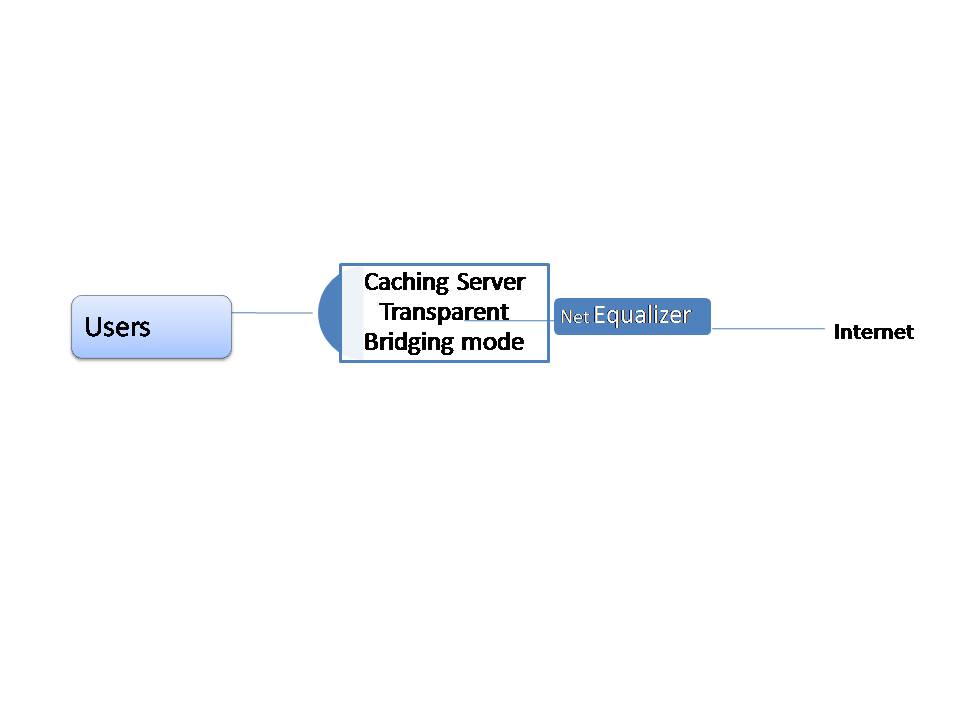
You’ll need to put your caching server in transparent mode and run it on the private side of your NetEqualizer.

NetEqualizer Placement with caching server

Related Article fourteen tips to make your WISP more profitable

Network Capacity Planning: Is Your Network Positioned for Growth?


Authored by:  Sandy McGregor, Director of Sales & Marketing for APConnections, Inc.
Sandy has a Masters in Management Information Systems and over 17 years experience in the Applications Development Life Cycle.  In the past, she has been a Project Manager for large-scale data center projects, as well as a Director heading up architecture, development and operations teams.  In Sandy’s current role at APConnections, she is responsible for tracking industry trends.

As you may have guessed, mobile users are gobbling up network bandwidth in 2010!  Based on research conducted in the first half of 2010, Allot Communications has released The Allot MobileTrends Report , H1 2010 showing dramatic growth in mobile data bandwidth usage in 2010- up 68% in Q1 and Q2.

I am sure that you are seeing the impacts of all this usage on your networks.  The good news is all this usage is good for your business, as a network provider,  if you are positioned to grow to meet the needs of all this growth!  Whether you sell network usage to customers (as a ISP or WISP) or “sell” it internally (colleges and corporations), growth means that the infrastructure you provide becomes more and more critical to your business.

Here are some areas that we found of particular interest in the article, and their implications on your network, from our perspective…

1) Video Streaming grew by 92% to 35% of mobile use

It should be no surprise that video steaming applications take up a 35% share of mobile bandwidth, and grew by 92%.  At this growth rate, which we believe will continue and grow even faster in the future, your network capacity will need to grow as well.  Luckily, bandwidth prices are continuing to come down in all geographies.

No matter how much you partition your network using a bandwidth shaping strategy, the fact is that video streaming takes up a lot of bandwidth.  Add to that the fact that more and more users are using video, and you have a full pipe before you know it!  While you can look at ways to cache video, we believe that you have no choice but to add bandwidth to your network.

2) Users are downloading like crazy!

When your customers are not watching videos, they are downloading, either via P2P or HTTP, which combined represented 31 percent of mobile bandwidth, with an aggregate growth rate of 80 percent.  Although additional network capacity can help somewhat here, large downloads or multiple P2P users can still quickly clog your network.

You need to first determine if you want to allow P2P traffic on your network.  If you decide to support P2P usage, you may want to think how you will identify which users are doing P2P and if you will charge a premium for this service. Also, be aware that encrypted P2P traffic is on the rise, which makes it difficult to figure out what traffic is truly P2P.

Large file downloads need to be supported.  Your goal here should be to figure out how to enable downloading for your customers without slowing down other users and bringing the rest of your network to a halt.

In our opinion, P2P and downloading is an area where you should look at bandwidth shaping solutions.  These technologies use various methods to prioritize and control traffic, such as application shaping (Allot, BlueCoat, Cymphonix) or behavior-based shaping (NetEqualizer).

These tools, or various routers (such as Mikrotik), should also enable you to set rate limits on your user base, so that no one user can take up too much of your network capacity.  Ideally, rate limits should be flexible, so that you can set a fixed amount by user, group of users (subnet, VLAN), or share a fixed amount across user groups.

3) VoIP and IM are really popular too

The second fastest growing traffic types were VoIP and Instant Messaging (IM).  Note that if your customers are not yet using VoIP, they will be soon.  The cost model for VoIP just makes it so compelling for many users, and having one set of wires if an office configuration is attractive as well (who likes the tangle of wires dangling from their desk anyways?).

We believe that your network needs to be able to handle VoIP without call break-up or delay.  For a latency-sensitive application like VoIP, bandwidth shaping (aka traffic control, aka bandwidth management) is key.  Regardless of your network capacity, if your VoIP traffic is not given priority, call break up will occur.  We believe that this is another area where bandwidth shaping solutions can help you.

IM on the other hand, can handle a little latency (depending on how fast your customers type & send messages).  To a point, customers will tolerate a delay in IM – but probably 1-2 seconds max.  After that,they will blame your network, and if delays persist, will look to move to another network provider.

In summary, to position your network for growth:

1) Buy More Bandwidth – It is a never-ending cycle, but at least the cost of bandwidth is coming down!

2) Implement Rate Limits – Stop any one user from taking up your whole network.

3) Add Bandwidth Shaping – Maximize what you already have.  Think efficiency here.  To determine the payback period on an investment in the NetEqualizer, try our new ROI tool.  You can put together similar calculations for other vendors.

Note:  The Allot MobileTrends Report data was collected from Jan. 1 to June 30 from leading mobile operators worldwide with a combined user base of 190 million subscribers.

Bandwidth Control Return on Investment (ROI) Calculator


Are you looking to justify the cost of purchasing a bandwidth control device for your Internet or WAN link? Our ROI calculator is Industry neutral, click here to see custom results based on your network.

Aside from our customers’ comments about the overall improvement in their network performance, one of the most common remarks we hear from NetEqualizer users concerns the technology’s positive return on investment (ROI).

However, it’s also one of the most common questions we get from potential customers – How will the NetEqualizer benefit my bottom line?

To better answer this question, we recently interviewed NetEqualizer customers from across several verticals to get their best estimates of the cost savings and value associated with their NetEqualizer. We compiled their answers into a knowledge base that we now use to estimate reasonable ROI calculations.

Our calculations are based on real data and were done conservatively as not to create false promises. There are plenty of congested Internet links suffering out there every day, and hence there is more than enough value with the NetEqualizer. So, we did not need to exaggerate.

ROI calculations were based on the following:

  1. Savings in Bandwidth Costs – Stay at your current bandwidth level or delay future upgrades.
  2. Reduced Labor and Support Costs – Avoid Internet congestion issues that lead to support calls during peak usage times.
  3. Retention of Customers – Stop losing customers, clients, and guests because of unreliable or unresponsive Internet service (applies to ISPs and operators such as hotels and executive suites).
  4. Addition of New Customers – Put more users on your link than before while keeping them all happy.

To see what the NetEqualizer can do for you, visit http://www.netequalizer.com

Other ROI calculators

New APconnections Corporate Speed Test Tool Released for NetEqualizer


For many Internet users, one of the first troubleshooting steps when online access seems to slow is to run a simple speed test. And, under the right circumstances, speed tests can be an effective way to pinpoint the problem.

However, slowing Internet speeds aren’t just an issue for the casual user. Over our years of troubleshooting thousands of corporate and other commercial links, a recurring issue has been customers not getting their full-advertised bandwidth from their upstream provider. Some customers are aware something is amiss from examining bandwidth reports on their routers and some of these problems we stumble upon while troubleshooting network congestion issues.

But, what if you have a shared, busy corporate Internet connection such as this — with hundreds or thousands of users on the link at one time? Should a traditional speed test be the first place to turn? In this situation, the answer is “no.” Running a speed test under these conditions is neither meaningful nor useful.

Let me explain.

The problem starts with the overall design and process of the speed test itself. Speed tests usually run short duration files. For example, a 10-megabit file sent over a hundred-megabit link might complete in 0.1 seconds, reporting the link speed to the operator at 100 megabits. However, statistically this is just a snapshot of one very small moment in time and is of little value when the demands on a network are constantly changing. Furthermore, with this type of test, the link must be free of active users, which is nearly impossible when you have an entire office, for example, accessing the network at once.

On these larger shared links, the true speed can only be measured during peak times with users accessing a wide variety of applications persistently over a significant period. But, there is no easily controlled Web speed test site that can measure this type of performance on your link.

Yes, a sophisticated IT administrator can run reports and see trends and make assumptions. And many do. Yet, for some businesses, this isn’t practical.

For this reason, we’ve introduced the NetEqualizer Speed Test Utility.

How Does the NetEqualizer Speed Test Utility Work?

The NetEqualizer Speed Test Utility is an intelligent tool embedded in your NetEqualizer that can be activated from your GUI. On high-traffic networks, there is always a busy hour background load on the link – a baseline if you will. When you set up the speed test tool, you simply tell the NetEqualizer some basics about your network, including:

  • Link Speed
  • Number of Users
  • Busy Hours

After turning the tool on, it will keep track of your network’s bandwidth usage. If your usage drops below expected levels, it will present a mild warning on the GUI screen that your bandwidth may be compromised and give an explanation of the deviation. The operator can also be notified by e-mail.

This set up allows bandwidth to be monitored without having to depend on unreliable speed tests or run time-consuming reports, allowing the problem to be more quickly identified and addressed.

For more information about the NetEqualizer Speed Test Utility, contact APconnections at sales@apconnections.net.

A Case Study: Hospitality Industry and the Cost of Internet Congestion


In the hospitality industry, expenses are watched closely. All expenditures must be balanced with customer satisfaction, and reality dictates that some customer complaints cannot immediately be remedied. With the reduced revenue that’s come with the current economic climate, difficult decisions must be made about what issues to address and when.

While the quality of basic hotel services and comforts may still serve as the baseline for guests’ satisfaction, high-speed Internet service is quickly becoming a factor when choosing where to stay. This is especially true for business travelers.

In this article, we use interviews with NetEqualizer customers in the hospitality industry and our own experience to define the cost of a congested Internet pipe in terms of dollar impact on a hotel business. The conclusions below are based on a business-class, three-star travel hotel with 200 rooms. These same metrics can be scaled up to larger conference centers or smaller travel hotels.

We start with the online behavior that’s behind bandwidth congestion and then discuss the financial repercussions.

Causes of Bandwidth Congestion and Slow Internet Speeds

A hotel of this size typically has two to 10 megabits of shared bandwidth available to guests. We assume 30 percent of the guests (roughly 60 people) are using the Internet for business purposes (e-mail, browsing, Skype, etc.) in the early to late evening hours. We also assume that 10 percent of the guests (20 people) will use the Internet for more intense recreational purposes such as Youtube or Hulu.

With this ratio of users, the Hulu and YouTube users will easily overwhelm a 10-megabit link, causing a rolling brown out for most of the evening.

Cost of Rolling Brown Out

We conservatively assume that about 5 percent of hotel customers will remember a poor Internet experience and try another hotel the next time they’re in town. Considering this, the approximate loss of revenue amounts to about $500 per week as a result of poor quality of Internet service.

Obviously this loss could potentially be offset by new guests and competitors’ customers that were unhappy with their experience and crossed over to your hotel. However, if you solve the congestion issue — especially if other hotels in your area are encountering similar problems — your retained customer base would slowly rise over time.

And, as the old business adage goes, it’s generally cheaper and more efficient to keep customers than to constantly find new ones.

Cost of Support

Most franchise hotels outsource their IT services to a third party. Your IT consulting staff will likely try to remedy the congestion through trial and error by adjusting various on-site equipment. We will assign a $500-a-month cost to this effort. Even if this cost is absorbed by an IT consultant already on retainer, it still cuts into time they could spend improving other services.

Cost of Additional Bandwidth

One potential remedy that’s often tried, and comes with a price that’s most likely not simply absorbed into a retainer, is simply purchasing additional bandwidth. The good news is that bandwidth contracts are always getting less expensive. However, most operators have found that doubling or tripling the size of their Internet pipes has only a temporary effect on the congestion issue.

So, we’ll assign a cost to this solution of $400 per month, with varying effectiveness.

Conclusion

Based on these findings, bandwidth congestion on a hotel Internet link will conservatively cost about $1,000 per month depending on the specific circumstances and attempted solutions. Although there is no universal solution to the problem — even continuously purchasing additional bandwidth — an automated congestion control device like the NetEqualizer can potentially reduce this cost by 90 percent. And, unlike purchasing additional bandwidth, the cost isn’t recurring and the NetEqualizer generally pays for itself within a matter of months.

Therefore, as we repeatedly see in the experiences of our customers (in the hospitality industry and elsewhere), the solution to Internet congestion, and its ultimate cost, are often less dependent on the amount of bandwidth that’s available and more defined by how it’s managed.

Partial List of NetEqualizer Customers in the Hospitality Field

(Note: These are individual franchises)

Top Five Causes For Disruption Of Internet Service


slow-internetEditor’s Note: We took a poll from our customer base consisting of thousands of NetEqualizer users. What follows are the top five most common causes  for disruption of Internet connectivity.

1) Congestion: Congestion is the most common cause for short Internet outages.  In general, a congestion outage is characterized by 10 seconds of uptime followed by approximately 30 seconds of chaos. During the chaotic episode, the circuit gridlocks to the point where you can’t load a Web page. Just when you think the problem has cleared, it comes back.

The cyclical nature of a congestion outage is due to the way browsers and humans retry on failed connections. During busy times usage surges and then backs off, but the relief is temporary. Congestion-related outages are especially acute at public libraries, hotels, residence halls and educational institutions. Congestion is also very common on wireless networks. (Have you ever tried to send a text message from a crowded stadium? It’s usually impossible.)

Fortunately for network administrators, this is one cause of disruption that can be managed and prevented (as you’ll see below, others aren’t that easy to control). So what’s the solution? The best option for preventing congestion is to use some form of bandwidth control. The next best option is to increase the size of your bandwidth link. However without some form of bandwidth control, bandwidth increases are often absorbed quickly and congestion returns. For more information on speeding up internet services using a bandwidth controller, check out this article.

2) Failed Link to Provider: If you have a business-critical Internet link, it’s a good idea to source service from multiple providers. Between construction work, thunderstorms, wind, and power problems, anything can happen to your link at almost any time. These types of outages are much more likely than internal equipment failures.

3) Service Provider Internet Speed Fluctuates: Not all DS3 lines are the same. We have seen many occasions where customers are just not getting their contracted rate 24/7 as promised.

4) Equipment Failure: Power surges are the most common cause for frying routers and switches. Therefore, make sure everything has surge and UPS protection. After power surges, the next most common failure is lockup from feature-overloaded equipment. Considering this, keep your configurations as simple as possible on your routers and firewalls or be ready to upgrade to equipment with faster newer processing power.

Related Article: Buying Guide for Surge and UPS Protection Devices

5) Operator Error: Duplicating IP addresses, plugging wires into the wrong jack, and setting bad firewall rules are the leading operator errors reported.

If you commonly encounter issues that aren’t discussed here, feel free to fill us in in the comments section. While these were the most common causes of disruptions for our customers, plenty of other problems can exist.

Google Verizon Net Neutrality Policy, is it sincere?


With all the rumors circulating about the larger wireless providers trying to wall off competition or generate extra revenue through preferential treatment of traffic, they had to do something, hence  Google and Verizon crafted a joint statement on Net Neutrality. Making a statement in denial of a rumor on such a scale is somewhat akin to admitting the rumor was true. It reminds me of a politician claiming he has no plans to raise taxes.

Yes, I believe that most people who work for Google and Verizon, executives included, believe in an open Neutral Internet.  And yet, from experience, when push comes to shove, and profits are flat or dropping, the idea of leveraging your assets will be on the table.  And what better way to leverage your assets than restrict competition to your captive audience. Walling off a captive audience to selected content will always be enticing to any service provider looking for low hanging fruit.  Morals can easily be compromised or rationalized in the face of losing your house, and it only takes one over zealous leader to start a provider down the slope.

The checks and balances so far, in this case, are the consumers who have voiced outright disgust with anybody who dare toy with the idea of  preferential  treatment of Internet traffic for economic benefit.

For now this concept will have to wait, but it will be revisited again and hopefully consumers will rise up in disgust.  It would be naive to think that today’s statement by Verizon and Google would be  binding beyond the political moment.

Seven Points to Consider When Planning Internet Redundancy


By Art Reisman

Art Reisman CTO www.netequalizer.com

Editor’s note: Art Reisman is the CTO of APconnections. APconnections designs and manufactures the popular NetEqualizer bandwidth shaper.

The chances of being killed by a shark are 1 in 264 million. Despite those low odds, most people worry about sharks when they enter the ocean, and yet the same people do not think twice about getting into a car without a passenger-side airbag.

And so it is with networking redundancy solutions. Many equipment purchase decisions are enhanced by an irrational fear (created by vendors) and not on actual business-risk mitigation.

The solution to this problem is simple. It’s a matter of being informed and making decisions based on facts rather than fear or emotion. While every situation is different, here a few basic tips and questions to consider when it comes to planning Internet redundancy.

1) Where is your largest risk of losing Internet connectivity?

Vendors tend to push customers toward internal hardware solutions to reduce risk.  For example, most customers want a circuit design within their servers that will allow traffic to pass should the equipment fail. Yet our polling data of our customers shows that your Internet router’s chance of catastrophic failure is about 1 percent over a three-year period.  On the other hand, your internet provider has an almost 100-percent chance of having a full-day outage during that same three-year period.

Perhaps the cost of sourcing two independent providers is prohibitive, and there is no choice but to live with this risk. All well and good, but if you are truly worried about a connectivity failure into your business, you cannot meaningfully mitigate this risk by sourcing hot failover equipment at your site.  You MUST source two separate paths to the Internet to have any significant reduction in risk.  Requiring failover on individual pieces of equipment, without complete redundancy in your network from your provider down, with all due respect, is a mitigation of political and not actual risk.

2) Do not turn on unneeded bells and whistles on your router and firewall equipment.

Many router and device failures are not absolute.  Equipment will get cranky,  slow, or belligerent based on human error or system bugs.  Although system bugs are rare when these devices are used in the default set-up, it seems turning on bells and whistles is often an irresistible enticement for a tech.  The more features you turn on, the less standard your configuration becomes, and all too often the mission of the device is pushed well beyond its original intent.  Routers doing billing systems, for example.

These “soft” failure situations are common, and the fail-over mechanism likely will not kick in, even though the device is sick and not passing traffic as intended.  I have witnessed this type of failure first-hand at major customer installations.  The failure itself is bad enough, but the real embarrassment comes from having to tell your customer that the fail-over investment they purchased is useless in a real-life situation. Fail-over systems are designed with the idea that the equipment they route around will die and go belly up like a pheasant shot point-blank with a 12-gauge shotgun.  In reality, for every “hard” failure, there are 100 system-related lock ups where equipment sputters and chokes but does not completely die.

3) Start with a high-quality Internet line.

T1 lines, although somewhat expensive, are based on telephone technology that has long been hardened and paid for. While they do cost a bit more than other solutions, they are well-engineered to your doorstep.

4) If possible, source two Internet providers and use BGP to combine them.

Since Internet providers are the usually weakest link in your connection, critical operations should consider this option first before looking to optimize other aspects of your internal circuit.

5) Make sure all your devices have good UPS sources and surge protectors.

6) What is the cost of manually moving a wire to bypass a failed piece of equipment?

Look at this option before purchasing redundancy options on single point of failure. We often see customers asking for redundant fail-over embedded in their equipment. This tends to be a strategy of purchasing hardware such as  routers, firewalls, bandwidth shapers, and access points that provide a “fail open” (meaning traffic will still pass through the device) should they catastrophically fail.  At face value, this seems like a good idea to cover your bases. Most of these devices embed a failover switch internally to their hardware.  The cost of this technology can add about $3,000 to the price of the unit.

7) If equipment is vital to your operation, you’ll need a spare unit on hand in case of failure. If the equipment is optional or used occasionally, then take it out of your network.

Again, these are just some basic tips, and your final Internet redundancy plan will ultimately depend on your specific circumstances.  But, these tips and questions should put you on your way to a decision based on facts rather than one based on unnecessary fears and concerns.

What to expect from Internet Bursting


APconnections will be releasing ( version 4.7) a bursting feature on their NetEqualizer bandwidth controller this week. What follows is an explanation of the feature and also some facts and information about Internet Bursting that consumers will also find useful.

First an explanation on how the NetEqualizer bursting feature works.

– The NetEqualizer currently comes with a feature that lets you set a rate limit by IP address.

– Prior to the bursting feature, the top speed allowed for each user was fixed at a set rate limit.

– Now with bursting a user can be allowed a burst of bandwidth for 10 seconds with speeds multiples of two , three or four, or any multiple of their base rate limit.

So if for example a user has a base rate limit of 2 megabits a second, and a burst factor of 4, then their connection will be allowed to burst all the way up to 8 megabits for 10 seconds, at which time it will revert back to the original 2 megabits per second. This type of burst will be noticed when loading large Web pages loaded with graphics. They will essentially fly up in the browser at warp speed.

In order to make  bursting a “special” feature it obviously can’t be on all the time. For this reason the NetEqualizer by default, will force a user to wait 80 seconds before they can burst again.

Will bursting show up in speed tests?

With the default settings of 10 second bursts and an 80 second time out before the next burst it is unlikely a user will be able to see their  full burst speed accurately with a speed test site.

How do you set a bursting feature for an IP address ?

From the GUI

Select

Add Rules->set hard limit

The last field in the command specifies the burst factor.  Set this field to the multiple of the default speed you wish to burst up to.

Note: Once bursting has been set-up, bursting on an IP address will start when that IP exceeds its rate limit (across all connections for that IP).  The burst applies to all connections across the IP address.

How do you turn the burst feature off for an IP address.

You must remove the Hard Limit on the IP address and then recreate the Hard Limit by IP without bursting defined.

From the Web GUI Main Menu, Click on ->Remove/Deactivate Rules

Select the appropriate Hard Limit from the drop-down box. Click on ->Remove Rule

To re-add the rule without bursting, from the Web GUI Main Menu, Click on ->Add Rules->Hard Limit by IP and leave the last field set to 1.

Can you change the global bursting defaults for duration of burst and time between bursts ?

Yes, from the GUI screen you can select

misc->run command

In the space provided you would run the following command

/usr/sbin/brctl setburstparams my 40  30

The first parameter is the time,in seconds, an IP must wait before it can burst again. If an IP has done a burst cycle it will be forced to wait this long in seconds before it can burst again.

The second parameter is the time, in seconds, an IP will be allowed  to burst before begin relegated back to its default rate cap.

The global burst parameters are not persistent, meaning you will need to put a command in the start up file if you want them to stick  between reboots.

/usr/sbin/brctl

If speed tests are not a good way to measure a burst, then what do you recommend?

The easiest way would be  to extend the burst time to minutes (instead of the default 10 seconds ) and then run the speed test.

With the default set at 10 seconds the best was to see a burst in action is to take a continuous snap shot of an IP’s consumption during an extended download.

Beware of the confusion that bursting might cause.

NetEqualizer Field Guide to Network Capacity Planning


I recently reviewed an article that covered bandwidth allocations for various Internet applications. Although the information was accurate, it was very high level and did not cover the many variances that affect bandwidth consumption. Below, I’ll break many of these variances down, discussing not only how much bandwidth different applications consume, but the ranges of bandwidth consumption, including ping times and gaming, as well as how our own network optimization technology measures bandwidth consumption.

E-mail

Some bandwidth planning guides make simple assumptions and provide a single number for E-mail capacity planning, oftentimes overstating the average consumption. However, this usually doesn’t provide an accurate assessment. Let’s consider a couple of different types of E-mail.

E-mail — Text

Most E-mail text messages are at most a paragraph or two of text. On the scale of bandwidth consumption, this is negligible.

However, it is important to note that when we talk about the bandwidth consumption of different kinds of applications, there is an element of time to consider — How long will this application be running for? So, for example, you might send two kilobytes of E-mail over a link and it may roll out at the rate of one megabit. A 300-word, text-only E-mail can and will consume one megabit of bandwidth. The catch is that it generally lasts just a fraction of second at this rate. So, how would you capacity plan for heavy sustained E-mail usage on your network?

When computing bandwidth rates for classification with a commercial bandwidth controller such as a NetEqualizer, the industry practice is to average the bandwidth consumption for several seconds, and then calculate the rate in units of kilobytes per second (Kbs).

For example, when a two kilobyte file (a very small E-mail, for example) is sent over a link for a fraction of a second, you could say that this E-mail consumed two megabits of bandwidth. For the capacity planner, this would be a little misleading since the duration of the transaction was so short. If you take this transaction average over a couple of seconds, the transfer rate would be just one kbs, which for practical purposes, is equivalent to zero.

E-mail with Picture Attachments

A normal text E-mail of a few thousand bytes can quickly become 10 megabits of data with a few picture attachments. Although it may not look all the big on your screen, this type of E-mail can suck up some serious bandwidth when being transmitted. In fact, left unmolested, this type of transfer will take as much bandwidth as is available in transit. On a T1 circuit, a 10-megabit E-mail attachment may bring the line to a standstill for as long as six seconds or more. If you were talking on a Skype call while somebody at the same time shoots a picture E-mail to a friend, your Skype call is most likely going to break up for five seconds or so. It is for this reason that many network operators on shared networks deploy some form of bandwidth contorl or QoS as most would agree an E-mail attachment should not take priority over a live phone call.

E-mail with PDf Attachment

As a rule, PDF files are not as large as picture attachments when it comes to E-mail traffic. An average PDF file runs in the range of 200 thousand bytes whereas today’s higher resolution digital cameras create pictures of a few million bytes, or roughly 10 times larger. On a T1 circuit, the average bandwidth of the PDF file over a few seconds will be around 100kbs, which leaves plenty of room for other activities. The exception would be the 20-page manual which would be crashing your entire T1 for a few seconds just as the large picture attachments referred to above would do.

Gaming/World of Warcraft

There are quite a few blogs that talk about how well World of Warcraft runs on DSL, cable, etc., but most are missing the point about this game and games in general and their actual bandwidth requirements. Most gamers know that ping times are important, but what exactly is the correlation between network speed and ping time?

The problem with just measuring speed is that most speed tests start a stream of packets from a server of some kind to your home computer, perhaps a 20-megabit test file. The test starts (and a timer is started) and the file is sent. When the last byte arrives, a timer is stopped. The amount of data sent over the elapsed seconds yields the speed of the link. So far so good, but a fast speed in this type of test does not mean you have a fast ping time. Here is why.

Most people know that if you are talking to an astronaut on the moon there is a delay of several seconds with each transmission. So, even though the speed of the link is the speed of light for practical purposes, the data arrives several seconds later. Well, the same is true for the Internet. The data may be arriving at a rate of 10 megabits, but the time it takes in transit could be as high as 1 second. Hence, your ping time (your mouse click to fire your gun) does not show up at the controlling server until a full second has elapsed. In a quick draw gun battle, this could be fatal.

So, what affects ping times?

The most common cause would be a saturated network. This is when your network transmission rates of all data on your Internet link exceed the links rated capacity. Some links like a T1 just start dropping packets when full as there is no orderly line to send out waiting packets. In many cases, data that arrive to go out of your router when the link is filled just get tossed. This would be like killing off excess people waiting at a ticket window or something. Not very pleasant.

If your router is smart, it will try to buffer the excess packets and they will arrive late. Also, if the only thing running on your network is World of Warcraft, you can actually get by with 120kbs in many cases since the amount of data actually sent of over the network is not that large. Again, the ping time is more important and a 120kbs link unencumbered should have ping times faster than a human reflex.

There may also be some inherent delay in your Internet link beyond your control. For example, all satellite links, no matter how fast the data speed, have a minimum delay of around 300 milliseconds. Most urban operators do not need to use satellite links, but they all have some delay. Network delay will vary depending on the equipment your provider has in their network, and also how and where they connect up to other providers as well as the amount of hops your data will take. To test your current ping time, you can run a ping command from a standard Windows machine

Citrix

Applications vary widely in the amount of bandwidth consumed. Most mission critical applications using Citrix are fairly lightweight.

YouTube Video — Standard Video

A sustained YouTube video will consume about 500kbs on average over the video’s 10-minute duration. Most video players try to store the video up locally as fast as they can take it. This is important to know because if you are sizing a T1 to be shared by voice phones, theoretically,  if a user was watching a YouTube video, you would have 1 -megabit left over for the voice traffic. Right? Well, in reality, your video player will most likely take the full T1, or close to it, if it can while buffering YouTube.

YouTube — HD Video

On average, YouTube HD consumes close to 1 megabit.

See these other Youtube articles for more specifics about YouTube consumption

Netflix – Movies On Demand

Netflix is moving aggressively to a model where customers download movies over the Internet, versus having a DVD sent to them in the mail.  In a recent study, it was shown that 20% of bandwidth usage during peak in the U.S. is due to Netflix downloads. An average a two hour movie takes about 1.8 gigabits, if you want high-definition movies then its about 3 gigabits for two hours.   Other estimates are as high as 3-5 gigabits per movie.

On a T1 circuit, the average bandwidth of a high-definition Netflix movie (conversatively 3 gigabits/2 hours) over one second will be around 400kbs, which consumes more than 25% of the total circuit.

Skype/VoIP Calls

The amount of bandwidth you need to plan for a VoIP network is a hot topic. The bottom line is that VoIP calls range from 8kbs to 64kbs. Normally, the higher the quality the transmission, the higher the bit rate. For example, at 64kbs you can also transmit with the quality that one might experience on an older style AM radio. At 8kbs, you can understand a voice if the speaker is clear and pronunciates  their words clearly.  However, it is not likely you could understand somebody speaking quickly or slurring their words slightly.

Real-Time Music, Streaming Audio and Internet Radio

Streaming audio ranges from about 64kbs to 128kbs for higher fidelity.

File Transfer Protocol (FTP)/Microsoft Servicepack Downloads

Updates such as Microsoft service packs use file transfer protocol. Generally, this protocol will use as much bandwidth as it can find. There are several limiting factors for the actual speed an FTP will attain, though.

  1. The speed of your link — If the factors below (2 and 3) do not come into effect, an FTP transfer will take your entire link and crowd out VoIP calls and video.
  2. The speed of the senders server — There is no guarantee that the  sending serving is able to deliver data at the speed of your high speed link. Back in the days of dial-up 28.8kbs modems, this was never a factor. But, with some home internet links approaching 10 megabits, don’t be surprised if the sending server cannot keep up. During peak times, the sending server may be processing many requests at one time, and hence, even though it’s coming from a commercial site, it could actually be slower than your home network.
  3. The speed of the local receiving machine — Yes, even the computer you are receiving the file on has an upper limit. If you are on a high speed university network, the line speed of the network can easily exceed your computers ability to take up data.

While every network will ultimately be different, this field guide should provide you with an idea of the bandwidth demands your network will experience. After all, it’s much better to plan ahead rather than risking a bandwidth overload that causes your entire network to come to a hault.

Related Article a must read for anybody upgrading their Internet Pipe is our article on Contention Ratios

Created by APconnections, the NetEqualizer is a plug-and-play bandwidth control and WAN/Internet optimization appliance that is flexible and scalable. When the network is congested, NetEqualizer’s unique “behavior shaping” technology dynamically and automatically gives priority to latency sensitive applications, such as VoIP and email. Click here for a full price list.

Other products that classify bandwidth