Are Hotels Jamming 3G Access?


By Art Reisman

About 10 years ago, hotel operators were able to squeeze a nice chunk of change out of guests by charging high toll rates for phone service. However, most of that revenue went by the wayside in the early 2000s when every man, woman, and child on earth started carrying a cell phone. While this loss of revenue was in some cases offset by fees for Internet usage, thanks to 3G access cards most business travelers don’t even bother with hotel Internet service anymore — especially if they have to pay for it.

Yet, these access cards, and even your cell phone, aren’t always reliable in certain hotel settings, such as in interior conference rooms. But, are these simply examples of the random “dead spots” we encounter within the wireless world, or is there more to it? From off-the-record conversations with IT managers, we have learned that many of these rooms are designed with materials that deliberately block 3G signals — or at best make no attempt to allow the signals in. This is especially troubling in hotels that are still hanging on to the pay-for-Internet revenue stream, which will exist as long as customers (or their companies) will support it.

However, reliable complimentary Internet access is quickly becoming an increasingly common selling point for many hotels and is already a difference maker for some chains. We expect this will soon become a selling point even for the large conference centers that are currently implementing the pay-for-access plan.

While meeting the needs and expectations of every hotel guest can be challenging, the ability to provide reliable and affordable Internet service should be a relatively painless way for hotels and conference centers to keep customers happy. Reliable Internet service can be a differentiating factor and an incentive, or deterrent, for future business.

The challenge is finding a balance between the customer-satisfaction benefits of providing such a service and your bottom line. When it comes to Internet service, many  hotels and conference centers are achieving this balance with the help of the NetEqualizer system. In the end, the NetEqualizer is allowing hotels and conference centers to provide better and more affordable service while keeping their own costs down. While the number of 3G and 4G users will certainly continue to grow, the option of good old wireless broadband is hard to overlook. And if it’s available to guests at a minimal fee or no extra charge, hotels and conference centers will not longer have to worry about keeping competing means of Internet access out.

Note: I could not find any specific references to hotels’ shrinking phone toll rate revenue, but as anecdotal evidence, most of the articles complaining about high phone toll charges were at least 7 years old, meaning not much new has been written on the subject in the last few years.

Update 2015

It seems that my suspicions have been confirmed officially. You can read the entire article here Marriott fined for jamming wifi

The Facts and Myths of Network Latency


There are many good references that explain how some applications such as VoIP are sensitive to network latency, but there is also some confusion as to what latency actually is as well as perhaps some misinformation about the causes. In the article below, we’ll separate the facts from the myths and also provide some practical analogies to help paint a clear picture of latency and what may be behind it.

Fact or Myth?

Network latency is caused by too many switches and routers in your network.

This is mostly a myth.

Yes, an underpowered router can introduce latency, but most local network switches add minimal latency — a few milliseconds at most. Anything under about 10 milliseconds is, for practical purposes, not humanly detectable. A router or switch (even a low-end one) may add about 1 millisecond of latency. To get to 10 milliseconds you would need eight or more hops, and even then you wouldn’t be near anything noticeable.

The faster your link (Internet) speed, the less latency you have.

This is a myth.

The speed of your network is measured by how fast IP packets arrive. Latency is the measure of how long they took to get there. So, it’s basically speed vs. time. An example of latency is when NASA sends commands to a Mars orbiter. The information travels at the speed of light, but it takes several minutes or longer for commands sent from earth to get to the orbiter. This is an example of data moving at high speed with extreme latency.

VoIP is very sensitive to network latency.

This is a fact.

Can you imagine talking in real time to somebody on the moon? Your voice would take about eight seconds to get there. For VoIP networks, it is generally accepted that anything over about 150 milliseconds of latency can be a problem. When latency gets higher than 150 milliseconds, issues will emerge — especially for fast talkers and rapid conversations.

Xbox games are sensitive to latency.

This is another fact.

For example, in may collaborative combat games, participants are required to battle players from other locations. Low latency on your network is everything when it comes to beating the opponent to the draw. If you and your opponent shoot your weapons at the exact same time, but your shot takes 200 milliseconds to register at the host server and your opponent’s shot gets there in 100 milliseconds, you die.

Does a bandwidth shaping device such as NetEqualizer increase latency on a network ?

This is true, but only for the “bad” traffic that’s slowing the rest of your network down anyway.

Ever hear of the firefighting technique where you light a back fire to slow the fire down? This is similar to the NetEqualizer approach. NetEqualizer deliberately adds latency to certain bandwidth intensive applications, such as large downloads and p2p traffic, so that chat, email, VoIP, and gaming get the bandwidth they need. The “back fire” (latency) is used to choke off the unwanted, or non-time sensitive, applications. (For more information on how the NetEqualizer works, click here.)

Video is sensitive to latency.

This is a myth.

Video is sensitive to the speed of the connection but not the latency. Let’s go back to our man on the moon example where data takes eight seconds to travel from the earth to the moon. Latency creates a problem with two-way voice communication because in normal conversion, an eight second delay in hearing what was said makes it difficult to carry a conversion. What generally happens with voice and long latency is that both parties start talking at the same time and then eight seconds later you experience two people talking over each other. You see this happening a lot with on television with interviews done via satellite. However most video is one way. For example, when watching a Netflix movie, you’re not communicating video back to Netflix. In fact, almost all video transmissions are on delay and nobody notices since it is usually a one way transmission.

NetEqualizer News: November 2010


NetEqualizer

November 2010

NetEqualizer News

Upcoming NetEqualizer Feature To Supercharge YouTube

Greetings! 

Enjoy another issue of the NetEqualizer Newsletter. This month, we introduce an upcoming NetEqualizer feature that will change the way YouTube is viewed on your network. As always, feel free to pass this along to others who might be interested in NetEqualizer News.

In this issue:

  • Supercharge YouTube With Our Upcoming NetEqualizer Feature

  • Thanks To You: Celebrate The Holidays With A New NetEqualizer

  • Best Of The Blog

  • Congratulations, David!

Supercharge YouTube With Our Upcoming NetEqualizer Feature
YouTube LogoGeneral caching is usually not something we promote because of the problems it can cause with secure pages and rapidly changing content. But, we also understand it’s inevitable that most ISPs will need to selectively cache content to stay competitive. This is especially true for certain high-traffic and bandwidth-intensive websites.

Considering this, we’re now working in our test labs to integrate a custom YouTube caching feature for the NetEqualizer. This feature will store the top 300-500 trending YouTube videos, which make up a significant portion of YouTube traffic, for faster and more efficient access.

This approach is already being taken by several major ISPs, but should prove beneficial for networks of all sizes.

For more information about how caching video can improve your network performance, click here.

If video caching (YouTube or otherwise) with the NetEqualizer is something that would be of interest to you, or if you have any questions, please let us know at admin@apconnections.net or 1-800-918-2763.

Thanks To You: Celebrate The Holidays With A New NetEqualizer
As we celebrate Thanksgiving and move into the holiday season, we at APconnections want to express our thanks to all of our customers. To start, we’re pleased to introduce a new and expanded version of our NetEqualizer lifetime trade-in policy. Customers with NetEqualizers purchased four or more years ago now qualify for a credit of 50 percent of the original unit’s purchase price (not including NSS, NHW, etc.) toward a new NetEqualizer.
This offer is an addition to our original lifetime trade-in policy guaranteeing that in the event of an un-repairable failure of a NetEqualizer unit, customers have the option to purchase a replacement unit at a 50-percent discount off of the list price. 

While this policy is unique in its own right, we’re also challenging tech-industry tradition by offering it on units purchased from authorized NetEqualizer resellers. To learn more, or to get your trade-in started, contact us at sales@apconnections.net or 1-800-918-2763.

For our official trade-in policy, visit our website.

Best Of The Blog
Product Ideas Worth Bringing To Market  

Editor’s Note:This month’s Best Of The Blog is a little out of the box, but it’s fun to think of product ideas. Feel free to add to our list (or to let us know if the products already exist) in the comments section on the blog and we’ll put your ideas in. Obviously, save the best ideas for yourself!

The following post will serve as a running list of various ideas as I think of them. I promise at least two or three a week. Since I run a technology company, I really don’t have time to see any of these ideas through to fruition.

The reason I’m sharing them is simply that I hate to let an idea go to waste. Notice that I did not say good idea. An idea cannot be judged until you make an attempt to develop it further, which I have not done in most cases.

Note: I cannot ensure exclusive rights or ownership for the development of any of these ideas.

1) A Real Unbiased Cell Phone Coverage Map We all know those spots on the interstate and parts of towns where our cell phone coverage is worthless. If you could publish an easy-to-use, widely accepted and maintained guide to these areas, it would become a very popular site.

Research Findings: From my brief search on the subject a consumer trade rag called CNET has done some work in this area but I could only find their demos and press releases. I kept getting the map of the Seattle area with no obvious way to get a broader map search.

2) Commodity Land Trading Site

Congratulations, David!
David WallaceCongratulations to David Wallace, our long-time marketing and public relations consultant. David is only a few short months away from receiving his doctorate in Communication from the University of Colorado at Boulder. 

Over the past four years, David has been a driving force behind the growth of APconnections. He’s a pioneer in guerrilla Internet marketing and research and has advanced the field in many ways that continue to astound us. We wish him the best as he transitions into a faculty position in his field. Good luck, David!

Contact Us
email: admin@apconnections.net 

phone: 303-997-1300

web: http://www.netequalizer.com


-
-
APconnections Partners AiBridges  

Candela Technologies

DoubleRadius

Dynamic Broadband

ExNet

Extensive Networks

FISPA25

Grupo Imaginación

Cibernética

PacificNet Telefonía Pública y Privada S.A.

Tranzeo Wireless Technologies

Vox Solutions

ZCorum

-


Site Meter


Analyzing the cost of Layer 7 Packet Shaping


November, 2010

By Eli RIles

For most IT administrators layer 7 packet shaping involves two actions.

Action 1:  Involves inspecting and analyzing data to determine what types of traffic are on your network.

Action 2: Involves taking action by adjusting application  flows on your network .

Without  the layer 7 visibility and actions,  an administrator’s job would degrade into a quagmire of random guesswork. Or would it?

Layer 7 monitoring and shaping is intuitively appealing , but it is a good idea to take a step back and break down examine the full life cycle costs of your methodology .

In an ironic inverse correlation, we assert that costs increase with the complexity of the monitoring tool.

1) Obviously, the more detailed the reporting tool (layer 7 ) , the more expensive its initial price tag.

2)  The kicker comes with part two. The more expensive the tool, the more  detail  it will provide, and the more time an administrator is likely to spend adjusting and mucking, looking for optimal performance.

But, is it a fair to assume higher labor costs with  more advanced monitoring and information?

Well, obviously it would not make sense to pay more for an advanced tool if there was no intention of doing anything with the detailed information it provides. Why have the reporting tool in the first place if the only output was to stare at reports and do nothing? Typically, the more information an admin has about a network, the more inclined he might be to spend time making adjustments.

On a similar note, an oversight often made with labor costs is the belief  that when  the work needed to adjust the network comes to fruition, the associated adjustments can remain statically in place. However, in reality, network traffic changes constantly, and thus the tuning so meticulously performed on Monday may be obsolete by Friday.

Does this mean that the overall productivity of using a bandwidth tool is a loss? Not at all. Bandwidth monitoring and network mucking can certainly result in a cost-effective solution. But, where is the tipping point? When does a monitoring solution create more costs than it saves?

A review of recent history reveals that technologies with a path similar to bandwidth monitoring have become commodities and shunned the overhead of most human intervention.  For example, computer operators disappeared off the face of the earth with the invention of cheaper computing in the late 1980′s.  The function of a computer operator did not disappear completely, it just got automated and rolled into the computer itself. The point is, anytime the cost of a resource is falling, the attention and costs used to manage it should be revisited.

An effective compromise with many of our customers is that they are stepping down from expensive complex reporting tools to a simpler approach. Instead of trying to determine every type of traffic on a network by type, time of day, etc., an admin can spot trouble by simply checking overall usage numbers once a week or so. With a basic bandwidth control solution in place (such as a NetEqualizer), the acute problems of a network locking up will go away, leaving what we would call only “chronic” problems, which may need to be addressed eventually, but do not require immediate action.

For example, with a simple reporting tool you can plot network usage by user.  Such a report, although limited in detail, will often reveal a very distinct bell curve of usage behavior. Most users will be near the mean, and then there are perhaps one or two percent of users that will be well above the mean. You don’t need a fancy tool to see what they are doing; abuse becomes obvious just looking at the usage (a simple report).

However, there is also the personal control factor, which often does not follow clear lines of ROI (return on investment).

What we have experienced when proposing a more hands-off model to network management is that a customer’s comfort depends on their bias for needing to know, which is an unquantifiable personal preference. Even in a world where bandwidth is free, it is still human nature to want to know specifically what bandwidth is being used for, with detailed information regarding the type of traffic. There is nothing wrong with this desire, but we wonder how strong it might be if the savings obtained from using simpler monitoring tools were converted into a trip to Hawaii.

In our next article, we’ll put some real world numbers to the test for actual break downs, so stay tuned. In the mean time, here are some other articles on bandwidth monitoring that we recommend. And, don’t forget to take our poll.

List of monitoring tools compiled by Stanford

Top five free monitoring tools

Planetmy
Linux Tips
How to set up a monitor for free

Five Tips to Manage Network Congestion


As the demand for Internet access continues to grow around the world, the complexity of planning, setting up, and administering your network grows. Here are five (5) tips that we have compiled, based on discussions with network administrators in the field.

#1) Be Smart About Buying Bandwidth
The local T1 provider does not always give you the lowest price bandwidth.  There are many Tier 1 providers out there that may have fiber within line-of-sight of your business. For example, Level 3 has fiber rings already hot in many metro areas and will be happy to sell you bandwidth. To get a low-cost high-speed link to your point of presence, numerous companies can set up your wireless network infrastructure.

#2) Manage Expectations
You know the old saying “under promise and over deliver”.  This holds true for network offerings.  When building out your network infrastructure, don’t let your network users just run wide open. As you add bandwidth, you need to think about and implement appropriate rate limits/caps for your network users.  Do not wait; the problem with waiting is that your original users will become accustomed to higher speeds and will not be happy with sharing as network use grows – unless you enforce some reasonable restrictions up front.  We also recommend that you write up an expectations document for your end users “what to expect from the network” and post it on your website for them to reference.

#3) Understand Your Risk Factors
Many network administrators believe that if they set maximum rate caps/limits for their network users, then the network is safe from locking up due to congestion. However, this is not the case.  You also need to monitor your contention ratio closely.  If your network contention ratio becomes unreasonable, your users will experience congestion aka “lock ups” and “freeze”. Don’t make this mistake.

This may sound obvious, but let me spell it out. We often run into networks with 500 network users sharing a 20-meg link. The network administrator puts in place two rate caps, depending on the priority of the user  — 1 meg up and down for user group A and 5 megs up and down for user group B.  Next, they put rate caps on each group to ensure that they don’t exceed their allotted amount. Somehow, this is supposed to exonerate the network from experiencing contention/congestion. This is all well and good, but if you do the math, 500 network users on a 20 meg link will overwhelm the network at some point, and nobody will then be able to get anywhere close to their “promised amount.”

If you have a high contention ratio on your network, you will need something more than rate limits to prevent lockups and congestion. At some point, you will need to go with a layer-7 application shaper (such as Blue Coat Packeteer or Allot NetEnforcer), or go with behavior-based shaping (NetEqualizer). Your only other option is to keep adding bandwidth.

#4) Decide Where You Want to Spend Your Time
When you are building out your network, think about what skill sets you have in-house and those that you will need to outsource.  If you can select network applications and appliances that minimize time needed for set-up, maintenance, and day-to-day operations, you will reduce your ongoing costs. This is true whether your insource or outsource, as there is an “opportunity cost” for spending time with each network toolset.

#5) Use What You Have Wisely
Optimize your existing bandwidth.   Bandwidth shaping appliances can help you to optimize your use of the network.   Bandwidth shapers work in different ways to achieve this.  Layer-7 shapers will allocate portions of your network to pre-defined application types, splitting your pipe into virtual pipes based on how you want to allocate your network traffic.  Behavior-based shaping, on the other hand, will not require predefined allocations, but will shape traffic based on the nature of the traffic itself (latency-sensitive, short/bursty traffic is prioritized higher than hoglike traffic).   For known traffic patterns on a WAN, Layer-7 shaping can work very well.  For unknown patterns like Internet traffic, behavior-based shaping is superior, in our opinion.

On Internet links, a NetEqualizer bandwidth shaper will allow you to increase your customer base by between 10 to 30 percent without having to purchase additional bandwidth. This allows you to increase the amount of people you can put into your infrastructure without an expensive build out.

In order to determine whether the return-on-investment (ROI) makes sense in your environment, use our ROI tool to calculate your payback period on adding bandwidth control to your network.  You can then compare this one-time cost with your expected recurring month costs of additional bandwidth.  Also note in many cases you will need to do both at some point.  Bandwidth shaping can delay or defer purchasing additional bandwidth, but with growth in your network user base, you will eventually need to consider purchasing more bandwidth.

In Summary…
Obviously, these five tips are not rocket science, and some of them you may be using already.  We offer them here as a quick guide & reminder to help in your network planning.  While the sea change that we are all seeing in internet usage (more on that later…) makes network administration more challenging every day, adequate planning can help to prepare your network for the future.

Created by APconnections, the NetEqualizer is a plug-and-play bandwidth control and WAN/Internet optimization appliance that is flexible and scalable. When the network is congested, NetEqualizer’s unique “behavior shaping” technology dynamically and automatically gives priority to latency sensitive applications, such as VoIP and email. Click here to request a full price list.

Enhance Your Internet Service With YouTube Caching


Have you ever wondered why certain videos on YouTube seem to run more smoothly than others? Over the years, I’ve consistently noticed that some videos on my home connection will run without interruption while others are as slow as molasses. Upon further consideration, I determined a simple common denominator for the videos that play without interruption — they’re popular. In other words, they’re trending. And, the opposite is usually true for the slower videos.

To ensure better performance, my Internet provider keeps a local copy of the popular YouTube content (caching), and when I watch a trending video, they send me the stream from their local cache. However, if I request a video that’s not contained in their current cache, I’m sent over the broader Internet to the actual YouTube content servers. When this occurs, my video streams are located off the provider’s local network and my pipe can be restricted. Therefore, the most likely cause for the slower video stream is traffic congestion at peak hours.

Considering this, caching video is usually a win-win for the ISP and Internet consumer. Here’s why…

Benefits of Caching Video for the ISP

Last-mile connections from the point of presence to the customer are usually not overloaded, especially on a wired or fiber network such as a cable operator. Caching video allows a provider to keep traffic on their last mile and hence doesn’t clog the provider’s exchange point with the broader Internet. Adding bandwidth to the exchange point is expensive, but caching video will allow you to provide a higher class of service without the large recurring costs.

Benefits of ISP-Level Caching for the Internet Consumer

Put simply, the benefit is an overall better video-viewing experience. Most consumers could care less about the technical details behind the quality of their Internet service. What matters is the quality itself. In this competitive market and the rising expectations for video service, the ISP needs every advantage it can get.

Why Target YouTube for Caching?

YouTube video is very bandwidth intensive and relatively stable content. By stable, we mean once posted, the video content does not get changed or edited. This makes it a prime candidate for effective caching.

Should an ISP Cache All Of The Data It Can?

While this is the default setting for most Squid caching servers, we recommend only caching the popular free video sites such as YouTube. This would involve some selective filtering, but caching everything in a generic mode can cause confusion with some secure sites not functioning correctly.

Note: With Squid Proxy you’ll need a third party module to cache YouTube.

How Will Caching Work with My NetEqualizer or Other Bandwidth Control Device?

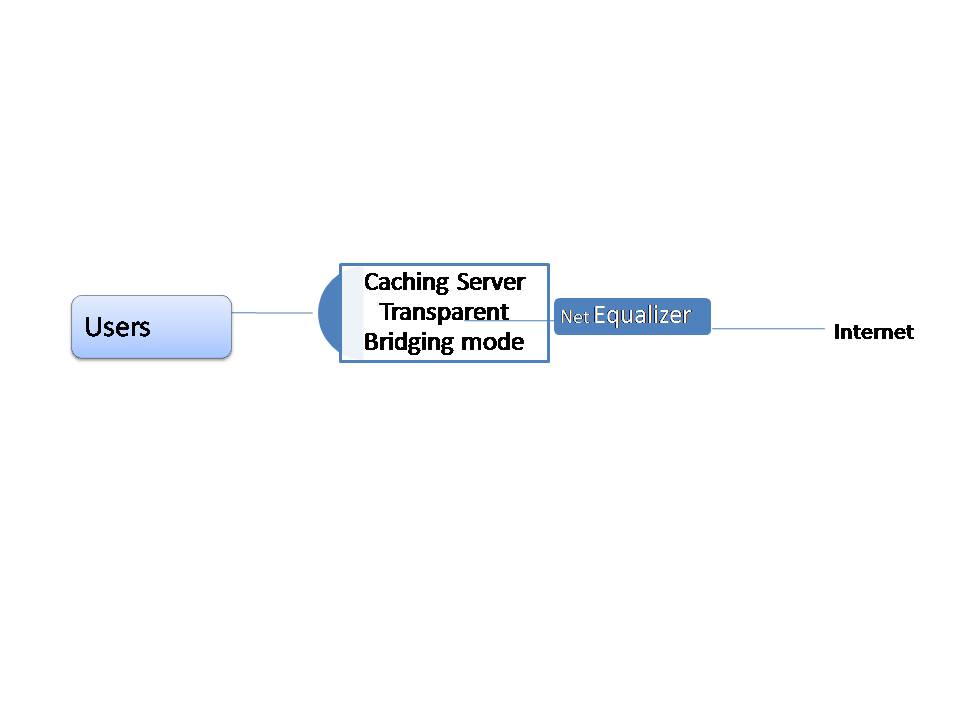
You’ll need to put your caching server in transparent mode and run it on the private side of your NetEqualizer.

NetEqualizer Placement with caching server

Related Article fourteen tips to make your WISP more profitable

Network Capacity Planning: Is Your Network Positioned for Growth?


Authored by:  Sandy McGregor, Director of Sales & Marketing for APConnections, Inc.
Sandy has a Masters in Management Information Systems and over 17 years experience in the Applications Development Life Cycle.  In the past, she has been a Project Manager for large-scale data center projects, as well as a Director heading up architecture, development and operations teams.  In Sandy’s current role at APConnections, she is responsible for tracking industry trends.

As you may have guessed, mobile users are gobbling up network bandwidth in 2010!  Based on research conducted in the first half of 2010, Allot Communications has released The Allot MobileTrends Report , H1 2010 showing dramatic growth in mobile data bandwidth usage in 2010- up 68% in Q1 and Q2.

I am sure that you are seeing the impacts of all this usage on your networks.  The good news is all this usage is good for your business, as a network provider,  if you are positioned to grow to meet the needs of all this growth!  Whether you sell network usage to customers (as a ISP or WISP) or “sell” it internally (colleges and corporations), growth means that the infrastructure you provide becomes more and more critical to your business.

Here are some areas that we found of particular interest in the article, and their implications on your network, from our perspective…

1) Video Streaming grew by 92% to 35% of mobile use

It should be no surprise that video steaming applications take up a 35% share of mobile bandwidth, and grew by 92%.  At this growth rate, which we believe will continue and grow even faster in the future, your network capacity will need to grow as well.  Luckily, bandwidth prices are continuing to come down in all geographies.

No matter how much you partition your network using a bandwidth shaping strategy, the fact is that video streaming takes up a lot of bandwidth.  Add to that the fact that more and more users are using video, and you have a full pipe before you know it!  While you can look at ways to cache video, we believe that you have no choice but to add bandwidth to your network.

2) Users are downloading like crazy!

When your customers are not watching videos, they are downloading, either via P2P or HTTP, which combined represented 31 percent of mobile bandwidth, with an aggregate growth rate of 80 percent.  Although additional network capacity can help somewhat here, large downloads or multiple P2P users can still quickly clog your network.

You need to first determine if you want to allow P2P traffic on your network.  If you decide to support P2P usage, you may want to think how you will identify which users are doing P2P and if you will charge a premium for this service. Also, be aware that encrypted P2P traffic is on the rise, which makes it difficult to figure out what traffic is truly P2P.

Large file downloads need to be supported.  Your goal here should be to figure out how to enable downloading for your customers without slowing down other users and bringing the rest of your network to a halt.

In our opinion, P2P and downloading is an area where you should look at bandwidth shaping solutions.  These technologies use various methods to prioritize and control traffic, such as application shaping (Allot, BlueCoat, Cymphonix) or behavior-based shaping (NetEqualizer).

These tools, or various routers (such as Mikrotik), should also enable you to set rate limits on your user base, so that no one user can take up too much of your network capacity.  Ideally, rate limits should be flexible, so that you can set a fixed amount by user, group of users (subnet, VLAN), or share a fixed amount across user groups.

3) VoIP and IM are really popular too

The second fastest growing traffic types were VoIP and Instant Messaging (IM).  Note that if your customers are not yet using VoIP, they will be soon.  The cost model for VoIP just makes it so compelling for many users, and having one set of wires if an office configuration is attractive as well (who likes the tangle of wires dangling from their desk anyways?).

We believe that your network needs to be able to handle VoIP without call break-up or delay.  For a latency-sensitive application like VoIP, bandwidth shaping (aka traffic control, aka bandwidth management) is key.  Regardless of your network capacity, if your VoIP traffic is not given priority, call break up will occur.  We believe that this is another area where bandwidth shaping solutions can help you.

IM on the other hand, can handle a little latency (depending on how fast your customers type & send messages).  To a point, customers will tolerate a delay in IM – but probably 1-2 seconds max.  After that,they will blame your network, and if delays persist, will look to move to another network provider.

In summary, to position your network for growth:

1) Buy More Bandwidth – It is a never-ending cycle, but at least the cost of bandwidth is coming down!

2) Implement Rate Limits – Stop any one user from taking up your whole network.

3) Add Bandwidth Shaping – Maximize what you already have.  Think efficiency here.  To determine the payback period on an investment in the NetEqualizer, try our new ROI tool.  You can put together similar calculations for other vendors.

Note:  The Allot MobileTrends Report data was collected from Jan. 1 to June 30 from leading mobile operators worldwide with a combined user base of 190 million subscribers.

NetEqualizer News: October 2010


NetEqualizer
October 2010 NetEqualizer News

NetEqualizer Speed Test Utility; Flyaway Contest Winner Announced
Greetings!

Enjoy another issue of the NetEqualizer Newsletter. This month, we reveal the details about our newest NetEqualizer feature — the NetEqualizer Speed Test Utility — and announce the most recent Flyaway Contest winner. As always, feel free to pass this along to others who might be interested in NetEqualizer news.

In this issue:

  • Smart NetEqualizer Speed Test Tool For High-Traffic Networks Coming Soon
  • New ROI Calculator Reveals Long-term NetEqualizer Benefits
  • Effectiveness Of Equalizing Technology As Hidden Node Solution Confirmed
  • And The Flyaway Contest Winner Is…
  • Best Of The Blog
Coming Soon: Smart NetEqualizer Speed Test Tool for High-Traffic Networks

Next month, we’ll introduce our newest standard NetEqualizer feature – the NetEqualizer Speed Test Utility.After years of witnessing administrators of corporate networks struggle with diagnosing bandwidth speed issues, we’ve designed the Speed Test Utility with exactly those users in mind. It provides corporate network administrators with a bandwidth-monitoring tool that overcomes many of the problems generally encountered with online speed testing sites.

How It Works

The Speed Test Utility is an intelligent tool embedded in your NetEqualizer that can be activated from your GUI. On high-traffic networks, there is always a busy hour background load on the link – a baseline, if you will. When you set up the speed test tool, you simply tell the NetEqualizer some basics about your network, including:

  • Link Speed
  • Number of Users
  • Busy Hours

After turning the tool on, it will keep track of your network’s bandwidth usage. If your usage drops below expected levels, it will present a mild warning on the GUI screen that your bandwidth may be compromised and give an explanation of the deviation. The operator can also be notified by e-mail.

This set up allows bandwidth to be monitored without having to depend on unreliable speed tests or run time-consuming reports, allowing the problem to be more quickly identified and addressed.

For more information about the NetEqualizer Speed Test Utility, e-mail us at sales@apconnections.net. The final release is expected to ship in November with all new units, however, contact us if you wish to beta test a pre-release copy.

New ROI Calculator Reveals Long-term NetEqualizer Benefits

Aside from our customers’ comments about the overall improvement in their network performance, one of the most common remarks we hear from NetEqualizer users concerns the technology’s positive return on investment (ROI).However, it’s also one of the most common questions we get from potential customers – How will the NetEqualizer benefit my bottom line?

To better answer this question, we recently interviewed NetEqualizer customers from across several verticals to get their best estimates of the cost savings and value associated with their NetEqualizer. We compiled their answers into a knowledge base that we now use to estimate reasonable ROI calculations.

Our calculations are based on real data and were done conservatively as not to create false promises. There are plenty of congested Internet links suffering out there every day, and hence there is more than enough value with the NetEqualizer. So, we did not need to exaggerate.

ROI calculations were based on the following:

  1. Savings in Bandwidth Costs – Stay at your current bandwidth level or delay future upgrades.
  2. Reduced Labor and Support Costs – Avoid Internet congestion issues that lead to support calls during peak usage times.
  3. Retention of Customers – Stop losing customers, clients, and guests because of unreliable or unresponsive Internet service (applies to ISPs and operators such as hotels and executive suites).
  4. Addition of New Customers – Put more users on your link than before while keeping them all happy (For more information, see APconnections’ Field Guide To Contention Ratios).

To see what the NetEqualizer can do for you, check out the ROI calculator at http://www.netequalizer.com/ROI.php.

Effectiveness Of Equalizing Technology As Hidden Node Solution Confirmed
University of Limerick Last month, we released findings from the University of Limerick confirming the effectiveness of APconnections “Equalizing” technology as a hidden node solution.The study, which was performed on the University of Limerick campus in Ireland, utilized the university’s unique Azimuth testing environment to simulate the conditions that typically lead to hidden nodes.

Hidden Nodes Explained

In wireless networks, administrators are commonly faced with the problem of a “communication breakdown” between individual computers, or nodes. For example, although two nodes may be able to communicate with the access point (AP), the distance between the individual nodes and their inability to communicate hide the nodes from each other.

This prevents one of the nodes from courteously “backing off” if they were to send data at the same time. Instead, the two nodes are forced to compete for access to the AP, often leading to the node with the stronger overall signal strength monopolizing the available bandwidth and preventing the second node from connecting to the network (For more information on the hidden node problem, see APconnections’ Hidden Node White Paper).

The Findings

According to the report, without the use of the APconnections Equalizing technology, the dominant node monopolized the available bandwidth while the hidden node was “locked out” and could not access the network, creating an “unacceptable” end-user experience.

However, the study showed this problem could be effectively solved through the use of our Equalizing technology. The technology ensured that even users of hidden nodes maintained reliable network access by adding latency to the flow of the dominant nodes. This forced the dominant nodes “to back off and allow potentially hidden nodes to establish communications, thus reducing network disruption.”

The full University of Limerick report can be found here on our website. For a detailed explanation of APconnections Equalizing technology, click here.

We are currently recommending our NetEqualizer Lite to solve hidden node problems.

And The Flyaway Contest Winner Is…
Every few months, we have a dfrontierrawing to give away two roundtrip domestic airline tickets from Frontier Airlines to one lucky person who’s recently tried out our online NetEqualizer demo.The time has come to announce this round’s winner.

And the winner is…Scott Shinn of Carolina’s Lending Source, Inc.

Congratulations, Scott! Please contact us within 30 days at admin@apconnections.net or 303-997-1300 to claim your prize.

Best Of The Blog
A Case Study: Hospitality Industry and the Cost of Internet Congestion

In the hospitality industry, expenses are watched closely. All expenditures must be balanced with customer satisfaction, and reality dictates that some customer complaints cannot immediately be remedied. With the reduced revenue that’s come with the current economic climate, difficult decisions must be made about what issues to address and when.While the quality of basic hotel services and comforts may still serve as the baseline for guests’ satisfaction, high-speed Internet service is quickly becoming a factor when choosing where to stay. This is especially true for business travelers.

In this article, we use interviews with NetEqualizer customers in the hospitality industry and our own experience to define the cost of a congested Internet pipe in terms of dollar impact on a hotel business. The conclusions below are based on a business-class, three-star travel hotel with 200 rooms. These same metrics can be scaled up to larger conference centers or smaller travel hotels.

We start with the online behavior that’s behind bandwidth congestion and then discuss the financial repercussions.

Causes of Bandwidth Congestion and Slow Internet Speeds

A hotel of this size typically has two to 10 megabits of shared bandwidth available to guests. We assume 30 percent of the guests (roughly 60 people) are using the Internet for business purposes (e-mail, browsing, Skype, etc.) in the early to late evening hours. We also assume that 10 percent of the guests (20 people) will use the Internet for more intense recreational purposes such as Youtube or Hulu.

Contact Informationemail: admin@apconnections.netphone: 303-997-1300

web: http://www.netequalizer.com

Bandwidth Control Return on Investment (ROI) Calculator


Are you looking to justify the cost of purchasing a bandwidth control device for your Internet or WAN link? Our ROI calculator is Industry neutral, click here to see custom results based on your network.

Aside from our customers’ comments about the overall improvement in their network performance, one of the most common remarks we hear from NetEqualizer users concerns the technology’s positive return on investment (ROI).

However, it’s also one of the most common questions we get from potential customers – How will the NetEqualizer benefit my bottom line?

To better answer this question, we recently interviewed NetEqualizer customers from across several verticals to get their best estimates of the cost savings and value associated with their NetEqualizer. We compiled their answers into a knowledge base that we now use to estimate reasonable ROI calculations.

Our calculations are based on real data and were done conservatively as not to create false promises. There are plenty of congested Internet links suffering out there every day, and hence there is more than enough value with the NetEqualizer. So, we did not need to exaggerate.

ROI calculations were based on the following:

  1. Savings in Bandwidth Costs – Stay at your current bandwidth level or delay future upgrades.
  2. Reduced Labor and Support Costs – Avoid Internet congestion issues that lead to support calls during peak usage times.
  3. Retention of Customers – Stop losing customers, clients, and guests because of unreliable or unresponsive Internet service (applies to ISPs and operators such as hotels and executive suites).
  4. Addition of New Customers – Put more users on your link than before while keeping them all happy.

To see what the NetEqualizer can do for you, visit http://www.netequalizer.com

Other ROI calculators

New APconnections Corporate Speed Test Tool Released for NetEqualizer


For many Internet users, one of the first troubleshooting steps when online access seems to slow is to run a simple speed test. And, under the right circumstances, speed tests can be an effective way to pinpoint the problem.

However, slowing Internet speeds aren’t just an issue for the casual user. Over our years of troubleshooting thousands of corporate and other commercial links, a recurring issue has been customers not getting their full-advertised bandwidth from their upstream provider. Some customers are aware something is amiss from examining bandwidth reports on their routers and some of these problems we stumble upon while troubleshooting network congestion issues.

But, what if you have a shared, busy corporate Internet connection such as this — with hundreds or thousands of users on the link at one time? Should a traditional speed test be the first place to turn? In this situation, the answer is “no.” Running a speed test under these conditions is neither meaningful nor useful.

Let me explain.

The problem starts with the overall design and process of the speed test itself. Speed tests usually run short duration files. For example, a 10-megabit file sent over a hundred-megabit link might complete in 0.1 seconds, reporting the link speed to the operator at 100 megabits. However, statistically this is just a snapshot of one very small moment in time and is of little value when the demands on a network are constantly changing. Furthermore, with this type of test, the link must be free of active users, which is nearly impossible when you have an entire office, for example, accessing the network at once.

On these larger shared links, the true speed can only be measured during peak times with users accessing a wide variety of applications persistently over a significant period. But, there is no easily controlled Web speed test site that can measure this type of performance on your link.

Yes, a sophisticated IT administrator can run reports and see trends and make assumptions. And many do. Yet, for some businesses, this isn’t practical.

For this reason, we’ve introduced the NetEqualizer Speed Test Utility.

How Does the NetEqualizer Speed Test Utility Work?

The NetEqualizer Speed Test Utility is an intelligent tool embedded in your NetEqualizer that can be activated from your GUI. On high-traffic networks, there is always a busy hour background load on the link – a baseline if you will. When you set up the speed test tool, you simply tell the NetEqualizer some basics about your network, including:

  • Link Speed
  • Number of Users
  • Busy Hours

After turning the tool on, it will keep track of your network’s bandwidth usage. If your usage drops below expected levels, it will present a mild warning on the GUI screen that your bandwidth may be compromised and give an explanation of the deviation. The operator can also be notified by e-mail.

This set up allows bandwidth to be monitored without having to depend on unreliable speed tests or run time-consuming reports, allowing the problem to be more quickly identified and addressed.

For more information about the NetEqualizer Speed Test Utility, contact APconnections at sales@apconnections.net.

A Case Study: Hospitality Industry and the Cost of Internet Congestion


In the hospitality industry, expenses are watched closely. All expenditures must be balanced with customer satisfaction, and reality dictates that some customer complaints cannot immediately be remedied. With the reduced revenue that’s come with the current economic climate, difficult decisions must be made about what issues to address and when.

While the quality of basic hotel services and comforts may still serve as the baseline for guests’ satisfaction, high-speed Internet service is quickly becoming a factor when choosing where to stay. This is especially true for business travelers.

In this article, we use interviews with NetEqualizer customers in the hospitality industry and our own experience to define the cost of a congested Internet pipe in terms of dollar impact on a hotel business. The conclusions below are based on a business-class, three-star travel hotel with 200 rooms. These same metrics can be scaled up to larger conference centers or smaller travel hotels.

We start with the online behavior that’s behind bandwidth congestion and then discuss the financial repercussions.

Causes of Bandwidth Congestion and Slow Internet Speeds

A hotel of this size typically has two to 10 megabits of shared bandwidth available to guests. We assume 30 percent of the guests (roughly 60 people) are using the Internet for business purposes (e-mail, browsing, Skype, etc.) in the early to late evening hours. We also assume that 10 percent of the guests (20 people) will use the Internet for more intense recreational purposes such as Youtube or Hulu.

With this ratio of users, the Hulu and YouTube users will easily overwhelm a 10-megabit link, causing a rolling brown out for most of the evening.

Cost of Rolling Brown Out

We conservatively assume that about 5 percent of hotel customers will remember a poor Internet experience and try another hotel the next time they’re in town. Considering this, the approximate loss of revenue amounts to about $500 per week as a result of poor quality of Internet service.

Obviously this loss could potentially be offset by new guests and competitors’ customers that were unhappy with their experience and crossed over to your hotel. However, if you solve the congestion issue — especially if other hotels in your area are encountering similar problems — your retained customer base would slowly rise over time.

And, as the old business adage goes, it’s generally cheaper and more efficient to keep customers than to constantly find new ones.

Cost of Support

Most franchise hotels outsource their IT services to a third party. Your IT consulting staff will likely try to remedy the congestion through trial and error by adjusting various on-site equipment. We will assign a $500-a-month cost to this effort. Even if this cost is absorbed by an IT consultant already on retainer, it still cuts into time they could spend improving other services.

Cost of Additional Bandwidth

One potential remedy that’s often tried, and comes with a price that’s most likely not simply absorbed into a retainer, is simply purchasing additional bandwidth. The good news is that bandwidth contracts are always getting less expensive. However, most operators have found that doubling or tripling the size of their Internet pipes has only a temporary effect on the congestion issue.

So, we’ll assign a cost to this solution of $400 per month, with varying effectiveness.

Conclusion

Based on these findings, bandwidth congestion on a hotel Internet link will conservatively cost about $1,000 per month depending on the specific circumstances and attempted solutions. Although there is no universal solution to the problem — even continuously purchasing additional bandwidth — an automated congestion control device like the NetEqualizer can potentially reduce this cost by 90 percent. And, unlike purchasing additional bandwidth, the cost isn’t recurring and the NetEqualizer generally pays for itself within a matter of months.

Therefore, as we repeatedly see in the experiences of our customers (in the hospitality industry and elsewhere), the solution to Internet congestion, and its ultimate cost, are often less dependent on the amount of bandwidth that’s available and more defined by how it’s managed.

Partial List of NetEqualizer Customers in the Hospitality Field

(Note: These are individual franchises)

PPPoE may be outdated


By Art Reisman

Art Reisman is  currently CTO and Co-Founder of NetEqualizer.  He  has worked at several start up companies over the years, and has invented and brought several technology products to market, both on his own, and with backing of larger corporations.  Including tools for the automotive industry.

We often get asked if we support PPPoE (Point-to-Point Protocol over Ethernet) through our bandwidth controller at this time.  We have decided not to support PPPoE.  What follows is our reasoning behind this decision.

First, some background on PPP.  Point-to-Point Protocal (PPP) is the protocol that was developed to allow the Internet to traverse through the phone system.  It converts digital IP traffic over a modem (analog phone circuit) into sound, and is essential when doing dial up because without it you could not have dial up internet service.  In other words, a phone line to a customer’s house cannot transmit IP packets directly, only audio sounds, so the PPP is a protocol converter that takes a series of sounds and transmits them over the line.  Similar to FAX, if you pick up the line and listen you will hear squealing.

1) We were not interested in building a PPPoE billing system and database.

I assume that since every dial up system also required billing and an authentication database, that somehow the PPP server, the thing that has a modem pool to talk over phone lines, also needs to integrate other aspects of the service to make a turn-key system for providers with Radius, billing etc.

2)There is no reason to continue legacy PPP in the new environment.

As providers transitioned from dial up to broadband wireless, in order to accommodate their legacy PPP server systems, they retrofitted their new wireless network with PPPoE modems at the customer site.   This was so the central PPP server would only need to transmit serialized sound data out of the lines as it had with phone lines.  It also served as way to preserve the legacy, dial up, connection mechanism that authorized users.

We believe that providers should transition from PPP to newer technologies, as PPP is becoming obsolete.

3)Operators are putting off the inevitable.

Now with the investment of these PPP servers integrating with the billing systems, we are where we are today. Even though there is no need to transmit data serially over the Ethernet, providers use PPPoE to preserve other aspects of their existing infrastructure which grew up when dial up was king.  This is similar to mainframe vendors trying to preserve their old screen-scrape technology when the Internet first came out, rather than move to the inevitable web GUI interface (where they eventually all had to go anyways).

4) Newer technologies are more efficient.

As far as I can tell, new wireless providers that do not do any traditional dial up are just creating overhead by trying to preserve PPP, as it is not needed in their circuit.  Generic IP and more modern forms of customer authentication such as MAC address or a login are more efficient.

Of course, you may disagree with our reasoning.  Please feel free to let us know your thoughts on PPPoE.

Nine tips to consider when starting a product company


By Art Reisman

I often get asked to help friends,  and friends  of friends, with flushing out their start up idea’s.  Usually they are looking for a cheerleader to build confidence.  Confidence and support are essential part of building a company; however I will not be addressing those aspects here. I am not a good predictor of what might take off, and a marginal motivator at best,  but I do know from many failures as well as successes, the things you will need  to give yourself the best chance of success.    What follows are   just the facts, as I know them.

1) You don’t have much of a chance unless you jump in full time.

If you are not willing to jump into your venture full time, you are stacking the odds against yourself. Going halfway is like running a marathon without training and expecting to win. So be honest with yourself, are your doing this as a hobby or do you expect a business to pop out?  I know the ideal situation is to start as a hobby and when the business grows a bit then go full time,  you can also win the lottery but its not likely.   Even with a unique idea and no obvious competition you are still competing for mind share.  Treating your business as a hobby is akin to studying for a final when you don’t know what is on the test.  To insure a good grade you’ll need to know more than everybody else taking the test which means you need to study hard.

2) If your idea  requires a change in culture or behavior you are less likely to succeed.

There are literally trillions of ideas and things you can do that might be successful given a little energy. Too often I see entrepreneurs stuck on something that requires a change of consumer behavior beyond their control. This is not to say their ideas are bad or that a change in human behavior is not in order. The problem is you will have limited time and resources to promote and market your idea.  The best inventions probe high demand low resistance niches , meaning they fit into a segment where there will little adaption resistance.

I worked with a company that invented a shoe that would allow you to track your children.  One of the  behavioral show stoppers was that you had to put the shoe  in a charger every night.  Who puts their shoes in  a charger? It’s not that it could not be sold with this limitation, but the fact that it required a change in behavior which made  it a much less attractive idea.

Although one might assume that text messaging on phones just happened , from its roots in the Japanese market of the early 1990’s,  it took 10 years to become commonplace in the US. The feature was an add-on to product already in a channel and generating revenue hence it did not require a house bet from existing service providers to bring to market. You most likely will not have this kind channel to leverage for your product, in other words, it takes a special set of circumstances to influence human behavior and be successful.

3) Your idea involves  consulting or support services

If your goal is to get immediate income and become your own boss, then consulting and services are relatively easy to get going in.  Yes you will need to work hard to win over customers and retain them, but realistically if you are  good at what you do,  income will follow . The downside of consulting and support  is that it is very hard to clone your value  and expand beyond your original partners. For this reason, the tips in this article are geared toward bringing a product to market.

4) Sell it to strangers

Hopefully you don’t have too many enemies but the point of this statement is validate your product need. Selling a book to your family and friends through courtesy buys is good for some feedback and worthwhile, but you will never know how your product will fare until you are converting random strangers.  If you can sell to somebody that  hates you personally then you’ll know the product has staying power.

5) Test Market with small samples

The late billy mayes had it down to a science , take almost anything  produce a commerical and sell it to a small market with  a late night TV advertisement. Obviously this validation is only good for home consumer products, but the idea is to test market small.

6) Sell the idea without the goods.

You need to be careful with this one.  The general rule here is, do not under any circumstance take any money unless you  have your product in stock. Either that or fully disclose to potential customers that they are  pre-ordering a product that does not physically exist. If you break these ground rules you will fail. I learned this trick from a friend of mine who wanted to sell Satellite dishes when they first came out. They did not even have a Franchise license, but they took out a small Advertisement in the local paper for Satellite dishes and the response was overwhelming , they just told inquiries they were out of stock ( true statement) and then proceeded to get a Franchise License and follow up with their inquiries.

7) How do you eat an Elephant?

One bite at a time. I define success as selling something , anything and making one dollar, once you have made a dollar you can concentrate on your second dollar. Great if you can go faster, but unless you are really big  now as a company, there will be plenty of time and  space to grow your product into. You don’t need sales offices all over the world that is just a distraction.

8) Ask successful people to help and advise.  Most entrapanuers and business people love to help others get started and if you have a good idea they can help you open doors for oppurtunities but you must ask, and you must be sincere. Everybody loves the underdog and is willing to help. Remember your brother in law, that is a sales rep for Toshiba, is not who I am talking about.  You need to get advice from people who have started companies from scratch. Nothing wrong with brother in law at Toshiba, but the if you are doing a product spend your time getting advice from others who have brought products to marker.

9) Stop worrying about the competition.  Just do what you do best.  You will  often   to differentiate yourself from the competition.  I politely keep the subject on what I know , my product, and how it fits the customers needs.    Never bad mouth a competitor even if you believe them to be scum an astute customer will figure that out for themselves. Let somebody else bad mouth them.

10) I am waiting to be in a better financial situation before I start a  company

Time on this earth is way more valuable than the any dollar you can make. Letting years go by is not a rational option if you intend on doing a product. Your financial needs are likely  an illusion created by others expectations.  If you have to live in trailer without heat to make ends meet while developing your product you can do it. In fact,  the sacrifices you make will be far healthier for your children than that new Nintendo game. It just amazes me how many people will borrow 100k and give it to a school for a childs education while at the same time are afraid of investing in their dream with time and savings.

About the Author:

Art Reisman is  currently CTO and Co-Founder of NetEqualizer. He  has worked at several start up companies over the years , and has invented and brought several technology products to market, both on his own, and with backing of larger corporations.  Including tools for the automotive industry.

Related Articles

Practical and inspirational tips on bootstrapping

Building a software company from scratch

NetEqualizer News: September 2010


NetEqualizer

September 2010

NetEqualizer News

Ireland Tech Seminar Coming Soon; Starbucks Gift Card Offer Announced

Greetings!

Enjoy another issue of the NetEqualizer Newsletter. This month, we announce more details about October’s Ireland Tech Seminar and kickoff our most recent Starbucks gift card offer. As always, feel free to pass this along to others who might be interested in NetEqualizer news.

In this issue:

  • October Ireland Tech Seminar Coming Soon!
  • What Is The NetEqualizer Doing For You?
  • NetEqualizer Trivia
  • Best Of The Blog

October Ireland Tech Seminar Coming Soon!
NetEq. Seminars

We have now opened registration for our Fall Technical Seminar in Dublin, Ireland, presented by our authorized reseller Ai Bridges. For your convenience, we’re offering the Seminar on two dates: Monday, October 4th, and Tuesday, October 5th. Sign up for whichever date works best for you!

This seminar is not to be missed…Our CTO, Art Reisman, will be there in person to discuss the NetEqualizer technology and to answer your questions.

Here are the details:

When:

  • Monday, October 4, 2010, OR Tuesday, October 5, 2010
  • 9:30 a.m. to 3:15 p.m. (same time both days)
  • Lunch will be provided

Where:

CLICK HERE TO REGISTER

We look forward to seeing you this October in Dublin, Ireland!

What Is The NetEqualizer Doing For You?

At APconnections, we like to keep up with how the NetEqualizer is being used in different environments around the world. Over the past several years, a major part of how we spread the word about the NetEqualizer has been through the experiences of our customers.So, if you’re currently using the NetEqualizer and want to share your experience with the technology, send us a quick one-paragraph write-up on what the NetEqualizer is doing for you. As a “thank you” for your time, we’ll send you a $20 Starbucks gift card.

Testimonials should be sent to admin@apconnections.net. We look forward to hearing what you have to say!

(Limited supply of gift cards available. Offer good while supplies last. One gift card per customer.)

NetEqualizer Trivia

While many of our customers know us pretty well, here are a few NetEqualizer facts that are sure to leave some of you stumped. The correct answers can be found at the end of the newsletter.

1. Where is NetEqualizer manufactured?

  • Beijing
  • Austin, Texas
  • Santa Clara, California
  • Hong Kong
2. What country outside of North America has the most NetEqualizer systems in use?
  • France
  • Ireland
  • China
  • India
3. The NetEqualizer can be found in which of these locations?
  • Faroe Islands
  • Malta
  • Iceland
  • Seychelles
4. How many end users have their Internet service go through a NetEqualizer on an average day?
  • 10 million
  • 4 million
  • 2 million
  • 500,000
Best Of The Blog
Top Five Causes For Disruption Of Internet Service

Editor’s Note: We recently took a poll from our customer base consisting of thousands of NetEqualizer users. What follows are the top five most common causes for disruption of Internet connectivity.

1) Congestion

Congestion is the most common cause for short Internet outages. In general, a congestion outage is characterized by 10 seconds of uptime followed by approximately 30 seconds of chaos. During the chaotic episode, the circuit gridlocks to the point where you can’t load a Web page. Just when you think the problem has cleared, it comes back. The cyclical nature of a congestion outage is due to the way browsers and humans retry on failed connections. During busy times usage surges and then backs off, but the relief is temporary.

Congestion related outages are especially acute at public libraries, hotels, residence halls and educational institutions.

Contact Information

email: admin@apconnections.net
phone: 303-997-1300

Join our mailing list

Trivia Answers

  1. Santa Clara, California – Since switching to ASA Computers for our semi-custom manufactured servers in 2005, NetEqualizer has been completely U.S.-based and manufactured. ASA, who provides full solutions including ‘ISP packages’, servers for ‘.com’ companies, computing environments for schools and research organizations, RAID and NAS set-ups, network installation, help-desk support, and much more, also makes equipment for the likes of Cisco, Microsoft and many Fortune 500 companies.
  2. Ireland (the UK is second)
  3. All of the above
  4. 4 million users

Your ISP May Not Be Who You Think It Is


By Art Reisman, APconnections CTO (www.netequalizer.com)

Have you ever logged into your wireless laptop at a library or hotel lobby or airport?

Have you ever visited and used WiFi in a small-town coffee shop?

Do you take classes at a local university?

What got us thinking on this subject was the flurry of articles on net neutrality — a hot-button issue in the media these days. With each story, the reporters usually rush to get quotes and statements from all the usual suspects — Verizon, Google, Comcast, Time Warner, etc. It’s as if these providers ARE the Internet. However, in this article, we’ll show there is a significant loose conglomerate of smaller providers that, taken together, create a much larger entity than any of these traditional players.

These smaller organizations buy bulk bandwidth from tier-1 providers such as Level 3 and then redistribute it to their customers. In other words, they are your ISP. To give you a rough idea on just how large this segment is, we have worked up some numbers with conservative estimates.

There are roughly 121,000 libraries in the US. Some are very large with thousands of patrons per day and some are very small with perhaps just a handful of daily visitors. We estimate that half provide some form of wireless Internet service, and of those, they would average 300 unique users per month. That gives us approximately 18 million patrons using the Internet in libraries per year.

There are approximately 15 million students attending higher education institutions, with K-through-12 schools making up another 72 million students. If all the university students, and perhaps half of the K-through-12 students use the Internet at their schools, that gives us another 45 million users.

In 2004, half the hotels in the U.S. had broadband service.  It would be safe to assume that this numbers is over 90 percent in 2010. There are approximately 130,000 hotels listed in the US. With an average occupancy per night of 30 guests per hotel (very conservative), we can easily conclude that 100 million people use the Internet from U.S. hotels over the course of a year.

Lastly there are 10,000 small regional ISPs and cable companies serving smaller and rural customers. These companies average about 1,000 customers, covering another 10 million people.

Yes, some of these users are being double counted as many obviously have multiple sources to the Internet, but the point is, with conservative estimates, we were able to easily estimate 100 million users through these alternate channels, making this segment much larger than any single provider.

Therefore, when discussing the issue of net neutrality, or any regulation or privacy debate concerning the Internet, one should look beyond just the big-name providers. There’s a good chance you’ll find your own online experience regularly extends beyond these high-profile ISPs.

NetEqualizer bandwidth controllers are used in hotels, libraries, schools, WiFi hotspots and businesses around the world and have aided in the Internet experience of over 100 million users since 2003.