How to get Access to Blocked Internet Sites and Blocked Video Services


Have you ever taken a flight where video access is blocked?

Perhaps you are in a European Country where a well known provider blocks Skype to force you to use their phone service?

All you need to get around these suspect practices is to use a standard VPN, and it is easier than you think. I am on a flight right now and am going to try watching a movie. I am using IPvanish, but there are many VPN services you can choose from, and use for just a few dollars a month.

Just today, I was trying to restore my iPad to factory defaults. I supposedly have 20 megabit business service from Comcast.  While running the restore, I noticed that my download speed was running at about 200kbs max, and yet speedtests were showing no problems with my connection. So I rebooted my computer, started up my VPN, and found out that I am not getting my full 10 megabits.  What can I infer from this ? Well, I can only assume that Comcast has some sort of bandwidth control and is identifying my Apple device download and slowing it down. I was able to repeat this test.

By the way, I did get to watch a movie on my flight – success!  And that was a much needed break from work.

Note: There is one more trick required to un-block for some VPN services and some  streaming sites.  You may need to hide your DNS activities as well, since some blocking services will also block the DNS request before you even get to the site.

For example, the VPN tunnel will hide what you are doing from anybody, but the initial lookup service to get the site may not be hidden, because you are likely using by default your provider(s) DNS service. So, you should also set your DNS service to a third party site other than your provider after you fire up your VPN. In this way DNS requests should also be encrypted.

Behind The Scenes, How Many Users Can an Access Point Handle ?


Assume you are teaching a class with thirty students, and every one of them needs help with their homework, what would you do? You’d probably schedule a time slot for each student to come in and talk to you one on one (assuming they all had different problems and there was no overlap in your tutoring).

Fast forward to your wireless access point.  You have perhaps heard all the rhetoric about 3.5 gigaherts, or 5.3 megahertz ?

Unfortunately, the word frequency is tossed around in tech buzzword circles the same way car companies and their marketing arms talk about engine sizes. I have no idea what 2.5 Liter Engine is,  it might sound cool and it might be better than a 2 liter engine, but in reality I don’t know how to compare the two numbers. So to answer our original question, we first need a little background on frequencies to get beyond the marketing speak.

A good example of a frequency, that is also easy to visualize, are ripples on pond. When you drop a rock in the water, ripples propagate out in all directions. Now imagine if  you stood in the water, thigh deep across the pond,  and the ripples hit your leg once each second.  The frequency of the ripples in the water would be 1 hertz, or one peak per second. With access points, there are similar ripples that we call radio waves. Although you can’t see them, like the ripples on the water, they are essentially the same thing. Little peaks and values of electromagnetic waves going up and down and hitting the antenna of the wireless device in your computer or Iphone. So when a marketing person tells you their AP is 2.4 Gigahertz, that means those little ripples coming out of  it are hitting your head, and everything else around them, 2.4 billion times each second. That is quite a few ripples per second.

Now in order to transmit a bit of data, the AP actually stops and starts transmitting ripples. One moment it is sending out 2.4 billion ripples pdf second the next moment it is not.  Now this is where it gets a bit weird, at least for me. The 2.4 billion ripples a second really have no meaning as far as data transmission by themselves; what the AP does is set up a schedule of time slots, let’s say 10 million time slots a second, where it is either transmitting ripples, or it turns the ripple generator off. Everybody that is in communication with the AP is aware of the schedule and all the 10 million time slots.  Think of these time slots as dates on your Calendar, and if you have a sunny day, call that a one, while if you have a cloudy day call that a 0.  Cloudy days are a binary 1 and clear day a binary 0. After we string together 8 days we have a sequence of 1’s and 0’s and a full byte. Now 8 days is a long time to transmit a byte, that is why the AP does not use 24 hours for a time slot, but it could , if we were some laid back hippie society where time did not matter.

So let’s go back over what we have learned and plug in some realistic parameters.
Let’s start with a frequency of 2.4 gigahertz. The fastest an AP can realistically turn this ripple generator off and on is about 1/4 the frequency or about 600 time slots/bits per second. This assumes a perfect world and all the bits get out without any interference from other things generating ripples (like your microwave) or something. So in reality the effective rate might be more on the order of 100 million bits a second.
Now let’s say there are 20 users in the room, sharing the available bits equally. They would all be able to run 5 megabits each. But again, there is over head switching between these users (sometimes they talk at the same time and have to constantly back off and re-synch)  Realistically with 20 users all competing for talk time,  1 to 2 megabits per user is more likely.

Other factors that can affect the number of users.
As you can imagine the radio AP manufacturers do all sorts of things to get better numbers. The latest AP’s have multiple antennas and run in two frequencies (two ripple generators) for more bits.

There are also often interference problems with multiple AP’s in the area , all making ripples . The transmission of  ripples for one AP do not stop at a fixed boundary, and this complexity will cause the data rates to slow down while the AP’s sort themselves out.

For related readings on Users and Access Points:

How Many Users Can a Wireless Access Point Handle?

How to Build Your Own Linux Access Points

How to use Access Points to set up and In-Home Music System

Does Your School Have Enough Bandwidth for On-line Testing?


K-12 schools are all rapidly moving toward “one-for-one” programs, where every student has a computer, usually a laptop. Couple this with standardized, cloud-based testing services, and you have the potential for an Internet gridlock during the testing periods. Some of the common questions we hear are:

How will all of these students using the cloud affect our internet resource?

Will there be enough bandwidth for all of those students using on-line testing?

What type of QoS should we deploy, or should we buy more bandwidth?

The good news is that most cloud testing services are designed with a fairly modest bandwidth footprint.

For example, a student connection to a cloud testing application will average around 150kbs (kilo-bits per second).

In a perfect world, a 40 megabit link could handle about 400 students simultaneously doing on-line testing as long as there was no other major traffic.

On the other hand, a video stream may average 1500kbs or more.

A raw download, such as an iOS update, may take as much as 15,000kbs, that is 100 times more bandwidth than the student taking an on-line test.

A common belief when choosing a bandwidth controller to support on-line testing is to find a tool which will specifically identify the on-line testing service and the non-essential applications, thus allowing the IT staff at the school to make adjustments giving the testing a higher priority (QoS). Yes, this strategy seems logical but there are several drawbacks:

  • It does require a fairly sophisticated form of bandwidth control and can be fairly labor intensive and expensive.
  • Much of the public Internet traffic may be encrypted or tunneled, and hard to identify.
  • Another complication trying to give Internet traffic traditional priority is that a typical router cannot give priority to incoming traffic, and most of the test traffic is incoming (from the outside in). We detailed this phenomenon in our post about QoS and the Internet.

The key is not to make the problem more complicated than it needs to be. If you just look at the footprint of the streams coming into the testing facility, you can assume, from our observation, that all streams of 150kbs are of a higher priority than the larger streams, and simply throttle the larger streams. Doing so will insure there is enough bandwidth for the testing service connections to the students. The easiest way to do this is with a heuristic-based bandwidth controller, a class of bandwidth shapers that dynamically give priority to smaller streams by slowing down larger streams.

The other option is to purchase more bandwidth, or in some cases a combination of more bandwidth and a heuristic-based bandwidth controller, to be safe.

Please contact us for a more in-depth discussion of options.

For more information on cloud usage in K-12 schools, check out these posts:

Schools View Cloud Infrastructure as a Viable Option

K-12 Education is Moving to the Cloud

For more information on Bandwidth Usage by Cloud systems, check out this article:

Know Your Bandwidth Needs: Is Your Network Capacity Big Enough for Cloud Computing?

NetEqualizer News: June 2015


June 2015

Greetings!

Enjoy another issue of NetEqualizer News! This month, we announce the 8.3 Release – Expanded RTR, introduce our End of Spring Sale, update you on our DDoS monitoring and prevention technology, and preview our upcoming seminars and conferences. As always, feel free to pass this along to others who might be interested in NetEqualizer News.

A message from Art…
Art Reisman, CTO – APconnections

Spring has been interesting in Colorado this year – artif you like to set records for the most rain in 20 years, that is! Luckily, one of my favorite TV channels is The Weather Channel, so I have been enjoying all the storms… With spring coming to an end soon, I look forward to warmer summer weather.

We love it when we hear back from you – so if you have a story you would like to share with us of how we have helped you, let us know. Email me directly at art@apconnections.net. I would love to hear from you!

8.3 Release is G/A

We are very excited to announce that our 8.3 Release – Expanded RTR is now generally available!

The beta tests for the 8.3 Release have gone very well, and we are ready to release the new reporting features to everyone! Here is a comment from one of our beta customers:

“One of the things that really got my attention on the new 8.3 Release was the ability to see, in real-time, the traffic on all my subnets on one screen. I simply created a pool for all the subnets in my network, and I can instantly see the saturation in the dynamic bar charts that update once a second. I know instantly which segments are saturated by glancing at my monitor screen.”

This release expands our current reporting features to include even more useful information, graphs, and tables. Here are just a few of the new additions you’ll find in the 8.3 Release:

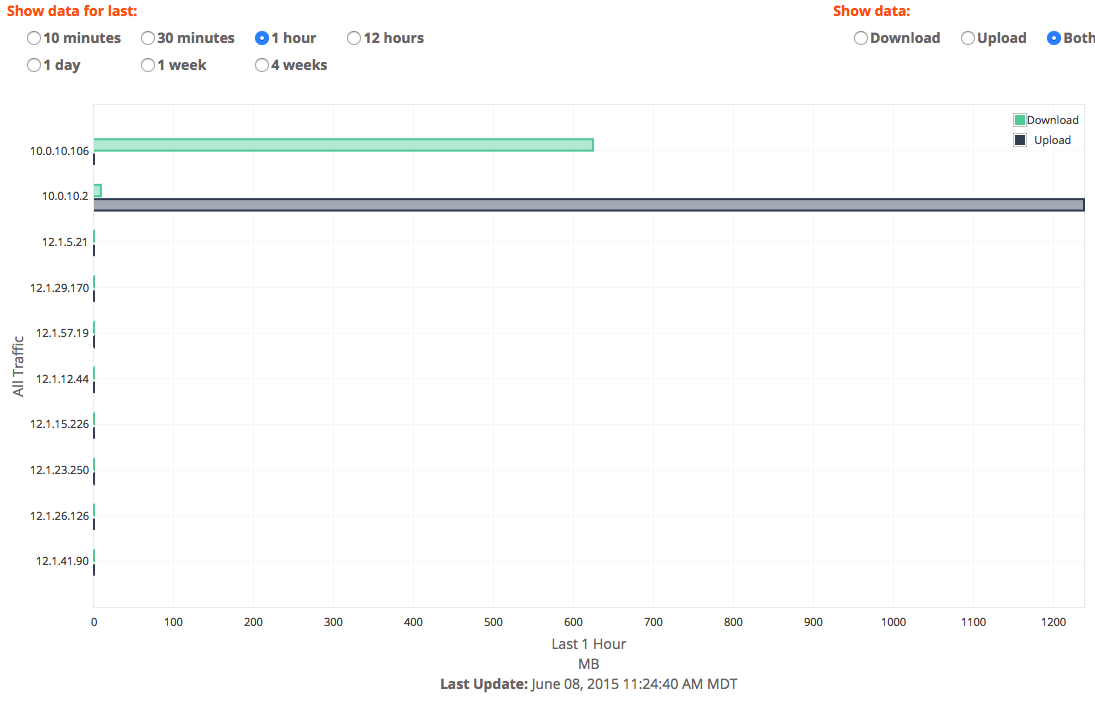
1) Top Talkers Report – this has been one of the most requested graphs and was a popular feature of our previous reporting tool, ntop. You can use this feature to see which IP addresses have used the most bandwidth over time.

toptalkers

2) General Penalty Report – we are bringing this one back from the first version of RTR! You can see both IPs that are currently being penalized, as well as a historical count of penalties that have occurred over time.

penalties

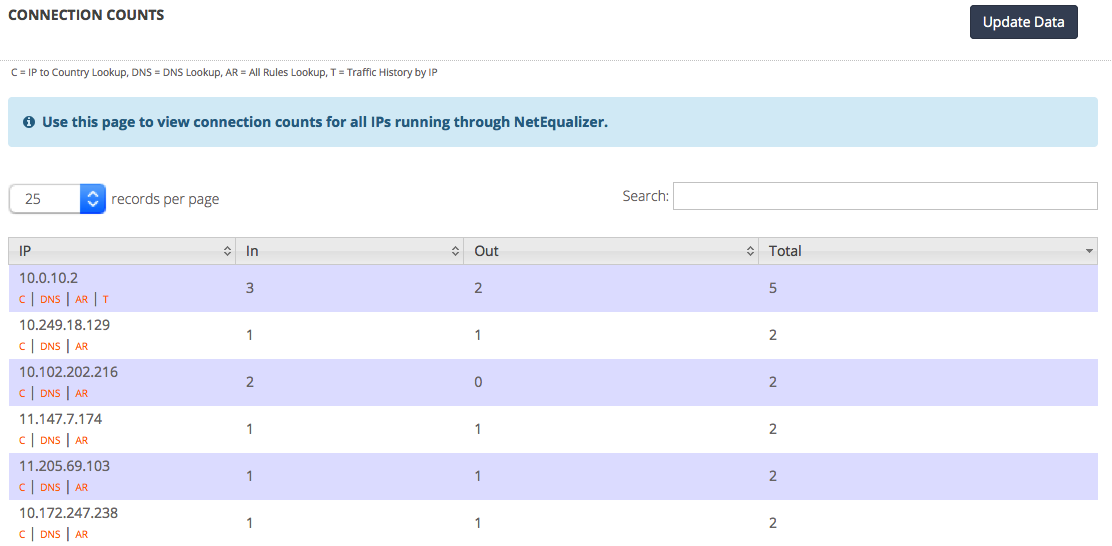
3) Connection Count Report – NetEqualizer controls P2P traffic by using connection count limits on IP addresses. However, figuring out what limit to set for your network depends on how it’s used. You can use the new Connection Count Report to see how many connections individual IP addresses have, and thus set your connection limit to the appropriate level.

connectioncounts

You can read more about all of the features of the 8.3 Release here in the 8.3 Software Update. If you would like to upgrade to 8.3, just click on the button below to send a request to Support.

contact_us_box-1

These features are free to all customers with valid NetEqualizer Software and Support. If you are not current with NSS, contact us today!


Spring for a Lease in our End of Spring Sale

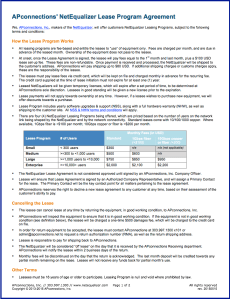
Our Leasing Program continues to be a popular choice for customers that want to use a NetEqualizer with no long-term leasecommitment, and also want to spread out their costs over each month instead of incurring one upfront expense. If you have ever considered leasing a NetEqualizer, now is the time!

To celebrate two years of the NetEqualizer Leasing Program, all new NetEqualizer Leases started before August 31st, 2015 will get 50% off the 1st month fee.

This offer is subject to availability, and customers must qualify to participate in our Leasing Program.

We also are excited to announce that we have added fiber connectivity to our leasing program, in both the 1Gbps and 10Gbps levels. And, to provide more flexibility in financing for our larger customers, we are now offering an Enterprise-Level Lease, for customers with more than 10,000 end users.

If you are interested in learning more, you can read the details of our Leasing Program here, or contact us below.

contact_us_box-1


DDoS Update

The 8.3 Release also includes our recent Distributed Denial of Service (DDoS) Monitor at no extra charge! In addition, our new DDoS Firewall tool (DFW) can be purchased as an add-on module for an additional fee.

Here are some tips from our security experts for how to handle DDoS attacks, or stop them in the first place:
• Lock out unexpected geographies – Most businesses do not need global availability for their websites.
• If an attack occurs, look for fraud – Sometimes DDoS attacks can be smokescreens for other breaches.
• Route traffic through a system like CloudFlare – Their vast network can help thwart bandwidth overloads.
• Have a plan – Build DDoS into your Disaster Recovery Plan, and know who to call when an attack occurs.

The NetEqualizer can help you have a plan.

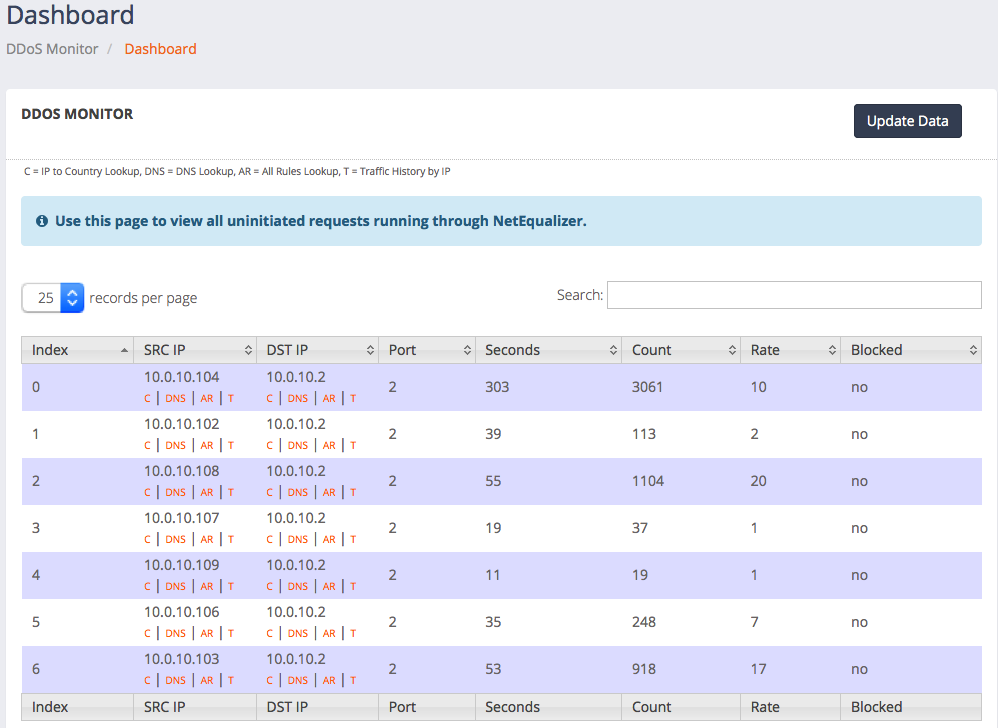
The new DDoS Monitor, which comes standard, shows you some basic metrics on the outside intrusion hit rate into your network. It can be used to spot anomalies which would indicate a likely DDoS attack in progress.

See our detailed blog article on the subject for how this technology works. Here is a screenshot of the DDoS Monitor dashboard:

ddos

If you decide you need something more proactive to mitigate a DDoS attack, we have a solution for you! For a one time charge of $3,500, which includes one hour of training and consulting, we install our DDoS Firewall (DFW) feature, which can be configured to block standard DDoS attacks.

contact_us_box-1


NetEqualizer Tech Seminars and Conferences

Our CTO, Art Reisman, will be on-site at Mercersburg Academy in Mercersburg, Pennsylvania during edACCESS Vendor Day, June 24th.edaccess

If you have ever been curious about the NetEqualizer, and want to learn more, stop by to talk to Art. We also look forward to visiting with customers as well, so please come by and say hello. You might even get some free NetEqualizer bling from Art!

If you cannot attend the edACCESS conference, but are in the area of South Central Pennsylvania, and would like to meet with Art, email him at:

art@apconnections.net

Art will be in the area for a few days after the conference as well.

How do you tell if edACCESS is right for you? Their mission is to provide support and networking for information technology staff at secondary schools and small colleges. Most edACCESS members come from schools with an FTE of under 1,000 students. So, if that sounds like you, consider attending the 2015 edACCESS Conference.

If you have never been to an edACCESS Conference, you might not know that they are purposely run small (100 attendees maximum) and that they use the peer conference mode.

Here is what they say on the edACCESS website:

“Each edACCESS conference is small, responsive, and participant-driven. Small, because edACCESS conferences are limited to one hundred attendees. Responsive, because half the conference is spent discussing topics chosen by attendees through a careful first-day process. Participant-driven, because we believe that, collectively, we are the experts.”

We hope to see you there!

contact_us_box-1


Best Of The Blog

The Facts and Myths of Network Latency

By Art Reisman – CTO – APconnections

There are many good references that explain how some applications such as VoIP are sensitive to network latency, but there is also some confusion as to what latency actually is as well as perhaps some misinformation about the causes.

In the article below, we’ll separate the facts from the myths and also provide some practical analogies to help paint a clear picture of latency and what may be behind it…

Photo Of The Month
IMG_0997
Brighton Beach, UK
This picture was taken by one of our staff on Brighton Beach, UK during our recent Tech Seminar. Brighton Beach features Brighton Pier, which is a pleasure pier that opened in 1899. Here, the ride operators are shown taking a break from work.

Network Provider Outages and DDoS Attacks Dwarf Local Hardware Failure Problems


My Internet Service went down yesterday and I had to revert to my backup provider.

Network Outages due to upstream provider failure are endless…

Comcast Outage for North Denver Fiber cut

Comcast hit with massive Internet outage

Forum discussion about wide spread Internet outage Des Moines Iowa

Spokane Washington 10,000 customers without Internet service

Wide spread Internet outage London , Virgin Media

And even if your provider is not to blame, there are endless hackers out there instigating DDoS attacks , some with an ax to grind others just for random entertainment.

DDoS attack brings down Web Drive Client New Zealand

DDoS attack brings down dutch government

DDoS attack interrupts tournament.

Although this sampling of news stories is not very scientific, I could literally spend a month clipping these articles. There are new ones every day, and that is just the major ones that get reported. If I informally poll our customers, almost every single one of them has seen a DDoS attack of  some kind in the past year, and all have had some sort of upstream Internet outages within the last couple of years.

Now if I ask how many have had critical Network Equipment go down due to hardware failure, that list shrinks to maybe 1 or 2 percent of our customers. Basically, what this tells me is you have a 100 percent chance of a Network outage for some period of time every year due to a problem upstream with your provider. You have  a 2 percent chance due to a hardware failure with your local core Router/Firewall/Bandwidth/Switches.

To put that another way, for every 50 outages caused by external events at your provider beyond your control, you have 1 event due to internal hardware failure.

The solution is to have multiple distinct Internet Providers on hand at all times, so if one goes down you can switch over to the other. As I said there is nothing wrong with the idea of sourcing redundant local equipment, but statistically it is much more important to get a second Internet provider sourced before investing in redundant equipment.

Here is another article highlighting the prevalence network outages.

Note: Although DDoS attacks are provider Independent, your chances of stopping or mitigating the attack are enhanced by having multiple providers.

Other causes of failures:
Yes, wireless topologies are notoriously unstable, and so are applications running on Web Servers, both of which can cause service outages to local users. These types outages are usually not on the same order as catastrophic hardware failure problems or upstream failures. Outages with wireless equipment and service are usually related to these products getting into a bad state, and are not associated with a complete loss of communication to the outside world. You’ll still need to re-boot these systems to get them back into a good state.

Related Articles: 

The Top Five Causes of Disruption of Internet Service

Five Tips for Defending Against a DDoS Attack


Posted in DDoS. 1 Comment »

QoS and Your Cloud Applications, the Must Know Facts


When you make the switch to the cloud, you will likely discover that the standard QoS techniques, from the days when services were hosted within your enterprise, will not work on traffic coming in from the public Internet.  Below we detail why, and offer some unique alternatives to traditional router-based QoS. Read on to learn about new QoS techniques designed specifically for the Cloud.

Any QoS designed for the Cloud must address incoming traffic not originating on your Network

Most Internet congestion is caused by incoming traffic. From downloads of data not originating at your facility. Unlike the pre-cloud days, your local router cannot give priority to this data because it has no control over the sending server stream.  Yes, you can still control the priority of outgoing data, but if recreational traffic coming into your network comes in at the same priority as, let’s say, a cloud based VOIP call, then when your download link is full, all traffic will suffer.

Likely No Help from your service provider

Even if you asked your cloud hosting service to mark their traffic as priority, your public Internet provider likely will not treat ToS bits with any form of priority. Hence, all data coming from the Internet into your router from the outside will hit with equal priority. During peak traffic times, important cloud traffic will not be able to punch through the morass.

Is there any way to give priority to incoming cloud traffic?

Is QoS over the Internet for Cloud traffic possible? The answer is yes, QoS on an Internet link is possible. We have spent the better part of seven years practicing this art form and while it is not rocket science, it does require a philosophical shift in thinking to get your arms around it.

How to give priority to Cloud Traffic

We call it “equalizing,” or behavior-based shaping, and it involves monitoring incoming and outgoing streams on your Internet link. Priority or QoS is nothing more than favoring one stream’s packets over another stream’s. You can accomplish priority QoS on incoming streams by queuing (slowing down) one stream over another without relying on ToS bits.

How do we determine which “streams” to slow down?

It turns out in the real world there are three types of applications that matter:

1 ) Cloud based Business applications. Typically things like data bases, accounting, sales force, educational, Voip services.

2) Recreational traffic such as Netflix, YouTube

3) Downloads and updates

The kicker that we discovered and almost always holds true is that Cloud based applications will use a fraction of the bandwidth of the video recreational traffic and the downloads. If you can simply spot these non essential data hogs by size and slow them down a bit, there will be plenty of room for your Cloud applications during peak periods.

How do we ensure that cloud traffic has priority if we can’t rely on QoS bits?

To be honest, we stumbled upon this technique about 12 years ago. We keep track of all the streams coming into your network with what can best be described as a sniffing device. When we see a large stream of data, we know from experience that it can’t be cloud traffic, as it is too large of a stream. Cloud applications by design are rarely large streams, because if they were, the cloud application would likely be sluggish and not commercially viable. With our sniffing device, the NetEqualizer, we are able to slow down the non-cloud connections by adding in tiny bit of latency, while at the same time allowing the cloud application streams to pass through. The interesting result is that the sending servers (the same ones that ignore TOS bits) will actually sense that their traffic is being delayed in transport and they will back off their sending speeds on their own.

For more information or a demo feel free to contact us http://www.netequalizer.com.

For further reading on this topic, check out this article: “Traffic Management, Vital in the Cloud”

Miracle Product Fixes Slow Internet on Trains, Planes, and the Edge of the Grid


My apologies for the cheesy lead in. Just having some lighthearted fun, after my return from a seminar in the UK, and seeing all their news stands with all their sensational headlines.

A few years ago I got a call from an agency that maintained the Internet service for the National Train service of a European country. (Finland)
The scheme they used to provide internet access on their trains was to put a 4g wireless connection on every train, and then relay the data to a standard Wifi connection for customers on the train.  The country has good 4g access throughout, hence this was the most practical way to get Internet to a moving vehicle.

Using this method they were able to pipe “mobile” wifi into the trains running around the country.  When their trains got a bit crowded the service became useless during peak times. All the business travelers on the train were funneling through what was essentially a 3 or 4 megabit connection.

Fortunately, we were able to work with them to come up with a scheme to alleviate the congestion. The really cool part of the solution was that we were able to put a central Netequalizer at their main data center, and there was no need to put a device on each train. Many of the solutions to this type of problem, either developed internally by satellite providers or by airlines offering Wifi, require a local controller at the user end, thus the cost and the logistics of the solution are much higher than using the centralized NetEqualizer.

We have talked about the using a centralized NetEqualizer for MPLS networks, but sometimes it is hard to visualize using a central bandwidth controller for other hub and spoke type connections such as the train problem. If you would like more information on the details we would be more than happy to provide them.

Complimentary NetEqualizer Bandwidth Management Seminar in the UK


Press Release issued via BusinessWire.

April 08, 2015 01:05 AM Mountain Daylight Time

LAFAYETTE, Colo.–(BUSINESS WIRE)–APconnections, an innovation-driven technology company that delivers best-in-class network traffic management solutions, is excited to announce its upcoming complimentary NetEqualizer Technical Seminar on April 23rd, 2015, in Oxfordshire, United Kingdom, hosted by Flex Information Technology Ltd.

This is not a marketing presentation; it is run by and created for technical staff.

Join us to meet APconnections’ CTO Art Reisman, a visionary in the bandwidth management industry (check out Art’s blog). This is not a marketing presentation; it is run by and created for technical staff. The Seminar will feature in-depth, example-driven discussions of network optimization and provide participants with a first-hand look at NetEqualizer technology.

Seminar highlights include:

  • Learn how behavior-based shaping provides superior QoS for Internet traffic
  • Optimize business-critical VoIP, email, web browsing, SaaS & web applications
  • Control excessive bandwidth use by non-priority applications
  • Gain control over P2P traffic
  • Get visibility into your network with real-time reporting
  • See the NetEqualizer in action! We will demo a live system.

We welcome both customers and those just beginning to think about bandwidth shaping. The Seminar will take place at 14:30pm, Thursday, April 23rd, at Flex Information Technology Ltd in Grove Technology Park, Wantage, Oxfordshire OX12 9FF.

Online registration, including location and driving directions, is available here. There is no cost to attend, but registration is requested. Questions? Contact Paul Horseman at paul@flex.co.uk or call +44(0)333.101.7313.

About Flex Information Technology Ltd
Flex Information Technology is a partnership founded in 1993 to provide maintenance and support services to wide range of customers with large mission critical systems, particularly the Newspaper and Insurance sectors. In 1998 the company began focusing on support for small to medium businesses. Today we provide “Smart IT Solutions combined with Flexible and Quality Services for Businesses” to a growing satisfied customer base. We have accounts with leading IT suppliers and hardware and software distributors in the UK.

About APconnections
APconnections is a privately held company founded in 2003 and is based in Lafayette, Colorado, USA. Our flexible and scalable network traffic management solutions can be found at thousands of customer sites in public and private organizations of all sizes across the globe, including: Fortune 500 companies, major universities, K-12 schools, Internet providers, libraries, and government agencies on six continents.

Contacts

APconnections, Inc.
Sandy McGregor, 303-997-1300 x104
sandym@apconnections.net
or
Flex Information Technology Ltd
Paul Horseman, +44(0)333 101 7313
paul@flex.co.uk

NetEqualizer News: April 2015


April 2015

Greetings!

Enjoy another issue of NetEqualizer News! This month, we update you on our upcoming NetEqualizer Tech Seminars and conferences, ask for your input on what are your most pressing IT problems, and preview more exciting features for our Spring Release (8.3). As always, feel free to pass this along to others who might be interested in NetEqualizer News.

A message from Art…
Art Reisman, CTO – APconnections

Early April is the time of year in North America when some of the early arriving bird migrants start their journey north. artI saw a couple of common Grackles and an Eastern Phoebe this last week, as well as an Osprey – just to name a few. Spring is also the time of year when I get out on the road and start visiting customers. London and Pennsylvania are on the docket, with more to come.
art photo for NL

I really enjoy meeting with customers around the world and hearing their experiences. It’s how some of our best products and features have come to light. Whether it’s a small change to the NetEqualizer interface, or a problem that needs solving, we thrive off of these conversations. Read more about opportunities to meet with me and share your thoughts in this month’s newsletter.

We love it when we hear back from you – so if you have a story you would like to share with us of how we have helped you, let us know. Email me directly at art@apconnections.net. I would love to hear from you!

2015 Technical Seminars

neteq seminar logo with border
Spring 2015 – Coming to the UK on April 23rd

We are coming across the Pond this spring! If you are in or around the United Kingdom on April 23, 2015, come join our CTO, Art Reisman, for an informative and educational session hosted by Flex Information Technology Ltd.

Art will be at the Grove Technology Park in Wantage, Oxfordshire, United Kingdom OX12 9FF the afternoon of April 23rd. You can view the details and register for the event here.

Our Technical Seminars are great because they are not marketing sessions. They are run by our CTO and are technical briefings. The seminar includes discussion on bandwidth control and also a live demonstration of the NetEqualizer technology.

So, if you have always been curious about the NetEqualizer, and would like to learn more, stop by for an afternoon! Or if you are an existing customer, and would like to meet Art to pick his brain, join us in the UK!

Please contact Paul Horseman of Flex Information Technology Ltd with any questions:

paul@flex.co.uk
-or-
+44 (0)333 101 7313

Summer or Fall 2015 – Location TBD

We are currently starting to plan our Summer/Fall 2015 Tech Seminar. For this seminar, we are looking stateside. If you are in the United States and would like to be considered as a host site, let us know by contacting us at:

sales@apconnections.net
-or-
(303) 997-1300


What is Your Better Mouse Trap?

As always, we are looking to expand our product line in ways that are useful to our customers. Our DDoS Monitoring and DDoS Firewall are a perfect example of an urgent need that came up last month, with several customers being caught off guard by attacks. We responded with a timely interim release, by integrating some existing technology from our IPS device into the NetEqualizer.

We are also interested in new ideas that will help make the life of an IT administrator easier. We want to help you to solve your most pressing IT problems, so please take a moment and think of what your better mouse trap would be, and tell us!

Even if you don’t think it is possible, just throw it out there! Your ideas are invaluable in helping us to create the next generation networking solutions.

contact_us_box-1


Annual edACCESS Conference

edaccess

June 24, 2015

We are looking forward to visiting with a few our customers at the annual edACCESS Conference hosted by Mercersburg Academy in Mercersburg, Pennsylvania. We will stop by for Vendor Day on Wednesday, June 24th.

If you have never been to an edACCESS Conference, you might not know that they are purposely run small (100 attendees maximum) and that they use the peer conference model.

Here is what they say on the edACCESS website:

“Each edACCESS conference is small, responsive, and participant-driven. Small, because edACCESS conferences are limited to one hundred attendees. Responsive, because half the conference is spent discussing topics chosen by attendees through a careful first-day process. Participant-driven, because we believe that, collectively, we are the experts.”

If you cannot attend this conference, but are in the area of South Central Pennsylvania, please let us know and perhaps we can stop by as we will be on the East Coast for a few days after the conference.

We are looking forward to seeing you there!

contact_us_box-1


Expanded RTR: Spring Release (8.3) Update

Anticipated Release Date: May 2015

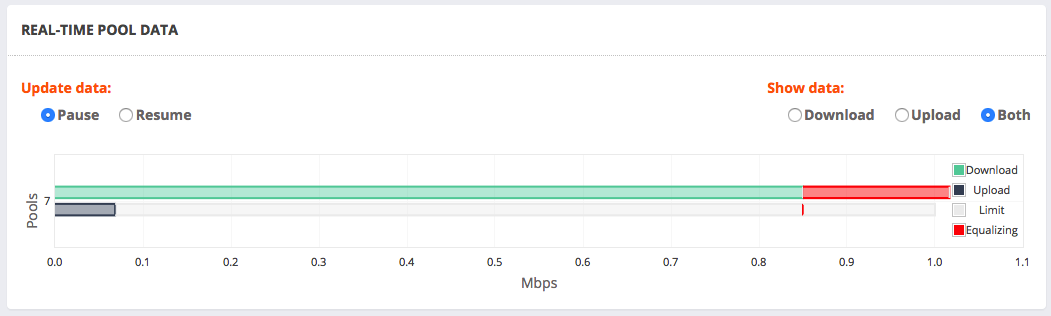
Wow! I got a chance to kick the tires on our 8.3 Release last week. My favorite new RTR report now gives you the ability to see real-time bar charts showing actual bandwidth usage on a per Pool basis (you can also see the Top IP or IP subnet users).

And the real icing on the cake was the red warning colors on the bar chart whenever a pool went into Equalizing, essentially a nice graphical indicator that the NetEqualizer is doing it’s job on your main screen. Here is a screenshot of this feature:

Pools

We’ve also added in a number of other exciting features! These include, but are not limited to:

1) Historical Penalty Reporting – see how many penalties were enforced at a given point in time on your NetEqualizer.

2) Connection Count Reporting – see connection counts by IP. Use this to find possible P2P issues on your network.

3) Export Data from RTR – export data from the RTR databases in CSV format to keep a history longer than 4 weeks or just analyze the data as you wish.

4) Active Penalties – see all connections that are currently being Equalized, as well as what type of penalty they are receiving.

For more details on Release 8.3 features, check out our March 2015 Newsletter.

The coding for Release 8.3 is now complete, and we are moving it into our testing process. We are currently anticipating a May 2015 release, and will announce it in the May 2015 Newsletter.

Once 8.3 reaches GA, these features will be free to customers with valid NetEqualizer Software and Support (NSS). You will need to upgrade first to version 8.0+. If you are not current with NSS, contact us today!

contact_us_box-1


Best Of The Blog

The Technology Differences between a Web Filter and a Traffic Shaper

By Art Reisman – CTO – APconnections

First, a couple of definitions, so we are all on the same page:

A Web Filter is basically a type of specialized firewall with a configurable list of URLs. Using a Web Filter, a Network Administrator can completely block specific web sites, or block complete categories of sites, such as pornography.

A Traffic Shaper is typically deployed to change the priority of certain kinds of traffic. It is used where blocking traffic completely is not required, or is not an acceptable practice. For example, the mission of a typical Traffic Shaper might be to allow users to get into their Facebook accounts, and to limit their bandwidth so as to not overshadow other more important activities. With a Traffic Shaper, the idea is to limit (shape) the total amount of data traffic for a given category.

From a technology standpoint, building a Web Filter is a much easier proposition than creating a Traffic Shaper. This is not to demean the value or effort that goes into creating a good Web Filter. When I say “easier,” I mean this from a core technology point of view. Building a good Web Filter product is not so much a technology challenge, but more of a data management issue.

A Web Filter worth its salt must be aware of potentially millions of various websites that are ever-changing. To manage these sites, a Web Filter product must be constantly getting updated. The product company supporting the Web Filter must search the Web, constantly indexing new web sites and their contents, and then passing this information into the Web Filter product. The work is ongoing, but not necessarily daunting in terms of technology prowess. The actual blocking of a Web site is simply a matter of comparing a requested URL against the list of forbidden web sites and blocking the request (dropping the packets)…

Photo Of The Month
IMG_0706
Tribute to Jack Miller
By Art Reisman
I had the honor to meet my neighbor Jack Miller and listen to his life stories over the past few years. Jack has the unique distinction of serving two WWII tours in North Africa. After the first tour, he was discharged to take care of his farm after the death of his mother, but then, through a clerical mix-up, he was shipped back, only this time he was taken POW by the Germans.I spent many summer evenings sitting on his front porch listening to his stories. My favorite one was set at a time when the Germans were in retreat, and his battalion was marching across Germany, extremely hungry and low on rations. He described walking past German farms with grazing cattle, and I asked him why they did not just take the cows and eat them. Without hesitation, Jack’s reply was “Why, those cows belonged to the German people.”

People like Jack were cut from a different mold.

We lost Jack at the age of 92 last November.

Rest in Peace, Jack.

So You Think you Have Enough Bandwidth?


There are actually only two tiers of bandwidth , video for all, and not video for all. It is a fairly black and white problem. If you secure enough bandwidth such that 25 to 30 percent of your users can simultaneously watch video feeds, and still have some head room on your circuit, congratulations  – you have reached bandwidth nirvana.

Why is video the lynchpin in this discussion?

Aside from the occasional iOS/Windows update, most consumers really don’t use that much bandwidth on a regular basis. Skype, chat, email, and gaming, all used together, do not consume as much bandwidth as video. Hence, the marker species for congestion is video.

Below, I present some of the metrics to see if you can mothball your bandwidth shaper.

1) How to determine the future bandwidth demand.
Believe it or not, you can outrun your bandwidth demand, if your latest bandwidth upgrade is large enough to handle the average video load per customer.  Then it is possible that no further upgrades will be needed, at least in the foreseeable future.

In the “Video for all” scenario the rule of thumb is you can assume 25 percent of your subscribers watching video at any one time.  If you still have 20 percent of your bandwidth left over, you have reached the video for all threshold.

To put some numbers to this
Assume 2000 subscribers, and a 1 gigabit link. The average video feed will require about 2 megabits. (note some HD video is higher than this )  This would mean, to support video 25 percent of your subscribers would use the entire 1 gigabit and there is nothing left over anybody else, hence you will run out of  bandwidth.

Now if you have 1.5 gigabits for 2000 subscribers you have likely reached the video for all threshold, and most likely you will be able to support them without any advanced intelligent bandwidth control . A simple 10 megabit rate cap per subscriber is likely all you would need.

2) Honeymoon periods are short-lived.
The reason why the reprieve in congestion after a bandwidth upgrade is so short-lived is usually because the operator either does not have a good intelligent bandwidth control solution, or they take their existing solution out thinking mistakenly they have reached the “video for all” level.  In reality, they are still under the auspices of the video not for all. They are lulled into a false sense of security for a brief honeymoon period.  After the upgrade things are okay. It takes a while for a user base to fill the void of a new bandwidth upgrade.

Bottom line: Unless you have the numbers to support 25 to 30 percent of your user base running video you will need some kind of bandwidth control.

Application Shaping and Encryption on a Collision Course


Art Reisman, CTO APconnections

I have had a few conversations lately where I have mentioned that due to increased encryption, application shaping is really no longer viable.  This statement without context evokes some quizzical stares and thus inspired me to expound.

I believe that due to increased use of encryption, Application Shaping is really no longer viable…

Yes, there are still ways to censor traffic and web sites, but shaping it, as in allocating a fixed amount of bandwidth for a particular type of traffic, is becoming a thing of the past. And here is why.

First a quick primer in how application shaping works.

When an IP packet with data comes into the application shaper, the packet shaper opens the packet and looks inside.  In the good old days the shaper would see the data inside the packet the same way it appeared in context on a web page. For example, when you loaded up the post that you are a reading now, the actual text is transported from the WordPress host server across the internet to you, broken up in a series of packets.  The only difference between the text on the page and the text crossing the Internet would be that the text in the packets would be chopped up into segments (about 1500 characters per packet is typical).

Classifying traffic in a packet shaper requires intercepting packets in transport, and looking inside them for particular patterns that are associated with applications (such as YouTube, Netflix, Bittorrent, etc.).  This is what is called the application pattern. The packet shaping appliance looks at the text inside the packets and attempts to identify unique sequences of characters, using a pattern matcher. Packet shaping companies, at least the good ones, spend millions of dollars a year keeping up with various patterns associated with ever-changing applications.

Perhaps you have used HTTPS, ssh. These are standard security features built into a growing number of websites. When you access a web page from a URL starting with HTTPS, that means this website is using encryption, and the text gets scrambled in a different way each time it is sent out.  Since the scrambling is unique/different for every user accessing the site, there is no one set pattern, and so a shaper using application shaping cannot classify the traffic. Hence the old methods used by packet shapers are no longer viable.

Does this also mean that you cannot block a website with a Web Filter when HTTPS is used?

I deliberately posed this question to highlight the difference between filtering a site and using application shaping to classify traffic. A site cannot typically hide the originating URL, as the encryption will not begin until there is an initial handshake. A web filter blocks a site based on the URL, thus blocking technology is still viable to prevent access to a website. Once the initial URL is known, data transfer is often set up on another transport port, and there is no URL involved in the transfer. Thus the packet shaper has no idea of where the datastream came from, nor is there any pattern that can be discerned due to the encryption stream.

So the short answer is that you can block a website using a web filter, even when https is used.  However, as we have seen, the same does not apply to shaping the traffic with an application shaper.

NetEqualizer News: March 2015


March 2015

Greetings!

Enjoy another issue of NetEqualizer News! This month, we announce the NE5000 (our Next Generation NetEqualizer solution), highlight our recent 8.2 Release (DDoS Monitoring and IPv6 Shaping), preview our upcoming 8.3 Release (Expanded RTR), and update you on NetEqualizer Tech Seminars and conferences. As always, feel free to pass this along to others who might be interested in NetEqualizer News.

A message from Art…
Art Reisman, CTO – APconnections

As we move closer to spring, I am ready for a thaw. artHere in the U.S., most of the country has been locked in snow and ice this winter. We are all ready for warm weather! As I think about warmer days, I start thinking about growing new things, and am happy to announce that as we continue to grow our capabilities, we are also building out advanced hardware platforms. This month we announce our Next Generation NetEqualizer!

We also continue to grow our next release (8.3), in which we are building out additional reporting (RTR) capabilities. Our goal is to have all of the new features released by late spring. And finally, our 8.2 DDoS Monitor, Firewall, and IPv6 equalizing release is now Generally Available.

We love it when we hear back from you – so if you have a story you would like to share with us of how we have helped you, let us know. Email me directly at art@apconnections.net. I would love to hear from you!

Announcing the Next Generation NetEqualizer! The NE5000 is Now Available

The next generation NetEqualizer is here!

Introducing the NE5000 – our top-of-the-line powerhouse solution for larger organizations.

neteq

The NE5000 comes standard with bi-directional 10 Gbps fiber (40 Gbps fiber optional), and it can shape bandwidth for up to 50,000 concurrent users.

There are also a few exciting additions to the NE5000 not seen in previous models.

• First, we included built-in redundancy so that the device fails open.
• Second, we included built-in power redundancy as well so that the unit will never experience sudden outages.
• And third, we included a built-in management port to make network integration and management even easier.

Take a look at our price list for pricing information, or contact us if you have questions!

contact_us_box-1


8.2 Release is Now Generally Available!

Our 8.2 Release is now generally available! This release includes two primary new features:

Distributed Denial of Service (DDoS) Monitoring

We are hearing that many of our customers need help with the onslaught of DDoS attacks on their networks. As the NetEqualizer is implemented near the network perimeter, and has visibility to all incoming and outgoing traffic, we are able to analyze traffic behavior and report on suspected DDoS attacks. Once identified as suspected DDoS, the NetEqualizer can then be used to block further traffic as needed.

IPv6 Bandwidth Shaping

For several years we have provided visibility to IPv6 traffic flowing through the NetEqualizer, to give you a view into how much IPv6 is on your network. We now feel that IPv6 has gained enough momentum to be a noticeable percentage on our customers’ networks. Therefore, as of 8.2 we are offering equalizing for IPv6 traffic. This will ensure that your full network gets the benefit of improved QoS during peak periods, for both IPv4 and IPv6 traffic.

The 8.2 update is simple and easy to install. We recommend upgrading as soon as possible in order to be properly prepared should a DDoS attack happen to you.

You can read more about these features in our release notes here. Our User Guide has also been updated with more information about how these features work.

These features are free to customers with valid NetEqualizer Software and Support who are running version 8.0+. If you are not current with NSS, contact us today!

contact_us_box-1


Update on 2015 Tech Seminars and Conferences

Throughout 2015, we’ll be using our Newsletter to update you on Tech Seminars that NetEqualizer is hosting, as well as conferences we’ll be attending. Stay tuned!

Here is what we currently have planned for the near future:

NetEqualizer Tech Seminar

We are currently exploring sites for a Tech Seminar in the UK during the summer or fall 2015. As of this newsletter, nothing is neteq seminar logo with borderfinalized. If you would like to host a tech seminar, we are also open to visiting a domestic site here in the U.S. or Canada, so please don’t hesitate to contact us.

edACCESS Conference

edACCESS provides support and networking for information technology staff at secondary schools and small colleges. Most members come from schools with under 1,000 students.edaccess

We will be joining in the edACCESS conference at Mercersburg Academy on June 24, 2015 for Vendor Day! Feel free to stop by and pick up some NetEqualizer bling!

If you have questions on either the NetEqualizer Tech Seminar or the edACCESS conference, contact us!

contact_us_box-1


8.3 Release (Expanded RTR) Arriving in Late Spring

Over the last few months we’ve continued to invest heavily in expanding our Real-Time Reporting (RTR) to make it even more robust. In late spring of this year, our 8.3 Release will be generally available.

The 8.3 Release includes many features our customers have asked for in the past to help improve their reporting experience. Here are just a few of the exciting new features:

Real-Time Pool and VLAN Dashboard

The current version of RTR has a real-time dashboard which shows current bandwidth usage. In Release 8.3, however, we’ve enhanced the dashboard to include both real-time pool and real-time VLAN bar graphs showing current usage. You can also easily see when your pools and/or VLANs are Equalizing.
Pools

Summary IP Reports

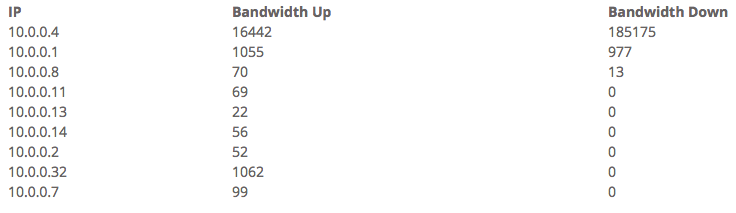
One of the most popular features in ntop, our previous reports offering, was the Summary Hosts Report, which highlighted how much bandwidth a particular IP address had used over a certain time period. In Release 8.3, we’ve added our own summary IP reports into RTR! Summary IP Reports is even better, as it will enable you to run custom database queries against all of the stored historical data to find exactly what you need. We will also include a handful of sample summary reports for common queries.
summary

Historical Penalty Graphs

In Release 8.3, you’ll be able to see how the NetEqualizer has penalized traffic over time. RTR will now include graphs for tracking how many penalties are being enforced each minute. We’ll then store the data for up to four weeks. And, just like our other graphs, you’ll be able to export the data for retention if you so choose. This has been one of our most commonly requested features, and now it’s here!
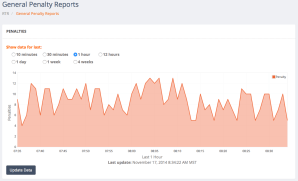
penalties

Once 8.3 reaches GA, these features will be free to customers with valid NetEqualizer Software and Support who are running version 8.0+ If you are not current with NSS, contact us today!

contact_us_box-1


Best Of The Blog

10 Things to Consider when Choosing a Bandwidth Shaper

By Art Reisman – CTO – APconnections

This article is intended as an objective guide for anyone trying to narrow down their options in the bandwidth controller market. Organizations today have a plethora of product options to choose from. To further complicate your choices, not only are there specialized bandwidth controllers, you’ll also find that most Firewall and Router products today contain some form of bandwidth shaping and QoS features.

What follows is an all-encompassing list of questions that will help you to quickly organize your priorities with regards to choosing a bandwidth shaper.

1) What is the Cost of Increasing your Bandwidth?

Although this question may be a bit obvious, it must be asked. We assume that anybody in the market for a bandwidth controller also has the option of increasing their bandwidth. The costs of purchasing and operating a bandwidth controller should ultimately be compared with the cost of increasing bandwidth on your network.

2) How much Savings should you expect from your Bandwidth Controller?

A good bandwidth controller in many situations can increase your carrying capacity by up to 50 percent. However, beware, some technologies designed to optimize your network can create labor overhead in maintenance hours. Labor costs with some solutions can far exceed the cost of adding bandwidth…

Photo Of The Month
snowshoe
Snowshoeing in Snowy Colorado
The snow this year broke records all over the U.S.! February was the snowiest February on record for Colorado. This is a picture of Boulder County Open Space, which is like a park, as everyone can use it for recreation. It is shared by a farmer to graze cows in the spring & summer. Here, one of our staff takes advantage of a snowy day to snowshoe.
Posted in News, Newsletters. Tags: , , . 1 Comment »

The Technology Differences Between a Web Filter and a Traffic Shaper


First, a couple of definitions, so we are all on the same page.
A Web Filter is basically a type of specialized firewall with a configurable list of URLs.  Using a Web Filter, a Network Administrator can completely block specific web sites, or block complete categories of sites, such as pornography.

A Traffic Shaper is typically deployed to change the priority of certain kinds of traffic.  It is used where blocking traffic completely is not required, or is not an acceptable practice.  For example, the mission of a typical Traffic Shaper might be to allow users to get into their Facebook accounts, and to limit their bandwidth so as to not overshadow other more important activities.  With a shaper the idea is to limit (shape) the total amount of data traffic for a given category.

From a technology standpoint, building a Web Filter is a much easier proposition than creating a Traffic Shaper.  This is not to demean the value or effort that goes into creating a good Web Filter.  When I say “easier”, I mean this from a core technology point of view.  Building a good Web Filter product is not so much a technology challenge, but more of a data management issue. A Web Filter worth its salt must be aware of potentially millions of various websites that are ever-changing. To manage these sites, a Web Filter product must be constantly getting updated. The product company supporting the Web Filter must search the Web, constantly indexing new web sites and their contents, and then passing this information into the Web Filter product. The work is ongoing, but not necessarily daunting in terms of technology prowess.  The actual blocking of a Web site is simply a matter of comparing a requested URL against the list of forbidden web sites and blocking the request (dropping the packets).
A Traffic Shaper, on the other hand, has a more daunting task than the Web Filter. This is due to the fact that unlike the Web Filter, a Traffic Shaper kicks in after the base URL has been loaded.  I’ll walk through a generic scenario to illustrate this point.  When a user logs into their Facebook account, the first URL they hit is a well-known Facebook home page.  Their initial query request coming from their computer to the Facebook home page is easy to spot by the Web Filter, and if you block it at the first step, that is the end of the Facebook session.  Now, if you say to your Traffic Shaper “I want you to limit Facebook Traffic to 1 megabit”, then the task gets a bit trickier.  This is because once you are logged into a Facebook  page subsequent requests are not that obvious. Suppose a user downloads an image or plays a shared video from their Facebook screen. There is likely no context for the Traffic Shaper to know the URL of the video is actually coming from Facebook.  Yes, to the user it is coming from their Facebook page, but when they click the link to play the video, the Traffic Shaper only sees the video link – it is not a Facebook URL any longer. On top of that, often times the Facebook page and it’s contents are encrypted for privacy.
For these reasons a traditional Traffic Shaper inspects the packets to see what is inside.  The traditional Traffic Shaper uses Deep Packet Inspection (DPI) to look into the data packet to see if it looks like Facebook data. This is not an exact science, and with the widespread use of encryption, the ability to identify traffic with accuracy is becoming all but impossible.
The good news is that there are other heuristic ways to shape traffic that are gaining traction in the industry.  The bad news is that many end customers continue to struggle with diminishing accuracy of traditional Traffic Shapers.
For more in depth information on this subject, feel free to e-mail me at art@apconnections.net.
By Art Reisman, CTO APconnections

NetEqualizer News: February 2015


February 2015

Greetings!

Enjoy another issue of NetEqualizer News! This month, we introduce an exciting new DDoS protection feature for NetEqualizer, share the results of our recent Holiday Giving Campaign, and preview our NetEqualizer 2015 Tech Seminar. As always, feel free to pass this along to others who might be interested in NetEqualizer News.

A message from Art…
Art Reisman, CTO – APconnections

Over the period of one week, we were contacted several times from customers asking us if the artNetEqualizer could do something to alleviate an ongoing Distributed Denial of Service (DDoS) attack. It turns out we do have some technology in our arsenal for this event, but it was only art photo for NL available in our NetGladiator product. Purchasing a full blown NetGladiator for a random attack is often not within the scope or budget for many of our customers. So, what if we could move this utility into our standard NetEqualizer base? We could then blanket a wide swath of our customers with DDoS protection as well as enhance the value of their NetEqualizer, and so that is what we have done. Read more about this exciting new offering below!

We love it when we hear back from you – so if you have a story you would like to share with us of how we have helped you, let us know. Email me directly at art@apconnections.net. I would love to hear from you!

Are You Under Attack? NetEqualizer Can Help!

Software Update 8.2 is now available as a limited beta release and includes our new Distributed Denial of Service (DDoS) Monitor at no extra charge! In addition, our new DDoS Firewall tool (DFW) can be purchased as an add-on module for an additional fee.

The DDoS Monitor, which comes standard, shows you some basic metrics on the outside intrusion hit rate into your network. It can be used to spot anomalies which would indicate a likely DDoS attack in progress. See our detailed blog article on the subject for how this technology works. Here is a screenshot of the DDoS Monitor dashboard:

ddos

If you decide you need something more proactive to mitigate a DDoS attack, we have a solution for you! For a one time charge of $3,500, which includes one hour of training and consulting, we install our DDoS Firewall (DFW) feature, which can be configured to block standard DDoS attacks.

Also included in Software Release 8.2 is IPv6 Equalizing. We have updated our shaping algorithms to account for both IPv4 and IPv6 traffic. This enables us to provide QoS across a dual stack so that congestion is eased across all of your traffic.

Our recent efforts to include DDoS mitigation functionality and enhanced IPv6 tools were accelerated due to the fact that our customers were facing immediate impacts. We have not forgotten our promise to release RTR enhancements, which are still scheduled for release in the late spring/early summer of 2015.

You can read more about software update 8.2 here. We anticipate that the 8.2 release will be generally available in the March/April 2015 timeframe.

For questions about our DDoS offering, IPv6 shaping enhancements, or anything else, contact us anytime:

sales@apconnections.net
-or-
303-997-1300


Holiday Giving Campaign Results

Thanks to you, our year-end Holiday Giving Campaign was a success! We were able to give sizable monetary donations to three worthy charities in early 2015.

This is really what the holidays are all about, and we thank you for helping us to support these worthy causes:

1) Toys for Tots: The mission for Toys for Tots is to collect new, unwrapped toys during
October, November and December each year, and distribute those toys as Christmas gifts to less fortunate children in the community in which the campaign is conducted.

tft

2) The Hunger Project: The Hunger Project is a global, non-profit, strategic organization committed to the sustainable end of world hunger.

29DRt83

3) Doctors Without Borders: Doctors Without Borders works in nearly 70 countries providing medical aid to those most in need regardless of their race, religion, or political affiliation.

logo


NetEqualizer 2015 Tech Seminars

Are you interested in enhanced on-site training, as well as helping to influence the direction of our next major software release?

We have found over the years that our on-site Tech Seminars become great vehicles for customers to dig deep and derive extra value from their installed NetEqualizer(s).

For example, we have hunted down P2P users during these events, as well as validated security tools and enhanced shaping techniques. It is also a great opportunity for our engineering team to gain insight into the latest needs of our customer base.NetEqualizer Seminars

The obligation of the host is to simply provide a conference room for demo and discussion, and also to allow some live analysis of their network. This is not a sales presentation. If you are interested in hosting, let us know!

This year, we would love to have the opportunity to present in Western Europe if anyone in that part of the world is interested!

Contact us at:

sales@apconnections.net
-or-
303-997-1300


Best Of The Blog

Fourteen Tips to Make Your ISP/WISP More Profitable

By Art Reisman – CTO – APconnections

As the demand for Internet access continues to grow around the world, opportunities for service providers are emerging in markets far and wide. Yet, simply offering Internet service, even in untapped areas, does not guarantee long-term success. Just as quickly as your customer-base grows, the challenges facing ISPs and WISPs begin to emerge.

From competition to unhappy customers, the business venture that once seemed certain to succeed can quickly test the will of even the most battle-hardened and tech savvy business owners. However, there are ways to make the road to profitability a little smoother…

Photo Of The Month
drone
Aerial Photography from Remote Control Drone
Small remote control drones with cameras are becoming very popular in the United States. This particular shot was taken by a member of our staff in New Smyrna Beach, Florida. It is looking south toward Cape Canaveral.

Firewall Recipe for DDoS Attack Prevention and Mitigation


Although you cannot “technically” stop a DDoS attack, there are ways to detect and automatically mitigate the debilitating effects on your public facing servers. Below, we shed some light on how to accomplish this without spending hundreds of thousands of dollars on a full service security solution that may be overkill for this situation.

Most of the damage done by a targeted DDoS attack is the result of the overhead incurred on your servers from large volume of  fake inquiries into your network. Often with these attacks, it is not the volume of raw bandwidth  that is the issue, but the reduced the slow response time due to the overhead on your servers. For a detailed discussion of how a DDoS attack is initiated please visit http://computer.howstuffworks.com/zombie-computer3.htm zombie-computer-3d

We assume in our recipe below, that you have some sort of firewall device on your edge that can actually count hits into your network from an outside IP, and also that you can program this device to take blocking action automatically.

Note: We provide this type of service with our NetGladiator line. As of our 8.2 software update, we also provide this in our NetEqualizer line of products.

Step 1
Calculate your base-line incoming activity. This should be a running average of unique hits per minute or perhaps per second. The important thing is that you have an idea of what is normal. Remember we are only concerned with Un-initiated hits into your network, meaning outside clients that contact you without being contacted first.

Step 2
Once you have your base hit rate of incoming queries, then set a flag to take action ( step 3 below), should this hit rate exceed more than 1.5 standard deviations above your base line.  In other words if your hit rate jumps by statistically large amount compared to your base line for no apparent reason i.e .you did not mail out a newsletter.

Step 3
You are at step 3 because you have noticed a much larger than average hit rate of un-initiated requested into your web site. Now you need to look for a hit count by external IP. We assume that the average human will only generate at most a hit every 10 seconds or so, maybe higher. And also on average they will like not generate more than 5 or 6 hits over a period of a few minutes.  Where as a hijacked client attacking your site as part of a DDOS attack is likely to hit you at a much higher rate.  Identify these incoming IP’s and go to Step 4.

Step 4
Block these IP’s on your firewall for a period of 24 hours. You don’t want to block them permanently because it is likely they are just hijacked clients ,and also if they are coming from behind a Nat’d community ( like a University) you will be blocking a larger number of users who had nothing to do with the attack.

If you follow these steps you should have a nice pro-active watch-dog on your firewall to mitigate the effects of any DDoS attack.

For further consulting on DDoS or other security related issues feel free to contact us at admin@apconnections.net.

Related Articles:

Defend your Web Server against DDoS Attacks – techrecipes.com

How DDoS Attacks Work, and Why They’re Hard to Stop

How to Launch a 65 gbps DDoS Attack – and How to Stop It