Will Bandwidth Shaping Ever Be Obsolete?


By Art Reisman

CTO – www.netequalizer.com

I find public forums where universities openly share information about their bandwidth shaping policies an excellent source of information. Unlike commercial providers, these user groups have found technical collaboration is in their best interest, and they often openly discuss current trends in bandwidth control.

A recent university IT user group discussion thread kicked off with the following comment:

“We are in the process of trying to decide whether or not to upgrade or all together remove our packet shaper from our residence hall network.  My network engineers are confident we can accomplish rate limiting/shaping through use of our core equipment, but I am not convinced removing the appliance will turn out well.”

Notice that he is not talking about removing rate limits completely, just backing off from an expensive extra piece of packet shaping equipment and using the simpler rate limits available on his router.  The point of my reference to this discussion is not so much to discourse over the different approaches of rate limiting, but to emphasize, at this point in time, running wide-open without some sort of restriction is not even being considered.

Despite an 80 to 90 percent reduction in bulk bandwidth prices in the past few years, bandwidth is not quite yet cheap enough for an ISP to run wide-open. Will it ever be possible for an ISP to run wide-open without deliberately restricting their users?

The answer is not likely.

First of all, there seems to be no limit to the ways consumer devices and content providers will conspire to gobble bandwidth. The common assumption is that no matter what an ISP does to deliver higher speeds, consumer appetite will outstrip it.

Yes, an ISP can temporarily leap ahead of demand.

We do have a precedent from several years ago. In 2006, the University of Brighton in the UK was able to unplug our bandwidth shaper without issue. When I followed up with their IT director, he mentioned that their students’ total consumption was capped by the far end services of the Internet, and thus they did not hit their heads on the ceiling of the local pipes. Running without restriction, 10,000 students were not able to eat up their 1 gigabit pipe! I must caveat this experiment by saying that in the UK their university system had invested heavily in subsidized bandwidth and were far ahead of the average ISP curve for the times. Content services on the Internet for video were just not that widely used by students at the time. Such an experiment today would bring a pipe under a similar contention ratio to its knees in a few seconds. I suspect today one would need more or on the order of 15 to 25 gigabits to run wide open without contention-related problems.

It also seems that we are coming to the end of the line for bandwidth in the wireless world much more quickly than wired bandwidth.

It is unlikely consumers are going to carry cables around with their iPad’s and iPhones to plug into wall jacks any time soon. With the diminishing returns in investment for higher speeds on the wireless networks of the world, bandwidth control is the only way to keep order of some kind.

Lastly I do not expect bulk bandwidth prices to continue to fall at their present rate.

The last few years of falling prices are the result of a perfect storm of factors not likely to be repeated.

For these reasons, it is not likely that bandwidth control will be obsolete for at least another decade. I am sure we will be revisiting this issue in the next few years for an update.

Getting the Keys to the Kingdom: SQL Injection


By Zack Sanders

Director of Security – www.netgladiator.net

SQL injection is one of the most well-known vulnerabilities in web application security. Because so many web sites today are database driven, an SQL injection vulnerability puts the entire application and its users at risk. The purpose of this article is to explain what SQL injection is, show how easily it can be exploited, and discuss what steps you can take to make sure your site is secure from this devastating attack vector.

What is SQL injection?

SQL injection is performed by including portions of SQL statements in a web form entry field in an attempt to get the web site to pass a newly formed malicious SQL command to the database. The vulnerability happens when user input is either incorrectly filtered or user input is not strongly typed and unexpectedly executed. SQL commands are thus injected from the web form into the database of an application (like queries) to change the database content or dump the database information like credit card or passwords to the attacker. Average websites can experience 100’s of SQL injection attempts per hour from automated bots scouring the Internet.

How do attackers discover it?

When searching for SQL injection, an attacker is looking for an application that behaves differently based on varying inputs to a form. For example, a vulnerable web form might accept expected content just fine, but if SQL characters are inputted, a system-level SQL error is generated saying something like, “There is an error in your MySQL syntax.” This tells the attacker that the SQL code is being interpreted, even though it is incorrect. This indicates that the application is vulnerable.

How is a site that is vulnerable exploited?

Once an application is deemed vulnerable, an attacker will try using an automated injection tool to glean information about the database. Structure data like the information schema, the version of SQL being run, and table names are all trivial to gather. Once the structure is defined and understood, custom SQL statements can be written to download data from interesting tables like, “users”, “customers”, “payments”, etc. Here is a screenshot from a recent client of mine whose site was vulnerable. These are just a few of the columns from the “users” table.
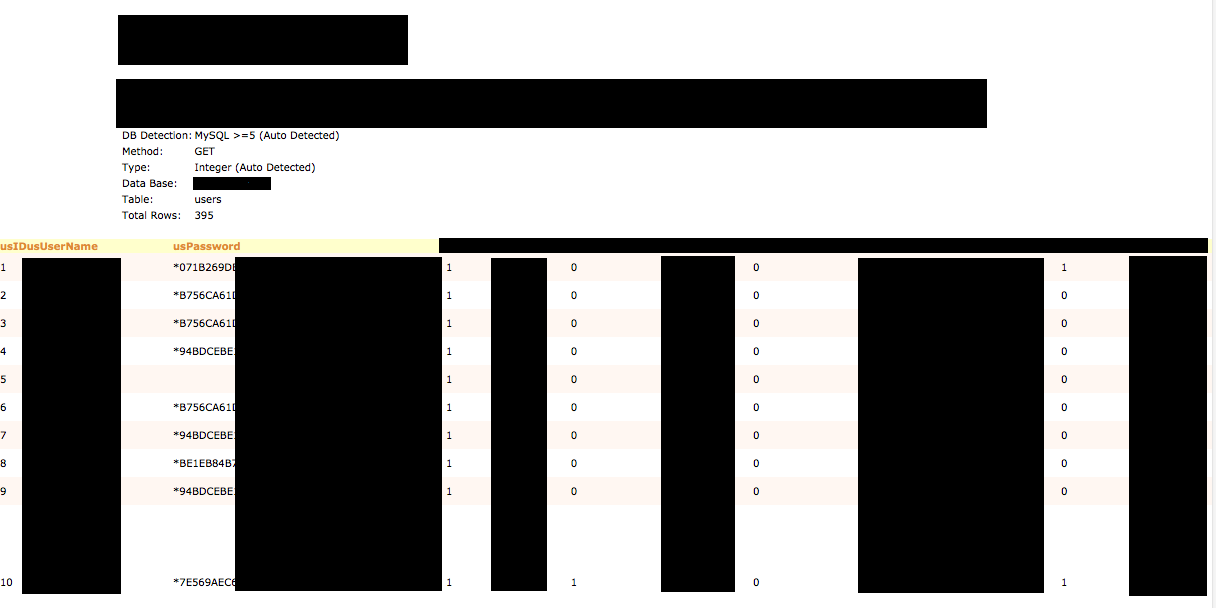
* Names, email addresses, partial passwords, usernames, and addresses are blocked out.

What happens next?

With this level of access, the sky is the limit. Here are a few things an attacker might do:

1) Take all of the hashed passwords and run them against a rainbow table for matches. This is why long passwords are so important. Even though hashing is a one-way algorithm for encryption, the hashes for short and common passwords are all known and can easily be looked up reversely. An attacker might then use the passwords, along with email addresses, to compromise other accounts owned by those users.

2) Change the super administrator flag for a user they know the password for, and log in to gain further access. A common goal is to get to a file upload interface so that a script can be uploaded to the server that would give an attacker remote control.

3) Drop the entire database purely to wreak havoc.

How do you protect your site from SQL injection?

ALL GET and POST requests involving the database need to be filtered and analyzed before being run. This includes actions like:

1) Stripping away SQL characters. In MySQL, this would be the mysql_real_escape_string() function.

2) Analyze for expected input. Should the entry only be a number 1-50? Check to make sure it is a positive number, non-zero, and no more than two characters.

3) Have strong database permissions. Different database users should be created with only needed permissions for their function. For example, don’t use the root MySQL user to connect your web application to your database.

4) Hire an expert to assess your web application. The cost of performing this type of health check is miniscule compared to the cost of being exploited.

5) Install an intrusion protection system like NetGladiator that looks for SQL characters in URL’s.

The keys to the kingdom

Hopefully you can now see the danger of SQL injection. The level of control and access coupled with the ease of discovery and exploitation make it extremely problematic. The good news is, putting basic protections in place is relatively easy.

Contact us today if you want help securing your web application!

Layer 7 Application Shaping Dying with Increased SSL


By Art Reisman
CTO – www.netequalizer.com

When you put a quorum of front line IT administrators  in a room, and an impromptu discussion break out, I become all ears. For example, last Monday, the discussion at our technical seminar at Washington University turned to the age-old subject of controlling P2P.

I was surprised to hear from several of our customers about just how difficult it has become to implement Layer 7 shaping. The new challenge stems from fact that SSL traffic cannot be decrypted and identified from a central bandwidth controller. Although we have known about this limitation for a long time, my sources tell me there has been a pick up in SSL adoption rates over the last several years. I don’t have exact numbers, but suffice it to say that SSL usage is way up.

A traditional Layer 7 shaper will report SSL traffic as “unknown.” A small amount of unknown traffic has always been considered tolerable, but now, with the pick up SSL traffic, rumor has it that some vendors are requiring a module on each end node to decrypt SSL pages. No matter what side of the Layer 7 debate you are on, this provision can be a legitimate show stopper for anybody providing public or semi-open Internet access, and here is why:

Imagine your ISP is requiring you to load a special module on your laptop or iPad to decrypt all your SSL information and send them the results? Obviously, this will not go over very well on a public Internet. This relegates Layer 7 technologies to networks where administrators have absolute control over all the end points in their network. I suppose this will not be a problem for private businesses, where recreational traffic is not allowed, and also in countries with extreme controls such as China and Iran, but for a public Internet providers in the free world,  whether it be student housing, a Library, or a municipal ISP, I don’t see any future in Layer 7 shaping.

More Ideas on How to Improve Wireless Network Quality


By Art Reisman

CTO – http://www.netequalizer.com

I just came back from one of our user group seminars held at a very prestigious University. Their core networks are all running smoothly, but they still have some hard to find, sporadic dead spots on their wireless network. It seems no matter how many site surveys they do, and how many times they try to optimize their placement of their access points, they always end up with sporadic transient dark spots.

Why does this happen?

The issue with 802.11 class wireless service is that most access points lack intelligence.

With low traffic volumes, wireless networks can work flawlessly, but add a few extra users, and you can get a perfect storm. Combine some noise, and a loud talker close to the access point (hidden node), and the weaker signaled users will just get crowded out until the loud talker with a stronger signal is done. These outages are generally regional, localized to a single AP, and may have nothing to do with the overall usage on the network. Often, troubleshooting is almost impossible. By the time the investigation starts, the crowd has dispersed and all an admin has to go on is complaints that cannot be reproduced.

Access points also have a mind of their own. They will often back down from the best case throughput speed to a slower speed in a noisy environment. I don’t mean audible noise, but just crowded airwaves, lots of talkers and possible interference from other electronic devices.

For a quick stop gap solution, you can take a bandwidth controller and…

Put tight rate caps on all wireless users, we suggest 500kbs or slower. Although this might seem counter-intuitive and wasteful, it will eliminate the loud talkers with strong signals from dominating an entire access point. Many operators cringe at this sort of idea, and we admit it might seem a bit crude. However, in the face of random users getting locked out completely, and the high cost of retrofitting your network with a smarter mesh, it can be very effective.

Along the same lines as using fixed rate caps, a bit more elegant solution is to measure the peak draw on your mesh and implement equalizing on the largest streams at peak times. Even with a smart mesh network of integrated AP’s, (described in our next bullet point) you can get a great deal of relief by implementing dynamic throttling of the largest streams on your network during peak times. This method will allow users to pull bigger streams during off peak hours.

Another solution would be to deploy smarter mesh access points…

I have to back track a bit on my stupid AP comments above. The modern mesh offerings from companies such as:

Aruba Networks (www.arubanetworks.com)

Meru ( www.merunetworks.com)

Meraki ( www.meraki.com)

All have intelligence designed to reduce the hidden node, and other congestion problems using techniques such as:

  • Switch off users with weaker signals so they are forced to a nearby access point. They do this basically by ignoring the weaker users’ signals altogether, so they are forced to seek a connection with another AP in the mesh, and thus better service.
  • Prevent low quality users from connecting at slow speeds, thus the access point does not need to back off for all users.
  • Smarter logging, so an admin can go in after the fact and at least get a history of what the AP was doing at the time.

Related article explaining optimizing wireless transmission.

Wireless Network Supercharger 10 Times Faster?


By Art Reisman

CTO – http://www.netequalizer.com

I just reviewed this impressive article:

  • David Talbot reports to MIT‘s Technology Review that “Academic researchers have improved wireless bandwidth by an order of magnitude… by using algebra to banish the network-clogging task of resending dropped packets.”

Unfortunately, I do not have enough details to explain the break through claims in the article specifically. However, through some existing background and analogies, I have detailed why there is room for improvement.

What follows below is a general explanation on  why there is room for a better method of data correction and elimination of retries on a wireless network.

First off, we need to cover the effects of missing wireless packets and why they happen.

In a wireless network, when transmitting data, the sender transmits a series of one’s and zero’s using a carrier frequency. Think of it like listening to your radio, and instead of hearing a person talking , all you hear is a series of beeps and silence. Although, in the case of a wireless network transmission, beeps would be coming so fast, you could not possibly hear the difference between the beep and silence. The good news is that a wireless receiver not only hears the beeps and silence, it interprets them into binary “ones’s” and “zeros’s” and puts them together into a packet.

The problem with this form of transmission is that wireless frequencies have many uncontrolled variables that can affect reliability. It would not be all that bad if carriers were not constantly pushing the envelope. Advertised speeds are based on a best-case signal, where the provider needs to cram as many bits on the frequency window in the shortest amount of time possible. There is no margin for error. With thousands of bits typically in a packet, all it takes is a few of them to be misinterpreted, and then the whole packet is lost and must be re-transmitted.

The normal way to tell if a packet is good or bad is using a technique called a check sum. Basically this means the receiver counts the number of incoming bits and totals them up as they a arrive. Everything in this dance is based on timing. The receiver listens to each time slot, and if it hears a beep it increments a counter, and if it hears silence, it does not increment the counter. At the end of a prescribed time, it totals the bits received and then compares the total to a separate sum (that is also transmitted). I am oversimplifying this process a bit, but think of it like two guys sending box cars full of chickens back and forth on a blind railroad with no engineers, sort of rolling them down hill to each other.

Guy 1 sends three box cars full in of chickens to Guy 2, and then a fourth box car with a note saying, “Please tell me if you got three box cars full of chickens, and also confirm there were 100 chickens in each car,” and then he waits for confirmation back from Guy 2.

Guy 2 gets 2 box cars full of chickens and the note, reads the note and realizes he only got two of the three, and there was a couple of chickens missing from on of the box cars,  so he sends a note back to Guy 1 that says, “I did not get 3 box cars of chickens just two and some of the chickens were missing, they must have escaped.”

The note arrives for Guy 1 and he re-sends a new box car to make up for the mixing chickens and a new not, telling Guy 1 what he re-sent a new box car with make up chickens.

I know this analogy of two guys sending chickens blindly in box cars with confirmation notes sounds somewhat silly and definitely inefficient, but the analogy serves to explain just how inefficient wireless communications can get with re-sends, especially if some of the bits are lost in transmission. Sending bits through the air-waves can quickly become a quagmire if conditions are not perfect and bits start getting lost.

The MIT team has evidently found a better way to confirm and ensure the transition of data. As I have pointed out, in countless articles about how congestion control speeds up networks, it follows that there is great room for improvement if you can eliminate the inefficiencies of retries on a wireless network. I don’t doubt claims of 10 fold increases in actual data transmitted and received can be achieved.

Special Glasses Needed to Spot Network Security Holes


By Art Reisman

CTO – http://www.netequalizer.com

Would you leave for vacation with your garage door wide open or walk off the edge of a cliff looking for a lost dog? Whether it be a bike lock, or that little beep your car makes when you hit the button on your remote, you rely on physical confirmation for safety and security every day.

Because network security holes do not illuminate any of our human senses, most businesses run blind with respect to what are obvious vulnerabilities. Security holes can be glaringly obvious to a hacker.

Have you ever seen an Owl swoop down in the darkness and grab a rabbit? I have, but only once, and that was in the dim glow of field illuminated by some nearby stadium lights. Owls take hundreds of rodents every night under the cover of darkness, they have excellent night vision and most rodents don’t.

To a hacker, a security hole can be just as obvious as that rabbit. You might feel seemingly secure under the cover of darkness. To your senses what may be invisible is quite obvious to a hacker. They have ways of illuminating your security holes. And then, they can choose to exploit them if deemed juicy enough. For some entry points, a hacker might have to look a little bit harder, like lifting a door mat to reveal a key. Never the less, they will see the key, and the problem is you won’t even know the key is under the mat.

Fancy automated tools that report risk are nice, but the only way to expose your actual network security holes is to hire somebody with night vision goggles that can see the holes. Most tools that do audits are not good enough by themselves, they sort of bumble around in the dark looking and feeling for things, and they really do not see them the way a hacker does.

I’d strongly urge any company that is serious about updating their security to employ a white knight hacker before any other investment outlay. For the same reason that automated systems cannot replace humans, even though billions have been spent on them over the years, you should not start your security defense with an automated tool. It must start with a human hell bent on breaking into your business and then showing you the holes. It never ceases to amaze me the types of holes our white knight hackers find. There is nothing better at spotting security holes than a guy with special glasses.

Is Your Data Really Secure?


By Zack Sanders

Most businesses, if asked, would tell you they do care about the security of their customers. The controversial part of security comes to a head when you ask the question in a different way. Does your business care enough about security to make an investment in protecting customer data? There are a few companies that proactively invest in security for security’s sake, but they are largely in the minority.

The two key driving factors that determine a business’s commitment to security investment are:

1) Government or Industry Standard Compliance – This is what drives businesses like your credit card company, your local bank, and your healthcare provider to care about security. In order to operate, they are forced to care. Standards like HIPAA and PCI require them to go through security audits and checkups. Note: And just because they invest in meeting a compliance standard,  it may not translate to secure data, as we will point out below.

2) A Breach Occurs – Nothing will change an organization’s attitude toward security like a massive, embarrassing security breach. Sadly, it usually takes something like this happening to drive home the point that security is important for everyone.

The fact is, most businesses are running on very thin margins and other operating operating costs come before security spending. Human nature is such that we prioritize by what is in front of us now. What we don’t know can’t hurt us. It is easy for a business to assume that their minimum firewall configuration is good enough for now. Unfortunately they cannot easily see the holes in their firewall. Most firewall security can easily be breached through advertised public interfaces.

How do we know? Because we often do complimentary spot checks on company web servers. It is a rare case when we  have not been able to break in, attaining access to all customer records. Even though our sample set is small, our breach rate is so high, we can reliably extrapolate that most companies can easily be broken into.

As we eluded to above, even some of the companies that follow a standard are still vulnerable. Many large corporations  just go through the motions to comply with a standard, so they might typically seek out “trusted,” large professional services firms to do their audits. Often, these companies will conduct boiler plate assessments where auditors run down a checklist with the sole goal of certifying the application or organization as compliant.

Hiring a huge firm to do an audit makes it much easier to deflect blame in the case of an incident. The employee responsible for hiring the audit firm can say, “Well, I hired XXX – what more could I have done?” If they had hired a small firm to do the audit, and a breach occurred, their judgement and job might come into question – however unfair that might be.

As a professional web application security analyst that has personally handled the aftermath of many serious security breaches, I would advocate that if you take your security seriously, start with an assessment challenge using a firm that will work to expose your real world vulnerabilities.

How to Speed Up Your Wireless Network


Editors Notes:

This article was adapted and updated from our original article for generic Internet congestion.

Note: This article is written from the perspective of a single wireless router, however all the optimizations explained below also apply to more complex wireless mesh networks.

It occurred to me today, that in all the years I have been posting about common ways to speed up your Internet, I have never really written a plain and simple consumer explanation dedicated to how a bandwidth controller can speed a congested wireless network. After all, it seems intuitive, that a bandwidth controller is something an ISP would use to slow down and regulate a users speed, not make it faster; but there can be a beneficial side to a smart bandwidth controller that will make a user’s experience on a network appear much faster.

What causes slowness on a wireless shared link?

Everything you do on your Internet creates a connection from inside your network to the Internet, and all these connections compete for the limited amount of bandwidth on your wireless router.

Quite a bit of slow wireless service problems are due to contention on overloaded access points. Even if you are the only user on the network, a simple update to your virus software running in the background can dominate your wireless link. A large download often will cause everything else you try (email, browsing) to come to a crawl.

Your wireless router provides first-come, first-serve service to all the wireless devices trying to access the Internet. To make matters worse, the heavier users (the ones with the larger persistent downloads) tend to get more than their fair share of wireless time slots. Large downloads are like the school yard bully – they tend to butt in line, and not play fair.

Also, what many people may not realize, is that even with a high rate of service to the Internet, your access point, or wireless back haul to the Internet, may create a bottle neck at a much lower throughput level than what your optimal throughput is rate for.

So how can a bandwidth controller make my wireless network faster?

A smart bandwidth controller will analyze all your wireless connections on the fly. It will then selectively take away some bandwidth from the bullies. Once the bullies are removed, other applications will get much needed wireless time slots out to the Internet, thus speeding them up.

What application benefits most when a bandwidth controller is deployed on a wireless network?

The most noticeable beneficiary will be your VoIP service. VoIP calls typically don’t use that much bandwidth, but they are incredibly sensitive to a congested link. Even small quarter-second gaps in a VoIP call can make a conversation unintelligible.

Can a bandwidth controller make my YouTube videos play without interruption?

In some cases yes, but generally no. A YouTube video will require anywhere from 500kbs to 1000kbs of your link, and is often the bully on the link; however in some instances there are bigger bullies crushing YouTube performance, and a bandwidth controller can help in those instances.

Can a home user or small business with a slow wireless connection take advantage of a bandwidth controller?

Yes, but the choice is a time-cost-benefit decision. For about $1,600 there are some products out there that come with support that can solve this issue for you, but that price is hard to justify for the home user – even a business user sometimes.

Note: I am trying to keep this article objective and hence am not recommending anything in particular.

On a home-user network it might be easier just to police it yourself, shutting off background applications, and unplugging the kids’ computers when you really need to get something done. A bandwidth controller must sit between your modem/router and all the users on your network.

Related Article Ten Things to Consider When Choosing a Bandwidth Shaper.

Related Article Hidden Nodes on your wireless network

Editors Choice: The Best of Speeding up Your Internet


Edited by Art Reisman

CTO – www.netequalizer.com

Over the years we have written a variety of articles related to Internet Access Speed and all of the factors that can affect your service. Below, I have consolidated some of my favorites along with a quick convenient synopsis.

How to determine the true speed of video over your Internet connection: If you have ever wondered why you can sometimes watch a full-length movie without an issue while at other times you can’t get the shortest of YouTube videos to play without interruption, this article will shed some light on what is going on behind the scenes.

FCC is the latest dupe when it comes to Internet speeds: After the Wall Street Journal published an article on Internet provider speed claims, I decided to peel back the onion a bit. This article exposes anomalies between my speed tests and what I experienced when accessing real data.

How to speed up your Internet connection with a bandwidth controller: This is more of a technical article for Internet Service Providers. It details techniques used to eliminate congestion on their links and thus increase the perception of higher speeds to their end users.

You may be the victim of Internet congestion: An article aimed at consumer and business users to explain some of the variance in your network speeds when congestion rears its ugly head.

Just how fast is your 4g network?: When I wrote this article, I was a bit frustrated with all the amazing claims of speed coming with wireless 4G devices. There are some fundamental gating factors that will forever insure that your wired connection will likely always be a magnitude faster than any wireless data device.

How does your ISP enforce your Internet speed?: Goes into some of the techniques used on upstream routers to control the speed of Internet and data connections.

Burstable Internet connections, are they of any value?: Sheds light on the ambiguity of the term “burstable.”

Speeding up your Internet connection with an optimizing appliance: Breaks down the tradeoffs of various techniques.

Why caching alone will speed up your Internet: One of my favorite articles. Caching, although a good idea, often creates great unattainable expectations. Find out why.

QoS is a matter of sacrifice: Explains how quality of service is a “zero sum” game, and why somebody must lose when favoring one type of traffic.

Using QoS to speed up traffic: More on the pros and cons of using a QoS device.

Nine tips and tricks to speed up your Internet connection: A great collection of 15 tips, this article seems to be timeless and continually grows in popularity.

Network bottlenecks when your router drops packets: A simple, yet technical, explanation of how hitting your line speed limit on your router causes a domino effect.

Why is the Internet access in my hotel so slow: Okay I admit i , this was an attempt to draw some attention to our NetEqualizer which solves this problem about 99 percent of the time for the hotel industry. You can bring the horse to water but you cannot make them drink.

Speed test tools from M-labs: The most reliable speed test tool there is, uses techniques that cannot easily be fooled by special treatment from your provider.

Are hotels jamming 3g access?: They may not be jamming 3g but they are certainly in no hurry to make it better.

Five more tips in testing your Internet speed: More tips to test Internet speed.

The Evolution of P2P and Behavior-Based Blocking


By Art Reisman

CTO – APconnections

www.netequalizer.com

I’ll get to behavior-based blocking soon, but before I do that, I encourage anybody dealing with P2P on their network to read about the evolution of P2P outlined below. Most of the methods historically used to thwart P2P, are short lived pesticides, and resistance is common. Behavior-based control is a natural wholesome predator of P2P which has proved to be cost effective over the past 10 years.

The evolution of P2P

P2P as it exists today is a classic example of Darwinian evolution.

In the beginning there was Napster. Napster was a centralized depository for files of all types. It also happened to be a convenient place to distribute unauthorized, copyrighted material. And so, the music industry, unable to work out a licensing distribution agreement with Napster basically closed it down. So now, you had all these consumers used to getting free music, and like a habituated wild animal, they were in no mood to pay 15.99 per CD from their local retailer.

P2P technology was already in existence when Napster was closed down; however until that time, it was intended to be a distribution system for legitimate content which came out of academia. By decentralizing the content to many multiple distribution points, the cost of distribution was much less than hosting content distribution on a private server. Decentralized content, good for legitimate distribution of academic content, quickly became a nightmare for the Music Industry.  Instead of having one cockroach of illegal content to deal with, they now had millions of little P2P cockroaches all over the world to contend with.

The Music industry had a multi-billion dollar leak in their revenue stream and went after enforcing copyright policy by harassing ISPs and threatening consumers with jail time. For the ISP, the legal liability of having copyrighted material on your network was a hassle, but the bigger problem was the congestion. When content was distributed by a single point supplier, there were natural cost barriers to prevent bandwidth utilization from rising unchecked. For example, when you buy a music file from Amazon or iTunes, both ends of the transaction require some form of payment. The supplier pays for a large bandwidth pipe, and the consumer pays money for the file. With P2P, the distributors and the clients are all consumers with essentially unlimited data usage on their home accounts, and the content is free. As P2P file sharing rose, ISPs had no easy way of changing their pricing model to deal with the orgy of file sharing. Although invisible to the public, it was a cyber party that rivaled 10 cent beer night fiasco of the 1970’s.

Resistant P2P pesticides

In order to thwart p2p usage, ISPs and businesses started spending hundreds of millions of dollars in technology that tracked specific P2P applications and blocked those streams. This technology is referred to as layer 7 blocking. Layer 7 blocking involves looking at the specific content traversing the Internet and identifying P2P applications by their specific footprint. Intuitively, this solution was a no-brainer* – spot P2P and block it. Most of these installations with layer 7 blocking showed some initial promise, however, as was the case with the previous cockroach infestation, P2P again evolved to meet the challenge and then some.

How does newer evolved P2P thwart layer 7 shaping?

1) There are now encrypted P2P clients where their footprint is hidden, and thus all the investment in the layer 7 shaper can go up in smoke once encrypted P2P infects your network. It can’t be spotted.

2) P2P clients open and close connections much faster than their first generation of the early 2000’s. To keep up with a the flurry of connections over a short time, the layer 7 engine must have many times the processing power of a traditional router, and must do the analysis quickly. The cost of layer 7 shaping is rising much faster than the cost of adding additional bandwidth to a circuit.

Also: Legally there also problems with eavesdropping on customer data without authorization.

How does behavior-based shaping P2P blocking keep up?

1) It uses a progressive rate limit on suspected P2P users.

P2P has the footprint of creating many simultaneous connections to move data across the internet. When behavior-based shaping is in effect, it detects these high connection count users, and slowly implements a progressive rate limit on all their data. This does not completely cut them off per se, but it punishes the speeds of the consumer using p2p and does so progressively as they use more p2p connections. This may seem a bit non specific in target, but when done correctly it rarely affects non P2P users, and even if it does, the behavior of using a large number of downloads is considered rude and abhorrent, and is most like a virus if not a P2P application.

2) It limits the user to a fixed number of simultaneous connections.

Also: It does not violate any privacy policies.

That covers the basics of P2P behavior-based shaping. In practice, we have developed our techniques with a bit of intelligence and do not wish to give away all of our fine tuning secrets, but suffice it to say, I have been implementing behavior-based shaping for 10 years and have empirically seen its effectiveness over time. The cost remains low with respect to licensing (very stable solution), and the results remain consistent.

* Although in some cases there was very little information about how effective the solution was working, companies and ISPs shelled out license fees year after year.

Are You Unknowingly Sharing Bandwidth with Your Neighbors?


Editor’s Note: The following is a revised and update version of our original article from April 2007.

In a recent article titled, “The White Lies ISPs Tell about Broadband Speeds,” we discussed some of the methods ISPs use when overselling their bandwidth in order to put on their best face for their customers. To recap a bit, oversold bandwidth is a condition that occurs when an ISP promises more bandwidth to its users than it can actually deliver hence, during peak hours you may actually be competing with your neighbor for bandwidth. Since the act of “overselling” is a relative term, with some ISPs pushing the limit to greater extremes than others, we thought it a good idea to do a quick follow-up and define some parameters for measuring the oversold condition.

For this purpose we use the term contention ratio. A contention ratio is simply the size of an Internet trunk divided by the number of users. We normally think of Internet trunks in units of megabits. For example, 10 users sharing a one megabit trunk would have a 10-to-1 contention ratio. If sharing the bandwidth on the trunk equally and simultaneously, each user could sustain a constant feed of 100kbs, which is exactly 1/10 of the overall bandwidth.

So what is an acceptable contention ratio?

From a business standpoint, it is whatever a customer will put up with and pay for without canceling their service. This definition may seem ethically suspect, but whether in the bygone days of telecommunications phone service or contemporary Internet bandwidth business, there are long-standing precedents for overselling. What do you think a circuit busy signal is caused by? Or a dropped cell phone call? It’s best to leave the moral debate to a university assignment or a Sunday sermon.

So, without pulling any punches, what exactly will a customer tolerate before pulling the plug?
Here are some basic unofficial observations:
  • Rural customers in the US and Canada: Contention ratios of 10 to 1 are common (2007 this was 20 to 1)
  • International customers in remote areas of the world: Contention ratios of 20 to 1 are common (2007 was 80 to 1)
  • Internet providers in urban areas: Contention ratios of 5 to 1 are to be expected (2007 this was 10 to 1) *

* Larger cable operators have extremely fast last mile connections, most of their speed claims are based on the speed of their last mile connection and not their Internet Exchange point thresholds. The numbers cited are related to their connection to the broader Internet and not the last mile from their office (NOC) to your home. Admittedly, the lines of what is the Internet can be blurred as many cable operators cache popular local content (NetFlix Movies, for example). The movie is delivered from a server at their local office direct to your home, hence technically we would not consider this related to your contention ratio to the Internet.

The numbers above are a good, rough starting point, but things are not as simple as they look. There is a statistical twist as bandwidth amounts get higher.

From the customers perspective of speed, contention ratios can actually increase as the overall Internet trunk size gets larger. For example, if 50 people can share one megabit without mutiny, it should follow that 100 people can share two megabits without mutiny as the ratio has not changed. It is still 50 to 1.

However, from observations of hundreds of ISPs, we can easily conclude that perhaps 110 people can share two megabits with the same tolerance as 50 people sharing one megabit. What this means is that the larger the ISP, the more bandwidth at a fixed cost per megabit, and thus the larger the contention ratios you can get away with.

Is this really true? And if so, what are its implications for your business?

This is simply an empirical observation, backed up by talking to literally thousands of ISPs over the course of four years and noticing how their over subscription ratios increase with the size of their trunk while customer perception of speed remains about the same.

A conservative estimate is that, starting with the baseline ratio listed above, you can safely add 10 percent more subscribers above and beyond the original contention ratio for each megabit of trunk they share.

Related Articles

How to speed up access on your iPhone

How to determine the true speed of video over your Internet Connection

Network Bottlenecks – When Your Router Drops Packets, Things Can Get Ugly


By Art Reisman

CTO – APconnections

As a general rule, when a network router sees more packets than it can send or receive on a link, it will drop the extra  packets. Intuitively, when your router is dropping packets, one would assume that the perceived slow down, per user, would be just a gradual shift slower.

What happens in reality is far worse…

1) Distant users get spiraling slower responses.

Martin Roth, a colleague of ours who founded one of the top performance analysis companies in the world, provided this explanation:

“Any device which is dropping packets “favors” streams with the shortest round trip time, because (according to the TCP protocol) the time after which a lost packet is recovered is depending on the round trip time. So when a company in Copenhagen/Denmark has a line to Australia and a line to Germany on the same internet router, and this router is discarding packets because of bandwidth limits/policing, the stream to Australia is getting much bigger “holes” per lost packet (up to 3 seconds) than the stream to Germany or another office in Copenhagen. This effect then increases when the TCP window size to Australia is reduced (because of the retransmissions), so there are fewer bytes per round trip and more holes between to round trips.”

In the screen shot above (courtesy of avenida.dk), the Bandwidth limit is 10 Mbit (= 1 Mbyte/s net traffic), so everything on top of that will get discarded. The problem is not the discards, this is standard TCP behaviour, but the connections that are forcefully closed because of the discards. After the peak in closed connections, there is a “dip” in bandwidth utilization, because we cut too many connections.

2) Once you hit a congestion point, where your router is forced to drop packets, overall congestion actually gets worse before it gets better.

When applications don’t get a response due to a dropped packet, instead of backing off and waiting, they tend to start sending re-tries, and this is why you may have noticed prolonged periods (3o seconds or more) of no service on a congested network. We call this the rolling brown out. Think of this situation as sort of a doubling down on bandwidth at the moment of congestion. Instead of easing into a full network and lightly bumping your head, all the devices demanding bandwidth ramp up their requests at precisely the moment when your network is congested, resulting in an explosion of packet dropping until everybody finally gives up.

How do you remedy outages caused by Congestion?

We have written extensively about solutions to prevent bottlenecks. Here is a quick summary with links:

1) The most obvious being to increase the size of your link.

2) Enforce rate limits per user.

3) Wse something more sophisticated like a Netequalizer, a device that is designed to specifically counter the effects of congestion.

From Martin Roth of Avenida.dk

“With NetEqualizer we may get the same number of discards, but we get fewer connections closed, because we “kick” the few connections with the high bandwidth, so we do not get the “dip” in bandwidth utilization.

The graphs (above) were recorded using 1 second intervals, so here you can see the bandwidth is reached. In a standard SolarWinds graph with 10 minute averages the bandwidth utilization would be under 20% and the customer would not know they are hitting the limit.”

———————————————————————-

The excerpt below was a message from a reseller who had been struggling with congestion issues at a hotel, he tried basic rate limits on his router first. Rate Limits will buy you some time , but on an oversold network you can still hit the congestion point, and for this you need a smarter device.

“…NetEq delivered a 500% gain in available bandwidth by eliminating rate caps, possible through a mix of connection limits and Equalization.  Both are necessary.  The hotel went from 750 Kbit max per accesspoint (entire hotel lobby fights over 750Kbit; divided between who knows how many users) to 7Mbit or more available bandwidth for single users with heavy needs.

The ability to fully load the pipe, then reach out and instantly take back up to a third of it for an immediate need like a speedtest was also really eye-opening.  The pipe is already maxed out, but there is always a third of it that can be immediately cleared in time to perform something new and high-priority like a speed test.”
 
Rate Caps: nobody ever gets a fast Internet connection.
Equalized: the pipe stays as full as possible, yet anybody with a business-class need gets served a major portion of the pipe on demand. “
– Ben Whitaker – jetsetnetworks.com

Are those rate limits on your router good enough?

P2P Protocol Blocking Now Offered with NetGladiator Intrusion Prevention


A few months ago we introduced our NetGladiator Intrusion Prevention (IPS) Device. To date, it has thwarted tens of thousands of robotic cyber attacks and counting. Success breeds success and our users wanted more.

When our savvy customers realized the power, speed, and low price point of our underlying layer 7 engine, we started getting requests seeking additional features such as: “Can you also block Peer To Peer and other protocols that cannot be stopped by our standard Web Filters and Firewalls?”  It was natural that we extended our IPS device to address this space; hence, today we are announcing the next-generation NetGladiator. We now offer a module that will allow you to block and monitor the world’s top 10 p2p protocols (which account for 99 percent of all P2P traffic). We also back our technology with our unique promise to implement a custom protocol blocking rule with the purchase of any system at no extra charge. For example, if you have a specific protocol you need to monitor and just can’t uncover it with your WebSense or Firewall filter, we will custom deliver a NetGladiator system that can track and/or block your unique protocol, in addition to our standard p2p blocking options.

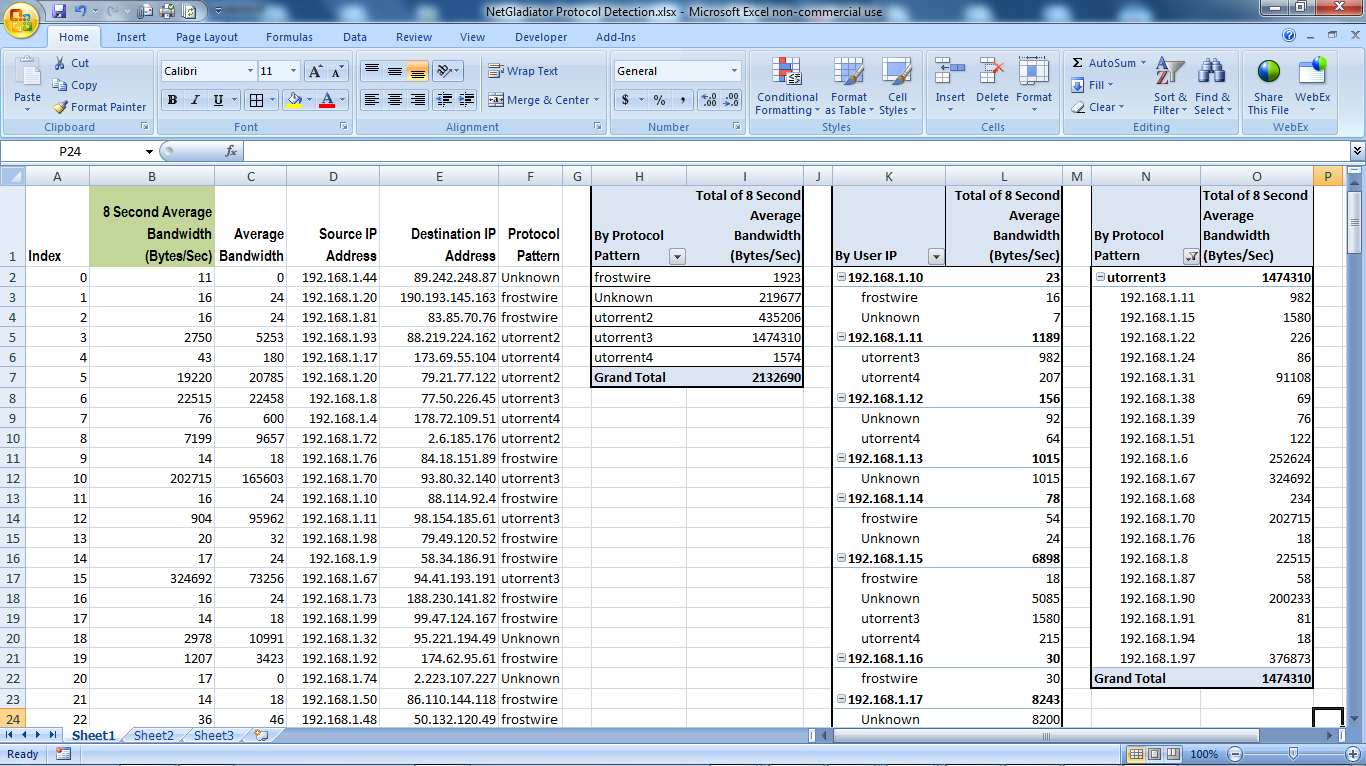
Below is a sample Excel live report integrated with the NetGladiator in monitor mode. On the screen snapshot below, you will notice that we have uncovered a batch of Utorrent and Frost Wire p2p traffic.

Please feel free to call 303-997-1300 or email our NetGladiator sales engineering team with any additional questions at ips@@apconnections.net.

Related Articles

NetGladiator A layer 7 shaper in sheep’s clothing

How to Speed Up Data Access on Your iPhone


By Art Reisman

Art Reisman CTO www.netequalizer.com

Editor’s note: Art Reisman is the CTO of APconnections. APconnections designs and manufactures the popular NetEqualizer bandwidth shaper.

Ever wonder if there was anything you can do to make your iPhone access a little bit faster?

When on Your Provider’s 4g Network and Data Access is Slow.

The most likely reason for slow data access is congestion on the provider line. 3g and 4g networks all have a limited sized pipe from the nearest tower back to the Internet. It really does not matter what your theoretical data speed is, when there are more people using the tower than the back-haul pipe can handle, you can temporarily lose service, even when your phone is showing three or four bars.

The other point of contention can be the amount of users connected to a tower exceeds the the towers carrying capacity in terms of frequency.  If this occurs you likely will not only lose data connectivity but also the ability to make and receive phone calls.

Unfortunately, you only have a couple of options in this situation.

– If you are in a stadium with a large crowd, your best bet is to text during the action. Pick a time when you know the majority of people are not trying to send data. If you wait for a timeout or end of the game, you’ll find this corresponds to the times when the network slows to a crawl, so try to finish your access before the last out of the game or the end of the quarter.

Get away from the area of congestion. I have experienced complete lockout of up to 30 minutes, when trying to text, as a sold out stadium emptied out. In this situation my only chance was to walk about 1/2 mile or so from the venue to get a text out. Once away from the main stadium, my iPhone connected to a tower with a different back haul away from the congested stadium towers.

When connected to a local wireless network and access is slow.

Get close to the nearest access point.

Oftentimes, on a wireless network, the person with the strongest signal wins. Unlike the cellular data network , 802.11  protocols used by public wireless access points have no way to time-slice data access. Basically, this means the device that talks the loudest will get all the bandwidth. In order to talk the loudest, you need to be closest to the access point.

On a relatively uncrowded network you might have noticed that you get fairly good speed even on a moderate or weak signal.  However, when there are a large number of users competing for the attention of a local access point, the loudest have the ability to dominate all the bandwidth, leaving nothing for the weaker iPhones. The phenomenon of the loudest talker getting all the bandwidth is called the hidden node problem. For a good explanation of the hidden node issue you can reference our white paper on the problem.

Shameless plug: If you happen to be a provider or know somebody that works for a provider please tell them to call us and we’d be glad to explain the simplicity of equalizing and how it can restore sanity to a congested network.

How to Block Frostwire, utorrent and Other P2P Protocols


By Art Reisman, CTO, http://www.netequalizer.com

Art Reisman CTO www.netequalizer.com

Disclaimer: It is considered controversial and by some definitions illegal for a US-based ISP to use deep packet inspection on the public Internet.

At APconnections, we subscribe to the philosophy that there is more to be gained by explaining your technology secrets than by obfuscating them with marketing babble. Read on to learn how I hunt down aggressive P2P traffic.

In order to create a successful tool for blocking a P2P application, you must first figure out how to identify P2P traffic. I do this by looking at the output data dump from a P2P session.

To see what is inside the data packets I use a custom sniffer that we developed. Then to create a traffic load, I use a basic Windows computer loaded up with the latest utorrent client.

Editors Note: The last time I used a P2P engine on a Windows computer, I ended up reloading my Windows OS once a week. Downloading random P2P files is sure to bring in the latest viruses, and unimaginable filth will populate your computer.

The custom sniffer is built into our NetGladiator device, and it does several things:

1) It detects and dumps the data inside packets as they cross the wire to a file that I can look at later.

2) It maps non printable ASCII characters to printable ASCII characters. In this way, when I dump the contents of an IP packet to a file, I don’t get all kinds of special characters embedded in the file. Since P2P data is encoded random music files and video, you can’t view data without this filter. If you try, you’ll get all kinds of garbled scrolling on the screen when you look at the raw data with a text editor.

So what does the raw data output dump of a P2P client look like ?

Here is a snippet of some of the utorrent raw data I was looking at just this morning. The sniffer has converted the non printable characters to “x”.
You can clearly see some repeating data patterns forming below. That is the key to identifying anything with layer 7. Sometimes it is obvious, while sometimes you really have work to find a pattern.

Packet 1 exx_0ixx`12fb*!s[`|#l0fwxkf)d1:ad2:id20:c;&h45h”2x#5wg;|l{j{e1:q4:ping1:t4:ka 31:v4:utk21:y1:qe
Packet 2 exx_0jxx`1kmb*!su,fsl0’_xk<)d1:ad2:id20:c;&h45h”2x#5wg;|l{j{e1:q4:ping1:t4:xv4^1:v4:utk21:y1:qe
Packet 3 exx_0kxx`1exb*!sz{)8l0|!xkvid1:ad2:id20:c;&h45h”2x#5wg;|l{j{e1:q4:ping1:t4:09hd1:v4:utk21:y1:qe
Packet 4 exx_0lxx`19-b*!sq%^:l0tpxk-ld1:ad2:id20:c;&h45h”2x#5wg;|l{j{e1:q4:ping1:t4:=x{j1:v4:utk21:y1:qe

The next step is to develop a layer 7 regular expression to identify the patterns in the data. In the output you’ll notice the string “exx” appears in line, and that is what you look for. A repeating pattern is a good place to start.

The regular expression I decided to use looks something like:

exx.0.xx.*qe

This translates to: match any string starting with “exx” followed, by any character “.” followed by “0”, followed by “xx”, followed by any sequence of characters ending with “qe”.

Note: When I tested this regular expression it turns out to only catch a fraction of the Utorrent, but it is a start. What you don’t want to do is make your regular expression so simple that you get false positives. A layer 7 product that creates a high degree of false positives is pretty useless.

The next thing I do with my new regular expression is a test for accuracy of target detection and false positives.

Accuracy of detection is done by clearing your test network of everything except the p2p target you are trying to catch, and then running your layer 7 device with your new regular expression and see how well it does.

Below is an example from my NetGladiator in a new sniffer mode. In this mode I have the layer 7 detection on, and I can analyze the detection accuracy. In the output below, the sniffer puts a tag on every connection that matches my utorrent regular expression. In this case, my tag is indicated by the word “dad” at the end of the row. Notice how every connection is tagged. This means I am getting 100 percent hit rate for utorrent. Obviously I doctored the output for this post :)

ndex SRCP DSTP Wavg Avg IP1 IP2 Ptcl Port Pool TOS
0 0 0 17 53 255.255.255.255 95.85.150.34 — 2 99 dad
1 0 0 16 48 255.255.255.255 95.82.250.60 — 2 99 dad
2 0 0 16 48 255.255.255.255 95.147.1.179 — 2 99 dad
3 0 0 18 52 255.255.255.255 95.252.60.94 — 2 99 dad
4 0 0 12 24 255.255.255.255 201.250.236.194 — 2 99 dad
5 0 0 18 52 255.255.255.255 2.3.200.165 — 2 99 dad
6 0 0 10 0 255.255.255.255 99.251.180.164 — 2 99 dad
7 0 0 88 732 255.255.255.255 95.146.136.13 — 2 99 dad
8 0 0 12 0 255.255.255.255 189.202.6.133 — 2 99 dad
9 0 0 12 24 255.255.255.255 79.180.76.172 — 2 99 dad
10 0 0 16 48 255.255.255.255 95.96.179.38 — 2 99 dad
11 0 0 11 16 255.255.255.255 189.111.5.238 — 2 99 dad
12 0 0 17 52 255.255.255.255 201.160.220.251 — 2 99 dad
13 0 0 27 54 255.255.255.255 95.73.104.105 — 2 99 dad
14 0 0 10 0 255.255.255.255 95.83.176.3 — 2 99 dad
15 0 0 14 28 255.255.255.255 123.193.132.219 — 2 99 dad
16 0 0 14 32 255.255.255.255 188.191.192.157 — 2 99 dad
17 0 0 10 0 255.255.255.255 95.83.132.169 — 2 99 dad
18 0 0 24 33 255.255.255.255 99.244.128.223 — 2 99 dad
19 0 0 17 53 255.255.255.255 97.90.124.181 — 2 99 dad

A bit more on reading this sniffer output…

Notice columns 4 and 5, which indicate data transfer rates in bytes per second. These columns contain numbers that are less than 100 bytes per second – Very small data transfers. This is mostly because as soon as that connection is identified as utorrent, the NetGladiator drops all future packets on the connection and it never really gets going. One thing I did notice is that the modern utorrent protocol hops around very quickly from connection to connection. It attempts not to show it’s cards. Why do I mention this? Because in layer 7 shaping of P2P, speed of detection is everything. If you wait a few milliseconds too long to analyze and detect a torrent, it is already too late because the torrent has transferred enough data to keep it going. It’s just a conjecture, but I suspect this is one of the main reasons why this utorrent is so popular. By hopping from source to source, it is very hard for an ISP to block this one without the latest equipment. I recently wrote a companion article regarding the speed of the technology behind a good layer 7 device.

The last part of testing a regular expression involves looking for false positives. For this we use a commercial grade simulator. Our simulator uses a series of pre-programmed web crawlers that visit tens of thousands of web pages an hour at our test facility. We then take our layer 7 device with our new regular expression and make sure that none of the web crawlers accidentally get blocked while reading thousands of web pages. If this test passes we are good to go with our new regular expression.

Editors Note: Our primary bandwidth shaping product manages P2P without using deep packet inspection.
The following layer 7 techniques can be run on our NetGladiator Intrusion Prevention System. We also advise that public ISPs check their country regulations before deploying a deep packet inspection device on a public network.