Clone(skb), The inside story on Packet Sniffing Efficiently on a Linux Platform


Even if you are not a  complete geek you might find this interesting.

The two common tools in standard Linux used in many commercial packet sniffing firewalls are, IPtables, and  the Layer7 Packet Classifier.  These low level rule sets are often used in commercial firewalls to identify protocols ( Youtube, Netflix etc) and  then to take action by blocking them or reducing their footprint;  however in their current form, they can bog down your firewall when exposed to higher throughput levels.  The  basic problems as you  run at high line speeds are

  •  The path through the Linux Kernel is bottle necked around an Interface port. What this means is that for every packet that must be analyzed for a specific protocol, the interface port where packets arrive, is put on hold while the analysis is completed. Think of a line of cars being searched going through a border patrol check point. Picture the back up as each car is completely searched at the gate while other cars wait in line. This is essentially what happens in the standard Linux-based packet classifier, all packets are searched while other packets wait in line. Eventually this can cause latency.
  • The publicly available protocol patterns are not owned and supported by any entity and  they are somewhat unreliable. I know, because I wrote and tested many of them over 10 years ago and they are still published and re-used. In fairness, protocol accuracy will always be the Achilles heel of layer 7 detection. There is however some good news in this area which I will cover shortly.

Technology Changes in the Kernel to alleviate the bottleneck

A couple of years ago we had an idea to create a low-cost turn-key intrusion detection device. To build something that could stand up to todays commercial line speeds we would require a better layer 7 detection engine that the standard IPtables solution.  We ended building a very nice Intrusion detection device called the NetGladiator.  One of the stumbling blocks of building this device that we overcame was to maintain a commercial grade line speed of up to 1 gigabyte while still being able to inspect packets.  How did we do it?

Okay so I am a geek, but while poking around in the Linux Kernel I  noticed an interesting call titled Clone(skb). What clone skb does, is allow you to make a very fast copy of an IP packet and its data as it comes through the kernel.  I also noticed in  the newer Linux kernel there was a mechanism for multi-threading.  If you go back to my analogy of cars lined up the border  you can think of  multi-threading and cloning each car such that:

1) Car comes to the border station,

2) clone (copy) it, wave it through without delay

3) send the clone off to a processing lab for analysis ,  a really close by lab near the border

4) If the analysis  from the lab comes back with contraband in the clone, then send a helicopter after the original car and arrest the occupants

5) Throw the clone away

We have taken the cloning and multi-threading elements of the Linux Kernel and produced a low cost, accurate packet classifier that can run at 10 times the line speeds as the standard tools. It will be released in Mid February


Guest Article From a WISP Owner in the Trenches


Editors Note:  A great read if you are thinking of starting a WISP and need a little inspiration.  Re-posted with permission from Rory Conaway, Triad WirelessRory is president and CEO of Triad Wireless, an engineering and design firm in Phoenix. Triad Wireless specializes in unique RF data and network designs for municipalities, public safety and educational campuses. E-mail comments to rory@triadwireless.net.

Tales from the Towers – Chapter 50: CRY ‘HAVOC!’, AND LET SLIP THE DOGS OF WAR

Interesting fellow that Shakespeare because not only did he write plays, he also acted in them.  And although Tales from the Towers doesn’t hold a candle (pre-electric times, you can groan now) to Mr. William’s contributions to culture, I have a double life too.  If you haven’t guessed it yet, writing articles really isn’t my full-time job (my wife is giving me the look that says I should find another hobby), I actually run a WISP, do installs, and handle tech support calls.  After 10 years though, and many mistakes and successes, I’ve decided to rethink my network from the ground up as if I was starting tomorrow and share that.  The idea is to help lay out a simplified road map that will bring forth thousands of new WISPs into the market that can start breaking down the digital divide without taxpayer money and creating a new business.  Since a thousand bee stings can take out the biggest animal, the more companies that jump into the industry, the better the chances of competing against the incumbents.  It’s time to open the floodgates of small business entrepreneurs and begin the war for last mile bandwidth delivery everywhere.  And although few outside Star Trek fans will recognize one of Shakespeare’s most famous sayings, they will recognize this modern variation, “Who let the dogs out”!  Hopefully it’s the WISP industry.

Triad_WirelessWhy would anyone want to start a WISP you ask?  Although many of us in the industry would say because we don’t have a life, the reality is that it can be a profitable small business model.  How about this, a typical WISP gross profit margin is about 90% (this varies depending on where you live).  Yes, you have read that correctly.  In the U.S., bandwidth costs average about $5-$20 per Mbps to a tower or some other demarcation point.  In some areas, it’s as little as 40 cents and others as much as $300 but in the 90% of the country that I believe WISPs have the greatest opportunities, bandwidth is inexpensive.  Even if it’s $20 per Mbps, that’s still a profit margin of 80%.  Wal-Mart would go apoplectic if they get half that and they squeeze suppliers like ripe lemons.  And my razor has more margin between the blade and my face than Amazon has on their products.  For any small business operator to find a product that he can buy for $5-$20 and resell for $100, legally I might add, is like printing money if you have the technical and marketing skills.

Between the FCC and the federal government being in the pocket of the incumbent cellular operators, tax-payer subsidized DSL providers, and all the FTTH zealots whose business plans are more like a lobbyists guide to squeeze taxpayers instead of a real business plan based on profit, it seems like being a WISP would be a huge challenge.  Ubiquiti, Cambium, and a few other companies now have second generation 802.11N inexpensive and broad product lines that are simple enough for even beginners to install and manage.  Throw in Mimosa with new 802.11ac product lines  (Ubiquiti is already shipping UniFi with 802.11ac) in the near future, and the wireless providers will be able to deliver speeds that will make DSL operators cry.  With those resources and lower costs, a wireless provider can provide bandwidth at wireline speeds and undercut the pricing or provide faster bandwidth at the same price.  Either way it’s a win-win situation and a golden opportunity to jump on the bandwagon of an industry that is only going to grow.  I’m not going to get into the triple-play option even though right now it’s the best model to fund FTTH.  I personally believe it’s a dying model as Voice-over-IP and Video-on-Demand will force everyone to a pure IP play in the future.

If you don’t think a WISP business model is a good idea, let’s analyze what the government thinks it costs CenturyLink (or what CenturyLink tells them it costs, boy do I want to send that invoice.  Yea, yea, it costs me $775, that’s the ticket ) to deploy a single customer with DSL with a speed of 3Mbps down.  The Connect America Fund was paying $775 per customer for deployment for these pathetic speeds plus subsidizing the monthly bills.  A WISP can do it for about $250 on-site and another $100 for the backhaul infrastructure per customer and probably make a profit on the install (hey FTTH guys, it really can be done without subsidies).  And even better, a WISP can charge less.  Unfortunately, I wouldn’t expect anyone from the FCC to do the research necessary to save the taxpayers from this CAF boondoggle.  They are very, very, very, proud of it but hey, ignorance is bliss (here is where you should get sick to your stomach).  Private enterprise really can succeed without small business killing government intervention.

Before jumping into any business though, we need to analyze the competitive environment,   DSL and Cable, since they provide most of the population bandwidth.  What’s interesting here is that while DSL is on the decline due to limitations and age of copper wire, it’s not really being replaced by better DSL.  In some CenturyLink areas for example, they are pulling fiber closer to the homes to get their DSL speeds up to 40Mbps.  However, unless another wireless technology comes along though, that’s probably their swan song until they upgrade to FTTH (don’t hold your breath waiting for it though).

DSL providers have 2 basic areas, cruddy service in low-density areas where they are the only provider and reasonably decent service in areas where they probably compete against cable providers.  There are opportunities in both areas although the cruddy areas are where I would start first.  Those are typically pocket or peripheral areas but if you can get about 20 customers or more, it’s a profit center.  It’s also a place to build from and test the local zoning code in cases those are issues.

In areas where they are delivering far more bandwidth, they are also charging more.  And since they also try to bundle with either their service or satellite providers, they have to add taxes (another reason to avoid triple-play since it also adds more office infrastructure and accounting requirements).  In Arizona for example, a phone/internet bundle CenturyLink package delivering 1.5 to 40Mbps with bundle is about $30-$65 plus taxes (almost $10 worth if it’s bundled).  They also have a package with Direct TV and then the costs start climbing well about $100.  And all those packages come with contracts of at least 1-2 years.

Cable providers aren’t much different though. They are not only all about bundling; they have constant price increases and fees along with higher prices to start with.  Although cable providers can provide some great speeds, up to 150Mbps, it’s still more expensive to deliver than wireless.  Triple play providers like cable are also under a huge amount of financial pressure from content providers.  When they have to pass that cost along to customers, the customers don’t differentiate the services, they just know their bills have gone berserk and start looking elsewhere.  I’ve had customers call me with cable bills that hit $200 and we just tell them about Ooma (don’t even mention MagicJack unless your idea of a good time is slamming your head in your refrigerator door), Roku, and local TV.  Amazing how much people will adjust their viewing and phone habits to save $100 per month.

Cable providers are getting hammered by the FTTH zealots who simply don’t understand that almost NOBODY really needs 100Mbps to their house today and NOBODY in the investment community is willing to fund it unless they also happen to own a Senator.  Just to make the FTTH subsidized fiber supporters have a conniption, the cable providers should publish the percentage of their users that have 10Mbps, 20Mbps, etc…  Then publish their average use and peak numbers.  Selling 50Mbps circuits and above is one of the biggest scams in our industry today.  It’s all about the latency, baby!

There is no FTTH business plan on this planet that was taxpayer subsidized that I’m aware of as a stand-alone business that is profitable that I’ve ever heard of.  I’m still waiting to see one, but please feel free to send your financials if you think you have one.  I’ll stand by and hold my breath.  LinkedIn is a great place to see examples of that. If you take the WISP position or even suggest that FTTH is not financially viable today to the “Experts” when the government gets involved, you learn that you should be committed because you dare to point that out.  Apparently stating facts is redefined as zealotry when you ask for the financial results of these projects.  The best excuse I have heard about getting me off a FTTH discussion when I kept insisting on actual facts was where I was banned from the group, not because of my view but because my picture wasn’t professional enough (apparently it wasn’t my good side).  What I really want to do is follow the money to see how much these consultants and companies are making from the taxpayers while fully knowing the plan will fail.  In this case, it’s all about the money baby!

The end result of this is if you start a WISP, don’t worry about the FTTH providers unless you think some clueless bureaucrat in California or the CAF/FCC gets the idea it’s a great place to waste more taxpayer money.  Even if they come into your area, they will be selling something that is more expensive that what a WISP can provide and few people will pay for.  The FTTH boys think everyone should pay at least $50 for 10Mbps or more if you want faster.  The good part is that they will provide middle –mile backhaul for you to undercut them and will probably get bought out by Google for $1 when it loses so much money, even the politicians get tired of funding it.

Privately funded FTTH systems that have triple play products are actually bigger threat to wireless systems and natural migration paths for triple-play WISPS although they are generally in more rural areas or urban areas.  Many of the companies currently doing fiber started out as WISPs meaning they are generally more efficient, and usually already profitable.  They are playing for the long-haul and have the resources and experience to do it the right way with little or no taxpayer subsidies.  The bad thing for them is as they get closer to higher density population centers, unless they are Google and the local government bends over to help them, government regulations make it difficult for them to expand into cities or suburbs.  It always amazes me that the local bureaucrats would rather ignore local business for years or just make life miserable for them to justify their jobs, rather than reach out and see how the can actually help them be successful.  Then when things aren’t going to so rosy for the municipality, they fall all over themselves looking for a savior like Google who doesn’t give flying donut about them.  Here’s a clue zoning department, cold call every WISP and ISP anywhere near your and see what you can do for them in terms of making the regulations easier to work with them instead of just writing new ones.   They you won’t have to sell your soul to a Google because you screwed up for years and are now trying to fix the mess you created.

Now that we know the general competitive landscape, the next question is where to start your business.  Although our country is wonderfully diverse in terms of density, intelligent guys like Brian Webster have analyzed some states down to how many driveway basketball nets per square mile.  Other resources like www.wispa.org, the FCC, and www.goubiquiti.com, have coverage maps of WISP service areas among many other services that we will cover later.  Without getting overlay complicated, I define the areas into rural, suburban, and city areas.  Most rural areas already have at least 1 WISP covering them and some rural areas have multiple WISPS.  My personal preference and where the articles will be focused on (Okay, I detour when it comes to government intervention in the private industry), is between suburban fringes through to the city fringes.  This is the most opportune areas for WISPS that have the biggest investment bang for the buck.  It’s also the easiest way to get inexpensive bandwidth. Next article we will focus on the RF environment, planning, and budgeting since those are going to be very closely tied together (and I’ll probably make some other political comment there also).  Time to go, the Big Dog is scratching at the back door to get out and he’s got some business to take care of, as do we all.

NetEqualizer News: January 2014


January 2014

Greetings!

Enjoy another issue of NetEqualizer News! This month, we talk about our Software Update 7.5 release, preview our new prices for 2014, and discuss some exciting new enhancements to NCO. As always, feel free to pass this along to others who might be interested in NetEqualizer News.

A message from Art…
Art Reisman, CTO – APconnections

As 2014 begins, we are excited to see what the year brings. In the United States, the economy is finally improving, at least art_canoe_picturewhen measured by job creation, stock market growth, and real estate sales. Hopefully, this trend continues, as we are ready for the Great Recession to be officially over! We hope that you are seeing an improving economy in your part of the world too.

With the new year, it is time to work on new things! Many of our long-time customers know that I love to work on new ideas and, with this in mind, we are excited to announce a new content partnership with the motion picture industry. I’ll explain this new and exciting expansion of our offerings below.

We love it when we hear back from you – so if you have a story you would like to share with us of how we have helped you, let us know. Email me directly at art@apconnections.net. I would love to hear from you!

Announcing Software Update 7.5!

Caching Enhancements & RTR Beta is now G/A

Our first release of 2014 is now available. This release contains two key features: 1) NCO (caching) module enhancements, and 2) our 7.4 Dynamic Real-Time Reporting (RTR) Beta is now Generally Available.

Caching Enhancements
In order to support better YouTube hit ratios for our NetEqualizer Caching Option (NCO), we have invested in technology that keeps up with the changing nature of how YouTube is delivered. YouTube URLs actually appear like dynamic content most of the time, even if it is the same video you are watching from the day before. One of the basic covenants of a caching engine is to NOT cache dynamic content. In this case of YouTube videos, we have built out logic to cache YouTube, as it is not really dynamic content, just dynamic addressing.127

For this release, we consulted with some of the top caching engineers in the world to ensure that we are evolving our caching engine to keep up with the latest addressing schemes. This required a change to our caching logic and some extensive testing in our labs.

It is now economically feasible to make a jump to a 1TB SSD drive. As of 7.5, we have now increased our SSD drive size from 256GB to 1TB. All new caching customers will be shipped the 1TB SSD. For existing NCO customers, if you would like to upgrade your drive size, please contact us for pricing.

New Reporting Features
Our Real-Time Reporting Tool (RTR) Beta version is now Generally Available! We had some great feedback over the last couple of months and are very happy with the way it turned out. Thanks to everyone who participated in our Beta!

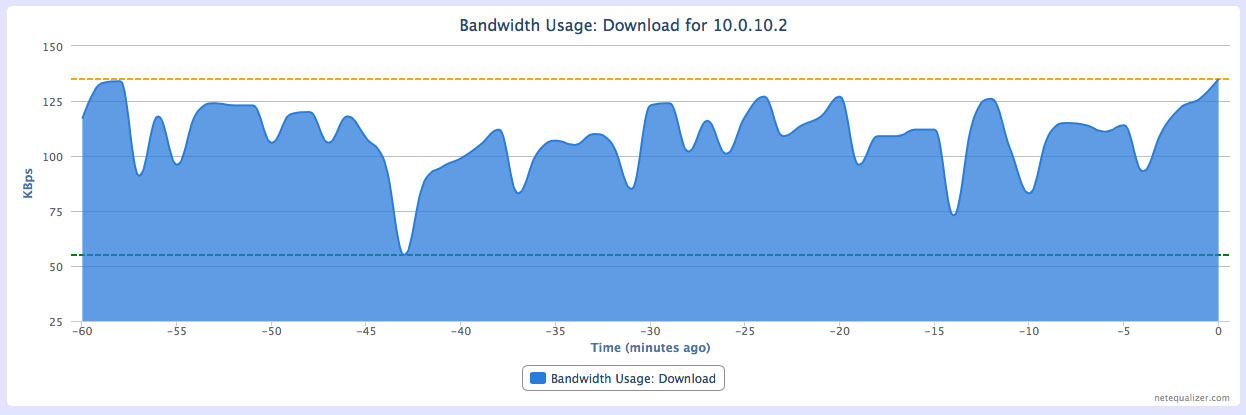
The new reporting features built into RTR allow for traffic reporting functionality similar to what you get from ntop. You can see overall traffic patterns from an historic point of view, and you can also drill down to see traffic patterns for specific IP addresses you want to track.
totaltraffic

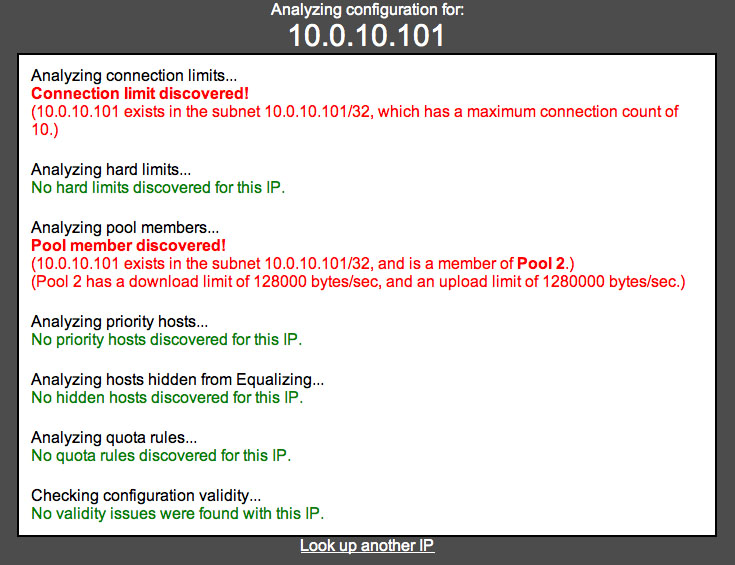
In addition, we added in the ability to show all rules associated with an IP address for easy trouble shooting. You can now see if a specific IP address is a member of a pool, has an associated hard limit, has priority, or has a connection limit.

allrules

Check out our Software Update 7.5 Release Notes for more details on what Software Update 7.5 includes.

These features will be free to customers with valid NetEqualizer Software and Support who are running version 7.0+ (NCO features will require NCO). If you are not current with NSS, contact us today!

sales@apconnections.net

-or-

303-997-1300


2014 NetEqualizer Pricing Preview

As we begin a new year, we are releasing our 2014 Price List for NetEqualizer, which will be effective February 1st, 2014.

Of note this year is that we have added back a 10Mbps license level to our NE3000 series.

We also continue to offer license upgrades on our NE2000 series. Remember that if you have a NE2000 purchased on or after August 2011, it will be supported past 12/31/2014. If you have an older NE2000, please contact us to discuss your options.

All Newsletter readers can get an advance peek here! For a limited time, the 2014 Price List can be viewed here without registration. You can also view the Data Sheets for each model once in the 2014 Price List.

Current quotes will not be affected by the pricing updates, and will be honored for 90 days from the date the quote was originally given.

If you have questions on pricing, feel free to contact us at:

sales@apconnections.net

-or-

303-997-1300


NCO Customers Will Soon Have Access to a Full Movie Library!

One of the things we had on our docket to work on this winter and spring was to expand our caching offering (NCO) to include Netflix.

In our due diligence we consulted with the Netflix Open Connect team (their caching engine), and discovered that they just don’t have the resources to support ISP’s with less than a 5 Gbps Netflix stream. Thus, we could not bundle their caching engine into our NCO offer – it is just too massive in scope.

Streaming long-form video content on the Internet cannot be accomplished reliably without a caching engine. It doesn’t matter how big your pipe is, you need to have a chunk of content stored locally to even have a chance to meet the potential demand – if you make any promises of consistent video content. This is why Netflix has spent millions of dollars providing caching servers to the largest commercial providers. Even with commercial providers’ big pipes to the backbone, they need to host Netflix content on their regional networks.

So what can we do to help our customers offer reliable streaming video content?

1) We would have to load up a caching server with content locally.
2) We would have to continually update it with new and interesting material.
3) We would need to take care of licensing desirable content.

The licensing part is the key to all this. It is not easy with some of the politics in the film industry, but after reaching out to some contacts over the last couple of weeks, it actually is very doable, due to the increase in independent distributors looking for channels.

Did you know that NetEqualizer servers sit in front of roughly 5,000,000 end users? This is sort of a “perfect storm” come to fruition. We have thousands of potential caching servers and a channel in place to serve a set of customers that currently do not have access to online streaming full length movie content. A customer running NCO would be able to choose between a Pay-Per-View (PPV) model and an unlimited content (UC) option.

The details and mechanics of these two options will be outlined in detail in our February Newsletter. In the meantime, please let us know your thoughts on how this offering would work best for your organization, and get on board with NCO to get the ball rolling!

To learn more about NCO, please read our Caching Executive White Paper.

If you have questions, contact us at:

sales@apconnections.net

-or-

303-997-1300


Coming Soon: Get Website Category Data from NCO

Along with our other enhancements to NCO, another feature we’ll be rolling out soon with our NetEqualizer Caching Option (NCO) is the ability to gather website category data for sites visited by your users.

This data can not only be used to tune your NetEqualizer, but will help in enforcing usage policies and other requirements.

To learn more about NCO, please read our Caching Executive White Paper.

If you are interested in NCO or have questions about this feature, contact us at:

sales@apconnections.net

-or-

303-997-1300


Best Of The Blog

Top 10 Out-of-the-Box Technology Predictions for 2014

By Art Reisman – CTO – APconnections

Back in 2011, I posted some technology predictions for 2012. Below is my revised and updated list for 2014.

1) Look for Google, or somebody, to launch an Internet Service using a balloon off the California Coast.

Well it turns out, those barges out in San Francisco Bay are for something far less ambitious than a balloon-based Internet service, but I still think this is on horizon so I am sticking with it.

2) Larger, slower transport planes to bring down the cost of comfortable international and long range travel.

I did some analysis on the cost of airline operators, and the largest percentage of the cost in air travel is fuel. You can greatly reduce fuel consumption per mile by flying larger, lighter aircraft at slower speeds. Think of these future airships like cruise ships. They will have more comforts than a the typical packed cross-continental flight of today. My guess is, given the choice, passengers will trade off speed for a little price break and more leg room…

Photo Of The Month

unnamed

Monterey, CA
Monterey is a waterfront community on the central coast of California with a temperate climate year-round. Kayaking, scuba diving, surfing, whale-watching and beach-going are just some of the activities to be enjoyed in and around Monterey. This photo was taken on a recent visit to Monterey by one of our staff members.

Top 10 Out-of-the-Box Technology Predictions for 2014


Back in 2011, I posted some technology predictions for 2012. Below is my revised and updated list for 2014.
1) Look for Google, or somebody, to launch an Internet Service using a balloon off the California Coast.
Well it turns out, those barges out in San Francisco bay are for something far less ambitious than a balloon based internet service, but I still think this is on horizon so I am sticking with it.
2) Larger slower transport planes to bring down the cost of comfortable international and long range travel.

I did some analysis on the cost of airline operators, and the largest percentage of the cost in air travel is fuel. You can greatly reduce fuel consumption per mile by flying larger, lighter aircraft at slower speeds. Think of these future airships like cruise ships. They will have more comforts than a the typical packed cross continental flight of today. My guess is, given the choice, passengers will trade off speed for a little price break and more leg room.

3) I am still calling for somebody to make a smart contextual search engine with a brain that weeds through the muck of bad useless commercial content to give you a decent result. It seems every year, intentional or not, Google is muddling their search results into the commercial. It is like the travel magazine that claims the editorial and advertising units are not related, some how the flow of money overrides good intentions. Google is very vulnerable to a mass exodus should somebody pull off a better search engine. Perhaps this search engine would allow the user to filter results from less commercial to more commercial sites?

4) Drones ? Sc#$$ drones, Amazon is not ever going to deliver any consumer package with a drone service.  This PR stunt was sucked up by the Media. Yes there will be many uses for unmanned aircraft but not residential delivery

5) Somebody is going to genetically engineer an ant colony to do something useful. Something simple, like fill in pot holes in streets with little pebbles. The Ants in Colorado already pile up mounds of pebbles around their colonies, just got to get them put them in the right place

6) Protein Shakes made out of finely powdered exoskeletons of insects. Not possible? Think of all the by product that goes into something like a hot dog and nobody flinches. If you could harvest a small percent of the trillions of grasshoppers in the world dry them and grind them up you would have an organic protein source without any environmental impact or those dreaded GMOs.

7) Look for more drugs that stop cancer at the cell level by turning off genetic markers.

This is my brothers research ongoing at University of Florida.

8) A diet pill that promotes weight loss without any serious side effects

I have no basis for this statement other than somebody must be getting close to figuring out the exact brain signals that trigger the urge to eat, and a way to counteract them effectively without using amphetamines or stimulants.
9) Virtual reality Beach Front Property.
They already have virtual reality windows. I am thinking next step is incorporating a complete home with a virtual breeze, sound , sites and smells. Just look at what people pay for beach front property anywhere in the world.  Besides who really wants to live Los Angeles or Florida with all the traffic. Suppose for a mere 50k you can upgrade your double wide retirement home in Arkansas to virtual beach front?

Squid Caching Can be Finicky


Editors Note: The past few weeks we have been working on tuning and testing our caching engine. We have been working  closely with  some of the developers who contribute to the Squid open source program.

Following are some of my  observations and discoveries regarding Squid Caching from our testing process.

Our primary mission was to make sure YouTube files cache correctly ( which we have done). One of the tricky aspects of caching a YouTube file, is that many of these files are considered dynamic content. Basically, this means their content contains a portion that may change with each access, sometimes the URL itself is just a pointer to a server where the content is generated fresh with each new access.

An extreme example of dynamic content would be your favorite stock quote site. During the business day much of the information on these pages is changing constantly, thus it  is obsolete within seconds. A poorly designed caching engine would do much more harm than good if it served up out of data stock quotes.

Caching engines by default try not cache dynamic content, and for good reason.    There are two different methods a caching server uses to decide whether or not to cache a page

1) The web designer can specifically set flags in the  format the actual URL  to tell caching engines whether a page is safe to cache or not.

In a recent test I set up a crawler to walk through the excite web site and all its urls. I use this crawler to create load in our test lab as well as to fill up our caching engine with repeatable content. I set my Squid Configuration file to cache all content less than 4k. Normally this would generate a great deal of Web hits , but for some reason none of the Excite content would cache. Upon further analysis our Squid consultant found the problem.

  I have completed the initial analysis. The problem is the excite.com
server(s). All of the “200 OK” excite.com responses that I have seen
among the first 100+ requests contain Cache-Control headers that
prohibit their caching by shared caches. There appears to be only two
kinds of Cache-Control values favored by excite:

Cache-Control: no-store, no-cache, must-revalidate, post-check=0,
               pre-check=0

and

Cache-Control: private,public

Both are deadly for a shared Squid cache like yours. Squid has options
to overwrite most of these restrictions, but you should not do that for
all traffic as it will likely break some sites.”

2) The second method is a bit more passive than deliberate directives.  Caching engines look at the actual URL of a page to gain clues about its permanence. A “?” used in the url implies dynamic content and is generally a  red flag to the caching server . And here-in lies the issue with caching Youtube files, almost all of them have  a “?” embedded within their URL.

Fortunately  Youtube Videos,  are normally permanent and unchanging once they are uploaded. I am still getting a handle these pages, but it seems the dynamic part is used for the insertion of different advertisements on the front end of the Video.  Our squid caching server uses a normalizing technique to keep the root of the URL consistent and thus serve up the correct base YouTube every time. Over the past two years we have had to replace our normalization technique twice in order to consistently cache YouTube files.

NetEqualizer News: December 2013


December 2013

Greetings!

Enjoy another issue of NetEqualizer News! This month, we discuss new features planned for 2014, announce our FlyAway Contest winner, give you a heads-up on some options for your old NE2000 devices, and highlight NetGladiator enhancements. As always, feel free to pass this along to others who might be interested in NetEqualizer News.

A message from Art…
Art Reisman, CTO – APconnections

As the year comes to a close, we are wrapping up our 2013 goals and now starting to look ahead to 2014! I am excited about art_canoe_picturewhere I see 2014 taking APconnections and the NetEqualizer and NetGladiator. You will see our continued commitment to investing in our platforms, from our 2014 planned features for NetEqualizer, to our strengthening of the NetGladiator product, and finally our ongoing work to enhance the NCO caching module. Once you read about our plans, I think you will be excited too! We share them in this newsletter, so that you can start mapping out your plan for 2014 as well…

We love it when we hear back from you – so if you have a story you would like to share with us of how we have helped you, let us know. Email me directly at art@apconnections.net. I would love to hear from you!

Planned NEW Features for 2014

The New Year is the perfect time to start thinking about new features for NetEqualizer! It is also a great time for you to start thinking about upgrading your device to the latest software.

2013 saw a lot of changes for NetEqualizer and for 2014 we plan on building on that base even more. In 2014, keep an eye out for some of these exciting new ideas:

1) Expanded caching – We’ve been enhancing our NetEqualizer Caching Option (NCO) for the the last several months and you should expect even more from this add-on feature in 2014.  We are testing out larger SSD drives, assessing whether Netflix can be cached, and looking for even more caching opportunities.

2) Heuristic-based identification – This is a really cool concept that we are currently developing. It is based on the idea that each user has their own unique “path” once they join the network. Knowing that path can help to identify users. The principles apply to both bandwidth optimization and security. Over the next year we’ll be implementing this idea and seeing what value it could add to both our NetEqualizer and NetGladiator product lines. See the next article, NetGladiator Continues to Grow, for more information.

3) Bigger, better, faster Reporting (RTR) – We have received very positive feedback on our initial RTR rollout, and our enhanced RTR Traffic Reports, which are currently in Beta.

We now feel it is time to expand RTR, with a goal to completely replace our ntop historical reporting by end of 2014.

We spent a lot of time in 2013 improving our user interface, and our commitment to making NetEqualizer easy to use will show in 2014 as well. Expect new features in our Dynamic Real-Time Reporting tool including, but not limited to:
– ntop-like historical data tracking
– Pool and VLAN drill-down reports
– Time of day configuration interface
– Penalty graphs over time
– and more!

These features will be free to customers with valid NetEqualizer Software and Support who are running version 7.0+ (NCO features will require NCO). If you are not current with NSS, contact us today!

sales@apconnections.net

-or-

303-997-1300


NetGladiator Continues to Grow

Our investment in IPS continues!
We are starting to plan some new features for NetGladiator in 2014, including some exciting heuristic-based identification capability. Deep in the world of network authentication lies a hidden signature. The hidden signature of behavior – the websites you visit, the paths you take, the things you pause on. Just like your fingerprints, your signature when you enter a Network is unique. We’ll be implementing this idea of heuristic-based identification throughout the year – let us know what you think!

Also, we have talked to some of you in 2013 regarding your IPS needs. If you are looking for a simple, elegant, and affordable way to protect your web applications, you should think about the NetGladiator. You should also consider taking our Hacking Challenge to see if your web applications are safe and secure!netgladiator_logo Contact us at:

ips@apconnections.net

-or-

303-997-1300

to discuss your security needs.


Our Next Local Linux Talk

Our CTO, Art Reisman, will be speaking at another local linux user group in early January.

The Boulder Linux Users Group will host the event in downtown Boulder, CO on January 9, 2014 at 6pm. Boulder is one of the biggest technology hotbeds outside of Silicon Valley, and we think there will be a lot of interesting discussion and ideas that come out of this meeting.

If you are in the Boulder, CO area at the time, feel free to stop on by!


And the FlyAway Contest Winner is…

Every few months, we have a drawing to give away two round-trip domestic airline tickets from Frontier Airlines to one lucky person who’s recently tried out our online NetEqualizer demo.

The time has come to announce this round’s winner.frontier airlines

And the winner is…

Jeff Gay at Morrisville State College! 

Congratulations, Jeff!

Please contact us within 30 days (by January 17, 2014) at:

admin@apconnections.net

-or-

303-997-1300

to claim your prize!


Some Options for Your NE2000

Earlier this year, we announced that we are discontinuing our NE2000 series, and are moving the NE2000 license levels (20, 50, 100, and 150Mbps) onto the NE3000 platform. This change was made to get ready for our 7.0+ 64-bit releases, and also to take advantage of multi-core processing. We also felt that it was time to consolidate on the NE3000 platform.

We have talked to many of you regarding this change. However, if you have not already talked to us about trading in your NE2000, we offer a generous 50% trade-in credit of your original unit purchase price towards a new unit (1 trade-in credit per unit purchased please).NE2000 options differ depending on when your NE2000 was purchased. Some of the more recent NE2000’s (purchases from August 2011 and later) can run our 7.0+ software, and these customers will be able to get support AFTER 12/31/2014 on these units.  For units purchased prior to August 20011 that cannot run 7.0+, support will be offered through 12/13/2014.

Contact us at:

sales@apconnections.net

-or-

303-997-1300

to discuss your options.


Best Of The Blog

Latest Notes on the Peer to Peer Front and DMCA Notices

By Art Reisman – CTO – APconnections

Just getting back from our tech talk seminar today at Western Michigan University. The topic of DMCA requests came up in our discussions, and here are some of my notes on the subject.

Background: The DMCA, which is the enforcement arm of the motion picture copyright conglomerate, tracks down users with illegal content.

They seem to sometimes shoot first and ask questions later when sending out their notices more specific detail to follow.

Unconfirmed Rumor has it, that one very large University in the State of Michigan just tosses the requests in the garbage and does nothing with them, I have heard of other organizations taking this tact. They basically claim this problem for the DMCA is not the responsibility of the ISP.

I also am aware of a sovereign Caribbean country that also ignores them. I am not advocating this as a solution just an observation…

Photo Of The Month
IMG_6167
Happy Holidays!
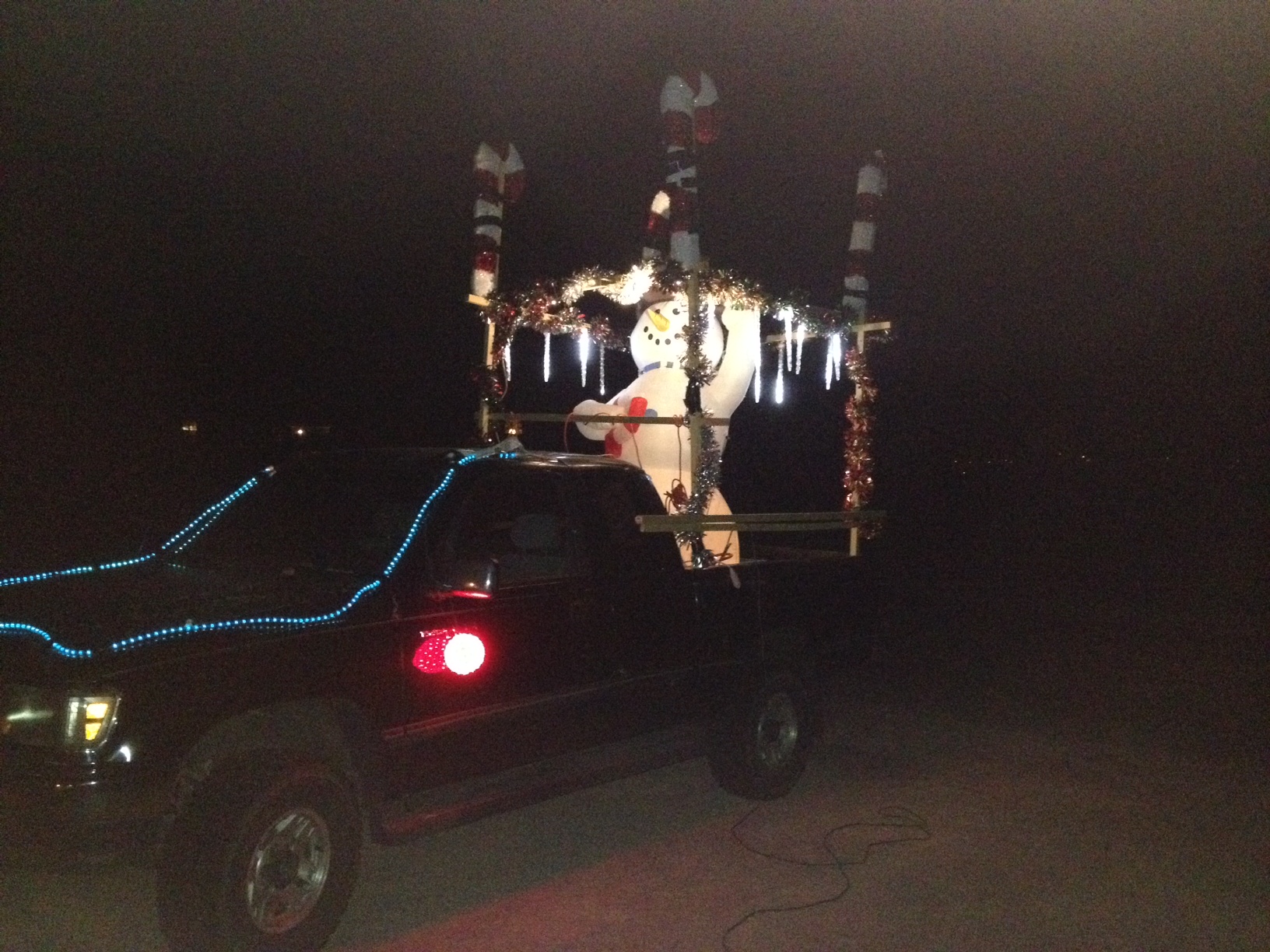
Our CTO, Art Reisman, entered this truck in the Louisville, CO Holiday Parade. It was about 5 degrees below zero (Fahrenheit) when it was in the parade. This is the 2nd year that Art has created a “Christmas Truck,” and he uses it to deliver cookies to neighbors as well during the Holiday Season.

Network User Authentication Using Heuristics


Most authentication systems are black and white, once you are in , you are in. It was brought our attention recently, that authentication should be an ongoing process,  not a one time gate with continuous unchecked free rein once in.

The reasons are well founded.

1) Students at universities and employees at businesses, have all kinds of devices which can get stolen/borrowed while open.

My high school kids can attest this many times over. Often the result is just an innocuous string of embarrassing texts emanating from their phones claiming absurd things. For example  ” I won’t be at the party, I was digging for a booger and got a nose bleed” ,  blasted out to their friends after they left their phone unlocked.

2) People will also deliberately give out their authentication to friends and family

This leaves a hole in standard authentication strategies .

Next year we plan to add an interesting twist to our Intrusion Detection Device ( NetGladiator). The idea was actually not mine, but was suggested by a customer recently at our user group meeting in Western Michigan.

Here is the plan.

The idea for our intrusion detection device would be to build a knowledge base of a user’s habits over time and then match those established patterns against a  tiered alert system when there is any kind of abrupt   change.

It should be noted that we would not be monitoring content, and thus we would be far less invasive than Google Gmail ,with their targeted advertisements,  we would primarily just following the trail or path of usage and not reading content.

The heuristics would consist of a three-pronged model.

Prong one, would look at general trending access across all users globally . If  an aggregate group of users on the network were downloading an IOS update, then this behavior would be classified as normal for individual users.

Prong two ,  would look at the pattern of usage for the authenticated user. For example most people tune their devices to start at a particular page. They also likely use a specific e-mail client, and then have their favorite social networking sites. String together enough these and you would develop unique foot print for that user. Yes the user could deviate from their pattern of established usage as long as there were still elements of their normal usage in their access patterns.

Prong three would be the alarming level. In general a user would receive a risk rating when they deviated into suspect behaviors outside their established baseline. Yes this is profiling similar to psychological profiling on employment tests, which are very accurate at predicting future behavior.

A simple example of a risk factor would be a user that all of sudden starts executing login scripts en masse outside of their normal pattern. Something this egregious would be flagged as high risk,  and the administrator could specify an automatic disconnection for the user at a high risk level. Lower risk behavior would be logged for after the fact forensics if any internal servers became compromised.

The Illusion of Separation: My Malaysia Trip Report


By Zack Sanders

VP of Security – APconnections

Traveling is an illuminating experience. Whether you are going halfway across the country or halfway around the world, the adventures that you have and the lessons that you learn are priceless and help shape your outlook on life, humanity, and the planet we live on. Even with the ubiquitousness of the Internet, we are still so often constrained by our limited and biased information sources that we develop a world view that is inaccurate and disconnected. This disconnection is the root of many of our problems – be they political, environmental, or social. There is control in fear and the powerful maintain their seats by reinforcing this separation to the masses. Having the realization that we are all together on this planet and that we all largely want the same things is something that can only be discovered by going out and seeing the world for yourself with as open of a mind as possible.

One of the great things about NetEqualizer, and working for APconnections, is that, while we are a relatively small organization, we are truly international in our business. From the United States to the United Kingdom, and Argentina to Finland, NetEqualizers are helping nearly every vertical around the world optimize the bandwidth they have available. Because of this global reach, we sometimes get to travel to unique customer sites to conduct training or help install units. We recently acquired a new customer in Malaysia – a large university system called International Islamic University Malaysia, or IIUM. In addition to NetEqualizers for all of their campuses, two days of training was allotted in their order – one day each at two of their main locations (Kuala Lumpur and Kuantan). I jumped at the chance to travel to Asia (my first time to the continent) and promptly scheduled some dates with our primary contact at the University.

I spent the weeks prior to my departure in Spain – a nicely-timed, but unrelated, warmup trip to shake the rust off that had accrued since my last international travel experience five years ago. The part about the Malaysia trip that I was dreading the most was the hours I would log sitting in seat 46E of the Boeing 777 metal I was to take to Kuala Lumpur with Singapore Airlines. Having the Spain trip occur before this helped ease me in to the longer flights.

F.C. Barcelona hosting Real Madrid at the Camp Nou.

My Malaysia itinerary looked like this:

Denver -> San Francisco (2.5 hours), Layover (overnight)

San Francisco -> Seoul (12 hours), Layover (1 hour)

Seoul -> Singapore (7 hours), Layover (6 hours)

Singapore -> Kuala Lumpur (1 hour)

I was only back in the United States from Spain for one week. It was a fast, but much needed, seven days of rest. The break went by quickly and I was back in the air again, this time heading west.

After 22 hours on the plane and 7 hours in various airports, I was ready to crash at my hotel in the City Centre when I touched down in KL. I don’t sleep too well on planes so I was pretty exhausted. The trouble was that it was 8am local time when I arrived and check-in wouldn’t be until 2:00pm. Fortunately, the fine folks at Mandarin Oriental accommodated me with a room and I slept the day away.

KL City Centre.

I padded my trip with the intention of having a few days before the training to get adjusted, but it didn’t take me as long as I thought and I was able to do some site seeing in and outside the city before the training.

My first stop was Batu Caves – a Hindu shrine located near the last stop of the LRT’s KTM-KOMUTER line in the Gombak District – which I later learned was near the location of my first training seminar. The shrine is set atop 272 stairs in a 400 million year old limestone cave. After the trek up you are greeted by lightly dripping water and a horde of ambitious monkeys in addition to the shrines within the cave walls.

Batu Caves entrance.

Batu Caves.

Petronas Towers.

This was the furthest I ventured from the city for site seeing. The rest of the time, I spent near the City Centre – combing through the markets of Chinatown and Little India, taking a tour of the Petronas Towers, and checking out the street food on Jalan Alor. Kuala Lumpur is a very Western city. The influence is everywhere despite the traditional Islamic culture. TGI-Fridays, Chili’s, and Starbucks were the hotspots – at least in this touristy part of town. On my last night I found a unique spot at the top of the Trader’s Hotel called Skybar. It is a prime location because it looks directly at the Petronas Towers – which, at night especially, are gorgeous. The designers of the bar did a great job implementing sweeping windows and sunken sofas to enjoy the view. I stayed there for a couple hours and had a Singapore Sling – a drink I’ve heard of but had never gotten to try.

Singapore Sling at the Skybar.

The city and sites were great, however, the primary purpose of the trip was not leisure – it was to share my knowledge of NetEqualizer with those that would be working with it at the University. To be honest, I wasn’t sure what to expect. This was definitely different from most locations I have been to in the past. A lot of thoughts went through my head about how I’d be received, if the training would be valuable or not, etc. It’s not that I was worried about anything in particular, I just didn’t know. My first stop was the main location in KL. It’s a beautifully manicured campus where the buildings all have aqua blue roofs. My cab driver did a great job helping me find the Information Technology Department building and I quickly met up with my contact and got set up in the Learning Lab.

This session had nine participants – ranging from IT head honchos to network engineers. The specific experience with the NetEqualizer also ranged from well-versed to none at all. I catered the training such that it would be useful to all participants – we went over the basics but also spent time on more advanced topics and configurations. All in all, the training lasted six hours or so, including an hour break for lunch that I took with some of the attendees. It was great talking with each of them – regardless of whether the subject was bandwidth congestion or the series finale episode of Breaking Bad. They were great hosts and I look forward to keeping in touch with them.

Training at IIUM.

I was pretty tired from the day by the time I arrived back at the hotel. I ate and got to bed early because I had to leave at 6:00am for my morning flight across the peninsula to Kuantan – a short, 35 minute jaunt eastward – to do it all over again at that campus. Kuantan is much smaller than KL, but it is still a large city. I didn’t get to see much of it, however, because I took a cab directly from the airport to the campus and got started. There were only four participants this time – but the training went just as well. I had similar experiences talking with this group of guys, and they, too, were great hosts. I returned back to the airport in the evening and took a flight back to KL. The flight is so short that it’s comical. It goes like this:

Taxi to the runway -> “Flight attendants prepare for takeoff” -> “You may now use your electronic devices” -> 5 minutes goes by -> “Flight attendants prepare for landing – please turn off your electronic devices” -> Land -> Taxi to terminal

The airport in Kuantan at sunset.

I had one more day to check out Kuala Lumpur and then it was back to the airport for another 22 hours of flying. At this point though, I felt like a flying professional. The time didn’t bother me and the frequent meals, Sons of Anarchy episodes, and extra leg room helped break it up nicely. I took a few days in San Francisco to recover and visit friends before ultimately heading back to Boulder.

It was a whirlwind of a month. I flew almost 33,000 miles in 33 days and touched down in eight countries on three continents. Looking back, it was a great experience – both personally and professionally. I think the time I spent in these places, and the things I did, will pay invaluable dividends going forward.

If your organization is interested in NetEqualizer training – regardless of whether you are a new or existing customer – let us know by sending an email to sales@apconnections.net!

View of KL Tower from the top of the Petronas Towers.

NetEqualizer News: November 2013


November 2013

Greetings!

Enjoy another issue of NetEqualizer News! This month, we discuss takeaways from our recent Technical Seminar, update you on our 7.4 RTR Beta progress, and highlight recent enhancements to our NetEqualizer Caching Option. As always, feel free to pass this along to others who might be interested in NetEqualizer News.

A message from Art…
Art Reisman, CTO – APconnections

As we move into the end of 2013, we start once again to sum up the year and think about all we are thankful for. We would like to take this opportunity to THANK YOU all for being a part of our success! We truly enjoy working with each and every one of you, and appreciate your business!thank_you

As most of you know, 2013 was a big year for us – our 10th Anniversary. Looking back, it has gone so fast! Looking forward, we see a bright future with even more opportunity on a global scale. Speaking of global, we had a staff member this month travel to Malaysia to conduct two 1-day training sessions – a national university there, IIUM, has many campuses throughout Malaysia where they employ NetEqualizers. If you are interested in learning more about our training offerings, contact us anytime!

We love it when we hear back from you – so if you have a story you would like to share with us of how we have helped you, let us know. Email me directly at art@apconnections.net. I would love to hear from you!

2013 Fall Technical Seminar Update

We recently held a half day seminar at Western Michigan University in Kalamazoo, Michigan. We would like to thank our host, Fawn Callen, for helping us get this event together, and for offering such as great space for the seminar!
logo-270x231
This was a great opportunity for folks to meet with Art in person, pick his brain on all things related to equalizing and caching, and also to share ideas with us on future features.

Here are some of the features that we walked away thinking about:

1) Historical penalty tracking over time – this would be graphical and would help you see an historical trend on how tight your bandwidth is.

2) Enhance the masking feature to allow for more subnets so that organizations can take advantage of ISP-offered bandwidth allotments for traffic such as video.

3) Heuristic-based identification of users based on usage patterns – track individuals not based on IP, necessarily, but based on how they use the Internet, what sites they visit, etc.

Let us know if these are important to you!
neteq seminar logo with border
Contact us at:

sales@apconnections.net


Update on 7.4 RTR Beta

We have a great group of customers trying out our 7.4 RTR Beta Software Release – and the results have been very positive!

We are working on making the data logging and graphing more efficient for large networks as well as some other small changes that will help make RTR and NetEqualizer in general even better and more useful!

totaltraffic

We’ll be thoroughly testing our enhancements the rest of November and December and all of those will be incorporated into our official 7.5 Software Release on January 1st.

This Release will be free to customers with valid NetEqualizer Software and Support who are running 7.0+. If you are not current with NSS, contact us today!

sales@apconnections.net


NetEqualizer Caching Enhancements

As we have discussed in previous issues of NetEqualizer News, we’ve been working hard with the folks at Squid to create a more robust custom caching solution for NetEqualizer.

Our enhancements include:

1) An updated caching solution that includes fixes and the latest features from Squid. This is beyond what open source has, and has been greatly improved with help from our Squid development consultant.

2) We are in the process of debating whether or not to include Netflix in future implementations of our caching. In relation to the NetEqualizer, the cost for doing this could be a bit high. However, there is good news. Providers are starting to offer Netflix traffic at a greatly reduced rate to their clients. We’ve already built in features that will help these clients take advantage of this offering. You can read more about caching in the cloud and Netflix traffic in the Best Of The Blog section of this newsletter.

For more information on the NetEqualizer Caching Option, read our white paper!


Best Of The Blog

Caching in the Cloud is Here

By Art Reisman – CTO – APconnections

I just got a note from a customer, a University, that their ISP is offering them 200 megabit internet at fixed price. The kicker is, they can also have access to a 1 gigabit feed specifically for YouTube at no extra cost. The only explanation for this is that their upstream ISP has an extensive in-network YouTube cache. I am just kicking myself for not seeing this coming!

I was well-aware that many of the larger ISPs cached NetFlix and YouTube on a large scale, but this is the first I have heard of a bandwidth provider offering a special reduced rate for YouTube to a customer downstream. I am just mad at myself for not predicting this type of offer and hearing about it from a third party.

As for the NetEqualizer, we have already made adjustments in our licensing for this differential traffic to come through at no extra charge beyond your regular license level, in this case 200 megabits. So if for example, you have a 350 megabit license, but have access to a 1Gbps YouTube feed, you will pay for a 350 megabit license, not 1Gbps. We will not charge you for the overage while accessing YouTube…

Photo Of The Month
Petronas Towers – Kuala Lumpur, Malaysia
As we mentioned in the Newsletter opener, a staff member of ours recently journeyed to Malaysia to conduct training sessions for NetEqualizer in two locations – Kuala Lumpur and Kuantan. The experience was a memorable one – Malaysia is a beautiful country with fantastic food, culture, and people. The 1,483 foot Petronas Towers are a testament to their success.

Latest Notes on the Peer to Peer Front and DMCA Notices


Just getting back from our tech talk seminar today at Western Michigan University. The topic of DMCA requests came up in our discussions, and here are some of my notes on the subject.

Background: The DMCA, which is the enforcement arm of the motion picture copyright conglomerate, tracks down users with illegal content.

They seem to sometimes shoot first and ask questions later when sending out their notices more specific detail to follow.

Unconfirmed Rumor has it, that one very large University in the State of Michigan just tosses the requests in the garbage and does nothing with them, I have heard of other organizations taking this tact. They basically claim  this problem for the DMCA is not the responsibility of the ISP.

I also am aware of a sovereign Caribbean country that also ignores them. I am not advocating this as a solution just an observation.

There was also a discussion on how the DMCA discovers copyright violators from the outside.

As standard practice,  most network administrators use their firewall to block UN-initiated requests  into the network from the outside. With this type of firewall setting, an outsider cannot just randomly probe a network  to find out what copyrighted material is being hosted. You must get invited in first by an outgoing request.

An analogy would be that if you show up at my door  uninvited, and knock, my doorman is not going to let you in, because there is no reason for you to be at my door. But if I order a pizza and you show up wearing  a pizza delivery shirt, my doorman is going to let you in.  In the world of p2p, the invite into the network is a bit more subtle, and most users are not aware they have sent out the invite, but it turns out any user with a p2p client is constantly sending out requests to p2p super nodes to attain information on what content is out there.  Doing so, opens the door on the firewall to let the P2p super node into the network.  The DMCA p2p super nodes just look like another web site to the firewall so it lets it in. Once in the DMCA reads directories of p2p clients.

In one instance, the DMCA is not really inspecting files for copyrighted material, but was only be checking for titles. A  music student who recorded their own original music, but named their files after original artists and songs based on the style of the song.  Was flagged erroneously with DMCA notifications based on his naming convention   The school security examined his computer and determined the content was not copyrighted at all.   What we can surmise from this account was that the DMCA was probing the network directories and not actually looking at the content of the files to see if they were truly in violation of copying original works.
Back to the how does the DMCA probe theory ? The consensus was that it is very likely that DMCA is actually running  super nodes, so they will get access to client directories.  The super  node is a server node that p2p clients contact to get advice on where to get music and movie content ( pirated most likely). The speculation among the user group , and these are very experienced front line IT administrators that have seen just about every kind  of p2p scheme.  They suspect that the since the DMCA super node is contacted by their student network first, it opens the door from the super node to come back and probe for content. In other words the super node looks like the Pizza delivery guy where you place your orders.
It was also further discussed and this theory is still quite open, that sophisticated p2p  networks try to cut out the DMCA  spy super nodes.  This gets more convoluted than peeling off character masks at a mission impossible movie. The p2p network operators need super nodes to distribute content, but these nodes cannot be permanently hosted, they must live in the shadows and are perhaps parasites themselves on client computers.

So questions that remain for future study on this subject are , how do the super nodes get picked , and how does the p2p network disable a spy DMCA super node ?

Caching in the Cloud is Here


By Art Reisman, CTO APconnections (www.netequalizer.com)

I just got a note from a customer, a University, that their ISP is offering them 200 megabit internet at fixed price. The kicker is, they can also have access to a 1 gigabit feed specifically for YouTube at no extra cost.  The only explanation for this is that their upstream ISP has an extensive in-network YouTube cache. I am just kicking myself for not seeing this coming!

I was well-aware that many of the larger ISPs cached NetFlix and YouTube on a large scale, but this is the first I have heard of a bandwidth provider offering a special reduced rate for YouTube to a customer downstream. I am just mad at myself for not predicting this type of offer and hearing about it from a third party.

As for the NetEqualizer, we have already made adjustments in our licensing for this differential traffic to come through at no extra charge beyond your regular license level, in this case 200 megabits. So if for example, you have a 350 megabit license, but have access to a 1Gbps YouTube feed, you will pay for a 350 megabit license, not 1Gbps.  We will not charge you for the overage while accessing YouTube.

Virtual Machines and Network Equipment Don’t Mix


By Art Reisman, CTO

Perhaps I am a bit old fashioned, but I tend to cringe when we get asked if we can run the NetEqualizer on  a virtual machine.

Here’s why.

The NetEqualizer performs a delicate balancing act between bandwidth shaping  and price/performance.   During this dance, it is of the utmost importance that the NetEqualizer,  “do no harm“.    That adage relates to making sure that all packets pass through the NetEqualizer such that:

1) The network does not see the NetEqualizer

2) The packets do not experience any latency

3) You do not change or molest the packet in any way

4) You do not crash

Yes, it would certainly be possible to run a NetEqualizer on a virtual machine, and I suspect that 90 percent of the time there would be no issues.  However. if there was a problem, a crash, or latency,  it would be virtually impossible (pun intended) to support the product – as there would be no way quantify the issue.

When we build and test NetEqualizer, and deliver it on a hardware platform, all performance and stability metrics are based on the assumption that the NetEqualizer is the sole occupant of the platform.  This means we have quantifiable resources for CPU, memory and LAN ports.  The rules above break down when you run a network device on a virtual machine.

A network device such as the NetEqualizer is carefully tested and quantified with the assumption that it has exclusive access to all the hardware resources on the platform.  If it were loaded on a shared hardware platform (VM) , you could no longer guarantee any performance metrics.

NetEqualizer News: October 2013


October 2013

Greetings!

Enjoy another issue of NetEqualizer News! This month, we preview our new RTR features (now available in Beta), reveal the location of our next Technical Seminar, discuss enhancements to our caching option, and remind you to get your web applications secured. As always, feel free to pass this along to others who might be interested in NetEqualizer News.

A message from Art…
Art Reisman, CTO – APconnections

art_smallFall is officially here in Boulder, Colorado. In fact, we had our first hard frost (the overnight low was 29 degrees Fahrenheit) on October 4th, pretty much right on schedule, as our fifty year average is October 6th. As we told you in our last newsletter, we have been planning for a late October harvest for our next release. We are right on track to release Software Update 7.5 in late October and have a Beta version of the new features available NOW. If you would like to get a sneak peek at the new features, learn more below about how to get involved in our 7.4 RTR Beta Test.

We love it when we hear back from you – so if you have a story you would like to share with us of how we have helped you, let us know. Email me directly at art@apconnections.net. I would love to hear from you!

2013 Fall Technical Seminar
neteq seminar logo with border

We are happy to announce the date and time of our 2013 Fall Technical Seminar! Please join our CTO, Art Reisman, at our host site, Western Michigan University, on Tuesday, November 12th, 2013 for a half-day seminar in Kalamazoo, Michigan.

To learn more or register for this FREE technical seminar, sign up here.logo-270x231

Last month we asked for folks to let us know if they would be interested in hosting our next Technical Seminar. We had several people step forward (thank you all!), and from that group, have decided to hold our 2013 Fall Technical Seminar in Michigan.

We think Michigan will be a great place to visit in the fall, are are excited to see the NetEqualizer in action at Western Michigan, a longtime customer who has been using NetEqualizers since early 2008.

If you have any questions regarding the Technical Seminar, contact us at:

sales@apconnections.net

We hope to see you there!


NetEqualizer Caching Investment

We have recently partnered with some of the Squid core development team to harden and make our caching the best it can be!

Recent testing with enhancements are showing even better hit ratios for YouTube and other media, resulting in a better caching system for our customers.

The NetEqualizer Caching Option (NCO) is available as an add-on to NetEqualizer systems at additional cost. Caching helps supplement the power of Equalizing by storing high-bandwidth streams locally for internal users.For more information on NCO, click here.If you are interested in adding caching to your system, contact us at:

sales@apconnections.net


Planning for 2014: Do You Need to Secure Your Web Applications?

As we near the end of 2013, many of you may be putting together your 2014 plans.netgladiator_logo If web application security is on your “must have” list for 2014, you might want to take a look at our sister product, the NetGladiator.

We used NetEqualizer’s guiding principles when we developed the NetGladiator: keep it affordable (starting at $3,500 USD), make sure it is easy to set up and maintain, and implement security rules that provide value and make sense without the overkill of most products.

If you would like to learn more, visit our website, take a look at our white paper, or contact us at:

ips@apconnections.net

Not sure if you should be thinking about web application security? Take our hacking challenge to see if your web apps are at risk!


RTR Release and Beta Testing!

We are very excited to announce the release of our new Real-Time Reporting (RTR) tool features!

Here are all the cool new reports/features that you will see in Software Update 7.4 (as well as our Beta version):

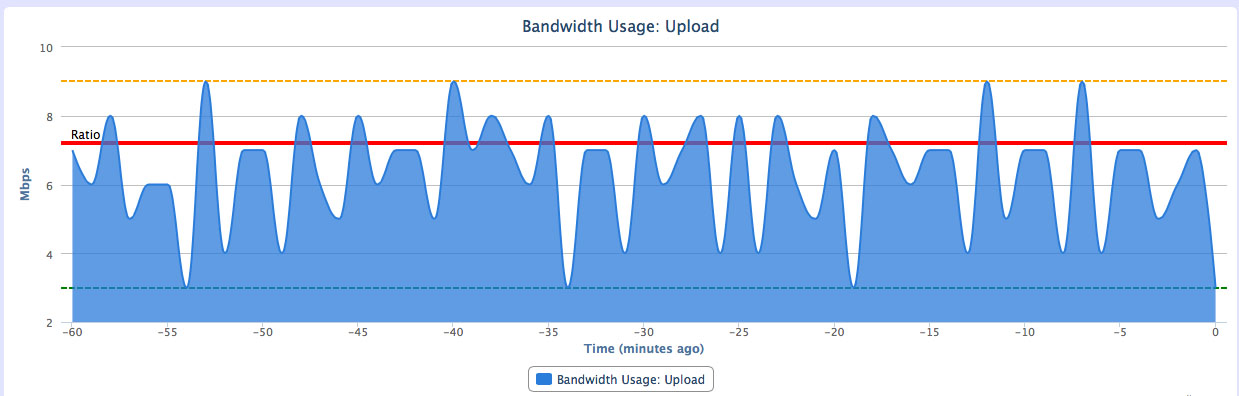
The first major enhancement you will see is the ability to look at graphs of all traffic going through the NetEqualizer.

This graph will show you your equalizing ratio and when traffic peaked above that threshold as well as minimum and maximum outputs in the given time frame. This will really help you see how often and when traffic is being Equalized from an historical perspective.

totaltraffic

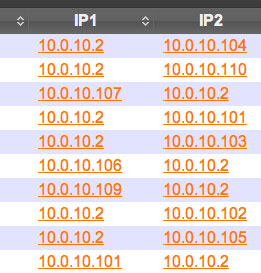
The other new features revolve around being able to run reports on each IP in your Active Connections table.

Instead of a static table, you will now see links associated with each IP address.
ip

Click the desired IP address to bring up the reporting interface.

report

From here, you can do a number of tasks:

1) Look at historical graphs of traffic to and from the given IP address.

ipgraph

2) Look up the country associated with the IP address.
3) Do an NS Lookup of the IP address to see what name server it is associated with.
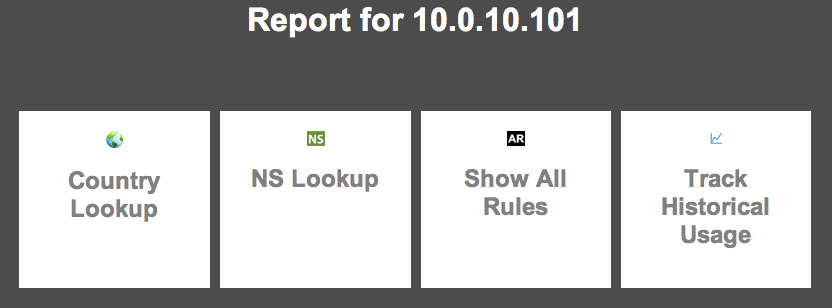
4) Show all rules for an IP – this interface shows you what rules currently affect the given IP (hard limits, pools, connection limits, etc.).

allrules

We are currently in Beta on new RTR Features (7.4 Release with RTR Beta), and would like several more customer participants. If you are interested, please email us at:

sales@apconnections.net

so we can see if you are a good fit for the Beta version. We plan to release the new RTR functionality to all customers as Software Update 7.5 in late October.

If you are interested in participating, you need to be current on NSS, and either be on the 7.4 release currently or be willing to upgrade to it. Once on 7.4, we will give you a hot fix to install the new RTR capabilities.

For more information on Software Update 7.4 and our Beta release, click here.


Best Of The Blog

Using OpenDNS on Your Wireless Network to Prevent DMCA Infringements

By Sam Beskur – CTO – Global Gossip

Editor’s Note: APconnections and Global Gossip have partnered to offer a joint hotel service solution, HMSIO. Read our HMSIO service offering datasheet to learn more.

Traffic Filtering with OpenDNS

Abstract
AUP (Acceptable Use Policy) violations which include DMCA infringements on illegal downloads (P2P, Usenet or otherwise) have been hugely troublesome in many locations where we provide public access WiFi. Nearly all major carriers here in the US now have some form of notification system to alert customers when violation occur and the once that don’t send notifications are silently tracking this behavior…

Photo Of The Month

artdoingymca
“It’s fun to stay at the Y.M.C.A.” (what’s this?)
At APconnections, we like to maintain a good work-life balance – and that includes having fun at the office. While our CTO, Art Reisman, was off running at the gym, we played this little Halloween “trick” on him.

How much on-line advertising revenue is fraudulent ?


Today the Wall Street Journal broke an article describing how professionals are scamming on-line advertising revenue.  The scam is pretty simple.

  • First create a web site of some kind.
  • Second hijack personal computers all over the world, or contract with a third party that does this for you.
  • Third have those computers visit your site en mass to drive up the popularity
  • Fourth sell advertisement space on your Website based on the fake heavy traffic

The big loser in this game is the advertising sponsor.

Our Experience

I have been scratching my head for years about the patterns and hit ratios of our own pay-per-click advertisements that we have placed through third parties such as Google  . The Google advertising network for Content Ad placement is a black hole of blind faith.  No matter how hard you examine your results, you cannot figure out who is clicking our advertisements and why.  I do know that Google on one hand takes fraud seriously, but I also know in the past we have been scammed.

Early on in our business, before we had any Web presence, we were putting a large portion of our very limited advertising budget into on-line advertising. Initially we did see a very strong correlation of clicks to inquiries. It was on the order of 100 to 1. One hundred paid clicks per one follow through inquiry. And then one day, we jumped to 1500 clicks. A whopping 15 fold increase in clicks, but there was no increase in corresponding inquiries, not even a tiny blip.  What are the chances of that ?  As you can imagine we had very little re-course other than to pay our bill for the phony clicks. We then removed our content placement advertisements and switched over to search engine only . Search engine clicks  are not likely scammed as Google does not split this revenue with third parties.

I honestly have no idea how big the scamming business on content advertisement is, but I do suspect it is enormous.  In the wall street journal article , the companies that have investigated and prosecuted scammers are large companies with resources to detect and do something about the fraud, the average small business placing content advertisements is running blind.

Using OpenDNS on Your Wireless Network to Prevent DMCA infringements


Editor’s Note:  The following was written by guest columnist, Sam Beskur, CTO of Global Gossip.  APconnections and Global Gossip have partnered to offer a  joint hotel service solution, HMSIO.  Read our HMSIO service offering datasheet to learn more.

Traffic Filtering with OpenDNS


Abstract

AUP (Acceptable Use Policy) violations which include DMCA infringements on illegal downloads (P2P, Usenet or otherwise) have been hugely troublesome in many locations where we provide public access WiFi.  Nearly all major carriers here in the US now have some form of notification system to alert customers when violation occur and the once that don’t send notifications are silently tracking this behavior.

As a managed service provider it is incredibly frustrating to receive these violation notifications as they never contain information one needs to stop the abuse but only the WAN IP of the offending location.  An end user who committed the infraction is often behind a NATed private address (192.168.x.x or 172.x.x.x) and for reasons still unknown to me they never provide information on the site hosting the illegal material, botnet, adware etc.

When a customer, on whose behalf one may be providing managed services for, receives one of these notifications this can jeopardize your account.

Expensive layer 7 DPI appliances will do the job in filtering P2P traffic but often times customers are reluctant to invest in these devices for a number of reasons: yet another appliance device to power, configure, maintain, support, another point of failure, another config to backup, no more Rackspace, etc, etc ad nausea.

Summary

Below we outline an approach that uses a cloud approach based on OpenDNS and NetEq which has very nearly eliminated all AUP violations across the networks we manage.

Anyone can use the public OpenDNS servers at the following addresses:

208.67.222.222

208.67.220.220

If however, one wishes to use the advanced filter capabilities you will need to subscribe to and create a paid account and register the static WAN IP of the address you are trying to filter.  Prices vary.

  1. Adjusted our content filter/traffic shaper (NetEqualizer) to limit/block # P2P connections.

  1. Configure your router / gateway device / dhcp server to use 208.67.222.220,  208.67.222.222  as primary and secondary DNS server.


  1. Once you have an OpenDNS account add your location for filtering and configure DNS blocking of P2P and malware sites         

  1. In order to prevent the more technically savvy end users from specifying ones own DNS server (8.8.8.8, 4.2.2.2, 4.2.2.1, etc.) it is a VERY good idea to configure your gateway to block all traffic on port 53 to all endpoints accept the OpenDNS servers.  DNS uses UDP port 53 so configuring this within IPTables (maybe even another feature for NetEqualizer) or within Cisco IOS is fairly trivial.  If you’re router doesn’t allow this hack it or get another one.


Depending on your setup there are a number of other techniques that can be added to this approach to further augment your ability to track NATed end user traffic but as I mentioned these steps alone have very nearly eliminated our AUP violation notifications.