APconnections and Global Gossip Announce Joint Network Solution Offering for Lodging Industry


Editor’s Note:  This release went out on May 16, 2013 11:05 AM Mountain Daylight Time.

LAFAYETTE, Colo.–(BUSINESS WIRE)–APconnections, an innovation-driven technology company that delivers best-in-class network traffic management appliances, and Global Gossip, a leader in network managed services for the lodging industry, today announced the joint Hotel Management System Integrated Offering (HMSIO).

“Working with APconnections on this joint solution offers tremendous potential. Since the integration of NetEqualizer into our head-end stack we have been able to offer a much improved end user Wi-Fi experience and overall greater customer satisfaction.”
Sam Beskur
Director of U.S. Operations
Global Gossip

GG-Horiz-w-orange-line

The joint offering combines the strengths of the NetEqualizer behavior-based bandwidth shaping appliance, with Global Gossip’s world-class managed network services offering. HMSIO will offer hotel and lodging customers a full suite of capabilities to manage their wireless networks, including customized authentication, behavior-based bandwidth shaping, 24/7/365 support, a cloud-based monitoring portal, and network design services. With HMSIO, hospitality and lodging customers can provide a “low noise”, high-quality, wireless Internet experience to guests along with unmatched excellence in customer support. Learn more in our HMSIO Data Sheet.

Global Gossip’s Director of U.S. Operations, Sam Beskur, says, “Working with APconnections on this joint solution offers tremendous potential. Since the integration of NetEqualizer into our head-end stack we have been able to offer a much improved end user Wi-Fi experience and overall greater customer satisfaction.”

APconnections’ CEO, Art Reisman, stated, “We have been looking for the right partner to offer an end-to-end network solution to our lodging industry customers. With their worldwide footprint and excellent technical support, Global Gossip’s network services are a great complement to our NetEqualizer bandwidth shaping products.”

About Global Gossip

Global Gossip (http://hsia.globalgossip.com) has been developing network and communication solutions since 1999 and currently manages and maintains over three hundred wired and wireless access networks globally. Our service locations span seven countries and include locations as remote and bandwidth challenged as the central Australian desert to high throughput networks in downtown London, England. Global Gossip has offices in Denver, Colorado; Sydney, Australia; and London, England.

About APconnections

APconnections is a privately held company founded in 2003 and is based in Lafayette, Colorado, USA (http://netequalizer.com). Our flexible and scalable network traffic management solutions can be found at thousands of customer sites in public and private organizations of all sizes across the globe, including: Fortune 500 companies, major universities, K-12 schools, Internet providers, libraries, and government agencies on six continents.
Contacts

APconnections, Inc.
Sandy McGregor, 303-997-1300 x.104
sandy@apconnections.net
or
Global Gossip LLC
Stephanie Dickens, 720-378-5087
sdickens@globalgossip.net

Your heard it here first, our prediction on how video will evolve to conserve bandwidth


Editors Note:

I suspect somebody out there has already thought of this,  but in my quick internet search I could not find any references to this specific idea, so I am takaing journalistic first  claim unofficial first rights to this idea.

The best example I think of to exemplify efficiency in video, are the old style cartoons,  such as the parody of South Park. If you ever watch south park animation,  the production quality  is done deliberately cheesy, very few moving parts with fixed backgrounds. In the South Park case, the intention was obviously not to save production costs.  The cheap animation is part of the comedy. That was not always the case,  the evolution of this sort of stop animation cartoon was from the early days  before computer animation took over the work of human artists working frame by frame. The fewer moving parts in a scene, the less work for the animator.  They could re-use existing drawings of a figure and just change the orientation of the mouth in perhaps three positions to animate talking.

Modern video compression tries to take advantage of some of the inherit static data from image to image , such that, each new frame is transmitted with less information.  At best, this is a hit or miss proposition.  There are likely many frivolous moving parts in a back ground that perhaps on the small screen of hand held device are not necessary.

My prediction is we will soon see a collaboration between production of video and Internet transport providers that allows for the average small device video production to have a much smaller footprint in transit.

Some of the basics of this technique would involve.

1) deliberately blurring or sending a background separate from the action. Think of a wide shot of break away lay-up in a basketball game. All you really need to see is the player and the basket in the frame the brain is going to ignore background details such as the crowd, they might as well be static character animations, especially on the scale of the screen of your Iphone not the same experience as your 56 inch HD flat screen.

2) Many of the videos in circulation the internet are news casts of a talking head giving the latest headlines. If you wanted to be extreme, you could  make the production such that the head is  tiny and animate it like a south park character,  this will take a much smaller footprint but technically still be video, and it would be much more like to play through without pausing.

3) The content sender can actually send a different production of the same video for low-bandwidth clients.

Note the reason why the production side of the house must get involved with the compression and delivery side of video is that the compression engines can only make assumptions on what is important and what is not, when removing information (pixels) from a video.

With a smart production engine geared toward the Internet, there is big savings here. Video is busting out all over the Internet and conserving from a production side only makes sense if you want to get your content deployed and viewed everywhere .

The security industry also does something similar taking advantage with fixed cameras on fixed backgrounds.

Related How much YouTube can the Internet Handle

Related Out of the box ideas on how to speed up your Internet

Blog dedicated to video compression, Euclid Discoveries.


How Many Users Can Your High Density Wireless Network Support? Find Out Before you Deploy.


By

Art Reisman

CTO http://www.netequalizer.com

Recently I wrote an article on how tough it has become to deploy wireless technology in high density areas.  It is difficult to predict final densities until fully deployed, and often this leads to missed performance expectations.

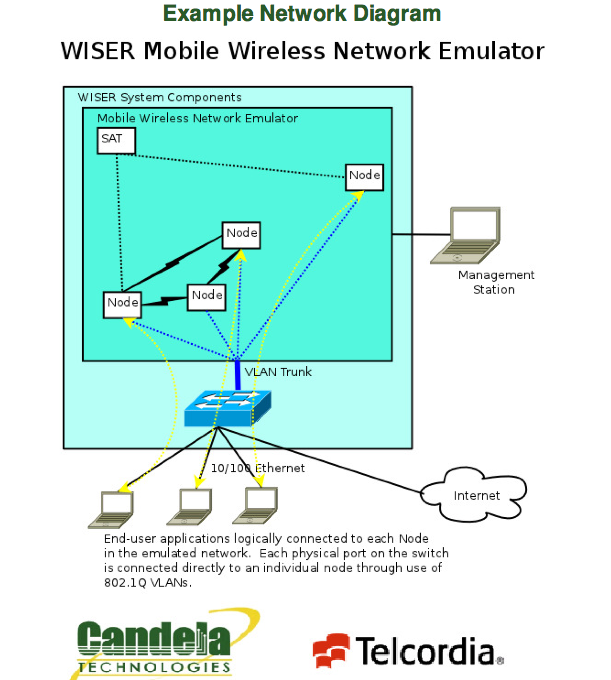
In a strange coincidence, while checking  in with my friends over at Candela Technologies last Friday , I was not  surprised to learn that their latest offering ,the Wiser-50 Mobile Wireless Network Emulator,  is taking the industry by storm.  

So how does their wireless emulator work and why would you need one ?

The Wiser-50  allows you to take your chosen access points, load them up with realistic  signals from a densely packed area of users, and play out different load scenarios without actually building out the network . The ability to this type of emulation  allows you to make adjustments to your design on paper without the costly trial and error of field trials.  You will be able to  see how your access points will behave under load  before you deploy them.  You can then make some reasonable assumptions on how densely to place your access points,  and more importantly get an idea on the upper bounds of your final network.

With IT deployments  scaling up into new territories of  densities, an investment in a wireless emulation tool will pay for itself many times over.  Especially when bidding on a project. The ability to justify how you have sized a quality solution over an ad-hock random solution, will allow your customer to make informed decisions on the trade -offs in wireless investment.

The technical capabilities of Wiser-50 are listed below.   If you are not familiar with all the terms involved with wireless testing I would suggest a call to Candelatech network engineers, they have years of experience helping all levels of customers and are extremely patient and easy to work with.

Scenario Definition Tool/Visualization

  • Complete Scenario Definition to add nodes, create mobility vectors and traffic profiles for run-time executable emulation.
  • Runtime GUI visualization with mobility and different link and traffic conditions.
  • Automatic Traffic generation & execution through the GUI.
  • Drag-and-drop capability for re-positioning of nodes.
  • Scenario consistency checks (against node capabilities and physical limitations such as speed of vehicle).
  • Mock-up run of the defined scenario (i.e., run that does not involve the emulator core to look at the scenario)
  • Manipulation of groups of nodes (positioning, movement as a group)
  • Capture and replay log files via GUI.
  • Support for 5/6 pre-defined scenarios.

RF Module

  • Support for TIREM, exponent-based, shadowing, fading, rain models (not included in base package.)
  • Support for adaptive modulation/coding for BER targets for ground-ground links.
  • Support for ground-to-ground & satellite waveforms
  • Support for MA TDMA (variants for ground-ground, ground-air & satellite links).
  • Support for minimal CSMA/CA functionality.
  • Support to add effects of selective ARQ & re-transmissions for the TDMA MAC.

Image

Related Articles

The Wireless Density Problem

Wireless Network Capacity Never Ending Quest Cisco Blog

NetEqualizer Directory Integration FAQ


Editor’s Note: This month, we announced the availability of the NetEqualizer Directory Integration (NDI) feature. Over the past few weeks, interest and inquiries have been high, so we’ve created the following Q&A to address many of the common questions we’ve received.

What is NDI anyway?
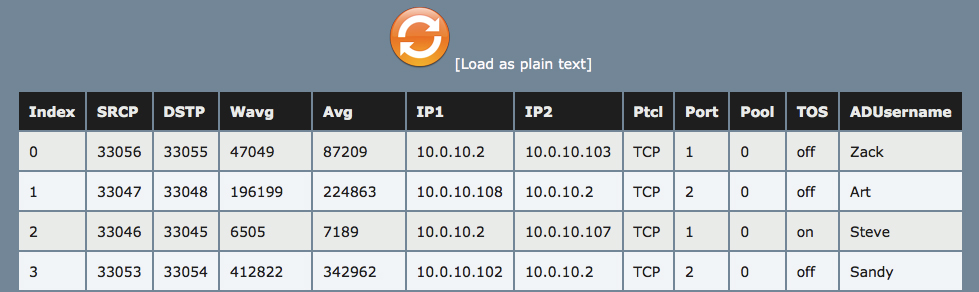
NetEqualizer Directory Integration (NDI) is an API for NetEqualizer that allows you to pull in username information from a directory and display it in your active connections table. This way, instead of only seeing IP to IP connection information, you can see usernames associated with those IPs so that you can make better decisions about how to manage your bandwidth. We will gradually be expanding NDI functionality to allow for shaping by username.

How much does NDI cost?
NDI requires setup consultation and is an additional add-on feature for the NetEqualizer. Currently, version 7.0 is required to run NDI. Take a look at our price list for more information.

How does NDI work?
NDI is an API on NetEqualizer that sends your directory server a URL containing an IP address. The process on your directory server then looks up the username for that IP and returns it to the NetEqualizer which stores the information.

What am I responsible for implementing with NDI?
You are responsible for implementing the process which resides on the directory server. This process returns a username when given an IP by the NDI API call. We have examples of how to do this for some directory server setups, but directory server setups are too specific for us to create a generic process that will work for all customers.

When would knowing the username be helpful?
Knowing the username instead of simply IP-to-IP information can helpful for administrators in many ways. Here are just a few:
– Easily see which users are taking up a lot of bandwidth. This is doable with a manual look up but that can get tedious.
– Eventually, NDI will be enhanced to shape by username. Again, this helps take away a step that an administrator would have to perform manually.
– Often, users are not assigned static IP addresses. With NDI’s dynamic updating, you don’t have to worry about the IP anymore. The username information will automatically adjust.

What are the upcoming enhancements to NDI?
We are planning to make NDI more robust in the months ahead. Our first feature will be Quotas by Username. This feature is currently in Beta. Once this feature is implemented, you will be able to assign usage quotas by username as opposed to IP or subnet. Additional possible changes to NDI include shaping by username and limiting by username. Stay tuned to NetEqualizer News for announcements.

If you have additional questions about NDI, feel free to contact us at: sales@apconnections.net!

APconnections Enhances NetEqualizer with Directory Integration Capability


LAFAYETTE, Colo.–(BUSINESS WIRE)–APconnections, an innovation-driven technology company that delivers best-in-class network traffic management solutions, is excited to announce NetEqualizer Directory Integration (NDI), as part of our 7.0 Release for the NetEqualizer product line.

NetEqualizer Directory Integration provides enhanced reporting for our customers. Our customers can identify the actual users consuming their valuable network bandwidth, so that they can react accordingly. I envision username identification to be incorporated into many areas in the future.
Art Reisman
NetEqualizer Co-Founder and CTO

NetEqualizer Directory Integration marks the advent of username reporting within the NetEqualizer. With the capabilities offered by NDI, customers can now report on network activity in even more meaningful ways, tracking usage based on known usernames. In the 7.0 Release, we have added username to real-time activity data and quota usage. Our Internet Provider customers will be excited to learn that we have extended this capability to Named Quotas, capturing username on network bandwidth usage over defined time periods. For more details on the 7.0 Release, see our Software Updates.

The NetEqualizer is affordably priced and is available in license levels from 20Mbps ($3,400) to 5Gbps ($13,100) on networks up to 40,000 users. See our NetEqualizer Price List for complete details. One year renewable NetEqualizer Software & Support (NSS) and NetEqualizer Hardware Warranties (NHW) are offered.

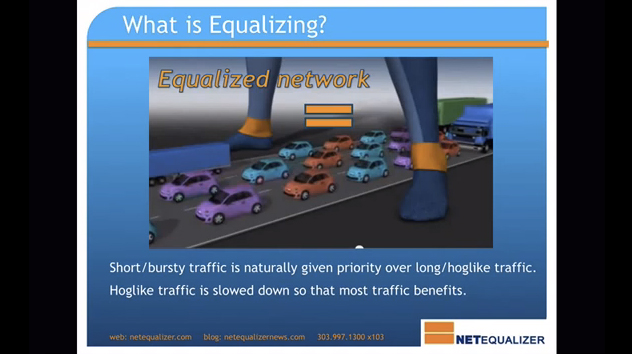
NetEqualizer bandwidth shapers utilize our unique behavior-based “equalizing” technology, which implement fairness algorithms to automatically provide bandwidth shaping and traffic control to your network. Immediately you will see higher QoS and optimal network performance, all while reducing maintenance and customer complaints. Equalizing gives priority to latency-sensitive applications, such as VoIP, web browsing, chat and e-mail over large file downloads and video that can clog your Internet pipe.

About APconnections: APconnections is based in Lafayette, Colorado, USA. We released our first commercial offering in July 2003. Today, our flexible, scalable, and affordable solutions can be found in over 4,000 installations in many types of public and private organizations of all sizes across the globe, including: Fortune 500 companies, major universities, K-12 schools, and Internet providers on six (6) continents. Learn more at www.netequalizer.com or contact us at sales@apconnections.net.

Contacts

APconnections, Inc.
Sandy McGregor, 303-997-1300
Director, Marketing
sandy@apconnections.net

Five Tips to Control Encrypted Traffic on Your Network


Editors Note:

Our intent with our tips is to exemplify some of the impracticalities involved with “brute force” shaping of encrypted traffic, and to offer some alternatives.

1) Insert Pre-Encryption software at each end node on your network.

This technique requires a special a custom APP that would need to be installed on Iphones, Ipads, and the laptops of end users. The app is designed  to relay all data to a centralized shaping device in an un-encrypted format.

  •   assumes that the a centralized  IT department has the authority to require special software on all devices using the network. It would not be feasible for environments where end users freely use their own equipment.

ssltraffic

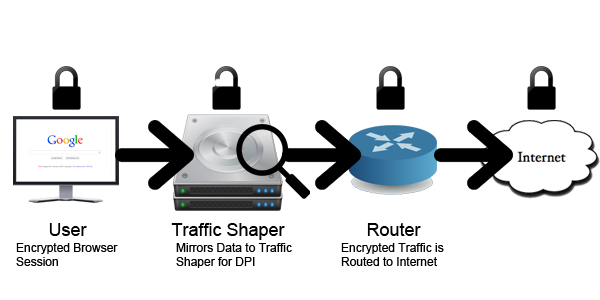
2) Use a sniffer traffic shaper that can decrypt the traffic on the fly.

  • The older 40 bit encryption codes could be hacked by a computer in about a one week, the newer 128 bit encryption codes would require the computer to run longer than the age of the Universe.

3) Just drop encrypted traffic, don’t allow it, forcing users to turn off SSL on their browsers.   Note: A traffic shaper, can spot encrypted traffic, it  just can’t tell you specifically what it is by content.

  • Seems rather draconian to block secure private transmissions, however the need to encrypt traffic over the Internet is vastly overblown. It is actually extremely unlikely for a personal information or credit card to get stolen in transit , but that is another subject
  • Really not practical where you have autonomous or public users, it will cause confusion at best, a revolt at worst.

4) Perhaps re-think what you are trying to accomplish.   There are more heuristic approaches to managing traffic which are immune to encryption.  Please feel free to contact us for more details on a heuristic approach to shaping encrypted traffic.

5) Charge a premium for encrypted traffic.  This would be more practical than blocking encrypted traffic, and would perhaps offset some of the costs for associate with the  overuse of p2p encrypted traffic.

NetEqualizer News: April 2013


April 2013

Greetings!

Enjoy another issue of NetEqualizer News! This month, we discuss our new 7.0 Software Update, announce our FlyAway Contest winner, and preview our new “Equalizing Explained” video. As always, feel free to pass this along to others who might be interested in NetEqualizer News.

A message from Art…
Art Reisman, CTO – APconnections

art_smallSpring has sprung! As I write this today, it is raining in Colorado, which is great for my garden. Grass is greening up here, and soon everything will be budding out or in bloom. Just like our spring release, Software Update 7.0, which is now ready! We talk more about the release, and how to get it, in this month’s newsletter.

And with April Fool’s Day just past, I got a little creative and updated a Beatles song with a NetEqualizer spin. Check it out below. It is featured as our “Poem Of The Month”.

We love it when we hear back from you – so if you have a story you would like to share with us of how we have helped you, let us know. Email me directly at art@apconnections.net. I would love to hear from you!

7.0 Software Update: NDI and 64-Bit Release

We recently released our latest NetEqualizer Software Update, further improving our existing technology. The update from 6.0b to 7.0 has the following enhancements:

NetEqualizer Directory Integration (NDI) 

Level 1
Level 1 of NDI is now GA. This version allows you to view directory user names in the Active Connections table so that you can associate each connection with a particular user.

ad

Level 2
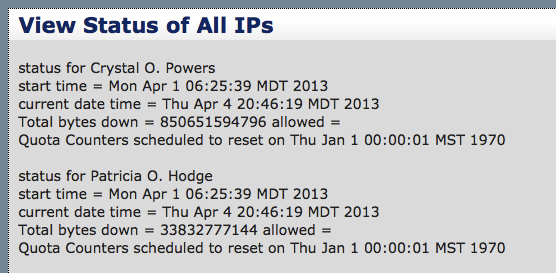
Level 2 of NDI is now in beta testing. This version allows you to view directory user names in quotas and set quota restrictions for users based on directory user name.

quotas

NDI requires a one-time setup fee of $1,000. This includes activation and setup of the NetEqualizer to prepare for incoming directory results via our API. Because each directory implementation varies drastically, gathering the required information on the directory side will require some development work.

64-Bit Processing

As part of our commitment to keeping our product supported on the latest hardware, we have upgraded our Linux kernel and re-certified the NetEqualizer software.

This kernel upgrade was also undertaken to take advantage of 64-bit processing. This will position us to offer enhanced capabilities to our core equalizing platform, without sacrificing speed and response times.

In previous releases, as we moved to multi-core hardware, we have split out key processes across cores, so that equalizing does not have to compete with other processing. With this 64-bit processing release, we will see increased speed for all processes across all cores.

Remember, Software Updates are available for free to customers with valid NetEqualizer Software & Support (NSS) – the NDI setup, however, has an initial fee.

At this time, most customers likely DO NOT need to update to 7.0 unless you are interested in NDI and/or are a NE4000-10G customer who needs faster performance.

For more notes on this Software Update, check out our release notes.

If you are not current with NSS, contact us today!

sales@apconnections.net

-or-

toll-free U.S. (888-287-2492),

worldwide (303) 997-1300 x. 103


New NetEqualizer Demo Video

Our previous “Equalizing Explained” video was great, but we felt it was necessary to create a new video that only focused on Equalizing and was short and to the point.

So, here it is on our YouTube channel.

equalizing

Even if you have already seen our old video, go ahead and take a look! It never hurts to have a quick refresher!

We will continue to develop and enhance this video over time – please feel free to send us your thoughts!


And the FlyAway Contest Winner Is…

Every few months, we have a drawing to give  away two round-trip domestic airline tickets from Frontier Airlines to one lucky person who’s recently tried out our online NetEqualizer demo.40

The time has come to announce this round’s winner.

And the winner is…

Michael Bamsey of Santel Communications.

Congratulations, Michael!

Please contact us within 30 days (by May 9, 2013) at:

admin@apconnections.net
-or-
303-997-1300

to claim your prize!


Best Of The Blog

The Wireless Density Problem

By Art Reisman – CTO – APconnections

Recently, we have been involved in several projects where an IT consulting company has attempted to bring public wireless service into a high density arena. So far, the jury is out on how effective these service offerings have fared.

The motivation for such a project is driven by several factors.

1) Most standard cellular 4G data coverage is generally not adequate to handle 20,000 people with iPhones in a packed arena. I am sure the larger carriers are also feverishly working on a solution, but I have no inside information as to their approach nor chance of success.

Note: I’d be interested to learn about any arenas with great coverage…

Poem Of The Month

To the tune of “Imagine” – by John Lennon

Imagine there’s no congestion
It’s easy if you try
No hidden fees surprise us
Above us high speed guy
Imagine all providers, giving bandwidth away

Imagine there’s no quotas
It isn’t hard to use
No killer apps that die for
A lack of bandwidth too

Imagine all the gamers living Layer-7 free
You may say, I’m a streamer
But I’m just gonna download one
I hope some day you’ll join us
And your speed concerns will be done

Does your ISP restrict you from the public Internet?


By Art Reisman

The term, walled off Garden, is the practice of a  service provider  locking  you into their  local content.   A classic  example of the walled off garden  was exemplified by the early years of AOL. Originally when using their dial-up service,  AOL provided all the content you could want.  Access to the actual internet was  granted  by AOL only after other dial-up Internet providers started to compete with their closed offerings.  Today, using much more subtle techniques, Internet providers try to keep you on their networks.  The reason is simple, it costs them money to transfer you across a boundary to another network, and thus,  it is in their economic interest to keep you within their network.

So how do Internet service providers keep you on their network?

1) Sometimes with monetary incentives , for example, with large commercial accounts they just tell you it is going to cost more. My experience with this practice are first hand. I have heard testimonial from many of our customers running   ISPs, mostly outside the US , where they are  sold a chunk of bulk  bandwidth with conditions. The Terms are often something on the order of:

  • – you have a 1  gigabit connection
  • – if you access data outside  the country you can only use 300 megabits.
  • – If you go over 300 megabits outside the country there will hefty additional fees.

obviously there is going to be a trickle down effect where the regional ISP is going to try to discourage usage outside of the local country under such terms.

2) Then there are more passive techniques such as blatantly looking at your private traffic and just not letting off their network. This technique was used in the US,  implemented by large service providers back in the mid 2000’s.  Basically they targeted peer-to-peer requests and made sure you did not leave their network. Essentially you would only find content from other users within your providers network, even though it would appear as though you were searching the entire Internet.  Special equipment was used to intercept your requests and only allow to you probe other users within your providers network thus saving them money by avoiding Internet Exchange fees.

3) Another way your provider will try  to keep you on their network is offer local mirrored content. Basically they keep a copy of common files at a central location . In most cases this  actually causes the user no harm as they still get the same content. But it can cause problems if not done correctly, they risk sending out old data or obsolete news stories that have been updates.

4) Lastly some governments just outright block content, but this is for mostly political reasons.

Editors Note: There are also political reasons to control where you go on the Internet Practiced in China and Iran

Related Article Aol folds original content operations

Related Article: Why Caching alone won’t speed up your Internet

Caching Success Urban Myth or Reality


Editors Note:

Caching is a bit overrated as a means of eliminating congestion and speeding up Internet access. Yes there are some nice caching tricks that create fleeting illusions of speed, but in the end, caching alone will fail to mitigate problems due to congestion. The following article adapted from our previous November  2011  posting details why.

You might be surprised to learn that Internet link congestion cannot be mitigated with a caching server alone. Contention can only be eliminated by:

1) Increasing bandwidth

2) Some form of intelligent bandwidth control

3) Or a combination of 1) and 2)

A common assumption about caching is that somehow you will be able to cache a large portion of common web content – such that a significant amount of your user traffic will not traverse your backbone with a decent caching solution. Unfortunately, our real world experience has shown us that the after the implementation of a caching solution the overall congestion on your Internet link shows no improvement.

For example: Let’s take the case of an  Internet trunk  that delivers 100 megabits, and is heavily saturated prior to implementing a caching  solution. What happens when you add a caching server to the mix?

From our experience, a good hit rate to cache will likely not exceed  5 percent. Yes, we have heard claims of 50 percent, but have not seen this in practice and suspect this is just best case vendor hype or a very specialized solution targeted at NetFLix (not general caching).  We have been selling a caching solution and discussing other caching solutions with customers for almost 3 years, and like any urban  myth, claims of high percentage caching hits are impossible to track down.

Why is the hit rate at best only 5 percent?

T
he Internet is huge relative to a cache, and you can only cache a tiny fraction of total Internet content. Even Google, with billions invested in data storage, does not come close. You can attempt to keep trending popular content in the cache, but the majority of access requests to the Internet will tend to be somewhat random and impossible to anticipate. Yes, a good number of hits locally resolve a Yahoo home page, but many more users are going to do unique things. For example, common hits like email and Facebook are all very different for each user, are not a shared resource maintained in the cache. User hobbies are also all different, and thus they traverse different web pages and watch different videos. The point is you can’t anticipate this data and keep it in a local cache any more reliably than guessing the weather long term. You can get a small statistical advantage, and that accounts for the 5 percent that you get right.


Even with caching at a 5 percent hit rate, your backbone link usage will not decline.

With caching in place, any gain in efficiency will be countered by a corresponding increase in total usage. Why is this?

If you assume an optimistic 10 percent hit rate to cache, you will end up getting a boost and obviously handle 10 percent more traffic than you did prior to caching , however your main pipe won’t.

This is worth repeating, if you cache 10 percent  of your data, that does not mean your Internet pipe usage will go from  100 percent to 90 percent , it is not a zero sum game. The net effect will be your main pipe will remain at 100 percent full , and you will get 10 percent on top of that from your cache.Thus your net usage to the  Internet appears to be 110 percent.  The problem is you still have a congested pipe and the associated slow web pages and files that are not stored in cache will suffer , you have not solved your congestion problem!

Perhaps I am beating a dead horse with examples, but just one more.

Let’s start with a very congested 100 megabit Internet link. Web hits are slow, YouTube takes forever, email responses are slow, and Skype calls break up. To solve these issues, you put in a caching server.

Now 10 percent of your hits come from cache, but since you did nothing to mitigate overall bandwidth usage, your users will simply eat up the extra 10 percent from cache and then some. It is like giving a drug addict a free hit of their preferred drug. If you serve up a fast YouTube, it will just encourage more YouTube usage.

Even with a good caching solution in place, if somebody tries to access Grandma’s Facebook page, it will have to come over the congested link, and it may time out and not load right away. Or, if somebody makes a Skype call it will still be slow. In other words, the 90 percent of the hits not in cache are still slow even though some video and some pages play fast, so the question is:

If 10 percent of your traffic is really fast, and 90 percent is doggedly slow, did your caching solution help?

The answer is yes, of course it helped, 10 percent of users are getting nice, uninterrupted YouTube. It just may not seem that way when the complaints keep rolling in. :)

CALEA: A Look Back and Forward


By Art Reisman – CTO – www.netequalizer.com

Art Reisman CTO www.netequalizer.com

It has been 4 years since the most recent round of CALEA laws took effect. At the time, our phones rang off the hook for several days with calls from various small ISPs worrying that they were going to be shut down if they did not invest in a large expensive CALEA compliant device.

Implementation of the law was open to interpretation.

Confusion over what CALEA was, stemmed from the fact that the CALEA laws themselves do not contain a technical specification. In essence, they are just laws. Suppose the Harvard Law school became the front end design team for all projects in Harvard’s engineering school. Lawyers write laws,  not engineering specifications. And so it was with CALEA, congress wrote a well intended law, but the implementation and enforcement part had to be interpreted. The FBI took the lead and wrote an extremely detailed specification as to what they wanted. The specification covered every scenario possible and thus the scope was costly to implement. Vendors willingly took the complex FBI specification to heart as part of the actual law, and built out high dollar CALEA certified devices. As vendors will do, their sales teams ran with it as gospel and spread fear in order to sell expensive equipment with large margins. Fortunately calmness prevailed at some point, and the FBI consultants worked with us and some of the smaller ISPs on a reasonable scaled down version of their CALEA requirements.

Ironically, even the current law has now become problematic for the FBI and they are requesting additional requirements.

The complexity of implementing the new CALEA laws are a reflection of the way we communicate with the Internet.

Prior to the Internet, the wire tap precedent for old phone systems was  much simpler to implement. And, I suspect this simplicity played a role in the surprise confusion implementing an updated  law. Historically a wire tap  was just a matter of arriving at the central office with a search warrant and a tapping device, a wire splice, then listening in on a customer phone call. The transition of  the law to implementation was fairly obvious.

Today there are many more things to consider when tracking end users:

  • users with bad intentions can  move from location to location (library to Internet cafe), data taps must be immediate, law enforcement
    cannot always wait a day for search Warrant to be effective
  • users often send and receive encrypted data that cannot easily be tapped into
  • Addressing schemes are dynamically allocated and do  not always allow a provider to identify a particular user
  • there are intermediate web sites that can hide a users identity

We expect the CALEA debate and what it entails to continue for quite some time.

Imagine Unlimited Bandwidth


By Art Reisman – CTO – www.netequalizer.com

Art Reisman CTO www.netequalizer.com

I was feeling a bit idealistic today about the future of bandwidth, so I jotted these words down. I hope it brightens your day

Imagine there’s no congestion
 It’s easy if you try
No hidden fees surprise us
Above us high speed guy
Imagine all providers, giving bandwidth away

Imagine there’s no Quota’s
It isn’t hard to use
 No killer apps that die for
A lack of bandwidth too
Imagine all the gamers living layer 7 free

You may say, I’m a streamer
But I’m just gonna download one
I hope some day you’ll join us
And your speed concerns will be done

The Wireless Density Problem


Recently, we have been involved in several projects where an IT consulting company has attempted to bring public wireless service into a high density arena. So far, the jury is out on how effective these service offerings have fared.

The motivation for such a project is driven by several factors.

1) Most standard cellular 4G data coverage is generally not adequate to handle 20,000 people with iPhones in a packed arena. I am sure the larger carriers are also feverishly working on a solution, but I have no inside information as to their approach nor chance of success.

Note: I’d be interested to learn about any arenas with great coverage?

2) Venue operators have customers that expect to be able to use their wireless devices during the course of a game to check stats, send pictures, etc.

3) Public frequency, wireless controllers, and access points are getting smarter rather quickly. Even though I have not seen clear success in these extremely high densities, free wireless solutions are gaining momentum.

We are actually doing a trial at a major sports venue in the coming weeks. From the perspective of the NetEqualizer, we are invited along to keep the  primary 1GB Internet pipe feeding the entire arena from going down. To date we have not been asked to referee the mayhem of access point regional gridlock and congestion in an arena setting, mostly because of of our price point and cost to deploy at each radio.

Why do these high density roll outs fail to meet expectation?

It seems, that 20+ thousand people in a small arena transmitting and receiving data over public frequencies really sucks for access points. The best way to picture this chaos would be to imagine listening to a million crickets on a warm summer night and trying to pick out the cadence of a single insect. Yes you might be able to single out a cricket  if it landed on your nose, but in a large arena not everybody can be next to an access point. The echoes from all the transmissions coming in to the radios in these high densities are unprecedented. Even with an initial success we see problems build as usage up take rises.  If you build it they will come! Typically what happens is that only a small percentage of attendees login to the wireless offering on the initial trial. The early success is tempered as usage doubles and doubles again eventually overwhelming the radios and their controllers.

My surprising conclusion

My prediction is that in the near future, we will start to see little plug in stations in high density venues. These stations will be compatible with next generation wireless devices, thus serving up data to your seat. You may scoff, but I am already hearing rumbles from many of our cutting edge high density housing internet providers on this issue. Due to wireless technology limitations they plan to keep their wired portals in their buildings, even in areas where they have spent heavily on wireless coverage.

Related Articles:

Siradel.com radio coverage

Addressing issues of wireless data coverage.

How to speed up access on your Iphone

10 Web Application Security Tools You Can’t Do Without


By Zack Sanders – Director of Security – APconnections

Since initiating our hacking challenge last year, we’ve helped multiple organizations shore up security flaws in their web application infrastructure. Proper web application security testing is always a mix of automated testing and manual testing. If you just run automated tests and don’t have the knowledge to interpret the results, the amount of false positives thrown at you will result in little value. If you don’t know the ins and outs of common vulnerabilities, manual testing alone will get you nowhere. With the right mix, you can create a baseline analysis from the automated tests that will help determine what areas of the application should be explored further manually.

Here are some of the tools I use the most when assessing a new web application along with brief descriptions*:

1) Metasploit – http://www.metasploit.com/ – Metasploit is an entire framework for penetration testing and security analysis. The tools are all open source and the community behind the software is outstanding.

2) DirBuster – http://sourceforge.net/projects/dirbuster/ – DirBuster is a directory brute force tool that allows you to create a tree view of a web application’s file system.

3) Nessus – http://www.tenable.com/products/nessus – Nessus is a great tool for identifying server-level vulnerabilities.

4) John the Ripper – http://www.openwall.com/john/ – JTR is a password cracker tool.

5) Havij – http://www.itsecteam.com/products/havij-v116-advanced-sql-injection/ – Havij is an advanced SQL injection tool that provides a GUI for conducting injection tests.

6) Charles Web Proxy – http://www.charlesproxy.com/ – Charles is an awesome tool that allows you to modify requests and responses in web applications.

7) Tamper Data Firefox Add-On – https://addons.mozilla.org/en-us/firefox/addon/tamper-data/ – Like Charles, this tool also allows you to modify requests.

8) Skipfish – http://code.google.com/p/skipfish/ – Skipfish is a web application security vulnerability scanner that will scan an entire website for issues. It results in quite a few false positives but also legitimate issues.

9) Firebug – https://getfirebug.com/ – This is a debugging tool for web developers but it is useful for security professionals in that you can easily see what is happening behind the scenes.

10) Websecurify – http://www.websecurify.com/ – Websecurify is an entire security environment meant for assisting in the manual testing phase.

These are only some of the tools out there for security professionals who are testing web applications. There are many more. But, they aren’t just available to the good guys. Bad guys have access to them too and are using them in attacks all the time. Let us know if we can run a security assessment for your organization using the same tools hackers do. The investment will be well worth it.

Contact us today at: ips@apconnections.net

*Use these tools at your own risk and only on websites you have permission to test.

What is a transparent bridge, and why can’t we use them in a wireless network to reduce congestion?


Back in the early days of the telephone, customers had what was called a party line. In this setup, the phone company strings  one common phone line into a neighborhood, and when
a phone call was intended for your house, the operator would ring the line with your designated number of rings. You were on the honor system to pick up
and listen only when the ringing was intended for your house. It takes little imagination to understand that only one person could be on the phone at the same time with this shared configuration.

antique phone and generator oak box 1920's 1930'?

Flash forward to 2013, and a modern computer network . Believe it or not the local  (ethernet) network works much the same as a party line.  All computers on the network listen and are only supposed to answer when being talked to. The idea of ethernet bridge came along when somebody figured out you could have a device on the wire that would prevent unwanted Ethernet packets ( analogous to rings) from traversing a segment of the wire they are not intended for. The benefit of the bridging device is to segment of the transmissions on a wire and reduce a good bit of the overhead from data not intended for your  network segment.

Wireless networks, based on 802.11 technology also could benefit from  a transparent bridge. They share the property that all shared devices must listen for their address and only answer when spoken to. Unfortunately there is no good place to insert a bridge device on a wireless network.  There is no wire containment of transmissions.  For the most part, once broadcast, transmissions spread out in all directions ,and thus nothing can stop a wireless transmission from reaching unintended devices. The only thing a network operator can do to relieve congestion is to divide the network up in geographic segments and limit the power at each tower from encroaching on neighboring segments.

Related Article: More ideas on how to improve wireless network quality.

NetEqualizer News: March 2013


March 2013

Greetings!

Enjoy another issue of NetEqualizer News! This month, we discuss AD integration into NetEqualizer, the results of our recent Educause conference, and new NetEqualizer features coming in 2013. As always, feel free to pass this along to others who might be interested in NetEqualizer News.

A message from Art…
Art Reisman, CTO – APconnections

art_smallSpring is almost upon us, and yet in Colorado it is just starting to feel like winter. We get our snowiest weeks typically in late February and early March. So far for this year, that is proving to be true. However, with spring coming soon we look forward to beginning again!

We love it when we hear back from you – so if you have a story you would like to share with us of how we have helped you, let us know. Email me directly at art@apconnections.net. I would love to hear from you!

2013 Software Update Features

We are already in the process of implementing exciting new features for our first Software Update of 2013!

Here is a quick preview of what you can expect this year:

64 Bit Processing: This change will allow current customers to operate on existing hardware and attain 20 to 50 percent improvements in performance.

Sortable Active Connections Table: You will now be able to sort the Active Connections table by any of the columns you choose.

Caching Service Updates: We will be updating and expanding our available caching services.

Port-Based Equalizing: Check out our blog article on bandwidth management on the public side of a NAT router.

Active Directory Integration: Now, administrators will be able to see AD user names in their Active Connections table.

Other Minor Enhancements

Check back with NetEqualizer News for updates on each of these new features and their scheduled releases!
Remember, new software updates (including all the features described above – except AD Integration) are available for free to customers with valid NetEqualizer Software & Support (NSS).

If you are not current with NSS, contact us today!

sales@apconnections.net

-or-

toll-free U.S. (888-287-2492),

worldwide (303) 997-1300 x. 103


Educause Conference Poster Session Update
educause logo

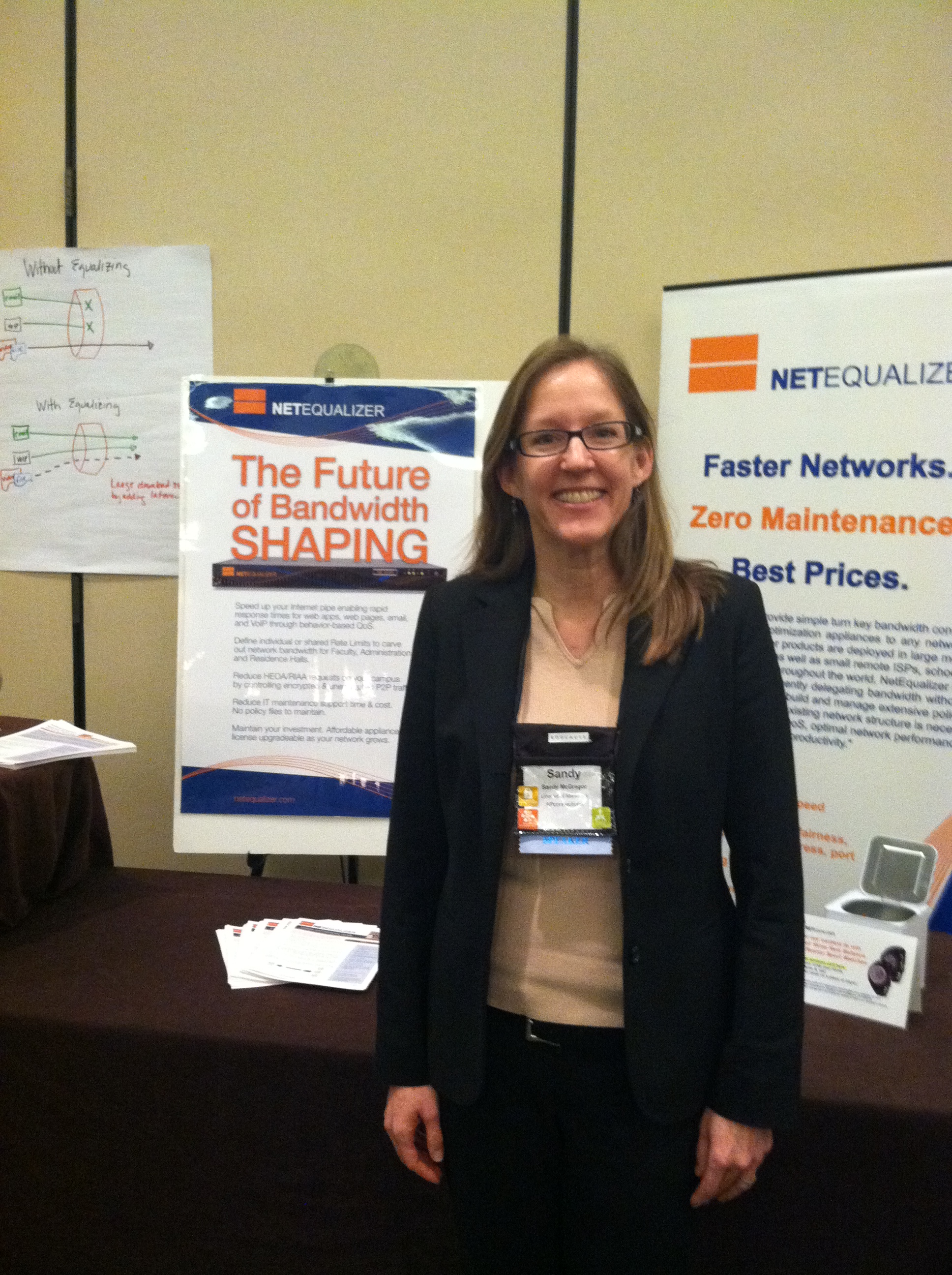
Sandy had a great time at the West/Southwest Regional Educause Conference in Austin  February 12-14th, 2013!

Here she is in front of her Poster Session materials:

wsw educause photo 1

Sandy talked about the “Future of Bandwidth Shaping” with the attendees. One professor, who also runs a ISP for colleges, even came from South Africa!

Most of you know that NetEqualizer is the future of bandwidth shaping, but if you need to convince anyone else (your boss, the powers that be, etc.), we recommend printing out our updated 1-2 page Executive White Paper and sharing that. If you are in Higher Education, you can also check out our newly revised College & University Guide.

Stay tuned to NetEqualizer News for updates on upcoming conferences!


AD Integration Beta and Support Update

We are close to releasing our new Active Directory integration feature and are nearing the end of our beta tests!

Thanks to all of those organizations that have helped us out thus far.

As an additional note, because Active Directory is a complicated environment which varies from customer to customer, the AD Integration feature will be an additional charge beyond NSS. This fee will include support in getting you up and running with the new feature.


Best Of The Blog

How Much Bandwidth Do You Really Need?

By Art Reisman – CTO – APconnections

When it comes to how much money to spend on the Internet, there seems to be this underlying feeling of guilt with everybody I talk to. From ISPs, to libraries or multinational corporations, they all have a feeling of bandwidth inadequacy. It is very similar to the guilt I used to feel back in College when I would skip my studies for some social activity (drinking). Only now it applies to bandwidth contention ratios. Everybody wants to know how they compare with the industry average in their sector. Are they spending on bandwidth appropriately, and if not, are they hurting their institution, will they become second-rate?

To ease the pain, I was hoping to put a together a nice chart on industry standard recommendations, validating that your bandwidth consumption was normal, and I just can’t bring myself to do it quite yet. There is this elephant in the room that we must contend with. So before I make up a nice chart on recommendations, a more relevant question is… how bad do you want your video service to be?

Your choices are:

  1. bad
  2. crappy
  3. downright awful

Although my answer may seem a bit sarcastic, there is a truth behind these choices. I sense that much of the guilt of our customers trying to provision bandwidth is based on the belief that somebody out there has enough bandwidth to reach some form of video Shangri-La; like playground children bragging about their father’s professions, claims of video ecstasy are somewhat exaggerated…

Photo Of The Month

photo-3

Snow Geese in Kansas

If you look closely at the lake you can see a gaggle of white Snow Geese in the water. Though they typically live in colder climates, they’ll come to warmer states in the winter to breed. This photo was taken in Kansas on a recent trip by one of our staff members.