

|
||||||||||||||||||||||


NetEqualizer P2P Locator Technology
May 21, 2011 — netequalizerEditor’s Note: The NetEqualizer has always been able to thwart P2P behavior on a network. However, our new utility can now pinpoint an individual P2P user or gamer without any controversial layer-7 packet inspection. This is an extremely important step from a privacy point of view as we can actually spot P2P users without looking at any private data.
A couple of months ago, I was doing a basic health check on a customer’s heavily used residential network. In the process, I instructed the NetEqualizer to take a few live snapshots. I then used the network data to do some filtering with custom software scripts. Within just a few minutes, I was able to inform the administrator that eight users on his network were doing some heavy P2P, and one in particular looked to be hosting a gaming session. This was news to the customer, as his previous tools didn’t provide that kind of detail.
A few days later, I decided to formally write up my notes and techniques for monitoring a live system to share on the blog. But, as I got started, another lightbulb went on…in the end, many customers just want to know the basics — who is using P2P, hosting game servers, etc. They don’t always have the time to follow a manual diagnostic recipe.
So, with this in mind, instead of writing up the manual notes, I spent the next few weeks automating and testing an intelligent utility to provide this information. The utility is now available with NetEqualizer 5.0.
The utility provides:
- A list of users that are suspected of using P2P
- A list of users that are likely hosting gaming servers
- A confidence rating for each user (from high to low)
- The option of tracking users by IP and MAC address
The key to determining a user’s behavior is the analysis of the fluctuations in their connection counts and total number of connections. We take snapshots over a few seconds, and like a good detective, we’ve learned how to differentiate P2P use from gaming, Web browsing and even video. We can do this without using any deep packet inspection. It’s all based on human-factor heuristics and years of practice.
Enclosed is a screen shot of the new P2P Locator, available under our Reports & Graphing menu.
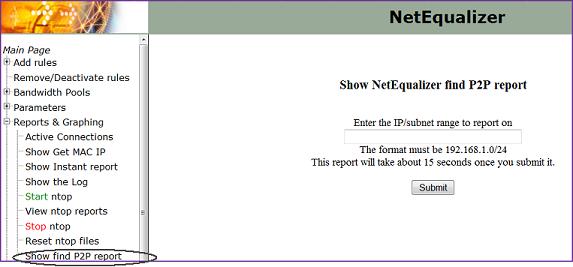
Our new P2P Locator technology
Contact us to learn more about the NetEqualizer P2P Locator Technology or NetEqualizer 5.0. For more information about ongoing changes and challenges with BitTorrent and P2P, see Ars Technica’s “BitTorrent Has New Plan to Shape Up P2P Behavior.”
Shaping Bandwidth by VLAN under the NetEqualizer Hood
May 18, 2011 — netequalizerAs a followup to my recent commentary on the history of VLAN tags, I decided to jump down into the guts of a bandwidth shaper and go over some of the techniques we use to set rate limits on a particular VLAN. When writing, I assumed the reader has a basic understanding of how data can be manipulated inside a computer program.
Let’s start with some background information. First off, the NetEqualizer bandwidth shaper is a transparent bridge. A typical setup has two Ethernet cards — one connected to your LAN and the other side connected to your WAN (Internet router). Before we added in our VLAN shaping, the Linux kernel bridging code would blindly transfer Ethernet packets from one side to the other, passing right through the NetEqualizer.
As these Ethernet packets pass through, they’re visible as data in the Linux kernel. Normally, they pass through unmolested — in one side out the other. However, the key to bandwidth shaping is what you do with them as they come through.
To give you a better idea of what goes inside the Linux kernel when data passes through, I’ve included a couple of snippets of C code below. This is actual Linux kernel code. I have also littered the code with some detailed explanations in line, so you don’t have to understand C to follow the logic.
Below is the C language data definition of the fields in an Ethernet header. When an Ethernet packet comes across the NetEqualizer, the contents of the Ethernet packet are put into data structures. The reason why we’re interested in the Ethernet header is that it’s where the VLAN tags are located.
Note: Code appears in italics while notes are in bold and non-italicized font.
struct vlan_ether_header {
char dst[6]; // This is six bytes for the destination MAC address.
char src[6]; // This is six bytes for the source MAC address.
short type;
short tci_vid;
short encapsulated_type;
} __attribute__ ((__packed__));
Below is the C function that finds the actual VLAN tag inside the Ethernet header in an Ethernet packet.
struct iphdr* findIph(struct sk_buff* skb, int *vlan_id) {
struct ethhdr* eh;
// This is a pointer to a data structure of type ether net header. We first declare the pointer and will assign it later.
struct iphdr* iph = NULL;
// This is a pointer to a data structure that contains the IP header of an IP packet (I did not show the definition of the structure).
*vlan_id = -1;
// Set the VLAN ID to something.
eh = (struct ethhdr*)(skb->mac_header);
/* The SKB buffer is the standard structure for network data being passed around the kernel. It contains all the data related to IP data including the Ethernet packet. Part of the Ethernet packet is the MAC header which is what we are interested in to find out the VLAN ID. FYI . . . SKB is the buffer that IP tables routinely use. To enforce firewall rules, they pass this buffer from rule-to-rule because everybody needs to look inside of it to decide what to do. I am not going to go into how it came into existence. Suffice to say the Ethernet packet is located in this buffer. The MAC header is a field in the SKB buffer and the above assignment copies this location to the variable eh, which is the pointer of an Ethernet header. We now have a data structure that we can access to see fields inside the Ethernet header as a packet passes through the NetEqualizer */
if (eh->h_proto == 0x0081) {
struct vlan_ether_header* veh = (struct vlan_ether_header*)(skb->mac_header);
if (veh->encapsulated_type == 0x0008) {
iph = (struct iphdr*)(skb->mac_header + sizeof(*veh));
*vlan_id = ((ntohs(veh->tci_vid)) & 0x0fff);
// BR_DEBUG_IP printk (KERN_INFO “got VLAN ID %d \n”, *vlan_id);
}
}
/* The above code snippet is where the actual VLAN ID gets put into the variable vlan_id. The FFF is a bit mask which slices the value of the VLAN ID out of the field tci_vid. It is a 12-bit number */
else {
if (eh->h_proto == 0x0008) {
iph = (struct iphdr*)(skb->mac_header + sizeof(*eh));
}
}
return iph;
}
Hopefully the code captured the spirit of the type of work that goes on in the Linux kernel to analyze packets. But, how does VLAN shaping work once you have the VLAN ID?
Well, once we have the VLAN ID of a packet, we check and see if there is a VLAN shaping rule in effect for that ID. There is a table in the Kernel with a list of all of the active VLAN shaping rules that have been specified by the user. If there is a rule for this VLAN, a counter is incrimented for the number of data bytes in the payload of the IP packet.
if (vlan_id > -1 && vlan_id < VLAN_MAX && hard_table[vlan_id + HARD_SIZE].ip == vlan_id && port_id ==2) {
hard_table[vlan_id + HARD_SIZE].incount=hard_table[vlan_id +HARD_SIZE].incount +hsize;
The code snippet above checks to make sure the VLAN ID is valid and then it increments the byte count for that VLAN. hsize is a variable that contains the actual number of data bytes in the Ethernet packet.
The NetEqualizer keeps this counter for an entire second (it will reset it each second), and if the data coming in for the VLAN is coming in faster than the rate limit defined by a user rule for that particular VLAN ID, then the NetEqualizer will take action by actually slowing down the packet in the kernel. This in turn reduces the data rate of transfer for the VLAN.
VLAN tags made simple
May 17, 2011 — netequalizerBy Art Reisman, CTO, www.netequalizer.com

Why am I writing a post on VLAN tags ?
VLAN tags and Bandwidth Control are often intimately related, but before I can post on the relationship I thought it prudent to comment on VLAN tags, I definitly think they are way over used and hope to comment on that also in a future post.
I generally don’t like VLAN tags, the original idea behind them was to solve the issue with Ethernet broadcasts saturating network segment. Wikipedia explains it like this…
After successful experiments with voice over Ethernet from 1981 to 1984, Dr. W. David Sincoskie joined Bellcore and turned to the problem of scaling up Ethernet networks. At 10 Mbit/s, Ethernet was faster than most alternatives of the time; however, Ethernet was a broadcast network and there was not a good way of connecting multiple Ethernets together. This limited the total bandwidth of an Ethernet network to 10 Mbit/s and the maximum distance between any two nodes to a few hundred feet.
What does that mean and why do you care?
First lets address how an Ethernet broadcast works and then we can discuss Dr Sincoskies solution and make some sense of it.
When a bunch of computers share a single Ethernet segment of a network separated by switches everybody can hear each other talking
Think of 2 people in a room yelling back and forth to communicate, that might work if one person pauses after each yell to give the other person a chance to yell back. Now if you had three people in a room they can still yell at each other and pause and listen for other people yelling and that might still work, but if you had 1000 people in the room and they are trying to talk to people on the other side of the room the pausing technique waiting for other people to talk does not work very well. And that is exactly the problem with Ethernet as it grows everybody is trying to talk on the same wire at once. VLAN tags work by essentially creating a bunch of smaller virtual rooms where only the noise and yelling from the people in the virtual room can be heard at one time.
Now when you set up a VLAN tag (virtual room ) you have to put up the dividers. On a network this is done by having the switches, the things the computers plug into, be aware of what virtual room each computer is in. The Ethernet tag specifies the identifier for the virtual room and so once set up you have a bunch of virtual rooms and everybody can talk.
This sort of begs the question
Does everybody attached to the Internet live in a virtual room ?
No virtual rooms (VLANs) were needed so a single organization like a company can put a box around their network segments to protect them with a common set of access rules ( firewall router), the Internet works fine without VLAN tags.
So a VLAN tag is only appropriate when a group of users sit behind a common router ?
Yes that is correct , Ethernet broadcasts ( yelling as per our analogy) do not cross cross router boundaries on the Internet.
Routers handle public IP addresses to figure out where to send things. A router does not use broadcast (yelling), it is much more discrete , it only sends on data to another router if it knows that the data is supposed to go there.
So why do we have two mechanisms one for local computers sending Ethernet broadcasts and another for routers using point to point routing ?
This post was supposed to be about VLAN tags….. I’ll take it one step further to explain the difference.
Perhaps you have heard about the layers of networking, layer 2 is Ethernet and Layer 3 is IP.
Answers.com gave me the monologue below, which is technically correct, but does not really make much sense unless you already had a good understanding of networking in the first place , so I’ll finish by breaking down this into something a little more relevant with some in-line comments.
Basically a layer 2 switch operates utilizing Mac addresses in it’s caching table to quickly pass information from port to port. A layer 3 switch utilizes IP addresses to do the same.
What this means is that an Ethernet switch looks at MAC addresses which are used by your router for local addressing to a computer on your network. Think back to people shouting in the room to communicate, the MAC address would be a Nick name that only their closest friends would use when they shout at each other. At the head end of your network is a router, this is where you connect to the Internet, and other Internet users send data to you from your IP address and this is essentially the well known public address at your router. The IP address could be thought of as the address of the building where everybody is inside shouting at each other. The routers job is to get information,sent by IP address destined for some body inside the room to the door. If you are a Comcast home user you likely have a Modem where you cable plugs in the Modem is the gateway to your house and is addressed by IP address by the outside world.
Essentially, A layer 2 switch is essentially a multiport transparent bridge. A layer 2 switch will learn about MAC addresses connected to each port and passes frames marked for those ports.
The above paragraph is referring to how an Ethernet switch sends data around, everybody in room registers their Nick-Name to the switch so it can shout in the direction of the person in the room when new data comes in.
It also knows that if a frame is sent out a port but is looking for the MAC address of the port it is connected to and drop that frame. Whereas a single CPU Bridge runs in serial, todays hardware based switches run in parallel, translating to extremly fast switching.
I left this paragraph in because it is completely unrelated to the question I asked that Answers.com responded to, so ignore it. This is a commentary about how modern switches can be reading and sending from multiple interfaces at the same time.
Layer 3 switching is a hybrid, as one can imagine, of a router and a switch. There are different types of layer 3 switching, route caching andtopology-based. In route caching the switch required both a Route Processor (RP) and a Switch Engine (SE). The RP must listen to the first packet to determine the destination. At that point the Switch Engine makes a shortcut entry in the caching table for the rest of the packets to follow.
More random stuff unrelated to the question “What is the difference between layer 3 and layer 2 ”
Due to advancement in processing power and drastic reductions in the cost of memory, today’s higher end layer 3 switches implement a topology-based switching which builds a lookup table and and poputlates it with the entire network’s topology. The database is held in hardware and is referenced there to maintain high throughput. It utilizes the longest address match as the layer 3 destination.
This is talking about how a Router translates between the local address Nick-Name of people yelling in the room and the public address of data leaving the building.
Now when and why would one use a l2 vs l3 vs a router? Simply put, a router will generally sit at the gateway between a private and a public network. A router can performNAT whereas an l3 switch cannot (imagine a switch that had the topology entries for the ENTIRE Internet!!).
NetEqualizer News: May 2011
May 10, 2011 — netequalizer
|
|||||||||||||||||||||||||||||||




YouTube Caching Results: detailed analysis from live systems
May 8, 2011 — netequalizerSince the release of YouTube caching support on our NetEqualizer bandwidth controller, we have been able to review several live systems in the field. Below we will go over the basic hit rate of YouTube videos and explain in detail how this effects the user experience. The analysis below is based on an actual snapshot from a mid-sized state university, using a 64 Gigabyte cache, and approximately 2000 students in residence.
The Squid Proxy server provides a wide range of statistics. You can easily spend hours examining them and become exhausted with MSOS, an acronym for “meaningless stat overload syndrome”. To save you some time we are going to look at just one stat from one report. From the Squid Statistics Tab on the NetEqualizer, we selected the Cache Client List option. This report shows individual Cache stats for all clients on your network. At the very bottom is a summary report totaling all squid stats and hits for all clients.
TOTALS
- ICP : 0 Queries, 0 Hits (0%)
- HTTP: 21990877 Requests, 3812 Hits (0%)
At first glance it appears as if the ratio of actual cache hits, 3812, to HTTP requests, 21990877, is extremely low. As with all statistics the obvious conclusion can be misleading. First off, the NetEqualizer cache is deliberately tuned to NOT cache HTTP requests smaller than 2 Megabytes. This is done for a couple of reasons:
1) Generally, there is no advantage to caching small Web pages, as they normally load up quickly on systems with NetEqualizer fairness in place. They already have priority.
2) With a few exceptions of popular web sites , small web hits are widely varied and fill up the cache – taking away space that we would like to use for our target content, Youtube Videos.
Breaking down the amount of data in a typical web site versus a Youtube hit.
It is true that web sites today can often exceed a Megabyte. However ,rarely does a web site of 2 Megabytes load up as a single hit. It is comprised of many sub-links, each of which generates a web hit in the summary statistics. A simple HTTP page typically triggers about 10 HTTP requests for perhaps 100K bytes of data total. A more complex page may generate 500K. For example, when you go to the CNN home page there are quite a few small links, and each link increments the HTTP counter. On the other hand, a YouTube hit generates one hit for about 20 megabits of data. When we start to look at actual data cached instead of total Web Hits, the ratio of cached to not cached is quite different.
Our cache set up is also designed to only cache Web pages from 2 megabytes to 40 megabytes, with an estimated average of 20 megabytes. When we look at actual data cached (instead of hits) this gives us about 400 gigabytes of regular HTTP data of which about 76 Gigabytes came from the cache. Conservatively about 10 percent of all HTTP data came from cache by this rough estimate. This number is much more significant than the HTTP statistics reveal.
Even more telling, is that effect these hits have on user experience.
YouTube streaming data, although not the majority of data on this customer system, is very time-sensitive while at the same time being very bandwidth intensive. The subtle boost made possible by caching 10 percent of the data on this system has a discernible effect on the user experience. Think about it, if 10 percent of your experience on the Web is video, and you were resigned to it timing out and bogging down, you will notice the difference when those YouTube videos play through to completion, even if only half of them come from cache.
For a more detailed technical overview of NetEqualizer YouTube caching (NCO) click here.
Setting Up a Squid Proxy Caching Co-Resident with a Bandwidth Controller
April 29, 2011 — netequalizerEditor’s Note: It was a long road to get here (building the NetEqualizer Caching Option (NCO) a new feature offered on the NE3000 & NE4000), and for those following in our footsteps or just curious on the intricacies of YouTube caching, we have laid open the details.
This evening, I’m burning the midnight oil. I’m monitoring Internet link statistics at a state university with several thousand students hammering away on their residential network. Our bandwidth controller, along with our new NetEqualizer Caching Option (NCO), which integrates Squid for caching, has been running continuously for several days and all is stable. From the stats I can see, about 1,000 YouTube videos have been played out of the local cache over the past several hours. Without the caching feature installed, most of the YouTube videos would have played anyway, but there would be interruptions as the Internet link coughed and choked with congestion. Now, with NCO running smoothly, the most popular videos will run without interruptions.
Getting the NetEqualizer Caching Option to this stable product was a long and winding road. Here’s how we got there.
First, some background information on the initial problem.
To use a Squid proxy server, your network administrator must put hooks in your router so that all Web requests go the Squid proxy server before heading out to the Internet. Sometimes the Squid proxy server will have a local copy of the requested page, but most of the time it won’t. When a local copy is not present, it sends your request on to the Internet to get the page (for example the Yahoo! home page) on your behalf. The squid server will then update a local copy of the page in its cache (storage area) while simultaneously sending the results back to you, the original requesting user. If you make a subsequent request to the same page, the Squid will quickly check it to see if the content has been updated since it stored away the first time, and if it can, it will send you a local copy. If it detects that the local copy is no longer valid (the content has changed), then it will go back out to the Internet and get a new copy.
Now, if you add a bandwidth controller to the mix, things get interesting quickly. In the case of the NetEqualizer, it decides when to invoke fairness based on the congestion level of the Internet trunk. However, with the bandwidth controller unit (BCU) on the private side of the Squid server, the actual Internet traffic cannot be distinguished from local cache traffic. The setup looks like this:
Internet->router->Squid->bandwidth controller->users
The BCU in this example won’t know what is coming from cache and what is coming from the Internet. Why? Because the data coming from the Squid cache comes over the same path as the new Internet data. The BCU will erroneously think all the traffic is coming from the Internet and will shape cached traffic as well as Internet traffic, thus defeating the higher speeds provided by the cache.
In this situation, the obvious solution would be to switch the position of the BCU to a setup like this:
Internet->router->bandwidth controller->Squid->users
This configuration would be fine except that now all the port 80 HTTP traffic (cached or not) will appear like it is coming from the Squid proxy server and your BCU will not be able to do things like put rate limits on individual users.
Fortunately, with the our NetEqualizer 5.0 release, we’ve created an integration with NetEqualizer and co-resident Squid (our NetEqualizer Caching Option) such that everything works correctly. (The NetEqualizer still sees and acts on all traffic as if it were between the user and the Internet. This required some creative routing and actual bug fixes to the bridging and routing in the Linux kernel. We also had to develop a communication module between the NetEqualizer and the Squid server so the NetEqualizer gets advance notice when data is originating in cache and not the Internet.)
Which do you need, Bandwidth Control or Caching?
At this point, you may be wondering if Squid caching is so great, why not just dump the BCU and be done with the complexity of trying to run both? Well, while the Squid server alone will do a fine job of accelerating the access times of large files such as video when they can be fetched from cache, a common misconception is that there is a big relief on your Internet pipe with the caching server. This has not been the case in our real world installations.
The fallacy for caching as panacea for all things congested assumes that demand and overall usage is static, which is unrealistic. The cache is of finite size and users will generally start watching more YouTube videos when they see improvements in speed and quality (prior to Squid caching, they might have given up because of slowness), including videos that are not in cache. So, the Squid server will have to fetch new content all the time, using additional bandwidth and quickly negating any improvements. Therefore, if you had a congested Internet pipe before caching, you will likely still have one afterward, leading to slow access for many e-mail, Web chat and other non-cachable content. The solution is to include a bandwidth controller in conjunction with your caching server. This is what NetEqualizer 5.0 now offers.
In no particular order, here is a list of other useful information — some generic to YouTube caching and some just basic notes from our engineering effort. This documents the various stumbling blocks we had to overcome.
1. There was the issue of just getting a standard Squid server to cache YouTube files.
It seemed that the URL tags on these files change with each access, like a counter, and a normal Squid server is fooled into believing the files have changed. By default, when a file changes, a caching server goes out and gets the new copy. In the case of YouTube files, the content is almost always static. However, the caching server thinks they are different when it sees the changing file names. Without modifications, the default Squid caching server will re-retrieve the YouTube file from the source and not the cache because the file names change. (Read more on caching YouTube with Squid…).
2. We had to move to a newer Linux kernel to get a recent of version of Squid (2.7) which supports the hooks for YouTube caching.
A side effect was that the new kernel destabilized some of the timing mechanisms we use to implement bandwidth control. These subtle bugs were not easily reproduced with our standard load generation tools, so we had to create a new simulation lab capable of simulating thousands of users accessing the Internet and YouTube at the same time. Once we built this lab, we were able to re-create the timing issues in the kernel and have them patched.
3. It was necessary to set up a firewall re-direct (also on the NetEqualizer) for port 80 traffic back to the Squid server.
This configuration, and the implementation of an extra bridge, were required to get everything working. The details of the routing within the NetEqualizer were customized so that we would be able to see the correct IP addresses of Internet sources and users when shaping. (As mentioned above, if you do not take care of this, all IPs (traffic) will appear as if they are coming from the Proxy server.
4. The firewall has a table called ConnTrack (not be confused with NetEqualizer connection tracking but similar).
The connection tracking table on the firewall tends to fill up and crash the firewall, denying new requests for re-direction if you are not careful. If you just go out and make the connection table randomly enormous that can also cause your system to lock up. So, you must measure and size this table based on experimentation. This was another reason for us to build our simulation lab.
5. There was also the issue of the Squid server using all available Linux file descriptors.
Linux comes with a default limit for security reasons, and when the Squid server hit this limit (it does all kinds of file reading and writing keeping descriptors open), it locks up.
Tuning changes that we made to support Caching with Squid
a. To limit the file size of a cached object of 2 megabytes (2MB) to 40 megabytes (40MB)
- minimum_object_size 2000000 bytes
- maximum_object_size 40000000 bytes
If you allow smaller cached objects it will rapidly fill up your cache and there is little benefit to caching small pages.
b. We turned off the Squid keep reading flag
- quick_abort_min 0 KB
- quick_abort_max 0 KB
This flag when set continues to read a file even if the user leave the page, for example when watching a video if the user aborts on their browser the Squid cache continues to read the file. I suppose this could now be turned back on, but during testing it was quite obnoxious to see data transfers talking place to the squid cache when you thought nothing was going on.
c. We also explicitly told the Squid what DNS servers to use in its configuration file. There was some evidence that without this the Squid server may bog down, but we never confirmed it. However, no harm is done by setting these parameters.
- dns_nameservers x.x.x.x
d. You have to be very careful to set the cache size not to exceed your actual capacity. Squid is not smart enough to check your real capacity, so it will fill up your file system space if you let it, which in turn causes a crash. When testing with small RAM disks less than four gigs of cache, we found that the Squid logs will also fill up your disk space and cause a lock up. The logs are refreshed once a day on a busy system. With a large amount of pages being accessed, the log will use close to one (1) gig of data quite easily, and then to add insult to injury, the log back up program makes a back up. On a normal-sized caching system there should be ample space for logs
e. Squid has a short-term buffer not related to caching. It is just a buffer where it stores data from the Internet before sending it to the client. Remember all port 80 (HTTP) requests go through the squid, cached or not, and if you attempt to control the speed of a transfer between Squid and the user, it does not mean that the Squid server slows the rate of the transfer coming from the Internet right away. With the BCU in line, we want the sender on the Internet to back off right away if we decide to throttle the transfer, and with the Squid buffer in between the NetEqualizer and the sending host on the Internet, the sender would not respond to our deliberate throttling right away when the buffer was too large (Link to Squid caching parameter).
f. How to determine the effectiveness of your YouTube caching statistics?
I use the Squid client cache statistics page. Down at the bottom there is a entry that lists hits verses requests.
TOTALS
- ICP : 0 Queries, 0 Hits (0%)
- HTTP: 21990877 Requests, 3812 Hits (0%)
At first glance, it may appear that the hit rate is not all that effective, but let’s look at these stats another way. A simple HTTP page generates about 10 HTTP requests for perhaps 80K bytes of data total. A more complex page may generate 500k. For example, when you go to the CNN home page there are quite a few small links, and each link increments the HTTP counter. On the other hand, a YouTube hit generates one hit for about 20 megabits of data. So, if I do a little math based on bytes cached we get, the summary of HTTP hits and requests above does not account for total data. But, since our cache is only caching Web pages from two megabits to 40 megabits, with an estimated average of 20 megabits, this gives us about 400 gigabytes of regular HTTP and 76 Gigabytes of data that came from the cache. Abut 20 percent of all HTTP data came from cache by this rough estimate, which is a quite significant.
NetEqualizer News: April 2011
April 15, 2011 — netequalizer
|
||||||||||
|
||||||||||
|
||||||||||
|
||||||||||


QoS is a Matter of Sacrifice
April 7, 2011 — netequalizerUsually in the first few minutes of talking to a potential customer, one of their requests will be something like “I want to give QoS (Quality of Service) to Video”, or “I want to give Quality of Service to our Blackboard application.”
The point that is often overlooked by resellers, pushing QoS solutions, is that providing QoS for one type of traffic always involves taking bandwidth away from something else.
The network hacks understand this, but for those that are not down in the trenches sometimes we must gently walk them through a scenario.
Take the following typical exchange:
Customer: I want to give our customers access to NetFlix and have that take priority over P2P.
NetEq Rep: How do you know that you have a p2p problem?
Customer: We caught a guy with Kazaa on his Laptop last year so we know they are out there.
NetEq rep (after plugging in a test system and doing some analysis): It looks like you have some scattered p2p users, but they are only about 2 percent of your traffic load. Thirty percent of your peak traffic is video. If we give priority to all your video we will have to sacrifice something, web browsing, chat, e-mail, Skype, and Internet Radio. I know this seems like quite a bit but there is nothing else out there to steal from, you see in order to give priority to video we must take away bandwidth from something else and although you have p2p, stopping it will not provide enough bandwidth to make a dent in your video appetite.
Customer (now frustrated by reality): Well I guess I will just have to tell our clients they can’t watch video all the time. I can’t make web browsing slower to support video, that will just create a new problems.
If you have an oversubscribed network, meaning too many people vying for limited Internet resources, when you implement any form of QoS, you will still end up with an oversubscribed network. QoS must rob Peter to pay Paul.
So when is QoS worth while?
QoS is a great idea if you understand who you are stealing from.
Here are some facts on using QoS to improve your Internet Connection:
Fact #1
If your QoS mechanism involves modifying packets with special instructions (ToS bits) on how it should be treated, it will only work on links where you control both ends of the circuit and everything in between.
Fact #2
Most Internet congestion is caused by incoming traffic. For data originating at your facility, you can certainly have your local router give priority to it on its way out, but you can’t set QoS bits on traffic coming into your network (we assume from a third party). Regulating outgoing traffic with ToS bits will not have any effect on incoming traffic.
Fact #3
Your public Internet provider will not treat ToS bits with any form of priority (the exception would be a contracted MPLS type network). Yes, they could, but if they did then everybody would game the system to get an advantage and they would not have much meaning anyway.
Fact #4
The next two facts address our initial question — Is QoS over the Internet possible? The answer is, yes. QoS on an Internet link is possible. We have spent the better part of seven years practicing this art form and it is not rocket science, but it does require a philosophical shift in thinking to get your arms around.
We call it “equalizing,” or behavior-based shaping, and it involves monitoring incoming and outgoing streams on your Internet link. Priority or QoS is nothing more than favoring one stream’s packets over another stream’s packets. You can accomplish priority QoS on incoming streams by queuing (slowing down) one stream over another without relying on ToS bits.
Fact #5
Surprisingly, behavior-based methods such as those used by our NetEqualizer do provide a level QoS for VoIP on the public Internet. Although you can’t tell the Internet to send your VoIP packets faster, most people don’t realize the problem with congested VoIP is due to the fact that their VoIP packets are getting crowded out by large downloads. Often, the offending downloads are initiated by their own employees or users. A good behavior-based shaper will be able to favor VoIP streams over less essential data streams without any reliance on the sending party adhering to a QoS scheme.
Please remember our initial point “providing QoS for one type of traffic always involves taking bandwidth away from something else,” and take these facts into consideration as you work on QoS for your network.
What Does Net Privacy Have to Do with Bandwidth Shaping?
April 1, 2011 — netequalizerI definitely understand the need for privacy. Obviously, if I was doing something nefarious, I wouldn’t want it known, but that’s not my reason. Day in and day out, measures are taken to maintain my privacy in more ways than I probably even realize. You’re likely the same way.
For example, to avoid unwanted telephone and mail solicitations, you don’t advertise your phone numbers or give out your address. When you buy something with your credit card, you usually don’t think twice about your card number being blocked out on the receipt. If you go to the pharmacist, you take it for granted that the next person in line has to be a certain distance behind so they can’t hear what prescription you’re picking up. The list goes on and on. For me personally, I’m sure there are dozens, if not hundreds, of good examples why I appreciate privacy in my life. This is true in my daily routines as well as in my experiences online.
The topic of Internet privacy has been raging for years. However, the Internet still remains a hotbed for criminal activity and misuse of personal information. Email addresses are valued commodities sold to spammers. Search companies have dedicated countless bytes of storage to every search term and IP address made. Websites place tracking cookies on your system so they can learn more about your Web travels, habits, likes, dislikes, etc. Forensically, you can tell a lot about a person from their online activities. To be honest, it’s a little creepy.
Maybe you think this is much ado about nothing. Why should you care? However, you may recall that less than four years ago, AOL accidentally released around 20 million search keywords from over 650,000 users. Now, those 650,000 users and their searches will exist forever in cyberspace. Could it happen again? Of course, why wouldn’t it happen again since all it takes is a packed laptop to walk out the door?
Internet privacy is an important topic, and as a result, technology is becoming more and more available to help people protect information they want to keep confidential. And that’s a good thing. But what does this have to do with bandwidth management? In short, a lot (no pun intended)!
Many bandwidth management products (from companies like Blue Coat, Allot, and Exinda, for example) intentionally work at the application level. These products are commonly referred to as Layer 7 or Deep Packet Inspect tools. Their mission is to allocate bandwidth specifically by what you’re doing on the Internet. They want to determine how much bandwidth you’re allowed for YouTube, Netflix, Internet games, Facebook, eBay, Amazon, etc. They need to know what you’re doing so they can do their job.
In terms of this article, whether you’re philosophically adamant about net privacy (like one of the inventors of the Internet), or could care less, is really not important. The question is, what happens to an application-managed approach when people take additional steps to protect their own privacy?
For legitimate reasons, more and more people will be hiding their IPs, encrypting, tunneling, or otherwise disguising their activities and taking privacy into their own hands. As privacy technology becomes more affordable and simple, it will become more prevalent. This is a mega-trend, and it will create problems for those management tools that use this kind of information to enforce policies.
However, alternatives to these application-level products do exist, such as “fairness-based” bandwidth management. Fairness-based bandwidth management, like the NetEqualizer, is the only a 100% neutral solution and ultimately provides a more privacy friendly approach for Internet users and a more effective solution for administrators when personal privacy protection technology is in place. Fairness is the idea of managing bandwidth by how much you can use, not by what you’re doing. When you manage bandwidth by fairness instead of activity, not only are you supporting a neutral, private Internet, but you’re also able to address the critical task of bandwidth allocation, control and quality of service.
edACCESS IT Conference Gains a Convert
April 1, 2011 — netequalizerBy Thomas Phelan, The Peddie School
I hate conferences. OK, perhaps “hate” is a bit strong, but I generally find them a very poor use of my time and I only go if I feel I absolutely have to. For this reason, it took me five years to finally act on the advice of a number of colleagues and attend an edACCESS conference. The verdict? I shouldn’t have waited so long!
It turns out that edACCESS is a fantastic conference, and I’ve gone every year since this first visit in 2008. In fact, I liked it so much, I volunteered to host edACCESS both this year and next here at the Peddie School in New Jersey. This year, the conference is running from June 20 through June 23.
For anyone not familiar with the conference, edACCESS is designed specifically for technology staff at K-12 schools and small colleges. Technology directors are the most well-represented group at edACCESS, but other technology staff positions such as network managers, database managers, and technology coordinators/facilitators also attend. Many participating schools send two or more representatives.
In a nutshell, edACCESS gets rid of the “expert” presentations which dominate most conferences and then builds around what is traditionally the best part of these meetings — the peer discussions that occur in between official presentations. With this model as the foundation, edACCESS excels on many different levels.
Each year I have brought back valuable information that has resulted in significant savings of both time and money. One of the things on my plate as I traveled to my first edACCESS conference held at St. Andrews was a $15,000 renewal for our aging high-maintenance Packeteer. It was at an edACCESS peer session that I learned of the NetEqualizer, which turned out to be a fraction of the cost of a Packeteer. In addition, I was able to setup, fully understand and configure the NetEqualizer in half a day, and it ultimately did a better job of QoS on our network!
However, the benefits of edACCESS don’t stop when the conference ends. One thing we could all use is better networking with others, but the challenge is finding time to make initial contacts. As useful as online forums, listservs, and Web 2.0 platforms can be, there’s no substitute for meeting people through face-to-face discussions. edACCESS will give you a chance to connect with, AND REALLY GET TO KNOW, more peers in other schools than you could in years of going to other conferences. If you attend edACCESS, I guarantee you’ll find yourself reaching for your edACCESS Facebook page throughout the year.
edACCESS is also the most cost effective conference you’ll ever attend. We are able to keep costs down because edACCESS is hosted by boarding schools. The standard registration fee (payment made prior to 5/6) is only $605 for a 4-day, 3-night conference with meals and dorm room included.
Lastly, edACCESS is just a lot of fun. When you return to work you might have a full inbox, but your batteries will be recharged and you’ll remember why supporting technology in schools is a pretty cool thing to be doing.
Enough of the sales pitch. If you have read this far and edACCESS sounds interesting, please take a minute to look at the conference brochure (http://falconnet.peddie.org/edaccess/edAccess_2011.pdf) and the edACCESS website (http://www.edaccess.org). And please, feel free to contact me if you have any questions at all about the conference.
$10,000 Prize for Predicting the World Switchover Date from IPv4
March 24, 2011 — netequalizerAlthough somewhat overshadowed by the major news stories developing around the world in recent weeks, those of us in the tech industry have seen no shortage of attention paid to the impending changes surrounding IPv4. Just today, I read a few articles about how the world has run out of IPv4 addresses. I also recently received a survey about our specific plans for IPv6.
Even with all of this media attention, however, there are many questions that still remain (one of which we’ve decided to use for a new contest). While we can’t answer all of them, we’d at least like to chime in about a few.
Will a switch to IPv6 really reduce the need for IPv4?
Despite its availability, no one will choose to completely convert to IPv6 until the rest of the world knows how to send and receive it. To do so would be communication suicide. Only when there is a near full conversion to IPv6 could you reliably use it to exclusively communicate. This creates a paradox of sorts: In order to remain accessible to all, you must retain your old IPv4 address.
This is easier said than done for some.
While there are certainly products and services to forward your mail when you establish an IPv6 address, what about a new company established from scratch with no pre-existing Web presence? When the owners call their ISP to obtain an address for their new website, instead of the simple exchange that may have taken place in the past, the conversation will go a little like this:
ISP: “We ran out of IPv4 addresses last week, but don’t worry, we are going to hook you up with a brand-spanking-new IPv6 address and you should be good to go.”
Business Owner: “So, how do the people that don’t speak IPv6 contact me?”
ISP: “Don’t worry. We’ll handle the conversions for you, like the postal office forwards your mail when you move.”
Business Owner: “Yes, but I did not have an existing address. I am a new company.”
Therefore, new companies must not only establish an IPv6 address, but they must also somehow scrounge up an old IPv4 address to prevent being cut off from the percentage of the world that has not switched over.
The point is that even with IPv6, there will be no immediate relief on the IPv4 address space (Fortunately, viable alternatives do exist).
So, when will IPv4 be obsolete?
We have no idea exactly when, but based on the discussion above, we don’t think it will happen any time soon.
What does it mean to be completely switched over to IPv6?
This question will only be answered over time, and even then, it will be open to various interpretations. However, to better track the implementation of IPv6, and to facilitate our understanding of it, we’ve decided to establish a contest.
The Contest
Note: The following is a contest overview. Official contest rules and registration details will be revealed in our April newsletter (click here to register for the upcoming newsletter).
Contest Rules and Requirements
We, APconnections, makers of the NetEqualizer, will award one $10,000 USD prize as per the following criteria:
- First, you must register for the contest and provide all required information. The registration link will be included in the April NetEqualizerNews newsletter and posted on the NetEqualizer News Blog after our newsletter goes out next month.
- Winners will be awarded based on predicting the date of the actual adoption of IPv6 worldwide (see below).
- If no entries are entered for the actual date, then the prize will be awarded to the next closest prediction after the date of switchover.
- One entry per person. Duplicate registrations will disqualify an entrant.
- Entrants must be 18 years of age or older on the date of entry.
- If more than one contestant chooses the winning date, the $10,000 USD prize will be divided equally among winners.
APconnections will monitor and announce when the world has switched over to IPv6 based on the following criteria:
- The winning date shall be determined by the first time/date we can actively verify that any set of 50 companies with revenue of over $5 million USD per year has changed its public-facing Internet addresses to a full 128-bit address.
- None of the 50 qualifying companies can be using any form of an older IPv4 address for any public communications with the Internet (i.e., e-mail servers, publicly accessible Web pages administered or licensed to the company).
- None of the 50 qualifying companies shall be using any special conversion equipment to translate between IPv4 and IPv6 addresses.
- Internal IPv6 intranet conversions do not qualify.
- All public addresses at qualifying companies must use an address with more than 32 bits (greater than 255.255.255.255).
- To be valid for the contest award, IPv6 worldwide adoption criteria date must be validated and published by the APconnections engineering staff and not by any other third party. Please feel free to help us by sending the names of any companies using IPv6 for verification.
Again, the official contest rules, registration information, and deadlines will be released in our upcoming April newsletter. So, be sure to sign up.
Notes on the Complexity of Internet Billing Systems
March 18, 2011 — netequalizerWhen using a product or service in business, it’s almost instinctive to think of ways to make it better. This is especially true when it’s a customer-centered application. For some, this thought process is just a habit. However, for others, it leads to innovation and new product development.
I recently experienced this type of stream of consciousness when working with network access control products and billing systems. Rather than just disregarding my conclusions, I decided to take a few notes on what could be changed for the better. These are just a few of the thoughts that came to mind.
The ideal product would:
- Cost next to nothing
- Auto-sense unique customer requirements
- Suggest differentiators such as custom Web screens where customers could view their bill
- Roll out the physical deployment bug free in any network topology
Up to this point, the closest products I’ve seen to fulfilling these tasks are from the turn-key vendors that supply systems en mass to hot-spot operators. The other alternative is to rely on custom-built systems. However, there are advantages and drawbacks to both options.
Turn-key Solutions
Let’s start with systems from the turn-key vendors. In short, these aren’t for everyone and only tend to be viable under certain circumstances, which include:
- A large greenfield ISP installation — In this situation, the cost of development of the application should be small relative to the size of the customer base. Also, the business model needs some flexibility to work with the features of the billing and access design.
- If you have plenty of time to troubleshoot your network — This translates into you having plenty of money allocated to troubleshooting and also realizing there will be several integrations and iterations in order to work out the kinks. This means you must have a realistic expectation for ongoing support (more on the this later). Projects go sour when vendor and customer assume the first iteration is all that’s needed. This is never true when doing even the most innocuous custom development.
- If you are willing to take the vendors’ suggestions on equipment and the business process — Generally, the vendor you’re using provides some basic options for your billing and authentication. This may require you to adjust your business process to meet some existing models.
The upside to these turn-key solutions is that if you’re able to operate within these constraints, you can likely get something going at a great price and fairly quickly. But, unfortunately, if you waiver from the turn-key vendor system, your support and cost cycle will likely increase dramatically.
The Hidden Costs of Customization
If you don’t fit into the categories discussed above, you may start looking into custom-built systems to better suit your specific needs. While going the custom-built route will obviously add to your initial price, it’s also important to realize that the long-term costs may increase as well.
Many custom network access control projects start as a nice prototype, but then profit margins tend to drop and changes need to be made. The largest hidden cost from prototype to finished product is in handling error cases and boundary conditions. In addition to adding to the development costs, ongoing support will be required to cover these cases. In our experience, here are a few of the common issues that tend to develop:
- Auditing and synchronization with customer databases — This is where your enforcement program (the feature that allows people on to your network) syncs up with your database. But, suppose you lose power and then come back up. How do you re-validate all of your customer ? Do you force them to re-login?
- Capacity planning — In many cases, the test system did not account for the size of a growing system. At what point will you be forced to divide and tranisition to multiple authentications systems?
- General “feature creep” — This occurs when changing customer expectations pressure the vendor to overrun a fixed-price bid. This in turn leads to shoddy work and more problems as the vendor tries to cut corners in order to hold onto some profit margin.
Conclusion
Based on this discussion, it’s clear that the perfect, one-time-fix NAC billing system may still only be in the minds of users. Therefore, it’s not a matter of trying to find the flawless solution but rather of taking your own needs into account while understanding the limitations of existing options. If you have a clear idea of what you need, as well as a reasonable expectation of what certain solutions can provide (and at what cost), the process of finding and implementing an NAC billing system will not only be more effective but also more painless.
Ever Wonder What Happened to All Those Original ISPs?
March 8, 2011 — netequalizerEditor’s Note: The folks over at ISP Finder (a nice service for those of you looking for ISP options) posted the following article this week that we thought was interesting.
Today there are thousands of ISP’s (Internet Service Providers), but it all started with a handful of dial-up services. Some of the names you will recognize and some of them you will not. All of them played a part in the early beginnings of what is now known as the world wide web.
1) Compuserve: Compuserve is one of the oldest and yet, still well-known online service providers. So what became of Compuserve? In 1980, Compuserve was purchased by H&R Block (that’s correct, the tax preparers). Approximately 20 years later they decided to sell off Compuserve. AOL offered a stock trade which wasn’t accepted but eventually it did end up under their umbrella via being purchased by Worldcom instead. The remaining aspects of Compuserve are now clothed within the Verizon Network.
2) Mindspring: This early ISP was located in Georgia. In the year 2000 Mindspring merged with Earthlink and has remained underneath their wing ever since. In 2008 Earthlink launched its VoIP under the Mindspring name.





 NetEqualizer News Blog
Confessions of a Hacker
April 9, 2011 — netequalizerBy Zack Sanders, NetEqualizer Guest Columnist
It’s almost three in the morning. Brian and I have been at it for almost sixteen hours. We’ve been trying to do one seemingly simple task for a while now: execute a command that lists files in a directory. Normally this would be trivial, but the circumstances are a bit different. We have just gotten into EZTrader’s blog and are trying to print a list of files in an unpublished blog post. Accomplishing this would prove that we could run any command we wanted to on the Web server, but it’s not working.
There must be something wrong with the syntax – there always is, right? We have to write the command into an ASP user control file, upload it via the attachment feature in the blog engine, and then reference it in a blog post. It’s ugly, but we are so close to piecing it all together.
I think it’s time for another cup of coffee.
EZTrader is a fictitious online stock trading company. Their front end is relatively basic, but their backend is complex. It allows users to manage their entire portfolio and has access to personal information and other types of sensitive data.
EZTrader came to us with an already strong security profile, but wanted to really put their site through the ringer by having us conduct an actual attack. They run automated scans regularly, have clean, secure code for their backend infrastructure with great SEO, and validate every request both on the client side and the server side. It really was impressive.
In the initial meeting with EZTrader, we were given a login and password for a generic user account so that we could test the authenticated portion of the site. We focused a lot of time and energy there because it is where the highest level of security is needed.
After days of trying to exploit this section of the website with no results, frustration was growing in each of us. Surely there must be some vulnerability to find, some place where they failed to properly secure the data.
Nope.
So what do you do when the front door is locked? Try a window.
We started looking around for possible attack vectors outside of the authenticated area. That’s when we came across the blog. Nobody writes a custom blog engine anymore. They use WordPress or some other open-source blog software. It’s almost always the right choice. These platforms have large communities of developers and testers that look for security holes and patch existing ones right away.
If you stay diligent on keeping your software up to date, you can’t go wrong with choosing an open-source blog platform. Problems arise when keeping this software current falls too low on the priority list. The primary reason this is so dangerous is that all of the bugs and security holes from your dated version are published for the world to see. That was precisely the case with EZTrader. They had an old version of OpenBlogger running on their website. We had finally found a chink in the armor.
We ran a few brute-force password crackers against the blog login form but they weren’t succeeding – access denied. Hmm, maybe it’s simpler.
Let’s do a quick Google search: “OpenBlogger default username and password.”
I’m feeling lucky.
The result: “Administrator/password.” This never seems to work, but it’s worth a shot…“Welcome back Administrator!” Wow. Now we are getting somewhere!
Many of the published vulnerabilities for open-source blog platforms reside in authenticated portions of the blog engine. Logging in with the default credentials was a major step, and now all we have to do is look for security weaknesses associated with that version. Back to Google.
“OpenBlogger 3.5.1 vulnerabilities.” Interesting.
What we find is that you can write code in the blog post itself and have it access any file on the system – even if it is outside of the Web root. This was billed as a “feature” of OpenBlogger. Haha, okay, thanks!
We already knew that the file upload feature of the blog puts files outside the Web root (we had tried accessing an uploaded file directly through the Web browser earlier, but that wasn’t possible due to this segregation). The key was to upload our custom code and reference it through code in the blog post. Once we figured out the path to the uploaded file, we just had to call that path in the blog post and our code would run. Our uploaded file had a simple job. If executed, it would run the “dir” command on the C:\ drive and print out the contents of the directory in a blog post. If we got this to work, the server was ours.
Maybe it’s the coffee, but suddenly I don’t feel so tired. I think we finally have the syntax right. Time to see if this dog will hunt.
Boom! There it is. The entire contents of the C:\ drive. If we can run the “dir” command, what else can we run? Let’s try to FTP one file off of their Web server to our Web server.
Okay, that worked. Let’s now try the entire C:\ drive.
That worked, too.
We now have the source code and supporting files for the entire Web server. This is where a molehill becomes a mountain. First, let’s upload a file that will give me persistent shell access to the drive so we can remove our shady looking blog post and poke around at will. Let’s also upload a file that will send me a text message when an administrator logs into the Web server. At that time, we’ll steal the authentication token and try it on other hosts connected to the network. Maybe it will work on the database server. While we are waiting for the administrator to log in, we’ll review all of our newly acquired source code for security holes that might have eluded us before.
The possibilities from here are endless. We could completely ruin EZTrader’s reputation by destroying their front page, their backend code, or their blog. We could upload more backdoors for access and sell them on the black market. We could sell their source code to E-Trade. We could compromise their other servers that are attached to that subnet.
We could run them out of business.
But luckily, our hats are white. When the CEO sees our report, she is astounded but relieved that we found these issues before the bad guys exploited them.
There are a few lessons that come out of an assessment like this:
It is important to be diligent with security EVERYWHERE. EZTrader’s great infrastructure was rendered obsolete because of one tiny oversight.
Security should exist in layers, and monitoring is crucial. Even if we were able to access the blog, some other process should have thwarted our advances. McAfee or Tripwire should have prevented us from uploading executables or FTPing files off of the server.
In short, security for an online business is paramount. Unlike a breach in the physical world, customers have little tolerance for digital break-ins. Reputation is everything.
In the end, EZTrader’s proactive decisions may have saved their company. It is much easier to prevent an attack than to deal with one after the fact. The cleanup can be messy and expensive. It is increasingly important for all executives and IT personnel to have this mindset, and putting public facing sites to tests like this can be the difference between prosperity and peril.
About the Author(s)
Zack Sanders and Brian Sax are Web Application Security Specialists with Fiddler on the Root (FOTR). FOTR provides web application security expertise to any business with an online presence. They specialize in ethical hacking and penetration testing as a service to expose potential vulnerabilities in web applications. The primary difference between the services FOTR offers and those of other firms is that they treat your website like an ACTUAL attacker would. They use a combination of hacking tools and savvy know-how to try and exploit your environment. Most security companies just run automated scans and deliver the results. FOTR is for executives that care about REAL security.
Share this: