Five Requirements for QoS and Your Cloud Computing


I received a call today from one of the Largest Tier 1 providers in the world.  The salesperson on the other end was lamenting about his inability to sell cloud services to his customers.  His service offerings were hot, but the customers’ Internet connections were not.  Until his customers resolve their congestion problems, they were in a holding pattern for new cloud services.

Before I finish my story,  I promised a list of what Next Generation traffic controller can do so without further adieu, here it is.

  1. Next Generation Bandwidth controllers must be able to mitigate traffic flows originating from the Internet such that important Cloud Applications get priority.
  2. Next Generation Bandwidth controllers must NOT rely on Layer 7 DPI technology to identify traffic. (too much encryption and tunneling today for this to be viable)
  3. Next Generation Bandwidth controllers must hit a price range of $5k to $10k USD  for medium to large businesses.
  4. Next Generation Traffic controllers must not require babysitting and adjustments from the IT staff to remain effective.
  5. A Next Generation traffic controller should adopt a Heuristics-based decision model (like the one used in the NetEqualizer).

As for those businesses mentioned by the sales rep, when they moved to the cloud many of them had run into bottlenecks.  The bottlenecks were due to their iOS updates and recreational “crap” killing the cloud application traffic on their shared Internet trunk.

Their original assumption was they could use the QoS on their routers to mitigate traffic. After all, that worked great when all they had between them and their remote business logic was a nailed up MPLS network. Because it was a private corporate link, they had QoS devices on both ends of the link and no problems with recreational congestion.

Moving to the Cloud was a wake up call!  Think about it, when you go to the cloud you only control one end of the link.  This means that your router-based QoS is no longer effective, and incoming traffic will crush you if you do not do something different.

The happy ending is that we were able to help our friend at BT telecom,BT_logo by mitigating his customers’ bottlenecks. Contact us if you are interested in more details.

Six Ways to Save With Cloud Computing


I was just doing some research on the cost savings of Cloud computing, and clearly it is shaking up the IT industry.  The five points in this Webroot article, “Five Financial Benefits of Moving to the Cloud”, really hit the nail on the head.   The major points are listed below.

#1. Fully utilized hardware

#2. Lower power costs

#3. Lower people costs

#4. Zero capital costs

#5. Resilience without redundancy

Not listed in the article details was a 6th way that you save money in the cloud.  The following is from conversations I have had with a few of our customers that have moved to the Cloud.

#6.  Lower network costs

Since your business services are in the cloud, you can ditch all of those expensive MPLS links that you use to privately tie your offices to your back-end systems, and replace them with lower-cost commercial Internet links. You do not really need more bandwidth, just better bandwidth performance.  The commodity Internet links are likely good enough, but… when you move to the Cloud you will need a smart bandwidth shaper.

Your link to the Internet becomes even more critical when you go the Cloud.  But that does not mean bigger and more expensive pipes. Cloud applications are very lean and you do not need a big pipe to support them. You just need to make sure recreational traffic does not cut into your business application traffic. Here is my shameless plug: The NetEqualizer is perfectly designed to separate out the business traffic from the recreational.  Licensing is simple, and surprisingly affordable.

The NetEqualizer is Cloud-Ready.  If you are moving your business applications to the Cloud, contact us to see if we can help ease congestion for your traffic going both to and from the Cloud.

How Much Bandwidth do you Need for Cloud Services?


The good news is most cloud applications have a very small Internet footprint. The bad news is, if left unchecked, all that recreational video will suck the life out of your Internet connection before you know it.

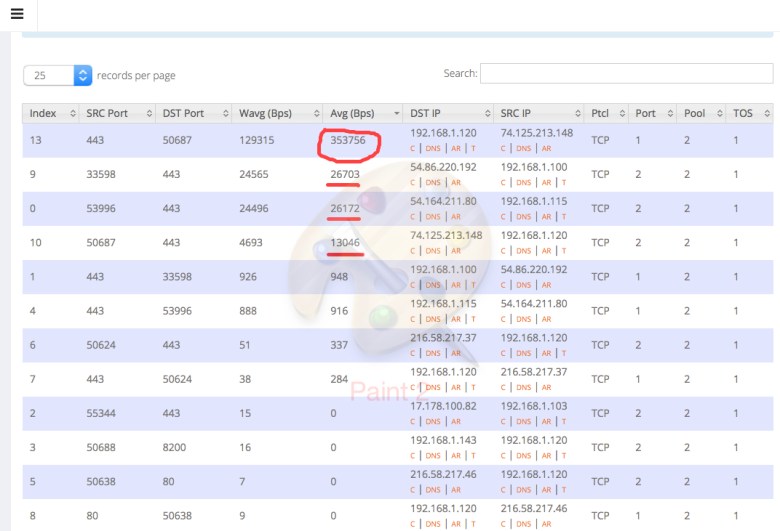
The screen shot below is from a live snapshot depicting bandwidth utilization on a business network. Screen Shot 2016-01-27 at 12.26.49 PM

That top number, circled in red, is a YouTube video, and it is consuming about 3 megabits of bandwidth.  Directly underneath that are a couple of cloud service applications from Amazon, and they are consuming 1/10 of what the YouTube video demolishes.

Over the past few years I have analyzed quite a few customer systems, and I consistently see cloud-based business applications consuming  a small fraction of what video and software updates require.

For most businesses,  if they never allowed a video or software update to cross their network, they could easily handle all the cloud-based business applications without worry of running out of room on their trunks. Remember, video and updates use ten times what cloud applications consume. The savings in bandwidth utilization would be so great that  they could cut their contracted bandwidth allocation to a fraction of what they currently have.

Coming back to earth, I don’t think this plan is practical. We live in a video and software update driven world.

If you can’t outright block video and updates, the next best thing would be to give them a lower priority when there is contention on the line. The natural solution that most IT administrators gravitate to is to try to identify it by traffic type.  Although intuitively appealing, there are some major drawbacks with typecasting traffic on the fly.  The biggest drawback is that everything is coming across as encrypted traffic, and you really can’t expect to identify traffic once it is encrypted.

The good news is that you can reliably guess that your smaller footprint traffic is Cloud or Interactive (important), and those large 3 megabit + streams should get a lower priority (not as important).  For more on the subject of how to set your cloud priority we recommend reading: QoS and your Cloud Applications


NetEqualizer News: January 2016


January 2016

Greetings!

Enjoy another issue of NetEqualizer News! This month, we introduce our new virtual NetEqualizer offering, highlight our Tech Refreshes, preview a cool new 8.4 Release feature, and discuss our DDoS Firewall option. As always, feel free to pass this along to others who might be interested in NetEqualizer News.

A message from Art…
Art Reisman, CTO – APconnections

Happy New Year! I hope your 2016 is off to a good start. Here at APconnections, we are starting 2016 off with a wonderful announcement:
0fad184f-5ea1-44c3-ad71-1093fd99f808

We are going Virtual! This month, we discuss how we are embracing Network Function Virtualization (NFV). Read below to learn more about this exciting offering!

twitterAnd remember we are now on Twitter! You can now follow us @NetEqualizer.

We love it when we hear back from you – so if you have a story you would like to share with us of how we have helped you, let us know. Email me directly at art@apconnections.net. I would love to hear from you!

In 2016, We Are Going Virtual!

As most of you know, Network Function Virtualization (NFV) has become a viable choice for many networking components. We now believe it is time to consider VM for bandwidth shaping, and are excited to announce that we will offer a NetEqualizer solution (NetEqualizer-VM) that runs on a virtual machine in 2016!

Our first offering, planned for early Q2 2016, will be targeted and tested for 100 Megabit links with 1,000 or fewer customers.

Note: There will always be reliability risks of sharing a hardware platform with other applications, hence we are starting with a relatively small footprint.

Also, in some areas of the world shipping our NetEqualizer hardware is complicated by complex trade policies, and tariffs. Thus, a Virtual offer will shorten the delivery time and reduce the mechanical overhead of hardware shipment.

Right now we are still working out all the details on NetEqualizer-VM pricing and what VMs will be supported.

If you are interested in learning more or participating in the Beta when available, please contact us!

contact_us_box-1


Start The New Year With A Tech Refresh!

Our NetEqualizer Tech Refreshes are a great way to start off the new year! These short, 30 minute WebEx sessions can provide great value to you and your team and help you get the most out of your NetEqualizer. Here are just a few of the benefits:

1) Learn about new releases – we are constantly evolving and enhancing our product. Tech Refreshes can help quickly get you up-to-speed on what is new!

2) Quickly educate a new employee – our Tech Refreshes make training a new staff member on NetEqualizer a breeze!

3) Ask questions and review your configuration – use this time to make sure that your unit is optimally configured, and ask any questions you’ve been curious about with your NetEqualizer!

Schedule your Tech Refresh today by clicking the link below.

Tech Refreshes are free to all customers with valid NetEqualizer Software and Support (NSS).

We also offer onsite training for you and your team in full day seminars – contact us for availability and pricing.

contact_us_box-1


8.4 Release Coming Soon!
User Interface Enhancements

In last month’s newsletter, we talked about changes coming to the regular NetEqualizer GUI. Over the next couple of months, we’ll highlight some of those changes here.

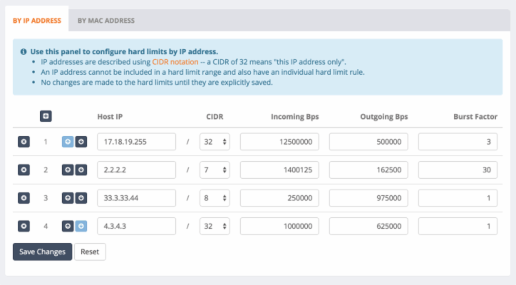
One of the changes we are most excited about is the ability to edit the configuration on the fly. See a screenshot of the Configure Hard Limits Interface below:

This makes even complex configuration changes and setup quick and easy! You’ll now be able to add, edit, and remove hard limits, pools, pool members, priority hosts, and more all from one place.

75f25c30-74b9-486a-9ed8-3dd85c649edd

As you can see, we are also changing the look and feel to match that of RTR. Check back next month for updates on more exciting changes!

Our time frame for General Acceptance of this release is March/April of 2016.

As with all software releases, the 8.4 Release will be free to all customers with valid NetEqualizer Software and Support (NSS).

contact_us_box-1


NetEqualizer DDoS Firewall In Action873a321d-b492-4f3f-9766-1b79c2231cc7

Just a reminder that our DDoS Firewall Option (DFW) is now installed at several locations, and is making a difference by heading off incoming DDoS attacks, even as you read this!

If you suspect you are being hit with sporadic or persistent DDoS attacks, the DDoS firewall option may be well worth the $3500 installation and consulting fee.

You can read more about DDoS on our blog here.

If you have any questions or would simply like to learn more, contact us!

contact_us_box-1


Best Of The Blog

Ten Ways To Make Your Life As An Internet Provider Easier

By Art Reisman – CTO – APconnections

From ISPs and WISPs to networks in libraries, businesses, and universities, Internet use is on the rise. Yet, as the demand for Internet access continues to grow around the world, so do both the opportunities and challenges for service providers.

Just as quickly as your user-base grows, the obstacles facing providers begin to emerge.

From competition to unhappy customers, the venture that once seemed certain to succeed can quickly test the will of even the most battle-hardened and tech-savvy business owners and network administrators. However, for all types of Internet providers, there are ways to make the process smoother…

Photo Of The Month
IMG_2445
What is this mountain range?
Tell us and you could win a $25 gift card!
This picture was taken by a staff member during a recent trip. The first four (4) people to email sales@apconnections.net with the name of this mountain range will win a $25 gift card!
The answer for last month is: The Iowa State Court House in Des Moines, IA

Caching Your iOS Updates Made Easy


If you have talked to us about caching in recent months, you probably know that we are now lukewarm on open ended third party caching servers . The simple un-encrypted content of the Internet circa 2010 has been replaced by dynamically generated pages along with increased content encryption.  It’s not that the caching servers don’t work, it’s just that if they follow rules of good practice, the amount of data that a caching server can cache has diminished greatly over the last few years.

The good news is that Apple has realized the strain they are putting on Business and ISP networks when their updates come out. They have recently released an easy to implement low-cost caching solution specifically for Apple content.  In fact, one of our customers noted in a recent discussion group that they are using an old MAC mini to cache iOS updates for an entire College Campus.

Other notes on Caching Options

Akamai offers a cloud solution. Usually hosted at larger providers, but if you are buying bandwidth in bulk sometimes you can often piggyback on their savings and get a discount on cached traffic.

There is also a service offered by Netflix for larger providers.  However, last I checked you must be using 10 gigabits sustained Netflix traffic to qualify.

Why Are DDoS attacks so hard to block?


I started off this post thinking about whether or not moving your infrastructure to a cloud would give organizations better protection against DDoS attackers, and the short answer is: not really.

The issue with a coordinated DDoS attack is that it is usually orchestrated from a wide range of attacking computers, which are typically hijacked, and retrofitted with undetected scripts that can be turned on to send out a flood of data at target when directed by the hijacker.

When the attack is commenced all these disparate computers start sending data to your organization in unison. In order to stop  just one  of these attacking computers from flooding your network you have to cut it off upstream at the source.

Blocking the attackers incoming IP  at your local firewall doesn’t do any good because the  main pipe  coming from your upstream provider is still flooded with garbage, and most likely unusable.   So you have to follow the trail of attacking computer farther upstream. Your provider should be able to help if you can work with them, but that may or may not be effective, because the DDOS attack, if large enough can also torment your provider.   And even if you do manage to work upstream and block the IP’s where the attack is coming from , some DDOS attackers can just keep coming at you from new wave of  IP addresses.  One person acting alone can Hi-jack millions of computers from around the world and use them in waves of recurring attacks, with little effort.

How does a hijacker have the time to take over a million computers?

I’ll cover that in my next post.

As for the cloud offering protection, a cloud hosted IT infrastructure cannot provide any immunity, the cloud can be attacked; however the cloud providres might have the resources to detect and more easily block an attacker farther upstream  and a bit more quickly so there is some benefit.


See also

Regulate DDOS like pollution

DD4BC Group Targets Companies with Ransom-Driven DDoS Attacks


IT/Tech Geek New Year Resolutions


Here are my tech geek new year resolutions for 2016.  If you have a loved one or friends that could use some help breaking away from their tech induced coma please share.

In 2016 I resolve to:

  1.  change my shirt at least once a week and take a shower ( I have been pretty good at this most of the time)
  2. when working on my laptop, purposely let the power run down and then take a break when the low power warning comes on ( yes I actually do this)
  3. find a window to look out every 15 minutes and make a mental note that that those squirrels and birds out there have it rougher than I do. (just looked out the window and saw 3 squirrels under the bird feeder)
  4. clean the food crumbs and scuz off my keyboard and screen once a week. ( my track record in 2015 was abysmal, but the upside is that nobody will touch my laptop)
  5. stop doing support calls from public places like grocery stores and airports
  6. help a random stranger every day.
  7. call my mom
  8. not to break the glass on my phone more than 3 times this year ( 3 times last year was a record, 5 if you count my iPad)
  9. make one new friend that does not play video games
  10. remind myself that wireless networks are imperfect pieces of @#$@ and not to take it personally when they fail.

Capacity Planning for Cloud Applications


The main factors to consider when capacity planning your Internet Link for cloud applications are:

1) How much bandwidth do your cloud applications actually need?

Typical cloud applications require about 1/2 of a megabit or less. There are exceptions to this rule, but for the most part a good cloud application design does not involve large transfers of data. QuickBooks, salesforce, Gmail, and just about any cloud-based data base will be under the 1/2 megabit guideline. The chart below really brings to light the difference between your typical, interactive Cloud Application and the types of applications that will really eat up your data link.

Screen Shot 2015-12-29 at 4.18.59 PM

Bandwidth Usage for Cloud Based Applications compared to Big Hitters

2) What types of traffic will be sharing your link with the cloud?

The big hitters are typically YouTube and Netflix.  They can consume up to 4 megabits or higher per connection.  Also, system updates for Windows and iOS, as well as internal backups to cloud storage, can consume 20 megabits or more.  Another big hitter can be typical Web Portal sites, such as CNN, Yahoo, and Fox News. A few years ago these sites had a small footprint as they consisted of static images and text.  Today, many of these sites automatically fire up video feeds, which greatly increase their footprint.

3) What is the cost of your Internet Bandwidth, and do you have enough?

Obviously, if there was no limit to the size of your Internet pipe or the required infrastructure to handle it, there would be no concerns or need for capacity planning.  In order to be safe, a good rule of thumb as of 2016 is that you need about 100 megabits per 20 users. Less than that, and you will need to be willing to scale back some of those larger bandwidth-consuming applications, which brings us to point 4.

4) Are you willing to give a lower priority to recreational traffic in order to insure your critical cloud applications do not suffer?

Hopefully you work in an organization where compromise can be explained, and the easiest compromise to make is to limit non-essential video and recreational traffic.  And those iOS updates? Typically a good bandwidth control solution will detect them and slow them down, so essentially they run in the background with a smaller footprint over a longer period of time.

Bandwidth Control in the Cloud


The good news about cloud based applications is that in order to be successful, they must be fairly light weight in terms of their bandwidth footprint. Most cloud based designers keep create applications with a fairly small data footprint. A poorly designed cloud application that required large amounts of data transfer, would not get good reviews and would likely fizzle out.

The bad news is that cloud applications must share your Internet link with recreational traffic, and recreational traffic is often bandwidth intensive with no intention of playing nice when sharing a link .

For businesses,  a legitimate concern is having their critical cloud based applications  starved for bandwidth. When this happens they can perform poorly or lock up, creating a serious drop in productivity.


If you suspect you have bandwidth contention impacting the performance of a critical cloud application, the best place to start  your investigation would be with a bandwidth controller/monitor that can show you the basic footprint of how much bandwidth an application is using.

Below is a quick screen shot that I often use from our NetEqualizer when trouble shooting a customer link. It gives me a nice  snap shot of utilization. I can sort the heaviest users by their bandwidth footprint. I can can then click on a convenient, DNS look up tab, to see who they are.

Screen Shot 2015-12-29 at 8.25.52 AM

In my next post I will detail some typical bandwidth planning metrics for going to the cloud . Stay tuned.

NetEqualizer News: December 2015


December 2015

Greetings!

Enjoy another issue of NetEqualizer News! This month, we update you on our 8.4 Release, talk about what our college customers are saying, feature Part 2 of our articles on RTR best practices, and ask once more for your ideas for the 2016 Roadmap. As always, feel free to pass this along to others who might be interested in NetEqualizer News.

A message from Art…
Art Reisman, CTO – APconnections

With the holiday season in full swing, I want to pause for a moment from my hectic schedule to thank you, our valued customers, for your loyalty in 2015. THANK YOU!thank_you

We here at APconnections truly appreciate your business. Thank you for helping us grow since 2003! I am lucky that I love what I do, and I really enjoy working with as many of you as I can. If you have any feedback, ideas, or questions for me, please reach out to me at art@apconnections.net. I hope you enjoy this month’s newsletter!

twitterAnd remember we are now on Twitter! You can now follow us @NetEqualizer.

We love it when we hear back from you – so if you have a story you would like to share with us of how we have helped you, let us know. Email me directly at art@apconnections.net. I would love to hear from you!

8.4 Release Update
User Interface Enhancements

We have exciting news to share regarding our next software update – Release 8.4. Throughout 2015, we made big changes to our Real-Time Reporting (RTR) and implemented tons of useful features. In 2016, we’ll be focusing our efforts on the rest of the NetEqualizer User Interface. Here are just a few of the things you can expect:

1) Better Configuration Management
We’ve listened to your feedback and are adding in the ability to edit traffic limits and other rules without removing them, control the units (Bps, Kbps, Mbps, etc.) displayed throughout the NetEqualizer interfaces, and manage the configuration all in one place – just to name a few!

2) Secure Logout and HTTPS by default
These popular feature requests will now be standard on all units running the 8.4 Release. Users will now be able to log out from the user interface securely and all data will be sent over HTTPS to and from the NetEqualizer.

3) Manage Time and Date from the GUI
With the 8.4 Release, you’ll be able to manage all time and date features of the NetEqualizer from the user interface instead of the command line.

4) Named Pools
This is one of the most requested items and it will be a reality in the 8.4 Release. With this release, you will be able to name your Pools however you see fit.

Our time frame for General Acceptance of this release is March or April of 2016.

As with all software releases, the 8.4 Release will be free to all customers with valid NetEqualizer Software and Support (NSS).

contact_us_box-1


What Our College Customers Are Saying…

Last month, we featured Morrisville State College in New York, our newest Case Study. Since then, we have heard from several more colleges who wanted to offer their feedback.

Please contact us if you would like your quote added to our testimonials page, even if you are not in the higher education space! We love hearing from all our customers about how we’ve helped them control congestion on their networks.

contact_us_box-1

You can view all of the College & University Testimonials on our website. Here are our two most recent:

usna

United States Naval Academy

IT Administration – United States Naval Academy
“Faced with mounting costs of upgrades for maintenance on our existing bandwidth shaper, in 2014 we did a little research and decided to try the NetEqualizer. We are currently running 1 gigabit for the entire campus, including students and faculty. Our bandwidth utilization is maxed out for most of the day and into the evening. Without a solid bandwidth shaper in place, operations would come to crawl.

Since deploying the NetEqualizer in the Spring of 2015 we have pretty much forgotten about it (in a good way). The NetEqualizer allows us to run at full capacity without the hassles of making adjustments on a daily basis.

One of the best investments we have ever made.”

delaware_valley_univ

Delaware Valley University

Michael Davis – Executive Director of Technology Services
“Delaware Valley University shifted from a packet shaping tool to a NetEqualizer over a year ago, and it is one of the best infrastructure decisions we have made.

The NetEqualizer has allowed us to provide better service to our students without increasing bandwidth, and we hear fewer complaints than ever about bandwidth.

We are planning our next bandwidth increase, and the NetEqualizer is going to make this better than usual. Factoring in student satisfaction with the amount of time that we no longer have to spend tuning a packet shaping device has made us very happy customers.

The support and sales teams at NetEqualizer are also fantastic.”


How Can RTR Help You?
Check Out RTR Best Practices (Part 2)

RTR is great as a simple reporting tool, but it can also be much more! Below we share some helpful ways to utilize the different reports in RTR to better configure your NetEqualizer and understand your network. This is Part 2 of a two-part series – read about Part 1 last month!

1) Figure out who has used the most data over time
Usually on the NetEqualizer, we are talking about usage rates like Mbps, Kbps, etc. But, sometimes you might want to know who has downloaded or uploaded the most data over time (in MB, GB, etc.). Use Traffic History -> Top Talkers to find out!
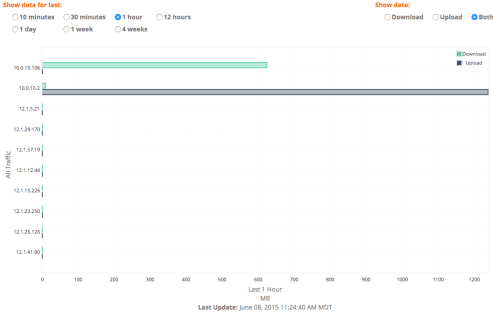
toptalkers

2) Use the Start/Stop RTR page to view system status messages
The NetEqualizer has processes in place that will rotate old data and keep you from running out of memory. However, you can check to make sure things look good and RTR is running smoothly on the Start/Stop RTR page.
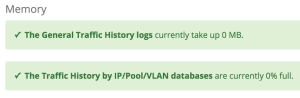
memory

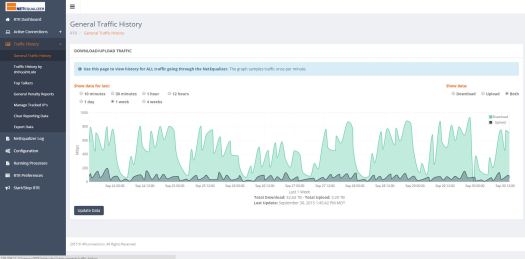
3) Use the General Penalty Reports page to correlate data to the General Traffic History page
In last month’s newsletter, we showed a perfect example of what we’d expect a network to look like. Check out the graphs for Morrisville State College in their Case Study.

We always want to ensure that some Equalizing is occurring during busy times. If you don’t see many penalties during busy times, your HOGMIN value may be set too high.

Consult the User Guide for appropriate HOGMIN values for your network.
GeneralTrafficHistory-2

GeneralPenalty-1

If you are current on NetEqualizer Software and Support (NSS), and have a question about RTR or would like a walk through, click the button below!

contact_us_box-1


It Is Not Too Late… To Give Input Into The 2016 Roadmap

For those of you that have already responded, THANK YOU. Rest assured that we have collected your feedback and added it to our Feature Request List for 2016.

If you have not yet responded, there is still time to influence our fall/winter 2016 release.

If you have a great idea for us, please let us know!

No idea is too “out there” – we want to solve your crunchiest, toughest networking issues.

Email us your idea.


Best Of The Blog

Regulate DDoS Like Pollution

By Art Reisman – CTO – APconnections

I just read another article on DDOS attacks and how companies are being extorted. As usual I am thinking way out of the box again.

Background on the mechanics of DDOS attack

The raw tools of a DDOS attacker are made possible by the billions of computing devices sitting around the world attached to the Internet. A DDOS attacker probes constantly for computers to hack, and then once they have access to several hundred or more in their control, they can point them to any business, sending a storm of data requests jamming Internet links from the outside. Think of a million people trying to cram into the door of your apartment all at once, you would be trapped inside…

Photo Of The Month
building
Where was this picture taken?
Tell us and you could win a $25 gift card! 

This picture was taken by a staff member during a recent customer site visit in the United States. The first four (4) people to email sales@apconnections.net with the name of this building will win a $25 gift card!

The answer for last month is: United States Naval Academy Chapel

Regulate DDoS Like Pollution


I just read another article on DDOS attacks and how companies are being extorted.  As usual I am thinking way out of the box again.

Background on the mechanics of DDOS attack

The raw tools of  DDOS attacker are made possible by  the billions computing devices sitting around  the world attached  to the Internet.   A DDOS attacker probes constantly for computers to hack, and then once they have access to  several hundred or more in their control , they can point  them to any business, sending a storm of data requests jamming  Internet links from the outside. Think of a million people trying to cram into the door of your apartment all at once, you would be trapped inside.

I know first hand this can happen. I put some vulnerable poorly written HTML code on a home computer I was  testing with , and somebody found it , exploited the HTML code and turned it into an attacking computer.

The best and perhaps the only reliable way to stop a DDOS attack is to stop it at the source computers. The problem here is that these are privately owned and are maintained by people that usually have no idea that their computer has been hijacked.  The larger providers do have fairly sophisticated software to detect attacks coming from home users but obviously this is not working very well.

Despite how Orwellian this might sound , I am thinking that perhaps some government standard built into the line cards that connect to the Internet is where we will find a solution.    Okay, I can hear the groans and feel the tomatoes hitting my face , but before you pass judgment , remember these attacks are terroristic in nature. We debate heavily over gun control and the second amendment, and yet we sort of sit idly by and take  trillions in dollars of economic hits from internet terrorists.

A technical solution is quite feasible and here is how it would work. 

Most of the devices that connect computers to the Internet have mini computers built into them. These computers that handle the lowest level of communication are basically factory sealed at the time of manufacture. For example: the computer chips inside wireless Lan cards that connect you to the outside world, they have little factory sealed computer programs.

The footprint of a DDOS attack going out is much different than normal usage patterns and could be easily spotted and detected by the chip sets in these line cards.

The EPA regulates the smoke stacks on coal power plants and the emissions on cars to keep our air clean. The same precedent could be used to regulate any device that connects to the internet. It is absurd at the ease of which a few people can bring down entire multi billion dollar corporations. By inserting a simple logic  in the chip sets of consumer devices we could detect and disable DDOS attack attempts before they get going. In essence  we would remove the criminals tool set , perhaps entirely in a matter of a few years . The beauty of this proposal is that it would have no effect on the operating systems that computers use.  IOS , Linux, Windows would not require any updates, only the platforms that they run on.

I am likely about 10 years ahead of my time with this writing , but I suspect given the rise of DDOS attacks this may be a very viable solution. We’ll see when the dust settles.


Posted in DDoS. 3 Comments »

Do We Really Need a Home Security Network Device ?


A friend of mine sent me a note this morning, asking if our bandwidth shaping device could provide the same type of service as this new DoJo application. Their niche is basically that you cannot trust third-party devices in your home network from being hijacked. For example, the software engineers writing the code that allows you to remote control your dishwasher from your iPhone, are likely not security experts. It is a reasonable assertion that a hacker might exploit a security hole in their software.  The Dojo will detect any smart device breaches and take action, a good idea for sure.

I spent about 20 minutes reading  and thinking about their specification and what value that provides to the home user.  And then it hit me, there is a more obvious precaution to  secure your home network that you might be overlooking.

IN 2016 and going forward THERE SHOULD BE NO REASON TO STORE ANY PERSONAL DATA ON  YOUR HOME NETWORK.

  • Gmail in the cloud
  • Quick books in the cloud
  • Banking in the cloud
  • Facebook in the cloud
  • Google Docs in the cloud
  • Stock Trading in the Cloud

No, nothing is ever completely  secure, and certainly anything you put in the cloud can be hacked, but in my opinion, the level of security afforded by the cloud is far better than anything you can rig together on your home network.

Think about it…

Your bank spends hundreds of millions on staying ahead of hackers. You have secret pictures, secret questions that  challenge you about your second cousin’s favorite hobby.  They know when you coming from new or different IP address.

Gmail now tells you when there is a login from a non standard computer.

These modern cloud applications are about as secure as a consumer could hope for. For the same reason you should not keep wads of cash in a safe in your house, you should not keep any personal information on storage devices in your house. Let your dishwasher go hog wild, who cares. I catch hackers on my network all the time, they have hijacked a few servers to send spam and attack other consumers (my bad), but there is really nothing of interest laying around on any of my devices other than some geezer MP3 music, and my vacation photos on my iPad that nobody else wants to look at anyway.

But if you must secure important data in your home network yes go ahead and invest in a device like the Dojo, it can’t hurt, but before you do that change your habits and use the cloud whenever possible.

Art Reisman

CTO http://www.netequalizer.com

Speed up Your Browser, Free Yourself From Java Script


This morning I read an article by Klint Finley about his experience with disabling Java Script.  I am about 8 hours into my experiment now, and here is what I have found so far.

The results were amazing for the on-line periodicals (traditional newspapers) that I like to browse through. Even with my 20 megabit Internet connection, some of these sites are just endless piles of garbage with advertisements and videos popping up, forcing screen refreshes, and making the content unreadable.  Some of them take so long to load, I just give up and get back to work. With Java script turned off, all that changed.   I have not tested the limits on this yet, but I was able to get through a couple of these sites clicking to various articles and my delays were about 1/10 of normal, which is a significant improvement.

On the downside I found some of  the web-based applications that I depend on to be nonfunctional.  Klint mentions issues with Google Docs, but it goes farther than that. My Google Calendar did not work and neither did my WordPress or Cisco Webex. What I am doing now on my MAC laptop is keeping two browsers active.  Firefox with Java Script disabled, and Safari with it enabled.  I feel that this is a good compromise and worth the effort of switching.

Editors Note: Turning off Java Script is only going to impact things that you launch from a traditional browser. The pre- loaded applications on your devices do not use Java Script.


Comcast at It Again, Shaping Amazon Content


Sunday night I decided I would finally try watching the Sopranos.  Amazon offers Sopranos content for $1.99 an episode, which saves me the hassle of getting a full year HBO subscription to get episodes.  First pass on my smart internet connected TV,  I could not get the Amazon stream to run at all, and so I reverted to watching it on my laptop.  It came up on the laptop, but the video was choppy and constantly breaking up, stalling etc.   In other words it was being throttled by Comcast.  Solution?

I just fired up my IPvanish which hides the source of the video from Comcast, and presto, I was able to watch the whole episode without an issue.   If you experience content streaming problems with your National ISP try using a VPN tunnel, it has worked for me quite well.

There are other posts about this practice.

There is something rotten in the state of online streaming.

How to get access to blocked Internet Sites.

Editors Note: I completely understand why they throttle content, and have covered the economics behind this before. I just don’t like the secrecy  and deception around it, hence I will continue to publish articles when I find it.

Art Reisman
CTO, http://www.netequalizer.com

NetEqualizer News: November 2015


November 2015

Greetings!

Enjoy another issue of NetEqualizer News! This month, we officially release the NE5000, help you out with RTR best practices, feature a live customer NetEqualizer installation and Case Study, and ask for your assistance in our 2016 planning. As always, feel free to pass this along to others who might be interested in NetEqualizer News.

A message from Art…
Art Reisman, CTO – APconnections

We are awaiting our first snow here in Colorado, with our first really cold night killing off the last of the garden this past week (22F/-5C). While the garden goes to sleep, we are laying plans for next year, both in the garden and with the NetEqualizer!art

There is still time to give us feedback for 2016. If you would like to contribute to the 2016 NetEqualizer Roadmap, we welcome your ideas. Call or email us with your suggestions. And, for those of you that have already responded, THANK YOU!

This month make it official – our NE5000 powerhouse solution is ready for primetime! If you are thinking of taking your NetEqualizer solution to the next level, read more below.

twitterAnd remember we are now on Twitter! You can now follow us @NetEqualizer.

We love it when we hear back from you – so if you have a story you would like to share with us of how we have helped you, let us know.

Email me directly at art@apconnections.net. I would love to hear from you!

NE5000: Official Release

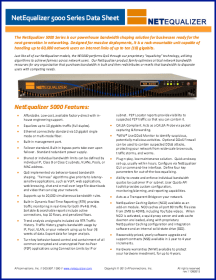
We often get quizzical looks from customers when they see our price performance numbers. Now pushing 10 Gbps line speeds and the ability to shape 60,000 users, we have heard rumblings that some analysts don’t believe our product can perform at this price point. We just ignore them, as they are mostly in the pocket of our competitors anyway.

With a list price of $22,000 USD, our new NE5000 brings bandwidth control pricing back to Earth.

How do we do it?NE5000_data_sheet

Really, it’s just old-fashioned hard work! At the core of our NetEqualizer technology lies a team of computer scientists that spend their days optimizing the algorithms and techniques to ensure high reliability and performance.

We also go against the conventional wisdom of packet classification – that is our other advantage. Packet Classification is on the way out, and there is no ignoring it any longer.

If you have not had a chance to work with us before, we encourage you to check out our new high-end model and set up a WebEx with our technical team for a demo. Click the button below to contact us!

Here is a link to our NE5000 data sheet to get you started:

The NE5000 Data Sheet

contact_us_box-1


Real World RTR: Live at Morrisville State CollegeMorrisville Logo #3

When developing RTR and other NetEqualizer features, we are often using simulated data – real system testing occurs near the end of the cycle. During a recent Technical Refresh session with Rob Gaudreau of Morrisville State College, however, we got to see some exciting results from a live NetEqualizer that we wanted to share.

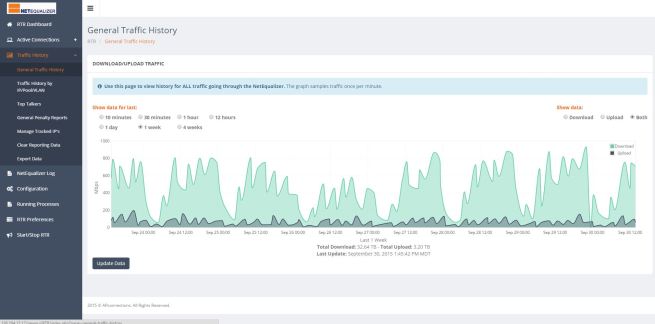
The first interesting graph is their General Traffic History:

GeneralTrafficHistory-1

This is a graph of bandwidth usage for the previous week. It’s great to see how predictable the traffic patterns are, and how useful RTR can be in seeing what occurred historically and how you can use that data to plan for the future.

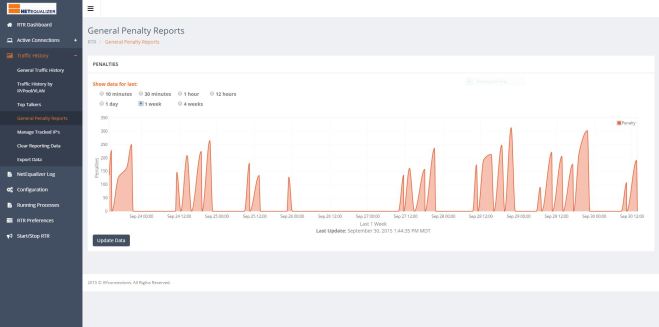
The second interesting graph is their General Penalty History:

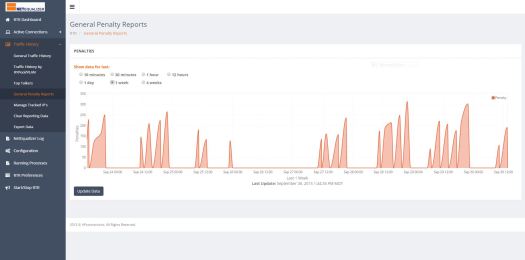
GeneralPenalty-1

This is a graph of the number of penalties that were occurring over the previous week – the same time period used to generate the General Traffic History graph. Notice how the penalty count directly correlates with the busy times.

Those penalties are the NetEqualizer hard at work, shaping the largest connections during congested hours of the day, and letting traffic through untouched during less busy times – all without IT administrator intervention.morrisville_case_study

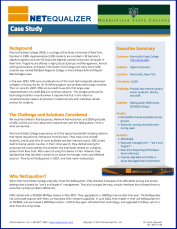
Morrisville State College – Case Study
We enjoyed talking to Rob so much and hearing about his experience with NetEqualizer, that we decided to turn it into a full case study so that others could hear their story. Check it out, here:

Morrisville State College Case Study

Schedule your Technical Refresh Today!
Our Technical Refreshes have been a huge success! These walkthroughs have proven valuable to both new and experienced customers. We are always enhancing our technology and interfaces, so it’s easy to get to the point where features are new and unfamiliar.

If you are current on NetEqualizer Software and Support (NSS), and you are interested in a 30-minute WebEx to see the newest interfaces and learn more about RTR, click the link below!

contact_us_box-1


How Can RTR Help You? Check Out RTR Best Practices (Part 1)

RTR is great as a simple reporting tool, but it can also be much more! Below we share some helpful ways to utilize the different reports in RTR to better configure your NetEqualizer and understand your network. This is Part 1 of a two-part series – look for Part 2 next month!

1) Set up Traffic History IPs for Graphing
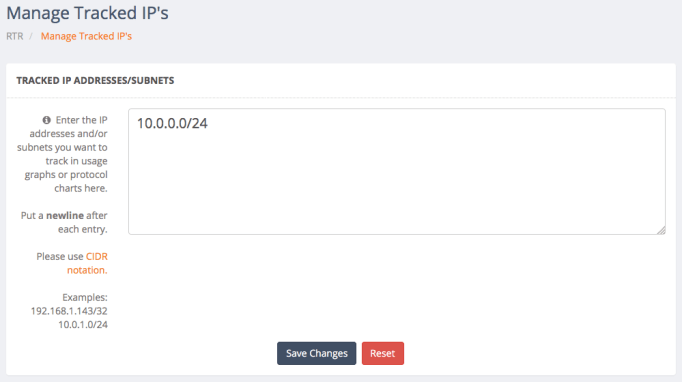
Use Traffic History->Manage Tracked IPs to add your internal IPs (or any other IP you care about) to the tracking system. The first step in getting the most out of RTR is telling it which IP addresses you want to track.

managetrackedips

2) Figure out your Top Users by Monitoring Real-Time Connections
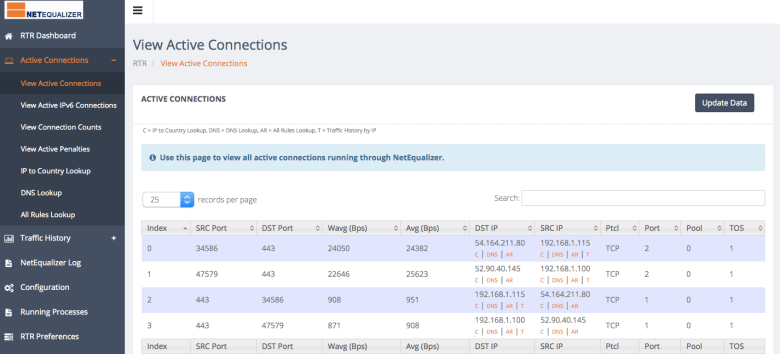
Use Active Connections->View Active Connections and sort by the Wavg column to see your top bandwidth users. Use the C and DNS options below the external IP address to learn more about the connected host (C for Country Code and DNS for NS Lookup). Use the AR and T options below the internal IPs to view rules associated with the IP (AR) and its historical bandwidth usage (T).

unnamed (1)

3) See if P2P is an Issue on your Network
Use Active Connections->View Connection Counts to see the IP addresses of users with lots of concurrent connections.

This data can help you determine any P2P users on your network and can also help you establish a baseline for implementing system-wide connection count limits.

Look for outliers and then set a limit such that almost all of your users fall below it with normal network usage. You can also copy the IP of the user with the most connections, filter the Active Connections table for that user, and then view all the different external IP addresses they are connected to.

unnamed (2)

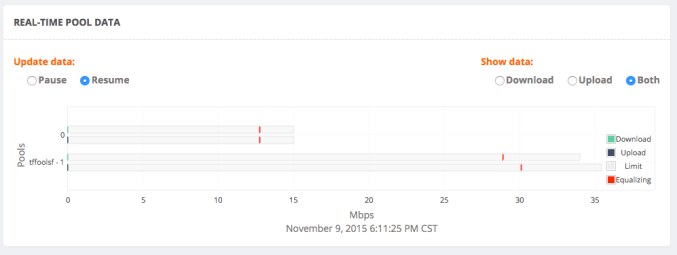
4) See What your Bandwidth Pools are Doing Right Now
Use the RTR Dashboard to view real-time pool data. Remember, all traffic falls under “Pool 0,” so even if you don’t use pools in your network, you can use this horizontal bar graph to see when your network is Equalizing (when it passes the red line).

realtimepool

If you are current on NetEqualizer Software and Support (NSS), and have a question about RTR or would like a walk through, click the button below!

contact_us_box-1


Help Us Set The 2016 NetEqualizer Roadmap

We have finalized our Winter Release (8.4), but there is still time to influence our 2016 Roadmap. We will start planning our Fall Release soon, and we would love to add your ideas to the release.

If you have a great idea for us, please let us know!

No idea is too “out there” – we want to solve your crunchiest, toughest networking issues. Click on the button below to email us your idea.

If you have already responded, rest assured that we have collected your feedback and added it to our Feature Request List.


Best Of The Blog

A Cure for Electronic Theft?

By Art Reisman – CTO – APconnections

What if we created a new electronic currency, a-la Bitcoin, with a twist. Let’s start by taking an idea from the Federal Government, and put a watermark on our personal funds – something unique that signifies who legally possesses the currency. Cattle ranchers do this with a brand so nobody steals their cattle. This has worked pretty well for a few hundred years, right?

With our new personal watermark, suppose somebody breaks into our bank, and wires all your money to some idiot in Russia. In today’s world, the only way to find that money is to follow the trail, and that takes a huge effort from a banking forensics person, working with International governments. The money may travel so fast it may not be possible to recover. Now, suppose the funds had an electronic tag that could not be altered by a criminal. For example currency in your possession has a public private encryption key, and only you can authorize a change in possession…

Photo Of The Month
picture
Where was this picture taken?
Tell us and you could win a $25 gift card.
This picture was taken by a staff member during a recent college customer site visit at a cathedral. The first four people to email sales@apconnections.net with the name of the college where this cathedral is located get a $25 gift card!