QoS is a Matter of Sacrifice


Usually in the first few minutes of talking to a potential customer, one of their requests will be something like “I want to give QoS (Quality of Service) to Video”, or “I want to give Quality of Service to our Blackboard application.”

The point that is often overlooked by resellers, pushing QoS solutions, is that providing QoS for one type of traffic always involves taking bandwidth away from something else.

The network hacks understand this, but for those that are not down in the trenches sometimes we must gently walk them through a scenario.

Take the following typical exchange:

Customer: I want to give our customers access to NetFlix and have that take priority over P2P.

NetEq Rep: How do you know that you have a p2p problem?

Customer: We caught a guy with Kazaa on his Laptop last year so we know they are out there.

NetEq rep (after plugging in a test system and doing some analysis): It looks like you have some scattered p2p users, but they are only about 2 percent of your traffic load. Thirty percent of your peak traffic is video. If we give priority to all your video we will have to sacrifice something, web browsing, chat, e-mail, Skype, and Internet Radio. I know this seems like quite a bit but there is nothing else out there to steal from, you see in order to give priority to video we must take away bandwidth from something else and although you have p2p, stopping it will not provide enough bandwidth to make a dent in your video appetite.

Customer (now frustrated by reality): Well I guess I will just have to tell our clients they can’t watch video all the time. I can’t make web browsing slower to support video, that will just create a new problems.

If you have an oversubscribed network, meaning too many people vying for limited Internet resources, when you implement any form of QoS, you will still end up with an oversubscribed network. QoS must rob Peter to pay Paul.

So when is QoS worth while?

QoS is a great idea if you understand who you are stealing from.

Here are some facts on using QoS to improve your Internet Connection:

Fact #1

If your QoS mechanism involves modifying packets with special instructions (ToS bits) on how it should be treated, it will only work on links where you control both ends of the circuit and everything in between.

Fact #2

Most Internet congestion is caused by incoming traffic. For data originating at your facility, you can certainly have your local router give priority to it on its way out, but you can’t set QoS bits on traffic coming into your network (we assume from a third party). Regulating outgoing traffic with ToS bits will not have any effect on incoming traffic.

Fact #3

Your public Internet provider will not treat ToS bits with any form of priority (the exception would be a contracted MPLS type network). Yes, they could, but if they did then everybody would game the system to get an advantage and they would not have much meaning anyway.

Fact #4

The next two facts address our initial question — Is QoS over the Internet possible? The answer is, yes. QoS on an Internet link is possible. We have spent the better part of seven years practicing this art form and it is not rocket science, but it does require a philosophical shift in thinking to get your arms around.

We call it “equalizing,” or behavior-based shaping, and it involves monitoring incoming and outgoing streams on your Internet link. Priority or QoS is nothing more than favoring one stream’s packets over another stream’s packets. You can accomplish priority QoS on incoming streams by queuing (slowing down) one stream over another without relying on ToS bits.

Fact #5

Surprisingly, behavior-based methods such as those used by our NetEqualizer do provide a level QoS for VoIP on the public Internet. Although you can’t tell the Internet to send your VoIP packets faster, most people don’t realize the problem with congested VoIP is due to the fact that their VoIP packets are getting crowded out by large downloads. Often, the offending downloads are initiated by their own employees or users. A good behavior-based shaper will be able to favor VoIP streams over less essential data streams without any reliance on the sending party adhering to a QoS scheme.

Please remember our initial point “providing QoS for one type of traffic always involves taking bandwidth away from something else,” and take these facts into consideration as you work on QoS for your network.

NetEqualizer Testing and Integration of Squid Caching Server


Editor’s Note: Due to the many variables involved with tuning and supporting Squid Caching Integration, this feature will require an additional upfront support charge. It will also require at minimum a NE3000 platform. Contact sales@netequalizer.com for specific details.

In our upcoming 5.0 release, the main enhancement will be the ability to implement YouTube caching from a NetEqualizer. Since a squid-caching server can potentially be implemented separately by your IT department, the question does come up about what the difference is between using the embedded NetEqualizer integration and running the caching server stand-alone on a network.

Here are a few of the key reasons why using the NetEqualizer caching integration provides for the most efficient and effective set up:

1. Communication – For proper performance, it’s important that the NetEqualizer know when a file is coming from cache and when it’s coming from the Internet. It would be counterproductive to have data from cache shaped in any way. To accomplish this, we wrote a new utility, aptly named “cache helper,” to advise the NetEqualizer of current connections originating from cache. This allows the NetEqualizer to permit cached traffic to pass without being shaped.

2. Creative Routing – It’s also important that the NetEqualizer be able to see the public IP addresses of traffic originating on the Internet. However, using a stand-alone caching server prevents this. For example, if you plug a caching server into your network in front of a NetEqualizer (between the NetEqualizer and your users), all port 80 traffic would appear to come from the proxy server’s IP address. Cached or not, it would appear this way in a default setup. The NetEqualizer shaping rules would not be of much use in this mode as they would think all of the Internet traffic was originating from a single server. Without going into details, we have developed a set of special routing rules to overcome this limitation in our implementation.

3. Advanced Testing and Validation – Squid proxy servers by themselves are very finicky. Time and time again, we hear about implementations where a customer installed a proxy server only to have it cause more problems than it solved, ultimately slowing down the network. To ensure a simple yet tight implementation, we ran a series of scenarios under different conditions. This required us to develop a whole new methodology for testing network loads through the Netequalizer. Our current class of load generators is very good at creating a heavy load and controlling it precisely, but in order to validate a caching system, we needed a different approach. We needed a load simulator that could simulate the variations of live internet traffic. For example, to ensure a stable caching system, you must take the following into consideration:

  • A caching proxy must perform quite a large number of DNS look-ups
  • It must also check tags for changes in content for cached Web pages
  • It must facilitate the delivery of cached data and know when to update the cache
  • The squid process requires a significant chunk of CPU and memory resources
  • For YouTube integration, the Squid caching server must also strip some URL tags on YouTube files on the fly

To answer this challenge, and provide the most effective caching feature, we’ve spent the past few months developing a custom load generator. Our simulation lab has a full one-gigabit connection to the Internet. It also has a set of servers that can simulate thousands of simultaneous users surfing the Internet at the same time. We can also queue up a set of YouTube users vying for live video from the cache and Internet. Lastly, we put a traditional point-to-point FTP and UDP load across the NetEqualizer using our traditional load generator.

Once our custom load generator was in place, we were able to run various scenarios that our technology might encounter in a live network setting.  Our testing exposed some common, and not so common, issues with YouTube caching and we were able to correct them. This kind of analysis is not possible on a live commercial network, as experimenting and tuning requires deliberate outages. We also now have the ability to re-create a customer problem and develop actual Squid source code patches should the need arise.

What Is Deep Packet Inspection and Why the Controversy?


By Art Reisman

Art Reisman CTO www.netequalizer.com

Editor’s note: Art Reisman is the CTO of APconnections. APconnections designs and manufactures the popular NetEqualizer bandwidth shaper. APconnections removed all deep packet inspection technology from their NetEqualizer product over 2 years ago.

Article Updated March 2012

As the debate over Deep Packet Inspection continues, network administrators are often faced with a difficult decision: ensure network quality or protect user privacy. However, the legality of the practice is now being called into question, adding a new twist to the mix. Yet, for many Internet users, deep packet inspection continues to be an ambiguous term in need of explanation. In the discussion that follows, deep packet inspection will be explored in the context of the ongoing debate.

Exactly what is deep packet inspection?

All traffic on the Internet travels around in what is called an IP packet. An IP packet is a string of characters moving from computer A to computer B. On the outside of this packet is the address where it is being sent. On the inside of the packet is the data that is being transmitted.

The string of characters on the inside of the packet can be conceptually thought of as the “payload,” much like the freight inside of a railroad car. These two elements, the address and the payload, comprise the complete IP packet.

When you send an e-mail across the Internet, all your text is bundled into packets and sent on to its destination. A deep packet inspection device literally has the ability to look inside those packets and read your e-mail (or whatever the content might be).

Products sold that use DPI are essentially specialized snooping devices that examine the content (pay load inside) of Internet packets. Other terms sometimes used to describe techniques that examine Internet data are packet shapers, layer-7 traffic shaping, etc.

How is deep packet inspection related to net neutrality?

Net neutrality is based on the belief that nobody has the right to filter content on the Internet. Deep packet inspection is a method used for filtering. Thus, there is a conflict between the two approaches. The net neutrality debate continues to rage in its own right.

Why do some Internet providers use deep packet inspection devices?

There are several reasons:

1) Targeted advertising If a provider knows what you are reading, they can display content advertising on the pages they control, such as your login screen or e-mail account.

2) Reducing “unwanted” traffic — Many providers are getting overwhelmed by types of traffic that they deem as less desirable such as Bittorrent and other forms of peer-to-peer. Bittorrent traffic can overwhelm a network with volume. By detecting and redirecting the Bittorrent traffic, or slowing it down, a provider can alleviate congestion.

3) Block offensive material — Many companies or institutions that perform content filtering are looking inside packets to find, and possibly block, offensive material or web sites.

4) Government spying — In the case of Iran (and to some extent China), DPI is used to keep tabs on the local population.

When is it appropriate to use deep packet inspection?

1) Full disclosure — Private companies/institutions/ISPs that notify employees that their Internet use is not considered private have the right to snoop, although I would argue that creating an atmosphere of mistrust is not the mark of a healthy company.

2) Law enforcement — Law enforcement agencies with a warrant issued by a judge would be the other legitimate use.

3) Intrusion detection and prevention– It is one thing to be acting as an ISP  and to eaves drop on a public conversation;  it is entirely another paradigm if you are a  private business examining the behavior of somebody  coming in your front door. For example in a private home it is within your right to look through your peep hole and not let shady characters into your home.  In a private business it is a good idea to use Deep packet inspection in order to block unwanted intruders from your network. Blocking bad guys before they break into and damage your network and is perfectly acceptable.

4) Spam filtering- Most consumers are very happy to have their ISP or email provider remove spam.  I would categorize this type of DPI as implied disclosure. For example, in Gmail you do have the option to turn Spam filtering off, and although most consutomers may not realize that google is reading their mail ( humans don’t read it but computer scanners do), their motives are understood. What consumers may not realize is that their email provider is also reading everything they do in order to set target advertising

Does Content filtering use Deep Packet Inspection ?

For the most part no. Content filtering is generally  done at the URL level. URL’s are generally considered public information, as routers need to look this up anyway. We have only encountered content filters at private institutions that are within their right.

What about spam filtering, does that use Deep Packet Inspection?

Yes many Spam filters will look at content, and most people could not live without their spam filter, however with spam filtering most people have opted in at one point or another, hence it is generally done with permission.

What is all the fuss about?

It seems that consumers are finally becoming aware of what is going on behind the scenes as they surf the Internet, and they don’t like it. What follows are several quotes and excerpts from articles written on the topic of deep packet inspection. They provide an overview not only of how DPI is currently being used, but also the many issues that have been raised with the practice.

For example, this is an excerpt from a recent PC world article:

Not that we condone other forms of online snooping, but deep packet inspection is the most egregious and aggressive invasion of privacy out there….It crosses the line in a way that is very frightening.

Paul Stephens, director of policy and advocacy for the Privacy Rights Clearinghouse, as quoted in the E-Commerce Times on November 14, 2008. Read the full article here.

Recently, Comcast had their hand slapped for re-directing Bittorrent traffic:

Speaking at the Stanford Law School Center for Internet and Society, FCC Chairman Kevin Martin said he’s considering taking action against the cable operator for violating the agency’s network-neutrality principles. Seems Martin was troubled by Comcast’s dissembling around the BitTorrent issue, not to mention its efforts to pack an FCC hearing on Net neutrality with its own employees.

— Digital Daily, March 10, 2008. Read the full article here.

Later in 2008, the FCC came down hard on Comcast.

In a landmark ruling, the Federal Communications Commission has ordered Comcast to stop its controversial practice of throttling file sharing traffic.

By a 3-2 vote, the commission on Friday concluded that Comcast monitored the content of its customers’ internet connections and selectively blocked peer-to-peer connections.

Wired.com, August 1, 2008.Read the full article here.

To top everything off, some legal experts are warning companies practicing deep packet inspection that they may be committing a felony.

University of Colorado law professor Paul Ohm, a former federal computer crimes prosecutor, argues that ISPs such as Comcast, AT&T and Charter Communications that are or are contemplating ways to throttle bandwidth, police for copyright violations and serve targeted ads by examining their customers’ internet packets are putting themselves in criminal and civil jeopardy.

Wired.com, May 22, 2008. Read the full article here.

However, it looks like things are going the other way in the U.K. as Britain’s Virgin Media has announced they are dumping net neutrality in favor of targeting bittorrent.

The UK’s second largest ISP, Virgin Media, will next year introduce network monitoring technology to specifically target and restrict BitTorrent traffic, its boss has told The Register.

The Register, December 16, 2008. Read the full article here.

Canadian ISPs confess en masse to deep packet inspection in January 2009.

With the amount of attention being paid to Comcast recently, a lot of people around the world have begun to look at their ISPs and wonder exactly what happens to their traffic once it leaves. This is certainly true for Canada, where several Canadian ISPs have come under the scrutiny of the CRTC, the regulatory agency responsible for Canada. After investigation, it was determined that all large ISPs in Canada filter P2P traffic in some fashion.

Tech Spot, January 21, 2009. Read the full article here.

In April 2009, U.S. lawmakers announced plans to introduce legislation that would limit the how ISPs could track users. Online privacy advocates spoke out in support of such legislation.

In our view, deep packet inspection is really no different than postal employees opening envelopes and reading letters inside. … Consumers simply do not expect to be snooped on by their ISPs or other intermediaries in the middle of the network, so DPI really defies legitimate expectations of privacy that consumers have.

Leslie Harris, president and CEO of the Center for Democracy and Technology, as quoted on PCWorld.com on April 23, 2009. Read the full article here.

The controversy continues in the U.S. as AT&T is accused of traffic shaping, lying and blocking sections of the Internet.

7/26/2009 could mark a turning point in the life of AT&T, when the future looks back on history, as the day that the shady practices of an ethically challenged company finally caught up with them: traffic filtering, site banning, and lying about service packages can only continue for so long before the FCC, along with the bill-paying public, takes a stand.

Kyle Brady, July 27, 2009. Read the full article here.

[February 2011 Update] The Egyptian government uses DPI to filter elements of their Internet Traffic, and this act in itself becomes the news story. In this video in this news piece, Al Jazeera takes the opportunity to put out an unflattering piece on the company Naurus that makes the DPI technology and sold it to the Egyptians.

While the debate over deep packet inspection will likely rage on for years to come, APconnections made the decision to fully abandon the practice over two years ago, having since proved the viability of alternative approaches to network optimization. Network quality and user privacy are no longer mutually exclusive goals.

Created by APconnections, the NetEqualizer is a plug-and-play bandwidth control and WAN/Internet optimization appliance that is flexible and scalable. When the network is congested, NetEqualizer’s unique “behavior shaping” technology dynamically and automatically gives priority to latency sensitive applications, such as VoIP and email. Click here for a full price list.

NetEqualizer Brand Becoming an Eponym for Fairness and Net Neutrality techniques


An eponym is a general term used to describe from what or whom something derived its name. Therefore, a proprietary eponym could be considered a brand name, product or service mark which has fallen into general use.

Examples of common brand Eponyms include Xerox, Google, and  Band Aid.  All of these brands have become synonymous with the general use of the class of product regardless of the actual brand.

Over the past 7 years we have spent much of our time explaining the NetEqualizer methods to network administrators around the country;  and now,there is mounting evidence,  that  the NetEqualizer brand, is taking on a broader societal connotation. NetEqualizer, is in the early stages as of becoming and Eponym for the class of bandwidth shapers that, balance network loads and ensure fairness and  Neutrality.   As evidence, we site the following excerpts taken from various blogs and publications around the world.

From Dennis OReilly <Dennis.OReilly@ubc.ca> posted on ResNet Forums

These days the only way to classify encrypted streams is through behavioral analysis.  ….  Thus, approaches like the NetEqualizer or script-based ‘penalty box’ approaches are better.

Wisp tutorial Butch Evans

About 2 months ago, I began experimenting with an approach to QOS that mimics much of the functionality of the NetEqualizer (http://www.netequalizer.com) product line.

TMC net

Comcast Announces Traffic Shaping Techniques like APconnections’ NetEqualizer…

From Technewsworld

It actually sounds a lot what NetEqualizer (www.netequalizer.com) does and most people are OK with it…..

From Network World

NetEqualizer looks at every connection on the network and compare it to the overall trunk size to determine how to eliminate congestion on the links

Star Os Forum

If you’d really like to have your own netequalizer-like system then my advice…..

Voip-News

Has anyone else tried Netequalizer or something like it to help with VoIP QoS? It’s worked well so far for us and seems to be an effective alternative for networks with several users…..

Enhance Your Internet Service With YouTube Caching


Have you ever wondered why certain videos on YouTube seem to run more smoothly than others? Over the years, I’ve consistently noticed that some videos on my home connection will run without interruption while others are as slow as molasses. Upon further consideration, I determined a simple common denominator for the videos that play without interruption — they’re popular. In other words, they’re trending. And, the opposite is usually true for the slower videos.

To ensure better performance, my Internet provider keeps a local copy of the popular YouTube content (caching), and when I watch a trending video, they send me the stream from their local cache. However, if I request a video that’s not contained in their current cache, I’m sent over the broader Internet to the actual YouTube content servers. When this occurs, my video streams are located off the provider’s local network and my pipe can be restricted. Therefore, the most likely cause for the slower video stream is traffic congestion at peak hours.

Considering this, caching video is usually a win-win for the ISP and Internet consumer. Here’s why…

Benefits of Caching Video for the ISP

Last-mile connections from the point of presence to the customer are usually not overloaded, especially on a wired or fiber network such as a cable operator. Caching video allows a provider to keep traffic on their last mile and hence doesn’t clog the provider’s exchange point with the broader Internet. Adding bandwidth to the exchange point is expensive, but caching video will allow you to provide a higher class of service without the large recurring costs.

Benefits of ISP-Level Caching for the Internet Consumer

Put simply, the benefit is an overall better video-viewing experience. Most consumers could care less about the technical details behind the quality of their Internet service. What matters is the quality itself. In this competitive market and the rising expectations for video service, the ISP needs every advantage it can get.

Why Target YouTube for Caching?

YouTube video is very bandwidth intensive and relatively stable content. By stable, we mean once posted, the video content does not get changed or edited. This makes it a prime candidate for effective caching.

Should an ISP Cache All Of The Data It Can?

While this is the default setting for most Squid caching servers, we recommend only caching the popular free video sites such as YouTube. This would involve some selective filtering, but caching everything in a generic mode can cause confusion with some secure sites not functioning correctly.

Note: With Squid Proxy you’ll need a third party module to cache YouTube.

How Will Caching Work with My NetEqualizer or Other Bandwidth Control Device?

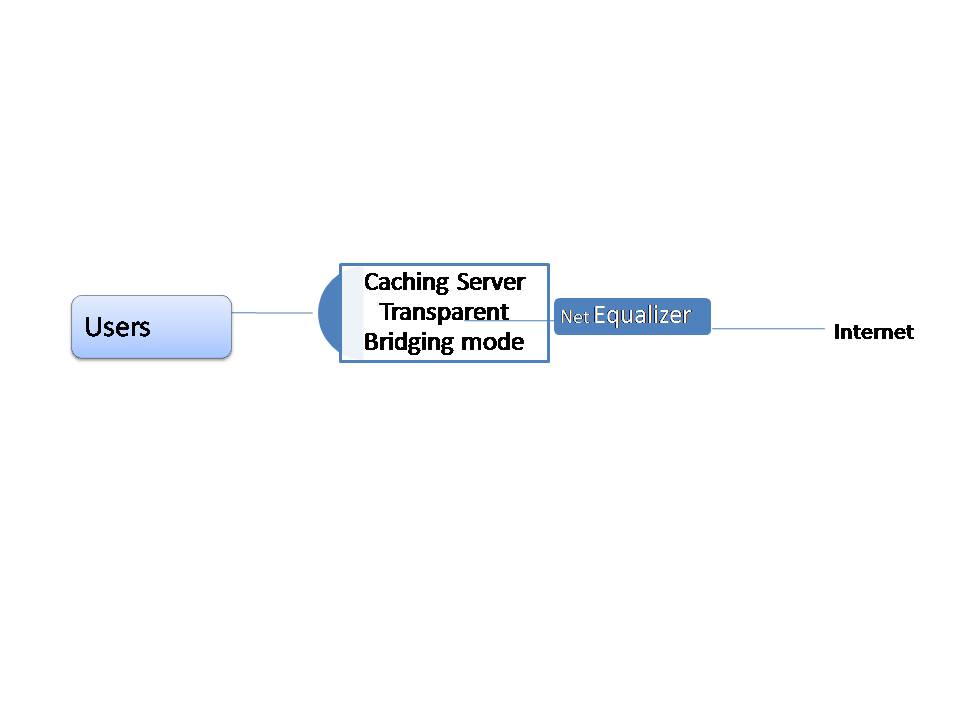
You’ll need to put your caching server in transparent mode and run it on the private side of your NetEqualizer.

NetEqualizer Placement with caching server

Related Article fourteen tips to make your WISP more profitable

PPPoE may be outdated


By Art Reisman

Art Reisman is  currently CTO and Co-Founder of NetEqualizer.  He  has worked at several start up companies over the years, and has invented and brought several technology products to market, both on his own, and with backing of larger corporations.  Including tools for the automotive industry.

We often get asked if we support PPPoE (Point-to-Point Protocol over Ethernet) through our bandwidth controller at this time.  We have decided not to support PPPoE.  What follows is our reasoning behind this decision.

First, some background on PPP.  Point-to-Point Protocal (PPP) is the protocol that was developed to allow the Internet to traverse through the phone system.  It converts digital IP traffic over a modem (analog phone circuit) into sound, and is essential when doing dial up because without it you could not have dial up internet service.  In other words, a phone line to a customer’s house cannot transmit IP packets directly, only audio sounds, so the PPP is a protocol converter that takes a series of sounds and transmits them over the line.  Similar to FAX, if you pick up the line and listen you will hear squealing.

1) We were not interested in building a PPPoE billing system and database.

I assume that since every dial up system also required billing and an authentication database, that somehow the PPP server, the thing that has a modem pool to talk over phone lines, also needs to integrate other aspects of the service to make a turn-key system for providers with Radius, billing etc.

2)There is no reason to continue legacy PPP in the new environment.

As providers transitioned from dial up to broadband wireless, in order to accommodate their legacy PPP server systems, they retrofitted their new wireless network with PPPoE modems at the customer site.   This was so the central PPP server would only need to transmit serialized sound data out of the lines as it had with phone lines.  It also served as way to preserve the legacy, dial up, connection mechanism that authorized users.

We believe that providers should transition from PPP to newer technologies, as PPP is becoming obsolete.

3)Operators are putting off the inevitable.

Now with the investment of these PPP servers integrating with the billing systems, we are where we are today. Even though there is no need to transmit data serially over the Ethernet, providers use PPPoE to preserve other aspects of their existing infrastructure which grew up when dial up was king.  This is similar to mainframe vendors trying to preserve their old screen-scrape technology when the Internet first came out, rather than move to the inevitable web GUI interface (where they eventually all had to go anyways).

4) Newer technologies are more efficient.

As far as I can tell, new wireless providers that do not do any traditional dial up are just creating overhead by trying to preserve PPP, as it is not needed in their circuit.  Generic IP and more modern forms of customer authentication such as MAC address or a login are more efficient.

Of course, you may disagree with our reasoning.  Please feel free to let us know your thoughts on PPPoE.

Nine tips to consider when starting a product company


By Art Reisman

I often get asked to help friends,  and friends  of friends, with flushing out their start up idea’s.  Usually they are looking for a cheerleader to build confidence.  Confidence and support are essential part of building a company; however I will not be addressing those aspects here. I am not a good predictor of what might take off, and a marginal motivator at best,  but I do know from many failures as well as successes, the things you will need  to give yourself the best chance of success.    What follows are   just the facts, as I know them.

1) You don’t have much of a chance unless you jump in full time.

If you are not willing to jump into your venture full time, you are stacking the odds against yourself. Going halfway is like running a marathon without training and expecting to win. So be honest with yourself, are your doing this as a hobby or do you expect a business to pop out?  I know the ideal situation is to start as a hobby and when the business grows a bit then go full time,  you can also win the lottery but its not likely.   Even with a unique idea and no obvious competition you are still competing for mind share.  Treating your business as a hobby is akin to studying for a final when you don’t know what is on the test.  To insure a good grade you’ll need to know more than everybody else taking the test which means you need to study hard.

2) If your idea  requires a change in culture or behavior you are less likely to succeed.

There are literally trillions of ideas and things you can do that might be successful given a little energy. Too often I see entrepreneurs stuck on something that requires a change of consumer behavior beyond their control. This is not to say their ideas are bad or that a change in human behavior is not in order. The problem is you will have limited time and resources to promote and market your idea.  The best inventions probe high demand low resistance niches , meaning they fit into a segment where there will little adaption resistance.

I worked with a company that invented a shoe that would allow you to track your children.  One of the  behavioral show stoppers was that you had to put the shoe  in a charger every night.  Who puts their shoes in  a charger? It’s not that it could not be sold with this limitation, but the fact that it required a change in behavior which made  it a much less attractive idea.

Although one might assume that text messaging on phones just happened , from its roots in the Japanese market of the early 1990’s,  it took 10 years to become commonplace in the US. The feature was an add-on to product already in a channel and generating revenue hence it did not require a house bet from existing service providers to bring to market. You most likely will not have this kind channel to leverage for your product, in other words, it takes a special set of circumstances to influence human behavior and be successful.

3) Your idea involves  consulting or support services

If your goal is to get immediate income and become your own boss, then consulting and services are relatively easy to get going in.  Yes you will need to work hard to win over customers and retain them, but realistically if you are  good at what you do,  income will follow . The downside of consulting and support  is that it is very hard to clone your value  and expand beyond your original partners. For this reason, the tips in this article are geared toward bringing a product to market.

4) Sell it to strangers

Hopefully you don’t have too many enemies but the point of this statement is validate your product need. Selling a book to your family and friends through courtesy buys is good for some feedback and worthwhile, but you will never know how your product will fare until you are converting random strangers.  If you can sell to somebody that  hates you personally then you’ll know the product has staying power.

5) Test Market with small samples

The late billy mayes had it down to a science , take almost anything  produce a commerical and sell it to a small market with  a late night TV advertisement. Obviously this validation is only good for home consumer products, but the idea is to test market small.

6) Sell the idea without the goods.

You need to be careful with this one.  The general rule here is, do not under any circumstance take any money unless you  have your product in stock. Either that or fully disclose to potential customers that they are  pre-ordering a product that does not physically exist. If you break these ground rules you will fail. I learned this trick from a friend of mine who wanted to sell Satellite dishes when they first came out. They did not even have a Franchise license, but they took out a small Advertisement in the local paper for Satellite dishes and the response was overwhelming , they just told inquiries they were out of stock ( true statement) and then proceeded to get a Franchise License and follow up with their inquiries.

7) How do you eat an Elephant?

One bite at a time. I define success as selling something , anything and making one dollar, once you have made a dollar you can concentrate on your second dollar. Great if you can go faster, but unless you are really big  now as a company, there will be plenty of time and  space to grow your product into. You don’t need sales offices all over the world that is just a distraction.

8) Ask successful people to help and advise.  Most entrapanuers and business people love to help others get started and if you have a good idea they can help you open doors for oppurtunities but you must ask, and you must be sincere. Everybody loves the underdog and is willing to help. Remember your brother in law, that is a sales rep for Toshiba, is not who I am talking about.  You need to get advice from people who have started companies from scratch. Nothing wrong with brother in law at Toshiba, but the if you are doing a product spend your time getting advice from others who have brought products to marker.

9) Stop worrying about the competition.  Just do what you do best.  You will  often   to differentiate yourself from the competition.  I politely keep the subject on what I know , my product, and how it fits the customers needs.    Never bad mouth a competitor even if you believe them to be scum an astute customer will figure that out for themselves. Let somebody else bad mouth them.

10) I am waiting to be in a better financial situation before I start a  company

Time on this earth is way more valuable than the any dollar you can make. Letting years go by is not a rational option if you intend on doing a product. Your financial needs are likely  an illusion created by others expectations.  If you have to live in trailer without heat to make ends meet while developing your product you can do it. In fact,  the sacrifices you make will be far healthier for your children than that new Nintendo game. It just amazes me how many people will borrow 100k and give it to a school for a childs education while at the same time are afraid of investing in their dream with time and savings.

About the Author:

Art Reisman is  currently CTO and Co-Founder of NetEqualizer. He  has worked at several start up companies over the years , and has invented and brought several technology products to market, both on his own, and with backing of larger corporations.  Including tools for the automotive industry.

Related Articles

Practical and inspirational tips on bootstrapping

Building a software company from scratch

Top Five Causes For Disruption Of Internet Service


slow-internetEditor’s Note: We took a poll from our customer base consisting of thousands of NetEqualizer users. What follows are the top five most common causes  for disruption of Internet connectivity.

1) Congestion: Congestion is the most common cause for short Internet outages.  In general, a congestion outage is characterized by 10 seconds of uptime followed by approximately 30 seconds of chaos. During the chaotic episode, the circuit gridlocks to the point where you can’t load a Web page. Just when you think the problem has cleared, it comes back.

The cyclical nature of a congestion outage is due to the way browsers and humans retry on failed connections. During busy times usage surges and then backs off, but the relief is temporary. Congestion-related outages are especially acute at public libraries, hotels, residence halls and educational institutions. Congestion is also very common on wireless networks. (Have you ever tried to send a text message from a crowded stadium? It’s usually impossible.)

Fortunately for network administrators, this is one cause of disruption that can be managed and prevented (as you’ll see below, others aren’t that easy to control). So what’s the solution? The best option for preventing congestion is to use some form of bandwidth control. The next best option is to increase the size of your bandwidth link. However without some form of bandwidth control, bandwidth increases are often absorbed quickly and congestion returns. For more information on speeding up internet services using a bandwidth controller, check out this article.

2) Failed Link to Provider: If you have a business-critical Internet link, it’s a good idea to source service from multiple providers. Between construction work, thunderstorms, wind, and power problems, anything can happen to your link at almost any time. These types of outages are much more likely than internal equipment failures.

3) Service Provider Internet Speed Fluctuates: Not all DS3 lines are the same. We have seen many occasions where customers are just not getting their contracted rate 24/7 as promised.

4) Equipment Failure: Power surges are the most common cause for frying routers and switches. Therefore, make sure everything has surge and UPS protection. After power surges, the next most common failure is lockup from feature-overloaded equipment. Considering this, keep your configurations as simple as possible on your routers and firewalls or be ready to upgrade to equipment with faster newer processing power.

Related Article: Buying Guide for Surge and UPS Protection Devices

5) Operator Error: Duplicating IP addresses, plugging wires into the wrong jack, and setting bad firewall rules are the leading operator errors reported.

If you commonly encounter issues that aren’t discussed here, feel free to fill us in in the comments section. While these were the most common causes of disruptions for our customers, plenty of other problems can exist.

Natural Address Translation FAQ


By Art Reisman

Art Reisman CTO www.netequalizer.com

Editor’s note: Art Reisman is the CTO of APconnections. APconnections designs and manufactures the popular NetEqualizer bandwidth shaper.

Editors Note: The official term for one public IP address mapped to multiple private IP addresses is PAT. However, most IP people use the terms interchangeably.


I was doing some internal research on natural address translation (NAT) this past week, and as I looked for reliable sources, I became a bit frustrated with the information available. Yes, the information is out there and the Wikipedia article has some nice charts with all the details. But, if you’re looking  for the rational reasons behind NAT, you might want to shoot yourself in the head by the time you read through all of the information and find what you’re looking for.

To preserve your sanity, as well as answer some key questions quickly, I’ve put together the following Q&A detailing some key points when it comes to NAT. We’ll start with the basics and go from there.

What is NAT?

In order to allow multiple users to share a single IP address, modern routers utilize NAT to find unused port numbers and map them to a set of local private IP addresses. So, for example, let’s say your Internet provider gives you a single IP address for your household. It could be something like 98.245.90.60, which is a public IP address owned by Comast.

All of the computers in your house must share the single IP address that Comcast provides. So, your local router — the Linksys wireless router you bought for $79 — will use NAT to tag traffic with port numbers and then create some additional IP addresses right where your house connects to the Internet.

Let’s say you contacted the Microsoft website to download the latest service pack. When Microsoft sends you the download, it’s going to send it to 98.245.90.60:5001. “5001” is the port number established for the FTP transfer and 98.245.90.60 is the Comcast-owned Internet address for your entire house. Using NAT, your router will then interpret the port number and change the IP address to a unique internal address (like 192.168.1.103:8700, for example) before it gets to your computer.

Why do we need NAT?

NAT is useful because home users often have more than one computer in their household and yet only have a single IP address from their provider. Since every computer that talks on the Internet requires an IP address, it would not be possible to have more than one computer in your house without NAT.

How does NAT map a single IP address to multiple computers without things like Web browsing getting mixed up?

First, here’s some background on the difference between a base IP address and a port number. Internet addresses have two parts: an IP address, such as 98.243.90.60, and a port number. The IP address is used to route data across the Internet and the port is used by the receiving device — your computer — to determine what service to provide. For example, port 80 is the default port address for Web browsing.

Before the invention of NAT, Internet routers mostly ignored the port part of the address as they did not need it to move IP packets across the Internet. When describing the function of a port number, I like to use the analogy of a large dormitory with individual room numbers for the people living there. The postal service ignores the room numbers as their service ends at the address of the dormitory. They do not sort the mail by room number. For internet routers, port numbers are like room numbers. They deliver the packet to the end user’s computer and the port number is then interpreted.

The range of possible port numbers are in the tens of thousands, which is more than enough interpreting services by a user’s computer.  Think of a dorm with 1,000 residents in which they would only need 1,000 numbers for mailboxes, but still had 1,000,000 reserved.

What happens if there are no free ports to do the translation?

On small home networks this is not likely to happen, but you can get conflicts if, for example, you try to use NAT on a network with tens of thousands  of users. The total number of unique ports available is 65,000 and most users will require more than one port at a time.

Does NAT slow down my Internet connection?

Not enough for you to notice.

Why does my provider only allocate one IP address for my residence?

Even though there are about 4,000,000,000 (four billion) possible Internet addresses, the actual addresses are given out in large blocks, and once given out, they are hard to get back. So, and this is purely an example, let’s say a large company was given a class B set of addresses (which used to be common in the early days). They would have 64,000 addresses in their control. Hence, even with 4,000,000,000 possible addresses, they are in short supply, and your provider cannot afford to give them out more than one at a time.

Can I have more than one IP address?

Yes, but you would likely need a business class Internet service, which is generally quite a bit more expensive than residential-type service.

When will the world run out of IP addresses?

Some say we already have and there is a big push to go to a new standard called IPV6. However, we don’t think that will ever happen.

Editors Note: The official term for one public IP address mapped to multiple private IP addresses is PAT. However, most IP people use the terms interchangeably.

Does Lower cost bandwidth foretell a decline in Expensive Packet Shapers ?


This excerpt is from a recent interview with Art Reisman and has some good insight into the future of bandwidth control appliances.

Are you seeing a drop off in layer 7 bandwidth shapers in the marketplace?

In the early stages of the Internet, up until the early 2000s, the application signatures were not that complex and they were fairly easy to classify. Plus the cost of bandwidth was in some cases 10 times more expensive than 2010 prices. These two factors made the layer 7 solution a cost-effective idea. But over time, as bandwidth costs dropped, speeds got faster and the hardware and processing power in the layer 7 shapers actually rose. So, now in 2010 with much cheaper bandwidth, the layer 7 shaper market is less effective and more expensive. IT people still like the idea, but slowly over time price and performance is winning out. I don’t think the idea of a layer 7 shaper will ever go away because there are always new IT people coming into the market and they go through the same learning curve. There are also many WAN type installations that combine layer 7 with compression for an effective boost in throughput. But, even the business ROI for those installations is losing some luster as bandwidth costs drop.

So, how is the NetEqualizer doing in this tight market where bandwidth costs are dropping? Are customers just opting to toss their NetEqualizer in favor of adding more bandwidth?

There are some that do not need shaping at all, but then there are many customers that are moving from $50,000 solutions to our $10,000 solution as they add more bandwidth. At the lower price points, bandwidth shapers still make sense with respect to ROI. Even with lower bandwidth costs  users will almost always clog the network with new more aggressive applications. You still need a way to gracefully stop them from consuming everything, and the NetEqualizer at our price point is a much more attractive solution.

Related article on Packeteers recent Decline in Revenue

Related article Layer 7 becoming obsolete from SSL

The Inside Scoop on Where the Market for Bandwidth Control Is Going


Editor’s Note: The modern traffic shaper appeared in the market in the late 1990s. Since then market dynamics have changed significantly. Below we discuss these changes with industry pioneer and APconnections CTO Art Reisman.

Editor: Tell us how you got started in the bandwidth control business?

Back in 2002, after starting up a small ISP, my partners and I were looking for a tool that we could plug-in and take care of the resource contention without spending too much time on it. At the time, we had a T1 to share among about 100 residential users and it was costing us $1200 per month, so we had to do something.

Editor: So what did you come up with?

I consulted with my friends at Cisco on what they had. Quite a few of my peers from Bell Labs had migrated to Cisco on the coat tails of Kevin Kennedy, who was also from Bell Labs. After consulting with them and confirming there was nothing exactly turnkey at Cisco, we built the Linux Bandwidth Arbitrator (LBA) for ourselves.

How was the Linux Bandwidth Arbitrator distributed and what was the industry response?

We put out an early version for download on a site called Freshmeat. Most of the popular stuff on that site are home-user based utilities and tools for Linux. Given that the LBA was not really a consumer tool, it rose like a rocket on that site. We were getting thousands of downloads a month, and about 10 percent of those were installing it someplace.

What did you learn from the LBA project?

We eventually bundled layer 7 shaping into the LBA. At the time that was the biggest request for a feature. We loosely partnered with the Layer 7 project and a group at the Computer Science Department at the University of Colorado to perfect our layer 7 patterns and filter. Myself and some of the other engineers soon realized that layer 7 filtering, although cool and cutting edge, was a losing game with respect to time spent and costs. It was not impossible but in reality it was akin to trying to conquer all software viruses and only getting half of them. The viruses that remain will multiply and take over because they are the ones running loose. At the same time we were doing layer 7, the core idea of Equalizing,  the way we did fairness allocation on the LBA, was s getting rave reviews.

What did you do next ?

We bundled the LBA into a CD for install and put a fledgling GUI interface on it. Many of the commercial users were happy to pay for the convenience, and from there we started catering to the commercial market and now here we are with modern version of the NetEqualizer.

How do you perceive the layer 7 market going forward?

Customers will always want layer 7 filtering. It is the first thing they think of from the CIO on down. It appeals almost instinctively to people. The ability to choose traffic  by type of application and then prioritize it by type is quite appealing. It is as natural as ordering from a restaurant menu.

We are not the only ones declaring a decline in Deep packet inspection we found this opinion on another popular blog regarding bandwidth control:

The end is that while Deep Packet Inspection presentations include nifty graphs and seemingly exciting possibilities; it is only effective in streamlining tiny, very predictable networks. The basic concept is fundamentally flawed. The problem with generous networks is not that bandwidth wants to be shifted from “terrible” protocols to “excellent” protocols. The problem is volume. Volume must be managed in a way that maintains the strategic goals of the arrangement administration. Nearly always this can be achieved with a macro approach of allocating an honest share to each entity that uses the arrangement. Any attempt to micro-manage generous networks ordinarily makes them of poorer quality; or at least simply results in shifting bottlenecks from one business to another.

So why did you get away from layer 7 support in the NetEqualizer back in 2007?

When trying to contain an open Internet connection it does not work very well. The costs to implement were going up and up. The final straw was when encrypted p2p hit the cloud. Encrypted p2p cannot be specifically classified. It essentially tunnels through $50,000 investments in layer 7 shapers, rendering them impotent. Just because you can easily sell a technology does not make it right.

We are here for the long haul to educate customers. Most of our NetEqualizers stay in service as originally intended for years without licensing upgrades. Most expensive layer 7 shapers are mothballed after about 12 months are just scaled back to do simple reporting. Most products are driven by channel sales and the channel does not like to work very hard to educate customers with alternative technology. They (the channel) are interested in margins just as a bank likes to collect fees to increase profit. We, on the other hand, sell for the long haul on value and not just what we can turn quickly to customers because customers like what they see at first glance.

Are you seeing a drop off in layer 7 bandwidth shapers in the marketplace?

In the early stages of the Internet up until the early 2000s, the application signatures were not that complex and they were fairly easy to classify. Plus the cost of bandwidth was in some cases 10 times more expensive than 2010 prices. These two factors made the layer 7 solution a cost-effective idea. But over time, as bandwidth costs dropped, speeds got faster and the hardware and processing power in the layer 7 shapers actually rose. So, now in 2010 with much cheaper bandwidth, the layer 7 shaper market is less effective and more expensive. IT people still like the idea, but slowly over time price and performance is winning out. I don’t think the idea of a layer 7 shaper will ever go away because there are always new IT people coming into the market and they go through the same learning curve. There are also many WAN type installations that combine layer 7 with compression for an effective boost in throughput. But, even the business ROI for those installations is losing some luster as bandwidth costs drop.

So, how is the NetEqualizer doing in this tight market where bandwidth costs are dropping? Are customers just opting to toss their NetEqualizer in favor of adding more bandwidth?

There are some that do not need shaping at all, but then there are many customers that are moving from $50,000 solutions to our $10,000 solution as they add more bandwidth. At the lower price points, bandwidth shapers still make sense with respect to ROI.  Even with lower bandwidth costs, users will almost always clog the network with new more aggressive applications. You still need a way to gracefully stop them from consuming everything, and the NetEqualizer at our price point is a much more attractive solution.

Seven Points to Consider When Planning Internet Redundancy


By Art Reisman

Art Reisman CTO www.netequalizer.com

Editor’s note: Art Reisman is the CTO of APconnections. APconnections designs and manufactures the popular NetEqualizer bandwidth shaper.

The chances of being killed by a shark are 1 in 264 million. Despite those low odds, most people worry about sharks when they enter the ocean, and yet the same people do not think twice about getting into a car without a passenger-side airbag.

And so it is with networking redundancy solutions. Many equipment purchase decisions are enhanced by an irrational fear (created by vendors) and not on actual business-risk mitigation.

The solution to this problem is simple. It’s a matter of being informed and making decisions based on facts rather than fear or emotion. While every situation is different, here a few basic tips and questions to consider when it comes to planning Internet redundancy.

1) Where is your largest risk of losing Internet connectivity?

Vendors tend to push customers toward internal hardware solutions to reduce risk.  For example, most customers want a circuit design within their servers that will allow traffic to pass should the equipment fail. Yet our polling data of our customers shows that your Internet router’s chance of catastrophic failure is about 1 percent over a three-year period.  On the other hand, your internet provider has an almost 100-percent chance of having a full-day outage during that same three-year period.

Perhaps the cost of sourcing two independent providers is prohibitive, and there is no choice but to live with this risk. All well and good, but if you are truly worried about a connectivity failure into your business, you cannot meaningfully mitigate this risk by sourcing hot failover equipment at your site.  You MUST source two separate paths to the Internet to have any significant reduction in risk.  Requiring failover on individual pieces of equipment, without complete redundancy in your network from your provider down, with all due respect, is a mitigation of political and not actual risk.

2) Do not turn on unneeded bells and whistles on your router and firewall equipment.

Many router and device failures are not absolute.  Equipment will get cranky,  slow, or belligerent based on human error or system bugs.  Although system bugs are rare when these devices are used in the default set-up, it seems turning on bells and whistles is often an irresistible enticement for a tech.  The more features you turn on, the less standard your configuration becomes, and all too often the mission of the device is pushed well beyond its original intent.  Routers doing billing systems, for example.

These “soft” failure situations are common, and the fail-over mechanism likely will not kick in, even though the device is sick and not passing traffic as intended.  I have witnessed this type of failure first-hand at major customer installations.  The failure itself is bad enough, but the real embarrassment comes from having to tell your customer that the fail-over investment they purchased is useless in a real-life situation. Fail-over systems are designed with the idea that the equipment they route around will die and go belly up like a pheasant shot point-blank with a 12-gauge shotgun.  In reality, for every “hard” failure, there are 100 system-related lock ups where equipment sputters and chokes but does not completely die.

3) Start with a high-quality Internet line.

T1 lines, although somewhat expensive, are based on telephone technology that has long been hardened and paid for. While they do cost a bit more than other solutions, they are well-engineered to your doorstep.

4) If possible, source two Internet providers and use BGP to combine them.

Since Internet providers are the usually weakest link in your connection, critical operations should consider this option first before looking to optimize other aspects of your internal circuit.

5) Make sure all your devices have good UPS sources and surge protectors.

6) What is the cost of manually moving a wire to bypass a failed piece of equipment?

Look at this option before purchasing redundancy options on single point of failure. We often see customers asking for redundant fail-over embedded in their equipment. This tends to be a strategy of purchasing hardware such as  routers, firewalls, bandwidth shapers, and access points that provide a “fail open” (meaning traffic will still pass through the device) should they catastrophically fail.  At face value, this seems like a good idea to cover your bases. Most of these devices embed a failover switch internally to their hardware.  The cost of this technology can add about $3,000 to the price of the unit.

7) If equipment is vital to your operation, you’ll need a spare unit on hand in case of failure. If the equipment is optional or used occasionally, then take it out of your network.

Again, these are just some basic tips, and your final Internet redundancy plan will ultimately depend on your specific circumstances.  But, these tips and questions should put you on your way to a decision based on facts rather than one based on unnecessary fears and concerns.

Nine Tips and Technologies for Network WAN Optimization


By Art Reisman

Art Reisman CTO www.netequalizer.com

Editor’s note: Art Reisman is the CTO of APconnections. APconnections designs and manufactures the popular NetEqualizer bandwidth shaper.

Although there is no way to actually make your true WAN speed faster, here are some tips for  corporate IT professionals that can make better use of the bandwidth you already have, thus providing the illusion of a faster pipe.

1) Caching — How  does it work and is it a good idea?

Caching servers have built-in intelligence to store the most recently and most frequently requested information, thus preventing future requests from traversing a WAN/Internet link unnecessarily.

Caching servers keep a time stamp of their last update to data. If the page time stamp has not changed since the last time a user has accessed the page, the caching server will present a local stored copy of the Web page, saving the time it would take to load the page from across the Internet.

Caching on your WAN link in some instances can reduce traffic by 50 percent or more. For example, if your employees are making a run on the latest PDF explaining their benefits, without caching each access would traverse the WAN link to a central server duplicating the data across the link many times over. With caching, they will receive a local copy from the caching server.

What is the downside of caching?

There are two main issues that can arise with caching:

a) Keeping the cache current –If you access a cache page that is not current you are at risk of getting old and incorrect information. Some things you may never want to be cached. For example, the results of a transactional database query. It’s not that these problems are insurmountable, but there is always the risk the data in cache will not be synchronized with changes. I personally have been misled by old data from my cache on several occasions.

b) Volume – There are some 300 million websites on the Internet. Each site contains upwards of several megabytes of public information. The amount of data is staggering and even the smartest caching scheme cannot account for the variation in usage patterns among users and the likelihood they will hit an uncached page.

We recommend Squid as a proxy solution.

2) Protocol Spoofing

Historically, there have been client server applications developed for an internal LAN. Many of these applications are considered chatty. For example, to complete a transaction between a client and server, tens of messages may be transmitted when perhaps one or two would suffice. Everything was fine until companies, for logistical and other reasons, extended their LANs across the globe using WAN links to tie different locations together.

To get a better visual on what goes on in a chatty application perhaps an analogy will help. It’s like  sending family members your summer vacation pictures, and, for some insane reason, putting each picture in a separate envelope and mailing them individually on the same mail run. Obviously, this would be extremely inefficient, just as chatty applications can be.

What protocol spoofing accomplishes is to “fake out” the client or server side of the transaction and then send a more compact version of the transaction over the Internet (i.e., put all the pictures in one envelope and send it on your behalf, thus saving you postage).

For more information, visit the Protocol Spoofing page at WANOptimization.org.

3) Compression

At first glance, the term compression seems intuitively obvious. Most people have at one time or another extracted a compressed Windows ZIP file. If you examine the file sizes pre- and post-extraction, it reveals there is more data on the hard drive after the extraction. Well, WAN compression products use some of the same principles, only they compress the data on the WAN link and decompress it automatically once delivered, thus saving space on the link, making the network more efficient. Even though you likely understand compression on a Windows file conceptually, it would be wise to understand what is really going on under the hood during compression before making an investment to reduce network costs. Here are two questions to consider.

a) How Does it Work? — A good and easy way to visualize data compression is comparing it to the use of short hand when taking dictation. By using a single symbol for common words a scribe can take written dictation much faster than if he were to spell out each word. The basic principle behind compression techniques is to use shortcuts to represent common data.

Commercial compression algorithms, although similar in principle, can vary widely in practice. Each company offering a solution typically has its own trade secrets that they closely guard for a competitive advantage. However, there are a few general rules common to all strategies. One technique is to encode a repeated character within a data file. For a simple example, let’s suppose we were compressing this very document and as a format separator we had a row with a solid dash.

The data for this solid dash line is comprised of approximately 160 times the ASCII character “-�. When transporting the document across a WAN link without compression, this line of document would require 80 bytes of data, but with clever compression, we can encode this using a special notation “-� X 160.

The compression device at the front end would read the 160 character line and realize,”Duh, this is stupid. Why send the same character 160 times in a row?” So, it would incorporate a special code to depict the data more efficiently.

Perhaps that was obvious, but it is important know a little bit about compression techniques to understand the limits of their effectiveness. There are many types of data that cannot be efficiently compressed.

For example, many image and voice recordings are already optimized and there is very little improvement in data size that can be accomplished with compression techniques. The companies that sell compression based solutions should be able to provide you with profiles on what to expect based on the type of data sent on your WAN link.

b) What are the downsides? — Compression always requires equipment at both ends of the link and results can be sporadic depending on the traffic type.

If you’re looking for compression vendors, we recommend FatPipe, Juniper Networks

4) Requesting Text Only from Browsers on Remote Links

Editors note: Although this may seem a bit archaic and backwoods, it can be effective in a pinch to keep a remote office up and running.

If you are stuck with a dial-up or slower WAN connection, have your users set their browsers to text-only mode. However, while this will speed up general browsing and e-mail, it will do nothing to speed up more bandwidth intensive activities like video conferencing. The reason why text only can be effective is that  most Web pages are loaded with graphics which take up the bulk of the load time. If you’re desperate, switching to text-only will eliminate the graphics and save you quite a bit of time.

5) Application Shaping on Your WAN Link

Editor’s Note: Application shaping is appropriate for corporate IT administrators and is generally not a practical solution for a home user. Makers of application shapers include Packeteer and Allot and are typically out of the price range for many smaller networks and home users.

One of the most popular and intuitive forms of optimizing bandwidth is a method called “application shaping,” with aliases of “traffic shaping,” “bandwidth control,” and perhaps a few others thrown in for good measure. For the IT manager that is held accountable for everything that can and will go wrong on a network, or the CIO that needs to manage network usage policies, this is a dream come true. If you can divvy up portions of your WAN/Internet link to various applications, then you can take control of your network and ensure that important traffic has sufficient bandwidth.

At the center of application shaping is the ability to identify traffic by type.  For example, identifying between Citrix traffic, streaming audio, Kazaa peer-to-peer, or something else. However, this approach is not without its drawbacks.

Here are a few common questions potential users of application shaping generally ask.

a) Can you control applications with just a firewall or do you need a special product? — Many applications are expected to use Internet ports when communicating across the Web. An Internet port is part of an Internet address, and many firewall products can easily identify ports and block or limit them. For example, the “FTP” application commonly used for downloading files uses the well known “port 21.”

The fallacy with this scheme, as many operators soon find out, is that there are many applications that do not consistently use a fixed port for communication. Many application writers have no desire to be easily classified. In fact, they don’t want IT personnel to block them at all, so they deliberately design applications to not conform to any formal port assignment scheme. For this reason, any product that aims to block or alter application flows by port should be avoided if your primary mission is to control applications by type.

b) So, if standard firewalls are inadequate at blocking applications by port, what can help?

As you are likely aware, all traffic on the Internet travels around in what is called an IP packet. An IP packet can very simply be thought of as a string of characters moving from Computer A to Computer B. The string of characters is called the “payload,” much like the freight inside a railroad car. On the outside of this payload, or data, is the address where it is being sent. These two elements, the address and the payload, comprise the complete IP packet.

In the case of different applications on the Internet, we would expect to see different kinds of payloads. For example, let’s take the example of a skyscraper being transported from New York to Los Angeles. How could this be done using a freight train? Common sense suggests that one would disassemble the office tower, stuff it into as many freight cars as it takes to transport it, and then when the train arrived in Los Angeles hopefully the workers on the other end would have the instructions on how to reassemble the tower.

Well, this analogy works with almost anything that is sent across the Internet, only the payload is some form of data, not a physical hunk of bricks, metal and wires. If we were sending a Word document as an e-mail attachment, guess what, the contents of the document would be disassembled into a bunch of IP packets and sent to the receiving e-mail client where it would be re-assembled. If I looked at the payload of each Internet packet in transit, I could actually see snippets of the document in each packet and could quite easily read the words as they went by.

At the heart of all current application shaping products is special software that examines the content of Internet packets, and through various pattern matching techniques, determines what type of application a particular flow is. Once a flow is determined, then the application shaping tool can enforce the operators policies on that flow. Some examples of policy are:

  • Limit Citrix traffic to 100kbs
  • Reserve 500kbs for Shoretel voice traffic

The list of rules you can apply to traffic types and flow is unlimited. However, there is a  downside to application shaping of which you should be aware. Here are a few:

  • The number of applications on the Internet is a moving target. The best application shaping tools do a very good job of identifying several thousand of them, and yet there will always be some traffic that is unknown (estimated at 10 percent by experts from the leading manufacturers). The unknown traffic is lumped into the unknown classification and an operator must make a blanket decision on how to shape this class. Is it important? Is it not? Suppose the important traffic was streaming audio for a Web cast and is not classified. Well, you get the picture. Although theory behind application shaping by type is a noble one, the cost for a company to stay up to date is large and there are cracks.
  • Even if the application spectrum could be completely classified, the spectrum of applications constantly changes. You must keep licenses current to ensure you have the latest in detection capabilities. And even then it can be quite a task to constantly analyze and change the mix of policies on your network. As bandwidth costs lessen, how much human time should be spent divvying up and creating ever more complex policies to optimize your WAN traffic?

6) Test Your WAN-Link Speed

A common issues with slow WAN link service is that your provider is not giving you what they have advertised.

For more information, see The Real Meaning of Comcast Generosity.

7) Make Sure There Is No Interference on Your Wireless Point-to-Point WAN Link

If the signal between locations served by a point to point link are weak, the wireless equipment will automatically downgrade its service to a slower speed. We have seen this many times where a customer believes they have perhaps a 40-megabit backhaul link and perhaps are only realizing five megabits.

8) Deploy a Fairness Device to Smooth Out Those Rough Patches During Contentious Busy Hours

Yes, this is the NetEqualizer News Blog, but with all bias aside, these things work great. If you are in an office sharing an Internet feed with various users, the NetEqualizer will keep aggressive bandwidth users from crowding others out. No, it cannot create additional bandwidth on your pipe, but it will eliminate the gridlock caused  by your colleague  in the next cubicle  downloading a Microsoft service pack.

Yes, there are other devices on the market (like your fancy router), but the NetEqualizer was specifically designed for that mission.

9) Bonus Tip: Kill All of Those Security Devices and See What Happens

With recent out break of the H1N1 virus, it reminded me of  how sometimes the symptoms and carnage from a vaccine are worse than the disease it claims to cure. Well, the same holds true for your security protection hardware on your network. From proxies to firewalls, underpowered equipment can be the biggest choke point on your network.

Created by APconnections, the NetEqualizer is a plug-and-play bandwidth control and WAN/Internet optimization appliance that is flexible and scalable. When the network is congested, NetEqualizer’s unique “behavior shaping” technology dynamically and automatically gives priority to latency sensitive applications, such as VoIP and email.

Click here for a full price list.

Links to other bandwidth control products on the market.

Packet Shaper by Blue Coat

Exinda

Riverbed

Exinda  Packet Shaper  and Riverbed tend to focus on the enterprise WAN optimization market.

Cymphonix

Cymphonix comes  from a background of detailed reporting.

Emerging Technologies

Very solid  product for bandwidth shaping.

Exinda

Exinda from Australia has really made a good run in the US market offering a good alternative to the incumbants.

Netlimiter

For those of you who are wed to Windows NetLimiter is your answer

NetEqualizer Field Guide to Network Capacity Planning


I recently reviewed an article that covered bandwidth allocations for various Internet applications. Although the information was accurate, it was very high level and did not cover the many variances that affect bandwidth consumption. Below, I’ll break many of these variances down, discussing not only how much bandwidth different applications consume, but the ranges of bandwidth consumption, including ping times and gaming, as well as how our own network optimization technology measures bandwidth consumption.

E-mail

Some bandwidth planning guides make simple assumptions and provide a single number for E-mail capacity planning, oftentimes overstating the average consumption. However, this usually doesn’t provide an accurate assessment. Let’s consider a couple of different types of E-mail.

E-mail — Text

Most E-mail text messages are at most a paragraph or two of text. On the scale of bandwidth consumption, this is negligible.

However, it is important to note that when we talk about the bandwidth consumption of different kinds of applications, there is an element of time to consider — How long will this application be running for? So, for example, you might send two kilobytes of E-mail over a link and it may roll out at the rate of one megabit. A 300-word, text-only E-mail can and will consume one megabit of bandwidth. The catch is that it generally lasts just a fraction of second at this rate. So, how would you capacity plan for heavy sustained E-mail usage on your network?

When computing bandwidth rates for classification with a commercial bandwidth controller such as a NetEqualizer, the industry practice is to average the bandwidth consumption for several seconds, and then calculate the rate in units of kilobytes per second (Kbs).

For example, when a two kilobyte file (a very small E-mail, for example) is sent over a link for a fraction of a second, you could say that this E-mail consumed two megabits of bandwidth. For the capacity planner, this would be a little misleading since the duration of the transaction was so short. If you take this transaction average over a couple of seconds, the transfer rate would be just one kbs, which for practical purposes, is equivalent to zero.

E-mail with Picture Attachments

A normal text E-mail of a few thousand bytes can quickly become 10 megabits of data with a few picture attachments. Although it may not look all the big on your screen, this type of E-mail can suck up some serious bandwidth when being transmitted. In fact, left unmolested, this type of transfer will take as much bandwidth as is available in transit. On a T1 circuit, a 10-megabit E-mail attachment may bring the line to a standstill for as long as six seconds or more. If you were talking on a Skype call while somebody at the same time shoots a picture E-mail to a friend, your Skype call is most likely going to break up for five seconds or so. It is for this reason that many network operators on shared networks deploy some form of bandwidth contorl or QoS as most would agree an E-mail attachment should not take priority over a live phone call.

E-mail with PDf Attachment

As a rule, PDF files are not as large as picture attachments when it comes to E-mail traffic. An average PDF file runs in the range of 200 thousand bytes whereas today’s higher resolution digital cameras create pictures of a few million bytes, or roughly 10 times larger. On a T1 circuit, the average bandwidth of the PDF file over a few seconds will be around 100kbs, which leaves plenty of room for other activities. The exception would be the 20-page manual which would be crashing your entire T1 for a few seconds just as the large picture attachments referred to above would do.

Gaming/World of Warcraft

There are quite a few blogs that talk about how well World of Warcraft runs on DSL, cable, etc., but most are missing the point about this game and games in general and their actual bandwidth requirements. Most gamers know that ping times are important, but what exactly is the correlation between network speed and ping time?

The problem with just measuring speed is that most speed tests start a stream of packets from a server of some kind to your home computer, perhaps a 20-megabit test file. The test starts (and a timer is started) and the file is sent. When the last byte arrives, a timer is stopped. The amount of data sent over the elapsed seconds yields the speed of the link. So far so good, but a fast speed in this type of test does not mean you have a fast ping time. Here is why.

Most people know that if you are talking to an astronaut on the moon there is a delay of several seconds with each transmission. So, even though the speed of the link is the speed of light for practical purposes, the data arrives several seconds later. Well, the same is true for the Internet. The data may be arriving at a rate of 10 megabits, but the time it takes in transit could be as high as 1 second. Hence, your ping time (your mouse click to fire your gun) does not show up at the controlling server until a full second has elapsed. In a quick draw gun battle, this could be fatal.

So, what affects ping times?

The most common cause would be a saturated network. This is when your network transmission rates of all data on your Internet link exceed the links rated capacity. Some links like a T1 just start dropping packets when full as there is no orderly line to send out waiting packets. In many cases, data that arrive to go out of your router when the link is filled just get tossed. This would be like killing off excess people waiting at a ticket window or something. Not very pleasant.

If your router is smart, it will try to buffer the excess packets and they will arrive late. Also, if the only thing running on your network is World of Warcraft, you can actually get by with 120kbs in many cases since the amount of data actually sent of over the network is not that large. Again, the ping time is more important and a 120kbs link unencumbered should have ping times faster than a human reflex.

There may also be some inherent delay in your Internet link beyond your control. For example, all satellite links, no matter how fast the data speed, have a minimum delay of around 300 milliseconds. Most urban operators do not need to use satellite links, but they all have some delay. Network delay will vary depending on the equipment your provider has in their network, and also how and where they connect up to other providers as well as the amount of hops your data will take. To test your current ping time, you can run a ping command from a standard Windows machine

Citrix

Applications vary widely in the amount of bandwidth consumed. Most mission critical applications using Citrix are fairly lightweight.

YouTube Video — Standard Video

A sustained YouTube video will consume about 500kbs on average over the video’s 10-minute duration. Most video players try to store the video up locally as fast as they can take it. This is important to know because if you are sizing a T1 to be shared by voice phones, theoretically,  if a user was watching a YouTube video, you would have 1 -megabit left over for the voice traffic. Right? Well, in reality, your video player will most likely take the full T1, or close to it, if it can while buffering YouTube.

YouTube — HD Video

On average, YouTube HD consumes close to 1 megabit.

See these other Youtube articles for more specifics about YouTube consumption

Netflix – Movies On Demand

Netflix is moving aggressively to a model where customers download movies over the Internet, versus having a DVD sent to them in the mail.  In a recent study, it was shown that 20% of bandwidth usage during peak in the U.S. is due to Netflix downloads. An average a two hour movie takes about 1.8 gigabits, if you want high-definition movies then its about 3 gigabits for two hours.   Other estimates are as high as 3-5 gigabits per movie.

On a T1 circuit, the average bandwidth of a high-definition Netflix movie (conversatively 3 gigabits/2 hours) over one second will be around 400kbs, which consumes more than 25% of the total circuit.

Skype/VoIP Calls

The amount of bandwidth you need to plan for a VoIP network is a hot topic. The bottom line is that VoIP calls range from 8kbs to 64kbs. Normally, the higher the quality the transmission, the higher the bit rate. For example, at 64kbs you can also transmit with the quality that one might experience on an older style AM radio. At 8kbs, you can understand a voice if the speaker is clear and pronunciates  their words clearly.  However, it is not likely you could understand somebody speaking quickly or slurring their words slightly.

Real-Time Music, Streaming Audio and Internet Radio

Streaming audio ranges from about 64kbs to 128kbs for higher fidelity.

File Transfer Protocol (FTP)/Microsoft Servicepack Downloads

Updates such as Microsoft service packs use file transfer protocol. Generally, this protocol will use as much bandwidth as it can find. There are several limiting factors for the actual speed an FTP will attain, though.

  1. The speed of your link — If the factors below (2 and 3) do not come into effect, an FTP transfer will take your entire link and crowd out VoIP calls and video.
  2. The speed of the senders server — There is no guarantee that the  sending serving is able to deliver data at the speed of your high speed link. Back in the days of dial-up 28.8kbs modems, this was never a factor. But, with some home internet links approaching 10 megabits, don’t be surprised if the sending server cannot keep up. During peak times, the sending server may be processing many requests at one time, and hence, even though it’s coming from a commercial site, it could actually be slower than your home network.
  3. The speed of the local receiving machine — Yes, even the computer you are receiving the file on has an upper limit. If you are on a high speed university network, the line speed of the network can easily exceed your computers ability to take up data.

While every network will ultimately be different, this field guide should provide you with an idea of the bandwidth demands your network will experience. After all, it’s much better to plan ahead rather than risking a bandwidth overload that causes your entire network to come to a hault.

Related Article a must read for anybody upgrading their Internet Pipe is our article on Contention Ratios

Created by APconnections, the NetEqualizer is a plug-and-play bandwidth control and WAN/Internet optimization appliance that is flexible and scalable. When the network is congested, NetEqualizer’s unique “behavior shaping” technology dynamically and automatically gives priority to latency sensitive applications, such as VoIP and email. Click here for a full price list.

Other products that classify bandwidth

The Promise of Streaming Video: An Unfunded Mandate


By Art Reisman, CTO, www.netequalizer.com

Art Reisman CTO www.netequalizer.com
Art Reisman is a partner and co-founder of APconnections, a company that provides bandwidth control solutions (NetEqualizer) to
ISPs, Universities, Libraries, Mining Camps, and any organization where groups of users must share their Internet resources equitably. What follows is an objective educational journey on how consumers and ISPs can live in harmony with the explosion of YouTube video.

The following is written primarily for the benefit of mid-to-small sized internet services providers (ISPs).  However, home consumers may also find the details interesting.  Please follow along as I break down the business cost model of the costs required to keep up with growing video demand.

In the past few weeks, two factors have come up in conversations with our customers, which has encouraged me to investigate this subject further and outline the challenges here:

1) Many of our ISP customers are struggling to offer video at competitive levels during the day, and yet are being squeezed due to high bandwidth costs.  Many look to the NetEqualizer to alleviate video congestion problems.  As you know, there are always trade-offs to be made in handling any congestion issue, which I will discuss at the end of this article.  But back to the subject at hand.  What I am seeing from customers is that there is an underlying fear that they (IT adminstrators) are behind the curve.   As I have an opinion on this, I decided I need to lay out what is “normal” in terms of contention ratios for video, as well what is “practical” for video in today’s world.

2) My internet service provider, a major player that heavily advertises how fast their speed is to the home, periodically slows down standard YouTube Videos.  I should be fair with my accusation, with the Internet you can actually never be quite certain who is at fault.  Whether I am being throttled or not, the point is that there are an ever-growing number of video content providers , who are pushing ahead with plans that do not take into account, nor care about, a last mile provider’s ability to handle the increased load.  A good analogy would be a travel agency that is booking tourists onto a cruise ship without keeping a tally of tickets sold, nor caring, for that matter.  When all those tourists show up to board the ship, some form of chaos will ensue (and some will not be able to get on the ship at all).

Some ISPs are also adding to this issue, by building out infrastructure without regard to content demand, and hoping for the best.  They are in a tight spot, getting caught up in a challenging balancing act between customers, profit, and their ability to actually deliver video at peak times.

The Business Cost Model of an ISP trying to accommodate video demands

Almost all ISPs rely on the fact that not all customers will pull their full allotment of bandwidth all the time.  Hence, they can map out an appropriate subscriber ratio for their network, and also advertise bandwidth rates that are sufficient enough to handle video.  There are four main governing factors on how fast an actual consumer circuit will be:

1) The physical speed of the medium to the customer’s front door (this is often the speed cited by the ISP)
2) The combined load of all customers sharing their local circuit and  the local circuit’s capacity (subscriber ratio factors in here)
3) How much bandwidth the ISP contracts out to the Internet (from the ISP’s provider)

4) The speed at which the source of the content can be served (Youtube’s servers), we’ll assume this is not a source of contention for our examples below, but it certainly should remain a suspect in any finger pointing of a slow circuit.

The actual limit to the am0unt of bandwidth a customer gets at one time, which dictates whether they can run a live streaming video, usually depends  on how oversold their ISP is (based on the “subscriber ratio” mentioned in points 1 and 2 above). If  your ISP can predict the peak loads of their entire circuit correctly, and purchase enough bulk bandwidth to meet that demand (point 3 above), then customers should be able to run live streaming video without interruption.

The problem arises when providers put together a static set of assumptions that break down as consumer appetite for video grows faster than expected.  The numbers below typify the trade-offs a mid-sized provider is playing with in order to make a profit, while still providing enough bandwidth to meet customer expectations.

1) In major metropolitan areas, as of 2010, bandwidth can be purchased in bulk for about $3000 per 50 megabits. Some localities less some more.

2) ISPs must cover a fixed cost per customer amortized: billing, sales staff, support staff, customer premise equipment, interest on investment , and licensing, which comes out to about $35 per month per customer.

3) We assume market competition fixes price at about $45 per month per customer for a residential Internet customer.

4) This leaves $10 per month for profit margin and bandwidth fees.  We assume an even split: $5 a month per customer for profit, and $5 per month per customer to cover bandwidth fees.

With 50 megabits at $3000 and each customer contributing $5 per month, this dictates that you must share the 50 Megabit pipe amongst 600 customers to be viable as a business.  This is the governing factor on how much bandwidth is available to all customers for all uses, including video.

So how many simultaneous YouTube Videos can be supported given the scenario above?

Live streaming YouTube video needs on average about 750kbs , or about 3/4 of a megabit, in order to run without breaking up.

On a 50 megabit shared link provided by an ISP, in theory you could support about 70 simultaneous YouTube sessions, assuming nothing else is running on the network.  In the real world there would always be background traffic other than YouTube.

In reality, you are always going to have a minimum fixed load of internet usage from 600 customers of approximately 10-to-20 megabits.  The 10-to-20 megabit load is just to support everything else, like web sufing, downloads, skype calls, etc.  So realistically you can support about 40 YouTube sessions at one time.  What this implies that if 10 percent of your customers (60 customers) start to watch YouTube at the same time you will need more bandwidth, either that or you are going to get some complaints.  For those ISPs that desperately want to support video, they must count on no more than about 40 simultaneous videos running at one time, or a little less than 10 percent of their customers.

Based on the scenario above, if 40 customers simultaneously run YouTube, the link will be exhausted and all 600 customers will be wishing they had their dial-up back.  At last check, YouTube traffic accounted for 10 percent of all Internet Traffic.  If left completely unregulated, a typical rural ISP could find itself on the brink of saturation from normal YouTube usage already.  With tier-1 providers in major metro areas, there is usually more bandwidth, but with that comes higher expectations of service and hence some saturation is inevitable.

This is why we believe that Video is currently an “unfunded mandate”.  Based on a reasonable business cost model, as we have put forth above, an ISP cannot afford to size their network to have even 10% of their customers running real-time streaming video at the same time.  Obviously, as bandwidth costs decrease, this will help the economic model somewhat.

However, if you still want to tune for video on your network, consider the options below…

NetEqualizer and Trade-offs to allow video

If you are not a current NetEqualizer user, please feel free to call our engineering team for more background.  Here is my short answer on “how to allow video on your network” for current NetEqualizer users:

1) You can determine the IP address ranges for popular sites and give them priority via setting up a “priority host”.
This is not recommended for customers with 50 megs or less, as generally this may push you over into a gridlock situation.

2) You can raise your HOGMIN to 50,000 bytes per second.
This will generally let in the lower resolution video sites.  However, they may still incur Penalities should they start buffering at a higher rate than 50,000.  Again, we would not recommend this change for customers with pipes of 50 megabits or less.

With either of the above changes you run the risk of crowding out web surfing and other interactive uses , as we have described above. You can only balance so much Video before you run out of room.  Please remember that the Default Settings on the NetEq are designed to slow video before the entire network comes to halt.

For more information, you can refer to another of Art’s articles on the subject of Video and the Internet:  How much YouTube can the Internet Handle?

Other blog posts about ISPs blocking YouTube