Update: Bandwidth Consumption and the IT Professionals that are Tasked to Preserve It


“What is the Great Bandwidth Arms Race? Simply put, it is the sole reason my colleague gets up and goes to work each day. It is perhaps the single most important aspect of his job—the one issue that is always on his mind, from the moment he pulls into the campus parking lot in the morning to the moment he pulls into his driveway at home at night. In an odd way, the Great Bandwidth Arms Race is the exact opposite of the “Prime Directive” from Star Trek: rather than a mandate of noninterference, it is one of complete and intentional interference. In short, my colleague’s job is to effectively manage bandwidth consumption at our university. He is a technological gladiator, and the Great Bandwidth Arms Race is his arena, his coliseum in which he regularly battles conspicuous bandwidth consumption.”

The excerpt above is from an article written by Paul Cesarini, a Professor at Bowling Green University back 2007. It would be interesting to get some comments and updates from Paul at some point, but for now, I’ll provide an update from the vendor perspective.

Since 2007, we have seen a big drop in P2P traffic that formerly dominated most networks. A report from bandwidth control vendor Sandvine tends to agree with our observations.

Sandvine Report
— The growth of Netflix, the decline of P2P traffic, and the end of the PC era are three notable aspects of a new report by network equipment company Sandvine. Netflix accounted for 27.6% of downstream U.S. Internet traffic in the third quarter, according to Sandvine’s “Global Internet Phenomena Report” for Fall 2011. YouTube accounted for 10 percent of downstream traffic and BitTorrent, the file-sharing protocol, accounted for 9 percent.”

We also agree with Sandvine’s current findings that video is driving bandwidth consumption; however, for the network professionals entrenched in the battle of bandwidth consumption, there is another factor at play which may indicate some hope on the horizon.

There has been a precipitous drop on raw bandwidth costs over the past 10 years. Commercial bandwidth rates have dropped from around $100 or more per megabit to as little as $10 per megabit. So the question now is: Will the availability of lower-cost bandwidth catch up to the demand curve? In other words, will the tools and human effort put into the fight against managing bandwidth become moot? And if so, what is the time frame?

I am going to go out halfway on limb and claim we are seeing bandwidth catch up with demand and hence the battle for the IT professional is going to subside over the coming years.

The reason for my statement is that once we get to a price point where most consumers can truly send and receive interactive video (note this is the not the same as ISPs using caching tricks), we will see some of the pressure spent on micro-managing bandwidth consumption with human labor ease up. Yes, there will be consumers that want HD video all the time, but with a few rules in your bandwidth control device you will be able allow certain levels of bandwidth consumption through, including low resolution video for Skype and YouTube, without crashing your network. Once we are at this point, the pressure for making trade-offs on specific kinds of consumption will ease off a bit.  What this implies is that the cost of human labor to balance bandwidth needs will be relegated to dumb devices and perhaps obsolete this one aspect of the job for an IT professional.

Our Take on Network Instruments 5th Annual Network Global Study


Editors Note: Network Instruments released their “Fifth Annual State of the Network Global study” on March 13th, 2o12. You can read their full study here. Their results were based on responses by 163 network engineers, IT directors, and CIOs in North America, Asia, Europe, Africa, Australia, and South America. Responses were collected from October 22, 2011 to January 3, 2012.

What follows is our take (or my .02 cents) on the key findings around Bandwidth Management and Bandwidth Monitoring from the study.

Finding #1: Over the next two years, more than one-third of respondents expect bandwidth consumption to increase by more than 50%.

Part of me says “well, duh!” but that is only because we hear that from many of our customers. So I guess if you were an Executive, far removed from the day-to-day, this would be an important thing to have pointed out to you. Basically, this is your wake up call (if you are not already awake) to listen to your Network Admins who keep asking you to allocate funds to the network. Now is the time to make your case for more bandwidth to your CEO/President/head guru. Get together budget and resources to build out your network in anticipation of this growth – so that you are not caught off guard. Because if you don’t, someone else will do it for you.

Finding #2: 41% stated network and application delay issues took more than an hour to resolve.

You can and should certainly put monitoring on your network to be able to see and react to delays. However, another way to look at this, admittedly biased from my bandwidth shaping background, is get rid of the delays!

If you are still running an unshaped network, you are missing out on maximizing your existing resource. Think about how smoothly traffic flows on roads, because there are smoothing algorithms (traffic lights) and rules (speed limits) that dictate how traffic moves, hence “traffic shaping.” Now, imagine driving on roads without any shaping in place. What would you do when you got to a 4-way intersection? Whether you just hit the accelerator to speed through, or decided to stop and check out the other traffic probably depends on your risk-tolerance and aggression profile. And the result would be that you make it through OK (live) or get into an ugly crash (and possibly die).

Similarly, your network traffic, when unshaped, can live (getting through without delays) or die (getting stuck waiting in a queue) trying to get to its destination. Whether you look at deep packet inspection, rate limiting, equalizing, or a home-grown solution, you should definitely look into bandwidth shaping. Find a solution that makes sense to you, will solve your network delay issues, and gives you a good return-on-investment (ROI). That way, your Network Admins can spend less time trying to find out the source of the delay.

Finding #3: Video must be dealt with.

24% believe video traffic will consume more than half of all bandwidth in 12 months.
47% say implementing and measuring QoS for video is difficult.
49% have trouble allocating and monitoring bandwidth for video.

Again, no surprise if you have been anywhere near a network in the last 2 years. YouTube use has exploded and become the norm on both consumer and business networks. Add that to the use of video conferencing in the workplace to replace travel, and Netflix or Hulu to watch movies and TV, and you can see that video demand (and consumption) has risen sharply.

Unfortunately, there is no quick, easy fix to make sure that video runs smoothly on your network. However, a combination of solutions can help you to make video run better.

1) Get more bandwidth.

This is just a basic fact-of-life. If you are running a network of < 10Mbps, you are going to have trouble with video, unless you only have one (1) user on your network. You need to look at your contention ratio and size your network appropriately.

2) Cache static video content.

Caching is a good start, especially for static content such as YouTube videos. One caveat to this, do not expect caching to solve network congestion problems (read more about that here) – as users will quickly consume any bandwidth that caching has freed up. Caching will help when a video has gone viral, and everyone is accessing it repeatedly on your network.

3) Use bandwidth shaping to prioritize business-critical video streams (servers).

If you have a designated video-streaming server, you can define rules in your bandwidth shaper to prioritize this server. The risk of this strategy is that you could end up giving all your bandwidth to video; you can reduce the risk by rate capping the bandwidth portioned out to video.

As I said, this is just my take on the findings. What do you see? Do you have a different take? Let us know!

Economic Check List for Bandwidth Usage Enforcement


I just got off the phone with a good friend of mine that contracts out IT support for about 40 residential college housing apartment buildings. He was asking about the merits of building a quota tool to limit the amount of total consumption, per user, in his residential buildings. I ended up talking him out of building an elaborate quota-based billing system, and I thought it would be a good idea share some of the business logic of our discussion.

Some background on the revival of usage-based billing (and quotas)

Although they never went away completely, quotas have recently revived themselves as the tool of choice for deterring bandwidth usage and secondarily as cash generation tool for ISPs.  There was never any doubt that they were mechanically effective as a deterrent.  Historically, the hesitation of implementing quotas was that nobody wanted to tell a customer they had a limit on their bandwidth.  Previously, quotas existed only in fine print, as providers kept their bandwidth quota policy tight to their belt.  Prior to the wireless data craze, they only selectively and quietly enforced them in extreme cases.  Times have changed since we addressed the debate with our article, quota or not to quota, several years ago.

Combine the content wars of Netflix, Hulu, and YouTube, with the massive over-promising of 4G networks from providers such as Verizon, AT&T and Sprint, and it seems that quotas on data have followed right along where limitations used to reign supreme. Consumers seem to have accepted the idea of a quota on their data plan. This new acclimation of consumers to quotas may open the door for traditional fixed-line carriers to offer different quota plans as well.

That brings us to the question of how to implement a quota system, what is cost effective?

In cases where you have just a few hundred subscribers (as in my discussion with our customer above), it just does not make economic sense to build a full-blown usage-based billing and quota system.

For example, it is pretty easy to just eyeball a monthly usage report with a tool such as ntop, and see who is over their quota. A reasonable quota limit, perhaps 16 gigabytes a month, will likely have only a small percentage of users exceeding their limits. These users can be warned manually with an e-mail quite economically.

Referencing a recent discussion thread where the IT Administrator of University of Tennessee Chattanooga chimed in…

“We do nothing to the first 4Gb, allowing for some smoking “occasional” downloads/uploads, but then apply rate limits in a graduated fashion at 8/12/16Gb. Very few reach the last tier, a handful may reach the 2nd tier, and perhaps 100 pass the 4Gb marker. Netflix is a monster.”

I assume they, UTC, have thousands of users on their network, so if you translate this down to a smaller ISP with perhaps 400 users, it means only a handful are going to exceed their 16 GB quota. Most users will cut back on the first warning.

What you can do if you have 1000+ customers (you are a large ISP)

For a larger ISP, you’ll need an automated usage-based billing and quota system and with that comes a bit more overhead.  However, with the economy-of-scale of a larger ISP, the cost of a more automated usage-based billing and quota system should start to reach payback at 1000+ users. Here are some things to consider:

1) You’ll need to have a screen where users can login and see their remaining data limits for the billing period.

2) Have some way to mitigate getting them turned back on automatically if the quota system starts to restrict them.

3) Send out automated warning levels at 50 and 80 percent (or any predefined levels of your choice).

4) You may need a 24 hour call center to help them, as they won’t be happy when their service unknowingly comes to a halt on a Sunday night (yes, this happened to me once), and they have no idea why.

5) You will need automated billing and security on your systems, as well as record back-up and logging.

What you can do if you have < 1000 customers (you are a small ISP)

It’s not that this can’t be done, but the cost of such a set of features needs to be amortized over a large set of users. For the smaller ISP, there are simpler things you can try first.

I like to first look at what a customer is trying to accomplish with their quota tool, and then take the easiest path to accomplish their goal. Usually the goal is just to keep total bandwidth consumption down, secondarily the goal is to sell incremental plans and charge for the higher amounts of usage.

Send out a notice announcing a quota plan
The first thing I pointed out from experience is that if you simply threaten a quota limitation in your policy, with serious consequences, most of your users will modify their behavior, as nobody wants to get hit with a giant bill. In other words, the easiest way to get started is to send out an e-mail about some kind of vague quota plan and abusers will be scaled back. The nice part of this plan is it costs nothing to implement and may cut your bandwidth utilization overnight.

I have also noticed that once a notice is sent out you will get a 98 percent compliance rate. That is 8 notices needed per 400 customers. Your standard reporting tool (in our case ntop) can easily and quickly show you the overages over a time period and with a couple of e-mails you have your system – without creating a new software implementation. Obviously, this manual method is not practical for an ISP with 1 million subscribers; but for the small operator it is a great alternative.

NetEqualizer User-Quota API (NUQ-API)

If we have not convinced you, and you feel that you MUST have a quota plan in place, we do offer a set of APIs with the NetEqualizer to help you build your own customized quota system. Warning: these APIs are truly for tech geeks to play with. If that is not you, you will need to hire a consultant to write your code for you. Learn more about our NUQ-API (NetEqualizer User-Quota API).

Have you tried something else that was cost-effective? Do you see other alternatives for small ISPs? Let us know your thoughts!

Five Great Ideas to Protect Your Data with Minimal Investment


We see quite a bit of investment when it comes to data security. Many solutions are selected on the quantity of threats deterred. Large feature sets, driven by FUD, are exponential in cost, and at some point the price of the security solution will outweigh the benefit. But where do you draw the line?

Note:

1) It is relatively easy to cover 95 percent of the real security threats that can damage a business’s bottom line or reputation.

2) It is totally impossible to completely secure data.

3) The cost for security starts to hockey stick as you push toward the mythical 100 percent secure solution.

For example, let’s assume you can stop 95 percent of potential security breaches with an investment of $10, but it would cost $10 million to achieve 99 percent coverage. What would you do? Obviously you’d stop someplace between 95 and 99 percent coverage. Hence, the point of this post. The tips below are intended to help with the 95 percent rule, what is reasonable and cost effective. You should never be spending more money securing an asset than that asset is worth.

Some real world examples of reducing practical physical risk would be putting life jackets in a watercraft, or an airbag in an automobile. If we took the approach to securing your water craft or automobile with the FUD of data security, everybody would be driving 5 million dollar Abrams tanks, and trout fishing in double hulled aircraft carriers.

Below are some security ideas to protect your data that should greatly reduce your risk at a minimal investment.

1) Use your firewall to block all uninitiated requests from outside the region where you do business.

For example, let’s assume you are a regional medical supply company in the US. What is the likelihood that you will be getting a legitimate inquiry from a customer in China, India, or Africa? Probably not likely at all. Many hackers come in from an IP addresses originating in foreign countries, for this reason you should use your firewall to block any request outside of your region. This type of block will still allow internal users to go out to any Internet address, but will prevent unsolicited requests from outside your area.  The cost to implement such a block is free to very little, yet the security value is huge. According to many of our customers, just doing this simple block can reduce 90 percent of potential intrusions.

2) Have a security expert check your customer facing services for standard weaknesses. For a few hundred dollars, an expert can examine your security holes in just a few hours. A typical security hole often exploited by a hacker is SQL Injection – this is where a hacker inserts an SQL command in your URL or web form to see if the backend code executes the command. If it does, further exploration and exploitation will occur which could result in total system compromise. A good security expert can find most of these holes and make recommendations on how to remedy it in a few hours.

3) Install an IDPS (Intrusion Detection and Prevention System) in between your Internet connection and your data servers. A good IDPS will detect and block suspicious inquiries to your web servers and enterprise. There are even some free systems you can install with a little elbow grease.

4) Lay low, and don’t talk about your security prowess. Hackers are motivated by challenge. There are millions of targets out there and only a very small number of businesses get intentionally targeted with a concerted effort by a human. Focused hacking by a human takes a huge amount of resources and time on the part of the intruder. Without a specific motive to target your enterprise, the automated scripts and robots that crawl the internet will only probe so far and move on. The simple intrusion steps outlined here are very effective against robots and crawlers, but would be much less effective against a targeted intrusion. This is because there are often numerous entry points outside the web application – physical breaches, social engineering, etc.

5) Have an expert monitor your logs and the integrity of your file system. Combining automatic tools with manual review is an excellent line of defense against attack. Many organizations think that installing an automated solution will get them the security they need, but this is not the case. Well known virus scan tools that “analyze your web site for 25,000 vulnerabilities” are really just selling you security theater. While their scanning technology does help in many ways, combining the results of the scans with manual review and analysis is the only way to go if you care about good security. Our security friends at Fiddler on the Root, mentioned above, say they have a 100% success rate in hacking sites scanned with tools like McAfee.

File integrity monitoring is also extremely beneficial. Knowing right away that a file changed on your web server when nothing should have changed is very powerful in preventing an attack. Many attacks develop over time and if you can catch an attack early your chances of preventing its success are much greater.

Some Unique Ideas on How to Fight Copyright Piracy


I promised, half seriously, in my last commentary to help the RIAA, and the music industry, come up with some ideas to fight media piracy.

First, let’s go over the current primary method that the RIAA uses to root out copyright violations.

Note: These techniques were brought to my attention by institutions that have been served RIAA requests, and the following is educated conjecture based on those observations.

How the RIAA Roots Out Copyright Violations

P2P Directory Scan

Most P2P clients will publicly advertise a directory of stored files for download for other P2P clients to see. I suspect most consumers who use a P2P client are not aware that they are also setting up a server when they install their P2P client. For example, if you are running a P2P client on your laptop, you are also most likely running a P2P server advertising media files from your hard drive for others to download. To find you, it is just a simple matter of the RIAA agent, using another client, to ask your server what music files are available. If they find copyrighted material on your hard drive, they may then attempt to locate you and send you a cease and desist. Unless you are intentionally profiting and distributing large amounts of copyrighted material, this method is really the only practical method to track down a small-scale distributor.

So far so good, but the problem the RIAA often has with apprehension is that many home users have their IP address hidden behind their ISP provider. In other words, the RIAA can only track a user to their local ISP and from there the trail goes cold.  A good analogy would be to assume that you were dog the bounty hunter and all you had to go on was the address of an apartment building.  That gets you in the general area of a suspect, but you would still need some help in finding the unit number, thus making apprehension a bit more complex.

So essentially what they do is send a threatening letter to your ISP requesting that they do something about your downloading of illegal music. It is far more efficient for them to send this letter than to investigate further.  The copyright lobbyists also work for favorable laws to force ISPs to be accountable for pirated material going across their wires.  These laws often get into the grey area of jeopardizing the open Internet.

Okay, now for the fun part.  Here are some unique ideas from left field to help find copyright violators.

How to Fight Media Piracy (some wild ideas)

1) Seed the Internet with a music file deliberately containing a benevolent virus.

The virus’s only symptom would be to e-mail the RIAA information about the person playing the illegal download on their computer. The ironic thing about this method is that many P2P files are encrusted with viruses already. The intent of this virus would just be to locate the violator. I am not sure if this would be illegal or be considered entrapment; it would be like the police selling drugs to a user and then arresting them, but it would be effective.

2) Flood the internet with poor quality copies of the real recordings.

I am not sure if this would work or not, but the idea is if all the free black market copies of music out there were really poor quality, that would increase the incentive to get a real version from a reputable source.  Especially if the names and the titles, as well as the file sizes of the bad copies could not be determined until after they were downloaded.

3) Create a giant free site like MegaUpload (if you go to this site, it is now just an FBI piracy warning).

Let it fill up with bootleg material, and once users started using this site extensively, start appending little recorded messages on the music files as they go out that say things about violating copyright law.  So when they play, the user hears a threatening message about how they have violated the law and what can happen to them. This is a twist on idea #2 above.

Maybe the RIAA and music industry will take up one of my ideas and use it to stop copyright infringement.  If you can think of other ways to reduce piracy, please feel free to comment and add your ideas to my list.

What Does it Cost You Per Mbs for Bandwidth Shaping?


Sometimes by using a cost metric you can distill a relatively complicated thing down to a simple number for comparison. For example, we can compare housing costs by Dollars Per Square Foot or the fuel efficiency of cars by using the Miles Per Gallon (MPG) metric.  There are a number of factors that go into buying a house, or a car, and a compelling cost metric like those above may be one factor.   Nevertheless, if you decide to buy something that is more expensive to operate than a less expensive alternative, you are probably aware of the cost differences and justify those with some good reasons.

Clearly this makes sense for bandwidth shaping now more than ever, because the cost of bandwidth continues to decline and as the cost of bandwidth declines, the cost of shaping the bandwidth should decline as well.  After all, it wouldn’t be logical to spend a lot of money to manage a resource that’s declining in value.

With that in mind, I thought it might be interesting to looking at bandwidth shaping on a cost per Mbs basis. Alternatively, I could look at bandwidth shaping on a cost per user basis, but that metric fails to capture the declining cost of a Mbs of bandwidth. So, cost per Mbs it is.

As we’ve pointed out before in previous articles, there are two kinds of costs that are typically associated with bandwidth shapers:

1) Upfront costs (these are for the equipment and setup)

2) Ongoing costs (these are for annual renewals, upgrades, license updates, labor for maintenance, etc…)

Upfront, or equipment costs, are usually pretty easy to get.  You just call the vendor and ask for the price of their product (maybe not so easy in some cases).  In the case of the NetEqualizer, you don’t even have to do that – we publish our prices here.

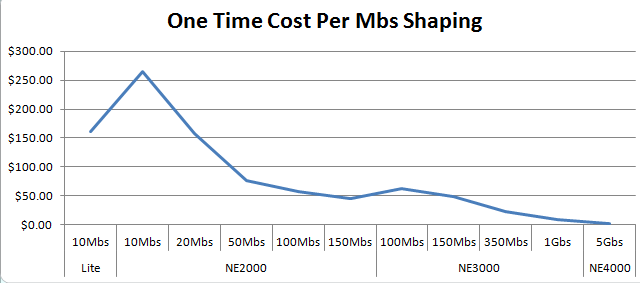
With the NetEqualizer, setup time is normally less than an hour and is thus negligible, so we’ll just divide the unit price by the throughput level, and here’s the result:

I think this is what you would expect to see.

For ongoing costs you would need to add all the mandatory per year costs and divide by throughput, and the metric would be an ongoing “yearly” per Mbs cost.

Again, if we take the NetEqualizer as an example, the ongoing costs are almost zero.  This is because it’s a turn-key appliance and it requires no time from the customer for bandwidth analysis, nor does it require any policy setup/maintenance to effectively run (it doesn’t use policies). In fact, it’s a true zero maintenance product and that yields zero labor costs. Besides no labor, there’s no updates or licenses required (an optional service contract is available if you want ongoing access to technical support, or software upgrades).

Frankly, it’s not worth the effort of graphing this one. The ongoing cost of a NetEqualizer Support Agreement ranges from $29 (dollars) – $.20 (cents) per Mbs per year. Yet, this isn’t the case for many other products and this number should be evaluated carefully. In fact, in some cases the ongoing costs of some products exceed the upfront cost of a new NetEqualizer!

Again, it may not be the case that the lowest cost per Mbs of bandwidth shaping is the best solution for you – but, if it’s not, you should have some good reasons.

If you shape bandwidth now, what is your cost per Mbs of bandwidth shaping? We’d be interested to know.

If your ongoing costs are higher than the upfront costs of a new NetEqualizer and you’re open to a discussion, you should drop us a note at sales@apconnections.net.

Music Anti-Piracy in Perspective Once Again


By: Art Reisman

Art Reisman CTO www.netequalizer.com

Art Reisman is the CTO of APconnections. He is Chief Architect on the NetGladiator and NetEqualizer product lines.

I was going to write a commentary story a couple weeks ago when the news broke about the government shut down of the Megaupload site. Before I could get started, one of my colleagues pointed out this new undetectable file sharing tool. Although I personally condemn any kind of software or copyright piracy in any form, all I can say is the media copyright enforcement industry should have known better. They should have known that when you spray a cockroach colony with pesticide, a few will survive and their offspring will be highly resistant.

Here is a brief excerpt from rawstory.com:

The nature of its technology (file sharing technology) is completely decentralized, leaving moderation to the users. Individuals can rename files, flag phony downloads or viruses, create “channels” of verified downloads, and act as nodes that distribute lists of peers across the network.

In the recent U.S. debate over anti-piracy measures, absolutely none of the proposed enforcement mechanisms would affect Tribler: it is, quite literally, the content industry’s worst nightmare come to life.”

Flash back to our 2008 story about how the break up Napster caused the initial wave of P2P. Back in 2001, Napster actually wanted to work on licensing for all their media files, and yet they were soundly rebuked and crushed by industry executives and the legal departments who saw no reason to compromise for fear of undermining their retail media channels. Within a few months of Napster’s demise, decentralized P2P exploded with the first wave of Kazaa, Bearshare and the like.

In this latest round of piracy, decentralized file sharing has dropped off a bit, and consumers started to congregate at centralized depositories again, most likely for the convenience of finding the pirated files they want quickly. And now with the shutting down of these sites, they are scattering again to decentralized P2P. Only this time, as the article points out, we have decentralized P2P on steroids. Perhaps a better name would be P2P 3G or P2P 4G.

And then there was the SOPA Fiasco

The Internet is so much bigger than the Music Industry, and it is a scary thought that the proposed  SOPA laws went as far as they did before getting crushed.

I am going to estimate the economic power of the Internet at 30 trillion dollars. How did I arrive at that number?  Basically that number implies that roughly half the worlds GDP is now tied to the Internet, and I don’t mean just Internet financial transactions for on-line shopping. It is the first place most communication starts for any business. It is as important as railroads, shipping, and trucking combined in terms of economic impact. If you want, we can reduce that number to 10 trillion, 1/6 of the worlds GDP , it does not really matter for the point I am about to make.

The latest figure I could find is that the Music Industry did approximately 15 billion dollars worth of business at their peak before piracy, and has steadily declined since then. There is no denying that the Music Industry has suffered 5 to 6 billion dollars in losses due to on-line piracy in the past few years, however that number is roughly .06 percent of the total positive economic impact of the Internet. Think of a stadium with 1000 people watching a game and one person standing up in front and forcing everybody to stop cheering  so they could watch the game without the bothersome noise. That is the power we are giving to the copyright industry.  We have a bunch of sheep in our Congress running around creating laws to appease a few lobbyists that risk damaging the free enterprise that is the Internet. Risking damage to the only real positive economic driver of the past 10 years. The potential damage to free enterprise by these restrictive overbearing laws is not worth the risk. Again, I am not condoning piracy nor am I against the Music Industry enforcing their laws and going after criminals, but the peanut butter approach to using a morbid congress to recoup their losses is just stupid.  The less regulation we can put on the Internet the more economic impact it will have now and into the future.  These laws and heavy-handed enforcement tactics create unrealistic burdens on operators and businesses and need to be put into perspective. There has to be a more intelligent way to enforce existing laws besides creating a highly-regulated Internet.

Stay tuned for some suggestions in my next article.

FCC is the Latest Dupe in Speed-Test Shenanigans


Shenanigans: is defined as the deception or tomfoolery on the part of carnival stand operators. In the case of Internet speed, claims made in the latest Wall Street Journal article, the tomfoolery is in the lack of details on how these tests were carried out.

According to the article, all the providers tested by the FCC delivered 50 megabits or more of bandwidth consistently for 24 hours straight. Fifty megabits should be enough for 50 people to continuously watch a YouTube stream at the same time. With my provider, in a large metro area, I often can’t even watch one 1 minute clip for more than a few seconds without that little time-out icon spinning in my face. By the time the video queues up enough content to play all the way through, I have long since forgotten about it and moved on. And then, when it finally starts playing again, I have to go back and frantically find it and kill the YouTube window that is barking at me from somewhere in the background.

So what gives here? Is there something wrong with my service?

I am supposed to have 10 megabit service. When I run a test I get 20 megabits of download enough to run 20 YouTube streams without issue, so far so good.

The problem with translating speed test claims to your actual Internet experience is that there are all kinds of potentially real problems once you get away from the simplicity of a speed test, and yes, plenty of deceptions as well.

First, lets look at the potentially honest problems with your actual speed when watching a YouTube video:

1) Remote server is slow: The YouTube server itself could actually be overwhelmed and you would have no way to know.

How to determine: Try various YouTube videos at once, you will likely hit different servers and see different speeds if this is the problem.

2) Local wireless problems: I have been the victim of this problem. Running two wireless access points and a couple of wireless cameras jammed one of my access points to the point where I could hardly connect to an Internet site at all.

How to determine: Plug your computer directly into your modem, thus bypassing the wireless router and test your speed.

3) Local provider link is congested: Providers have shared distribution points for your neighborhood or area, and these can become congested and slow.

How to determine: Run a speed test. If the local link to your provider is congested, it will show up on the speed test, and there cannot be any deception.


The Deceptions

1) Caching

I have done enough testing first hand to confirm that my provider caches heavily trafficked sites whenever they can. I would not really call this a true deception, as caching benefits both provider and consumer; however, if you end up hitting a YouTube video that is not currently in the cache, your speed will suffer at certain times during the day.

How to Determine: Watch a popular YouTube video, and then watch an obscure, seldom-watched YouTube.

Note: Do not watch the same YouTube twice in a row as it may end up in your local cache, or your providers local cache, after the first viewing.

2) Exchange Point Deceptions

The main congestion point between you and the open Internet is your providers exchange point. Most likely your cable company or DSL provider has a dedicated wire direct to your home. This wire, most likely has a clean path back to the NOC central location. The advertised speed of your service is most likely a declaration of the speed from your house to your providers NOC, hence one could argue this is your Internet speed. This would be fine except that most of the public Internet content lies beyond your provider through an exchange point.

The NOC exchange point is where you leave your local providers wires and go out to access information from data hosted on other provider networks. Providers pay extra costs when you leave their network, in both fees and in equipment costs. A few of things they can do to deceive you are:

– Give special priority to your speed tests through their site to insure the speed test runs as fast as possible.

– Re-route local traffic for certain applications back onto their network. Essentially limiting and preventing traffic from leaving their network.

– They can locally host the speed test themselves.
How to determine: Use a speed test tool that cannot be spoofed.

See also:

Is Your ISP Throttling your Bandwidth

NetEqualizer YouTube Caching

Cloud Computing – Do You Have Enough Bandwidth? And a Few Other Things to Consider


The following is a list of things to consider when using a cloud-computing model.

Bandwidth: Is your link fast enough to support cloud computing?

We get asked this question all the time: What is the best-practice standard for bandwidth allocation?

Well, the answer depends on what you are computing.

– First, there is the application itself.  Is your application dynamically loading up modules every time you click on a new screen? If the application is designed correctly, it will be lightweight and come up quickly in your browser. Flash video screens certainly spruce up the experience, but I hate waiting for them. Make sure when you go to a cloud model that your application is adapted for limited bandwidth.

– Second, what type of transactions are you running? Are you running videos and large graphics or just data? Are you doing photo processing from Kodak? If so, you are not typical, and moving images up and down your link will be your constraining factor.

– Third, are you sharing general Internet access with your cloud link? In other words, is that guy on his lunch break watching a replay of royal wedding bloopers on YouTube interfering with your salesforce.com access?

The good news is (assuming you will be running a transactional cloud computing environment – e.g. accounting, sales database, basic email, attendance, medical records – without video clips or large data files), you most likely will not need additional Internet bandwidth. Obviously, we assume your business has reasonable Internet response times prior to transitioning to a cloud application.

Factoid: Typically, for a business in an urban area, we would expect about 10 megabits of bandwidth for every 100 employees. If you fall below this ratio, 10/100, you can still take advantage of cloud computing but you may need  some form of QoS device to prevent the recreational or non-essential Internet access from interfering with your cloud applications.  See our article on contention ratio for more information.

Security: Can you trust your data in the cloud?

For the most part, chances are your cloud partner will have much better resources to deal with security than your enterprise, as this should be a primary function of their business. They should have an economy of scale – whereas most companies view security as a cost and are always juggling those costs against profits, cloud-computing providers will view security as an asset and invest more heavily.

We addressed security in detail in our article how secure is the cloud, but here are some of the main points to consider:

1) Transit security: moving data to and from your cloud provider. How are you going to make sure this is secure?
2) Storage: handling of your data at your cloud provider, is it secure once it gets there from an outside hacker?
3) Inside job: this is often overlooked, but can be a huge security risk. Who has access to your data within the provider network?

Evaluating security when choosing your provider.

You would assume the cloud company, whether it be Apple or Google (Gmail, Google Calendar), uses some best practices to ensure security. My fear is that ultimately some major cloud provider will fail miserably just like banks and brokerage firms. Over time, one or more of them will become complacent. Here is my check list on what I would want in my trusted cloud computing partner:

1) Do they have redundancy in their facilities and their access?
2) Do they screen their employees for criminal records and drug usage?
3) Are they willing to let you, or a truly independent auditor, into their facility?
4) How often do they back-up data and how do they test recovery?

Big Brother is watching.

This is not so much a traditional security threat, but if you are using a free service you are likely going to agree, somewhere in their fine print, to expose some of your information for marketing purposes. Ever wonder how those targeted ads appear that are relevant to the content of the mail you are reading?

Link reliability.

What happens if your link goes down or your provider link goes down, how dependent are you? Make sure your business or application can handle unexpected downtime.

Editors note: unless otherwise stated, these tips assume you are using a third-party provider for resources applications and are not a large enterprise with a centralized service on your Internet. For example, using QuickBooks over the Internet would be considered a cloud application (and one that I use extensively in our business), however, centralizing Microsoft excel on a corporate server with thin terminal clients would not be cloud computing.

How Safe is The Cloud?


By Zack Sanders, NetEqualizer Guest Columnist

There is no question that cloud-computing infrastructures are the future for businesses of every size. The advantages they offer are plentiful:

  • Scalability – IT personnel used to have to scramble for hardware when business decisions dictated the need for more servers or storage. With cloud computing, an organization can quickly add and subtract capacity at will. New server instances are available within minutes of provisioning them.
  • Cost – For a lot of companies (especially new ones), the prospect of purchasing multiple $5,000 servers (and to pay to have someone maintain them) is not very attractive. Cloud servers are very cheap – and you only pay for what you use. If you don’t require a lot of storage space, you can pay around 1 cent per hour per instance. That’s roughly $8/month. If you can’t incur that cost, you should probably reevaluate your business model.
  • Availability – In-house data centers experience routine outages. When you outsource your data center to the cloud, everything server related is in the hands of industry experts. This greatly increases quality of service and availability. That’s not to say outages don’t occur – they do – just not nearly as often or as unpredictably.

While it’s easy to see the benefits of cloud computing, it does have its potential pitfalls. The major questions that always accompany cloud computing discussions are:

  • “How does the security landscape change in the cloud?” – and
  • “What do I need to do to protect my data?”

Businesses and users are concerned about sending their sensitive data to a server that is not totally under their control – and they are correct to be wary. However, when taking proper precautions, cloud infrastructures can be just as safe – if not safer – than physical, in-house data centers. Here’s why:

  • They’re the best at what they do – Cloud computing vendors invest tons of money securing their physical servers that are hosting your virtual servers. They’ll be compliant with all major physical security guidelines, have up-to-date firewalls and patches, and have proper disaster recovery policies and redundant environments in place. From this standpoint, they’ll rank above almost any private company’s in-house data center.
  • They protect your data internally – Cloud providers have systems in place to prevent data leaks or access by third parties. Proper separation of duties should ensure that root users at the cloud provider couldn’t even penetrate your data.
  • They manage authentication and authorization effectively – Because logging and unique identification are central components to many compliance standards, cloud providers have strong identity management and logging solutions in place.

The above factors provide a lot of piece of mind, but with security it’s always important to layer approaches and be diligent. By layering, I mean that the most secure infrastructures have layers of security components that, if one were to fail, the next one would thwart an attack. This diligence is just as important for securing your external cloud infrastructure. No environment is ever immune to compromise. A key security aspect of the cloud is that your server is outside of your internal network, and thus your data must travel public connections to and from your external virtual machine. Companies with sensitive data are very worried about this. However, when taking the following security measures, your data can be just as safe in the cloud:

  • Secure the transmission of data – Setup SSL connections for sensitive data, especially logins and database connections.
  • Use keys for remote login – Utilize public/private keys, two-factor authentication, or other strong authentication technologies. Do not allow remote root login to your servers. Brute force bots hound remote root logins incessantly in cloud provider address spaces.
  • Encrypt sensitive data sent to the cloud – SSL will take care of the data’s integrity during transmission, but it should also be stored encrypted on the cloud server.
  • Review logs diligently – use log analysis software ALONG WITH manual review. Automated technology combined with a manual review policy is a good example of layering.

So, when taking proper precautions (precautions that you should already be taking for your in-house data center), the cloud is a great way to manage your infrastructure needs. Just be sure to select a provider that is reputable and make sure to read the SLA. If the hosting price is too good to be true, it probably is. You can’t take chances with your sensitive data.

About the author:

Zack Sanders is a Web Application Security Specialist with Fiddler on the Root (FOTR). FOTR provides web application security expertise to any business with an online presence. They specialize in ethical hacking and penetration testing as a service to expose potential vulnerabilities in web applications. The primary difference between the services FOTR offers and those of other firms is that they treat your website like an ACTUAL attacker would. They use a combination of hacking tools and savvy know-how to try and exploit your environment. Most security companies  just run automated scans and deliver the results. FOTR is for executives that care about REAL security.

The Benefits of Requiring Online Registration Forms


By Zack Sanders, NetEqualizer Guest Columnist

The registration form is quickly becoming antiquated in the online world. Once viewed as an easy way to sign up or declare your interest in a company or product, the annoyance level and security concerns associated with filling out your personal data in a web form has led many businesses to utilize other techniques to grab new clientele. For a lot of companies, this is the right approach. There are metrics that show conversion rates for sales and sign-ups are higher when one asks for less information up front. This works particularly well for business-to-consumer sites, social networks that rely on ad revenue and large user bases, and web startups who need to gain a following.

For example, signing up for an online dating site might require you only enter in your sex, age, and email address. Then, once you’ve used the site a little bit, they’ll have you fill out other information in your profile. They’ve already hooked you at this point so obtaining a little more data is a trivial task. If they asked for all your information initially before letting you try the site, they’d be much less likely to gain you as a user.

A lot of companies might be quick to switch to this sort of registration method (after all, it’s the increasingly popular choice), but they should be careful about acting too hastily. It isn’t the best choice for every business. In fact, most business-to-business (B2B) organizations will see more success from a typical registration form. This is true for the following reasons:

  • Business customers usually have more strategic, long-term goals and have already determined there is a business need for your product. They usually aren’t just browsing with little intent to buy.
  • Your sales team will be more efficient because their calls to potential clients will convert better. They won’t be wasting their time as often when they know they are talking to at least semi-serious customers.
  • More sophisticated products might require a discussion between an expert/engineer and the customer. Every organization has slightly different problems they are trying to solve and it’s important to determine quickly whether your product will really help solve their issue. Just like with sales, you want to be efficient with these discussions too.
  • B2B transactions are usually large in volume or cost. Any organization or individual looking to purchase an expensive product won’t mind filling in their information. Because they are serious, the annoyance factor associated with a form goes down.
  • B2B companies have established reputations. Likely, potential customers already know you are legitimate. They won’t be as concerned about providing you with their personal details.

Figuring out what information to ask for is also an important task. You want to walk the fine line of getting complete data without being too invasive. Your form will be best received when you:

  • Make sure that the information you ask for is relevant to your product.
  • Make sure the customer feels confident about your privacy policy. No one wants their information sold to third parties.
  • Don’t hound potential clients with sales calls. Repeat calls from vendors can be extremely annoying and are a huge turnoff.

At NetEqualizer, we’ve tried both the quick/no registration method as well as our current method of requiring a form to be completed. We’ve found that the above benefits of a registration process outweigh the ease of not requiring any information. Our sales team and engineers can make more targeted, efficient phone calls and it gives us the opportunity to explain the benefits of our solution completely to potential customers. In return, the customers get better, more tailored service and support.

About the author:

Zack Sanders is a Web Application Security Specialist with Fiddler on the Root (FOTR). FOTR provides web application security expertise to any business with an online presence. They specialize in ethical hacking and penetration testing as a service to expose potential vulnerabilities in web applications. The primary difference between the services FOTR offers and those of other firms is that they treat your website like an ACTUAL attacker would. They use a combination of hacking tools and savvy know-how to try and exploit your environment. Most security companies  just run automated scans and deliver the results. FOTR is for executives that care about REAL security.

Product Ideas Worth Bringing to Market


By Art Reisman

Updated September 2012

Updated Jan 2013

Art Reisman is currently CTO and co-founder of APconnections, creator of the NetEqualizer. He has worked at several start-up companies over the years and has invented and brought several technology products to market, both on his own and with the backing of larger corporations. This includes tools for the automotive industry.

The following post will serve as a running list of various ideas as I think of them.

The reason I’m sharing them is simply that I hate to let an idea go to waste. Notice that I did not say a good idea. An idea cannot be judged until you make an attempt to develop it further, which I have not done in most cases.

Note: I cannot ensure exclusive rights or ownership for the development of any of these ideas.

1) A Real, Unbiased, Cell Phone Coverage Map

We all know those spots on the interstate and parts of town where our cell phone coverage is worthless. If you could publish an easy-to-use, widely-accepted and maintained guide to these areas, it would become a very popular site.

Research: From my brief search on the subject, a consumer trade rag called CNET has done some work in this area, but I could only find their demos and press releases. I kept getting a map of the Seattle area with no obvious way to get a broader map search.

2) Commodity Land Trading Site

If you have ever flown over the Great Plains you have noticed a gigantic, undeveloped sea of crop and grass land. It is very hard to invest in these tracts for anything less than 1000 acres. Unlike commercial and residential real estate, land prices are fairly easy to quantify, and the simplicity of land allows most of these tracts to be sold at auction. Larger portfolio managers and partnerships snap them up in the same way they would invest in a Mutual Fund. The idea is to place a large portion of farm land into a fund that can easily trade in fractional shares – each representing a real, tangible share of the land.

Research: There is a farm production site with a similar model already.

3) Visit Wineries From all 50 U.S. States at One Location

The idea here is to have one themed retail outlet where you can buy wines from all 50 states with each state given an equal share of floor space. Wines would be set up in themed booths from each state’s wine-producing area, with history and background literature also available. Wines would be from unique, boutique-type wineries and perhaps a few dollars more than the list price. In other words, this store would be more of a themed destination near a major interstate or tourist hub. Every state in the county has wineries, and most have wine growing areas.

Research: Article on wines from all 50 states.

4) Reclaimed Barn Wood

At one time the homesteads on the Great Plains numbered one per approximately 160 acres. Now there is about one family farm per several-thousand acres. As families have consolidated, all that remains are numerous, small, weathered barns and sheds.I would imagine the demand for this reclaimed wood would be on the East Coast and West Coast. There is a company that specializes in reclaimed barn wood, however I suspect the market has room for another player.

5) Site Dedicated to Debunking Dead-end Technologies

Often over the span of an Engineer’s career, they are forced to work on technologies that are politically based, and just down-right impractical or stupid. Once there is money or political pressure behind them, finding opposing views is hard to do. However, for investors or companies betting the house on them, an unbiased opinion from somebody with a brain would have great value, especially if such data could avert billions of dollars of wasted investment and time on technologies destined to fail. A couple of examples of over hyped technologies that drove product decisions are:

VXML
Artificial Intelligence
Voice Recognition

This is not to say there was not some merit in these technologies, but they had some basic flaws that have made them fall far short of their promises. These short falls were easily understood by many engineers working on them, but once the promises were sold to investors, the short comings were shoved under a rug.

6) Find Me a Human

I searched  the other day for a tool like this and so far have come up empty.

Take your phone call to a corporation or government agency, and call you back when it had a human on the line. The “how” does not matter to the end user here, but it would involve the reverse engineering of corporate call trees in order to navigate them for you.

7) A Natural Speed Test Tool for Corporations and Users with Higher-end Connections

Most speed tests are initiated by the user at a specific time, usually when they suspect their Internet is slow. But what if you have a busy corporate Internet connection? In this case, you might have hundreds of users on the link at one time, and running a speed test is not likely practical for a couple of reasons:

1) Speed tests usually run short duration files. For example, a 10 megabit file on a 100 megabit link would complete in 0.1 seconds, and perhaps correctly report the link speed to the operator, but this test would be irrelevant when compared to the same link’s performance with 1000 users downloading files all day long.

2) Speed tests might be able to test line speed to your nearest pop, but almost all public speed test sites are designed for consumers sending relatively short files to nearby local servers.

The good news is we have this in beta with our NetEqualizer product.

8) Web Search Engine for Faces or Images

You seed the search engine with an image or picture and it will scour the web looking for similar people. Perhaps something that could be used in crime fighting? I suspect something like this already exists but not at a consumer level.

Research: Tineye is trying to accomplish this feat at a consumer level.

9) A Search Engine that Really Finds What You are Looking For

When I first started using the Web, it seemed that all my searches found relevant content. Looking back, almost all the original content on the Web was academic. Academia and government predated any commercial use of the Web. Today, it seems like you can’t find anything non-commercial, and I suspect the reason is that commercial content simply overwhelms the system. Perhaps this Web search engine would filter all commercial content.

For example, last night I was looking for a free radio station that plays content similar to Sirius Satellite Radio’s “Deep Tracks.” I have this station in my car, but I really did not want to update my subscription to listen to radio on the Internet as there are 1000’s of free radio stations. My searches kept coming up with the same commercial crap and I had to weed through it, spending almost an hour trying to decipher it. Whenever I did find a station that claimed to play Deep Tracks, they didn’t as a format. They were all local stations with the same exact top 100 classic rock songs over and over. What got me going is that I know there is some freak out there with a Deep-Tracks-like play list. However, instead of finding that person, I am relegated to researching the old-fashioned way – human-to-human through forums and blogs – as the Web search engines cannot understand my context.

10) Insect Biomass in Pet Food

We had a very bad grasshopper outbreak in our yard this year. The little buggers eventually moved into the garden and chewed up the pumpkin plants and the tassels on the corn plants. Rather than use insecticides and try to destroy them, there must be a commercial use for them. Perhaps if you could attract them in large numbers into a trap and grind them into a high protein dog food there might be a market for them? They are free and abundant in most grassy areas, so the main cost would be in collection, transport, processing and marketing. I like this idea.

11) Buffalo Gourd Oil and by products

This little gourd is the toughest most drought resistant plant I have ever seen. The only problem with it is that the pulp is bitter. It may be the most bitter substance known to man kind. I should know I tried it. All the data on it claims there is nothing toxic to it, and I am pretty sure the cows that roam our pasture eat them, eating the gourds and leaving the plant.

So where is the commercial value ?
If you can figure out a process to efficiently separate the seeds from the pulp, the oil when pressed is delightfully sweet. I spent about 2 hours cleaning seeds and then ran a cup full through my manual seed press, the oil was very tasty.

Why bother with Buffalo Gourd ?

Well unlike other dry land crops grown in the western great plains such as corn , and sunflower seeds

1) the Buffalo gourd puts down a tap root as a perennial and finds deep water sources.

2) It grows well in the bottom lands and hill sides where it can find deep ground water places that most farmers have no use for with their cultivated drops

3)  thrives when other plants are withering in drought quite easily.

4)It also grows back in the same spot without reseeding.

5) seed oil is delicious

6) I am guessing the rest of the plant can be used as an insecticide or mosquito repellent, going to try it.
The technical issues with this plant are

1) Harvesting in mass, may need to be hand picked.

2) Drying and separating the seed from the pulp.

12) A real holloween town, not just a fancy pumpkin patch

This idea just won’t go away , the basic premise would be to create a real neighbor hood in a real midwestern town where it is always Halloween. I am not sure of the economics. Here is what I have flushed out so far.

-Small town with older houses within 45 minutes of  a population center

-Purchase 4 to 6 older larger homes on a residential block

-work with city to get some sort of exemption or special use business license

-Refurb the exteriors in holloween colors and trim

-town should be a liberal arts college with a strong theatre department, hire 20 or so students ,give them free rent in the houses

and have them rotate through shifts as holloween characters

-have characters always on shift, the idea is that it is always a holloween town not a park that opens or closes

-no charge for roaming the streets but there would be a charge for house tours, houses would have various special effects and so would the back yards

Other Related Articles:

Technology Predictions for 2012

Practical and Inspirational Tips on Bootstrapping

Building a Software Company from Scratch

Commentary: Is IPv6 Heading Toward a Walled-Off Garden?


In a recent post we highlighted some of the media coverage regarding the imminent demise of the IPv4 address space. Subsequently, during a moment of introspection, I realized there is another angle to the story. I first assumed that some of the lobbying for IPv6 was a hardware-vendor-driven phenomenon; but there seems to be another aspect to the momentum of Ipv6. In talking to customers over the past year, I learned they were already buying routers that were IPv6 ready, but there was no real rush. If you look at a traditional router’s sales numbers over the past couple years, you won’t find anything earth shattering. There is no hockey-stick curve to replace older equipment. Most of the IPv6 hardware sales were done in conjunction with normal upgrade time lines.

The hype had to have another motive, and then it hit me. Could it be that the push to IPv6 is a back-door opportunity for a walled-off garden? A collaboration between large ISPs, a few large content providers, and mobile device suppliers?

Although the initial world of IPv6 day offered no special content, I predict some future IPv6 day will have the incentive of extra content. The extra content will be a treat for those consumers with IPv6-ready devices.

The wheels for a closed off Internet are already in place. Take for example all the specialized apps for the iPhone and iPad. Why can’t vendors just write generic apps like they do for a regular browser? Proprietary offerings often get stumbled into. There are very valid reasons for specialized apps for the iPhone, and no evil intent on the part of Apple, but it is inevitable that as their market share of mobile devices rises, vendors will cease to write generic apps for general web browsers.

I don’t contend that anybody will deliberately conspire to create an exclusively IPv6 club with special content; but I will go so far as to say in the fight for market share, product managers know a good thing when they see it. If you can differentiate content and access on IPv6, you have an end run around on the competition.

To envision how a walled garden might play out on IPv6, you must first understand that it is going to be very hard to switch the world over to IPv6 and it will take a long time – there seems to be agreement on that. But at the same time, a small number of companies control a majority of the access to the Internet and another small set of companies control a huge swatch of the content.

Much in the same way Apple is obsoleting the generic web browser with their apps, a small set of vendors and providers could obsolete IPv4 with new content and new access.

Offer Value, Not Fear


Recently, I thought back to an experience I had at a Dollar Rental Car in Maui a few years ago. When I refused their daily insurance coverage, the local desk agent told me that my mainland-based insurance was not good in Hawaii. He then went on to tell me that I would be fully responsible for the replacement cost of the car I was driving should something happen to it. I would have been more apt to buy their insurance had their agent just told me the truth – that most of his compensation was based on selling their daily coverage insurance policies.

Selling fear to your customers is often the easy way out. It reminds me of the old Bugs Bunny cartoon where a character is on the verge of making a moral decision. On one shoulder, a little devil is yelling in his ear, and on the other, a little angel. The devil is offering a clear, short-term pleasure deal to the character. The devil’s path leads to immediate gratification, while the angel preaches delayed gratification in exchange for doing the right thing. The angel argues that doing the right thing now will lead to a lifetime of happiness.

In our business, the angel sits on one shoulder and says, “Sell value. Sell something that helps your customers become more profitable.” While the little devil is sitting on the other shoulder saying, “Scare them. Tell them their servers are going to crash and they are going to be held accountable. They will be flogged, humiliated, disgraced, and shunned by the industry. Unless of course they buy your product. Oh, you don’t have a good fear story? We’ll invent one. We’ll get the Wall Street Journal to write an article about it. You know, they also feed off fear.”

There is an excellent partnership between vendors and the media. Think about all the fear based run-ups that have been capitalized on over the years: CALEA, IPv6 (we are running out IP addresses), Radon, mold, plastics, global warming, the ozone hole, Anthrax. Sure, these are all based on fact, but when vendors sense a fear-motivated market, they really can’t help themselves from foaming at the mouth. The devil on my shoulder continues, “These guys will never buy value, they are fear driven. Wasn’t that Y2K thing great? Nobody could quantify the actual threat so they replaced everything, even borrowed money to do it if they had to.”

Humor aside, the problems with selling fear, even warranted fear, are:

1) It is not sustainable without continually upping the ante.
2) You will be selling against other undifferentiated products, and the selling may eventually become unscrupulous, thus forcing you into a corner where you’ll be required to exaggerate.
3) It takes away profit from your customer. Yes, the customer should know better, but investing in security is a cost, too many costs and eventually there is no customer.
4) It is a relationship of mistrust from the start.

On the other hand, if you offer value:

1) Your customer will keep buying from you.
2) A customer that has realized value from your products will give you the benefit of the doubt on your next product.
3) A high-value product may not be the first thing on a customer’s mind, but once in place, with proven value, good customers will purchase upgrades which fund improvements in the product, and thus contribute to a profitable vendor and profitable customer.
4) Value builds an environment of trust from the start.

So while sometimes it is easier to sell fear to a potential client, selling value will ultimately provide longevity to your business and leave you with happy customers.

The Story of NetEqualizer


By Art Reisman

CTO www.netequalizer.com

In the spring of 2002, I was a systems engineer at Bell Labs in charge of architecting Conversant – an innovative speech-processing product. Revenue kept falling quarter by quarter, and meanwhile upper management seemed to only be capable of providing material for Dilbert cartoons, or perhaps helping to fine-tune the script for The Office. It was so depressing that I could not even read Dilbert anymore – those cartoons are not as amusing when you are living them every day.

Starting in the year 2000, and continuing every couple of months, there was a layoff somewhere in the company (which was Avaya at the time). Our specific business unit would get hit every six months or so. It was like living in a hospice facility. You did not want to get to know anybody too well because you would be tagged with the guilt of still having a job should they get canned next week. The product I worked on existed only as a cash cow to be milked for profit, while upper management looked to purchase a replacement. I can’t say I blamed them; our engineering expertise was so eroded by then that it would have been a futile effort to try and continue to grow and develop the product.

Mercifully, I was laid off in June of 2003.

Prior to my pink slip, I had been fiddling with an idea that a friend of mine, Paul Harris, had come up with. His idea was to run a local wireless ISP. This initially doomed idea spawned from an article in the local newspaper about a guy up in Aspen, CO that was beaming wireless Internet around town using a Pringles can – I am not making this up. Our validation consisted of Paul rigging up a Pringles can antenna, attaching it to his laptop’s wireless card (we had external cards for wireless access at the time), and then driving a block from his house and logging in to his home Internet. Amazing!

The next day, while waiting around for the layoff notices, we hatched a plan to see if we could set up a tiny ISP from my neighborhood in northern Lafayette, CO. I lived in a fairly dense development of single-family homes, and despite many of my neighbors working in the tech industry, all we could get in our area was dial-up Internet. Demand was high for something faster.

So, I arranged to get a 1/2 T1 line to my house at the rate of about $1,500 per month, with the idea that I could resell the service to my neighbors. Our take rate for service appeared to be everybody I talked to. And so, Paul climbed onto the roof and set up some kind of pole attached to the top of the chimney, with a wire running down into the attic where we had a $30 Linksys AP. The top of my roof gave us a line-of-sight to 30 or 40 other rooftops in the area. We started selling service right away.

In the meantime, I started running some numbers in my head about how well this 1/2 T1 line would hold up. It seemed like every potential customer I talked to planned on downloading the Library of Congress, and I was afraid of potential gridlock. I had seen gridlock many times on the network at the office – usually when we were beating the crap out if it with all the geeky things we experimented on at Bell Labs.

We finally hooked up a couple of houses in late March, and by late April the trees in the area leafed out and blocked our signal. Subsequently, the neighbors got annoyed and stopped paying. Most 802.11 frequencies do not travel well through trees. I was also having real doubts about our ability to make back the cost of the T1 service, especially with the threat of gridlock looming once more people came online – not to mention the line-of-sight being blocked by the trees.

Being laid off was a blessing in disguise. Leaving Bell Labs was not a step I would have taken on my own. Not only did I have three kids, a mortgage, and the net worth of a lawnmower, my marketable technical skills had lapsed significantly over the past four years. Our company had done almost zero cutting-edge R&D in that time. How was I going to explain that void of meaningful, progressive work on my resume? It was a scary realization.

Rather than complain about it, I decided to learn some new skills, and the best way to do that is to give yourself a project. I decided to spend some time trying to figure out a way to handle the potential saturation on our T1 line. I conjured up my initial solution from my computer science background. In any traditional operating systems’ course, there is always a lesson discussing how a computer divvies up its resources. Back in the old days, when computers were very expensive, companies with computer work would lease time on a shared computer to run a “job”. Computing centers at the time were either separate companies, or charge-back centers in larger companies that could afford a mainframe. A job was the term used for your computer program. The actual computer code was punched out on cards. The computer operator would take your stack of cards from behind a cage in a special room and run them through the machine. Many operators were arrogant jerks that belittled you when your job kicked out with an error, or if it ran too long and other jobs were waiting. Eventually computer jobs evolved so they could be submitted remotely from a terminal, and the position of the operator faded away. Even without the operator, computers were still very expensive, and there were always more jobs to run than the amount of leased time on the computer. This sounds a lot like a congested Internet pipe, right?

The solution for computers with limited resources was a specialized program called an operating system.  Operating systems decided what jobs could run, and how much time they would get, before getting furloughed. During busy times, the operating system would temporarily kick larger jobs out and make them wait before letting them back in. The more time they used before completion, the lower their priority, and the longer they would wait for their turn.

My idea – and the key to controlling congestion on an Internet pipe – was based on adapting the proven OS scheduling methodology used to prevent gridlock on a computer and apply it to another limited resource – bandwidth on an Internet link. But, I wasn’t quite sure how to accomplish this yet.

Kevin Kennedy was a very respected technical manager during my early days at Bell Labs in Columbus, Ohio. Kevin left shortly after I came on board, and eventually rose up to be John Chambers’ number two at Cisco. Kevin helped start a division at Cisco which allowed a group of engineers to migrate over and work with him – many of whom were friends of mine from Bell Labs. I got on the phone and consulted a few of them on how Cisco dealt with congestion on their network. I wondered if they had anything smart and automated, and the answer I got was “yes, sort of.” There was some newfangled way to program their IOS operating system, but nothing was fully automated. That was all I needed to hear. It seemed I had found a new niche, and I set out to make a little box that you plugged into a WAN or Internet port that would automatically relieve congestion and not require any internal knowledge of routers and complex customizations.

In order to make an automated fairness engine, I would need to be able to tap into the traffic on an Internet link. So I started looking at the Linux kernel source code and spent several weeks reading about what was out there. Reading source code is like building a roadmap in your head. Slowly over time neurons start to figure it out – much the same way a London Taxi driver learns their way around thousands of little streets with some of them being dead ends. I eventually stumbled into the Linux bridge code. The Linux bridge code allows anybody with a simple laptop and two Ethernet cards to build an Ethernet bridge. Although an Ethernet bridge was not really related in function to my product idea, it solved all of the upfront work I would need to do to break into an Internet connection to examine data streams and then reset their priorities on the fly as necessary – all this with complete transparency to the network.

As usual, the mechanics of putting the concept in my head into working code was a bit painful and arduous. I am not the most adept when it comes to using code syntax and wandering my way around kernel code. A good working knowledge of building tools, compiling tools, and legacy Linux source code is required to make anything work in the Linux kernel. The problem was that I couldn’t stand those details. I hated them and would have gladly paid somebody else to implement my idea, but I had absolutely no money. Building and coding in the Linux kernel is like reading a book you hate where the chapters and plot are totally scrambled. But, having done it many times, I slogged through, and out the other side appeared the Linux Bandwidth Arbitrator (LBA) – a set of utilities and computer programs made for Linux open source that would automatically take a Linux bridge and start applying fairness rules.

Once I had the tool working in my small home test lab, I started talking about it on a couple of Linux forums. I needed a real network to test it on because I had no experience running a network. My engineering background up until now had been working with firmware on proprietary telecommunication products. I had no idea how my idea would perform in the wild.

Eventually, as a result of one of my Linux forum posts, a call came in from a network administrator and Linux enthusiast named Eric who ran a network for a school district in the Pacific Northwest. I thought I had hit the big time. He was a real person with a real network with a real problem. I helped him load up a box with our tool set in his home office for testing. Eventually, we got it up and running on his district network with mixed results. This experiment, although inconclusive, got some serious kinks worked out with my assumptions.

I went back to the Linux forums with my newfound knowledge. I learned of a site called “freshmeat.net” where one could post free software for commercial use. The response was way more than I expected, perhaps a thousand hits or so in the first week. However, the product was not easy to build from scratch and most hits were just curious seekers of free tools. Very few users had built a Linux kernel, let alone had the skill set to build a Linux Bandwidth Arbitrator from my instructions. But, it only took one qualified candidate to further validate the concept.

This person turned out to be an IT administrator from a state college in Georgia. He loaded our system up after a few questions, and the next thing I knew I got an e-mail that went something like this:

“Since we installed the LBA, all of our congestion has ceased, and the utilization on our main Internet trunk is 20% less. The students are very happy!”

I have heard this type of testimonial many times since, but I was in total disbelief with this first one. It was on a significant network with significant results! Did it really work, or was this guy just yanking my chain? No. It was real, and it really did work!

I was broke and ecstatic at the same time. The Universe sends you these little messages that you are on the right track just when you need them. To me, this e-mail was akin to 50,000 people in a stadium cheering for you. Queue the Rocky music.

Our following on freshmeat.net grew and grew. We broke into the Top 100 projects, which is like making it to Hollywood Week on American Idol to tech geeks, and then broke the Top 50 or so in their rankings. This was really quite amazing because most of the software utilities on freshmeat.net were consumer-based utilities, which have a much broader audience. The only projects with higher rankings in a business-to-business utility product (like the LBA) were utilities like SQL Dansguard, and other very well-known projects.

Shortly after going live on freshmeat.net, I started collaborating add-ons to the LBA utility with Steve Wagor (now my partner at APconnections). He was previously working as a DBA, webmaster, and jack-of-all-trades for a company that built websites for realtors in the southwestern United States. We were getting about one request a week to help install the LBA in a customer network. Steve got the idea to make a self-booting CD that could run on any standard PC with a couple of LAN cards. In August of 2004, we started selling them. Our only current channel was freshmeat.net, which allowed us to offer a purchasable CD as long as we offered the freeware version too.* We sold fifteen CD’s that first month. The only bad news was that we were working for about $3.00 per hour. There were too many variables on the customer-loaded systems to be as efficient as we needed to be.  Also, many of the customers loading the free CD were as broke as we were and not able to pay for our expertise.

* As an interesting side note, we also had a free trial version that ran for about two hours that could be converted to the commercial version with a key. The idea was to let people try it, prove it worked, and then send them the permanent key when they paid. Genius, we thought. However, we soon realized there were thousands of small Internet cafes around the world that would run the thing for two hours and then reboot. They were getting congestion control and free consulting from us. So in countries where the power goes out once a day anyway, no one is bothered by a sixty-second Internet outage.

As word got out that the NetEqualizer worked well, we were able to formalize the commercial version and started bundling everything into our own manufacturing and shipping package from the United States. This eliminated all the free consulting work on the demo systems, and also ensured a uniform configuration that we could support.

Today NetEqualizer has become an adjective brand name in growing circles.

Some humble facts:

NetEqualizer is a multi-million dollar company.

NetEqualizer’s have over ten million users going through them on six continents.

We serve many unique locales in addition to the world’s largest population centers. Some of the more interesting places are:

  • Malta
  • The Seychelles Islands
  • The Northern Slopes of Alaska
  • Iceland
  • Barbados
  • Guantanamo Bay
  • The Yukon Territory
  • The Afghan-American Embassy
  • The United States Olympic Training Center
  • Multiple NBA arenas
  • Yellowstone National Park

Stay tuned for Part II, “From Startup to Multi-National, Multi-Million Dollar Enterprise.”

Meanwhile, check out these related articles:

NetEqualizer Brand Becoming an Eponym for Fairness and Net-Neutrality Techniques

Building a Software Company from Scratch” – Adapted from an entrepreneur.org article.