Why Caching Alone Will Not Solve Your Congestion Issue


Editors Note:
The intent of this article to is to help set appropriate expectations of using a caching server on an uncontrolled Internet link. There are some great speed gains to be had with a caching server; however, caching alone will not remedy a heavily congested Internet connection.


Are you going down the path of using a caching server (such as Squid) to decrease peak usage load on a congested Internet link? 

You might be surprised to learn that Internet link congestion cannot be mitigated with a caching server alone. Contention can only be eliminated by:

1) Increasing bandwidth

2) Some form of bandwidth control

3) Or a combination of 1) and 2)

A common assumption about caching is that somehow you will be able to cache a large portion of common web content – such that a significant amount of your user traffic will not traverse your backbone to your provider. Unfortunately, caching a large portion of web content to attain a significant hit ratio is not practical, and here is why:

Lets say your Internet trunk delivers 100 megabits and is heavily saturated prior to implementing caching or a bandwidth control solution. What happens when you add a caching server to the mix?

From our experience, a good hit rate to cache will likely not exceed 10 percent. Yes, we have heard claims of 50 percent, but have not seen this in practice. We assume this is an urban myth or just a special case.

Why is the hit rate at best only 10 percent?

Because the Internet is huge relative to a cache, and you can only cache a tiny fraction of total Internet content. Even Google, with billions invested in data storage, does not come close. You can attempt to keep trending popular content in the cache, but the majority of access requests to the Internet will tend to be somewhat random and impossible to anticipate. Yes, a good number of hits might hit the Yahoo home page and read the popular articles, but many users more are going to do unique things. For example, common hits like email and Facebook are all very different for each user, and cannot be maintained in the cache. User hobbies are also all different, and thus they traverse different web pages and watch different videos. The point is you can’t anticipate this data and keep it in a local cache any more reliably than guessing the weather long term. You can get a small statistical advantage, and that accounts for the 10 percent that you get right.

Note: Without a statistical advantage your hit rate would be effectively be 0.

Even with caching at a 10 percent hit rate, your link traffic will not decline.

With caching in place, any gain in efficiency will be countered by a corresponding increase in total usage. Why is this?

If you assume a 10 percent hit rate to cache, you will end up getting a 10 percent increase in Internet usage and thus, if your pipe to the Internet was near congestion when you put the caching solution in, it will still be congested. Yes, the hits to cache will be fast and amazing, but the 90 percent of the hits that do not come from the cache will equal 100 percent of your Internet link. The resulting effect will be that 90 percent of your Internet accesses will be sluggish due to the congested link.

Another way to understand is by practical example.

Let’s start with a very congested 100 megabit Internet link. Web hits are slow, YouTube takes forever, email responses are slow, and Skype calls break up. To solve these issues, you put in a caching server.

Now 10 percent of your hits come from cache, but since you did nothing to mitigate overall bandwidth usage, your users will simply eat up the extra 10 percent from cache and then some. It is like giving a drug addict a free hit of their preferred drug. If you serve up a fast YouTube, it will just encourage more YouTube usage.

Even with a good caching solution in place, if somebody tries to access Grandma’s Facebook page, it will have to come over the congested link, and it may time out and not load right away. Or, if somebody makes a Skype call it will still be slow. In other words, the 90 percent of the hits not in cache are still slow even though some video and some pages play fast, so the question is:

If 10 percent of your traffic is really fast, and 90 percent is doggedly slow, did your caching solution help?

The answer is yes, of course it helped, 10 percent of users are getting nice, uninterrupted YouTube. It just may not seem that way when the complaints keep rolling in. :)


Editors Update August 20 2013

This article written back in 2011  still says it all, and we continue to confirm  by talking to our ISP customers, that, at best a  generic caching engine will get a 10 percent hit rate for people watching movies. However this hit rate has little effect on solving congestion issues on the Internet link itself.

Eleven Tips to Improve VoIP & Video on the Internet Using NetEqualizer and DiffServ/TOS Bits


When talking to potential customers that do not have a NetEqualizer in place (yet), we often hear concerns from companies with recently installed VoIP systems that they are having trouble hearing incoming calls on their phones.  Typically, the root cause for this poor connection is that users are downloading files simultaneously with their VoIP calls.

Router technologies use a technology called DiffServ to enforce priority. Diffserv is reliable at preventing your outgoing Internet data users from interfering with your VoIP calls; however, most router technologies cannot prevent incoming Internet data traffic from overwhelming your incoming VoIP stream. This makes for the interesting dilemma on a call where they can hear you but you can’t hear them.

Fortunately, our bandwidth shaping technology, unlike a basic router, already uses techniques that allow an enterprise to prevent incoming data from overwhelming their VoIP/Skype calls.  We call this technology “Equalizing,” and we have recently enhanced our Equalizing algorithms (version 5.5 and above) such that specific priority for TOS/DiffServ bits will also be recognized.  DiffServ stands for “Differentiated Services Code Point (DSCP)” field and is analogous to the Type of Service (TOS) field.

The following FAQ addresses eleven common questions about our new TOS/DiffServ-aware technology:

1) Who can take advantage of this feature?
Anybody who needs to give priority to an incoming video or voice stream but does not know the source IP of the sender.

2) How do you control whether traffic coming into your network has a TOS/DiffServ bit enabled or not?
This is great mystery. Very little is written about this and how public Internet applications use the TOS bit. From experiments to-date, it seems that YouTube and VoIP providers are setting TOS bit(s) on their data streams.  This is the main reason why the initial NetEqualizer release 5.5 will be in beta test. It is an experimental release so our customers can turn on TOS/DiffServ priority and gather information on performance gains.

3) Who can set a TOS bit?
Almost any application that wants to can send out a stream with a TOS bit set; however, the typical home user does not have access to the TOS bit.

4) What are some of the Caveats with using the DiffServ/TOS Priority Feature?
In the initial beta release, we did not differentiate between types of TOS bits. There are several bits that can be set in this field by the sender that imply different types of quality. We decided to just treat this entire field as ON or OFF in our first release. Most networks that attempt multiple levels of priority are just not practical, as equipment lacks resolution in their processing to enforce different levels of priority. We decided to keep it simple; a stream either has priority or it doesn’t. Multiple levels of priority is more of an academic endeavor for wishful specifications.

5) How do you set the DiffServ/TOS Priority Feature from the NetEqualizer GUI?
Under “Modify Parameters” in the NetEqualizer set up screen:

TOS_ENABLED (on/off)

6) How do you know when a stream on your network has the DiffServ/TOS bit enabled?
From the “Active Connections” reporting screen on the NetEqualizer GUI, you will see a value of either on or off in the last column of the connection row.  “Off” indicates a TOS value of 0; “on” represents a TOS value greater than 0.

7) How does DiffServ/TOS bit priority compare with normal default equalizing?

To recap: A NetEqualizer bandwidth shaper naturally gives priority to VoIP and small web pages.

Now with the ability to provide priority specifically to streams with the TOS bit set, you can more tightly tune the NetEqualizer for VoIP priority, while at the same time provide priority for video.  The big variable will be just how much the TOS bit is used in public applications. On many of our field systems, we do have room to allow a little extra priority for the occasional video or Skype with video component. With the ability to honor TOS priority, your Internet link can grant priority to video without having to know the IP address of the sender or receiver.

8) What if an ISP allowed priority for a TOS bit and their users get wind of it?  Can they figure out a way to jump in front of the line giving ALL of their traffic priority?
We do not think this is likely at this time; the user would have to be aware of the practice of giving priority to TOS in a bandwidth controller to start, and they would then need a fairly sophisticated setup to change all of their applications to set this bit. A more realistic scenario is that video applications will by default already set this service.

9) With the lack of control over who can set a TOS bit, doesn’t this make this feature a little risky to turn on?
My analogy would be that we have a drug that promises to cure cancer and there might be some side effects (none of them will kill you, we promise), so give it a try and tell us what you find.

Note: An administrator has the ability to turn DiffServ/TOS priority on and off quickly, and take a look at the streams on the network. From our early tests over the Internet, we did see some public streams with this bit set, but it was only a small minority of them. We think the potential benefits far outweigh the risk.
Also, we will be working closely with all customers that participate in the Beta.  When Beta customers choose to turn  on DiffServ/TOS priority, we will be available to support them, and are happy to login and do some quick heuristics to assess results.  Our next release beyond the beta will make some sweeping optimizations.

10) Lets suppose all video from YouTube has the TOS bit set, would it be counter-productive to turn it on?
The worst case scenario here is that it would render your bandwidth shaping ineffective, which is no worse than running your network without your bandwidth shaper.  The best case scenario is that you have a mix of large downloads, BitTorrents, etc. that do not have the TOS bit set,  and so turning this feature on will make your video and VoIP better.

11) Many of the points discussed are specific to priority for video.  What about priority for VoIP – does it help with that?
Yes, it can, but for the most part normal equalizing already gives priority to VoIP.  In our next release, we expect to know if the VoIP providers and video providers are following guidelines for using different TOS bits. We could then give priority to VoIP all of the time, and especially on very tight networks, we could lower the HOGMIN threshold to further differentiate VoIP traffic. This point is rather technical, and if you have read this far it might be a good idea to pick up the phone and talk over these concepts with one of our network engineers.

Related Article
Other Solutions

Product Ideas Worth Bringing to Market


By Art Reisman

Updated September 2012

Updated Jan 2013

Art Reisman is currently CTO and co-founder of APconnections, creator of the NetEqualizer. He has worked at several start-up companies over the years and has invented and brought several technology products to market, both on his own and with the backing of larger corporations. This includes tools for the automotive industry.

The following post will serve as a running list of various ideas as I think of them.

The reason I’m sharing them is simply that I hate to let an idea go to waste. Notice that I did not say a good idea. An idea cannot be judged until you make an attempt to develop it further, which I have not done in most cases.

Note: I cannot ensure exclusive rights or ownership for the development of any of these ideas.

1) A Real, Unbiased, Cell Phone Coverage Map

We all know those spots on the interstate and parts of town where our cell phone coverage is worthless. If you could publish an easy-to-use, widely-accepted and maintained guide to these areas, it would become a very popular site.

Research: From my brief search on the subject, a consumer trade rag called CNET has done some work in this area, but I could only find their demos and press releases. I kept getting a map of the Seattle area with no obvious way to get a broader map search.

2) Commodity Land Trading Site

If you have ever flown over the Great Plains you have noticed a gigantic, undeveloped sea of crop and grass land. It is very hard to invest in these tracts for anything less than 1000 acres. Unlike commercial and residential real estate, land prices are fairly easy to quantify, and the simplicity of land allows most of these tracts to be sold at auction. Larger portfolio managers and partnerships snap them up in the same way they would invest in a Mutual Fund. The idea is to place a large portion of farm land into a fund that can easily trade in fractional shares – each representing a real, tangible share of the land.

Research: There is a farm production site with a similar model already.

3) Visit Wineries From all 50 U.S. States at One Location

The idea here is to have one themed retail outlet where you can buy wines from all 50 states with each state given an equal share of floor space. Wines would be set up in themed booths from each state’s wine-producing area, with history and background literature also available. Wines would be from unique, boutique-type wineries and perhaps a few dollars more than the list price. In other words, this store would be more of a themed destination near a major interstate or tourist hub. Every state in the county has wineries, and most have wine growing areas.

Research: Article on wines from all 50 states.

4) Reclaimed Barn Wood

At one time the homesteads on the Great Plains numbered one per approximately 160 acres. Now there is about one family farm per several-thousand acres. As families have consolidated, all that remains are numerous, small, weathered barns and sheds.I would imagine the demand for this reclaimed wood would be on the East Coast and West Coast. There is a company that specializes in reclaimed barn wood, however I suspect the market has room for another player.

5) Site Dedicated to Debunking Dead-end Technologies

Often over the span of an Engineer’s career, they are forced to work on technologies that are politically based, and just down-right impractical or stupid. Once there is money or political pressure behind them, finding opposing views is hard to do. However, for investors or companies betting the house on them, an unbiased opinion from somebody with a brain would have great value, especially if such data could avert billions of dollars of wasted investment and time on technologies destined to fail. A couple of examples of over hyped technologies that drove product decisions are:

VXML
Artificial Intelligence
Voice Recognition

This is not to say there was not some merit in these technologies, but they had some basic flaws that have made them fall far short of their promises. These short falls were easily understood by many engineers working on them, but once the promises were sold to investors, the short comings were shoved under a rug.

6) Find Me a Human

I searched  the other day for a tool like this and so far have come up empty.

Take your phone call to a corporation or government agency, and call you back when it had a human on the line. The “how” does not matter to the end user here, but it would involve the reverse engineering of corporate call trees in order to navigate them for you.

7) A Natural Speed Test Tool for Corporations and Users with Higher-end Connections

Most speed tests are initiated by the user at a specific time, usually when they suspect their Internet is slow. But what if you have a busy corporate Internet connection? In this case, you might have hundreds of users on the link at one time, and running a speed test is not likely practical for a couple of reasons:

1) Speed tests usually run short duration files. For example, a 10 megabit file on a 100 megabit link would complete in 0.1 seconds, and perhaps correctly report the link speed to the operator, but this test would be irrelevant when compared to the same link’s performance with 1000 users downloading files all day long.

2) Speed tests might be able to test line speed to your nearest pop, but almost all public speed test sites are designed for consumers sending relatively short files to nearby local servers.

The good news is we have this in beta with our NetEqualizer product.

8) Web Search Engine for Faces or Images

You seed the search engine with an image or picture and it will scour the web looking for similar people. Perhaps something that could be used in crime fighting? I suspect something like this already exists but not at a consumer level.

Research: Tineye is trying to accomplish this feat at a consumer level.

9) A Search Engine that Really Finds What You are Looking For

When I first started using the Web, it seemed that all my searches found relevant content. Looking back, almost all the original content on the Web was academic. Academia and government predated any commercial use of the Web. Today, it seems like you can’t find anything non-commercial, and I suspect the reason is that commercial content simply overwhelms the system. Perhaps this Web search engine would filter all commercial content.

For example, last night I was looking for a free radio station that plays content similar to Sirius Satellite Radio’s “Deep Tracks.” I have this station in my car, but I really did not want to update my subscription to listen to radio on the Internet as there are 1000’s of free radio stations. My searches kept coming up with the same commercial crap and I had to weed through it, spending almost an hour trying to decipher it. Whenever I did find a station that claimed to play Deep Tracks, they didn’t as a format. They were all local stations with the same exact top 100 classic rock songs over and over. What got me going is that I know there is some freak out there with a Deep-Tracks-like play list. However, instead of finding that person, I am relegated to researching the old-fashioned way – human-to-human through forums and blogs – as the Web search engines cannot understand my context.

10) Insect Biomass in Pet Food

We had a very bad grasshopper outbreak in our yard this year. The little buggers eventually moved into the garden and chewed up the pumpkin plants and the tassels on the corn plants. Rather than use insecticides and try to destroy them, there must be a commercial use for them. Perhaps if you could attract them in large numbers into a trap and grind them into a high protein dog food there might be a market for them? They are free and abundant in most grassy areas, so the main cost would be in collection, transport, processing and marketing. I like this idea.

11) Buffalo Gourd Oil and by products

This little gourd is the toughest most drought resistant plant I have ever seen. The only problem with it is that the pulp is bitter. It may be the most bitter substance known to man kind. I should know I tried it. All the data on it claims there is nothing toxic to it, and I am pretty sure the cows that roam our pasture eat them, eating the gourds and leaving the plant.

So where is the commercial value ?
If you can figure out a process to efficiently separate the seeds from the pulp, the oil when pressed is delightfully sweet. I spent about 2 hours cleaning seeds and then ran a cup full through my manual seed press, the oil was very tasty.

Why bother with Buffalo Gourd ?

Well unlike other dry land crops grown in the western great plains such as corn , and sunflower seeds

1) the Buffalo gourd puts down a tap root as a perennial and finds deep water sources.

2) It grows well in the bottom lands and hill sides where it can find deep ground water places that most farmers have no use for with their cultivated drops

3)  thrives when other plants are withering in drought quite easily.

4)It also grows back in the same spot without reseeding.

5) seed oil is delicious

6) I am guessing the rest of the plant can be used as an insecticide or mosquito repellent, going to try it.
The technical issues with this plant are

1) Harvesting in mass, may need to be hand picked.

2) Drying and separating the seed from the pulp.

12) A real holloween town, not just a fancy pumpkin patch

This idea just won’t go away , the basic premise would be to create a real neighbor hood in a real midwestern town where it is always Halloween. I am not sure of the economics. Here is what I have flushed out so far.

-Small town with older houses within 45 minutes of  a population center

-Purchase 4 to 6 older larger homes on a residential block

-work with city to get some sort of exemption or special use business license

-Refurb the exteriors in holloween colors and trim

-town should be a liberal arts college with a strong theatre department, hire 20 or so students ,give them free rent in the houses

and have them rotate through shifts as holloween characters

-have characters always on shift, the idea is that it is always a holloween town not a park that opens or closes

-no charge for roaming the streets but there would be a charge for house tours, houses would have various special effects and so would the back yards

Other Related Articles:

Technology Predictions for 2012

Practical and Inspirational Tips on Bootstrapping

Building a Software Company from Scratch

How to Speed Up Your Internet Connection with a Bandwidth Controller


slow-internet

It occurred to me today, that in all the years I have been posting about common ways to speed up your Internet, I have never really written a plain and simple consumer explanation dedicated to how a bandwidth controller can speed up your Internet. After all, it seems intuitive, that a bandwidth controller is something an ISP would use to slow down your Internet; but there can be a beneficial side to a bandwidth controller, even at the home-consumer level.

Quite a bit of slow Internet service problems are due to contention on your link to the Internet. Even if you are the only user on the Internet, a simple update to your virus software running in the background can dominate your Internet link. A large download often will cause everything else you try (email, browsing) to come to a crawl.

What causes slowness on a shared link?

Everything you do on your Internet creates a connection from inside your network to the Internet, and all these connections compete for the limited amount of bandwidth which your ISP provides.

Your router (cable modem) connection to the Internet provides first-come, first-serve service to all the applications trying to access the Internet. To make matters worse, the heavier users (the ones with the larger persistent downloads), tend to get more than their fair share of router cycles. Large downloads are like the school yard bully – they tend to butt in line, and not play fair.

So how can a bandwidth controller make my Internet faster?

A smart bandwidth controller will analyze all your Internet connections on the fly. It will then selectively take away some bandwidth from the bullies. Once the bullies are removed, other applications will get much needed cycles out to the Internet, thus speeding them up.

What application benefits most when a bandwidth controller is deployed on a network?

The most noticeable beneficiary will be your VoIP service. VoIP calls typically don’t use that much bandwidth, but they are incredibly sensitive to a congested link. Even small quarter-second gaps in a VoIP call can make a conversation unintelligible.

Can a bandwidth controller make my YouTube videos play without interruption?

In some cases yes, but generally no. A YouTube video will require anywhere from 500kbs to 1000kbs of your link, and is often the bully on the link; however in some instances there are bigger bullies crushing YouTube performance, and a bandwidth controller can help in those instances.

Can a home user or small business with a slow connection take advantage of a bandwidth controller?

Yes, but the choice is a time-cost-benefit decision. For about $1,600 there are some products out there that come with support that can solve this issue for you, but that price is hard to justify for the home user – even a business user sometimes.

Note: I am trying to keep this article objective and hence am not recommending anything in particular.

On a home-user network it might be easier just to police it yourself, shutting off background applications, and unplugging the kids’ computers when you really need to get something done. A bandwidth controller must sit between your modem/router and all the users on your network.

Related Article Ten Things to Consider When Choosing a Bandwidth Shaper.

NetEqualizer News: October 2011


NetEqualizer News

October 2011

Greetings!

Enjoy another issue of NetEqualizer News! This month, we present a video demonstration detailing how active connections behave on a live network. The video utilizes a real-time reporting tool that you can leverage with your own NetEqualizer data! We also preview some new features coming this fall (IPv6 Visibility and ToS Priority), announce our FlyAway Contest winner, and discuss P2P blocking! As always, feel free to pass this along to others who might be interested in NetEqualizer News.

Our Website     Contact Us      NetEqualizer Demo      Price List      Join Our Mailing List

In This Issue:

:: Demo: How Active Connections Behave in Real Time

:: And The Fly Away Contest Winner Is…

:: Update on New Features Coming This Fall

:: Best Of The Blog

Demo: How Active Connections Behave in Real Time

We often get asked about active connections and how they are handled by the NetEqualizer. The answer to this question is fundamental to how equalizing and behavior-based bandwidth shaping works.

In early August, we posted an article on our blog that discussed how you could generate real-time reports using Excel and your NetEqualizer data. The video linked to below references that project, and uses it to demonstrate how active connections behave in real-time on a live network.

There are some interesting observations you can take away from this video, even if you don’t implement the reporting tool on your own device. You will come away from it with a better understanding of how users are connected through your network, and what types of connections are occurring every second.

Click the image below to view the video.  Note: real-time reports using Excel functionality has been replaced by Dynamic Real-Time Reporting in software update 7.1:

Some key points from the video are:

  • For every user, there are many connections occurring that most people are probably not aware of. The OS might be checking for updates, A/V could be checking for new signatures, an email program is reloading its inbox, etc.
  • Most connections have a very short life, and they are also mostly very small. 90% of connections will only utilize 10 to 1000 bytes/second.
  • Flows change dynamically. Even for a single user, 2 to 20 connections (or more) can exist at any moment in time.
  • Contention can occur quickly. Because of the variability in connections (especially with a broad user base), network contention can occur quickly. If large downloads are part of the active connections, this contention happens even faster.
  • The NetEqualizer instantly responds to this problem by taking a Robin Hood approach to the hogging connections. It shaves off bandwidth from the large connections and gives that much-needed resource to the thousands of other connections that require it.

View the blog article referenced in the video above here:
Dynamic Reporting With The NetEqualizer.

And The FlyAway Contest Winner Is…

frontier airlinesEvery few months, we have a drawing to give away two roundtrip domestic airline tickets from Frontier Airlines to one lucky person who’s recently tried out our online NetEqualizer demo.

The time has come to announce this round’s winner.
And the winner is…Mohammed O. Ibrahim of Zanzibar Connections.  Congratulations, Mohammed!
Please contact us within 30 days (by November 10th, 2011) at: email
admin -or- 303-997-1300 to claim your prize.

Update on New Features
Coming This Fall!

We are very excited about the new features coming in our Fall 2011 Software Update!

IPv6 Visibility

As we await the need to handle significant amounts of IPv6 traffic, NetEqualizer is already implementing solutions to meet the shift head-on. The Fall 2011 Software Update will include features that will provide enhanced visibility to IPv6 traffic.

This feature will help our customers that are experimenting with IPv6/IPv4 dual stacks, as they start to see IPv6 Internet traffic on their networks.

The enhanced IPv6 capabilities that we are implementing in the NetEqualizer this Fall include:

  • Providing you with visibility to current IPv6 connections so that you to determine if you need to start shaping IPv6 traffic.
  • Logging the IPv6 traffic so that you can obtain a historical snapshot to help in your IPv6 planning efforts.

ToS Priority

We are now seeing an influx of customers looking to provide priority bandwidth to VoIP connections on their links without all the hassle of complex router rules. NetEqualizer’s new Type of Service (ToS) Priority feature is the solution. Included in the Fall 2011 Software Update, the ToS Priority feature will automatically prioritize connections that are utilizing services like VoIPas well as a host of other types of important connections. This will provide improved quality of service (QoS) on your network.

Larger SSD Drives

We will now be shipping with larger SSD drives to customers waiting to try our NetEqualizer Caching Option (NCO).

As always, the Fall 2011 Software Update will be available at no charge to customers with valid NetEqualizer Software Subscriptions (NSS).

For more information on the NetEqualizer or the upcoming release, visit our blog or contact us at: email sales -or- toll-free U.S.(800-918-2763), worldwide (303) 997-1300 x. 103.

Best of the Blog

How Effective is P2P Blocking?
by Art Reisman – CTO – NetEqualizer

This past week, a discussion about peer-to-peer (P2P) blocking tools came up in a user group that I follow. In the course of the discussion, different IT administrators chimed in, citing their favorite tools for blocking P2P traffic.

At some point in the discussion, somebody posed the question, “How do you know your peer-to-peer tool is being effective?” For the next several hours the room went eerily silent.

The reason why this question was so intriguing to me is that for years I collaborated with various developers on creating an open-source P2P blocking tool using layer 7 technology (the Application Layer of the OSI Model). During this time period, we released several iterations of our technology as freeware. Our testing and trials showed some successes, but we also learned how fragile the technology was and we were reluctant to push it out commercially.

To keep reading, click here.

Photo Of The Month

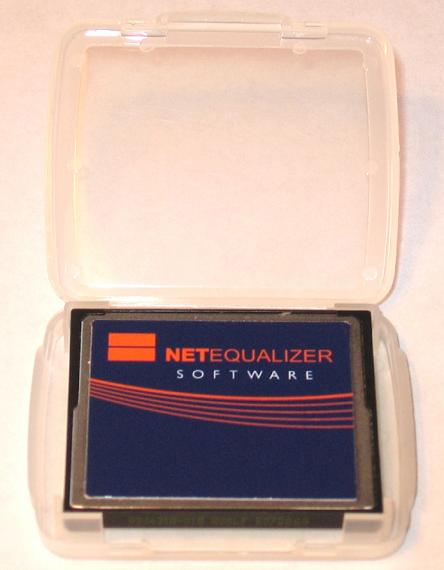
NetEqualizer CF Card

New Design!

As of August 10th, 2011, our Compact Flash Cards are being shipped with a new label design and card case!

View our videos on YouTube

You May Be the Victim of Internet Congestion


Have you ever had a mysterious medical malady? The kind where maybe you have strange spots on your tongue, pain in your left temple, or hallucinations of hermit crabs at inappropriate times – symptoms seemingly unknown to mankind?

But then, all of a sudden, you miraculously find an exact on-line medical diagnosis?

Well, we can’t help you with medical issues, but we can provide a similar oasis for diagnosing the cause of your slow network – and even better, give you something proactive to do about it.

Spotting classic congested network symptoms:

You are working from your hotel room late one night, and you notice it takes a long time to get connected. You manage to fire off a couple emails, and then log in to your banking website to pay some bills. You get the log-in prompt, hit return, and it just cranks for 30 seconds, until… “Page not found.” Well maybe the bank site is experiencing problems?

You decide to get caught up on Christmas shopping. Initially the Macy’s site is a bit a slow to come up, but nothing too out of the ordinary on a public connection. Your Internet connection seems stable, and you are able to browse through a few screens and pick out that shaving cream set you have been craving – shopping for yourself is more fun anyway. You proceed to checkout, enter in your payment information, hit submit, and once again the screen locks up. The payment verification page times out. You have already entered your credit card, and with no confirmation screen, you have no idea if your order was processed.

We call this scenario, “the cyclical rolling brown out,” and it is almost always a problem with your local Internet link having too many users at peak times. When the pressure on the link from all active users builds to capacity, it tends to spiral into a complete block of all access for 20 to 30 seconds, and then, service returns to normal for a short period of time – perhaps another 30 seconds to 1 minute. Like a bad case of Malaria, the respites are only temporary, making the symptoms all the more insidious.

What causes cyclical loss of Internet service?

When a shared link in something like a hotel, residential neighborhood, or library reaches capacity, there is a crescendo of compound gridlock. For example, when a web page times out the first time, your browser starts sending retries. Multiply this by all the users sharing the link, and nobody can complete their request. Think of it like an intersection where every car tries to proceed at the same time, they crash in the middle and nobody gets through. Additional cars keep coming and continue to pile on. Eventually the police come with wreckers and clear everything out of the way. On the Internet, eventually the browsers and users back off and quit trying – for a few minutes at least. Until late at night when the users finally give up, the gridlock is likely to build and repeat.

What can be done about gridlock on an Internet link?

The easiest way to prevent congestion is to purchase more bandwidth. However, sometimes even with more bandwidth, the congestion might overtake the link. Eventually most providers also put in some form of bandwidth control – like a NetEqualizer. The ideal solution is this layered approach – purchasing the right amount of bandwidth AND having arbitration in place. This creates a scenario where instead of having a busy four-way intersection with narrow streets and no stop signs, you now have an intersection with wider streets and traffic lights. The latter is more reliable and has improved quality of travel for everyone.

For some more ideas on controlling this issue, you can reference our previous article, Five Tips to Manage Internet Congestion.

How Effective is P2P Blocking?


This past week, a discussion about peer-to-peer (P2P) blocking tools came up in a user group that I follow. In the course of the discussion, different IT administrators chimed in, citing their favorite tools for blocking P2P traffic.

At some point in the discussion, somebody posed the question, “How do you know your peer-to-peer tool is being effective?” For the next several hours the room went eerily silent.

The reason why this question was so intriguing to me is that for years I collaborated with various developers on creating an open-source P2P blocking tool using layer 7 technology (the Application Layer of the OSI Model). During this time period, we released several iterations of our technology as freeware. Our testing and trials showed some successes, but we also learned how fragile the technology was and we were reluctant to push it out commercially. I had always wondered if other privately-distributed layer 7 blocking tools had found some magic key to perfection?

Sometimes, written words can be taken as fact even though the same spoken words might be dismissed as gossip; and so it was with our published open source technology. We started getting indications that it was getting picked up and integrated in other solutions and touted as gospel.

Our experience with P2P blocking:

Our free P2P blocking tool worked most of the time – maybe eighty percent. Eighty percent accuracy is fine for an experimental open-source tool. Intuitively, a blocking tool is expected to be 99.9 percent effective. Even though most customers would likely not conclusively measure our accuracy, eighty percent was too low to ethically sell this technology without disclosures.

The on-line discussion ended fairly quickly when the question of accuracy was brought up, and I think it is safe to assume the silence is an indication that nobody else was achieving better than eighty percent.

How do you validate the effectiveness of a P2P tool?

1) Brute force testing:

I am not aware of too many IT administrators that have the time to load up six or seven different P2P clients on their laptops, and download bootlegged Madonna videos all day.

In testing P2P clients, we infected several computers with just about every virus in circulation. Over time, you can get a rough idea of how deep you must go to expose weaknesses in your tool set. To be thorough, you can’t stop at the first P2P client tool. In the real world, users on your network will likely search for multiple P2P clients, especially if the first one fails. Once they find a kink in the armor, they will yap to others, exposing your Achilles heel.

2) Reduction of RIAA requests:

Most small-to-medium ISP’s don’t really think about P2P unless they get RIAA requests or their network is saturated.

RIAA requests seem to be a big motivator in purchasing technology to block P2P. If you are getting RIAA requests (these are letters from lawyers threatening to sue you for copyright infringement), you can install your P2P blocking tool, and if in the next week your notifications of copyright violations are way down, you can assume that you have put a good dent in your P2P downloading issue.

3) Reduced congestion:

Plug your P2P tool in and see if your network utilization drops.

4) Lower connection rates through your router:

One of the signatures of P2P is that clients will open up hundreds of connections per minute to P2P servers in order to download content. There are ways to measure and quantify these connection rates empirically.

Other observations:

Many times we’ll hear from an ISP/operator claiming they have P2P users run amok on their network, however analysis often shows most of their traffic is video – Netflix, YouTube, Hulu, etc.

Total P2P traffic has really dropped off quite a bit in the last three or four years. We attribute this decline to:

1) Legal iTunes. 99 cent songs have eliminated the need for pirated music.

2) RIAA enforcement and education of copyright laws.

3) The invention of the iPad and iPhone. These devices control the applications which run on them (they are not going to distribute P2P clients as readily).

One method to handle P2P problems is to control all the computers in your environment, scan them before granting network access, and then block access to P2P sites (the sites where the client utilities are loaded from).

Note: once a P2P client is loaded on a computer you cannot block any single remote site, as the essence of P2P is that the content is not centralized.

Summary:

Results of different P2P blocking techniques are often temporary, especially when you have an aggressive user base with motivation to download free content.

Commentary: Is IPv6 Heading Toward a Walled-Off Garden?


In a recent post we highlighted some of the media coverage regarding the imminent demise of the IPv4 address space. Subsequently, during a moment of introspection, I realized there is another angle to the story. I first assumed that some of the lobbying for IPv6 was a hardware-vendor-driven phenomenon; but there seems to be another aspect to the momentum of Ipv6. In talking to customers over the past year, I learned they were already buying routers that were IPv6 ready, but there was no real rush. If you look at a traditional router’s sales numbers over the past couple years, you won’t find anything earth shattering. There is no hockey-stick curve to replace older equipment. Most of the IPv6 hardware sales were done in conjunction with normal upgrade time lines.

The hype had to have another motive, and then it hit me. Could it be that the push to IPv6 is a back-door opportunity for a walled-off garden? A collaboration between large ISPs, a few large content providers, and mobile device suppliers?

Although the initial world of IPv6 day offered no special content, I predict some future IPv6 day will have the incentive of extra content. The extra content will be a treat for those consumers with IPv6-ready devices.

The wheels for a closed off Internet are already in place. Take for example all the specialized apps for the iPhone and iPad. Why can’t vendors just write generic apps like they do for a regular browser? Proprietary offerings often get stumbled into. There are very valid reasons for specialized apps for the iPhone, and no evil intent on the part of Apple, but it is inevitable that as their market share of mobile devices rises, vendors will cease to write generic apps for general web browsers.

I don’t contend that anybody will deliberately conspire to create an exclusively IPv6 club with special content; but I will go so far as to say in the fight for market share, product managers know a good thing when they see it. If you can differentiate content and access on IPv6, you have an end run around on the competition.

To envision how a walled garden might play out on IPv6, you must first understand that it is going to be very hard to switch the world over to IPv6 and it will take a long time – there seems to be agreement on that. But at the same time, a small number of companies control a majority of the access to the Internet and another small set of companies control a huge swatch of the content.

Much in the same way Apple is obsoleting the generic web browser with their apps, a small set of vendors and providers could obsolete IPv4 with new content and new access.

NetEqualizer News: September 2011


NetEqualizer News

September 2011  

Greetings! 

Enjoy another issue of NetEqualizer News! This month, we discuss two new features that will be available in the Fall 2011 Software Update (IPv6 visibility and ToS priority handling), as well as introduce a new and exciting way to report on and monitor your NetEqualizer data. As always, feel free to pass this along to others who might be interested in NetEqualizer News.

In This Issue:
:: IPv6 Visibility
:: ToS Priority Feature
:: Dynamic Reporting With The NetEqualizer
:: Best Of The Blog

 Our Website         Contact Us         NetEqualizer Demo         Price List     Join Our Mailing List

 Coming This Fall:
IPv6 Visibility 

As part of the Fall 2011 Software Update, the NetEqualizer will provide enhanced visibility to IPv6 traffic. This feature will help our customers that are experimenting with IPv6/IPv4 dual stacks, as they start to see IPv6 Internet traffic on their networks.

As you may be aware, the NetEqualizer today currently supports passing IPv6 traffic; we are now adding visibility to IPv6 traffic.

Do not worry if you are not in dual stack mode yet, as customers are reporting only tiny amounts of IPv6 Internet traffic at this point.  Industry tests to-date show that only about 0.0026% (2 thousands of a percent!) of Internet traffic is IPv6.

Nonetheless, NetEqualizer is preparing for the eventual move by gradually building in IPv6 visibility and functionality in upcoming releases.

The enhanced IPv6 capabilities that we are implementing in the NetEqualizer this Fall include:

  • Providing you with visibility to current IPv6 connections so that you to determine if you need to start shaping IPv6 traffic.
  • Logging the IPv6 traffic so that you can obtain a historical snapshot to help in your IPv6 planning efforts.

Building in these capabilities now will help make the transition down the road that much easier for both us and our customers.

To read more about IPv6, and the debate surrounding it, check out our NetEqualizer News blog articles on the subject:

Ten Things You Should Know About IPv6

Do We Really Need IPv6 and When

As always, the Fall 2011 Software Update will be available at no charge to customers with valid NetEqualizer Software Subscriptions (NSS).

For more information on the NetEqualizer or the upcoming Fall 2011 Software Update, visit our blog or contact us via email: sales or toll-free U.S.(800-918-2763), worldwide (303) 997-1300 x. 103.

Coming This Fall:   

ToS Priority Feature

In addition to IPv6 visibility, our upcoming Fall 2011 Software Update will have the ability to honor ToS-bit priority on any stream coming into your network. The NetEqualizer methodology is the only optimization device that can provide QoS in both directions of a voice or video call over an Internet link.

For additional details and a breakdown of the technology, check out our recent blog article:

NetEqualizer Provides Unique Low-Cost Way To Send Your Priority Traffic Over The Internet an article from our blog

As always, the Fall 2011 Software Update will be available at no charge to customers with valid NetEqualizer Software Subscriptions (NSS).

For more information on the NetEqualizer or the upcoming release, visit our blog or contact us via email to sales or call toll-free U.S.(800-918-2763), worldwide (303) 997-1300 x. 103.

Dynamic Reporting  

with the NetEqualizer  

Have you ever wanted an inexpensive real-time bandwidth reporting tool?  

Well, you’ve found it.

Dynamic Reporting

The NetEqualizer can now easily integrate with Excel to deliver powerful monitoring and reporting of data – all in near real time. The tutorial linked to below outlines just one of the ways the NetEqualizer can work with Excel in this way. Feel free to implement the solution described, or build upon it to create your own unique reporting tool. The possibilities are infinite!

Dynamic Reporting With The NetEqualizer

an article from our blog.

Best Of The Blog


The Story of NetEqualizer  

by Art Reisman – CTO – NetEqualizer  


The following story details the start of NetEqualizer as a product and as a company. It is an interesting story that should prove inspirational for any entrepreneurial mind looking to start a business.

In the spring of 2002, I was a systems engineer at Bell Labs in charge of architecting Conversant – an innovative speech-processing product. Revenue kept falling quarter by quarter, and meanwhile upper management seemed to only be capable of providing material for Dilbert cartoons, or perhaps helping to fine-tune the script for The Office. It was so depressing that I could not even read Dilbert anymore – those cartoons are not as amusing when you are living them every day.

Starting in the year 2000, and continuing every couple of months, there was a layoff somewhere in the company (which was Avaya at the time). Our specific business unit would get hit every six months or so. It was like living in a hospice facility. You did not want to get to know anybody too well because you would be tagged with the guilt of still having a job should they get canned next week. The product I worked on existed only as a cash cow to be milked for profit, while upper management looked to purchase a replacement. I can’t say I blamed them; our engineering expertise was so eroded by then that it would have been a futile effort to try and continue to grow and develop the product. Mercifully, I was laid off in June of 2003.

Prior to my pink slip, I had been fiddling with an idea that a friend of mine, Paul Harris, had come up with. His idea was to run a local wireless ISP. This initially doomed idea spawned from an article in the local newspaper about a guy up in Aspen, CO that was beaming wireless Internet around town using a Pringles canI am not making this up.


To keep reading, click here or download the full story…

EPUB cover

Download eBook

NetEqualizer Story CoverDownload PDF

Photo Of The Month  

Chautauqua Park

Fall is coming…   

The transition from summer to fall in Colorado is one of the most beautiful times of the year. The temperatures return to bearable, and the sun is out late enough for an after-work hike or an evening picnic. Experiencing this phenomenal weather is one of the many reasons we live, work, and play in Colorful Colorado.

    View our videos on YouTube

Offer Value, Not Fear


Recently, I thought back to an experience I had at a Dollar Rental Car in Maui a few years ago. When I refused their daily insurance coverage, the local desk agent told me that my mainland-based insurance was not good in Hawaii. He then went on to tell me that I would be fully responsible for the replacement cost of the car I was driving should something happen to it. I would have been more apt to buy their insurance had their agent just told me the truth – that most of his compensation was based on selling their daily coverage insurance policies.

Selling fear to your customers is often the easy way out. It reminds me of the old Bugs Bunny cartoon where a character is on the verge of making a moral decision. On one shoulder, a little devil is yelling in his ear, and on the other, a little angel. The devil is offering a clear, short-term pleasure deal to the character. The devil’s path leads to immediate gratification, while the angel preaches delayed gratification in exchange for doing the right thing. The angel argues that doing the right thing now will lead to a lifetime of happiness.

In our business, the angel sits on one shoulder and says, “Sell value. Sell something that helps your customers become more profitable.” While the little devil is sitting on the other shoulder saying, “Scare them. Tell them their servers are going to crash and they are going to be held accountable. They will be flogged, humiliated, disgraced, and shunned by the industry. Unless of course they buy your product. Oh, you don’t have a good fear story? We’ll invent one. We’ll get the Wall Street Journal to write an article about it. You know, they also feed off fear.”

There is an excellent partnership between vendors and the media. Think about all the fear based run-ups that have been capitalized on over the years: CALEA, IPv6 (we are running out IP addresses), Radon, mold, plastics, global warming, the ozone hole, Anthrax. Sure, these are all based on fact, but when vendors sense a fear-motivated market, they really can’t help themselves from foaming at the mouth. The devil on my shoulder continues, “These guys will never buy value, they are fear driven. Wasn’t that Y2K thing great? Nobody could quantify the actual threat so they replaced everything, even borrowed money to do it if they had to.”

Humor aside, the problems with selling fear, even warranted fear, are:

1) It is not sustainable without continually upping the ante.
2) You will be selling against other undifferentiated products, and the selling may eventually become unscrupulous, thus forcing you into a corner where you’ll be required to exaggerate.
3) It takes away profit from your customer. Yes, the customer should know better, but investing in security is a cost, too many costs and eventually there is no customer.
4) It is a relationship of mistrust from the start.

On the other hand, if you offer value:

1) Your customer will keep buying from you.
2) A customer that has realized value from your products will give you the benefit of the doubt on your next product.
3) A high-value product may not be the first thing on a customer’s mind, but once in place, with proven value, good customers will purchase upgrades which fund improvements in the product, and thus contribute to a profitable vendor and profitable customer.
4) Value builds an environment of trust from the start.

So while sometimes it is easier to sell fear to a potential client, selling value will ultimately provide longevity to your business and leave you with happy customers.

The Story of NetEqualizer


By Art Reisman

CTO www.netequalizer.com

In the spring of 2002, I was a systems engineer at Bell Labs in charge of architecting Conversant – an innovative speech-processing product. Revenue kept falling quarter by quarter, and meanwhile upper management seemed to only be capable of providing material for Dilbert cartoons, or perhaps helping to fine-tune the script for The Office. It was so depressing that I could not even read Dilbert anymore – those cartoons are not as amusing when you are living them every day.

Starting in the year 2000, and continuing every couple of months, there was a layoff somewhere in the company (which was Avaya at the time). Our specific business unit would get hit every six months or so. It was like living in a hospice facility. You did not want to get to know anybody too well because you would be tagged with the guilt of still having a job should they get canned next week. The product I worked on existed only as a cash cow to be milked for profit, while upper management looked to purchase a replacement. I can’t say I blamed them; our engineering expertise was so eroded by then that it would have been a futile effort to try and continue to grow and develop the product.

Mercifully, I was laid off in June of 2003.

Prior to my pink slip, I had been fiddling with an idea that a friend of mine, Paul Harris, had come up with. His idea was to run a local wireless ISP. This initially doomed idea spawned from an article in the local newspaper about a guy up in Aspen, CO that was beaming wireless Internet around town using a Pringles can – I am not making this up. Our validation consisted of Paul rigging up a Pringles can antenna, attaching it to his laptop’s wireless card (we had external cards for wireless access at the time), and then driving a block from his house and logging in to his home Internet. Amazing!

The next day, while waiting around for the layoff notices, we hatched a plan to see if we could set up a tiny ISP from my neighborhood in northern Lafayette, CO. I lived in a fairly dense development of single-family homes, and despite many of my neighbors working in the tech industry, all we could get in our area was dial-up Internet. Demand was high for something faster.

So, I arranged to get a 1/2 T1 line to my house at the rate of about $1,500 per month, with the idea that I could resell the service to my neighbors. Our take rate for service appeared to be everybody I talked to. And so, Paul climbed onto the roof and set up some kind of pole attached to the top of the chimney, with a wire running down into the attic where we had a $30 Linksys AP. The top of my roof gave us a line-of-sight to 30 or 40 other rooftops in the area. We started selling service right away.

In the meantime, I started running some numbers in my head about how well this 1/2 T1 line would hold up. It seemed like every potential customer I talked to planned on downloading the Library of Congress, and I was afraid of potential gridlock. I had seen gridlock many times on the network at the office – usually when we were beating the crap out if it with all the geeky things we experimented on at Bell Labs.

We finally hooked up a couple of houses in late March, and by late April the trees in the area leafed out and blocked our signal. Subsequently, the neighbors got annoyed and stopped paying. Most 802.11 frequencies do not travel well through trees. I was also having real doubts about our ability to make back the cost of the T1 service, especially with the threat of gridlock looming once more people came online – not to mention the line-of-sight being blocked by the trees.

Being laid off was a blessing in disguise. Leaving Bell Labs was not a step I would have taken on my own. Not only did I have three kids, a mortgage, and the net worth of a lawnmower, my marketable technical skills had lapsed significantly over the past four years. Our company had done almost zero cutting-edge R&D in that time. How was I going to explain that void of meaningful, progressive work on my resume? It was a scary realization.

Rather than complain about it, I decided to learn some new skills, and the best way to do that is to give yourself a project. I decided to spend some time trying to figure out a way to handle the potential saturation on our T1 line. I conjured up my initial solution from my computer science background. In any traditional operating systems’ course, there is always a lesson discussing how a computer divvies up its resources. Back in the old days, when computers were very expensive, companies with computer work would lease time on a shared computer to run a “job”. Computing centers at the time were either separate companies, or charge-back centers in larger companies that could afford a mainframe. A job was the term used for your computer program. The actual computer code was punched out on cards. The computer operator would take your stack of cards from behind a cage in a special room and run them through the machine. Many operators were arrogant jerks that belittled you when your job kicked out with an error, or if it ran too long and other jobs were waiting. Eventually computer jobs evolved so they could be submitted remotely from a terminal, and the position of the operator faded away. Even without the operator, computers were still very expensive, and there were always more jobs to run than the amount of leased time on the computer. This sounds a lot like a congested Internet pipe, right?

The solution for computers with limited resources was a specialized program called an operating system.  Operating systems decided what jobs could run, and how much time they would get, before getting furloughed. During busy times, the operating system would temporarily kick larger jobs out and make them wait before letting them back in. The more time they used before completion, the lower their priority, and the longer they would wait for their turn.

My idea – and the key to controlling congestion on an Internet pipe – was based on adapting the proven OS scheduling methodology used to prevent gridlock on a computer and apply it to another limited resource – bandwidth on an Internet link. But, I wasn’t quite sure how to accomplish this yet.

Kevin Kennedy was a very respected technical manager during my early days at Bell Labs in Columbus, Ohio. Kevin left shortly after I came on board, and eventually rose up to be John Chambers’ number two at Cisco. Kevin helped start a division at Cisco which allowed a group of engineers to migrate over and work with him – many of whom were friends of mine from Bell Labs. I got on the phone and consulted a few of them on how Cisco dealt with congestion on their network. I wondered if they had anything smart and automated, and the answer I got was “yes, sort of.” There was some newfangled way to program their IOS operating system, but nothing was fully automated. That was all I needed to hear. It seemed I had found a new niche, and I set out to make a little box that you plugged into a WAN or Internet port that would automatically relieve congestion and not require any internal knowledge of routers and complex customizations.

In order to make an automated fairness engine, I would need to be able to tap into the traffic on an Internet link. So I started looking at the Linux kernel source code and spent several weeks reading about what was out there. Reading source code is like building a roadmap in your head. Slowly over time neurons start to figure it out – much the same way a London Taxi driver learns their way around thousands of little streets with some of them being dead ends. I eventually stumbled into the Linux bridge code. The Linux bridge code allows anybody with a simple laptop and two Ethernet cards to build an Ethernet bridge. Although an Ethernet bridge was not really related in function to my product idea, it solved all of the upfront work I would need to do to break into an Internet connection to examine data streams and then reset their priorities on the fly as necessary – all this with complete transparency to the network.

As usual, the mechanics of putting the concept in my head into working code was a bit painful and arduous. I am not the most adept when it comes to using code syntax and wandering my way around kernel code. A good working knowledge of building tools, compiling tools, and legacy Linux source code is required to make anything work in the Linux kernel. The problem was that I couldn’t stand those details. I hated them and would have gladly paid somebody else to implement my idea, but I had absolutely no money. Building and coding in the Linux kernel is like reading a book you hate where the chapters and plot are totally scrambled. But, having done it many times, I slogged through, and out the other side appeared the Linux Bandwidth Arbitrator (LBA) – a set of utilities and computer programs made for Linux open source that would automatically take a Linux bridge and start applying fairness rules.

Once I had the tool working in my small home test lab, I started talking about it on a couple of Linux forums. I needed a real network to test it on because I had no experience running a network. My engineering background up until now had been working with firmware on proprietary telecommunication products. I had no idea how my idea would perform in the wild.

Eventually, as a result of one of my Linux forum posts, a call came in from a network administrator and Linux enthusiast named Eric who ran a network for a school district in the Pacific Northwest. I thought I had hit the big time. He was a real person with a real network with a real problem. I helped him load up a box with our tool set in his home office for testing. Eventually, we got it up and running on his district network with mixed results. This experiment, although inconclusive, got some serious kinks worked out with my assumptions.

I went back to the Linux forums with my newfound knowledge. I learned of a site called “freshmeat.net” where one could post free software for commercial use. The response was way more than I expected, perhaps a thousand hits or so in the first week. However, the product was not easy to build from scratch and most hits were just curious seekers of free tools. Very few users had built a Linux kernel, let alone had the skill set to build a Linux Bandwidth Arbitrator from my instructions. But, it only took one qualified candidate to further validate the concept.

This person turned out to be an IT administrator from a state college in Georgia. He loaded our system up after a few questions, and the next thing I knew I got an e-mail that went something like this:

“Since we installed the LBA, all of our congestion has ceased, and the utilization on our main Internet trunk is 20% less. The students are very happy!”

I have heard this type of testimonial many times since, but I was in total disbelief with this first one. It was on a significant network with significant results! Did it really work, or was this guy just yanking my chain? No. It was real, and it really did work!

I was broke and ecstatic at the same time. The Universe sends you these little messages that you are on the right track just when you need them. To me, this e-mail was akin to 50,000 people in a stadium cheering for you. Queue the Rocky music.

Our following on freshmeat.net grew and grew. We broke into the Top 100 projects, which is like making it to Hollywood Week on American Idol to tech geeks, and then broke the Top 50 or so in their rankings. This was really quite amazing because most of the software utilities on freshmeat.net were consumer-based utilities, which have a much broader audience. The only projects with higher rankings in a business-to-business utility product (like the LBA) were utilities like SQL Dansguard, and other very well-known projects.

Shortly after going live on freshmeat.net, I started collaborating add-ons to the LBA utility with Steve Wagor (now my partner at APconnections). He was previously working as a DBA, webmaster, and jack-of-all-trades for a company that built websites for realtors in the southwestern United States. We were getting about one request a week to help install the LBA in a customer network. Steve got the idea to make a self-booting CD that could run on any standard PC with a couple of LAN cards. In August of 2004, we started selling them. Our only current channel was freshmeat.net, which allowed us to offer a purchasable CD as long as we offered the freeware version too.* We sold fifteen CD’s that first month. The only bad news was that we were working for about $3.00 per hour. There were too many variables on the customer-loaded systems to be as efficient as we needed to be.  Also, many of the customers loading the free CD were as broke as we were and not able to pay for our expertise.

* As an interesting side note, we also had a free trial version that ran for about two hours that could be converted to the commercial version with a key. The idea was to let people try it, prove it worked, and then send them the permanent key when they paid. Genius, we thought. However, we soon realized there were thousands of small Internet cafes around the world that would run the thing for two hours and then reboot. They were getting congestion control and free consulting from us. So in countries where the power goes out once a day anyway, no one is bothered by a sixty-second Internet outage.

As word got out that the NetEqualizer worked well, we were able to formalize the commercial version and started bundling everything into our own manufacturing and shipping package from the United States. This eliminated all the free consulting work on the demo systems, and also ensured a uniform configuration that we could support.

Today NetEqualizer has become an adjective brand name in growing circles.

Some humble facts:

NetEqualizer is a multi-million dollar company.

NetEqualizer’s have over ten million users going through them on six continents.

We serve many unique locales in addition to the world’s largest population centers. Some of the more interesting places are:

  • Malta
  • The Seychelles Islands
  • The Northern Slopes of Alaska
  • Iceland
  • Barbados
  • Guantanamo Bay
  • The Yukon Territory
  • The Afghan-American Embassy
  • The United States Olympic Training Center
  • Multiple NBA arenas
  • Yellowstone National Park

Stay tuned for Part II, “From Startup to Multi-National, Multi-Million Dollar Enterprise.”

Meanwhile, check out these related articles:

NetEqualizer Brand Becoming an Eponym for Fairness and Net-Neutrality Techniques

Building a Software Company from Scratch” – Adapted from an entrepreneur.org article.

Integrating NetEqualizer with Active Directory


By Art Reisman

CTO www.netequalizer.com

I have to admit, that when I see this question posed to one of our sales engineers, I realize our mission of distributing a turn key bandwidth controller will always require a context switch for potential new customers.

It’s not that we can’t tie into Active Directory, we have. The point is that our solution has already solved the customer issue of bandwidth congestion in a more efficient way than divvying up bandwidth per user based on a profile in Active Directory.

Equalizing is the art form of rewarding bandwidth to the real time needs of users at the appropriate time, especially during peak usage hours when bandwidth resources are stretched to their limit. The concept does take some getting used to. A few minutes spent getting comfortable with our methodology will often pay off many times over in comparison to the man hours spent tweaking and fine tuning a fixed allocation scheme.

Does our strategy potentially alienate the Microsoft Shop that depends on Active Directory for setting customized bandwidth restrictions per user ?

Yes, perhaps in some cases it does. However, as mentioned earlier, our mission has always been to solve the business problem of congestion on a network, and equalizing has proven time and again to be the most cost effective in terms of immediate results and low recurring support costs.

Why not support Active Directory integration to get in the door with a new customer ?

Occasionally, we will open up our interface in special cases and integrate with A/D or Radius, but what we have found is that there are a myriad of boundary cases that come up that must be taken care of. For example, synchronizing after a power down or maintenance cycle. Whenever two devices must talk to each other in a network sharing common data, the support and maintenance of the system can grow exponentially. The simple initial requirements of setting a rate limit per user are often met without issue. It is the follow on inevitable complexity and support that violates the nature and structure of our turn-key bandwidth controller. What is the point in adding complexity to a solution when the solution creates more work than the original problem?

See related article on the True Cost of Bandwidth Monitoring.

Speeding Up Your Internet Connection Using a TOS Bit


A TOS bit (Type Of Service bit) is a special bit within an IP packet that directs routers to give preferential treatment to selected packets. This sounds great, just set a bit and move to the front of the line for faster service. As always there are limitations.

How does one set a TOS bit?

It seems that only very special enterprise applications, like VoIP PBX’s, actually set and make use of TOS bits. Setting the actual bit is not all that difficult if you have an application that deals with the Network layer, but most commercial applications just send their data on to their local host computer clearing house for data, which in turn, puts the data into IP packets without a TOS bit set. After searching around for a while, I just don’t see any literature on being able to set a TOS bit at the application level. For example, there are several forums where people mention setting the TOS bit in Skype but nothing definitive on how to do it.

However, not to be discouraged, and being the hacker that I am, I could, with some work, make a little module to force every packet leaving my computer or wireless device standard with the TOS bit set. So why not package this up and sell it to the public as an Internet accelerator?

Well before I spend any time on it, I must consider the following:

Who enforces the priority for TOS packets?

This is a function of routers at the edge of your network, and all routers along the path to wherever the IP packet is going. Generally, this limits the effectiveness of using a TOS bit to networks that you control end-to-end. In other words, a consumer using a public Internet connection cannot rely on their provider to give any precedence to TOS bits; hence this feature is relegated to enterprise networks within a business or institution.

Incoming traffic generally cannot be controlled.

The subject of when you can and cannot control a TOS bit does get a bit more involved (pun intended). We have gone over it in more detail in a separate article.

Most of what you do is downloading.

So assuming that your Internet provider did give special treatment to incoming data (which it likely does not), such as video, downloads, and VoIP, the problem with my accelerator idea is that it could only set the TOS bit on data leaving your computer. Incoming TOS bits would have to be set by the sending server.

The moral of the story is that TOS bits that traverse the public Internet don’t have much of a chance in making a difference in your connection speed.

In conclusion, we are going to continue to study TOS bits to see where they might be beneficial and complement our behavior-based shaping (aka “equalizing”) technology.

NetEqualizer expects to gain market share in recession


Lafayette Colorado

APconnections released a statement today saying that they expect to gain market share in the highly competitive bandwidth control and WAN optimization market should there be another downturn in the world economy.

“We obviously don’t wish a recession on anybody.   The main reason for our success in a tight market is our low price.  In good times some customers are hesitant to contact us  because they believe that our lower pricing model just can’t be true without a gimmick. When a recession comes along, businesses are still faced with the problem of a congested Internet link with less operating dollars available to spend.  Next thing we know is that our phone starts ringing with inquiries, followed by new customers opting to trial the NetEqualizer.”  The cautious inquirer soon turns into an NetEqualizer advocate, as per the comment below.

Peter Spencer Deskspace.biz

In the UK there is an advertising slogan for paint that says:  ”It does exactly what it says on the tin”. Well the NetEqualizer does exactly what they claim on their website: we took it out of the box, plugged it in to our network, and 10 minutes later, all our bandwidth problems disappeared. No more dropped VoIP calls, and no more complaints about slow internet access or stuck emails. We did get a couple of unhappy users – but those were the folks who were downloading movies on peer-to-peer or running unauthorised web-servers on our network – and they had caused all the trouble for everyone! NetEqualizer was automatically throttling back their bandwidth usage. Easy. We have 100 tenants in our serviced office, and the internet just HAS to work 24/7 – NetEqualizer has made them, and us, happy!

Related Article Does Lower cost bandwidth  foretell a drop off  in expensive  Packet Shapers

Dynamic Reporting With The NetEqualizer


Update  Feb 2014

The spread sheet reporting features  described below as an excel Integration have now been integrated into the NetEqualizer GUI as of 2013. We have also added protocol reporting for common applications.  We generally do not break links to old articles hence we did not take this article down.


Have you ever wanted an inexpensive real-time bandwidth reporting tool?

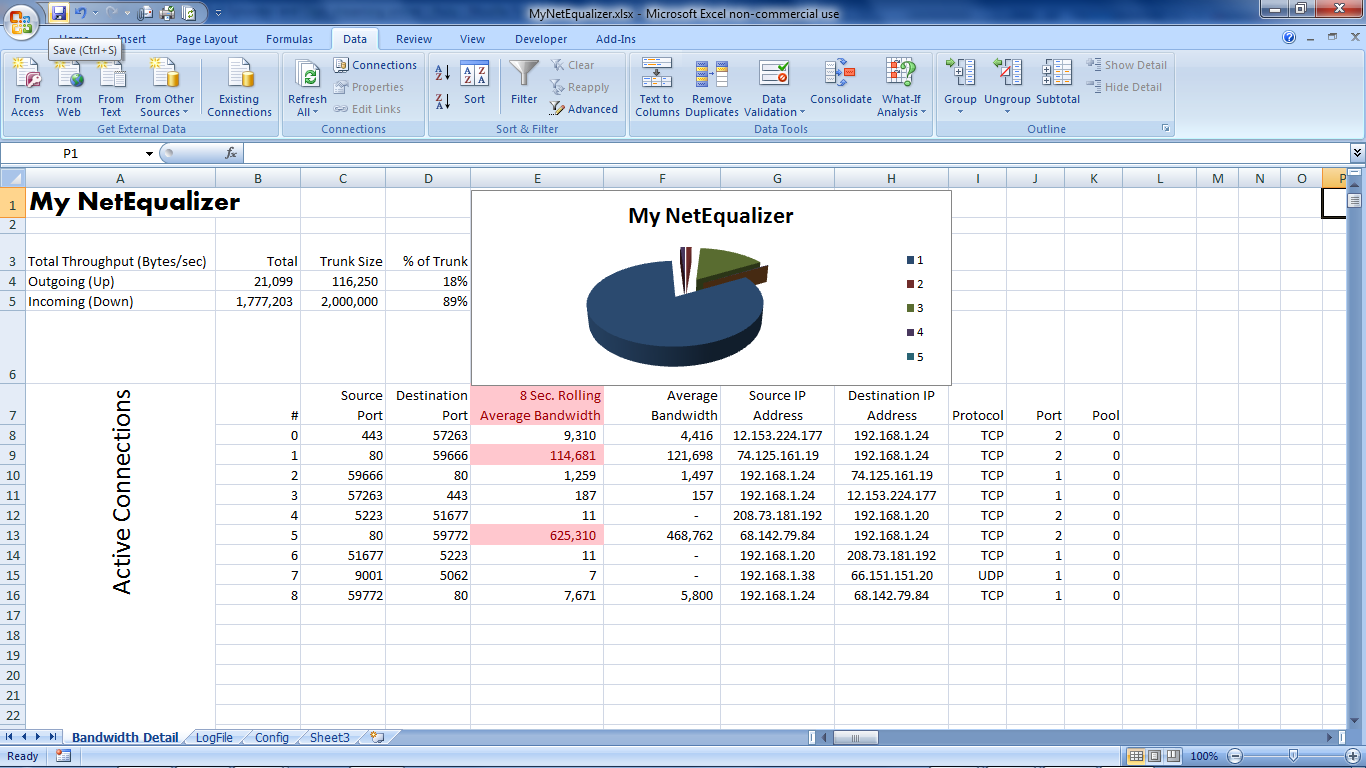
The following excel integration, totally opens up the power of the NetEqualizer bandwidth data. Even I love watching my NetEqualizer data on my spreadsheet. Last night, I had it up and watched as the bandwidth spiked all of a sudden, so I looked around to see why it was – turns out my son started watching NetFlix on his Nintendo DS! Too funny, but very persuasive in terms of enhancing your ability to do monitoring.

This blog shows just one example, but suffice it to say that the reporting options are endless. You could easily write a VBA routine in Excel to bring this data down every second. You could automatically log the days top 10 highest streams, or top 10 highest connections. You could graph the last 60 seconds (or other timeframe) of per second peak usage. You could update this graph, watching it scroll by in real time. It’s endless what you could do, with relatively little effort (because Excel does all the computationally hard work as pre-programmed routines for reporting and display).

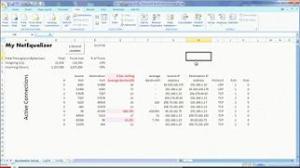
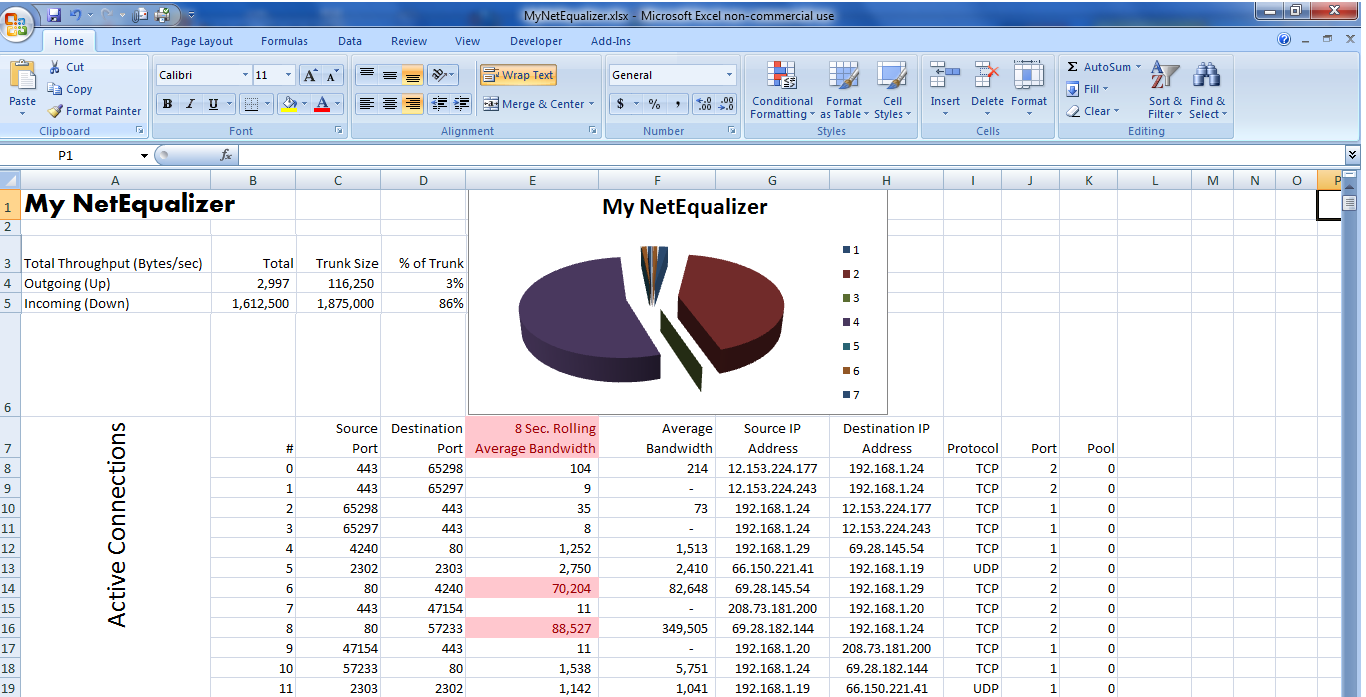
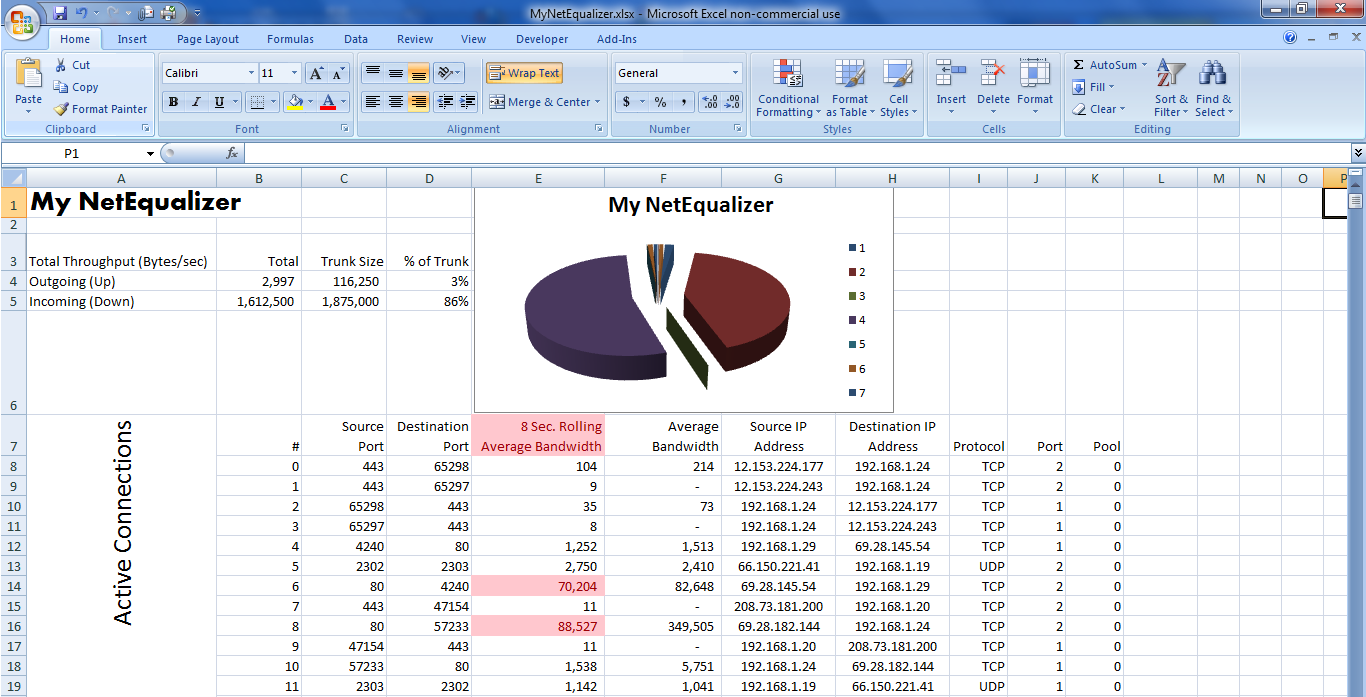
Here’s a picture of what’s happening on my NetEqualizer right now as I write this:

Fig-1

Pretty slick eh? After I put this spreadsheet together the first time, I won’t have to do anything to have it report current data every minute or sooner. Let me explain how you can do it too.

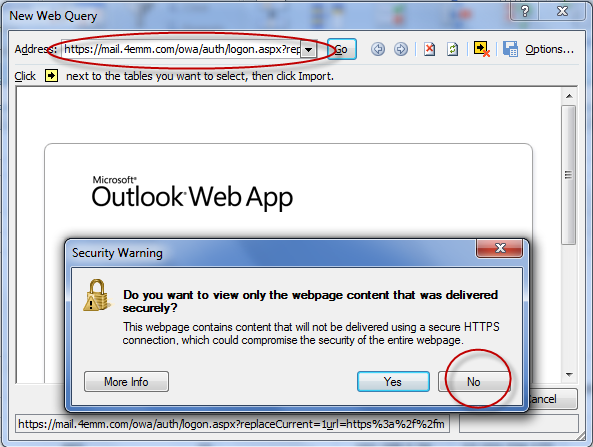
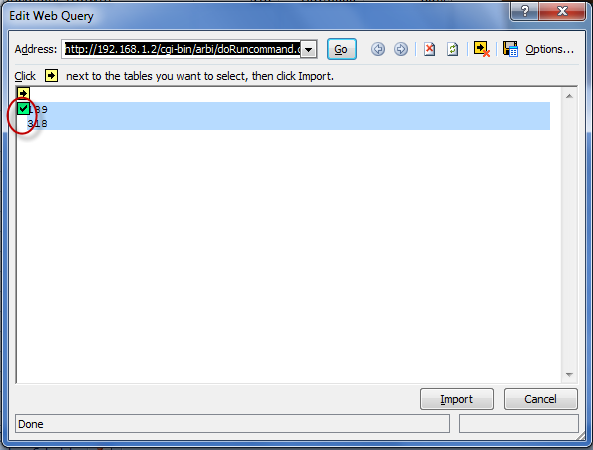
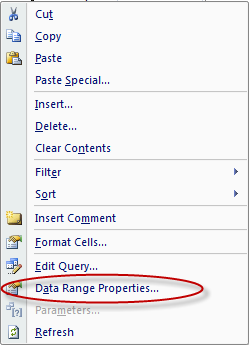
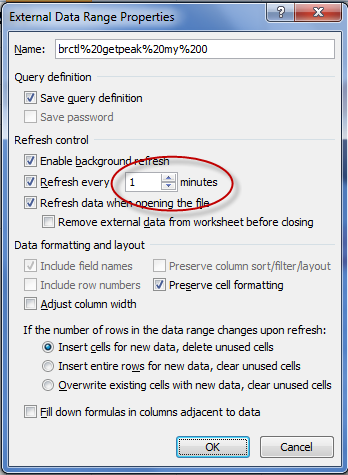
Did you know that there’s a little known feature in Microsoft Excel called an Excel Web Query?  This facility allows you to specify an http: address on the web and use the data off the resulting web page for automatic insertion into Excel.  Further, you can tell Excel that you want your spreadsheet to be automatically updated regularly – as frequently as every minute or whenever you hit the “Refresh All” key. If you combine this capability with the ability to run a NetEqualizer report from your browser using the embedded command, you can automatically download just about any NetEqualizer data into a spreadsheet for reporting, graphing and analysis.

Fig-1 above shows some interesting information all of it gathered from my NetEqualizer as well as some information that has been programmed into my spreadsheet. Here’s what’s going on: Cells B4 & B5 contain information pulled from my NetEqualizer, it is the total bandwidth Up & Down respectively going through the unit right now. It compares this with cells C4 & C5, which are the TrunkUp & TrunkDown settings (also pulled from the NetEqualizer’s configuration file and downloaded automatically) and calculates cells D4 & D5 showing the % of trunk used. The Cells B8:K show all the data from the NetEqualizer’s Active Connections Report. The column titled “8 Second Rolling Average Bandwidth” shows Wavg and this data is also automatically plotted in a pie chart showing the bandwidth composition of my individual flows. Also, I put a conditional rule on my bandwidth flow that says because I’m greater than 85% of my TrunkDown speed, all Flows greater than HOGMIN should be highlighted in Red. All of this updated every minute, or sooner if I hit the refresh key.

I’ll take you through a step by step on how I created the page above so you unlock the power of Excel on your critical bandwidth data.

The steps I outline are for Excel 2007, this can be done in earlier versions of Excel but the steps will be slightly different. All I ask is if you create a spreadsheet like this and do something you really like, let us know about it (email: sales@apconnections.net).

I’m going to assume that you know how to construct a basic spreadsheet. This document would be far too long if I took you through each little step to create the report above. Instead, I’ll show you the important part – how to get the data from the NetEqualizer into the spreadsheet and have it automatically and regularly refresh itself.

In this page there are two links: One at B4:B5, and another at B8:K (K has no ending row because it depends on how many connections it pulls – thus K could range from K8 to K99999999 – you get the idea).

Let’s start by linking my total up and down bandwidth to cells B4:B5 from the NetEqualizer.  To do this, follow these steps:

Select cell B4 with your cursor.

Select the “Data” tab and click “From Web”.


Click “No” and Erase the address in the address bar:

Put the following in the Address Bar instead – make sure to put the IP Address of your NetEqualizer instead of “YourNetEqualizersIPAddress” – and hit return:

—Please contact us (support@apconnections.net) if you are a current NetEqualizer user and want the full doc—

You may get asked for your User ID and Password – just use your normal NetEqualizer User ID and Password.

Now you should see this:


Click on the 2nd arrow in the form which turns it into a check mark after it’s been clicked (as shown in the picture above). This highlights the data returned which is the “Peak” bandwidth (Up & Down) on the NetEqualizer .  Click the Import button.  In a few seconds this will populate the spreadsheet with this data in cells B4 & B5.

Now, let’s tell the connection that we want the data updated every 1 minute. Right Click on B4 (or B5), and you will see this:


Click on Data Range Properties.

Change “Refresh every” to 1 minute. Also, you should copy the other click marks as well.  Hit “OK”.

Done! Total Bandwidth flow data from the NetEqualizer bridge will now automatically update into the spreadsheet every 60 seconds.

For the Active Connections portion of this report, follow the same instructions starting by selecting cell B8. Only for this report, use the following web address (remember to use your NetEqualizer’s IP):

—Please contact us (support@apconnections.net) if you are a current NetEqualizer user and want the full doc—

(note: we’ve had some reports that this command doesn’t cut and paste well probably because of the “wrap”, you may need to type it in)

Also, please copy and paste this exactly (unless you’re a Linux expert – and if you are send me a better command!) since there are many special formatting characters that have been used to make this import work in a well behaved manner.  Trust me on this, there was plenty of trial an error spent on getting this to come in reliably.

Also, remember to set the connection properties to update every 1 minute.

At this point you may be noticing one of the cool things about this procedure is that I can run my own “custom” reports via a web http address that also issues Linux commands like “cat” & “awk” – being able to do this allows me to take just about any data off the NetEqualizer for automatic import into Excel.

So that’s how it’s done. Here’s a list of a few other handy web connection reports:

For your NetEqualizer’s configuration file use:

—Please contact us (support@apconnections.net) if you are a current NetEqualizer user and want the full doc—

For your NetEqualizer’s log file use:

—Please contact us (support@apconnections.net) if you are a current NetEqualizer user and want the full doc—

(note: we’ve had some reports that this command doesn’t cut and paste well probably because of the “wrap”, you may need to type it in)

Once you get all the data you need into your Excel, you can operate on the data using any Excel commands including macros, or Excel Visual Basic.

Lastly, do you want to see what’s happening right now, and you don’t want to wait up to 60 seconds? Hit the “Refresh All” button on the “Data” tab – that will refresh everything as of this second:

Good luck, and let us know how it goes…

Caveat – this feature is unsupported by APConnections.