

Sometimes by using a cost metric you can distill a relatively complicated thing down to a simple number for comparison. For example, we can compare housing costs by Dollars Per Square Foot or the fuel efficiency of cars by using the Miles Per Gallon (MPG) metric. There are a number of factors that go into buying a house, or a car, and a compelling cost metric like those above may be one factor. Nevertheless, if you decide to buy something that is more expensive to operate than a less expensive alternative, you are probably aware of the cost differences and justify those with some good reasons.
Clearly this makes sense for bandwidth shaping now more than ever, because the cost of bandwidth continues to decline and as the cost of bandwidth declines, the cost of shaping the bandwidth should decline as well. After all, it wouldn’t be logical to spend a lot of money to manage a resource that’s declining in value.
With that in mind, I thought it might be interesting to looking at bandwidth shaping on a cost per Mbs basis. Alternatively, I could look at bandwidth shaping on a cost per user basis, but that metric fails to capture the declining cost of a Mbs of bandwidth. So, cost per Mbs it is.
As we’ve pointed out before in previous articles, there are two kinds of costs that are typically associated with bandwidth shapers:
1) Upfront costs (these are for the equipment and setup)
2) Ongoing costs (these are for annual renewals, upgrades, license updates, labor for maintenance, etc…)
Upfront, or equipment costs, are usually pretty easy to get. You just call the vendor and ask for the price of their product (maybe not so easy in some cases). In the case of the NetEqualizer, you don’t even have to do that – we publish our prices here.
With the NetEqualizer, setup time is normally less than an hour and is thus negligible, so we’ll just divide the unit price by the throughput level, and here’s the result:
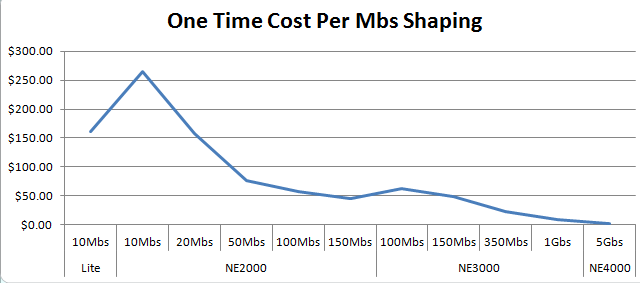
I think this is what you would expect to see.
For ongoing costs you would need to add all the mandatory per year costs and divide by throughput, and the metric would be an ongoing “yearly” per Mbs cost.
Again, if we take the NetEqualizer as an example, the ongoing costs are almost zero. This is because it’s a turn-key appliance and it requires no time from the customer for bandwidth analysis, nor does it require any policy setup/maintenance to effectively run (it doesn’t use policies). In fact, it’s a true zero maintenance product and that yields zero labor costs. Besides no labor, there’s no updates or licenses required (an optional service contract is available if you want ongoing access to technical support, or software upgrades).
Frankly, it’s not worth the effort of graphing this one. The ongoing cost of a NetEqualizer Support Agreement ranges from $29 (dollars) – $.20 (cents) per Mbs per year. Yet, this isn’t the case for many other products and this number should be evaluated carefully. In fact, in some cases the ongoing costs of some products exceed the upfront cost of a new NetEqualizer!
Again, it may not be the case that the lowest cost per Mbs of bandwidth shaping is the best solution for you – but, if it’s not, you should have some good reasons.
If you shape bandwidth now, what is your cost per Mbs of bandwidth shaping? We’d be interested to know.
If your ongoing costs are higher than the upfront costs of a new NetEqualizer and you’re open to a discussion, you should drop us a note at sales@apconnections.net.






 NetEqualizer News Blog
Five Great Ideas to Protect Your Data with Minimal Investment
February 27, 2012 — netequalizerWe see quite a bit of investment when it comes to data security. Many solutions are selected on the quantity of threats deterred. Large feature sets, driven by FUD, are exponential in cost, and at some point the price of the security solution will outweigh the benefit. But where do you draw the line?
Note:
1) It is relatively easy to cover 95 percent of the real security threats that can damage a business’s bottom line or reputation.
2) It is totally impossible to completely secure data.
3) The cost for security starts to hockey stick as you push toward the mythical 100 percent secure solution.
For example, let’s assume you can stop 95 percent of potential security breaches with an investment of $10, but it would cost $10 million to achieve 99 percent coverage. What would you do? Obviously you’d stop someplace between 95 and 99 percent coverage. Hence, the point of this post. The tips below are intended to help with the 95 percent rule, what is reasonable and cost effective. You should never be spending more money securing an asset than that asset is worth.
Some real world examples of reducing practical physical risk would be putting life jackets in a watercraft, or an airbag in an automobile. If we took the approach to securing your water craft or automobile with the FUD of data security, everybody would be driving 5 million dollar Abrams tanks, and trout fishing in double hulled aircraft carriers.
Below are some security ideas to protect your data that should greatly reduce your risk at a minimal investment.
1) Use your firewall to block all uninitiated requests from outside the region where you do business.
For example, let’s assume you are a regional medical supply company in the US. What is the likelihood that you will be getting a legitimate inquiry from a customer in China, India, or Africa? Probably not likely at all. Many hackers come in from an IP addresses originating in foreign countries, for this reason you should use your firewall to block any request outside of your region. This type of block will still allow internal users to go out to any Internet address, but will prevent unsolicited requests from outside your area. The cost to implement such a block is free to very little, yet the security value is huge. According to many of our customers, just doing this simple block can reduce 90 percent of potential intrusions.
2) Have a security expert check your customer facing services for standard weaknesses. For a few hundred dollars, an expert can examine your security holes in just a few hours. A typical security hole often exploited by a hacker is SQL Injection – this is where a hacker inserts an SQL command in your URL or web form to see if the backend code executes the command. If it does, further exploration and exploitation will occur which could result in total system compromise. A good security expert can find most of these holes and make recommendations on how to remedy it in a few hours.
3) Install an IDPS (Intrusion Detection and Prevention System) in between your Internet connection and your data servers. A good IDPS will detect and block suspicious inquiries to your web servers and enterprise. There are even some free systems you can install with a little elbow grease.
4) Lay low, and don’t talk about your security prowess. Hackers are motivated by challenge. There are millions of targets out there and only a very small number of businesses get intentionally targeted with a concerted effort by a human. Focused hacking by a human takes a huge amount of resources and time on the part of the intruder. Without a specific motive to target your enterprise, the automated scripts and robots that crawl the internet will only probe so far and move on. The simple intrusion steps outlined here are very effective against robots and crawlers, but would be much less effective against a targeted intrusion. This is because there are often numerous entry points outside the web application – physical breaches, social engineering, etc.
5) Have an expert monitor your logs and the integrity of your file system. Combining automatic tools with manual review is an excellent line of defense against attack. Many organizations think that installing an automated solution will get them the security they need, but this is not the case. Well known virus scan tools that “analyze your web site for 25,000 vulnerabilities” are really just selling you security theater. While their scanning technology does help in many ways, combining the results of the scans with manual review and analysis is the only way to go if you care about good security. Our security friends at Fiddler on the Root, mentioned above, say they have a 100% success rate in hacking sites scanned with tools like McAfee.
File integrity monitoring is also extremely beneficial. Knowing right away that a file changed on your web server when nothing should have changed is very powerful in preventing an attack. Many attacks develop over time and if you can catch an attack early your chances of preventing its success are much greater.
Share this: