Is the Reseller Channel for Network Equipment Declining?


Back in 2008, TMCnet posed an interesting question about traditional PBX vendors. Has VOIP outgrown traditional business service channels? And that got me wondering, what is going on in the traditional network equipment channel? Is it starting to erode in favor of direct sales?

We are seeing a split in buying patterns.

1) Companies that do not have an in house staff generally make their equipment purchases based on the advice of their Network Consultants, VARs or local reseller.

The line between Network Consultants and VARs has always been a bit muddy.  Most network consultants tend to dabble in reselling.  Hence this relationship behaves like the traditional channel where consultants and VARs represent specific manufactures, and  mark up equipment to make margins. Customers benefit because the true cost of the consulting, to design and deploy their  networks, is subsidized by the margins the VARs make on their equipment sales.

2) On the other hand, companies and institutions with  in house IT staffs are starting to get away from the traditional equipment reseller.  They are more likely to do their research on line, and are more than willing to buy outside of a traditional channel.  This creates a strange double edged sword for OEMs,  as they are heavily dependent on the relationships of their channel partners to move equipment. For the same reason that those factory outlet stores are located outside of town, OEMs do not want to shoot themselves in the foot by selling direct and competing with their resellers.

Even though there is some degradation in the traditional channel, I don’t think we will see its demise any time soon for a couple of reasons.

1) Network solutions remain labor intensive, and expertise will always be at a minimum. Even with cloud based computing there is still a good bit of infrastructure required at the enterprise and this bodes well for the VARs and reseller who offer their expertise while acting as the conduit to move equipment with mark-up from the OEMs

2) Network equipment itself resists becoming a commodity. Yes home routers and such have gone that route, but with advanced features such as bandwidth optimization and security driving the market , network equipment remains complex enough to justify the value added channel.

What are you seeing?

Related Article:  Us channel sales flat for third straight year.

On the Trail of Network Latency Over a Satellite Link


By Art Reisman – CTO – www.netequalizer.com

Art Reisman CTO www.netequalizer.com

This morning, just for fun, I decided to isolate the latency on a route from my home office, to a computer located at a remote hunting lodge. The hunting lodge is serviced by a Wild Blue satellite link.

What causes latency?

The factors that influence network latency are:

1) Wire transport speed.

Not to be confused with the amount of data a wire carry in a second, I am referring to the raw speed at which data travels on a wire. Once on the wire, the traversal time from end to end. For the most part, we can assume data travels at the speed of light: 186,000 miles per second.

2) Distance.

How far is the data traveling. Even though data travels at the speed of light, a hop across the United States will cost you about 4 milliseconds, and a hop up to a stationary satellite  ( round trip about 44,000 miles) adds a minimum of 300 milliseconds. I have worked through an example of how you can  trace latency across a satellite link below.

3) Number of hops.

How many switching points are there between source and destination? Each hop requires the data to move from one wire to another, and this requires a small amount of waiting to get on the next wire. Each hop can be an additional 2 or  3 milliseconds.

4) Overhead processing on a hop.

This can also add up, sometimes at the end points points, people like to look at the data, usually for security reasons, on their firewall. Depending on the number of features and processing power of the firewall this can also add a wide range of latency. Normal is from 1 or 2 milliseconds, but that can blow up to 50 milliseconds or in some cases even more when you turn on too many features on your firewall.

How much latency is too much?

It really depends on what you are doing. If it is a one way conversation, like you are watching a Netflix movie, you are probably not going to care if the data is arriving a half second after it was sent, but if you are talking interactively on a Skype call, you will find your self talking over the other person quite often – especially at the beginning of a call.

Tracing Latency across a satellite link.

Note: I am doing this all from the command line on my Mac.

Step one: I have the IP address of a computer that I know is only accessible by Satellite. So first I run a command called trace route to find all the hops along the route.

localhost:~ root# traceroute 75.104.xxx.xxx

When I run this command I get a list of every hop along the route, I also get some millisecond times for each hop from trace route but I am not sure if I trust them, so I am not showing them.

From my Mac command line I do:

traceroute to 75.104.xxx.xxx (75.104.xxx.xxx)
1  192.168.1.1 (192.168.1.1)- This is my local router or gateway the first hop
2  95.145.80.1 (95.145.80.1) – This is the Comcast Router , the first router upstream from my house at the local Comcast NOC most likely.
3  te-8-1-ur01.boulder.co.denver.comcast.net (68.85.107.85) – We then go through a bunch of Comcast links
4  te-7-4-ur02.boulder.co.denver.comcast.net (68.86.103.122)
5  te-0-10-0-10-ar02.aurora.co.denver.comcast.net (68.86.179.97)
6  he-3-10-0-0-cr01.denver.co.ibone.comcast.net (68.86.92.25)
7  xe-5-0-2-0-pe01.910fifteenth.co.ibone.comcast.net (68.86.82.202)
8  173.167.58.162 (173.167.58.162) – and then we leave the Comcast network of routers here
9  if-1-1-2-0.tcore1.pdi-paloalto.as6453.net (66.198.127.85) – and finally to some other back bone router
10  66.198.127.94 (66.198.127.94)
11  * * *
13 75.104.xxx.xxx ( This IP is on the other side of a Satellite link)

Now here is the cool part, I am going to ping the last IP address before the route goes up to the satellite, and then the hop after that to see what the latency over the satellite hop is.

Note the physical satellite does not have an IP, there is a router here on Earth that transmits data up and over the satellite link.

localhost:~ root# ping 66.198.127.94
PING 66.198.127.94 (66.198.127.94): 56 data bytes
64 bytes from 66.198.127.94: icmp_seq=0 ttl=56 time=42.476 ms
64 bytes from 66.198.127.94: icmp_seq=1 ttl=56 time=55.878 ms
64 bytes from 66.198.127.94: icmp_seq=2 ttl=56 time=42.382 ms

About 50 milliseconds.

And the last hop to the remote computer.

localhost:~ root# ping  75.104.xxx.xxx
PING 75.104.180.156 (75.104.xxx.xxx): 56 data bytes
Request timeout for icmp_seq 0
64 bytes from 75.104.180.xxx: icmp_seq=0 ttl=109 time=1551.310 ms
64 bytes from 75.104.180.xxx: icmp_seq=1 ttl=109 time=1574.177 ms
64 bytes from 75.104.180.xxx: icmp_seq=2 ttl=109 time=1494.628 ms

Wow that hop up over the satellite link added about 1500 milliseconds to my ping time!

That is a little more latency than I would have expected, but in fairness to Wild Blue they do a good job at a reasonable price. The funny thing is streaming audio works fine over the Satellite link because it is not latency sensitive.  However a skype call might be a bit more painful , 300 milliseconds is about the tolerance level where users start to notice latency on a phone call, 500 is manageable, and up over 1000, starts to require a little planning and pausing before and after you speak.

References. A non technical guide to fixing TCP/IP problems

NetEqualizer News: February 2013


February 2013

Greetings!

Enjoy another issue of NetEqualizer News! This month, we discuss AD integration into NetEqualizer, our upcoming Educause conference, the new NetEqualizer Dashboard feature, and the history of P2P blocking. As always, feel free to pass this along to others who might be interested in NetEqualizer News.

A message from Art…
Art Reisman, CTO – APconnections

art_smallIn February, our thoughts turn to love and friendship. Valentine’s Day is coming up this week, a great day to celebrate those in your life that you love. So this month we celebrate you, our customers!

This Newsletter is our valentine to you! As candy is fattening, we are instead fattening up your mind. Our gifts to you include an opportunity to participate in our AD Beta Test, a chance to learn more about the history of P2P, and the opportunity to pick up some bling at Educause!

We love it when we hear back from you – so if you have a story you would like to share with us of how we have helped you, let us know. Email me directly at art@apconnections.net. I would love to hear from you!

AD Integration Update and Beta Testing

We are well underway with beta testing our new and exciting NetEqualizer feature – Active Directory integration. The feature is being broken down into two release phases:

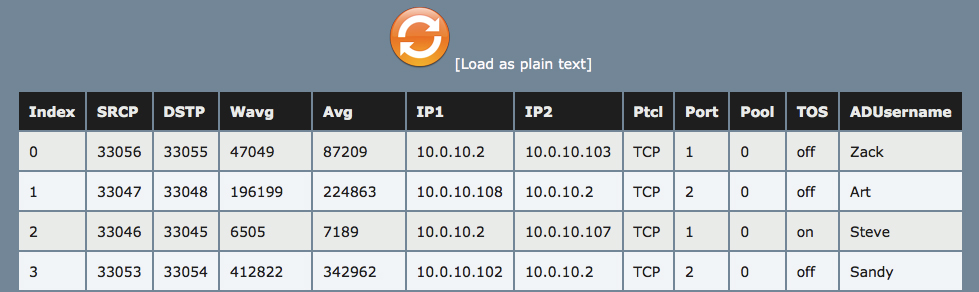
In the first phase, we’ll allow administrators to see the Active Directory username associated with the IP Address in the connection table (assuming the user used Active Directory to authenticate). We’ll also allow you to sort the table by username and IP for quick analysis of a specific username.

This screenshot shows how usernames will be displayed in the connection table:

ad

In the second phase, which will be released in the summer of 2013, we’ll allow administrators to set rate limits by username as well as give priority to certain users. This way, users don’t have to be part of a certain subnet to gain priority access.

If your organization uses Active Directory for user authentication, you have had a NetEqualizer for at least one year, and you’d be willing to assist us in our testing, let us know by sending an email to:

sales@apconnections.net

Stay tuned to NetEqualizer News for more updates and GA release details!


See You at Educause!

And get a cool NetEqualizer pen!

We are conducting a Poster Session on Wednesday, 2/13 at the West/Southwest Educause Regional Conference in Austin, Texas.educause logo

If you are at the conference, stop by to see us!  If you do, and mention this Newsletter, we will give you a fabulous NetEqualizer pen!

pens3

Here is our abstract for the conference:

Maximizing Your Internet Resource: Why Behavior-Based QoS Is the Future of Bandwidth Shaping

Higher education is tasked to do more with less, particularly when managing a scarce resource like bandwidth. Behavior-based QoS, an affordable bandwidth shaping technology, is coming to the forefront. It’s also gaining mindshare as a superior bandwidth shaping technology, as encrypted traffic thwarts deep packet inspection. This poster will delve into the differences between DPI and behavior-based QoS, explaining where each is best suited for networks. Learn how to reduce P2P and HEOA/RIAA requests on your campus and see behavior-based QoS in action.

We will offer a live online demonstration of our affordable NetEqualizer:

(www.netequalizer.com).

We hope to see you there!


Don’t Forget to Upgrade to 6.0!

With a brief tutorial on our Dashboard

If you have not already upgraded your NetEqualizer to Software Update 6.0, now is the perfect time! We have discussed the new upgrade in depth in previous newsletters and blog posts, so this month we thought we’d show you how to take advantage of our new Dashboard features!

If you have not explored it, here is what you can expect to see:

– You can immediately tell which key processes are running, through our green (on)/red (off) icons. This helps you to make sure that everything is running as expected.
– You can Run Diagnostics directly by clicking on the icon at the top right of the Dashboard.
– You can see how much bandwidth is being consumed both from the Internet (% Bandwidth Down) and to the Internet (% Bandwidth Up). One great side affect of this is that you can tell if your cables are set-up correctly too. Typically, Bandwidth Down is much higher than Bandwidth Up.  If you see the opposite, you should consider reversing your cables. Contact our Support Team if you have questions.
– You can quickly see what version you are running, which will help you to determine if you need to upgrade.  You can always see what is available in each software update on our blog by clicking on the Software Updates page.
– If you are using Pools to limit bandwidth, you can select which Pool to view the Pool Traffic Up and Pool Traffic Down.To keep the Dashboard relevant and clean, we limit what we show there. However, we are open to suggestions! If there are other key items that you think warrant Dashboard status, let us know. Just send an email with your ideas to:

sales@apconnections.net.

Remember, new software updates (including all the features described above) are available for free to customers with valid NetEqualizer Software & Support (NSS).

If you are not current with NSS, contact us today!

sales@apconnections.net

-or-

toll-free U.S. (888-287-2492),

worldwide (303) 997-1300 x. 103


Best Of The Blog

A Brief History of Peer to Peer File Sharing and the Attempts to Block It

By Art Reisman – CTO – APconnections

The following history is based on my notes and observations as both a user of peer to peer, and as a network engineer tasked with cleaning it up.

Round One, Napster, Centralized Server, Circa 2002

Napster was a centralized service, unlike the peer to peer behemoths of today there was never any question of where the copyrighted material was being stored and pirated from. Even though Napster did not condone pirated music and movies on their site, the courts decided by allowing copyrighted material to exist on their servers, they were in violation of copyright law. Napster’s days of free love were soon over…

Photo Of The Month

signs

Photo by Casey Sanders

A Slower Pace

When people picture the state of Texas, most think of vast ranches, cattle, and cactus. While much of the state does resemble this type of landscape, the northeastern part is actually heavily wooded and contains many lakes. Life in this rural area of the country moves a bit slower than our high-speed, high-tech lives in Metro Denver, Colorado. Sometimes it is cathartic to put all the work aside for a bit and just stare off into the woods.

How Much Bandwidth Do You Really Need?


By Art Reisman – CTO – www.netequalizer.com

Art Reisman CTO www.netequalizer.com

When it comes to how much money to spend on the Internet, there seems to be this underlying feeling of guilt with everybody I talk to. From ISPs, to libraries or multinational corporations, they all have a feeling of bandwidth inadequacy. It is very similar to the guilt I used to feel back in College when I would skip my studies for some social activity (drinking). Only now it applies to bandwidth contention ratios. Everybody wants to know how they compare with the industry average in their sector. Are they spending on bandwidth appropriately, and if not, are they hurting their institution, will they become second-rate?

To ease the pain, I was hoping to put a together a nice chart on industry standard recommendations, validating that your bandwidth consumption was normal, and I just can’t bring myself to do it quite yet. There is this elephant in the room that we must contend with. So before I make up a nice chart on recommendations, a more relevant question is… how bad do you want your video service to be?

Your choices are:

  1. bad
  2. crappy
  3. downright awful

Although my answer may seem a bit sarcastic, there is a truth behind these choices. I sense that much of the guilt of our customers trying to provision bandwidth is based on the belief that somebody out there has enough bandwidth to reach some form of video Shangri-La; like playground children bragging about their father’s professions, claims of video ecstasy are somewhat exaggerated.

With the advent of video, it is unlikely any amount of bandwidth will ever outrun the demand; yes, there are some tricks with caching and cable on demand services, but that is a whole different article. The common trap with bandwidth upgrades is that there is a false sense of accomplishment experienced before actual video use picks up. If you go from a network where nobody is running video (because it just doesn’t work at all), and then you increase your bandwidth by a factor of 10, you will get a temporary reprieve where video seems reliable, but this will tempt your users to adopt it as part of their daily routine. In reality you are most likely not even close to meeting the potential end-game demand, and 3 months later you are likely facing another bandwidth upgrade with unhappy users.

To understand the video black hole, it helps to compare the potential demand curve pre and post video.

A  quality VOIP call, which used to be the measuring stick for decent Internet service runs about 54kbs. A quality  HD video stream can easily consume about 40 times that amount. 

Yes, there are vendors that claim video can be delivered at 250kbs or less, but they are assuming tiny little stop action screens.

Couple this tremendous increase in video stream size with a higher percentage of users that will ultimately want video, and you would need an upgrade of perhaps 60 times your pre-video bandwidth levels to meet the final demand. Some of our customers, with big budgets or government subsidized backbones, are getting close but, most go on a honeymoon with an upgrade of 10 times their bandwidth, only to end up asking the question, how much bandwidth do I really need?

So what is an acceptable contention ratio?

  • Typically in an urban area right now we are seeing anywhere from 200 to 400 users sharing 100 megabits.
  • In a rural area double that rati0 – 400 to 800 sharing 100 megabits.
  • In the smaller cities of Europe ratios drop to 100 people or less sharing 100 megabits.
  • And in remote areas served by satellite we see 40 to 50 sharing 2 megabits or less.

A Brief History of Peer to Peer File Sharing and the Attempts to Block It


By Art Reisman

The following history is based on my notes and observations as both a user of peer to peer, and as a network engineer tasked with cleaning  it up.

Round One, Napster, Centralized Server, Circa 2002

Napster was a centralized service, unlike the peer to peer behemoths of today there was never any question of where the copyrighted material was being stored and pirated from. Even though Napster did not condone pirated music and movies on their site, the courts decided by allowing copyrighted material to exist on their servers, they were in violation of copyright law. Napster’s days of free love were soon over.

From an historic perspective the importance of the decision to force the shut down of Napster was that it gave rise to a whole new breed of p2p applications. We detailed this phenomenon in our 2008 article.

Round Two, Mega-Upload  Shutdown, Centralized Server, 2012

We again saw a doubling down on p2p client sites (they expanded) when the Mega-Upload site, a centralized sharing site, was shutdown back in Jan 2012.

“On the legal side, the recent widely publicized MegaUpload takedown refocused attention on less centralized forms of file sharing (i.e. P2P). Similarly, improvements in P2P technology coupled with a growth in file sharing file size from content like Blue-Ray video also lead many users to revisit P2P.”

Read the full article from deepfield.net

The shut down of Mega-Upload had a personal effect on me as I had used it to distribute a 30 minute account from a 92-year-old WWII vet where he recalled, in oral detail, his experience of surviving a German prison camp.

Blocking by Signature, Alias Layer 7 Shaping, Alias Deep packet inspection. Late 1990’s till present

Initially, the shining star savior in the forefront against spotting illegal content on your network, this technology can be expensive and fail miserably in the face of newer encrypted p2p applications. It also can get quite expensive to keep up with the ever changing application signatures, and yet it is still often the first line of defense attempted by ISPs.

We covered this topic in detail, in our recent article,  Layer 7 Shaping Dying With SSL.

Blocking by Website

Blocking the source sites where users download their p2p clients is still possible. We see this method applied at mostly private secondary schools, where content blocking is an accepted practice. This method does not work for computers and devices that already have p2p clients. Once loaded, p2p files can come from anywhere and there is no centralized site to block.

Blocking Uninitiated Requests. Circa Mid-2000

The idea behind this method is to prevent your Network from serving up any content what so ever! Sounds a bit harsh, but the average Internet consumer rarely, if ever, hosts anything intended for public consumption. Yes at one time, during the early stages of the Internet, my geek friends would set up home pages similar to what everybody exposes on Facebook today. Now, with the advent hosting sites, there is just no reason for a user to host content locally, and thus, no need to allow access from the outside. Most firewalls have a setting to disallow uninitiated requests into your network (obviously with an exemption for your publicly facing servers).

We actually have an advanced version of this feature in our NetGladiator security device. We watch each IP address on your internal network and take note of outgoing requests, nobody comes in unless they were invited. For example, if we see a user on the Network make a request to a Yahoo Server , we expect a response to come back from a Yahoo server; however if we see a Yahoo server contact a user on your network without a pending request, we block that incoming request. In the world of p2p this should prevent an outside client from requesting a receiving a copyrighted file hosted on your network, after all no p2p client is going to randomly send out invites to outside servers or would they?

I spent a few hours researching this subject, and here is what I found (this may need further citations). It turns out that p2p distribution may be a bit more sophisticated and has ways to get around the block uninitiated query firewall technique.

P2P networks such as Pirate Bay use a directory service of super nodes to keep track of what content peers have and where to find them. When you load up your p2p client for the first time, it just needs to find one super node to get connected, from there it can start searching for available files.

Note: You would think that if these super nodes were aiding and abetting in illegal content that the RIAA could just shut them down like they did Napster. There are two issues with this assumption:

1) The super nodes do not necessarily host content, hence they are not violating any copyright laws. They simply coordinate the network in the same way DNS service keep track of URL names and were to find servers.
2) The super nodes are not hosted by Pirate Bay, they are basically commandeered from their network of users, who unwittingly or unknowingly agree to perform this directory service when clicking the license agreement that nobody ever reads.

From my research I have talked to network administrators that claim despite blocking uninitiated outside requests on their firewalls, they still get RIAA notices. How can this be?

There are only two ways this can happen.

1) The RIAA is taking liberty to simply accuse a network of illegal content based on the directory listings of a super node. In other words if they find a directory on a super node pointing to copyrighted files on your network, that might be information enough to accuse you.

2) More likely, and much more complex, is that the Super nodes are brokering the transaction as a condition of being connected. Basically this means that when a p2p client within your network, contacts a super node for information, the super node directs the client to send data to a third-party client on another network. Thus the send of information from the inside of your network looks to the firewall as if it was initiated from within. You may have to think about this, but it makes sense.

Behavior based thwarting of p2p. Circa 2004 – NetEqualizer

Behavior-based shaping relies on spotting the unique footprint of a client sending and receiving p2p applications. From our experience, these clients just do not know how to lay low and stay under the radar. It’s like the criminal smuggling drugs doing 100 MPH on the highway, they just can’t help themselves. Part of the p2p methodology is to find as many sources of files as possible, and then, download from all sources simultaneously. Combine this behavior with the fact that most p2p consumers are trying to build up a library of content, and thus initiating many file requests, and you get a behavior footprint that can easily be spotted. By spotting this behavior and making life miserable for these users, you can achieve self compliance on your network.

Read a smarter way to block p2p traffic.

Blocking the RIAA probing servers

If you know where the RIAA is probing from you can deny all traffic to their probes and thus prevent the probe of files on your network, and ensuing nasty letters to desist.

Can Rural Internet Services be Subsidized with Advertising?


By Art Reisman

I just read a Wall Street Journal article this morning regarding the lack of home Internet service in poor rural areas. In this story, the children of Cirtronelle, Alabama are forced to do their homework at the local McDonald’s because the local Library closes at 6, and they must use the Internet to complete their school assignments. Internet at home is either not available or it is too expensive.

This got me thinking of an idea that had been bandied around for quite some time with some of our rural WISP NetEqualizer customers. It has been a while, but we actually helped a few operators set up systems with some form of on-line advertising (prior to the great recession). For example, the base minimum  subscription price required for a rural WISP to turn a profit starts at around $40 to $50 a month. So what if a WISP sold a lower grade service, $10 a month, and then required that each time a home user logged on  to the service, that they were presented with a 20 second promo trailer from a local merchant? The Merchant would then subsidize the WISP per showing. Would this be a viable alternative to stimulate rural Internet services?

I am sure many a WISP has tried this, and I suspect the barriers are:

1) The mechanics of redirection and authentication, in other words this requires a much more complex authentication infrastructure than what a small WISP would typical start with.

2) Selling advertisement space, this would be a full time hustle to keep slots filled and paying.

3) Justifying the return on investment to the advertiser.

Comments and/or ideas are welcome!

admin@netequalizer.com

Alternatives to Bandwidth Addiction


By Art Reisman

CTO – http://www.netequalizer.com

Art Reisman CTO www.netequalizer.com

Bandwidth providers are organized to sell bandwidth. In the face of bandwidth congestion, their fall back position is always to sell more bandwidth, never to slow consumption. Would a crack dealer send their clients to a treatment program?

For example, I have had hundreds of encounters with people at bandwidth resellers; all of our exchanges have been courteous and upbeat, and yet a vendor relationship rarely develops. Whether they are executives, account managers, or front-line technicians, the only time they call us is as a last resort to save an account, and for several good reasons.

1) It is much easier, conceptually, to sell a bandwidth upgrade rather than a piece of equipment.

2) Bandwidth contracts bring recurring revenue.

3) Providers can lock in a bandwidth contract, investors like contracts that guarantee revenue.

4) There is very little overhead to maintain a leased bandwidth line once up and running.

5) And as I eluded to before, would a crack dealer send a client to rehab?

6) Commercial bandwidth infrastructure costs have come down in the last several years.

7) Bandwidth upgrades are very often the most viable and easiest path to relieve a congested Internet connection.

Bandwidth optimization companies exist because at some point customers realize they cannot outrun their consumption. Believe it or not, the limiting factor to Internet access speed is not always the pure cost of raw bandwidth, enterprise infrastructure can be the limiting factor. Switches, routers, cabling, access points and back-hauls all have a price tag to upgrade, and sometimes it is easier to scale back on frivolous consumption.

The ROI of optimization is something your provider may not want you know.

The next time you consider a bandwidth upgrade at the bequest of your provider, you might want to look into some simple ways to optimize your consumption. You may not be able to fully arrest your increased demand with an optimizer, but realistically you can slow growth rate from a typical unchecked 20 percent a year to a more manageable 5 percent a year. With an optimization solution in place, your doubling time for bandwidth demand can easily reduce down from about 3.5 years to 15 years, which translates to huge cost savings.

Note: Companies such as level 3 offer optimization solutions, but with all do respect, I doubt those business units are exciting stock holders with revenue. My guess is they are a break even proposition; however I’d be glad to eat crow if I am wrong, I am purely speculating.  Sometimes companies are able to sell adjunct services at a nice profit.

Related NY times op-ed on bandwidth addiction

The Voice Report Telecom Junkies Interview: “Bandwidth Battles: A New Approach”


Linfield College logoListen in on a conversation with Andrew Wolf, telecom manager and NetEqualizer customer from Linfield College, and Art Reisman, CTO APconnections, as they spoke to George David, president of CCMI and publisher of TheVoiceReport.

Andrew switched from a Packeteer to a NetEqualizer in mid-2011.  In this interview Andrew talks about how the NetEqualizer has not only reduced Linfield College’s network congestion, but also has saved him both ongoing labor costs (no babysitting the solution or adding policies) and upfront costs on the hardware itself.

Listen the to broadcast: Bandwidth Battles: A New Approach
From TheVoiceReport Telecom Junkies, aired on 4/5/2012 | Length 12:16

College & University Guide

College & University Guide

Telecom manager Andrew Wolf at Linfield College had a problem – one just about all communications pros face or will face: huge file downloads were chewing up precious bandwidth and dragging down network performance. Plenty of traditional fixes were available, but the cost and staff to manage the apps were serious obstacles. Then Andrew landed on a unique “bandwidth behavior” approach from Art Reisman at NetEqualizer. End result – great performance at much lower costs, a real win-win. Get all the details in this latest episode of Telecom Junkies.

Want to learn more? See how others have benefited from NetEqualizer.  Read our NetEqualizer College & University testimonials.  Download our College & University Guide.

Check List for Integrating Active Directory to Your Bandwidth Controller


By Art Reisman, CTO, www.netequalizer.com

Art Reisman CTO www.netequalizer.com

The problem statement: You have in place an authentication service such as Radius, LDAP, or Active Directory, and now you want to implement some form of class of service per customer. For example, data usage limits (quotas) or bandwidth speed restriction per user. To do so, you’ll need to integrate your authentication device with an  enforcement device, typically a bandwidth controller.

There are products out there such as Nomadix that do both (authentication and rate limiting),  but most authentication devices are not turn-key when it comes to a mechanism to set rate limits.

Your options are:

1) You can haggle your way through various forums that give advice on setting rate limits with AD,

2) Or you can embark on a software integration project using a consultant to accomplish your bandwidth restrictions.

In an effort to help customers appreciate and understand what goes into such an integration, I have shared notes that I have used as starting point when synchronizing our NetEqualizer with Radius.

1) Start by developing (borrowing if you can) a generic abstract interface (middle ware) that is not specific to Active Dircectory, LDAP or Radius. Keep it clean and basic so as not to tie your solution to any specific authentication server.  The investment in a middle ware interface is well worth the upfront cost.  By using a middle layer you will avoid a messy divorce of your authentication system from your bandwidth controller should the need arise.

2) Chances are your bandwidth controller speaks IP, and your AD device speaks user name. So you’ll need to understand how your AD can extract IP addresses from user names and send them down to your bandwidth controller.

3) Your bandwidth controller will need a list of IP’s or MAC addresses , and their committed bandwidth rates. It will need to get this information from your authentication database.

5) On a cold start, you’ll need to make bandwidth controller aware of all active users, and perhaps during the initial synchronization, you may want to pace yourself so as to not bog down your authentication controller with a million requests on start-up.

6) Once the bandwidth controller has an initial list of users on board, you’ll need to have a back ground re-synch (audit) mechanism to make sure all the rate limits and associated IP addresses are current.

7) What to do if the bandwidth controller senses traffic from an IP that it is unaware of? You’ll need a default guest rate limit of some kind for unknown IP addresses. Perhaps you’ll want the bandwidth controller to deny service to unknown IPs?

8) Don’t forget to put a timeout on requests from the bandwidth controller to the authentication device.

NetEqualizer News: January 2013


January 2013

Greetings!

Enjoy another issue of NetEqualizer News! This month, we preview new features and hardware changes for NetEqualizer coming in 2013, discuss a recent NetGladiator Hacking Challenge security assessment, and announce 2013 NetEqualizer pricing. As always, feel free to pass this along to others who might be interested in NetEqualizer News.

A message from Art…
Art Reisman, CTO – APconnections

art_smallFor many, January is a time of new beginnings (good luck with all your resolutions!) and preparing for the future. Here at APconnections, we are thinking about what is important to achieve in 2013, what we should resolve to do to best meet our customers’ needs, and how to continue our leadership in giving you the best solutions for achieving faster, more secure networks.

As part of our planning, we have resolved to continue to stay abreast of advances in technology so that we can leverage them to give you, the customer, the best bandwidth shaping and web application security products!

We love it when we hear back from you – so if you have a story you would like to share with us of how we have helped you, let us know. Email me directly at art@apconnections.net. I would love to hear from you!

Coming Soon: Faster NetEqualizer Platforms

We’re constantly trying to keep our units up-to-date and on the forefront of bandwidth shaping technology. In support of this mission, 2013 will see the retirement of the NE2000 as a new unit. Current NE2000 customers, do not fear. We will continue to support and develop updates for NE2000 boxes just like we will for the new units.

The lowest throughput license will now be 20 Mbps and the -20 and -50 units will be moved to the NE3000 platform. This will provide faster processing to users at these bandwidth levels and will ensure that our hardware is kept inline with industry advances.


NetGladiator Hacking Challenge: Case Study

We’ve had a good amount of interest in our Hacking Challenge since we launched the proposal a few months ago. One recent assessment effectively illustrated the need for third-party security checks by a security expert:

This particular application had done a good job overall of putting protections in place. SQL characters were blocked in login pages and web forms, Javascript in the URL was properly removed and encoded, SSL was used to transmit data, etc.

While it appeared the application was good to go, near the end of the assessment our security experts discovered a hole that eventually led to full compromise of the site. It turns out that the registration form did not properly block SQL characters from all entries. While the freeform text fields did block SQL characters, drop down menus like State and Country did not.

Because of this one lapse in protection, the entire database schema was discoverable, which led to the database content being saved and downloaded. This then led to user password compromise of an administrator account which resulted in super user access to the administration area. Luckily, this was all part of the Hacking Challenge, so no actual harm occurred!

This example goes to show how important a third-party audit is. Even when precautions are taken, all it takes is one vulnerability to completely compromise a site.

Take our Hacking Challenge today!

To learn more about NetGladiator, check out our video here.

Or, contact us at:

ips@apconnections.net

-or-

303-997-1300 x123


2013 NetEqualizer Pricing

As we begin a new year, we’re making some minor changes to the NetEqualizer product line. To start, we’ll be deploying new features and faster hardware – see the other articles referenced in this newsletter for details.

We’re also releasing our 2013 Price List for NetEqualizer, which will be effective February 1st, 2013. However, all Newsletter readers can get an advance peek here! The price list can be viewed here without registration for a limited time. You can also view the updated Data Sheets for each model once in the 2013 Price List.

Current quotes will not be affected by the pricing updates, and will be honored for 90 days from the date the quote was originally given.


Coming Soon: New Features for NetEqualizer

We’ll soon be releasing new features for NetEqualizer.

Our commitment to continuous feature development supports our goal of providing as much value as possible to our customers. Here are some sneak peaks of new features coming soon:

Bandwidth Control on the Public Side of a NAT Router (Port-based Equalizing) 

We have done some significant work in our upcoming release with respect to managing network traffic from the outside of private network segments. The bottom line is we can now accomplish sophisticated bandwidth optimizations for segments of large networks hidden behind NAT routers.

One basic problem with a generic bandwidth controller is that they typically treat all users behind a NAT router as one user. Coming soon, we will shape not only on IP address, but on an IP/Port combination, so that we can optimize connections even in heavily NAT’d networks.

For more information on this approach, check out this blog article.

Active Directory Integration

For customers that use Microsoft Active Directory in their organizations, we have added the ability to correlate IP addresses to user names. This will help administrators view the user names associated with IPs in the Active Connections table and more easily enforce and analyze bandwidth usage.

We are currently looking for beta testers for this feature. If you have Active Directory and are interested in participating in the Beta, send an email to sales@apconnections.net.

Remember, new releases (aka “software updates) including all the new features described above, are available for free to customers with valid NetEqualizer Software & Support (NSS).

If you are not current with NSS, contact us today!

sales@apconnections.net

-or-

toll-free U.S. (888-287-2492),

worldwide (303) 997-1300 x. 103


Best Of The Blog

Wireless is Nice, But Wired Networks are Here to Stay

By Art Reisman – CTO – APconnections

The trend to go all wireless in high density housing was seemingly a slam dunk just a few years ago. The driving forces behind the exclusive deployment of wireless over wired access was two fold.

  • Wireless cost savings. It is much less expensive to strafe a building with a mesh network  rather than to pay a contractor to insert RJ45 cable throughout the building.
  • People expect wireless. Nobody plugs a computer into the wall anymore – or do they?

Something happened on the way to wireless Shangri-La. The physical limitations of wireless, combined with the appetite for ever-increasing video, have caused some high density housing operators to rethink their positions…

Photo Of The Month

hemingway house

Hemingway House

Key West’s second highest site (16 feet above sea level) is the former home of American author Ernest Hemingway. It is now a tourist attraction and museum. If you look closely below the bushes you can see a couple of the six and seven-toed cats that roam around the residence. The house was visited by one of our staff members on a recent jaunt to Key West in an attempt to escape the frigid weather in Colorado.

Bandwidth Control from the Public Side of a NAT Router, is it Possible?


We have done some significant work in our upcoming release with respect to managing network traffic from the outside of private network segments.

The bottom line is we can now accomplish sophisticated bandwidth optimizations for segments of large networks hidden behind the NAT routers.

The problem:

One basic problem with a generic bandwidth controller, is that they typically treat all users behind a NAT router as one user.

When using NAT, a router takes one public IP and divides it up such that up to several thousand users on the private side of a network can share it. The most common reason for this, is that there are a limited number of public IPv4 addresses to hand out, so it is common for organizations and ISP’s to share the public IP’s that they own among many users.

When a router shares an IP with more than one user, it manipulates a special semi private part of the IP packet , called a “port”, to keep track of who’s data belongs to whom behind the router. The easiest way to visualize this is to think of a company with one public phone number and many private internal extensions on a PBX. In the case of this type of phone arrangement, all the employees share the public phone numbers for out side calls.

In the case of a Nat’d router, all the users behind the router share one public IP address. For the bandwidth controller sitting on the public side of the router, this can create issues, it can’t shape the individual traffic of each user because all their traffic appears as if it is coming from one IP address.

The obvious solution to this problem is to locate your bandwidth controller on the private side of the NAT router; but for a network with many NAT routers such as a large distributed wireless mesh network, the cost of extra bandwidth controllers becomes prohibitive.

Drum Roll: Enter NetEqualizer Super hero.

The Solution:

With our upcoming release we have made changes to essentially reverse engineer the NAT Port addressing scheme inside our bandwidth controller, even when located on the Internet side of the router, we can now, apply our equalizing shaping techniques to individual user streams with much more accuracy than before.

We do this by looking at the unique port mapping for each stream coming out of your router. So, if for example, two users in your mesh network, are accessing Facebook, we will treat those users bandwidth and allocations independently in our congestion control. The Benefit from these techniques is the ability to provide QoS for a Face-to-Face chat session while at the same time limiting the video to Facebook component.

Wireless is Nice, but Wired Networks are Here to Stay


By Art Reisman, CTO, www.netequalizer.com

Art Reisman CTO www.netequalizer.com

The trend to go all wireless in high density housing was seemingly a slam dunk just a few years ago. The driving forces behind the exclusive deployment of wireless over wired access was two fold.

  • Wireless cost savings. It is much less expensive to strafe a building with a mesh network  rather than to pay a contractor to insert RJ45 cable throughout the building.
  • People expect wireless. Nobody plugs a computer into the wall anymore – or do they?

Something happened on the way to wireless Shangri-La. The physical limitations of wireless, combined with the appetite for ever increasing video, have caused some high density housing operators to rethink their positions.

In a recent discussion with several IT administrators representing large residential housing units, the topic turned to whether or not the wave of the future would continue to include wired Internet connections. I was surprised to learn that the consensus was that wired connections were not going away anytime soon.

To quote one attendee…

“Our parent company tried cutting costs by going all wireless in one of our new builds. The wireless access in buildings just can’t come close to achieving the speeds we can get in the wired buildings. When push comes to shove, our tenants still need to plug into the RJ45 connector in the wall socket. We have plenty of bandwidth at the core , but the wireless just does can’t compete with the expectations we have attained with our wired connections.”

I found this statement on a Resnet Mailing list from Brown University.

“Greetings,

     I just wanted to weigh-in on this idea. I know that a lot of folks seem to be of the impression that ‘wireless is all we need’, but I regularly have to connect physically to get reasonable latency and throughput. From a bandwidth perspective, switching to wireless-only is basically the same as replacing switches with half-duplex hubs.
     Sure, wireless is convenient, and it’s great for casual email/browsing/remote access users (including, unfortunately, the managers who tend to make these decisions). Those of us who need to move chunks of data around or who rely on low-latency responsiveness find themselves marginalized in wireless-only settings. For instance: RDP, SSH, and X11 over even moderately busy wireless connections are often barely usable, and waiting an hour for a 600MB Debian ISO seems very… 1997.”

Despite the tremendous economic pressure to build ever faster wireless networks, the physics of transmitting signals through the air will ultimately limit the speed of wireless connections far below of what can be attained by wired connections. I always knew this, but was not sure how long it would take reality to catch up with hype.

Why is wireless inferior to wired connections when it comes to throughput?

In the real world of wireless, the factors that limit speed include

  1. The maximum amount of data that can be transmitted on a wireless channel is less than wired. A rule of thumb for transmitting digital data over the airwaves is that you can only send bits of  data at 1/2 the frequency. For example, 800 megahertz ( a common wireless carrier frequency) has  800 million cycles per second and 1/2 of that is 400 million cycles per second. This translates to a theoretical maximum data rate of 400 megabits. Realistically though, with imperfect signals (noise) and other environmental factors, 1/10 of the original frequency is more likely the upper limit. This gives us a maximum carrying capacity per channel of 80 megabits on our 800 megahertz channel. For contrast, the upper limit of a single fiber cable is around 10 gigabits, and higher speeds are attained by laying cables in parallel, bonding multiple wires together in one cable, and on major back bones, providers can transmit multiple frequencies of light down the same fiber achieving speeds of 100 gigabits on a single fiber! In fairness, wireless signals can also use multiple frequencies for multiple carrier signals, but the difference is you cannot have them in close proximity to each other.
  2. The number of users sharing the channel is another limiting factor. Unlike a single wired connection, wireless users in densely populated areas must share a frequency, you cannot pick out a user in the crowd and dedicate the channel for a single person.  This means, unlike the dedicated wire going straight from your Internet provider to your home or office, you must wait your turn to talk on the frequency when there are other users in your vicinity. So if we take our 80 megabits of effective channel bandwidth on our 800 megahertz frequency, and add in 20 users, we are no down to 4 megabits per user.
  3. The efficiency of the channel. When multiple people are sharing a channel, the efficiency of how they use the channel drops. Think of traffic at a 4-way stop. There is quite a bit of wasted time while drivers try to figure out whose turn it is to go, not to mention they take a while to clear the intersection. Same goes for wireless users sharing techniques there is always overhead in context switching between users. Thus we can take our 20 user scenario down to an effective data rate of 2 megabits
  4. Noise.  There is noise and then there is NOISE. Although we accounted for average noise in our original assumptions, in reality there will always be segments of the network that experience higher noise levels than average. When NOISE spikes there is further degradation of the network, and sometimes a user cannot communicate at all with an AP. NOISE is a maddening and unquantifiable variable. Our assumptions above were based on the degradation from “average noise levels”, it is not unheard of for an AP to drop its effective transmit rate by 4 or 5 times to account for noise, and thus an effective data rate for all users on that segment from our original example drops down to 500kbs, just barely enough bandwidth to watch a bad video.

Long live wired connections!

Deja Vu, IVR, and the Online Shopper’s Bill of Rights


By Art Reisman
CTO
www.apconnections.net
www.netequalizer.com

My Bill of Rights for how the online shopping experience should be in a perfect world.

1) Ship to multiple addresses. This means specifically the ability to ship any item in an order to any address.

2) On the confirmation page, always let the user edit their order right there, delete, change quantity, ship to address, shipping options, etc. All buttons should be available for each item.

3) Never force the user to hit the back button for any mistake, assume they need to edit everything from every page, as if in a fully connected matrix. Let them navigate to anywhere from anywhere.

4) Don’t show items out of stock or on back order UNLESS the customer requests to see that garbage.

5) You had better know what is out of stock. :)

6) The submit button should immediately disappear when it is hit, it is either hit or not hit, and there should be no way for a customer to order something twice by accident or to be left wondering if they have ordered twice. The system should also display the appropriate status messages while an order is being processed.

7) If there is a problem on any page in the ordering process, a detailed message on what the problem was should appear at the top of page, along with highlighting the problem field, leaving a customer to wonder what they did wrong is just bad.

8) Gift wrap available or not when selecting an item, not at the end of the ordering process.

9) If the item or order is not under your inventory control then don’t sell it or pretend to sell it without a disclaimer.

10) Remember all the fields when navigating between options. For example, a user should never have to fill out an address twice unless it is a new address.

Why is it so hard to solve these problems ?

Long before the days of Internet, I was a system architect charged with designing an Integrated Voice Response product called Conversant (Conversant was one of the predecessors to Avaya IP Office). Although not nearly as wide-spread as the Internet of today, most large companies provided automated services over the phone throughout the 1990’s. Perhaps you are familiar with a typical IVR – Press 1 for sales, press 2 for support, etc. In an effort to reduce labor costs, companies also used the phone touch tone interface for more complex operations such as tracking your package or placing an order on a stock. It turns out that most of the quality factors associated with designing an IVR application of yesterday are now reflected in many of the issues facing the online shopping experience of today.

Most small companies really don’t have the resources to use anything more than a templated application. Sometimes the pre-built application is flawed, but more often than not, the application needs integration into the merchants back-end and business processes. The pre-built applications come with programming stubs for error conditions which must be handled. For small businesses, even the simplest customizations to an on-line application will run a minimum of 10k in programmer costs, and to hire a reputable company that specializes in customer integration is more like 50k.

Related Internet users bill of rights

NetEqualizer News: December 2012


December 2012

Greetings!

Enjoy another issue of NetEqualizer News! This month, we preview feature additions to NetEqualizer coming in 2013, offer a special deal on web application security testing for the Holidays, and remind NetEqualizer customers to upgrade to Software Update 6.0. As always, feel free to pass this along to others who might be interested in NetEqualizer News.

A message from Art…
Art Reisman, CTO – APconnections

artdaughterThis month’s picture is from Parent’s Night for my daughter’s volleyball team. In December, as I get ready for the Holidays, I often think about what is important to me – like family, friends, my health, and how I help to run this business. While pondering these thoughts, I came up with some quotes that have meaning to me, which I am sharing here. I hope you enjoy them, or that they at least get you thinking about what is important to you!

“Technology is not what has already been done.”
“Following too closely ruins the journey.”
“Innovation is not a democratic endeavor.”
“Time is not linear, it just appears that way most of the time.”

What are your favorite quotes? We love it when we hear back from you – so if you have a quote or a story you would like to share with us of how we have helped you, let us know. Email me directly at art@apconnections.net. I would love to hear from you!

NetEqualizer: Coming in 2013

We are always looking to improve our NetEqualizer product line such that our customers are getting maximum value from their purchase. Part of this process is brainstorming changes and additional features to adapt and help meet that need.

Here are a couple of ideas for changes to NetEqualizer that will arrive in 2013. Stay tuned to NetEqualizer News and our blog for updates on these features!

1) NetEqualizer in Mesh Networks and Cloud Computing

As the use of NAT distributed across mesh networks becomes more widespread, and the bundling of services across cloud computing becomes more prevalent, our stream-based behavior shaping will need to evolve.

This is due to the fact that we base our decision of whether or not to shape on a pair of IP addresses talking to each other without considering port numbers. Sometimes, in cloud or mesh networks, services are trunked across a tunnel using the same IP address. As they cross the trunk, the streams are broken out appropriately based on port number.

So, for example, say you have a video server as part of a cloud computing environment. Without any NAT, on a wide-open network, we would be able to give that video server priority simply by knowing its IP address. However, in a meshed network, the IP connection might be the same as other streams, and we’d have no way to differentiate it. It turns out, though, that services within a tunnel may share IP addresses, but the differentiating factor will be the port number.

Thus, in 2013 we will no longer shape just on IP to IP, but will evolve to offer shaping on IP(Port) to IP(Port). The result will be quality of service improvements even in heavily NAT’d environments.

2) 10 Gbps Line Speeds without Degradation

Some of our advantages over the years have been our price point, the techniques we use on standard hardware, and the line speeds we can maintain.

Right now, our NE3000 and above products all have true multi-core processors, and we want to take advantage of that to enhance our packet analysis. While our analysis is very quick and efficient today (sustained speeds of 1 Gbps up and down), in very high-speed networks, multi-core processing will amp up our throughput even more. In order to get to 10 Gbps on our Intel-based architecture, we must do some parallel analysis on IP packets in the Linux kernel.

The good news is that we’ve already developed this technology in our NetGladiator product (check out this blog article here).

Coming in 2013, we’ll port this technology to NetEqualizer. The result will be low-cost bandwidth shapers that can handle extremely high line speeds without degradation. This is important because in a world where bandwidth keeps getting cheaper, the only reason to invest in an optimizer is if it makes good business sense.

We have prided ourselves on smart, efficient, optimization techniques for years – and we will continue to do that for our customers!


Secure Your Web Applications for the Holidays!

We want YOU to be proactive about security. If your business has external-facing web applications, don’t wait for an attack to happen – protect yourself now! It only takes a few hours of our in-house security experts’ time to determine if your site might have issues, so, for the Holidays, we are offering a $500 upfront security assessment for customers with web applications that need testing!

If it is determined that our NetGladiator product can help shore up your issues, that $500 will be applied toward your first year of NetGladiator Software & Support (GSS). We also offer further consulting based on that assessment on an as-needed basis.

To learn more about NetGladiator, check out our video here.

Or, contact us at:

ips@apconnections.net

-or-

303-997-1300 x123


Don’t Forget to Upgrade to 6.0!: With a brief tutorial on User Quotas

If you have not already upgraded your NetEqualizer to Software Update 6.0, now is the perfect time!

We have discussed the new upgrade in depth in previous newsletters and blog posts, so this month we thought we’d show you how to take advantage of one of the new features – User Quotas.

User quotas are great if you need to track bandwidth usage over time per IP address or subnet. You can also send alerts to notify you if a quota has been surpassed.

To begin, you’ll want to navigate to the Manage User Quotas menu on the left. You’ll then want to start the Quota System using the third interface from the top, Start/Stop Quota System.

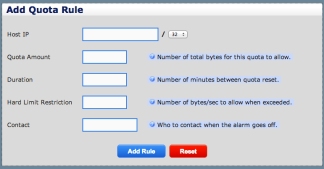
Now that the Quota System is turned on, we’ll add a new quota. Click on Configure User Quotas and take a look at the first window:

quota1

Here are the settings associated with setting up a new quota rule:

Host IP: Enter in the Host IP or Subnet that you want to give a quota rule to.

Quota Amount: Enter in the number of total bytes for this quota to allow.

Duration: Enter in the number of minutes you want the quota to be tracked for before it is reset (1 day, 1 week, etc.).

Hard Limit Restriction: Enter in the number of bytes/sec to allow the user once the quota is surpassed.  

Contact: Enter in a contact email for the person to notify when the quota is passed.

After you populate the form, click Add Rule. Congratulations! You’ve just set up your first quota rule!

From here, you can view reports on your quota users and more.

Remember, the new GUI and all the new features of Software Update 6.0 are available for free to customers with valid NetEqualizer Software & Support (NSS).

If you don’t have the new GUI or are not current with NSS, contact us today!

sales@apconnections.net

-or-

toll-free U.S. (888-287-2492),

worldwide (303) 997-1300 x. 103


Best Of The Blog

Internet User’s Bill of Rights

By Art Reisman – CTO – APconnections

This is the second article in our series. Our first was a Bill of Rights dictating the etiquette of software updates. We continue with a proposed Bill of Rights for consumers with respect to their Internet service.

1) Providers must divulge the contention ratio of their service. 

At the core of all Internet service is a balancing act between the number of people that are sharing a resource and how much of that resource is available.

For example, a typical provider starts out with a big pipe of Internet access that is shared via exchange points with other large providers. They then subdivide this access out to their customers in ever smaller chunks – perhaps starting with a gigabit exchange point and then narrowing down to a 10 megabit local pipe that is shared with customers across a subdivision or area of town.

The speed you, the customer, can attain is limited to how many people might be sharing that 10 megabit local pipe at any one time. If you are promised one megabit service, it is likely that your provider would have you share your trunk with more than 10 subscribers and take advantage of the natural usage behavior, which assumes that not all users are active at one time.

The exact contention ratio will vary widely from area to area, but from experience, your provider will want to maximize the number of subscribers who can share the pipe, while minimizing service complaints due to a slow network. In some cases, I have seen as many as 1,000 subscribers sharing 10 megabits. This is a bit extreme, but even with a ratio as high as this, subscribers will average much faster speeds when compared to dial up…

Photo Of The Month

sandybike

Kansas Clouds

The wide-open ranch lands in middle America provide a nice retreat from the bustle of city life. When he can find time, one of our staff members visits his property in Kansas with his family. The Internet connection out there is shaky, but it is a welcome change from routine.

You Must Think Outside the Box to Bring QoS to the Cloud and Wireless Mesh Networks


By Art Reisman
CTO – http://www.netequalizer.com

About 10 years ago, we had this idea for QoS across an Internet link. It was simple and elegant, and worked like a charm. Ten years later, as services spread out over the Internet cloud, our original techniques are more important than ever. You cannot provide QoS using TOS (diffserv) techniques over any public or semi public Internet link, but using our techniques we have proven the impossible is possible.

Why TOS bits don’t work over the Internet.

The main reason is that setting TOS bits are only effective when you control all sides of a conversation on a link, and this is not possible on most Internet links (think cloud computing and wireless mesh networks). For standard TOS services to work, you must control all the equipment in between the two end points. All it takes is one router in the path of a VoIP conversation to ignore a TOS bit, and its purpose becomes obsolete. Thus TOS bits for priority are really only practical inside a corporate LAN/WAN topology.

Look at the root cause of poor quality services and you will find alternative solutions.

Most people don’t realize the problem with congested VoIP, on any link, is due to the fact that their VoIP packets are getting crowded out by larger downloads and things like recreational video (this is also true for any interactive cloud access congestion). Often, the offending downloads are initiated by their own employees or users. A good behavior-based shaper will be able to favor VoIP streams over less essential data streams without any reliance on the sending party adhering to a TOS scheme.

How do we accomplish priority for VoIP?

We do this by monitoring all the streams on a link with one piece of equipment inserted anywhere in the congested link. In our current terminology, a stream consists of an IP (local), talking to another IP (remote Internet). When we see a large stream dominating the link, we step back and ask, is the link congested? Is that download crowding out other time-sensitive transactions such as VOIP? If the answer is yes to both questions, then we proactively take away some bandwidth from the offending stream. I know this sounds ridiculously simple, and does not seem plausible, but it works. It works very well and it works with just one device in the link irrespective of any other complex network engineering. It works with minimal set up. It works over MPLS links. I could go on and on, the only reason you have not heard of it is perhaps is that it goes against the grain of what most vendors are selling – and that is large orders for expensive high end routers using TOS bits.

Related article QoS over the Internet – is it possible?

Fast forward to our next release, how to provide QOS deep inside a cloud or mesh network where sending or receiving IP addresses are obfuscated.

Coming this winter we plan to improve upon our QoS techniques so we can drill down inside of Mesh and Cloud networks a bit better.

As the use of NAT, distributed across mesh networks, becomes more wide spread, and the bundling of services across cloud computing becomes more prevalent, one side effect has been that our stream based behavior shaping (QoS) is not as effective as it is when all IP addresses are visible (not masked behind a NAT/PAT device).

This is due to the fact that currently, we base our decision on a pair of IP’s talking to each other, but we do not consider the IP port numbers, and sometimes especially in a cloud or mesh network, services are trunked across a tunnel using the same IP. As these services get tunneled across a trunk, the data streams are bundled together using one common pair of IP’s and then the streams are broken out based on IP ports so they can be routed to their final destination. For example, in some cloud computing environments there is no way to differentiate the video stream within the tunnel coming from the cloud, from a smaller data access session. They can sometimes both be talking across the same set of IP’s to the cloud. In a normal open network we could slow the video (or in some cases give priority to it) by knowing the IP of the video server, and the IP of the receiving user,  but when the video server is buried within the tunnel sharing the IP’s of other services, our current equalizing (QOS techniques) become less effective.

Services within a tunnel, cloud, or mesh may be bundled using the same IPs, but they are often sorted out on different ports at the ends of the tunnel. With our new release coming this winter, we will start to look at streams as IP and port number, thus allowing for much greater resolution for QOS inside the Cloud and inside your mesh network. Stay tuned!