

|
||||||||||
|
||||||||||
|
||||||||||
|
||||||||||



Ever Wonder What Happened to All Those Original ISPs?
March 8, 2011 — netequalizerEditor’s Note: The folks over at ISP Finder (a nice service for those of you looking for ISP options) posted the following article this week that we thought was interesting.
Today there are thousands of ISP’s (Internet Service Providers), but it all started with a handful of dial-up services. Some of the names you will recognize and some of them you will not. All of them played a part in the early beginnings of what is now known as the world wide web.
1) Compuserve: Compuserve is one of the oldest and yet, still well-known online service providers. So what became of Compuserve? In 1980, Compuserve was purchased by H&R Block (that’s correct, the tax preparers). Approximately 20 years later they decided to sell off Compuserve. AOL offered a stock trade which wasn’t accepted but eventually it did end up under their umbrella via being purchased by Worldcom instead. The remaining aspects of Compuserve are now clothed within the Verizon Network.
2) Mindspring: This early ISP was located in Georgia. In the year 2000 Mindspring merged with Earthlink and has remained underneath their wing ever since. In 2008 Earthlink launched its VoIP under the Mindspring name.
NetEqualizer News: March 2011
March 2, 2011 — netequalizer
|
||||||||||||||||||||||||||


NetEqualizer Testing and Integration of Squid Caching Server
February 27, 2011 — netequalizerEditor’s Note: Due to the many variables involved with tuning and supporting Squid Caching Integration, this feature will require an additional upfront support charge. It will also require at minimum a NE3000 platform. Contact sales@netequalizer.com for specific details.
In our upcoming 5.0 release, the main enhancement will be the ability to implement YouTube caching from a NetEqualizer. Since a squid-caching server can potentially be implemented separately by your IT department, the question does come up about what the difference is between using the embedded NetEqualizer integration and running the caching server stand-alone on a network.
Here are a few of the key reasons why using the NetEqualizer caching integration provides for the most efficient and effective set up:
1. Communication – For proper performance, it’s important that the NetEqualizer know when a file is coming from cache and when it’s coming from the Internet. It would be counterproductive to have data from cache shaped in any way. To accomplish this, we wrote a new utility, aptly named “cache helper,” to advise the NetEqualizer of current connections originating from cache. This allows the NetEqualizer to permit cached traffic to pass without being shaped.
2. Creative Routing – It’s also important that the NetEqualizer be able to see the public IP addresses of traffic originating on the Internet. However, using a stand-alone caching server prevents this. For example, if you plug a caching server into your network in front of a NetEqualizer (between the NetEqualizer and your users), all port 80 traffic would appear to come from the proxy server’s IP address. Cached or not, it would appear this way in a default setup. The NetEqualizer shaping rules would not be of much use in this mode as they would think all of the Internet traffic was originating from a single server. Without going into details, we have developed a set of special routing rules to overcome this limitation in our implementation.
3. Advanced Testing and Validation – Squid proxy servers by themselves are very finicky. Time and time again, we hear about implementations where a customer installed a proxy server only to have it cause more problems than it solved, ultimately slowing down the network. To ensure a simple yet tight implementation, we ran a series of scenarios under different conditions. This required us to develop a whole new methodology for testing network loads through the Netequalizer. Our current class of load generators is very good at creating a heavy load and controlling it precisely, but in order to validate a caching system, we needed a different approach. We needed a load simulator that could simulate the variations of live internet traffic. For example, to ensure a stable caching system, you must take the following into consideration:
- A caching proxy must perform quite a large number of DNS look-ups
- It must also check tags for changes in content for cached Web pages
- It must facilitate the delivery of cached data and know when to update the cache
- The squid process requires a significant chunk of CPU and memory resources
- For YouTube integration, the Squid caching server must also strip some URL tags on YouTube files on the fly
To answer this challenge, and provide the most effective caching feature, we’ve spent the past few months developing a custom load generator. Our simulation lab has a full one-gigabit connection to the Internet. It also has a set of servers that can simulate thousands of simultaneous users surfing the Internet at the same time. We can also queue up a set of YouTube users vying for live video from the cache and Internet. Lastly, we put a traditional point-to-point FTP and UDP load across the NetEqualizer using our traditional load generator.
Once our custom load generator was in place, we were able to run various scenarios that our technology might encounter in a live network setting. Our testing exposed some common, and not so common, issues with YouTube caching and we were able to correct them. This kind of analysis is not possible on a live commercial network, as experimenting and tuning requires deliberate outages. We also now have the ability to re-create a customer problem and develop actual Squid source code patches should the need arise.
NetEqualizer News: January 2011
January 13, 2011 — netequalizer |
 |
|
|||||
|
||||||

Over the past few months, we’ve kept you updated on our upcoming NetEqualizer YouTube caching feature. We’re now excited to announce the availability of a beta testing trial.While we have sanity and load-tested our YouTube caching systems, and there is very little risk of lockup or failure, we’re offering the beta trial to obtain more real-world data from live networks. This will help us as we set expectations for our general release. The beta trial is available to all existing NetEqualizer customers and will be offered with complementary set-up support. (A $500 fee will apply for the general release.) However, to qualify, interested trial participants must meet the following requirements:
There are only a limited number of spaces in the trial available, so be sure to let us know if you’re interested at 1-800-918-2763 or admin@apconnections.net. For more information on YouTube caching, visit our new FAQ article on the NetEqualizer News Blog. |
||||||
|
||||||
|
For those of you who plan on waiting for the general release of the NetEqualizer YouTube caching feature, here are some additional details to give you a better idea of what to expect.For best results, we’re going to strongly suggest you have a NE3000-class or above NetEqualizer system. However, we will honor caching server systems on NE2000-class NetEqualizers purchased in the last three months. A current NetEqualizer Software Subscription will also be needed to install the feature along with a one-time $500 set-up charge to cover the installation and check-up of your caching system. YouTube caching will require a minimum of eight gigabits of memory, but systems having only four gigabits can still be used with an additional highly reliable disk drive device, which is also available to boost performance for the eight-gigabit units. As is, eight gigabits of memory will support between 150 and 250 YouTube videos depending on their average length. It is estimated that about 10 to 20 percent of your YouTube traffic will come from the cache, which will make a significant impact in average video speed and quality as well as the reduction of overall bandwidth usage. The disk drive version is estimated to cache approximately 4,000 of the most popular YouTube videos, likely increasing hit rates for videos to nearly 50 percent. In addition to improved video quality and access for the customer, the YouTube caching feature will offer administrators and ISPs an even more effective way to optimize their networks while respecting user privacy and net neutrality. For more information on the benefits of caching for net neutrality, click here. To learn more about the upcoming NetEqualizer YouTube caching feature general release, contact us at 1-800-918-2763 or sales@apconnections.net. |
||||||
|
||||||

As we begin a new year, we’re making some minor changes to the NetEqualizer product line. To start, we’re introducing the new-look NetEqualizer console (see unit to left). Of course, the quality of our product hasn’t changed, but we thought it was time for a little updating.Also, starting this month, we’ll be offering both the NE3000-100 and NE3000-150 NetEqualizer systems. This will allow customers to even better customize the NetEqualizer to their individual needs. Furthermore, we’ll be changing the NE2000-45 NetEqualizer model to the NE2000-50. Finally, in addition to these changes, we’re also releasing our 2011 NetEqualizer price list. The full list can be viewed here without registration for a limited time. Current quotes will not be affected by the pricing updates and will be honored for 90 days from the date the quote was originally given. |
||||||
|
||||||
| How to Determine a Comprehensive ROI for Bandwidth Shaping Products
In the past, we’ve published several articles on our blog to help customers better understand the NetEqualizer’s potential return on investment (ROI). Obviously, we do this because we think we offer a compelling ROI proposition for most bandwidth-shaping decisions. Why? Primarily because we provide the benefits of bandwidth shaping at a a very low cost – both initially and even more so over time. (Click here for the NetEqualizer ROI calculator.) But, we also want to provide potential customers with the questions that need to be considered before a product is purchased, regardless of whether or not the answers lead to the NetEqualizer. With that said, this article will break down these questions, addressing many issues that may not be obvious at first glance, but are nonetheless integral when determining what bandwidth shaping product is best for you. First, let’s discuss basic ROI. As a simple example, if an investment cost $100, and if in one year that investment returned $120, the ROI is 20 percent. Simple enough. But what if your investment horizon is five years or longer? It gets a little more complicated, but suffice it to say you would perform a similar calculation for each year while adjusting these returns for time and cost. The important point is that this technique is a well-known calculation for evaluating whether one thing is a better investment than another – be it bandwidth shaping products or real estate. Naturally and obviously the best financial decision will be determined by the greatest return for the smallest cost. The hard part is determining what questions to ask in order to accurately determine the ROI. A missed cost or benefit here or there could dramatically alter the outcome, potentially leading to significant unforeseen losses. For the remainder of this article, I’ll discuss many of the potential costs and returns associated with bandwidth shaping products, with some being more obscure than others. In the end, it should better prepare you to address the most important questions and issues and ultimately lead to a more accurate ROI assessment. Let’s start by looking at the largest components of bandwidth shaping product “costs” and whether they are one-time or ongoing. We’ll then consider the returns. |
||||||
|
||||||
NetEqualizer News: December 2010
December 11, 2010 — netequalizer |
|
|
|||||
|
||||||
|
Since announcing the upcoming release of our NetEqualizer YouTube caching feature last month, we’ve received an overwhelming number of inquiries as to when the feature will be available. As of now, we’re still working through multiple scenarios under load in our labs to ensure a seamless release, but we’re expecting a full launch some time next month.The upcoming feature will store the top 300-500 trending YouTube videos to ensure faster and more efficient access. For best results, we’re going to suggest 4 to 16 gigabits of RAM. Almost all of this memory will be used for caching, and the bulk of that will be these YouTube videos. This should be more than enough to capture the most popular YouTube content. We are considering an option to put a large disk drive in the NetEqualizer in a future release, but we still like the stability of the smaller cache hosted in RAM for both speed and reliability. Overall, the feature will be a major step toward making sure the most popular YouTube content is accessible and reliable even during your network’s busiest hours. (See our blog article, Enhance Your Internet Service With YouTube Caching, for more information on the benefits of video caching). All future sales in 2010 will be eligible for the new release, so there’s no need to hold off on purchasing a NetEqualizer unit. If you need a NetEqualizer today but are waiting for the release, just let us know when you purchase and we will grandfather you in with three months of the NetEqualizer Software Subscription (NSS) to cover support for the YouTube release at no extra cost. As always, the release will be available at no charge to all current NetEqualizer users with valid NetEqualizer Software Subscriptions. For more information, contact us at sales@apconnections.net or 1-800-918-2763. |
||||||
|
||||||

Plans are now in the works for our next complimentary NetEqualizer training seminar to be held in Southern California in early 2011. We’ll keep you posted as the details develop and the final date and location are determined, but in the meantime, here’s a preview of what to expect. The upcoming seminar will cover:
If that isn’t enough, we’ll be giving away great door prizes to attendees. So, be sure not to miss this seminar! For more information, or to let us know that you’re interested in attending, contact us at admin@apconnections.net. |
||||||
|
||||||
| By Art Reisman | The 10-Gigabit Barrier for Bandwidth Controllers and Intel-Based Routers
Editor’s Note: This article was adapted from our answer to a NetEqualizer pre-sale question asked by an ISP that was concerned with its upgrade path. We realized the answer was useful in a broader sense and decided to post it here. Any router, bandwidth controller, or firewall that is based on Intel architecture and buses will never be able to go faster than about about 7 gigabits sustained. (This includes our NE4000 bandwidth controller. While the NE4000 can actually reach speeds close to 10 gigabits, we rate our equipment for five gigabits because we don’t like quoting best-case numbers to our customers.) The limiting factor in Intel architecture is that to expand beyond 10-gigabit speeds you cannot be running with a central clock. Therefore, with a central clock controlling the show, it is practically impossible to move data around much faster than 10 gigabits. The alternative is to use a specialized asynchronous design, which is what faster switches and hardware do. |
|||||
|
||||||

Every few months, we have a drawing to give away two roundtrip domestic airline tickets from Frontier Airlines to one lucky person who’s recently tried out our online NetEqualizer demo.The time has come to announce this round’s winner. And the winner is…Craig Diotte of Algoma University. Congratulations, Craig! Please contact us within 30 days at admin@apconnections.net or 303-997-1300 to claim your prize. |
||||||
NetEqualizer News: November 2010
November 16, 2010 — netequalizer 

 |
|
|||||
|
||||||
 General caching is usually not something we promote because of the problems it can cause with secure pages and rapidly changing content. But, we also understand it’s inevitable that most ISPs will need to selectively cache content to stay competitive. This is especially true for certain high-traffic and bandwidth-intensive websites. General caching is usually not something we promote because of the problems it can cause with secure pages and rapidly changing content. But, we also understand it’s inevitable that most ISPs will need to selectively cache content to stay competitive. This is especially true for certain high-traffic and bandwidth-intensive websites. Considering this, we’re now working in our test labs to integrate a custom YouTube caching feature for the NetEqualizer. This feature will store the top 300-500 trending YouTube videos, which make up a significant portion of YouTube traffic, for faster and more efficient access.
This approach is already being taken by several major ISPs, but should prove beneficial for networks of all sizes.
For more information about how caching video can improve your network performance, click here.
If video caching (YouTube or otherwise) with the NetEqualizer is something that would be of interest to you, or if you have any questions, please let us know at admin@apconnections.net or 1-800-918-2763.
|
||||||
|
||||||
| As we celebrate Thanksgiving and move into the holiday season, we at APconnections want to express our thanks to all of our customers. To start, we’re pleased to introduce a new and expanded version of our NetEqualizer lifetime trade-in policy. Customers with NetEqualizers purchased four or more years ago now qualify for a credit of 50 percent of the original unit’s purchase price (not including NSS, NHW, etc.) toward a new NetEqualizer. This offer is an addition to our original lifetime trade-in policy guaranteeing that in the event of an un-repairable failure of a NetEqualizer unit, customers have the option to purchase a replacement unit at a 50-percent discount off of the list price. While this policy is unique in its own right, we’re also challenging tech-industry tradition by offering it on units purchased from authorized NetEqualizer resellers. To learn more, or to get your trade-in started, contact us at sales@apconnections.net or 1-800-918-2763. For our official trade-in policy, visit our website. |
||||||
|
||||||
| Product Ideas Worth Bringing To Market
Editor’s Note:This month’s Best Of The Blog is a little out of the box, but it’s fun to think of product ideas. Feel free to add to our list (or to let us know if the products already exist) in the comments section on the blog and we’ll put your ideas in. Obviously, save the best ideas for yourself! The following post will serve as a running list of various ideas as I think of them. I promise at least two or three a week. Since I run a technology company, I really don’t have time to see any of these ideas through to fruition. The reason I’m sharing them is simply that I hate to let an idea go to waste. Notice that I did not say good idea. An idea cannot be judged until you make an attempt to develop it further, which I have not done in most cases. Note: I cannot ensure exclusive rights or ownership for the development of any of these ideas. 1) A Real Unbiased Cell Phone Coverage Map We all know those spots on the interstate and parts of towns where our cell phone coverage is worthless. If you could publish an easy-to-use, widely accepted and maintained guide to these areas, it would become a very popular site. Research Findings: From my brief search on the subject a consumer trade rag called CNET has done some work in this area but I could only find their demos and press releases. I kept getting the map of the Seattle area with no obvious way to get a broader map search. 2) Commodity Land Trading Site |
||||||
|
||||||
 Congratulations to David Wallace, our long-time marketing and public relations consultant. David is only a few short months away from receiving his doctorate in Communication from the University of Colorado at Boulder. Congratulations to David Wallace, our long-time marketing and public relations consultant. David is only a few short months away from receiving his doctorate in Communication from the University of Colorado at Boulder.
Over the past four years, David has been a driving force behind the growth of APconnections. He’s a pioneer in guerrilla Internet marketing and research and has advanced the field in many ways that continue to astound us. We wish him the best as he transitions into a faculty position in his field. Good luck, David! |
||||||
|
||||||
 |
|
|||||
|
||||||||||||||||||
|
|
||||||
NetEqualizer News: October 2010
October 14, 2010 — netequalizer
|
|
|
|||||
|
||||||
|
Next month, we’ll introduce our newest standard NetEqualizer feature – the NetEqualizer Speed Test Utility.After years of witnessing administrators of corporate networks struggle with diagnosing bandwidth speed issues, we’ve designed the Speed Test Utility with exactly those users in mind. It provides corporate network administrators with a bandwidth-monitoring tool that overcomes many of the problems generally encountered with online speed testing sites. How It Works The Speed Test Utility is an intelligent tool embedded in your NetEqualizer that can be activated from your GUI. On high-traffic networks, there is always a busy hour background load on the link – a baseline, if you will. When you set up the speed test tool, you simply tell the NetEqualizer some basics about your network, including:
After turning the tool on, it will keep track of your network’s bandwidth usage. If your usage drops below expected levels, it will present a mild warning on the GUI screen that your bandwidth may be compromised and give an explanation of the deviation. The operator can also be notified by e-mail. This set up allows bandwidth to be monitored without having to depend on unreliable speed tests or run time-consuming reports, allowing the problem to be more quickly identified and addressed. For more information about the NetEqualizer Speed Test Utility, e-mail us at sales@apconnections.net. The final release is expected to ship in November with all new units, however, contact us if you wish to beta test a pre-release copy. |
||||||
|
||||||
|
Aside from our customers’ comments about the overall improvement in their network performance, one of the most common remarks we hear from NetEqualizer users concerns the technology’s positive return on investment (ROI).However, it’s also one of the most common questions we get from potential customers – How will the NetEqualizer benefit my bottom line? To better answer this question, we recently interviewed NetEqualizer customers from across several verticals to get their best estimates of the cost savings and value associated with their NetEqualizer. We compiled their answers into a knowledge base that we now use to estimate reasonable ROI calculations. Our calculations are based on real data and were done conservatively as not to create false promises. There are plenty of congested Internet links suffering out there every day, and hence there is more than enough value with the NetEqualizer. So, we did not need to exaggerate. ROI calculations were based on the following:
To see what the NetEqualizer can do for you, check out the ROI calculator at http://www.netequalizer.com/ROI.php. |
||||||
|
||||||
 Last month, we released findings from the University of Limerick confirming the effectiveness of APconnections “Equalizing” technology as a hidden node solution.The study, which was performed on the University of Limerick campus in Ireland, utilized the university’s unique Azimuth testing environment to simulate the conditions that typically lead to hidden nodes. Last month, we released findings from the University of Limerick confirming the effectiveness of APconnections “Equalizing” technology as a hidden node solution.The study, which was performed on the University of Limerick campus in Ireland, utilized the university’s unique Azimuth testing environment to simulate the conditions that typically lead to hidden nodes.
Hidden Nodes Explained In wireless networks, administrators are commonly faced with the problem of a “communication breakdown” between individual computers, or nodes. For example, although two nodes may be able to communicate with the access point (AP), the distance between the individual nodes and their inability to communicate hide the nodes from each other. This prevents one of the nodes from courteously “backing off” if they were to send data at the same time. Instead, the two nodes are forced to compete for access to the AP, often leading to the node with the stronger overall signal strength monopolizing the available bandwidth and preventing the second node from connecting to the network (For more information on the hidden node problem, see APconnections’ Hidden Node White Paper). The Findings According to the report, without the use of the APconnections Equalizing technology, the dominant node monopolized the available bandwidth while the hidden node was “locked out” and could not access the network, creating an “unacceptable” end-user experience. However, the study showed this problem could be effectively solved through the use of our Equalizing technology. The technology ensured that even users of hidden nodes maintained reliable network access by adding latency to the flow of the dominant nodes. This forced the dominant nodes “to back off and allow potentially hidden nodes to establish communications, thus reducing network disruption.” The full University of Limerick report can be found here on our website. For a detailed explanation of APconnections Equalizing technology, click here. We are currently recommending our NetEqualizer Lite to solve hidden node problems. |
||||||
|
||||||
Every few months, we have a d rawing to give away two roundtrip domestic airline tickets from Frontier Airlines to one lucky person who’s recently tried out our online NetEqualizer demo.The time has come to announce this round’s winner. rawing to give away two roundtrip domestic airline tickets from Frontier Airlines to one lucky person who’s recently tried out our online NetEqualizer demo.The time has come to announce this round’s winner.
And the winner is…Scott Shinn of Carolina’s Lending Source, Inc. Congratulations, Scott! Please contact us within 30 days at admin@apconnections.net or 303-997-1300 to claim your prize. |
||||||
|
||||||
| A Case Study: Hospitality Industry and the Cost of Internet Congestion
In the hospitality industry, expenses are watched closely. All expenditures must be balanced with customer satisfaction, and reality dictates that some customer complaints cannot immediately be remedied. With the reduced revenue that’s come with the current economic climate, difficult decisions must be made about what issues to address and when.While the quality of basic hotel services and comforts may still serve as the baseline for guests’ satisfaction, high-speed Internet service is quickly becoming a factor when choosing where to stay. This is especially true for business travelers. In this article, we use interviews with NetEqualizer customers in the hospitality industry and our own experience to define the cost of a congested Internet pipe in terms of dollar impact on a hotel business. The conclusions below are based on a business-class, three-star travel hotel with 200 rooms. These same metrics can be scaled up to larger conference centers or smaller travel hotels. We start with the online behavior that’s behind bandwidth congestion and then discuss the financial repercussions. Causes of Bandwidth Congestion and Slow Internet Speeds A hotel of this size typically has two to 10 megabits of shared bandwidth available to guests. We assume 30 percent of the guests (roughly 60 people) are using the Internet for business purposes (e-mail, browsing, Skype, etc.) in the early to late evening hours. We also assume that 10 percent of the guests (20 people) will use the Internet for more intense recreational purposes such as Youtube or Hulu. |
||||||
|
|
|||||
|
|
||||||
New APconnections Corporate Speed Test Tool Released for NetEqualizer
September 29, 2010 — netequalizerFor many Internet users, one of the first troubleshooting steps when online access seems to slow is to run a simple speed test. And, under the right circumstances, speed tests can be an effective way to pinpoint the problem.
However, slowing Internet speeds aren’t just an issue for the casual user. Over our years of troubleshooting thousands of corporate and other commercial links, a recurring issue has been customers not getting their full-advertised bandwidth from their upstream provider. Some customers are aware something is amiss from examining bandwidth reports on their routers and some of these problems we stumble upon while troubleshooting network congestion issues.
But, what if you have a shared, busy corporate Internet connection such as this — with hundreds or thousands of users on the link at one time? Should a traditional speed test be the first place to turn? In this situation, the answer is “no.” Running a speed test under these conditions is neither meaningful nor useful.
Let me explain.
The problem starts with the overall design and process of the speed test itself. Speed tests usually run short duration files. For example, a 10-megabit file sent over a hundred-megabit link might complete in 0.1 seconds, reporting the link speed to the operator at 100 megabits. However, statistically this is just a snapshot of one very small moment in time and is of little value when the demands on a network are constantly changing. Furthermore, with this type of test, the link must be free of active users, which is nearly impossible when you have an entire office, for example, accessing the network at once.
On these larger shared links, the true speed can only be measured during peak times with users accessing a wide variety of applications persistently over a significant period. But, there is no easily controlled Web speed test site that can measure this type of performance on your link.
Yes, a sophisticated IT administrator can run reports and see trends and make assumptions. And many do. Yet, for some businesses, this isn’t practical.
For this reason, we’ve introduced the NetEqualizer Speed Test Utility.
How Does the NetEqualizer Speed Test Utility Work?
The NetEqualizer Speed Test Utility is an intelligent tool embedded in your NetEqualizer that can be activated from your GUI. On high-traffic networks, there is always a busy hour background load on the link – a baseline if you will. When you set up the speed test tool, you simply tell the NetEqualizer some basics about your network, including:
- Link Speed
- Number of Users
- Busy Hours
After turning the tool on, it will keep track of your network’s bandwidth usage. If your usage drops below expected levels, it will present a mild warning on the GUI screen that your bandwidth may be compromised and give an explanation of the deviation. The operator can also be notified by e-mail.
This set up allows bandwidth to be monitored without having to depend on unreliable speed tests or run time-consuming reports, allowing the problem to be more quickly identified and addressed.
For more information about the NetEqualizer Speed Test Utility, contact APconnections at sales@apconnections.net.
NetEqualizer News: September 2010
September 7, 2010 — netequalizer |
|
|
|||||
|
||||||
|
We have now opened registration for our Fall Technical Seminar in Dublin, Ireland, presented by our authorized reseller Ai Bridges. For your convenience, we’re offering the Seminar on two dates: Monday, October 4th, and Tuesday, October 5th. Sign up for whichever date works best for you! This seminar is not to be missed…Our CTO, Art Reisman, will be there in person to discuss the NetEqualizer technology and to answer your questions. Here are the details: When:
Where:
We look forward to seeing you this October in Dublin, Ireland! |
||||||
|
||||||
|
At APconnections, we like to keep up with how the NetEqualizer is being used in different environments around the world. Over the past several years, a major part of how we spread the word about the NetEqualizer has been through the experiences of our customers.So, if you’re currently using the NetEqualizer and want to share your experience with the technology, send us a quick one-paragraph write-up on what the NetEqualizer is doing for you. As a “thank you” for your time, we’ll send you a $20 Starbucks gift card. Testimonials should be sent to admin@apconnections.net. We look forward to hearing what you have to say! (Limited supply of gift cards available. Offer good while supplies last. One gift card per customer.) |
||||||
|
||||||
|
While many of our customers know us pretty well, here are a few NetEqualizer facts that are sure to leave some of you stumped. The correct answers can be found at the end of the newsletter. 1. Where is NetEqualizer manufactured?
2. What country outside of North America has the most NetEqualizer systems in use?
3. The NetEqualizer can be found in which of these locations?
4. How many end users have their Internet service go through a NetEqualizer on an average day?
|
||||||
|
||||||
| Top Five Causes For Disruption Of Internet Service
Editor’s Note: We recently took a poll from our customer base consisting of thousands of NetEqualizer users. What follows are the top five most common causes for disruption of Internet connectivity. 1) Congestion Congestion is the most common cause for short Internet outages. In general, a congestion outage is characterized by 10 seconds of uptime followed by approximately 30 seconds of chaos. During the chaotic episode, the circuit gridlocks to the point where you can’t load a Web page. Just when you think the problem has cleared, it comes back. The cyclical nature of a congestion outage is due to the way browsers and humans retry on failed connections. During busy times usage surges and then backs off, but the relief is temporary. Congestion related outages are especially acute at public libraries, hotels, residence halls and educational institutions. |
||||||
|
||||||
Trivia Answers
- Santa Clara, California – Since switching to ASA Computers for our semi-custom manufactured servers in 2005, NetEqualizer has been completely U.S.-based and manufactured. ASA, who provides full solutions including ‘ISP packages’, servers for ‘.com’ companies, computing environments for schools and research organizations, RAID and NAS set-ups, network installation, help-desk support, and much more, also makes equipment for the likes of Cisco, Microsoft and many Fortune 500 companies.
- Ireland (the UK is second)
- All of the above
- 4 million users
NetEqualizer News: August 2010
August 19, 2010 — netequalizer
 |
|
||||||||
|
||||||||
|
||||||||
|
||||||||
 On September 27, APconnections and the NetEqualizer will be featured at the 2010 Canadian Cable Systems Alliance (CCSA) Conference“Click” Trade Show in Niagara-on-the-Lake, Ontario.The trade show will be part of the 17th annual CCSA Conference and Annual Meeting being held from September 26-28 at the White Oaks Conference Resort and Spa.If you’re planning to attend the conference, or will just be in the area, stop by to say hello and pick up some of our giveaways. On September 27, APconnections and the NetEqualizer will be featured at the 2010 Canadian Cable Systems Alliance (CCSA) Conference“Click” Trade Show in Niagara-on-the-Lake, Ontario.The trade show will be part of the 17th annual CCSA Conference and Annual Meeting being held from September 26-28 at the White Oaks Conference Resort and Spa.If you’re planning to attend the conference, or will just be in the area, stop by to say hello and pick up some of our giveaways. |
||||||||
|
||||||||
|
||||||||
|
||||||||
| Would you like to have a smart Web page policy security feature integrated within your NetEqualizer? If so, please let us know. We will be doing some beta integration testing soon with eSoft’s Web ThreatPak.Also, please let us know if you are already using their product and what your thoughts are.While there will be licensing charges for the eSoft technology, early integrators will get significant price breaks.To provide your feedback, contact us at 303-997-1300, extension 103, or at sales@apconnections.net. | ||||||||
|
||||||||
Seven Points To Consider When Planning Internet RedundancyThe chances of being killed by a shark are 1 in 264 million. Despite those low odds, most people worry about sharks when they enter the ocean, and yet the same people do not think twice about getting into a car without a passenger-side airbag. And so it is with networking redundancy solutions. Many equipment purchase decisions are enhanced by an irrational fear (created by vendors) and not on actual business-risk mitigation. The solution to this problem is simple. It’s a matter of being informed and making decisions based on facts rather than fear or emotion. While every situation is different, here a few basic tips and questions to consider when it comes to planning Internet redundancy. 1) Where is your largest risk of losing Internet connectivity? 2) Do not turn on unneeded bells and whistles on your router and firewall equipment. |
||||||||
|
||||||||

NetEqualizer News: July 2010
July 8, 2010 — netequalizer |
|
|||||
|
||||||
|
||||||
|
||||||
|
Did you know that NetEqualizer is made in America? Since switching to ASA Computers for our semi-custom manufactured servers in 2005, NetEqualizer has been completely U.S.-based and manufactured. ASA, who provides full solutions including ‘ISP packages’, servers for ‘.com’ companies, computing environments for schools and research organizations, RAID and NAS set-ups, network installation, help-desk support, and much more, also makes equipment for the likes of Cisco, Microsoft and many Fortune 500 companies.
|
||||||
|
||||||
|
||||||
|
||||||
|
White Paper: A Simple Guide to Network Capacity Planning
After many years of consulting and supporting the networking world with WAN optimization devices, we have sensed a lingering fear among Network Administrators who wonder if their capacity is within the normal range.
So, the question remains: How much bandwidth can you survive with before you impact morale or productivity?
The formal term we use to describe the number of users sharing a network link to the Internet is contention ratio. This term is defined as the size of an Internet trunk divided by the number of users. We normally think of Internet trunks in units of megabits. For example, 10 users sharing a one megabit trunk would have a 10-to- 1 contention ratio. If sharing the bandwidth on the trunk equally and simultaneously, each user could sustain a constant feed of 100kbs, which is exactly 1/10 of the overall bandwidth.
So what is an acceptable contention ratio?
|
||||||
|
||||||
 Every few months, we have a drawing to give away two roundtrip domestic airline tickets from Frontier Airlines to one lucky person who’s recently tried out our online NetEqualizer demo. Every few months, we have a drawing to give away two roundtrip domestic airline tickets from Frontier Airlines to one lucky person who’s recently tried out our online NetEqualizer demo.
The time has come to announce this round’s winner.
And the winner is…Javier Toro from Hablando Todos.
Congratulations, Javier! Please contact us within 30 days at admin@apconnections.net or 303-997-1300 to claim your prize.
|
||||||
|
||||||
|
|
|||
What to expect from Internet Bursting
July 6, 2010 — netequalizerAPconnections will be releasing ( version 4.7) a bursting feature on their NetEqualizer bandwidth controller this week. What follows is an explanation of the feature and also some facts and information about Internet Bursting that consumers will also find useful.
First an explanation on how the NetEqualizer bursting feature works.
– The NetEqualizer currently comes with a feature that lets you set a rate limit by IP address.
– Prior to the bursting feature, the top speed allowed for each user was fixed at a set rate limit.
– Now with bursting a user can be allowed a burst of bandwidth for 10 seconds with speeds multiples of two , three or four, or any multiple of their base rate limit.
So if for example a user has a base rate limit of 2 megabits a second, and a burst factor of 4, then their connection will be allowed to burst all the way up to 8 megabits for 10 seconds, at which time it will revert back to the original 2 megabits per second. This type of burst will be noticed when loading large Web pages loaded with graphics. They will essentially fly up in the browser at warp speed.
In order to make bursting a “special” feature it obviously can’t be on all the time. For this reason the NetEqualizer by default, will force a user to wait 80 seconds before they can burst again.
Will bursting show up in speed tests?
With the default settings of 10 second bursts and an 80 second time out before the next burst it is unlikely a user will be able to see their full burst speed accurately with a speed test site.
How do you set a bursting feature for an IP address ?
From the GUI
Select
Add Rules->set hard limit
The last field in the command specifies the burst factor. Set this field to the multiple of the default speed you wish to burst up to.
Note: Once bursting has been set-up, bursting on an IP address will start when that IP exceeds its rate limit (across all connections for that IP). The burst applies to all connections across the IP address.
How do you turn the burst feature off for an IP address.
You must remove the Hard Limit on the IP address and then recreate the Hard Limit by IP without bursting defined.
From the Web GUI Main Menu, Click on ->Remove/Deactivate Rules
Select the appropriate Hard Limit from the drop-down box. Click on ->Remove Rule
To re-add the rule without bursting, from the Web GUI Main Menu, Click on ->Add Rules->Hard Limit by IP and leave the last field set to 1.
Can you change the global bursting defaults for duration of burst and time between bursts ?
Yes, from the GUI screen you can select
misc->run command
In the space provided you would run the following command
/usr/sbin/brctl setburstparams my 40 30
The first parameter is the time,in seconds, an IP must wait before it can burst again. If an IP has done a burst cycle it will be forced to wait this long in seconds before it can burst again.
The second parameter is the time, in seconds, an IP will be allowed to burst before begin relegated back to its default rate cap.
The global burst parameters are not persistent, meaning you will need to put a command in the start up file if you want them to stick between reboots.
/usr/sbin/brctl
If speed tests are not a good way to measure a burst, then what do you recommend?
The easiest way would be to extend the burst time to minutes (instead of the default 10 seconds ) and then run the speed test.
With the default set at 10 seconds the best was to see a burst in action is to take a continuous snap shot of an IP’s consumption during an extended download.
Instant Bandwidth Snapshot Feature: Is this an Industry First?
June 30, 2010 — netequalizerOne of the things that we have noticed with reporting tools lately, including ntop (the reporting tool we integrate), is that there is no easy way to show instant bandwidth for a user. Most reporting tools smooth out usage over some time period, a 5 minute average is the norm.
For example, this popular Netflow Analyzer touts a 10 minute average, right from the FAQ on their main page it states:
“Real-time Bandwidth Reports for each WAN link
As soon as Netflow data is received, graphs are generated showing details on incoming and outgoing traffic on the link for the last 10 minutes.”
No where can we find a reasonable bandwitdh monitoring tool that will show you instant, as of this second, bandwidth utilization. We are sure somebody will e-mail us to dispute this claim, and if so, we will gladly publish their link and give them credit on our BLOG.
When is an Instant Bandwidth Reporting Tool useful?
1) The five minute average reporting tool is of little use when a customer calls and tells you they are not getting their expected bandwidth on a speed test or video. In these cases it is best to see the instant report while they are consuming the bandwidth, not averaged into a 10 minute aggregate.
2) If a customer has a fixed rate cap, and calls and reports that their VOIP is not working well. The easiest and quickest way is to check what their consumption is during a VOIP call is to see it now. You don’t need a fancy protocol analyzer to tell them they are sucking up their full 1 megabit allocation with their YouTube video specifically. You just need to know that their line is clear and that they are consuming the full megabit at this instant, thus exonerating you (the ISP or support person) from getting drawn down in the dregs of culpability.
Here are some links to other reporting tools.
http://www.javvin.com/packet.html
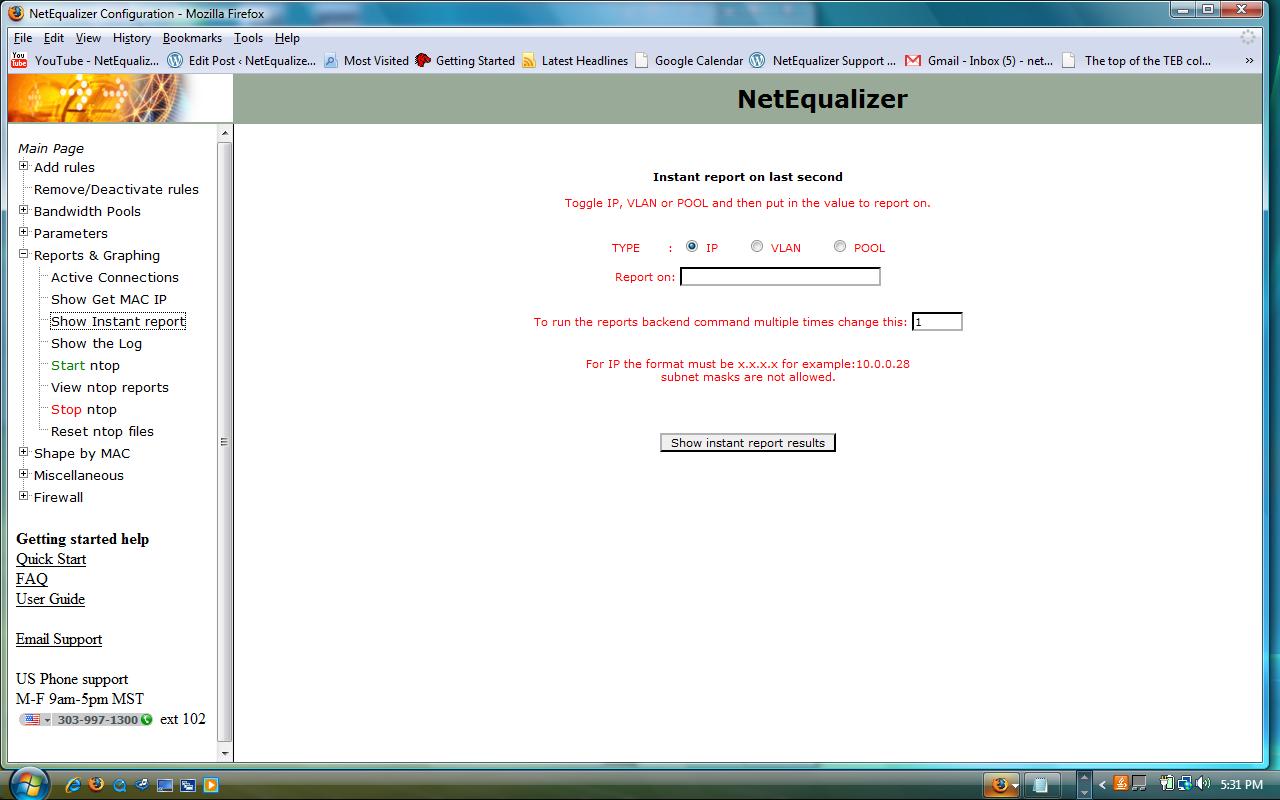
Here is a snapshot of our screen that allows you take an Instant Bandwidth Snapshot, showing the last second of utilization for a individual IP, Pool, or VLAN on your network.
NetEqualizer News: June 2010
June 3, 2010 — netequalizer |
|
|||||
|
||||||
|
||||||
|
||||||
|
The excerpt below is from the full article published on our blog, NetEqualizerNews.com.
|
||||||
|
||||||
|
||||||
|
||||||
|
FrontDoorSoftware: Prevent, Protect, Recover…Peace of Mind

Many of our customers, especially universities and IT organizations with help desk support (educational discounts are available), offer FrontDoorSoftware to their end users. It has some amazing features, including several security tools that will help prevent theft and locate a computer if it’s ever lost or stolen.
FrontDoorSoftware inserts a virtual security ownership label that appears as soon as anyone turns on a protected computer, essentially helping you to “Lock Your Laptop’s Front Door”. This feature works to (1) prevent theft of protected equipment, (2) protect valuable information, and (3) recover lost and stolen equipment. The unique design help makes it virtually impossible for a thief to resell, or even use, a protected computer, increasing chances of recovery from just three percent to 97 percent. Owners of a lost or stolen computer can:
For more information, visit frontdoorsoftware.com. |
||||||
|
||||||







 NetEqualizer News Blog