Case Study: A Successful BotNet-Based Attack


By Zack Sanders – Security Expert – APconnections

In early 2012, I took on a client who was a referral from someone I had worked with when I first got out of school. When the CTO of the company initially called me, they were actually in the process of being attacked at that very moment. I got to work right away using my background as both a web application hacker and as a forensic analyst to try and solve the key questions that we briefly touched on in a blog post just last week. Questions such as:

– What was the nature of the attack?

– What kind of data was it after?

– What processes and files on the machine were malicious and/or which legitimate files were now infected?

– How could we maintain business continuity while at the same time ensuring that the threat was truly gone?

– What sort of security controls should we put in place to make sure an attack doesn’t happen again?

– What should the public and internal responses be?

Background

For the sake of this case study, we’ll call the company HappyFeet Movies – an organization that specializes in online dance tutorials. HappyFeet has three basic websites, all of which help sell and promote their movies. Most of the company’s business occurs in the United States and Europe, with few other international transactions. All of the websites reside on one physical server that is maintained by a hosting company. They are a small to medium-sized business with about 50 employees locally.

Initial Questions

I always start these investigations with two questions:

1) What evidence do you see of an attack? Defacement? Increased traffic? Interesting log entries?

2) What actions have you taken thus far to stop the attack?

Here was HappyFeet’s response to these questions:

1) We are seeing content changes and defacement on the home page and other pages. We are also seeing strange entries in the Apache logs.

2) We have been working with our hosting company to restore to previous backups. However, after each backup, within hours, we are getting hacked again. This has been going on for the last couple of months. The hosting company has removed some malicious files, but we aren’t sure which ones.

Looking For Clues

The first thing I like to do in cases like this is poke around the web server to see what is really going on under the hood. Hosting companies often have management portals or FTP interfaces where you can interact with the web server, but having root access and a shell is extremely important to me. With this privileged account, I can go and look at all the relevant files for evidence that aligns with the observed behavior. Keep in mind, at this point I have not done anything as far as removing the web server from the production environment or shutting it down. I am looking for valuable information that really can only be discovered while the attack is in progress. The fact that the hosting company has restored to backup and removed files irks me, but there is still plenty of evidence available for me to analyze.

Here were some of my findings during this initial assessment – all of them based around one of the three sites:

1) The web root for one of the three sites has a TON of files in it – many of which have strange names and recent modification dates. Files such as:

db_config-1.php

index_t.php

c99.php

2) Many of the directories (even the secure ones) are world writable, with permissions:

drwxrwxrwx

3) There are SQL dumps/backups in the web root that are zipped so when visited by a web browser the user is prompted for a download – yikes!

4) The site uses a content management system (CMS) that was last updated in 2006 and the database setup interface is still enabled and visible at the web root.

5) Directory listings are enabled, allowing a user to see the contents of the directories – making discovery of file names above trivial task.

6) The Apache logs show incessant SQL injection attempts, which when ran, expose usernames and passwords in plain text.

7) The Apache logs also show many entries accessing a strange file called c99.php. It appeared to be some sort of interface that took shell commands as arguments, as is evident in the logs:

66.249.72.41 – – “GET /c99.php?act=ps_aux&d=%2Fvar%2Faccount%2F&pid=24143&sig=9 HTTP/1.1″ 200 286

Nature of the Attack

There were two basic findings that stood out to me most:

1) The c99.php file.

2) The successful SQL injection log entries.

c99.php

I decided to do some research and quickly found out that this is a popular PHP shell file. It was somehow uploaded to the web server and the rest of the mayhem was conducted through this shell script in the browser. But how did it get there?

The oldest log data on the server was December 19, 2011. At the very top of this log file were commands accessing c99.php, so I couldn’t really be sure how it got on there, but I had a couple guesses:

1) The most likely scenario I thought was that the attacker was able to leverage the file upload feature of the dated CMS – either by accessing it without an account, or by brute forcing an administrative account with a weak password.

2) There was no hardware firewall protecting connections to the server, and there were many legacy FTP and SSH accounts festering that hadn’t been properly removed when they were no longer needed. One of these accounts could have been brute forced – more likely an FTP account with limited access; otherwise a shell script wouldn’t really be necessary to interact with the server.

The log entries associated with c99.php were extremely interesting. There would be 50 or so GET requests, which would run commands like:

cd, ps aux, ls -al

Then there would be a POST request, which would either put a new file in the current directory or modify an existing one.

This went on for tens of thousands of lines. The very manual and linear nature of the entries seemed to me very much like an automated process of some type.

SQL Injection

The SQL injection lines of the logs were also very exploratory in nature. There was a long period of information gathering and testing against a few different PHP pages to see how they responded to database code. Once the attacker realized that the site was vulnerable, the onslaught began and eventually they were able to discover the information schema and table names of pertinent databases. From there, it was just a matter of running through the tables one at a time pulling rows of data.

What Was The Attack After?

The motives were pretty clear at this point. The attacker was a) attempting to control the server to use in other attacks or send SPAM, and b) gather whatever sensitive information they could from databases or configuration files before moving on. Exploited user names and passwords could later be used in identity theft, for example. Both of the above motives are very standard for botnet-based attacks. It should be noted that the attacker was not specifically after HappyFeet – in fact they probably knew nothing about them – they just used automated probing to look for red flags and when they returned positive results,  assimilated the server into their network.

Let the Cleanup Begin

Now that the scope of the attack was more fully understood, it was time to start cleaning up the server. When I am conducting this phase of the project, I NEVER delete anything, no matter how obviously malicious or how benign. Instead, I quarantine it outside of the web root, where I will later archive and remove it for backup storage.

Find all the shell files

The first thing I did was attempt to locate all of the shell files that might have been uploaded by c99.php. Because my primary theory was that the shell file was uploaded through a file upload feature in the web site, I checked those directories first. Right away I saw a file that didn’t match the naming convention of the other files. First of all, the directory was called “pdfs” and this file had an extension of PHP. It was also called broxn.php, whereas the regular files had longer names with camel-case that made sense to HappyFeet. I visited this file in the web browser and saw a GUI-like shell interface. I checked the logs for usage of this file, but there were none. Perhaps this file was just an intermediary to get c99.php to the web root. I used a basic find command to pull a list of all PHP files from the web root forward. Obviously this was a huge list, but it was pretty easy to run through quickly because of the naming differences in the files. I only had to investigate ten or so files manually.

I found three other shell files in addition to broxn.php. I looked for evidence of these in the logs, found none, and quarantined them.

What files were uploaded or which ones changed?

Because of the insane amount of GET requests served by c99.php, I thought it was safe to assume that every file on the server was compromised. It wasn’t worth going through the logs manually on this point. The attacker had access to the server long enough that this assumption is the only safe one. The less frequent occurrences of POST requests were much more more manageable. I did a grep through the Apache logs for POST requests submitted by c99.php and came up with a list of about 200 files. My thought was that these files were all either new or modified and could potentially be malicious. I began the somewhat pain-staking process of manually reviewing these files. Some had been overwritten back to their original state by the hosting company’s backup, but some were still malicious and in place. I noted these files, quarantined them, and retested website functionality.

Handling the SQL injection vulnerabilities

The dated CMS used by this site was riddled with SQL injection vulnerabilities. So much so, that my primary recommendation for handling it was building a brand new site. That process, however, takes time, and we needed a temporary solution. I used the log data that I had to figure out which pages the botnet was primarily targeting with SQL attacks. I manually modified the PHP code to do basic sanitizing on all inputs in these pages. This immediately thwarted SQL attacks going forward, but the damage had already been done. The big question here was how to handle the fact that all usernames and passwords were compromised.

Improving Security

Now that I felt the server was sufficiently cleaned, it was time to beef up the security controls to prevent future attacks. Here are some of the primary tasks I did to accomplish this:

1) Added a hardware firewall for SSH and FTP connections.

I worked with the hosting company to put this appliance in front of the web server. Now, only specific IPs could connect to the web server via SSH and FTP.

2) Audited and recreated all accounts.

I changed the passwords of all administrative accounts on the server and in the CMS, and regenerated database passwords.

3) Put IP restrictions on the administrative console of the CMS.

Now, only certain IP addresses could access the administrative portal.

4) Removed all files related to install and database setup for the CMS.

These files were no long necessary and only presented a security vulnerability.

5) Removed all zip files from the web root forward and disabled directory listings.

These files were readily available for download and exposed all sorts of sensitive information. I also disabled directory listings, which is helpful in preventing successful information gathering.

6) Hashed customer passwords for all three sites.

Now, the passwords for user accounts were not stored in plain text in the database.

7) Added file integrity monitoring to the web server.

Whenever a file changes, I am notified via email. This greatly helps reduce the scope of an attack should it breach all of these controls.

8) Wrote a custom script that blocks IP addresses that put malicious content in the URL.

This helps prevent information gathering or further vulnerability probing. The actions this script takes operate like a miniature NetGladiator.

9) Installed anti-virus software on the web server.

10) Removed world-writable permissions from every directory and adjusted ownership accordingly.

No directory should ever be world writable – doing so is usually just a lazy way of avoiding proper ownership. The world writable aspect of this server allowed the attack to be way more broad than it had to be.

11) Developed an incident response plan.

I worked with the hosting company and HappyFeet to develop an internal incident response policy in case something happens in the future.

Public Response

Due to the fact that all usernames and passwords were compromised, I urged HappyFeet to communicate the breach to their customers. They did so, and later received feedback from users who had experienced identity theft. This can be a tough step to take from a business point of view, but transparency is always the best policy.

Ongoing Monitoring

It is not enough to implement the above controls, set it, and forget it. There must be ongoing tweaking and monitoring to ensure a strong security profile. For HappyFeet, I set up a yearly monitoring package that includes:

– Manual and automated log monitoring.

– Server vulnerability scans once a quarter, and web application scans once every six months.

– Manual user history review.

– Manual anti-virus scans and results review.

Web Application Firewalls

I experimented with two types of web application firewalls for HappyFeet. Both of which took me down the road of broken functionality and over-robustness. One had to be completely uninstalled, and the other is in monitoring mode because protection mode disallowed legitimate requests. It also is alerting to probing attempts about 5,000 times per day – most of which are not real attacks – and the alert volume is unmanageable. Its only value is in generating data for improving my custom script that is blocking IPs based on basic malicious attempts.

This is a great example of how NetGladiator can provide a lot of value to the right environment. They don’t need an intense, enterprise-level intrusion prevention system – they just need to block the basics and not break functionality in their web sites. The custom script, much like NetGladiator, suits their needs to a T and can also be configured to reflect previous attacks and vulnerabilities I found in their site that are too vast to manually patch.

Lessons Learned

Here are some key take-aways from the above project:

– Being PROACTIVE is so much better than being REACTIVE when it comes to web security. If you are not sure where you stack up, have an expert take a look.

– Always keep software and web servers up to date. New security vulnerabilities arrive on the scene daily, and it’s extremely likely that old software is vulnerable. Often, security holes are even published for an attacker to research. It’s just a matter of finding out which version you have and testing the security flaw.

– Layered security is king. The security controls mentioned above prove just how powerful layering can be. They are working together in harmony to protect an extremely vulnerable application effectively.

If you have any questions on NetGladiator, web security, or the above case study, feel free to contact us any time! We are here to help, and don’t want you to ever experience an attack similar to the one above.

Why is the Internet Access in My Hotel So Slow?


The last several times I have stayed in Ireland and London, my wireless Internet became so horrific in the evening hours that I ended up walking down the street to work at the local Internet cafe. I’ll admit that hotel Internet service is hit or miss – sometimes it is fine , and other times it is terrible. Why does this happen?

To start to understand why slow Internet service persists at many hotels you must understand the business model.

Most hotel chains are run by Real Estate and Management type companies, they do not know the intricacies of wireless networks any more than they can fix a broken U-Joint on the hotel airport van. Hence, they hire out their IT – both for implementation and design consulting. The marching orders to their IT consultant is usually to build a system that generates revenue for the hotel. How can we charge for this service? The big cash cow for the hotel industry used to be the phone system, and then with advent of cell phones that went away. Then it was On-Demand Movies (mostly porn) , and that is fading fast. Competing on great free Internet service between operators has not been a priority. However, even with concessions to this model of business, there is no reason why it cannot be solved.

There are a multitude of reasons that Internet service can gridlock in a hotel, sometimes it is wireless interference, but by far the most common reason is too many users trying to watch video during peak times (maybe a direct result of pay on demand movies). When this happens you get the rolling brown out. The service works for 30 seconds or so, duping  you into thinking you can send an e-mail or finish a transaction; but just you as you submit your request, you notice everything is stuck, with no progress messages in the lower corner of your browser. And then, you get an HTTP time out. Wait perhaps 30 seconds, and all of a sudden things clear up and seem normal only to repeat again .

The simple solution for this gridlock problem is to use a dynamic fairness device such as our NetEqualizer. Many operators take the first step in bandwidth control and use their routers to enforcing fixed rate limits per customer, however this will  only provide some temporary relief and will not work in many cases.

The next time you experience the rolling brown out, send the hotel a link to this blog article (if you can get the email out). The  hotels that we have implemented our solution at are doing cartwheels down the street and we’d be happy to share their stories with anybody who inquires.

What to Do If Your Organization Has Been Hacked


By Zack Sanders – Security Expert – APconnections

It’s a scary scenario that every business fears; a successful attack on your web site that results in stolen information or embarrassing defacement.

From huge corporations, to mom-and-pop online shops, data security is (or should be) a keystone consideration. As we’ve written about before, no one is immune to attack – not even local businesses with small online footprints. I, personally, have worked with many clients whom you would not think would be targeted by hackers, and they end up being the victims of reasonably intricate and damaging attacks that cost many thousands of dollars to mitigate.

Because no set of security controls or solutions can make you truly safe from exploitation, it is important to have a plan in place in case you do get hacked. Having a documented plan ready BEFORE an attack occurs allows you to be calm and rational with your response. Below are some basic steps you should consider in an incident response plan and/or follow in case a breach occurs.

1) Stay calm.

An attack, especially one in progress, naturally causes panic. While understandable, these feelings will only cause you to make mistakes in handling the breach. Stay calm and stick to your plan.

2) DO NOT unplug the system.

Unplugging the affected system, deleting malicious files, or restoring to a backup are all panic-driven responses to a security incident. When you take measures such as these, you potentially destroy key evidence in determining what, if anything, was taken, how it was taken, and when. Leave the system in place and call an expert as soon as possible.

3) Call an expert.

There are many companies that specialize in post-breach analysis, and it is important to contact these folks right away. They can help determine how the breach occurred, what was taken, and when. They can also help implement controls and improve security so that the same attack does not happen again. If you’ve been hacked, this is the most important step to take.

4) Keep a record.

For possible eventual legal action and to simply keep track of system changes, always keep a record of what has happened to the infected system – who has touched it, when, etc.

5) Determine the scope of the attack, stop the bleeding, and figure out what was taken.

The expert you phoned in will analyze the affected system and follow the steps above. Once the scope is understood, the system will be taken offline and the security hole that caused the problem will be discovered and closed. After that, the information that was compromised will be reviewed. This step will help determine how to proceed next.

6) Figure out who to tell.

Once you’ve determined what kind of information was compromised, it is very important to communicate that to the right people. If it was internal documents, you probably don’t need to make that public. If it was usernames and passwords, you must let your users know.

7) Have a security assessment performed and improve security controls.

Have your expert analyze the rest of your infrastructure and web applications for security holes that could be a problem in the future. After this occurs, the expert can recommend tools that will vastly improve your security layering.

Of course, many of these tasks can be performed proactively to greatly reduce the likelihood of ever needing this process. Contact an expert now and have them analyze your systems for security vulnerabilities.

Are Those Bandwidth Limits on Your Router Good Enough?


Many routers and firewalls offer the ability to set rate limits  per user by IP. On a congested network, simple rate limits are certainly much better than doing nothing at all. Rate limits will force a more orderly distribution of bandwidth; however, if you really want to stretch your bandwidth, and  thus the number of users that can share a link, some form of dynamic fairness will outperform simple rate limits every time.

To visualize the point I’ll use the following analogy:

Suppose you ran an emergency room in a small town of  several hundred people. In order to allocate emergency room resources, you decide to allocate 1 hour, in each 24 hour day, for each person in the town to come to the emergency room. So essentially you have double/triple booked every hour in the day, and scheduled everybody regardless of whether or not they have a medical emergency. You also must hope that people will hold off on their emergency until their allotted time slot. I suppose you can see the absurdity in this model? Obviously an emergency room must take cases as they come in, and when things are busy, a screening nurse will decide who gets priority – most likely the sickest first.

Dividing up your bandwidth equally between all your users with some form of rate limit per user, although not exactly the same as our emergency room analogy, makes about as much sense.

The two methods used in the simple set rate limit model are to equally divide the bandwidth among users, or the more common, which is some form of over subscription.

So, for example, if you had 500 users sharing a 50 megabit trunk, you could:

1) Divide the 50 megabits equally, give all your users 100kbs, and thus if every user was on at the same time you would ensure that their sum total did not exceed 50 megabits.

The problem with this method is that 100kbs is a really slow connection – not much faster than dial up.

2) Oversubscribe, give them all 2 megabit caps – this is more typical. The assumption here is that on average not all users will be drawing their full allotment all the time, hence each user will get a reasonable speed most of the time.

This may work for a while, but as usage increases during busy times you will run into the rolling brown out. This is the term we use to describe the chaotic jerky slow network the typifies peak periods on an over subscribed network.

3) The smart thing to do is go ahead and set some sort of rate cap per user, perhaps 4 or 5 megabits, and combine that with something similar to our NetEqualizer technology.

Equalizing allows users to make use of all the bandwidth that is on the trunk and only slows down large streams (NOT the user) when the trunk is full. This follows more closely what the triage nurse does in the emergency room, and is far more effective at making good use of your Internet pipe.

Related Article using your router as a bandwidth controller

I believe this excerpt from the Resnet discussion group last year exemplifies the point:

You have stated your reservations, but I am still going to have to recommend the NetEqualizer. Carving up the bandwidth equally will mean that the user perception of the Internet connection will be poor even when you have bandwidth to spare. It makes more sense to have a device that can maximise the users perception of a connection. Here are some example scenarios.

NetEQ when utilization is low, and it is not doing anything:
User perception of Skype like services: Good
User perception of Netflix like services: Good
User perception of large file downloads: Good
User perception of “ajaxie” webpages that constantly update some doodad on the page: Good
User Perception of games: Good

Equally allocated bandwidth when utilization is low:
User perception of Skype like services: OK as long as the user is not doing anything else.
User perception of Netflix like services: OK as long as long as the user is not doing anything else.
User perception of large file downloads: Slow all of the time regardless of where the user is downloading the file from.
User perception of “ajaxie” webpages that constantly update some doodad on the page: OK
User perception of games: OK as long as the user is not doing anything else. That is until the game needs to download custom content from a server, then the user has to wait to enter the next round because of the hard rate limit.

NetEQ when utilization is high and penalizing the top flows:
User perception of Skype like services: Good
User perception of Netflix like services: Good – The caching bar at the bottom should be slightly delayed, but the video shouldn’t skip.  The user is unlikely to notice.
User perception of large file downloads: Good – The file is delayed a bit, but will still download relatively quickly compared to a hard bandwidth cap.  The user is unlikely to notice.
User perception of “ajaxie” webpages that constantly update some doodad on the page: Good
User perception of games: Good – downloading content between rounds might be a tiny bit slower, but fast compared to a hard rate limit.

Equally allocated bandwidth when utilization is high:
User perception of Skype like services: OK as long as the user is not doing anything else.
User perception of Netflix like services: OK as long as long as the user is not doing anything else.
User perception of large file downloads: Slow all of the time regardless of where the user is downloading the file from.
User perception of “ajaxie” webpages that constantly update some doodad on the page: OK as long as the user is not doing anything else.
User perception of games: OK as long as the user is not doing anything else. That is until the game needs to download custom content from a server, then the user has to wait to enter the next round because of the hard rate limit.

As far as the P2P thing is concerned, while I too realized that theoretically P2P would be favored, in practice it wasn’t really noticeable. If you wish, you can use connection limits to deal with this.  

One last thing to note: On Obama’s Inauguration Day, the NetEQ at PLU was able to tame the ridiculous number of live streams of the event without me intervening to change settings.  The only problems reported turned out to be bandwidth problems on the other end.  

I hope you find this useful.

Network Engineer
Information & Technology Services
Pacific Lutheran University

Do We Really Need SSL?


By Art Reisman, CTO, www.netequalizer.com, www.netgladiator.net.

Art Reisman CTO www.netequalizer.com

I know that perception is reality, and sometimes it is best to accept it, but when it comes to security, FUD, I get riled up.

For example, last year I wrote about the un-needed investment surrounding the IPV4 demise, and, as predicted, the IPv6 push turned out to be mostly vendor hype motivated by a desire to increase equipment sales. Today, I am here to dispel the misplaced fear around the concept of having your data stolen in transit over the Internet. I am referring to the wire between your residence and the merchant site at the other end. This does  not encompass the security of data once it is stored on disk drive at its final location, just the transit portion.

To get warmed up, let me throw out some analogies.

Do you fear getting carjacked going 75 mph on the interstate?

Most likely not, but I bet you do lock your doors when stopped.

Do you worry about encrypting your cell phone conversations?

Not unless you are on security detail in the military.

As with my examples, somebody stealing your credit card while it is in transit, although possible, is highly impractical; there are just better ways to steal your data.

It’s not that I am against VPN’s and SSL, I do agree there is a risk in transport of data. The problem I have is that the relative risk is so much lower than some other glaring security holes that companies ignore because they are either unaware, or more into perception than protecting data. And yet, customers will hand them financial data as long as their web site portal provides SSL encryption.

To give you some more perspective on the relative risk, let’s examine the task of stealing customer information in transit over the Internet.

Suppose for a moment that I am a hacker. Perhaps I am in it for thrills or for illegal financial gain, either way, I am going to be pragmatic with my approach and maximize my chances of finding a gold nugget.

So how would I go about stealing a credit card number in transit?

Option 1: Let’s suppose I parked in the alley behind your house and had a device sophisticated enough to eaves drop your wireless router and display all the web sites you visited. So now what? I just wait there, and hope perhaps in a few days or weeks you’ll make an online purchase and I’ll grab your cc information, and then I’ll run off and make a few purchases.  This may sound possible, and it is, but the effort and exposure would not be practical.

Option 2: If I landed a job at an ISP, I could hook up a sniffer that eaves drops on every conversation between the ISP customers and the rest of the Internet. I suppose this is a bit more likely than option 1;  but there is just no precedent for it – and ISPs often have internal safeguards to monitor and protect against this. I’d still need very specialized equipment and time to work unnoticed to pull this off. I’d have to limit my thefts to the occasional hit and run so as not to attract suspicion. The chances of economic benefit are slim, and the chances of getting caught are high, and thus the risk to the customer is very low.

For the criminal intent on stealing data, trolling the internet with a bot looking for unsecured servers, or working for a financial company where the data resides, and stealing thousands of credit cards is far more likely. SSL does nothing to prevent the real threats, and that is why you hear about hacking intrusions in the headlines everyday. Many of these break-ins could be prevented, but it takes a layered approach, not just a feel good SSL layer that we could do without.

Common NetGladiator Questions Explained


Since our last security-related blog post, The Truth About Web Security (And How to Protect Your Data), we’ve received many inquiries related to NetGladiator and best-practice security in general. In the various email and phone conversations thus far, we’ve encountered some recurring questions that many of you might also find useful. The purpose of this post is to provide answers to those questions.

1) Could an attacker circumvent NetGladiator by slowly probing the targets as not to be detected by the time anomaly metrics?

The NetGladiator detects multiple types of anomalies. Some are time-frequency based, and some are pattern based.

For instance, a normal user won’t be hitting 500 pages/minute, and a normal user will never be putting SQL in the URL attempting an injection. If a malicious user was slowly running a probing robot, it would likely still be attempting patterns that the NetGladiator would detect, and the NetGladiator would immediately block that IP. There are directory brute force tools that won’t hit on any patterns, but they will hit on the time frequency settings. If the attacker were to slow it down to a normal user click-rate, it’s possible they could go undetected, but these brute force lists rely on trying millions of common page and directory names quickly. It would not be worth it to run through this list at that pace.

2) Could a hacker change their IP address often enough so that NetGladiator would not think the source of the attack was the same?

The amount of IP addresses you’d need to spoof would make this a tiresome effort for the attacker, and in an automated attack by a botnet, the probe is more likely to just move on to a new target. In a targeted attack, IP spoofing, while possible, would also likely be more of a hassle than it’s worth. But, even if it were worth it for the attacker, the NetGladiator alerts admins to intrusion attempts, so you can proactively deal with the threat. You can also block by IP Range/Country so that if you notice someone spoofing IP addresses from a specific IP range, you can drop all those connections for as long as you like.

Also with regard to IP addresses, the NetGladiator only bans them for a set amount of time. This is because bots probe from new IP addresses all the time. A real user might eventually end up with that IP and you wouldn’t want to block it forever. That being said, if there was a constantly malicious IP, you can permanently block it.

3) Why is there a maximum number of patterns you can input into NetGladiator?

One of NetGladiator’s key differentiating factors is its “robustlessness” and its custom configuration. This may sound like a detriment, but it actually will make you better off. Not only will you be able to exclusively detect threats pertinent to your web application, you also will not break functionality – regardless of poor programming or setup on the back end. Many intrusion prevention systems are so robust in their blocking of requests that there are too many false positives to deal with (usually based on programming “errors” or infrastructure abnormalities). This often ends with the IPS being disabled – which helps no one. NetGladiator has a maximum number of patterns for one main reason:

Speed and efficiency.

We don’t want to hamper your web connections by inspecting packets for too many regular expressions. We’d rather quickly check for key patterns that show malicious intent under the assumption that those patterns will be tried eventually by an attacker. This way, data can seamlessly pass through, and your users won’t incur performance problems.

4) What kind of environments benefit from NetGladiator?

NetGladiator was built to protect web applications from botnets and hackers – it won’t have much use for you at the network level or the user level (email, SPAM, anti-virus, etc.). There are other options for security controls that focus on these areas. Every few years, the Open Web Application Security Project (OWASP), releases their Top 10 – which is a list of the most common web application security vulnerabilities facing sites today. NetGladiator helps protect against issues of this type, so any web application that has even a small amount of interactivity or backend to it will benefit from NetGladiator’s features.

We want to hear from you!

Have some questions about NetGladiator or web security in general? Visit our website, leave a comment, or shoot us an email at ips@apconnections.net.

Update: Bandwidth Consumption and the IT Professionals that are Tasked to Preserve It


“What is the Great Bandwidth Arms Race? Simply put, it is the sole reason my colleague gets up and goes to work each day. It is perhaps the single most important aspect of his job—the one issue that is always on his mind, from the moment he pulls into the campus parking lot in the morning to the moment he pulls into his driveway at home at night. In an odd way, the Great Bandwidth Arms Race is the exact opposite of the “Prime Directive” from Star Trek: rather than a mandate of noninterference, it is one of complete and intentional interference. In short, my colleague’s job is to effectively manage bandwidth consumption at our university. He is a technological gladiator, and the Great Bandwidth Arms Race is his arena, his coliseum in which he regularly battles conspicuous bandwidth consumption.”

The excerpt above is from an article written by Paul Cesarini, a Professor at Bowling Green University back 2007. It would be interesting to get some comments and updates from Paul at some point, but for now, I’ll provide an update from the vendor perspective.

Since 2007, we have seen a big drop in P2P traffic that formerly dominated most networks. A report from bandwidth control vendor Sandvine tends to agree with our observations.

Sandvine Report
— The growth of Netflix, the decline of P2P traffic, and the end of the PC era are three notable aspects of a new report by network equipment company Sandvine. Netflix accounted for 27.6% of downstream U.S. Internet traffic in the third quarter, according to Sandvine’s “Global Internet Phenomena Report” for Fall 2011. YouTube accounted for 10 percent of downstream traffic and BitTorrent, the file-sharing protocol, accounted for 9 percent.”

We also agree with Sandvine’s current findings that video is driving bandwidth consumption; however, for the network professionals entrenched in the battle of bandwidth consumption, there is another factor at play which may indicate some hope on the horizon.

There has been a precipitous drop on raw bandwidth costs over the past 10 years. Commercial bandwidth rates have dropped from around $100 or more per megabit to as little as $10 per megabit. So the question now is: Will the availability of lower-cost bandwidth catch up to the demand curve? In other words, will the tools and human effort put into the fight against managing bandwidth become moot? And if so, what is the time frame?

I am going to go out halfway on limb and claim we are seeing bandwidth catch up with demand and hence the battle for the IT professional is going to subside over the coming years.

The reason for my statement is that once we get to a price point where most consumers can truly send and receive interactive video (note this is the not the same as ISPs using caching tricks), we will see some of the pressure spent on micro-managing bandwidth consumption with human labor ease up. Yes, there will be consumers that want HD video all the time, but with a few rules in your bandwidth control device you will be able allow certain levels of bandwidth consumption through, including low resolution video for Skype and YouTube, without crashing your network. Once we are at this point, the pressure for making trade-offs on specific kinds of consumption will ease off a bit.  What this implies is that the cost of human labor to balance bandwidth needs will be relegated to dumb devices and perhaps obsolete this one aspect of the job for an IT professional.

Ever Wonder Why Your Video (YouTube) Over the Internet is Slow Sometimes?


By: Art Reisman

Art Reisman CTO www.netequalizer.com

Art Reisman is the CTO of APconnections. He is Chief Architect on the NetGladiator and NetEqualizer product lines.

I live in a nice suburban neighborhood with both DSL and Cable service options for my Internet. My speed tests always show better than 10 megabits of download speed, and yet sometimes, a basic YouTube or iTunes download just drags on forever. Calling my provider to complain about broken promises of Internet speed is futile. Their call center people in India have the patience of saints; they will wear me down with politeness despite my rudeness and screaming. Although I do want to believe in some kind of Internet Santa Claus, I know first hand that streaming unfettered video for all is just not going to happen. Below I’ll break down some of the limitations for video over the Internet, and explain some of the seemingly strange anomalies for various video performance problems.

The factors dictating the quality of video over the Internet are:

1) How many customers are sharing the link between your provider and the rest of the Internet

Believe it or not, your provider pays a fee to connect up to the Internet. Perhaps not in the same exact way a consumer does, but the more traffic they connect up to the rest of the Internet the more it costs them. There are times when their connection to the Internet is saturated, at which point all of their customers will experience slower service of some kind.

2) The server(s) where the video is located

It is possible that the content hosted site has overloaded servers and their disk drives are just not fast enough to maintain decent quality. This is usually what your operator will claim regardless if it is their fault or not. :)

3) The link from the server to the Internet location of your provider

Somewhere between the content video server and your provider there could be a bottleneck.

4) The “last mile”  link between you and your provider (is it dedicated or shared?)

For most cable and DSL customers, you have a direct wire back to your provider. For wireless broadband, it is a completely different story. You are likely sharing the airwaves to your nearest tower with many customers.

So why is my video slow sometimes for YouTube but not for NetFlix?

The reason why I can watch some NetFlix movies, and a good number of popular YouTube videos without any issues on my home system is that my provider uses a trick called caching to host some content locally. By hosting the video content locally, the provider can insure that items 2 and 3 (above) are not an issue. Many urban cable operators also have a dedicated wire from their office to your residence which eliminates issues with item 4 (above).

Basically, caching is nothing new for a cable operator. Even before the Internet, cable operators had movies on demand that you could purchase. With movies on demand, cable operators maintained a server with local copies of popular movies in their main office, and when you called them they would actually throw a switch of some kind and send the movie down the coaxial cable from their office to your house. Caching today is a bit more sophisticated than that but follows the same principles. When you watch a NetFlix movie, or YouTube video that is hosted on your provider’s local server (cache),  the cable company can send the video directly down the wire to your house. In most setups, you don’t share your local last mile wire, and hence the movie plays without contention.

Caching is great, and through predictive management (guessing what is going to be used the most), your provider often has the content you want in a local copy and so it downloads quickly.  However, should you truly surf around to get random or obscure YouTube videos, your chances of a slower video will increase dramatically, as it is not likely to be stored in your provider’s cache.

Try This: The next time you watch a (not popular) YouTube video that is giving your problems, kill it, and try a popular trending video. More often than not, the popular trending video will run without interruption. If you repeat this experiment a few times and get the same results, you can be certain that your provider is caching some video to speed up your experience.

In case you need more proof that this is “top of mind” for Internet Providers, check out the January 1st 2012, CED Magazine article on the Top Broadband 50 for 2011 (read the whole article here).  #25 (enclosed below) is tied to improving video over the Internet.

#25: Feeding the video frenzy with CDNs

So everyone wants their video anywhere, anytime and on any device. One way of making sure that video is poised for rapid deployment is through content delivery networks. The prime example of a cable CDN is the Comcast Content Distribution Network (CCDN), which allows Comcast to use its national backbone to tie centralized storage libraries to regional and local cache servers.

Of course, not every cable operator can afford the grand-scale CDN build-out that Comcast is undertaking, but smaller MSOs can enjoy some of the same benefits through partnerships. – MR

NetEqualizer News: April 2012


April 2012

Greetings!

Enjoy another issue of NetEqualizer News! This month, we preview two new NetEqualizer features (Priority Subnets and our Professional Quota API), demonstrate our improved tool that uses Microsoft Excel to harness and interpret bandwidth data, and lastly we discuss the truth about web security in our Best of Blog series. As always, feel free to pass this along to others who might be interested in NetEqualizer News.

A message from Art…


Daylight Savings Time is bittersweet. Even though you lose an hour of sleep the night you set the clocks forward, the extra hour of sunshine in the evening is worth it – mainly because it allows you to spend more time outside after work. For computer systems that are not automatically adjusted, this could present a problem. With NetEqualizer, we have two solutions that we’ve detailed in our blog:

1) Via your own NTP Time Servers
2) Via Internet Time Servers

Try it out, and never have to worry about time settings with your NetEqualizer again!

We love it when we hear back from you – so if you have a story you would like to share with us of how we have helped you, let us know. Email me directly here. I would love to hear from you!

New Feature: Priority Subnets
We will have a limited number of slots available for beta testing these features. Please contact us if you are interested and have a valid NSS. General availability will be in May 2012.

Beginning with the 5.8 Software Update, the NetEqualizer will be capable of providing priority connections to entire subnets – not just individual IP addresses.

To specify a priority subnet, you can use the existing Priority Host interface by inputting a subnet in CIDR notation. Here is an example:

Input the priority subnet in CIDR notation:

192.168.1.0/24

The prefix of /24 would subsequently provide priority to the IP addresses in the following range:

192.168.1.0 through 192.168.1.255

This feature can be useful when trying to prioritize traffic from a given section of your network – video streaming servers, for instance.

—-

As always, the 5.8 Software Update will be available at no charge to customers with valid NetEqualizer Software Subscriptions (NSS).

For more information on the NetEqualizer or the upcoming release, visit our blog or contact us at:

sales@apconnections.net
-or-
toll-free U.S.(888-287-2492),
worldwide (303) 997-1300 x. 103.


New Feature: Professional Quota API
We will have a limited number of slots available for beta testing these features. Please contact us if you are interested and have a valid NSS. General availability will be in May 2012.

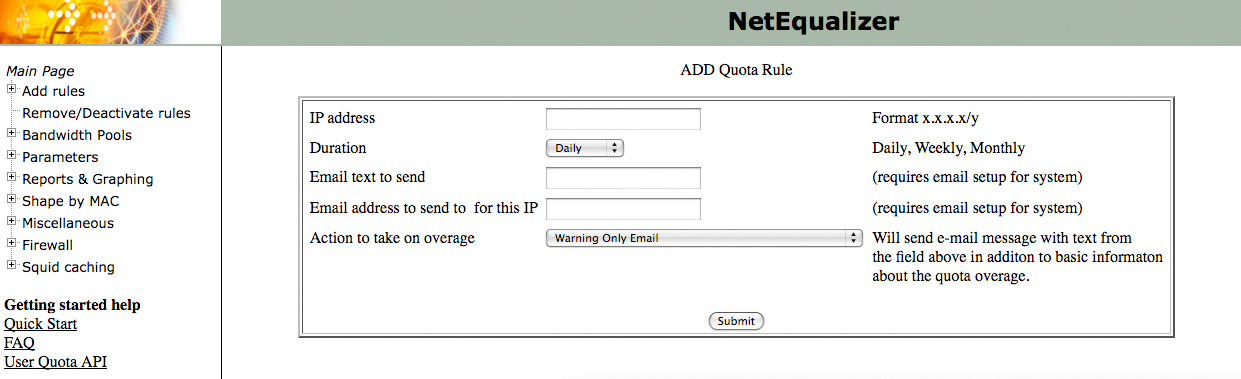
Beginning with the 5.8 Software Update, the NetEqualizer will have the ability to set bandwidth use quotas via a GUI for specific IP addresses.

This is an improvement upon our existing User Quota API toolset commands in that it is now even easier to create a custom quota solution that meets your needs.

If a quota is surpassed, you have multiple options on how to handle the abuser:

– Only email them a warning (which can often be effective enough).
– Email them a warning and limit their access to 200 kbps.
– Email them a warning and limit their access to 15 kbps – which is near 0.

There is also a reporting interface that allows you to monitor bandwidth use as a whole across each IP. This helps you determine if users exist that are hogging more than their fair share of the bandwidth.

—-

As always, the 5.8 Software Update will be available at no charge to customers with valid NetEqualizer Software Subscriptions (NSS).

For more information on the NetEqualizer or the upcoming release, visit our blog or contact us at:

sales@apconnections.net
-or-
toll-free U.S.(888-287-2492),
worldwide (303) 997-1300 x. 103.


Analyzing NetEqualizer with Excel – Improved!
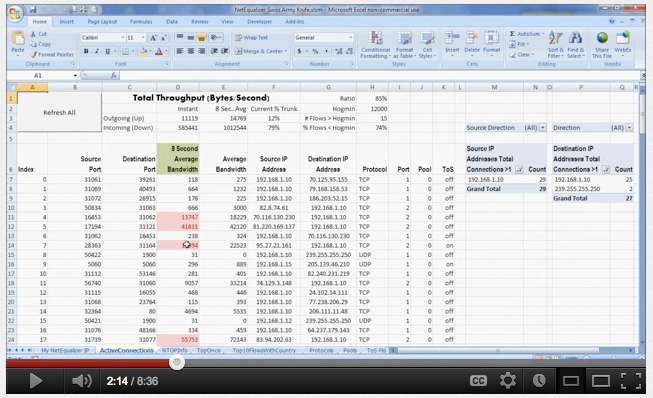
Back in August of 2011, we posted an article on our blog called “Dynamic Reporting With The NetEqualizer.” It turned out to be one of our most popular posts, with many people contacting us to find out more about utilizing Excel to interpret NetEqualizer data.

Because of this interest level, we decided to improve the functionality of this tool. For instance, one of the problems with the prior tool set was that we used an Excel function called a “web query.” This meant we had to program in a long string of commands about the NetEqualizer and where it resided. Now, all you have to do is put in the IP address of the NetEqualizer, and the rest is done for you. This is especially handy if the IP address changes, or you have more than one NetEqualizer.

Other additional features include:

– The ability to convert IP addresses to country of origin.
– A summarizing dashboard that displays key values from your NetEqualizer.
– An improved ability to view and graph NTOP data.
– And more!

View the demonstration video. This video is no longer available.  This functionality has been replaced with Dynamic Real-Time Reporting in software update 7.1.

We have working examples of this tool that we are happy to share with you. If you are interested, please contact us at:

sales@apconnections.net
-or-
toll-free U.S. (888-287-2492),
worldwide (303) 997-1300 x. 103.

Please be aware that NSS and NetEqualizer Support does NOT cover this tool or any bug fixes related to external programs.


Best Of The Blog

The Truth About Web Security (And How to Protect Your Data)

By Zack Sanders – Security Expert – APconnections
Security Theater

Internet security is an increasingly popular and fascinating subject that has pervaded our lives through multiple points of entry in recent years. Because of this infiltration, security expertise is no longer a niche discipline teetering on the fringe of computer science – it’s an integral part. Computer security concerns have ceased to be secondary thoughts and have made their way to the front lines of business decisions, political banter, and legislative reform. Hackers are common subjects in movies, books, and TV shows. It seems like every day we are reading about the latest security breach of a gigantic, international conglomerate. Customers who once were naive to how their data was used and stored are now outwardly concerned about their privacy and identity theft.

This explosion in awareness has, of course, yielded openings for the opportunistic. Companies now know there is a real business need for security, and there are thus hundreds of solutions available to you to improve your security footprint. But most of them are not telling you the truth about how to really secure your infrastructure. They just want to sell you their product – hyping its potential, touting its features, and telling you to install it and – *poof* – you no longer need to worry about security – something those in the industry call “Security Theater.” In many ways, these companies are actually making you less secure because of this sales point. Believing that you can plug in an “all-in-one device” and have it provide you with all of your security controls sounds good, but it’s unrealistic. When you stop being diligent on multiple levels, you start being vulnerable.

Real security is all about two things:

1) Being PROACTIVE.
2) Implementing LAYERED security controls…

Photo Of The Month

The Mighty Mississippi

Our CTO recently fulfilled a lifelong dream by embarking on a solo adventure down the Mississippi River in a canoe purchased at the push-off point of Davenport, Iowa. Strong winds made it nearly impossible to travel the entire route, but many of the goals of the trip were still accomplished – including camping on a river island.

The Truth About Web Security (And How to Protect Your Data)


By Zack Sanders – Security Expert at APconnections.

Security Theater

Internet security is an increasingly popular and fascinating subject that has pervaded our lives through multiple points of entry in recent years. Because of this infiltration, security expertise is no longer a niche discipline teetering on the fringe of computer science – it’s an integral part. Computer security concerns have ceased to be secondary thoughts and have made their way to the front lines of business decisions, political banter, and legislative reform. Hackers are common subjects in movies, books, and TV shows. It seems like every day we are reading about the latest security breach of a gigantic, international conglomerate. Customers who once were naive to how their data was used and stored are now outwardly concerned about their privacy and identity theft.

This explosion in awareness has, of course, yielded openings for the opportunistic. Companies now know there is a real business need for security, and there are thus hundreds of solutions available to you to improve your security footprint. But most of them are not telling you the truth about how to really secure your infrastructure. They just want to sell you their product – hyping its potential, touting its features, and telling you to install it and – *poof* – you no longer need to worry about security – something those in the industry call “Security Theater.” In many ways, these companies are actually making you less secure because of this sales point. Believing that you can plug in an “all-in-one device” and have it provide you with all of your security controls sounds good, but it’s unrealistic. When you stop being diligent on multiple levels, you start being vulnerable.

Real security is all about two things:

1) Being PROACTIVE.
2) Implementing LAYERED security controls.

Let’s briefly discuss each of these central tenants of best-practice security.

1) Being proactive is key for many reasons. When you are proactive with security, you are anticipating attacks before they start. This allows you to more calmly implement security controls, develop policies, and train staff before a breach occurs. You should be proactive about security for the same reasons you are proactive about your health. Eating well, exercising, and periodically seeing a doctor are all ways to improve your chances of remaining healthy. It doesn’t guarantee you won’t get sick, much in the same way security controls won’t guarantee you won’t get hacked, but it does greatly improve your odds. And if you are not proactive, just like with your personal health, if something does go wrong, it can often be too late to reverse the effects, as most of the damage has already been done.

2) Implementing a layered approach to security is paramount in reducing the odds of a successful attack. The goal is to take security controls that complement each other on different levels of your infrastructure and piece them together to form a solid line of defense. If one control is breached, another is there to back it up in a different, but equally effective way. It is actually possible to take products that are relatively ineffective on their own (say 75% effective), and layer them to lower the chances of a successful attack to less than 1%. If you implement just four 75%-effective tools, say, check out what your breach success rate becomes: (.25 * .25 * .25 *.25) = .0039 * 100 = 0.39%! That’s pretty impressive!

Here is an analogy

Think of your sensitive data as crown jewels that are stored in the center of a castle. If your only security control is a moat, it wouldn’t take much ingenuity for a thief to cross over the moat and subsequently steal your jewels. One thing we can do to improve security is better our moat. Let’s add some crocodiles – that will certainly help in thwarting would-be crossers. But, even though we’ve beefed up the security of the moat, it’s still passable. The problem is that we can never 100% secure the moat from thieves no matter what we do. We need to add in some complementary controls to back up the security of the moat in case the moat fails. So, we’ll place archers at the four corner towers and install a big door with multiple locks and guards at the front gate. We’ll move the jewels to the cellar and place them under lock and key with a designated guard. Knights will be trained to spot thieves, and there will be a checkpoint outside the castle for all incoming and outgoing guests. Now, instead ofhaving to just cross the moat, a thief would also have to get through the heavy door, through the locks, past the guards, past the archers, into the cellar, past another guard, and into the locked room. On exit, he’d have to get through all these again, including a manual search at the checkpoint. That seems tough to do compared to just crossing the moat.

Your web security infrastructure should work the same way. Multiple policies, devices, and configurations should all work in harmony to protect your sensitive data. When companies are trying to sell you an all-in-one security device, they are essentially trying to sell you a very robust moat. It’s not that their product won’t provide value, but it needs to be implemented as part of an overall security strategy, and it should not be solely relied upon.

How Real Attacks Occur

We have thought a lot lately about exactly how real attacks occur in the wild for organizations with interactive web applications. This is slightly simplistic, but it really seems to boil down to two key origins:

1) A hack results from an AUTOMATED scan or probe.

This is by far the most common type of attack, despite it not being as popular as the other. Many organizations don’t take this type of attack as seriously as they should. They think that just because they are a small, non-influential site with little customer data that they won’t be targeted. And they are probably right – a human attacker won’t be targeting them. But a robot has no discretion. The robot’s goal is to increase hosts in their botnet (for DOS attacks, sending SPAM, etc.), and to siphon off any available sensitive data from the server. The botnets are constantly scouring the Internet, rapidly attempting breaches with known, common patterns. They don’t get too sophisticated.

2) A hack results from a TARGETED attack.

The media has hyped this into the most popular type of attack, but it is much less common. Targeted attacks can begin from multiple motivations. Sometimes, a targeted attack will occur due to interesting results from an automated scan (as in #1, above). The other type of targeted attack is the most dangerous – an attacker, or group of attackers, specifically targeting your site for financial or political reasons. Despite what other products might profess, there is no one-stop solution for stopping this type of attack. A layered approach to security, as discussed above, is key.

Approaches to Dealing with Botnets/Malnets and other Automated Attacks

Botnets are large, distributed networks of private computers and servers that are infected with malicious software without the owner of the system being aware. The botnet computers can be used to scan targets for vulnerabilities or send out SPAM/malicious emails. Using systems registered to someone else provides a layer of anonymity to the attacker. He/she also has increased processing power and resources available at their disposal. Botnets rely heavily on attempting simple intrusions and speed. They often are brute forcing directory listings or credentials and once they’ve exhausted their lists, they move on.

There are a few things you can do to greatly lower the effectiveness of a botnet:

1) Think about if your website really needs to be open to the entire Internet. Are there countries/subnets that you will never receive business from? Why not just block these IP ranges right off the bat? It seems harsh at first, but if you think about it, there is a lot of added security value here for the small risk you turn away a legitimate customer.

2) Implement a tool that monitors the amount of requests received over a given time frame. A normal user won’t ever be requesting pages at the same rate as a botnet. If the request count reaches past a certain threshold, you can confidently block the offending IP.

3) Implement a tool that monitors logs for multiple 404 (Page Not Found) requests. Brute-force tools will generate plenty of 404 requests when they are hammering your servers. If you see multiple 404’s over a short period of time from the same IP, chances are good they are acting maliciously.

4) Look for common patterns in logs that suggest malicious intent. The information discovery process is very important for an attacker (or botnet). It is during this phase that they learn about possible vulnerabilities your sites might have. In order to find these holes, the attacker has to experiment with the site to see how it responds to malicious code. If you can isolate these probing attempts right off the bat, you stand a good chance at cutting off the information gathering process before they get results on potential attack vectors.

5) Implement a file integrity monitoring tool on your web server and have it actively alert to changes in files that are not supposed to change often. If an attacker finds an entry point, one of the first things they will try and do is upload a file to the server. Getting a file to the server is a huge accomplishment for an attacker. They can upload PHP or ASP files that act as shell interfaces to the server itself, and from there can wreak whatever havoc they’d like. With a file integrity monitoring tool, you can know if an file is added within minutes of upload and can deal with the threat before it is wide spread.

The NetGladiator

NetGladiator is a next-generation Intrusion Prevention System (IPS) made by APconnections that deals with some of the issues above and was built based on how attacks actually occur. It can be an effective layer in your security profile to help block unwanted web-based requests (either from a botnet or a targeting attacker) – you can think of it as a firewall for your web applications. In addition to handling web requests, it can detect time-based anomalies and block IP ranges by country and/or subnet.

NetGladiator has two primary goals:

1) Make your web infrastructure INVISIBLE and UNINTERESTING to probing botnets.
2) Provide value as a LAYERED appliance in case of a targeted attack.

NetGladiator also has some of the following aspects that set it apart from more expensive, overly robust IPS’s:

Customizable Configurations
Unlike other IPSs with insanely robust pattern sets, NetGladiator lets you pick and choose the patterns you’d like it to hit on. Other products inspect for every vulnerability known to man. While this sounds good, it isn’t very practical and often leads to broken functionality, false positives, and total reliance.

Support From a White Knight (a.k.a Professional Hacker)
As part of your support agreement when you purchase a NetGladiator, a real, white knight will help you set up and configure your machine to meet your needs. This includes identifying and patching any existing holes prior to your installation, deciding what issues you might face from a real attacker, and writing you a custom configuration for your box. That’s something that no one else provides – especially at this price point. And, if you want further security assessments performed, additional support hours can be purchased.

Plug and Play
If you’ve set up a NetEqualizer in the past, you’ll find NetGladiator’s installation process to be even easier. Just put it in front of your web servers, cable the box correctly, and turn it on. Traffic will be passing through it instantly. Now all that’s left is to configure your patterns. NetGladiator comes with default patterns in case no customization is necessary. NetGladiator also runs on its own system, and does not require any installs to your web server. This makes it platform independent and will create zero conflicts with your existing software and hardware.

But remember, protecting web applications is just one piece of the puzzle. In order to layer NetGladiator into your overall security strategy, you should complement its use with other controls. Some examples would be:

– Well-defined user and staff policies that deal with insider threats and social engineering

– Full or column-level database encryption

– Anti-virus

– File integrity monitoring

– Hardware firewalls

– A security assessment by an expert

etc…

Questions?

Need help instituting a layered security strategy? We have experience in all these levels of security controls and are happy to help with NetGladiator implementation or other security-related tasks. Just let us know how we can be of service!

Have some questions about NetGladiator or web security in general? Visit our website, leave a comment, or shoot us an email at ips@apconnections.net. In the next blog post, we’ll answer those questions and also discuss common ones we’ve received from customers so far.

Our Take on Network Instruments 5th Annual Network Global Study


Editors Note: Network Instruments released their “Fifth Annual State of the Network Global study” on March 13th, 2o12. You can read their full study here. Their results were based on responses by 163 network engineers, IT directors, and CIOs in North America, Asia, Europe, Africa, Australia, and South America. Responses were collected from October 22, 2011 to January 3, 2012.

What follows is our take (or my .02 cents) on the key findings around Bandwidth Management and Bandwidth Monitoring from the study.

Finding #1: Over the next two years, more than one-third of respondents expect bandwidth consumption to increase by more than 50%.

Part of me says “well, duh!” but that is only because we hear that from many of our customers. So I guess if you were an Executive, far removed from the day-to-day, this would be an important thing to have pointed out to you. Basically, this is your wake up call (if you are not already awake) to listen to your Network Admins who keep asking you to allocate funds to the network. Now is the time to make your case for more bandwidth to your CEO/President/head guru. Get together budget and resources to build out your network in anticipation of this growth – so that you are not caught off guard. Because if you don’t, someone else will do it for you.

Finding #2: 41% stated network and application delay issues took more than an hour to resolve.

You can and should certainly put monitoring on your network to be able to see and react to delays. However, another way to look at this, admittedly biased from my bandwidth shaping background, is get rid of the delays!

If you are still running an unshaped network, you are missing out on maximizing your existing resource. Think about how smoothly traffic flows on roads, because there are smoothing algorithms (traffic lights) and rules (speed limits) that dictate how traffic moves, hence “traffic shaping.” Now, imagine driving on roads without any shaping in place. What would you do when you got to a 4-way intersection? Whether you just hit the accelerator to speed through, or decided to stop and check out the other traffic probably depends on your risk-tolerance and aggression profile. And the result would be that you make it through OK (live) or get into an ugly crash (and possibly die).

Similarly, your network traffic, when unshaped, can live (getting through without delays) or die (getting stuck waiting in a queue) trying to get to its destination. Whether you look at deep packet inspection, rate limiting, equalizing, or a home-grown solution, you should definitely look into bandwidth shaping. Find a solution that makes sense to you, will solve your network delay issues, and gives you a good return-on-investment (ROI). That way, your Network Admins can spend less time trying to find out the source of the delay.

Finding #3: Video must be dealt with.

24% believe video traffic will consume more than half of all bandwidth in 12 months.
47% say implementing and measuring QoS for video is difficult.
49% have trouble allocating and monitoring bandwidth for video.

Again, no surprise if you have been anywhere near a network in the last 2 years. YouTube use has exploded and become the norm on both consumer and business networks. Add that to the use of video conferencing in the workplace to replace travel, and Netflix or Hulu to watch movies and TV, and you can see that video demand (and consumption) has risen sharply.

Unfortunately, there is no quick, easy fix to make sure that video runs smoothly on your network. However, a combination of solutions can help you to make video run better.

1) Get more bandwidth.

This is just a basic fact-of-life. If you are running a network of < 10Mbps, you are going to have trouble with video, unless you only have one (1) user on your network. You need to look at your contention ratio and size your network appropriately.

2) Cache static video content.

Caching is a good start, especially for static content such as YouTube videos. One caveat to this, do not expect caching to solve network congestion problems (read more about that here) – as users will quickly consume any bandwidth that caching has freed up. Caching will help when a video has gone viral, and everyone is accessing it repeatedly on your network.

3) Use bandwidth shaping to prioritize business-critical video streams (servers).

If you have a designated video-streaming server, you can define rules in your bandwidth shaper to prioritize this server. The risk of this strategy is that you could end up giving all your bandwidth to video; you can reduce the risk by rate capping the bandwidth portioned out to video.

As I said, this is just my take on the findings. What do you see? Do you have a different take? Let us know!

Economic Check List for Bandwidth Usage Enforcement


I just got off the phone with a good friend of mine that contracts out IT support for about 40 residential college housing apartment buildings. He was asking about the merits of building a quota tool to limit the amount of total consumption, per user, in his residential buildings. I ended up talking him out of building an elaborate quota-based billing system, and I thought it would be a good idea share some of the business logic of our discussion.

Some background on the revival of usage-based billing (and quotas)

Although they never went away completely, quotas have recently revived themselves as the tool of choice for deterring bandwidth usage and secondarily as cash generation tool for ISPs.  There was never any doubt that they were mechanically effective as a deterrent.  Historically, the hesitation of implementing quotas was that nobody wanted to tell a customer they had a limit on their bandwidth.  Previously, quotas existed only in fine print, as providers kept their bandwidth quota policy tight to their belt.  Prior to the wireless data craze, they only selectively and quietly enforced them in extreme cases.  Times have changed since we addressed the debate with our article, quota or not to quota, several years ago.

Combine the content wars of Netflix, Hulu, and YouTube, with the massive over-promising of 4G networks from providers such as Verizon, AT&T and Sprint, and it seems that quotas on data have followed right along where limitations used to reign supreme. Consumers seem to have accepted the idea of a quota on their data plan. This new acclimation of consumers to quotas may open the door for traditional fixed-line carriers to offer different quota plans as well.

That brings us to the question of how to implement a quota system, what is cost effective?

In cases where you have just a few hundred subscribers (as in my discussion with our customer above), it just does not make economic sense to build a full-blown usage-based billing and quota system.

For example, it is pretty easy to just eyeball a monthly usage report with a tool such as ntop, and see who is over their quota. A reasonable quota limit, perhaps 16 gigabytes a month, will likely have only a small percentage of users exceeding their limits. These users can be warned manually with an e-mail quite economically.

Referencing a recent discussion thread where the IT Administrator of University of Tennessee Chattanooga chimed in…

“We do nothing to the first 4Gb, allowing for some smoking “occasional” downloads/uploads, but then apply rate limits in a graduated fashion at 8/12/16Gb. Very few reach the last tier, a handful may reach the 2nd tier, and perhaps 100 pass the 4Gb marker. Netflix is a monster.”

I assume they, UTC, have thousands of users on their network, so if you translate this down to a smaller ISP with perhaps 400 users, it means only a handful are going to exceed their 16 GB quota. Most users will cut back on the first warning.

What you can do if you have 1000+ customers (you are a large ISP)

For a larger ISP, you’ll need an automated usage-based billing and quota system and with that comes a bit more overhead.  However, with the economy-of-scale of a larger ISP, the cost of a more automated usage-based billing and quota system should start to reach payback at 1000+ users. Here are some things to consider:

1) You’ll need to have a screen where users can login and see their remaining data limits for the billing period.

2) Have some way to mitigate getting them turned back on automatically if the quota system starts to restrict them.

3) Send out automated warning levels at 50 and 80 percent (or any predefined levels of your choice).

4) You may need a 24 hour call center to help them, as they won’t be happy when their service unknowingly comes to a halt on a Sunday night (yes, this happened to me once), and they have no idea why.

5) You will need automated billing and security on your systems, as well as record back-up and logging.

What you can do if you have < 1000 customers (you are a small ISP)

It’s not that this can’t be done, but the cost of such a set of features needs to be amortized over a large set of users. For the smaller ISP, there are simpler things you can try first.

I like to first look at what a customer is trying to accomplish with their quota tool, and then take the easiest path to accomplish their goal. Usually the goal is just to keep total bandwidth consumption down, secondarily the goal is to sell incremental plans and charge for the higher amounts of usage.

Send out a notice announcing a quota plan
The first thing I pointed out from experience is that if you simply threaten a quota limitation in your policy, with serious consequences, most of your users will modify their behavior, as nobody wants to get hit with a giant bill. In other words, the easiest way to get started is to send out an e-mail about some kind of vague quota plan and abusers will be scaled back. The nice part of this plan is it costs nothing to implement and may cut your bandwidth utilization overnight.

I have also noticed that once a notice is sent out you will get a 98 percent compliance rate. That is 8 notices needed per 400 customers. Your standard reporting tool (in our case ntop) can easily and quickly show you the overages over a time period and with a couple of e-mails you have your system – without creating a new software implementation. Obviously, this manual method is not practical for an ISP with 1 million subscribers; but for the small operator it is a great alternative.

NetEqualizer User-Quota API (NUQ-API)

If we have not convinced you, and you feel that you MUST have a quota plan in place, we do offer a set of APIs with the NetEqualizer to help you build your own customized quota system. Warning: these APIs are truly for tech geeks to play with. If that is not you, you will need to hire a consultant to write your code for you. Learn more about our NUQ-API (NetEqualizer User-Quota API).

Have you tried something else that was cost-effective? Do you see other alternatives for small ISPs? Let us know your thoughts!

NetEqualizer News: March 2012


March 2012

Greetings!

Enjoy another issue of NetEqualizer News! This month, we ask for suggestions regarding potential hosts for our next NetEqualizer Technical Seminar, discuss NetEqualizer’s selection for use in the United States National Park system, preview our new increased cache size, feature a new NetGladiator white paper, and more! As always, feel free to pass this along to others who might be interested in NetEqualizer News.

A message from Art…


We’ve been writing and thinking a lot about security lately. Just the other day, my neighbor received a business card from the Sheriff informing him that he’d checked out his house to make sure everything was alright due to a backyard sliding-glass door being ajar. This made me think about a corollary in web application security. It is much more rare in the online world that someone kindly alerts you to security vulnerabilities and then does no harm – unless of course you’ve hired them! That makes it even more important to protect your networks and data with layered security controls.

We love it when we hear back from you – so if you have a story you would like to share with us of how we have helped you, let us know. Email me directly here. I would love to hear from you!

We Are Looking for a Seminar Host!

Plans are now in the works for our next complimentary NetEqualizer Technical Seminar. We’re currently taking suggestions for potential hosts, so if you’re interested, be sure to let us know.

In order to maximize our reach based on previous technical seminars, we are ideally looking for hosts in one the following areas:

Washington, D.C.

San Francisco, California (Bay Area)

Florida (Southeastern United States)

Here’s what we’ll be covering in the seminar:

– The various tradeoffs regarding how to stem P2P and bandwidth abuse.

– Recommendations for curbing RIAA requests.

– Demo of the new NetEqualizer network access control module.

Intrusion detection discussion with an experienced, professional hacker.

– Lots of customer Q&A and information sharing.

We hope to see as many of you there as possible, and once we select a host site, more details and dates will follow – so stay tuned!

Thank you!


NetEqualizer Selected to Support Internet Access in US National Parks

The NetEqualizer was recently selected by Global Gossip to provide bandwidth arbitration for their High-Speed Internet Access (HSIA) offering in many United States National Parks.

The Internet connections available in these remote locations often lack the available bandwidth of urban locales. This fact makes it that much more important that one or two users can’t monopolize the connection.

Global Gossip’s Vice President of US Operations, Stephanie Dickens, says “The use of the NetEqualizer greatly diminishes the need for hands-on bandwidth management… We are thoroughly satisfied with the NetEqualizer’s remote management capabilities and its ease-of-use.”

NetEqualizers are currently deployed at the Furnace Creek Resort in Death Valley National Park, throughout guest and employee accommodations in Yellowstone National Park, Grand Canyon, Mount Rushmore, and five Ohio State Parks. The NetEqualizer will be deployed with the Global Gossip system in several more US locations before the end of 2012.

So next time you are smoothly streaming video on your iPad in Yellowstone while waiting for Old Faithful to erupt, think of us!


Larger Cache Available for NetEqualizer

We are excited to announce a larger cache upgrade for the NetEqualizer that is available now!

The upgrade increases the cache size from 140GB to 750GB and is available to both existing and new customers. If you are an existing customer with a valid NSS, we will send you a new hard drive and help you get it up and running for $1,000. For new customers, the upgraded cache costs $2,750.

If you have any questions about the new cache size option, feel free to contact us:

sales@apconnections.net

-or-

worldwide (303) 997-1300 x103. -or-

toll-free U.S. (888) 287-2492


NetGladiator White Paper and Research

NetGladiator is a brand new next-generation web application Intrusion Prevention System (IPS) that was developed by APconnections (creators of the NetEqualizer) and released last month. We discussed it in detail in the February Newsletter and have been talking about security a lot lately – both internally and on our blog.

We’ve also been doing a fair amount of research. Our executive white paper, available for download here, is a concise summary of the NetGladiator technology and the security issues it helps control.

Be sure to check it out to see if NetGladiator could be a valuable asset in your current layered security strategy – and if you don’t have a solid security plan in place, we can help with that too!

For More information on the NetGladiator, take a look at our website.

You can also visit our blog or contact us:

ips@apconnections.net

-or-

worldwide (303) 997-1300 x103. -or-

toll-free U.S. (888) 287-2492


Best Of The Blog

Five Great Ideas to Protect Your Data with Minimal Investment

By Art Reisman – CTO – NetEqualizer

We see quite a bit of investment when it comes to data security. Many solutions are selected on the quantity of threats deterred. Large feature sets, driven by FUD, are exponential in cost, and at some point the price of the security solution will outweigh the benefit. But where do you draw the line?

Note:

1) It is relatively easy to cover 95 percent of the real security threats that can damage a business’s bottom line or reputation.

2) It is totally impossible to completely secure data.

3) The cost for security starts to hockey stick as you push toward the mythical 100 percent secure solution.

For example, let’s assume you can stop 95 percent of potential security breaches with an investment of $10, but it would cost $10 million to achieve 99 percent coverage. What would you do? Obviously you’d stop someplace between 95 and 99 percent coverage. Hence, the point of this post. The tips below are intended to help with the 95 percent rule, what is reasonable and cost effective. You should never be spending more money securing an asset than that asset is worth.

Some real world examples of reducing practical physical risk would be putting life jackets in a watercraft, or an airbag in an automobile. If we took the approach to securing your water craft or automobile with the FUD of data security, everybody would be driving 5 million dollar Abrams tanks, and trout fishing in double hulled aircraft carriers.

Below are some security ideas to protect your data that should greatly reduce your risk at a minimal investment.

1) Use your firewall to block all uninitiated requests from outside the region where you do business.

For example, let’s assume you are a regional medical supply company in the US. What is the likelihood that you will be getting a legitimate inquiry from a customer in China, India, or Africa? Probably not likely at all…

Photo Of The Month

Laissez les bons temps rouler!

(Let the good times roll!)

February is typically a dull month in Colorado – save the occasional day we can get up to the mountains to ski. This makes it a great time to travel. Mardi Gras is easily the most entertaining holiday the month has to offer, and New Orleans is an amazing city with great culture and food. One of our staff members ventured South this year for Fat Tuesday and took this picture of a festive house on St. Charles Avenue.

APconnections Releases FREE Version of Intrusion Detection and Prevention Device


APconnections quietly released a free version of their IPS device yesterday. Codenamed StopHack, you can install this full-featured IPS with a little elbow grease on your own hardware. This powerful technology is used to detect and block hacker intrusion attempts before they get into your network.

Although the price is free for this version, under the hood, the StopHack software can handle about 10,000 simultaneous streams (users) hitting your network and will check every query for malformed and invasive URL’s. These type of attacks are the most dangerous and are typically exploited by probing bots to knock holes in your servers. StopHack also has a nice log where you can see who has attempted to breach your network, and a white list to exempt users from being scrutinized at all.

It comes with 16 of the most common intrusion techniques blocked, (more can be purchased with a support contract), and uses behavior-based techniques to differentiate a friendly IP from a non-friendly IP.

Click here for the StopHack FAQ.

Click here to get the download and installation instructions.

NOTE: StopHack is free to use but support must be purchased if you need help for any reason, including installation.

Five Great Ideas to Protect Your Data with Minimal Investment


We see quite a bit of investment when it comes to data security. Many solutions are selected on the quantity of threats deterred. Large feature sets, driven by FUD, are exponential in cost, and at some point the price of the security solution will outweigh the benefit. But where do you draw the line?

Note:

1) It is relatively easy to cover 95 percent of the real security threats that can damage a business’s bottom line or reputation.

2) It is totally impossible to completely secure data.

3) The cost for security starts to hockey stick as you push toward the mythical 100 percent secure solution.

For example, let’s assume you can stop 95 percent of potential security breaches with an investment of $10, but it would cost $10 million to achieve 99 percent coverage. What would you do? Obviously you’d stop someplace between 95 and 99 percent coverage. Hence, the point of this post. The tips below are intended to help with the 95 percent rule, what is reasonable and cost effective. You should never be spending more money securing an asset than that asset is worth.

Some real world examples of reducing practical physical risk would be putting life jackets in a watercraft, or an airbag in an automobile. If we took the approach to securing your water craft or automobile with the FUD of data security, everybody would be driving 5 million dollar Abrams tanks, and trout fishing in double hulled aircraft carriers.

Below are some security ideas to protect your data that should greatly reduce your risk at a minimal investment.

1) Use your firewall to block all uninitiated requests from outside the region where you do business.

For example, let’s assume you are a regional medical supply company in the US. What is the likelihood that you will be getting a legitimate inquiry from a customer in China, India, or Africa? Probably not likely at all. Many hackers come in from an IP addresses originating in foreign countries, for this reason you should use your firewall to block any request outside of your region. This type of block will still allow internal users to go out to any Internet address, but will prevent unsolicited requests from outside your area.  The cost to implement such a block is free to very little, yet the security value is huge. According to many of our customers, just doing this simple block can reduce 90 percent of potential intrusions.

2) Have a security expert check your customer facing services for standard weaknesses. For a few hundred dollars, an expert can examine your security holes in just a few hours. A typical security hole often exploited by a hacker is SQL Injection – this is where a hacker inserts an SQL command in your URL or web form to see if the backend code executes the command. If it does, further exploration and exploitation will occur which could result in total system compromise. A good security expert can find most of these holes and make recommendations on how to remedy it in a few hours.

3) Install an IDPS (Intrusion Detection and Prevention System) in between your Internet connection and your data servers. A good IDPS will detect and block suspicious inquiries to your web servers and enterprise. There are even some free systems you can install with a little elbow grease.

4) Lay low, and don’t talk about your security prowess. Hackers are motivated by challenge. There are millions of targets out there and only a very small number of businesses get intentionally targeted with a concerted effort by a human. Focused hacking by a human takes a huge amount of resources and time on the part of the intruder. Without a specific motive to target your enterprise, the automated scripts and robots that crawl the internet will only probe so far and move on. The simple intrusion steps outlined here are very effective against robots and crawlers, but would be much less effective against a targeted intrusion. This is because there are often numerous entry points outside the web application – physical breaches, social engineering, etc.

5) Have an expert monitor your logs and the integrity of your file system. Combining automatic tools with manual review is an excellent line of defense against attack. Many organizations think that installing an automated solution will get them the security they need, but this is not the case. Well known virus scan tools that “analyze your web site for 25,000 vulnerabilities” are really just selling you security theater. While their scanning technology does help in many ways, combining the results of the scans with manual review and analysis is the only way to go if you care about good security. Our security friends at Fiddler on the Root, mentioned above, say they have a 100% success rate in hacking sites scanned with tools like McAfee.

File integrity monitoring is also extremely beneficial. Knowing right away that a file changed on your web server when nothing should have changed is very powerful in preventing an attack. Many attacks develop over time and if you can catch an attack early your chances of preventing its success are much greater.