Economics of the Internet Cloud Part 1


Screen Shot 2016-04-05 at 10.07.59 AM.png

By Art Reisman

CTO, APconnections

Why is it that you need to load up all of your applications and carry them around with you on your personal computing device ?   From  I-bird Pro, to your favorite weather application, the standard operating model  assumes you purchase these things , and then  affix them to your medium of preference.

Essentially you are tethered to your personal device.

Yes there are business reasons why a company like Apple would prefer this model.   They own the hardware and they control the applications, and thus it is in their interest to keep you walled off and loyal  to your investment in Apple products.

But there is another more insidious economic restriction that forces this model upon us. And that is a lag in speed and availability of wireless bandwidth.  If you had a wireless connection to the cloud that was low-cost and offered a minimum of 300 megabits  access without restriction, you could instantly fire up any application in existence without ever pre-downloading it.  Your personal computing device would not store anything.   This is the world of the future that I referenced in my previous article , Will Cloud Computing Obsolete Your Personal Device?

The X factor in my prediction is when will we have 300 megabit wireless  bandwidth speeds across the globe without restrictions ?  The assumption is that bandwidth speed and prices will follow a similar kind of curve similar to improvements in  computing speeds, a Moore’s law for bandwidth if you will.

It will happen but the question is how fast, 10 years , 20 years 50 years?  And when it does vendors and consumers will quickly learn it is much more convenient to keep everything in the cloud.  No more apps tied to your device.  People  will own some some very cheap cloud space for all their  “stuff”,  and the  device on which it runs will become  less  and less important.

Bandwidth speed increases in wireless are running against some pretty severe headwinds which I will cover in my next article stay tuned.

Will Cloud Computing Obsolete Your Personal Device?


Screen Shot 2016-04-05 at 10.07.59 AM.png

By Art Reisman

CTO, APconnections

Twenty two years ago, all the Buzz  amongst the engineers in the AT&T Bell  labs offices,  was a technology called “thin client”.     The term “cloud” had not yet been coined yet,  but the seeds had been sowed.  We went to our project managment as we always did when we had a good idea, and as usual, being the dinosaurs that they were, they could not even grasp the concept , their brains were three sizes tooo small, and so the idea was tabled.

And then came  the Googles,  and the  Apples of the world,  the disrupters.  As bell labs reached old age , and wallowed in its death throws, I watched from afar as cloud computing took shape.

Today cloud computing is changing the face of the computer and networking world.   From my early 90’s excitement, it took over 10 agonizing years for the first cotyledons to appear above the soil. And even today,  20 years later, cloud computing is in its adolescence, the plants are essentially teenagers.

Historians probably won’t even take note of those 10 lost years. It will be footnoted as if that transition  time was instantaneous.  For those of us who waited in anticipation during  that incubation period , the time was real, it lasted over  1/4 of our professional working  lives.

Today, cloud computing is having a ripple effect on other technologies that  were  once assumed sacred. For example, customer premise networks and all the associated hardware are getting flushed down the toilet.    Businesses are simplifying their on premise networks and will continue to do so.  This is not good news for Cisco, or the desktop PC manufactures , chip makers and on down the line.

What to expect 20 years from now.   Okay here goes, I predict that the  “personal” computing devices that we know and love, might fall into decline in the next 25 years. Say goodbye to “your” IPAD or “your” iPhone.

That’s not to say you won’t have a device at your disposal for personal use, but it will only be tied to you for the time period for which you are using it.   You walk into the store , along with the shopping carts  there are  stack of computing devices, you pick one up , touch your thumb to it, and instantly it has all your data.

Imagine if  personal computing devices were so ubiquitous in society that you did not have to own one.  How freeing would that  be ?  You would not have to worry about forgetting it, or taking it through security . Where ever happened to be , in a  hotel, library, you could just grab one of the many complimentary devices stacked at the door, touch your thumb to the screen , and you are ready to go, e-mail, pictures , games all your personal settings ready to go.

Yes  you would  pay for the content and the services , through the nose most likely, but the hardware would be an irrelevant commodity.

Still skeptical ?  I’ll cover the the economics of how this transition will happen in my next post , stay tuned.

NetEqualizer News: November 2016


We hope you enjoy this month’s NetEqualizer Newsletter. Highlights include a 8.5 Release feature preview, customer testimonials, and more!


  November 2016


8.5 Release Planning is Underway!
Greetings! Enjoy another issue of NetEqualizer News.

As we start into the holiday season here in the U.S., I am thankful for many things. First, I want to THANK YOU, our customers, for making this all worthwhile.

fancy thank-you

In my conversations with customers & prospects, I hear over & over how much our behavior-based shaping (aka equalizing) saves you time, money, and headaches. Thank you for validating all our efforts here at APconnections!

I am also thankful that the Presidential Election is over in the U.S., as I am tired of seeing political TV advertisements, which seem to be on every 10 minutes.

We continue to work with you to solve some of your most pressing network problems – so if you have one that you would like to discuss with us, please call or email me anytime at 303.997.1300 x103 or art@apconnections.net.

And remember we are now on Twitter. You can follow us @NetEqualizer.

– Art Reisman (CTO)

In this Issue:

:: 8.5 Release Features Preview

:: We Want Your Suggestions for the 8.5 Release!

:: Is Anyone Out There Still Suffering From DDoS Attacks?

:: Featured Customer Testimonials

:: Best of Blog: Using NetEqualizer to Ensure Clean, Clear QoS for VOIP Calls

8.5 Release Features Preview

We are staring to plan our 8.5 Release!

We have started putting together initial plans for our late spring software update – 8.5 Release. We have some exciting features in mind! Here is a preview of several features that will be included:

Cloud Reporting

Have you ever wanted to access reporting data for longer than 4 weeks? The reason for the current NetEqualizer limit is that we can only store so much data on the device itself.unnamed-2

Our new Cloud Reporting offering will allow you to store historical NetEqualizer data for an extended period of time. You’ll be able to seamlessly pull this data from the Cloud and display the results on your NetEqualizer, or use it for other reporting and archiving purposes.

Read-only Login Account (customer feature request)

The NetEqualizer has always used basic HTTP authentication for it’s one account, but that is about to change! The next release will have a more standard login page with two roles – the current administrator role as well as a NEW read-only account role. The read-only account will let non-technical staff log in and view reports as well as a few other features.fsdf

NetEqualizer Logout (customer feature request)

We will support web application sessions with both log in & log out. Today we offer login but in 8.5 users will also be able to securely log their session out once they are finished using the GUI.

We are very excited about enhancing our recent 8.4 Release user interface with these changes. Stay tuned to the newsletter for updates on 8.5 features, release dates, and more!

We Want Your Suggestions for the 8.5 Release!

 We want your help! Last call for suggestions for our 8.5 Release.

Now is your last chance for 8.5 Release feature requests!

Many of our best features come from customer requests. For example, for all of you that wanted to have a read-only account for NetEqualizer administration, you’ll be happy to know that we have included it in our upcoming 8.5 Release. Our NetEqualizer Logout is also based on a customer suggestion.

For those suggested features that don’t make the cut, it is not because we did not like them (we like all the suggestions), but we have to filter on features that apply to a large set of our customers. We also keep track of all feature requests, so if yours does not make it into 8.5, it may be scheduled in a future release.

We only know what features you are interested in if you speak up! We have no way of knowing if a feature is popular or not unless we hear from you. So please, think deep and tell us what features would make the NetEqualizer tool more valuable to you!

Here are some questions you can ask yourself or your IT team to come up with ideas:

  1. What feature could I use to help us troubleshoot network problems, perhaps something you need to see in our reports?
  2. What feature would further help optimize our bandwidth resource, perhaps your wireless network has unique challenges?
  3. What security concerns do you have? Anything in the DDoS arena?
  4. What feature could be added to make setup and maintenance more efficient?

unnamed-3

Is Anyone Out There Still Suffering from DDoS Attacks?

What have your experiences been?

Perhaps the Russians have given up on hacking? We are not sure, but we certainly have seen a big drop off in DDoS help requests to our support team – so much so that we have put our DDoS firewall enhancement plans on hold.

We were working on a feature request to block foreign IP’s by connection count as one of our DDoS triggers. It would work something like this:

A NetEqualizer customer sets a white list for public IP’s to let through (not blocked). Any other public IP hitting the network with more than X active connections would trigger an alert or possibly a block based on your preference.

We need to know if such a feature, or another DDoS approach would be better, based on your experience.

Let us know what you have been seeing as far as DDoS attacks on your network!

unnamed-4

Featured Testimonials

What our customers are saying…

We take great pride in ensuring our customers are happy with their NetEqualizer! You can find all of our customer testimonials on our website under the “Customers” menu.

Here are just a few testimonials that we’ve received in 2016:

Reed Collegeunnamed-6

“We’ve had NetEqualizers on campus at Reed for several years and continue to be very happy with the product. We have a very small staff and don’t have time to “tune” a device like a Packetshaper. Instead the NetEqualizer is protocol agnostic in the way it shapes traffic for most users but also allows us to quickly prioritize some traffic if necessary.

Over the years the NetEqualizer has saved us countless hours of staff time. We did lose some visibility into what is happening on our border network but our IDS/IPS replaced that functionality. NetEqualizer is an excellent product.”Gary Schlickeiser – Director of Technology Infrastructure Services

Thanks Gary for your kind words!

Edmonton Regional Airport Authorityunnamed-7

“We presently use two NE3000 units for Internet traffic control and monitoring in a redundant setup. At present we have a maximum of 600 Mbps Internet throughput, with over 300 IP addresses in use in some 120+ address Pools.

The NetEqualizer is a very useful tool for us for monitoring and setting speeds for our many users. Most of the feeds come straight off our Campus network, which is spread over a seven kilometer distance from one end of the airdrome to the other. We also feed a number of circuits to customers using ADSL equipment in the older areas where fiber is not yet available. Everything runs though the “live” NE3000!

Controllability and monitoring is key for our customers, as they pay for the speed they are asking for. With the RTR Dashboard, we continually monitor overall usage peaks to make sure we provide enough bandwidth but, more importantly, to our individual customers. Many customers are not sure of how much bandwidth they need, so using the Neteq we can simply change their speed and watch the individual IP and/or Pool usage to monitor. This becomes especially useful now as many customers, including ourselves, use IP telephony to remote sites; so we need to maintain critical bandwidth availability for this purpose. That way when they or we have conference calls for example, no one is getting choppy conversations. All easily monitored and adjusted with the Dashboard and Traffic Management features.

We also have used the Neteq firewall feature to stop certain attack threats and customer infected pcs or servers from spewing email or other reported outbound attacks, not a fun thing but it happens.

Overall a very critical tool for our success in providing internet to users and it has worked very well for the past 8 or more years!”Willy Damgaard – Network and Telecom Analyst

Thanks Willy! We are happy to help.

Cooperative Light & Powerunnamed-8

“Our company is an electric utility and we have a subsidiary WISP with about 1,000 unlicensed fixed wireless customers. We purchased our first NetEqualizer about a year ago to replace our fair access policy server from another company. The server we replaced allowed burst then sustained bandwidth so we weren’t sure if “equalizing” would work, but it works extremely well as advertised.

The NetEqualizer is stable and actually requires very little maintenance after initial configuration. In our case, we wanted to limit the upper end of what a customer could use (max burst). We were able to set that parameter in our wireless CPE’s. Then we set the equalizing pools for the size of our APs. The NetEqualizer can do a burst then sustained then burst at equal intervals, but to our surprise we actually didn’t need to use it.

We also purchased the DDoS Firewall and that is working nicely as well for quick identification of attacks. Perhaps the most important thing to note is the support is excellent. From sales to engineering the team is very responsive and knowledgeable. We were so impressed that we actually purchased a second NetEqualizer to handle the rest of our network. This company is A+.”Kevin Olson – Communication Manager

Thanks Kevin!

It is wonderful to hear such glowing feedback from one of our newer customers! If you would like to share your feedback on the NetEqualizer, to be highlighted in a future NetEqualizer News, click here to send us an email.

unnamed-5

Best Of Blog

Using NetEqualizer to Ensure Clean, Clear QoS for VoIP Calls

By Art Reisman
 
Last week I talked to several ISP’s (Note: these were blind calls, not from our customers) that were having issues with end customers calling and complaining that their web browsing and VOIP calls were suffering. The funny thing is that the congestion was not the fault of the ISP, but the fault of the local connection being saturated with video. For example, if the ISP delivers a 10 meg circuit, and the customer starts two Netflix sessions, they would clog their own circuit.
Those conversations reminded me of an article I wrote back in 2010 that explains how the NetEqualizer can alleviate this type of congestion for VoIP. Here it is…

Photo of the Month
img_2686
Hiking Near Caribou Ranch
It’s been unseasonably warm in Colorado this fall. We’ve been taking advantage of this by hiking in the mountains amidst the changing leaf colors. 
APconnections, home of the NetEqualizer | (303) 997-1300 | Email | Website 

Crossing a Chasm, Transitioning From Packet Shaping to the Next Generation Bandwidth Shaping Technology


Screen Shot 2016-04-05 at 10.07.59 AM.png

By Art Reisman

CTO, APconnections

Even though I would self identify as an early adopter of new technology, when I look at my real life behavior, I tend to resist change and hang on to   technology that I am comfortable with.   Suffice it to say, I  usually need an event or a gentle push to get over my resistance.

Given that technology change is uncomfortable,  what follows is a gentle push, or perhaps a mild shove, to help anybody who is looking to pull the trigger on moving away from Packet Shaping into a more sustainable, cost-effective alternative.

First off, lets look at why packet shaping (layer 7 deep packet inspection) technologies are popular.

“A good layer 7 based tool creates the perception of complete control over your network. You can see what applications are running, how much bandwidth they are using, and make adjustments to flows to meet your business objectives.”

Although the above statement appears idyllic, the reality of implementing packet shaping, even at its prime, was at best only 60 percent accurate.  The remaining 40 percent of traffic could never be classified, and thus had to shaped based on guess work or faith.

Today, the accuracy of packet classification continues to slip. Security concerns are forcing most content providers to adopt encryption. Encrypted traffic cannot be classified.

In an effort to stay relevant, companies have moved away from deep packet inspection to classifying traffic by the source and destination (source IP’s are never encrypted and thus always visible).

If your packet shaping device knows the address range of a content provider, it can safely assume a traffic type by examining the source IP address.  For example, Youtube traffic emanates from a source address owned by Google.  The draw-back with this method is that savvy users can easily hide their sources by using any one of the publicly available VPN utilities out there.  The personal VPN world is exploding as individual users are moving to VPN tunneling services for all their home browsing.

The combination of VPN tunnels and encrypted content is slowly transforming the best application classifiers into paper weights.

So, what are the alternatives?   Is  there something better?

Yes, if you can let go of concept of controlling specific traffic by type,  you can find viable alternatives.  As per our title, you must “cross the chasm”, and surrender to a new way of bandwidth shaping, where decisions are based on usage heuristics, and not absolute identification.

What is a heuristic-based shaper ? 

Our heuristic-based bandwidth shapers borrow from the world of computer science and a CPU scheduling technique called shortest job first (SJF).  In today’s world,  a “job” is synonymous with an application.  You have likely unknowingly experienced the benefits of a shortest job first scheduler when you use a linux-based laptop, such as a MAC or Ubuntu.  Unlike the older Windows operating systems where one application can lock up your computer, such lock ups are rare on Linux .  Linux uses a scheduler that allows preemption to let other applications in during peak times, so they are not starved for service.     Simply put,  a computer with many applications using SJF will pick the application it thinks is going to use the least amount of time and run it first. Or preempt a hog to let another application in.

In the world of bandwidth shaping we do not have the issue of contended CPU resources, but we do have an overload of Internet applications that vie for bandwidth resources on a shared link.   The NetEqualizer uses SJF-type techniques to preempt users who are dominating a bandwidth link with large downloads and other hogs. Although the NetEqualizer does not specifically classify these hogging applications by type , it does not matter. The hogging applications, such as large downloads and high resolution video, by their large foot print alone, are given lower priority.  Thus the business critical interactive applications with smaller bandwidth resource consumption get serviced first.

Summary

The issue we often see with switching to heuristic-shaping technology is that it goes against the absolute control-oriented solution offered by Packet Shaping.  The alternative of sticking with deep packet inspection and expecting to get control over your network is becoming impossible, hence something must change.

The new heuristic model of bandwidth shaping accomplishes priority for interactive cloud applications, and the implementation is simple and clean.

Why is Your Internet Connection So Slow?


By Art Reisman

CTO – APconnections

Have you ever been on  a shared wireless network, in a Hotel , or Business, and noticed how your  connection can go from reasonable to completely unusable in a matter of seconds, and then cycle back to usable ?

The reason for this , is that once a network hits its bandwidth allocation, the providers router usually just starts dropping the excess packets. Intuitively, when your router is dropping packets, one would assume that the perceived slow down, per user, would be just a gradual shift slower.

What happens in reality is far worse…

1) Distant users get spiraling slower responses.

Martin Roth, a colleague of ours who founded one of the top performance analysis companies in the world, provided this explanation:

“Any device which is dropping packets “favors” streams with the shortest round trip time, because (according to the TCP protocol) the time after which a lost packet is recovered is depending on the round trip time. So when a company in Copenhagen/Denmark has a line to Australia and a line to Germany on the same internet router, and this router is discarding packets because of bandwidth limits/policing, the stream to Australia is getting much bigger “holes” per lost packet (up to 3 seconds) than the stream to Germany or another office in Copenhagen. This effect then increases when the TCP window size to Australia is reduced (because of the retransmissions), so there are fewer bytes per round trip and more holes between to round trips.”
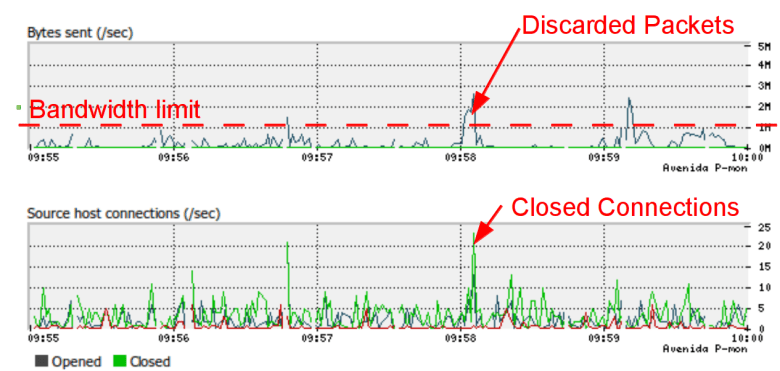
In the screen shot above (courtesy of avenida.dk), the Bandwidth limit is 10 Mbit (= 1 Mbyte/s net traffic), so everything on top of that will get discarded. The problem is not the discards, this is standard TCP behaviour, but the connections that are forcefully closed because of the discards. After the peak in closed connections, there is a “dip” in bandwidth utilization, because we cut too many connections.

2) Once you hit a congestion point, where your router is forced to drop packets, overall congestion actually gets worse before it gets better.

When applications don’t get a response due to a dropped packet, instead of backing off and waiting, they tend to start sending re-tries, and this is why you may have noticed prolonged periods (3o seconds or more) of no service on a congested network. We call this the rolling brown out. Think of this situation as sort of a doubling down on bandwidth at the moment of congestion. Instead of easing into a full network and lightly bumping your head, all the devices demanding bandwidth ramp up their requests at precisely the moment when your network is congested, resulting in an explosion of packet dropping until everybody finally gives up.

How do you remedy outages caused by Congestion?

We have written extensively about solutions to prevent bottlenecks. Here is a quick summary of possible solutions

1) The most obvious being to increase the size of your link.

2) Enforce rate limits per user. The problem with this solution is that you can waste a good bit of bandwidth if the network is lightly loaded

3) Use something more sophisticated like a Netequalizer, a device that is designed to specifically counter the effects of congestion.

From Martin Roth of Avenida.dk

“With NetEqualizer we may get the same number of discards, but we get fewer connections closed, because we “kick” the few connections with the high bandwidth, so we do not get the “dip” in bandwidth utilization.

The graphs (above) were recorded using 1 second intervals, so here you can see the bandwidth is reached. In a standard SolarWinds graph with 10 minute averages the bandwidth utilization would be under 20% and the customer would not know they are hitting the limit.”

———————————————————————-

The excerpt below was a message from a reseller who had been struggling with congestion issues at a hotel, he tried basic rate limits on his router first. Rate Limits will buy you some time , but on an oversold network you can still hit the congestion point, and for this you need a smarter device.

“…NetEq delivered a 500% gain in available bandwidth by eliminating rate caps, possible through a mix of connection limits and Equalization.  Both are necessary.  The hotel went from 750 Kbit max per accesspoint (entire hotel lobby fights over 750Kbit; divided between who knows how many users) to 7Mbit or more available bandwidth for single users with heavy needs.

The ability to fully load the pipe, then reach out and instantly take back up to a third of it for an immediate need like a speedtest was also really eye-opening.  The pipe is already maxed out, but there is always a third of it that can be immediately cleared in time to perform something new and high-priority like a speed test.”
 
Rate Caps: nobody ever gets a fast Internet connection.
Equalized: the pipe stays as full as possible, yet anybody with a business-class need gets served a major portion of the pipe on demand. “
– Ben Whitaker – jetsetnetworks.com

Are those rate limits on your router good enough?

A Packet Shaper Alternative


We generally don’t market the NetEqualizer product as an alternative to any particular competitor. NetEqualizer  stands on its own; however many of our customers are former Blue Coat, PacketShaper users. and their only complaint with our product is that they wish they could have found us sooner.

If you are looking for something simpler , lower cost , with a rock solid track record of solving congestion issues on Network Interfaces, you have come to the right place.

The basic premise of our technology is shaping by behavior based heuristics. Although that might sound a bit different from shaping by application, it is really quite effective and easy to use.  More importantly , it is becoming the best option in a world where the layer 7 techniques used by Blue Coat Packet Shaper, Allot NetEnforcer, Exinda  are unable to identify signatures due to increased content encryption.

Feel free to contact us , or any of our reference customers who have switched over to our technology to learn more.


NetEqualizer News: October 2016


We hope you enjoy this month’s NetEqualizer Newsletter. Highlights include our new NetEqualizer Online Demo plus Demo Guide complete with the 8.4 Release, tips on when to use QuickEdits and Bulk Edits in the new GUI, and advice on how to speed up Windows and Apple updates on your network.


 October 2016


New NetEqualizer Demo, and more!
Greetings! Enjoy another issue of NetEqualizer News.

art photo for NL

Fall in Colorado always seems so short compared to the other seasons. While still technically autumn, the more consistent colder temperatures make it feel like winter. By Halloween, we’ve usually had our first snow.

Just like the sun is setting on that fall feeling, we are finishing up everything that goes along with a major NetEqualizer software release. One of those last steps was updating our Online Demo with the latest code. We are excited to announce that it is now live! If you are curious about the 8.4 Release, check it out! We’ve enhanced our Online Demo to even more accurately reflect the value NetEqualizer provides and how the GUI supports your bandwidth shaping mission.

If you have any questions or want to update to the 8.4 release, feel free to contact us anytime!

We continue to work with you to solve some of your most pressing network problems – so if you have one that you would like to discuss with us, please call or email me anytime at 303.997.1300 x103 or art@apconnections.net.

And remember we are now on Twitter. You can follow us @NetEqualizer.

– Art Reisman (CTO)

In this Issue:

:: New Demo NetEqualizer

:: Product Demo Guide for 8.4

:: 8.4 GUI: QuickEdits vs. Bulk Edits

:: Best of Blog: How to Speed Up Windows/Apple Updates

New Demo NetEqualizer

Announcing a brand new NetEqualizer Demo – Updated with our latest (8.4) code!

One of the final steps in solidifying the 8.4 Release was updating our online Demo machine with the latest code, as well as meaningful data that can be used to see examples of the NetEqualizer in action.

key

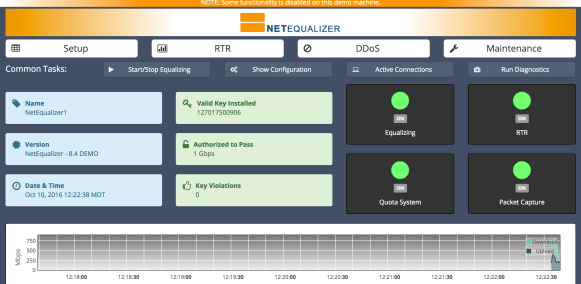
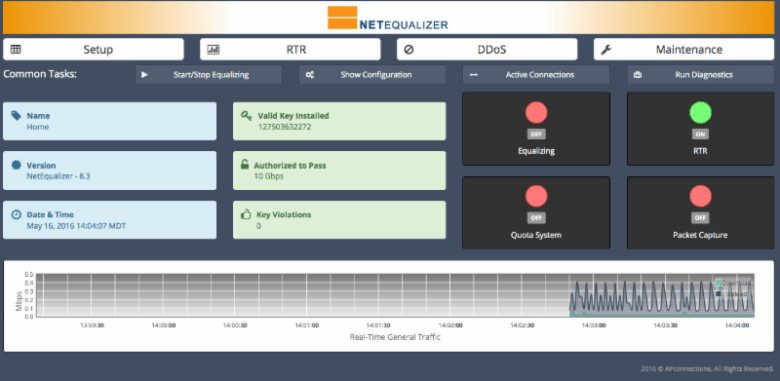
Above is the new 8.4 Dashboard for the Online Demo. You can see from the green information buttons that our demo is set up with for a 1Gbps license. The blue buttons show that this is NetEqualizer1, loaded with the 8.4 DEMO version.

graph

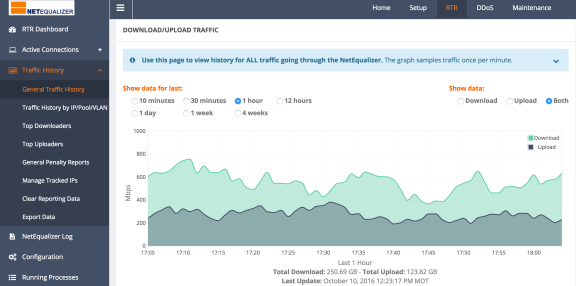
This screen shows the General Traffic Graph for the Online Demo. As you can see, the traffic load is consistent with the 1Gbps license.

With the new Demo machine, we’ve enhanced our sample data to be more accurate so that clicking through the interfaces realistically shows you what it’s like to run the NetEqualizer on your network. You can run reports, see active connections, analyze graphs, run commands, and make edits to the configuration, all while you explore the features of the NetEqualizer.

Check out the new interface here – and let us know what you think!

7cfb789e-ff7b-4b14-90b5-4efac931b576

Product Demo Guide for 8.4

 The Product Demo Guide for 8.4 is here!

Our Product Demo Guide has also been updated along with our new NetEqualizer Demo machine. The Demo Guide helps walk you through key concepts and interfaces within the NetEqualizer.demoguide

The Demo Guide is not just for potential NetEqualizer customers! If you want to see a preview of the 8.4 Release prior to upgrading, or just re-familiarize yourself with the NetEqualizer’s primary value-adds, this quick walk through is a great resource.

To view the updated guide, click here or click on the image to the right.

If you are interested in a more technical walk through with our engineering staff, contact us today!

8.4 GUI: QuickEdits vs. Bulk Edits

When to use each and why!

One of the most useful and interesting new features of the 8.4 Release is the ability to edit all of your NetEqualizer rules at once – something we call “Bulk Edits”. With Bulk Edits, you can perform several edits together, such as adding a rule, updating another rule, and deleting a third rule. You only have to save your new configuration one time, when you have finished all of your edits.

bulkedits

mpxGG3D

It is important to note that with Bulk Edits, your Equalizing process will be restarted when you save your new configuration. It only takes 10-20 seconds for the restart to complete, but during that time your network will not be shaped. For congested networks, it’s best to make bulk edit changes during a maintenance window or when the network is quieter.

The reason that we restart the equalizing process is that certain changes require the NetEqualizer to re-read in the new rules, and because Bulk Edits involve making arbitrary changes, we restart the Equalizing process to ensure all the adjustments are properly accounted for. Bulk Edits are great for large-scale changes and initial setup of the NetEqualizer!

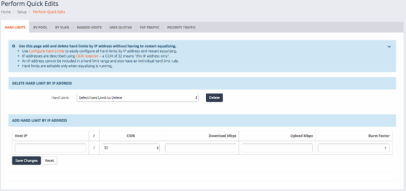
For those looking to make singular adds or deletes to their rules, we also have a Quick Edits interface available. The advantage of Quick Edits is that you can add or delete a rule without having to restart the Equalizing process. Quick Edits are great when you just need to add or remove a rule!

quickedits

8.4 perform_quick_edits

If you have any questions on Bulk Edits vs. Quick Edits, and are current on your NSS (NetEqualizer Software and Support), please contact us any time!

contact_us_box

Best Of Blog

How to Speed Up Windows/Apple Updates

By Art Reisman
 
I discovered a problem with my download speed while trying to recover my un-responsive iPad. Apple’s solution required me attach my iPad to my Mac, and then to download a new iOS image from the Internet, through the Mac and onto the iPad.
Speed should have been no problem with my business class, 20 megabit Internet connection from a well-known provider, right?…

Photo of the Month
devilscauseway
The Devil’s Causeway
This land bridge in the Flat Tops Wilderness area near Steamboat Springs, CO is one of Colorado’s most unique natural wonders. Reaching the Causeway is a popular day hike for locals, but actually crossing it is not for the faint of heart. At it’s narrowest the bridge is 3 feet wide with 800 foot drops on each side. A nice cross breeze and rocky terrain makes your knees a little wobbly. If you are ever in the area, visit this park and make the trek, as this is one of the most beautiful remote parks in the state.
APconnections, home of the NetEqualizer | (303) 997-1300 | Email | Website 

Together We Can Put an End to Pop Up Advertisements


Normally I would not advocate something like I am about to propose, but those pop up video advertisements are just killing me. Especially when I am using my wireless device as a hot spot,  these unwanted annoyances add insult to injury by draining my precious data usage. Yes, I have ad blockers on my browsers, but it is only a matter of time before they are subverted with some new technology. There is a better way to put an end to Pop up Advertisements but it will take a village to make a difference.

Believe it or not, the best way to put an end to unwanted advertisements is to click on them and then quickly abandon the resulting web page. Abandonments are the bane of the Marketing world. Here is why…

In traditional media a marketing team plays an advertisement/commercial for a known demographic at a fixed price, whether it be Television, Newspaper, Magazine, etc. They then measure the effectiveness of the advertisement by the increase in leads or sales over the period of time that the advertisement runs.

Digital pop advertisements are a bit different. It is a pay-for-click scheme where the advertiser gets charged by the click.  They blast these annoying advertisements to perhaps a million people with no real cost consequences, (other than fraud, but that is another story) because they do not pay unless people click on their ad.  As the people who click on the advertisements are very likely their target audience, this model is very efficient.  Advertisers love this model, as it allows them to essentially only pay advertising dollars to a self-qualified audience. After all, who clicks on an advertisement unless they have some level of interest in the product to start with?

However, if we consumers and web users rise up and just simply click on one or two web pop up ads a day that we have no interest in, the practice of bombarding us will come to end.

Why?  Because the cost of these extra clicks will make their advertising campaign much less efficient. The advertiser is looking for a return on investment, and the more clicks with no follow through sale that happen, the more unpalatable pop up ads will become.

If you too are annoyed by pop up ads, please share this article. Let us see if we can drive these advertisers back into the margins of our web pages, and get them out of our faces. I cannot do this alone.

How to Speed Up Windows/Apple Updates


I discovered a problem with my download speed while trying to recover my un-responsive iPad.  Apple’s solution required me attach my iPad to my Mac, and then to download a new iOS image from the Internet, through the Mac and onto the IPad.

Speed should have been no problem with my business class, 20 megabit Internet connection from a well-known provider, right?

So I thought.

When I started the iOS download, the little progress timer immediately registered 23 hours to go. Wow, that is long time to wait, and I needed my iPad for a trip the next morning.  I tried a couple of speed tests in parallel, and everything looked normal.  The question remained – where was the bottleneck on this iOS download?  Was it on Apple’s end or a problem with my provider?

Over the years I have learned that iOS  and Windows updates are the bane of many Internet Providers. They are constantly looking at ways to prevent them from gumming up their exchange points.  They will try to identify update traffic, either by using the source IP, or if that does not work, they can actually examine the download data to make a determination. In either case, once they have tagged it as an update, they will choose to slow it down to keep their exchange points clear during peak traffic hours.

To thwart their shaping and get my speed back up near 20 megabits as promised, I simply had to hide my intentions. This can be accomplished using any number of consumer grade VPN applications.

I turned on my  IPvanish, which automatically encrypts the data and original source of my iOS update. Once up and running with my VPN, my IOS update loaded in 23 minutes. A 60 fold speed increase from my previous attempt.

If you would like to read more, here are a couple of other posts about ISP’s throttling data:

There is something rotten in the state of online streaming.

How to get access to blocked Internet Sites.

Good luck!

NetEqualizer News: August 2016


We hope you enjoy this month’s NetEqualizer Newsletter. Highlights include Release 8.4 feedback, a preview of our new Quick Start Guide, an update on our 20 Gbps unit, and DDoS news.


August 2016


Release 8.4 feedback, and more!
Greetings! Enjoy another issue of NetEqualizer News.

art photo for NL

As the end of summer nears, here at APconnections we are basking in the glow of our latest 8.4 software release. Since our last newsletter, which announced that our 8.4 Release was generally available, we have been fully focused on deploying it. Our updated 8.4 GUI has been well-received, as you can read about in this month’s newsletter.

Also this month, we officially release our latest Quick Start Guide, updated for 8.4. Stay tuned for more to come on 8.4 documentation in next month’s newsletter.

Never one to rest on our laurels, we are now focused on the future – and this month you can read about our push for 20Gbps shapers. We also are enhancing our DDoS Firewall offering, to continue to bring you state-of-the-art protection.

We continue to work with you to solve some of your most pressing network problems – so if you have one that you would like to discuss with us, please call or email me anytime at 303.997.1300 x103 or art@apconnections.net.

And remember we are now on Twitter. You can follow us @NetEqualizer.

– Art Reisman (CTO)

In this Issue:

:: Release 8.4 Feedback

:: Release 8.4 Quick Start Guide

:: Is a 20Gbps NetEqualizer in Your Future?

:: More DDoS News

:: Best of Blog: Bandwidth Shaping Shake Up

Release 8.4 Feedback

Release 8.4 has been a hit!

Release 8.4 has been well received! We have had a good number of compliments so far on the new interface. Here is a sampling…


Thanks for chiming in early on holiday Sunday. We do know we can count on you guys! The new interface looks fantastic. Easy access to often used information. It’s clean, neat and modern. Well done!

Your instructions were great! The upgrade is complete… very smooth!

Still haven’t taken the time to thank you for the wonderful GUI upgrade – BIG IMPROVEMENT, THANK YOU!

The new release offers a complete overhaul of the previous user interface and enhances all of our setup and reporting screens. Here are just a few of the improvements we’ve made:

1) Bulk editing of your configuration. You can now make any number of changes to the configuration with one save!

mpxGG3D

2) New dashboard interface. The Release 8.4 dashboard offers a new real-time report, information about your NetEqualizer and running processes, as well as quick links to setup, reporting, and maintenance screens. 

78942211-3c78-4d37-9836-05ecb982e1f7

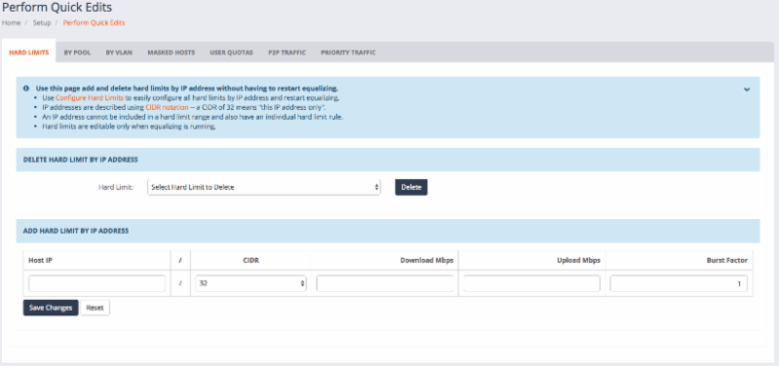
3) Perform quick edits without restarting Equalizing. If you just need to make a minor change, you can do so without impacting your busy network!

8.4 perform_quick_edits

Contact us today to update your NetEqualizer to Release 8.4! We also love hearing feedback from those of you who have been using Release 8.4!

As with all software releases, the 8.4 Release will be free to all customers with valid NetEqualizer Software and Support (NSS).

Release 8.4 Quick Start Guide

 Our new Quick Start Guide is here!

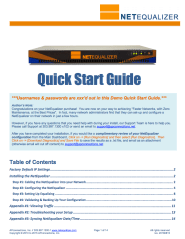
We are excited to announce that our Quick Start Guide has been updated to incorporate our recent 8.4 Release! Screenshot at Aug 22 14-27-51

This short guide contains 4 key sections to help you to set up & configure your NetEqualizer:

Step #1) Cabling the NetEqualizer into your Network
Step #2) Configuring the NetEqualizer
Step #3) Setting up Equalizing
Step #4) Validating & Backing up your Configuration

We also include three appendices, to further help with your setup:

Appendix #1) Viewing your Traffic
Appendix #2) Troubleshooting your Setup
Appendix #3) Syncing NetEqualizer to a Time Server

While used mainly to set up new equipment, this is a good reference if you want to revisit your settings. In addition, if you have not started using Real-Time Reporting (RTR), use Appendix #1 to get started.

We also recommend that you take a look at this to set your date/time and time zone (see Step #2), as well as to sync your NetEqualizer to a Time Server (see Appendix #3).

Stay tuned to our newsletter for updates on all of our 8.4 documentation releases!

Is a 20Gbps NetEqualizer in Your Future?

More Breaking News!

One of the advantages of the NetEqualizer and our underlying technology is that we do our shaping based on heuristics that can be collected quickly without requiring massive amounts of CPU resources. Traditional packet shaping technology that relies on heavy packet inspection cannot keep up with speeds over 5 Gbps without a complex set of parallel processors, which tend to drive product costs out of practical reach.

Hot on the heals of our Release 8.4, we are turning our attention toward a new class of bandwidth shaping solutions capable of handling 20 Gbps of throughput – while keeping the price tag well below anything else on the market. We will have more details in the coming months as we continue our in-house testing. Look for a formal announcement this fall, and feel free to contact us for more details before then!

airportMore DDoS News

Exciting enhancements to our DDoS Product!

More news on the DDOS front. We will be making some enhancements to our DDOS firewall this fall! Specifically, we will be adding a new feature to block/warn on external IP’s based on their total number of incoming connections. Currently our DDOS warning system triggers on the rate of data coming in from unknown external entities, however we do not have a total concurrent connection count alert specific to outside IP addresses. Stay tuned for more details in the coming weeks, and please email us your ideas for additional DDoS protection as you encounter any suspected issues on your network.
Best Of Blog

Bandwidth Shaping Shake Up

By Art Reisman
 
If you went to sleep in 2005 and woke up 10 years later you would likely be surprised by some dramatic changes in technology.
Smart cars that drive themselves are almost a reality
The desktop PC is no longer a consumer product
Wind farms now line the highways of rural America
Layer 7 shaping technology is now clinging to life, crashing the financials of several companies that bet the house on it
What happened to layer 7?

Photo of the Month
 

SANYO DIGITAL CAMERA

Remember those great roadside attractions?
This cheesy roadside attraction near Oakley Kansas off I-70 has come to end. I drove by it this summer and noticed the signage was down. The elderly operator had mentioned a few years ago that “times were not what they used to be” in the heyday of the 70’s. People were just not stopping anymore. Not only did it feature the world’s largest prairie dog as depicted in the photo, they also had a five-legged cow, a rattle snake pit, and a variety of North American animals in small cages. Although I felt bad for the animals and did not like to see them cooped up like that, I’ll miss the nostalgic charm of an era gone by.
APconnections, home of the NetEqualizer | (303) 997-1300 | Email | Website 

China Where Citizens Get around Internet Censorship


Screen Shot 2016-04-05 at 10.07.59 AM

By Art Reisman
CTO http://www.netequalizer.com

Over the years I have written a few articles on the perils of investing in deep packet inspection, and its coming obsolescence . One of my main points has been that tech savvy users in the US can bypass attempts to identify their traffic using encryption, thus reducing deep packet inspection firewalls into semi-comatose paper weights.

Sources for my blog articles came mostly from talking to hundreds of customers based in the US.  I have had scant information on China. My understanding of Chinese bandwidth shaping comes mostly from what I read in the papers. I have read about government sponsored censorship, plus a few of my US ex-pat customers in China have told me that there are many websites where they have been blocked.  They also have to be careful about what they say online.  I really had no idea if the average Chinese citizen resisted Internet censorship or not.

That was until a chance meeting last week.

On a plane flight from Denver to Charlotte,  I had the privilege to sit next to a recent Chinese college graduate who is currently teaching Chinese at a school here in the US. She was not a techie by any means, but obviously familiar with all the electronic social media tools that we use in the US.  I asked her if there was any problem with Internet censorship when she was in china, and before I could finish my sentence, she shrugged and half scolded me for being so “western stupid”.

We have very easy way to bypass the censorship, we use the” …. she stammered trying to come up with the English word… and then I finished her sentence . “You mean the VPN”, and then I showed her the VPN icon on my computer and she said “yes, yes, everybody does this.

Wow, what a windfall of a data point!  She obviously had no idea I had been preaching that Layer 7 was dead because VPNs cannot be easily cracked.

Even though this was just one data point and one person, I think I can infer that the use of VPN tunneling is probably widespread in China to avert China’s censorship. Another nail in the coffin of Deep Packet Inspection technology.

Bandwidth Shaping Shake Up, Your Packet Shaper May be Obsolete?


If you went to sleep in 2005 and woke up 10 years later you would likely be surprised by some dramatic changes in technology.

  • Smart cars that drive themselves are almost a reality
  • The desktop PC is no longer a consumer product
  • Wind farms  now line the highways of rural America
  • Layer 7 shaping technology is now clinging to life, crashing the financials of a several  companies that bet the house on it.

What happened to layer 7 and Packet Shaping?

In the early 2000’s all the rave in traffic classification was the ability to put different types of bandwidth traffic into labeled buckets and assign a priority to them. Akin to rating your food choices  on a tapas menu ,network administrators  enjoyed an extensive  list of various traffic. Youtube, Citrix,  news feeds, the list was only limited by the price and quality of the bandwidth shaper. The more expensive the traffic shaper , the more choices you had.

Starting in 2005 and continuing to this day,  several forces started to work against the layer 7 paradigm.

  • The price of bulk bandwidth went into a free fall, much faster than the relatively fixed cost of a bandwidth shaper.  The business proposition of buying a bandwidth shaper to conserve bandwidth utilization became much tighter. Some companies that were riding high saw their stock prices collapse.
  • Internet traffic became invisible and impossible to identify with the advent of encryption techniques. A traffic classifier using Layer 7,  cannot see inside HTTPS or a VPN tunnel, and thus it is essentially becomes a big expensive albatross with little value as the rate of encrypted traffic increases.
  • The FCC ruling toward Net Neutrality further put a damper on a portion of the Layer 7 market. For years ISPs had been using Layer 7 technology to give preferential treatment to different types of traffic.
  • Cloud based services are using less complex  architectures. Companies  can consolidate on one simplified central bandwidth shaper, where as before they might have had several on all their various WAN links and Network segments

So where does this leave the bandwidth shaping market?

There is still some demand for layer 7 type shapers, particular in countries like China, where they attempt to control   everything.  However in Europe and in the US , the trend is to more basic controls that do not violate the FCC rule, cost less, and use some form intelligent based fairness rules such as:

  • Quota’s ,  your cell phone data plan.
  • Fairness based heuristics is gaining momentum, lower price point, prevents congestion without violating FCC ruling  (  Equalizing).
  • Basic Rate limits,  your wired ISP 20 megabit plan, often implemented on a basic router and not a specialized shaping device.
  • No Shaping at all,  pipes are so large there is no need to ration bandwidth.

Will Shaping be around in 10 years?

Yes, consumers and businesses will always find ways to use all their bandwidth and more.

Will price points for bandwidth continue to drop ?

I am going to go against the grain here, and say bandwidth prices will flatten out in the near future.  Prices  over the last decade slid for several reasons which are no longer in play.

The biggest driver in price drops was the wide acceptance of wave division muliplexing on carrier lines in the 2005- present time frame. There was already a good bit of fiber in the ground but the WDM innovation caused a huge jump in capacity, with very little additional cost to providers.

The other factor was a major world-wide recession, where businesses where demand was slack.

Lastly there are no new large carriers coming on line. Competition and price wars will ease up as suppliers try to increase profits.


NetEqualizer News: June 2016


We hope you enjoy this month’s NetEqualizer Newsletter.  Highlights include our Release 8.4, an update on the ASCUE conference, a note about a possible 20Gbps NetEqualizer, and also a testimonial from one of our airport customers.

June 2016

Release 8.4 is here!
Greetings! Enjoy another issue of NetEqualizer News.

art photo for NL

Wow! It has been hot here in Denver the past few weeks. We went from May snow, to temperatures over 100 in just over 30 days. I prefer the snow, as I am not much of a hot weather person.

Speaking of heat, the pressure has been on us to get our 8.4 Release out this month. Breaking news – just in, the test team has just sent me a note that we are are ready for delivery on 8.4!

If you have feedback, ideas, or questions for me, please email me anytime at art@apconnections.net.

And remember we are now on Twitter. You can follow us @NetEqualizer.

– Art Reisman (CTO)

In this Issue:

:: NetEqualizer Release 8.4 Is Here!

:: ASCUE Update

:: Is a 20Gbps NetEqualizer in Our Future?

:: NetEqualizer at the Airport

:: Best of Blog: Virtual Internet Presence in the Netherlands Thwarts TV Blackout

NetEqualizer Release 8.4 Is Here!

8.4 is now Generally Available

We are excited to announce that Release 8.4 is now Generally Available! You can read all the details on Software Update 8.4 in our 8.4 Release Notes. And for those of you that have not heard already, here are the key updates to look forward to in 8.4:

#1) Graphical User Interface (GUI) Redesign

8.4 introduces a complete GUI redesign, finishing the GUI transition that we started with our 7.1 Real-Time Reporting (RTR) offering. Our new GUI is easier to navigate and more intuitive. Our logical groupings, such as Setup and RTR, make it easier than ever to find what you need. We now also enable you to select the units that you want to see for your entire GUI via Preferences. And now the GUI includes error checking to look for common data validation errors such as properly formed IP addresses and valid positive integers where required.  Additionally, we have expanded our warning and error messaging, to help ensure that your configuration is valid.

#2) The Updated NetEqualizer Dashboard 

The new NetEqualizer Dashboard gives you a quick view into the state of your NetEqualizer and your network, while providing access to all the key features of your NetEqualizer. From here you access our four core areas:
  • Setup – Use this to configure your NetEqualizer
  • RTR – Use this to monitor network connections and report traffic history
  • DDoS – Use this to view possible DDoS attacks
  • Maintenance – Use to view documentation and troubleshoot your NetEqualizer.

You can also utilize shortcuts to four Common Tasks (Start/Stop Equalizing, Show Configuration, View Active Connections, and Run Diagnostics). On our new Dashboard, all icons are clickable, so that you can drill into each area to view more details and edit as needed. We also think that you will enjoy seeing your current network traffic right on the dashboard via our new ticker tape type live monitor.

#3) Batch Configuration!

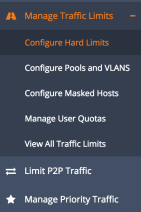
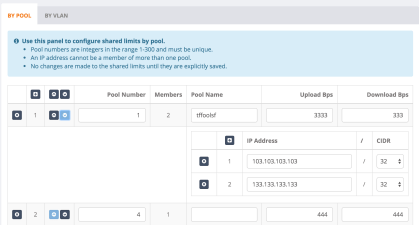
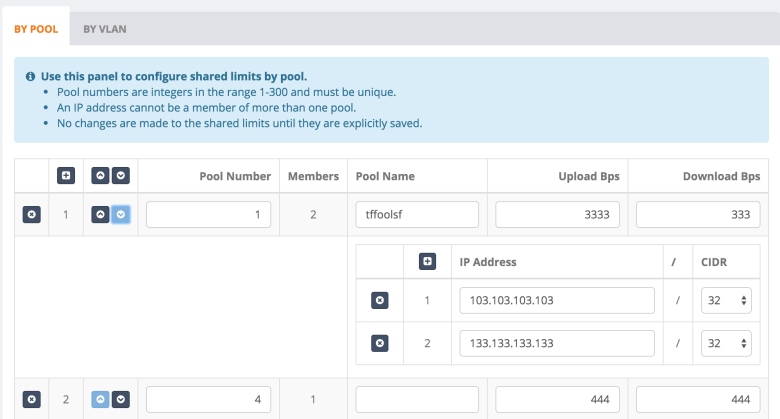
You now will have the ability to add, delete, and most importantly, modify, all of your Traffic Limits in a spreadsheet-type format from the GUI using Manage Traffic Limits.  This capability is a great feature to have in place when you are initially setting up your NetEqualizer, and also allows you to modify rules as your network changes. Manage Traffic Limits includes defining Hard Limits, Pools and VLAN Limits (Shared Limits), Masked Hosts, and User Quotas.

We also offer batch configuration for your P2P Limits (via Connection Limits) and Priority Traffic.
During batch configuration, we highlight all field changes to help you identify unsaved changes, and also include data validation error checking against your fields.
Please note: Batch Configuration changes require a full Equalizing Restart in order for your changes to take effect.  

#4) Perform Quick Edits

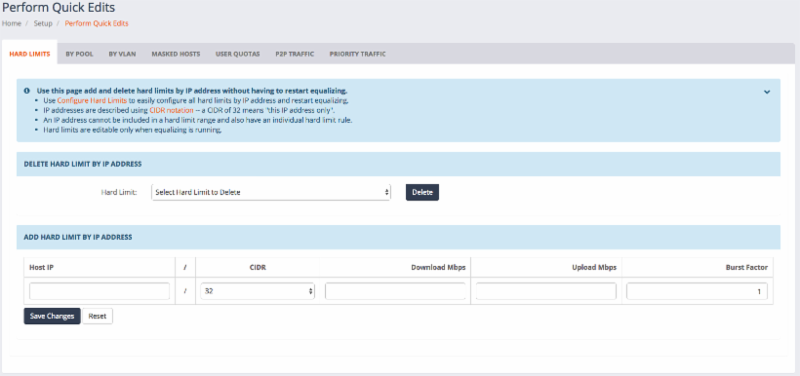
While batch mode can help you to initially configure your NetEqualizer and also support network changes, we also wanted to maintain your ability to make quick changes on the fly without bringing down your NetEqualizer process. Perform Quick Edits enables you to do just that. We have kept the ability for you to delete and add Individual Rules across all areas (Hard Limits, By Pool, By VLAN, Masked Hosts, User Quotas, P2P Traffic, and Priority Traffic), without needing to stop and restart Equalizing.

Please note: Perform Quick Edits do NOT require a full Equalizing Restart, as changes take effect upon saving.  For this reason, Perform Quick Edits does not include rule modifications – for that you use Manage Traffic Limits, Limit P2P Traffic, and Manage Priority Traffic.

8.4 perform_quick_edits

#5) Usability Enhancements

In addition to all the other great features in 8.4, we have added or enhanced the following:

  • You can now set the Date and Time, as well as the Time Zone, via the NetEqualizer GUI.
  • Run Diagnostics now offers the ability to save the generated data as a .txt file, that you can download and email to Support.
  • We have removed the information-only penalty threshold from the NetEqualizer Log, as it was confusing.
  • We have changed the Default Penalty Unit to 1, which works better with video traffic.
  • We have added DNS name resolution to all tabular reports in RTR via DHCP.
  • We have added Password Verification to the GUI.

Contact us today to update your NetEqualizer to Release 8.4!
As with all software releases, the 8.4 Release will be free to all customers with valid NetEqualizer Software and Support (NSS).

ASCUE Update

 Shaping Bandwidth – Learning to Love Netflix on Campus

As we mentioned in last month’s newsletter, one of our long-time customers, Hollis Townsend, Director of Technology Support and Operations at Young Harris College, spoke about his experience with the NetEqualizer in his talk at ASCUE.  Hollis’ presentation was titled “Shaping Bandwidth – Learning to Love Netflix on Campus”.

In case you missed Hollis’ presentation at the ASCUE Conference (June 12th-16th, 2016), I have enclosed some of the best excerpts here. Hollis presentation is a great case study into how the NetEqualizer can be used to affordably solve network congestion issues in campus environments. 

When Young Harris was looking to replace their Packeteer in 2007,
their wish list for their new solution was the following:

  •  Needed to be inexpensive to buy
  •  Inexpensive to maintain
  •  Web interface
  •  Easy to Maintain or Self Maintaining
  •  Expandable

After reviewing the market, in July 2007, Young Harris purchased a NetEqualizer to solve their network congestion issues and to replace their Packeteer. They have since upgraded their NetEQ as their network has grown over the years, and currently run an NE3000 with a 1Gbps license.  Here are their results:

They have significantly reduced costs.
  • They have spent significantly less than what they did on Packeteer.
  • They took advantage of our Lifetime Buyer Protection Policy of 50% trade-in credit towards new hardware, when they upgraded.
They find the NetEqualizer self-maintaining.
  • Virtually no time spent running the machine
  • About a 1 hour set up from the box to the rack and fully operational
  • Can view reports when desired
  • Literally months will go by with out anyone checking on it  
Students don’t complain and video can run. They had zero File Sharing notices in 2015 & 2016.
  • Students do not complain about bandwidth, just wireless coverage
  • System looks at flows, when bandwidth is over 80 percent, it starts shaping only the heavy users
  • Email, web surfing, gaming never gets shaped at all
  • Netflix, and most streaming services will adapt to low bandwidth on the fly
  • Most never see that they have been shaped, as once the peak is past bandwidth is returned to normal
  • Encrypted payloads don’t matter as it looks at the stream, not the content
  • File sharing is eliminated / reduced as it also is set to not allow a user to exceed multiple streams (over 45) from any single source.

Thank you Hollis for sharing your experiences with the NetEqualizer! 

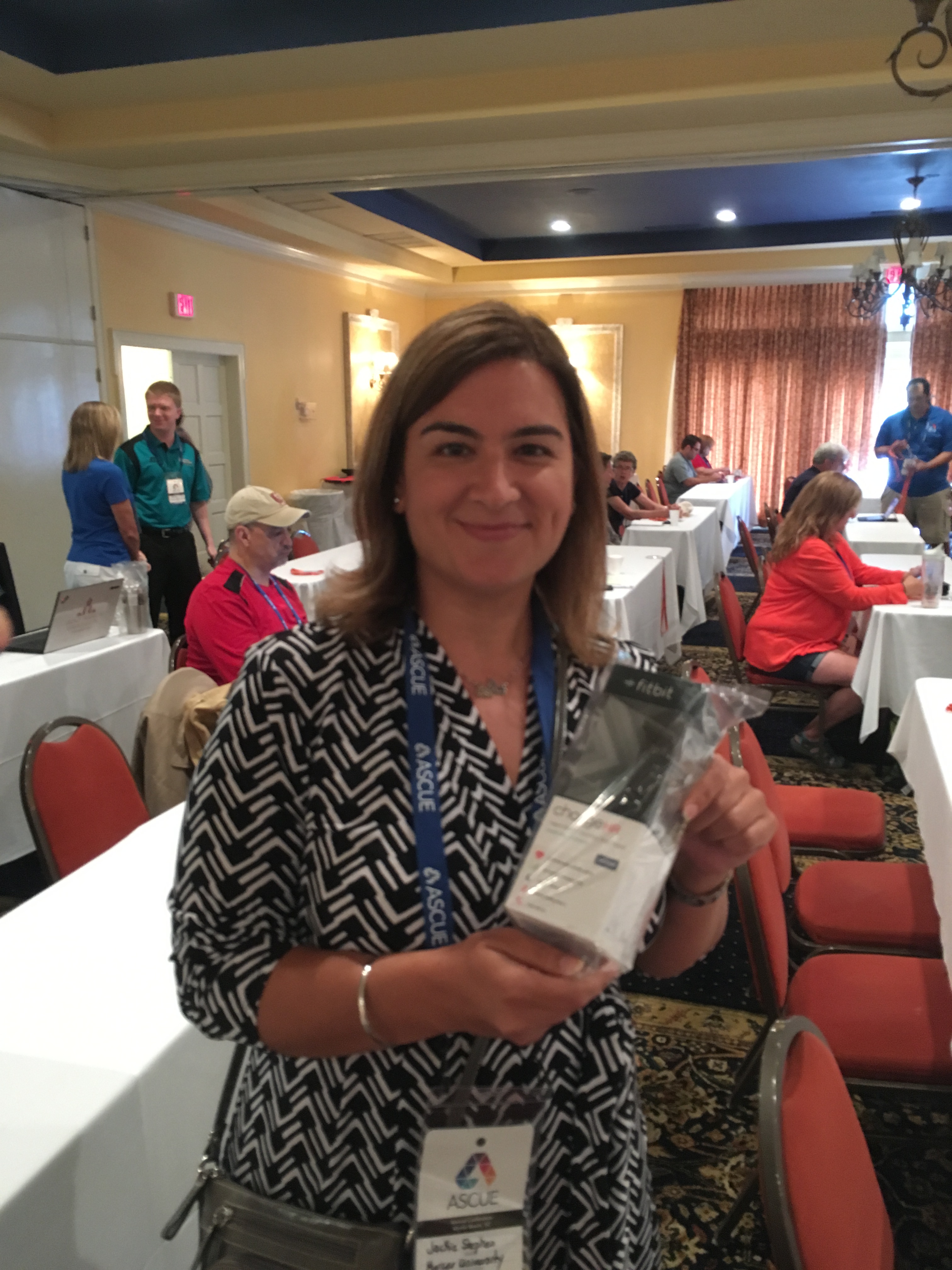
ASCUE fitbit_winnerWe are also happy to announce that the door prize winner of the Fitbit fitness watch was Jacqueline Stephen of Mercer University in Georgia. You can see a picture of our happy winner here.

ASCUE is the Association Supporting Computer Users in Education and they have been around since 1968. Members hail from all over North America. ASCUE’s mission is to provide opportunities for resource-sharing, networking, and collaboration within an environment that fosters creativity and innovation in the use of technology within higher education.

Is a 20Gbps NetEqualizer in Our Future?

More Breaking News!

Hot on the heels of our newly-released 8.4 Software Update, we have begun testing a couple of new hardware configurations for our NetEqualizer systems. In our next generation systems, we hope to achieve a commercial version capable of shaping 50,000 subscribers at speeds at or above 20 gigabits.

Look for an update in next month’s NetEqualizer News!

airportNetEqualizer at the Airport

Airport Congestion – No Problem for the NetEqualizer!

eiaThe next time you are waiting in the terminal trying to send a few last minute e-mails over the public WiFi, please don’t blame us.
If your connection is dragging, you are probably dealing with an installation where congestion control was an afterthought.

Airports with NetEqualizers at their head tend to be very responsive. Here is what Edmonton Regional Airport Authority, one of our customers, had to say…

Their NetEqualizer Configuration

“We presently use two NE3000 units for internet traffic control and monitoring in a redundant setup. At present we have a maximum of 600Mbps internet throughput with over 300 IP addresses in use in some 120+ address Pools.

(NetEqualizer is)… A very useful tool for us for monitoring and setting speeds for the many users. Most of the feeds come straight off our Campus network, which is spread over a seven kilometer distance from one end of the airdrome to the other. We also feed a number of circuits to customers using ADSL equipment in the older areas were fiber is not yet available.

Everything runs though the “live” NE3000!”

How the NetEqualizer has helped EIA 

Controllability and monitoring is key for our customers as they pay for the speed they are asking for. With the RTR Dashboard we continually monitor overall usage peeks to make sure we provide enough bandwidth but more importantly with individual customers. Many customers are not sure of how much bandwidth they need so using the Neteq we can simply change their speed and watch the individual IP and/or Pool usage to monitor.

This becomes especially useful now as many customer including ourselves use IP telephony to remote sites, so we need to maintain critical bandwidth availability for this purpose. That way when they or we have conference calls for example, no one is getting choppy conversations. All easily monitored and adjusted with the Dashboard and Traffic Management features.

We also have used the Neteq firewall feature to stop certain attack threats and customer infected PCs or servers from spewing email or other reported outbound attacks, not a fun thing but it happens.”

“Overall a very critical tool for our success in providing internet to users and it has worked very well for the past 8 or more years!”

Willy Damgaard 
Network and Telecom Analyst 
Edmonton Regional Airport Authority, IT Department
 
Thanks for the kind review, Willy!  
Best Of Blog

Virtual Internet Presence in The Netherlands, Thwarts TV Blackout

By Anonymous Guest
 
A few months ago I got rid of my Cable TV.  Other than a few sports networks, I never watched the other 507 channels.  Once free from that expensive local bundle, I  subscribed directly to MLB.tv for 1 year for about $100 a year, less than one months cable bill. It turned out there was one small hitch in my plan. Whenever I tried to watch my local Rockies , it is blacked out on the MLB.tv service in deference to their contractual obligations with their other distributor. ( my old cable company).  It seems the MLB.tv is smart enough to know where you are watching from based on your IP address…

Photo of the Month
 
lebronLeBron James
This photo is a copy of an acrylic painted by one of our staff members, and hangs in the office here in Colorado. Although it is LeBron James with his Miami Heat colors and number, it is a nice reminder of what hard work and perseverance can accomplish.
APconnections, home of the NetEqualizer | (303) 997-1300 | Email | Website 

The DDoS industrial Complex Just Keeps on Growing


DARPA (Defense Advanced Research Projects Agency) is now awarding projects to vendors so they can proliferate the security industry with next-generation tools to mitigate DDoS attacks.

In the article main points are:

DARPA says the XD3 program looks to develop technologies that:

  • Thwart DDoS attacks by dispersing cyber assets (physically and/or logically) to complicate adversarial targeting
  • Disguise the characteristics and behaviors of those assets to confuse or deceive the adversary
  • Blunt the effects of attacks that succeed in penetrating other defensive measures by using adaptive mitigation techniques on endpoints such as mission‐critical servers.

How about instead of creating infinite complexity, just stopping them.  I wrote how this could be done back in December in 2015.

Or better yet, how about stinging and arresting people who initiate them? Perhaps we don’t have the police powers to do so.  Maybe the FBI has the manpower to do this. Hopefully it will not get to the point where we need to just cut off those countries from the Internet.

Am I just stupid? Or am I missing something?  What would be the cost to the security industry if we actually found a non labor-intensive way to put and end to this nonsense?

By  Art Reisman
CTO www.netequalizer.com


NetEqualizer is Net Neutral, Packet Shaping is Not


The NetEqualizer has long been considered a net neutral appliance. Given the new net neutrality FCC regulations, upheld yesterday, I thought it would be good time to reiterate how the NetEqualizer shaping techniques  are  compliant with the FCC ruling.

Here is the basic FCC rule that applies to bandwidth shaping and preferential treatment:

The FCC created a separate rule that prohibits broadband providers from slowing down specific applications or services, a practice known as throttling. More to the point, the FCC said providers can’t single out Internet traffic based on who sends it, where it’s going, what the content happens to be or whether that content competes with the provider’s business.

I’ll break this down as it relates to the NetEqualizer.

1. The rule “prohibits broadband providers from slowing down specific applications or services”.

The NetEqualizer makes shaping decisions solely based on instantaneous usage and only when a link is congested. It does not single out a particular application or service for throttling. The NetEqualizer does not classify traffic, instead looking at how the traffic behaves in order to make a shaping decision.  The key to remember here is that the NetEqualizer only shapes when a link is congested, and without it in place, the link would drop packets which would cause a serious outage.

2.  The FCC said “providers can’t single out Internet traffic based on who sends it, where it’s going”.

The NetEqualizer is completely agnostic as to who is sending the traffic and as to where it is going. In fact, any rate limiting that we provide is independent of the traffic on network, and is used solely to partition a shared resource amongst a set of internal users, whether they be buildings, groups, or access points.

I hope we have finally seen an end to application-based shaping (Packet Shaping) on the Internet.  I see this ruling being upheld as the dawning of a new era.