The Exploitation of the American Tech Worker


Screen Shot 2016-04-05 at 10.07.59 AM

By Art Reisman
CTO http://www.netequalizer.com
I know what you might be thinking ,”Really? High tech workers being exploited?” And my answer is yes.  I’ll concede that this exploitation is not like the indentured servitude of the rubber barons of the late 19th century.  The players are more sophisticated, but the motives are the same.  Get a bunch of naive, young, impressionable people and waive a carrot with the possibility of riches and game on. Here is how it works.

Many top tech companies of today have started as more or less small unfunded garage shops, such as Google, Facebook, etc.  Venture capitalists have taken note of this, and they have also noticed how some of these young engineers will work day and night once they get sucked into thinking that their idea is the next Facebook.

The odds of any company growing into a valuation of a billion or more is quite small. What products will take off, what idea will get picked up on social media?  You just can’t predict this, but you can improve your odds by spreading your investment across a large number of infant startups.

From the investor standpoint, the equation makes sense. If you have a million dollars, you could perhaps fund one marginal existing company and hope they blossom; or you could take 50k and waive it front of 20 early stage startups who have not accomplished anything yet and are most likely running on fumes.

I see the articles 2 or 3 times a year in the local papers.  Boston alone has 50 start up incubators.  A typical investment company trolls these incubators, often sponsoring them, looking for promising, hard-working tech people with an idea and a prototype.  They offer them a small amount of cash, perhaps a nicer work space, advice, and so forth in return for a percentage of the fledgling company. Is this evil or wrong?  No, of course not. But there is the concept of subtle but very real exploitation going on here.  I’ll get to that part shortly.

A typical deal works something like this. Come to our incubator for the summer, we will give you office space, advice, and 50k for the three month period.  You’ll also get your company featured in a few newspapers and journals.  Local newspapers love giving free publicity to these incubators, especially if some big name VC is behind them.

Most likely 18 of these startups are going to fail through no fault of their own, it’s just their idea/product will go nowhere. One out of twenty might struggle along and create a small viable company with a niche market. And perhaps, just one will return 1000 fold or more on their 50k investment. That is the game.  Even that is a long shot, and you may have to play this game for several years before you hit that jackpot.

So now let’s take the 50k investment. Divide it by 3, for 3 months of summer and divide it again by 4, assuming the start up has four employees.  That breaks down to about 4k per person for three months, and most of these blokes are working 80+ hour weeks minimum, because they are chasing a dream. That is the culture of a tech startup.  Somehow, if you beat yourself into a tired frenzy, you are more likely to succeed, right?

Not really.  There are some people who do these insane hours, but the good ones are knocking off at 40 and are much more productive. But that is another article for another time.

Conservatively,  I can assign 300 hours a month per employee. That breaks down to about $4.50 an hour. Now granted, many of these tech startup people were working for free anyway before they struck a deal. So is this exploitation?

I don’t know, but take this into account – many of these investors are worth 100’s of millions or more and have multiple houses, boats, planes, etc. Essentially, when they buy a big stake in these start-ups, the engineers working for them now become their indentured servants.  Yes, the company employees are also driven by the potential of a big payout, but the odds are stacked against them.  Most will end up with a pile of credit card debt, and an old newspaper clipping for their resume.  I would hope that if I were the investor in this scheme I would make sure the people in the trenches made a living wage, perhaps $20 per hour?


NetEqualizer News: May 2016


We hope you enjoy this month’s NetEqualizer Newsletter.  Highlights include updates on upcoming Release 8.4, Seven Network Troubleshooting Tips, a reminder about the upcoming ASCUE conference, and also our complimentary Tech Refresh offering.

May 2016
Release 8.4 will debut in June! 
Greetings! Enjoy another issue of NetEqualizer News.

art photo for NLSpring has sprung in Colorado (finally!).  We are being treated to sunny days, mixed with cool winds and rain.  On the nice days, I like to birdwatch.  If you ever want to read a great story about birders, check out “The Big Year“.  The book is great; unfortunately the movie was a box office bomb!

2016 feels like a Big Year for the NetEqualizer!  We think you will agree that our 8.4 Release is a game changer.  We have added many batch configuration screens, which streamline the whole set-up process. 8.4 is expected to be Generally Available (GA) in June. Read below to learn more.

This month our favorite blog article gives you Seven Network Troubleshooting Tips, useful to those that do not troubleshoot on a daily basis!

Don’t forget that there is still time to register for ASCUE! We will be represented at the ASCUE Conference June 12-16th. Join Young Harris College at their talk featuring the NetEqualizer.
 
And finally, if you have not already taken advantage of our FREE Tech Refresh, what are you waiting for?  Contact us today to schedule your session.

If you have feedback, ideas, or questions for me, please email me anytime at art@apconnections.net.

And remember we are now on Twitter. You can follow us @NetEqualizer.

– Art Reisman (CTO)

In this Issue:

:: NetEqualizer Release 8.4 Debuts in June!

:: Renew your NetEqualizer Knowledge with a Tech Refresh

:: Learn about the NetEqualizer at ASCUE June 12-16

:: Best of Blog: Seven Must Know Network Troubleshooting Tips

NetEqualizer Release 8.4 Debuts in June!

A Few of My Favorite Things about Release 8.4….

Comments by Art Reisman
Last month we detailed some of the new features coming out in our 8.4 Release. To be honest, at the time of the last newsletter, I had not actually kicked the tires on it. These past few weeks I have been using it extensively, and have been really quite impressed. Here are some of my notes on what I love about 8.4.

#1) The Updated NetEqualizer Dashboard 

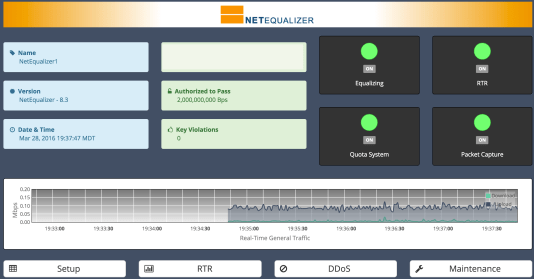
The Dashboard, with a ticker tape type live monitor, finally provides a clean professional look that the NetEqualizer deserves. From here you access four core areas: 1) Setup, 2) RTR, 3) DDoS, and 4) Maintenance. One change that you will love to see – your key is now listed in Mbps or Gbps. Below you can see under “Authorized to Pass” the key is for 10Gbps. The new curb appeal certainly has had a positive effect on recent customers that have previewed 8.4.

#2) Batch Configuration!

You now will have the ability to edit and modify all of your rules in a spreadsheet-type format from the GUI.  In my opinion, this was long overdue, so I am excited that we have finally been able to incorporate this feature into our GUI.

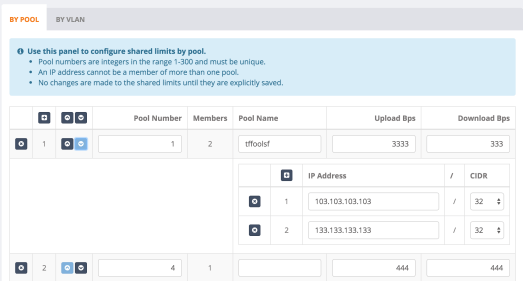
Previously, this was only possible by directly editing our configuration file.  While certainly efficient, it used to be a risky proposition, as there was no checking for malformed rules. With the GUI front end, error checking is now in place to look for common data validation errors such as properly formed IP addresses and valid positive integers where required.  There are also warning messages to help alert you as needed.  And as you can see below, you can name your Pools to something meaningful on your network (here they are called Test Pool 1, Test 2, and Test 3).


#3) Easily Set Time and Time Zone

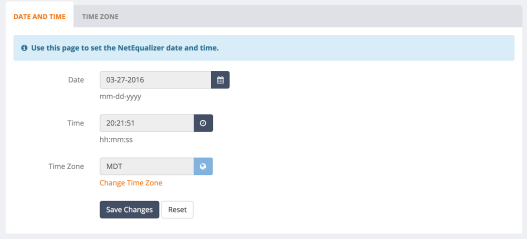
The new GUI also has an easy way to set the time and pick a timezone – no more logging in to the NetEqualizer terminal! (enough said)

#4) See Everything in the Units you Choose

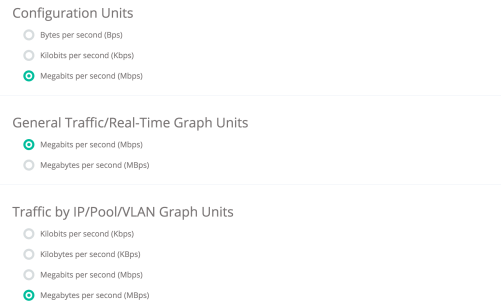
You can now choose your units for almost the entire interface!  No longer will you have to convert your trunk up and trunk down when setting those up for Equalizing.  You will now see them in the configuration units that you choose (Mbps, Kbps, Bps).  And you can select different units for graphs and configuration, if you prefer.   


Check back next month to get your copy of Release 8.4! 

As with all software releases, the 8.4 Release will be free to all customers with valid NetEqualizer Software and Support (NSS).

Renew your NetEqualizer Knowledge with a Tech Refresh

If you have not already scheduled a Tech Refresh, consider it!

Our FREE* Tech Refresh sessions (*with valid NSS) are conducted via webex, so you do not even have to leave your office to renew your NetEqualizer knowledge!Please take advantage of this offering, especially if you have new staff, are upgrading to a new release, or would like to learn more about our new features.  We receive glowing feedback on these sessions – they are only 30 minutes to one (1) hour and are worth the time!

These sessions can ensure that you and your team get the most out of your NetEqualizer!

Here are just a few of the benefits:
  • Learn about new releases – We are constantly evolving and enhancing our product. Tech Refreshes can help quickly get you up-to-speed on what is new!
  • Learn about features you are not using (yet) – Maybe you would like to use DDoS or RTR but need to better understand how they work. You can use this time to get acquainted with all the NetEqualizer has to offer.
  • Quickly educate a new employee – Our Tech Refreshes make training a new staff member on NetEqualizer a breeze!
  • Ask questions and review your configuration – Use this time to make sure that your unit is optimally configured, and ask any NetEqualizer questions that you have been curious about.
Schedule your Tech Refresh today by clicking the link below!
Tech Refreshes are free to all customers with valid NetEqualizer Software and Support (NSS).  We also offer full-day Onsite Training for you and your team, contact us for availability and pricing.
Tech Refresh button
Learn about the NetEqualizer at ASCUE  June 12-16

Join Young Harris College at ASCUE! 

Learn how they use the NetEqualizer to solve network congestion

 
It is almost here!  If you work in higher education, join your colleagues at ASCUE this spring, June 12-16th in Myrtle Beach, South Carolina.  And if you have ever wanted to learn more about how the NetEqualizer is used in higher education to resolve network congestion, you can hear all about it at ASCUE!

One of our long-time customers, Hollis Townsend, Director of Technology Support and Operations at Young Harris College, will be talking about his experience with the NetEqualizer in his talk at ASCUE.  Hollis’ presentation is titled “Shaping Bandwidth – Learning to Love Netflix on Campus“.

Young Harris has been using NetEqualizer to solve their network congestion issues since July, 2007. They have upgraded their NetEQ as their network has grown over the years, and currently run an NE3000 with a 1Gbps license.
We are also happy to announce that APconnections, home of the NetEqualizer, will be a Silver Sponsor at the ASCUE Conference. We will be giving away a great door prize – a Fitbit fitness watch!
It is not too late to register.  Visit the ASCUE website for details!
 

ASCUE is the Association Supporting Computer Users in Education and they have been around since 1968. Members hail from all over North America. ASCUE’s mission is to provide opportunities for resource-sharing, networking, and collaboration within an environment that fosters creativity and innovation in the use of technology within higher education.

Best Of Blog

Seven Must Know Network Troubleshooting Tips

By Art Reisman – CTO
 
Editor’s Note: This article contains some great tips to troubleshoot your network. While our network administrators already know this, others may not.  We hope this helps you the next time you are staring at a “loading…” message, and wondering what is going on!  
To get started you’ll need to get a hold of two key software tools: 1) Ping Tool and 2) a Network Scan Tool, both which I describe in more detail below.  And for advanced analysis (experts only), I will then show you how you can use a bandwidth shaper/sniffer if needed.

Ping Tool

Ping is a great tool to determine what your network responsiveness is (in milliseconds), identified by trying to get a response from a typical website. If you do not already know how to use Ping on your device there are hundreds of references to Ping and how to use it.  Simply google “how to use ping ” on your favorite device or computer to learn how to use it.
For example, I found these instructions for my MAC; and there are similar instructions for Windows, iPhone, Linux, Android, etc.
  1. Open Network Utility (located inside Applications > Utilities).
  2. Click Ping.
  3. Fill out the “Enter the network that you want to ping” field. You can enter the IP address or a web URL. For example, enter http://www.bbc.co.uk/iplayer to test the ping with that website.
  4. Click Ping.

Network Scan Tool

There are a variety of network SCAN tools/apps available for just about any consumer device or computer.  The decent ones will cost a few dollars, but I have never regretted purchasing one.  I use mine often for very common home and business network issues as I will detail in the tips below. Be sure and use the term “network scan tool” when searching, so you do not get confusing results about unrelated document scanning tools.
Once you get your scan tool installed, test it out by selecting Network Scan. Here is the output from my MAC scan tool.  I will be referencing this output later in the article.

Photo Of The Month

Cross That River

I had no idea that there were still Ferry Crossings along the Mississippi River. I took this photo in April, 2016 while traveling through the area.  Those trees in the background are in Kentucky, and I am standing in Missouri.

Virtual Internet Presence in The Netherlands, Thwarts TV Blackout


By Anonymous Guest

A few months ago I got rid of my Cable TV.  Other than a few sports networks, I never watched the other 507 channels.  Once free from that expensive local bundle, I  subscribed directly to MLB.tv for 1 year for about $100 a year, less than one months cable bill. It turned out there was one small hitch in my plan. Whenever I tried to watch my local Rockies , it is blacked out on the MLB.tv service in deference to their contractual obligations with their other distributor. ( my old cable company).  It seems the MLB.tv is smart enough to know where you are watching from based on your IP address.

Through the magic of the Internet , I now watch all my baseball games from the Netherlands, or Australia whatever Country sounds interesting. As I write my post, I am physically  in Colorado, but my virtual on-line presence for all purposes emanates from the Netherlands .  For example I went to check my local Colorado weather on weather Underground   just now, and these EU advertisements came up in the side bar. This one is from the UK but often they are in Dutch or German.

Screen Shot 2016-05-08 at 3.42.25 AM.png


Changing my virtual locations was easy, and it took about 5 minutes. First I signed up with the VPN application, IPvanish. When I fire up IPvanish it prompts me to pick a country. There are hundreds of options, next time I am going to Australia. It even shows me my connection speed.  Once IP vanish is up and running , I change my DNS server to a third-party, away from the Comcast Default. I use google’s 8.8.8.8 server. Otherwise MLB still thinks I am back in Colorado.  Lastly I clear my browsing history, and then I am set to go for tonight’s game without the black out restriction.

Top Ten Article Teasers for May 2016


Screen Shot 2016-04-05 at 10.07.59 AM

By Art Reisman
CTO http://www.netequalizer.com

I was wound up and ready to write an interesting blog article today.  Problem was , I had a serious issue getting started.  I spent an hour or so with so many angles and things on my mind, that I just could not narrow it down and get started.  Then I had an out of the box idea.   I decided  to use my freedom as one of the Editors of this blog to make my article the list of headlines and associated teasers of all the article ideas in my head.  Who does that ?
Sorry if any of these leave you hanging.

Why do so many companies take technology advice from Gartner ? If their information was really that good, they would not need to be selling it.

The TSA is now talking about 3 hour lines at airports this summer. My instinct tells me this organization has realized a new-found political power. They control the airports and you must pay up if you want to fly.

Deep packet inspection. Is it dead ? A simple VPN tunnel renders it useless.

A competitor of ours, ETINC, has a really great explanation on why DPI does not work when trying to eliminate P2P . The case against Deep Packet Inspection.

Umpires and IT people nobody really likes them.

Do you hire two plumbers when one is sufficient to fix your sink ? No of course not . Your employer is no different they don’t want you on their pay-roll.

Mega Mansions and Bandwidth how much do we really need? I am expecting a tiny bandwidth movement where millennials compete on how small their bandwidth foot print is.

Does anybody pay for good content anymore ? I stopped reading Back Packer Magazine when their content every month became a list of product reviews .

How many people are moving to Colorado because weed is legal ?

The Home PC will be completely dead in 10 years.  Replaced by the PC in  Virtual Cloud.


Let us know if you want any of these expanded on for next week.


Will Fixed Wireless Ever Stand up To Cable Internet?


;

Screen Shot 2016-04-05 at 10.07.59 AM

By Art Reisman
CTO http://www.netequalizer.com

Screen Shot 2016-04-21 at 1.46.41 PM

Last night I had a dream. A dream where  I was free from relying on my Cable operator for my Internet Service.  After all, the latest wireless technology can be used to beam an Internet signal into your house  at  speeds approaching 600 Megabits right?

My sources tell me some wireless operators  are planning to compete head  to head with entrenched cable operators. This new  tactic is a  bold experiment  considering  most legacy WISP operators normally offer service on the outskirts of town; areas  where traditional Cable and DSL  service is spotty or non-existent.  Going at the throat of the entrenched  cable operators in the urban corridor , beaming Internet into homes with service that compete on price and speed  is a bold undertaking.  Is it possible? Let’s look at some of the obstacles and some of the advantages.

In the wireless model, a provider lights up a fixed tower with Internet service and beams a signal from the tower into each home it services.

  • Unlike cable where there is a fixed  physical wire to each home , the wireless operator relies on a line of sight signal from tower to home. The tower can have as many as four transmitters each capable of 600 megabits The kicker is, to turn a profit,  you have to share the  600 megabits  from each transmitter among as many users as possible.  Each user only gets a fraction of the bandwidth.  For example,       to make the business case work you will need perhaps  100 users (homes ) on one transmitter, that breaks down to 6  megabits per customer.
  • Each tower will need a physical connection back to a tier one provider such as Level 3. This will be a cost duplicated at each tower. A cable operator has a more concentrated NOC and requires far fewer links connections to their Tier one connection.
  • Radio Interference is a problem so the tower may not be able to perform consistently at 600 megabits, when there is interference speeds are backed down
  • Cable operators can put 100 megabits or more down each wire direct to the customer home so if you get into a bandwidth speed war on the last mile connection, the wireless is still not competitive.
  • Towers in this speed range must be line of sight to the home, so the towers must be high enough to clear all trees and buildings , this creates logistical problems on putting in one tower for every 200 homes.

On the flip side I  would gladly welcome a solid 6 megabit feed from a local  wireless  provider.

Speed is not everything , as long as it is adequate for basic services, facebook, e-mail etc. Where a wireless operator can excel and win over customers are in the following areas.

  • good clean honest service
  • no back door price hikes
  • local support, and not that impersonal off shore call center service
  • customers tend to appreciate locally owned companies


Why Is IT Security FUD So Prevalent


Screen Shot 2016-04-05 at 10.07.59 AM.png

By Art Reisman

CTO, APconnections
www.netequalizer.com
I just read an article by Rafal Los titled Abandon FUD, Scare Tactics and Marketing Hype.

In summary, he calls out all the vendor sales  presentations with slides citing all the statistics as to why you should be scared.  Here is the excerpt:

I want you to take out the last slide deck you either made, received, or reviewed on the topic of security.  Now open it up and tell me if it fits the following mold:

  • [Slides 1~4] – some slides telling you how horrible the state of information security is, how hackers are hacking everything, and probably at least 1-2 “clippings” of articles in recent media.
  • [Slides 4~7] – some slides telling you how you need to “act now,” “get compliant,” “protect your IP,” “protect your customer data,” or other catch phrases which fall into the category of “well, duh.”
  • [Slides 7~50+] – slides telling you how if you buy this product/service you will be protected from the threat du’jour and rainbows will appear as unicorns sing your praises.

Here’s the thing… did you find the slide deck you’re looking at more or less fits the above pattern? Experience tells me the odds of you nodding in agreement right now is fairly high.

And then he blasts all vendors in general with his disgust.

Ask yourself, if you write slide decks like this one I just described – who does that actually serve?  Are you expecting an executive, security leader, or practitioner to read your slides and suddenly have a “Eureka!” moment in which they realize hackers are out to get them and they should quickly act? 

I can certainly understand his frustration.  His rant reminded me of people complaining about crappy airline service and then continuing to fly that airline because it was cheapest.

Obviously FUD is around because there are still a good number of companies that make FUD driven purchases, just like there are good number of people that fly on airlines with crappy service.  Although it is not likely that you can effect a 180 degree industry turn you can certainly make a start by taking a stand.

If you get the chance try this the next time a Vendor offers you a salivating FUD-driven slide presentation.

Simply don’t talk to the sales team.  Sales teams are a thin veneer on top of a product’s warts. Request a meeting with the Engineering or Test team of a company. This may not be possible, if you are a small IT shop purchasing from Cisco, but remember you are the customer, you pay their salaries, and this should be a reasonable request.

I did this a couple of times when I was the lead architect for an AT&T product line. Yes, I had some clout due to the size of AT&T and the money involved in the decision. Vendors would always be trying to comp me hard with free tickets to sporting events, and yet my only request was this: “I want to visit your facility and talk directly to the engineering test team.”  After days of squirming and alternative venues offered, they granted me my  request. When the day finally came, it was not the impromptu sit down with the engineering team I was hoping for. It felt more like I was visiting North Korea. I had two VP’s escort me into their test facility, probably the first time they had ever set foot in there, and as I tried to ask questions directly with their test team, the VP’s almost peed their pants.  After a while the VP’s settled down, when they realized I was not looking to ruin them, I just wanted the truth about how their product performed.

FUD is much easier to sell than the product.


NetEqualizer News: March 2016


We hope you enjoy this month’s NetEqualizer Newsletter. Highlights include features from Release 8.4, our 2016 Leasing Program, and a presentation highlighting the NetEqualizer at the 2016 ASCUE Conference.

March 2016
Release 8.4 is almost here!
Greetings! Enjoy another issue of NetEqualizer News.

I write this today in the midst of a spring blizzard in Colorado. So far it appears that I have at least 15 inches of snow and drifts up to three feet outside my house, while it continues to blow more snow in at 35 miles an hour. Just another typical March day in Colorado! I was hoping to talk about spring in this newsletter, but now it seems far away.0fad184f-5ea1-44c3-ad71-1093fd99f808

This month we are talking about our upcoming release, slated for May, which features a lot of cool Usability Enhancements. Read below to learn more. We also continue our discussion on how the NetEqualizer is Cloud-Ready, as all things Cloud continues to be top-of-mind for all of us.

We are excited to announce that we will be represented at the ASCUE Conference in June. Join Young Harris College at their talk featuring the NetEqualizer.

And finally, we share more news about our 2016 Leasing Program, and how we are keeping bandwidth shaping affordable.
twitter

And remember we are now on Twitter! You can now follow us @NetEqualizer.

We love it when we hear back from you – so if you have a story you would like to share with us of how we have helped you, let us know. Email me directly at art@apconnections.net. I would love to hear from you!

– Art Reisman (CTO)

In this issue:

:: NetEqualizer Release 8.4 – Enhanced Usability – Is Almost Ready!
:: Keeping Bandwidth Shaping Affordable
:: Join a Presentation on NetEqualizer at ASCUE in June 2016
:: Six Ways to Save with Cloud Computing

NetEqualizer Release 8.4 – Enhanced Usability – Is Almost Ready!
A Complete GUI Redesign!

We recently had the chance to kick the tires on our new 8.4 Release interface. It really has some significant wow factor type features. In hindsight, perhaps we should have called this NetEqualizer 9.0 and not just lowly 8.4. We have been talking about this release as a GUI Redesign & Pool Enhancements, but I really think 8.4 is a release full of Usability Enhancements, that will make it easier to manage and configure your NetEqualizer.
The biggest changes center on the the regular NetEqualizer GUI. We have transitioned everything to share the same look and feel as RTR. Here are some of the pages and features we are most excited about!1) Edit traffic limits on the fly without having to add/remove them one at a time! The screenshot below shows the Pool/VLAN shared limit interface. You can see the Pools, their names, and their associated members.mpxGG3D2) We added a cool new dashboard that serves as the homepage for NetEqualizer management (license key information blocked out in grey):dash3) The new GUI also has an easy way to set the time and pick a timezone – no more logging in to the NetEqualizer terminal!date4) You can now choose your units for the entire interface! This includes units for the configuration and RTR.unitesCheck back next month for an update on more exciting changes planned for 8.4!Our time frame for General Acceptance of this release is May of 2016.As with all software releases, the 8.4 Release will be free to all customers with valid NetEqualizer Software and Support (NSS).
contact_us_box-1
Keeping Bandwidth Shaping Affordable
NetEqualizer Leasing Program

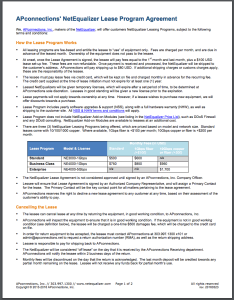
At APconnections, we are proud of our reputation for offering affordable bandwidth shaping solutions. In the summer of 2013, we decided that we could help our customers that need to better align costs with recurring revenue, by offering a Leasing Program.lease

We are happy to announce that we have enhanced our lease offerings in 2016. Our “Standard” lease now comes with a 1Gbps license, and leases for $500 per month. Adding 1Gbps fiber at any of our lease levels just bumps up the price by $100 per month. And for those needing maximum performance, we now also give you access to an Enterprise-class NE4000 with our 5Gbps license and 10Gbps fiber.

If leasing is of interest to you, and you would like to learn more, you can view our Leasing Program agreement here.

Please note that the NetEqualizer Leasing Program is generally available to customers in the United States and Canada. If you are outside of these countries, contact us to see if leasing is available in your area.

contact_us_box-1

Join a Presentation on NetEqualizer at ASCUE in June 2016
Association Supporting Computer Users in Education

We are excited to announce that one of our long-time customers, Hollis Townsend, Director of Technology Support and Operations at Young Harris College, will be talking about his experience with the NetEqualizer in his talk at ASCUE, June 12-16, 2016 in Myrtle Beach, South Carolina.yhc

Young Harris has been using NetEqualizer to solve their network congestion issues since July, 2007. They have upgraded their NetEQ as their network has grown over the years, and currently run an NE3000 with a 1Gbps license.

We are also happy to announce that APconnections, home of the NetEqualizer, will be a Silver Sponsor at the ASCUE Conference. We will be giving away a great door prize – a Fitbit fitness watch!ascue

If you use technology in higher education, you may want to consider attending ASCUE this June. And if you have ever wanted to talk to a colleague about their experience with the NetEqualizer, please join Hollis’ presentation. His presentation is tentatively titled “Shaping Bandwidth – Learning to Love Netflix on Campus”.

ASCUE is the Association Supporting Computer Users in Education and they have been around since 1968. Members hail from all over North America. ASCUE’s mission is to provide opportunities for resource-sharing, networking, and collaboration within an environment that fosters creativity and innovation in the use of technology within higher education.

Click here to learn more about ASCUE or register for the June conference.

contact_us_box-1

Six Ways to Save with Cloud Computing
NetEqualizer Looks to the Clouds

We are continuing our focus on the cloud for NetEqualizer. The NetEqualizer is now cloud ready – as we’ve written about in previous newsletters. There are a lot of benefits to using the cloud in general. Here are just a few:

1) Fully utilized hardware
2) Lower power costs
3) Lower people costs
4) Zero capital costs
5) Resilience without redundancy
6) Lower network costs

The last one, lower network costs, is interesting. Since your business services are in the cloud, you can ditch all of those expensive MPLS links that you use to privately tie your offices to your back-end systems, and replace them with lower-cost commercial Internet links. You do not really need more bandwidth, just better bandwidth performance. The commodity Internet links are likely good enough, but when you move to the Cloud, you will need a smart bandwidth shaper.

Your link to the Internet becomes even more critical when you go the Cloud. But that does not mean bigger and more expensive pipes. Cloud applications are very lean and you do not need a big pipe to support them. You just need to make sure recreational traffic does not cut into your business application traffic.

The NetEqualizer fits perfectly as the bandwidth shaping product in the above infrastructure. Let us know if you have any questions about the cloud-ready NetEqualizer!

contact_us_box-1

Best Of Blog
How to Build Your Own Speed Test Tool

By Art Reisman – CTO – APconnections

Editor’s Note: We often get asked to “prove” the NetEqualizer is making a difference regarding end user experience. The tool description and method outlined in our blog post, can be used to objectively justify the NetEqualizer value. Let us know if you need any help setting it up.

Most speed test sites measure the download speed of a large file from a server to your computer. There are two potential problems with using this metric.

1) ISPs can design their networks so these tests show best case results.
2) Humans are much more sensitive to the load time of interactive sites.

A better test of your perceived speed is how long it takes to load up a new web page…

Photo Of The Month
IMG_1966
Balloon
Have you ever wondered what happens to balloons when they are released into the sky? The remnants of this balloon landed right in front of a staff member on a clear day while hiking Black Star Canyon in Orange County, CA. Balloons like this are actually an environmental disaster as they often end up in oceans and are eaten by sea and wildlife.

Seven Must Know Network Troubleshooting Tips


Screen Shot 2016-04-05 at 10.07.59 AM.png

By Art Reisman

CTO, APconnections
www.netequalizer.com

To get started you’ll need to get ahold of two key software tools: 1) Ping Tool and 2) a Network Scan Tool, both which I describe in more detail below.  And for advanced analysis (experts only), I will then show you how you can use a bandwidth shaper/sniffer if needed.

Ping Tool

Ping is a great tool to determine what your network responsiveness is (in milliseconds), identified by trying to get a response from a typical website. If you do not already know how to use Ping on your device there are hundreds of references to Ping and how to use it.  Simply google “how to use ping ” on  your favorite device or computer to learn how to use it.

For example, I found these instructions for my MAC; and there are similar instructions for Windows, iPhone, Linux, Android, etc.

  1. Open Network Utility (located inside Applications > Utilities).
  2. Click Ping.
  3. Fill out the “Enter the network that you want to ping” field. You can enter the IP address or a web URL. For example, enter http://www.bbc.co.uk/iplayer to test the ping with that website.
  4. Click Ping.

Network Scan Tool

There are a variety of network SCAN tools/apps available for just about any consumer device or computer.  The decent ones will cost a few dollars, but I have never regretted purchasing one.  I use mine often for very common home and business network issues as I will detail in the tips below. Be sure and use the term “network scan tool” when searching, so you do not get confusing results about unrelated document scanning tools.

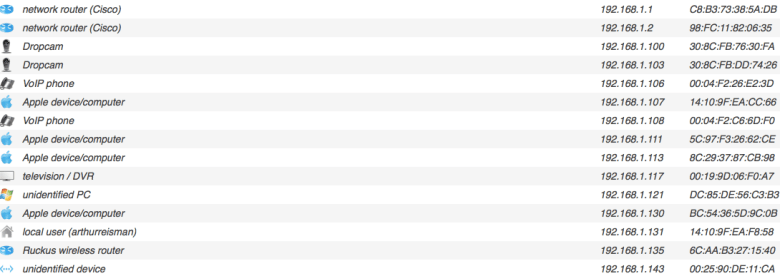
Once you get your scan tool installed, test it out by selecting Network Scan. Here is the output from my MAC scan tool.  I will be referencing this output later in the article.

Network Scan Output
Screen Shot 2016-04-05 at 5.33.19 AM


Tip #1: Using Ping to see if you are really connected to your Network

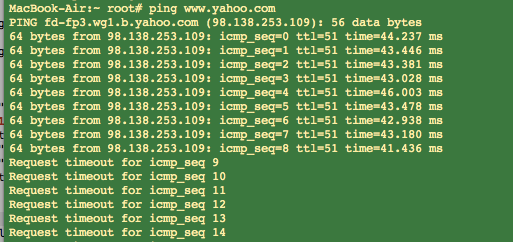
I like to open a window on my laptop and keep Ping going all day, it looks like this:

yahoo.com Ping  Output

Screen Shot 2016-04-05 at 8.25.10 AM

Amazingly, seemingly on cue, I lost connectivity to my Internet while I was running the tool for the screen capture above, and no, it was not planned or contrived.  I kicked off my ping by contacting http://www.yahoo.com (type in “ping http://www.yahoo.com”), a public website. And you can see that my round-trip time was around 40 milliseconds before it went dead. Any ping results under 100 milliseconds are normal.


Tip #2: How to Deal with Slow Ping Times

In the case above, my Internet Connection just went dead; it came back a minute or so later, and was most likely not related to anything local on my network.

If you start to see missed pings or slow Ping Times above 100 milliseconds, it is most likely due to congestion on your network.  To improve your response times, try turning off other devices/applications and see if that helps.  Even your TV video can suck down a good chunk of bandwidth.

Note: Always test two public websites with a ping before jumping to any conclusions. It is not likely but occasionally a big site like Yahoo will have sporadic response times.

Note: If you have a satellite link, slow and missed pings are normal just a fact-of-life.


Tip #3: If you can’t ping a public site, try pinging your local Wireless Router

To ping your local router all you need to find is the IP address of your router. And on almost all networks you can guess it quite easily by looking up the IP address of your computer, and then replacing the last number with a 1.

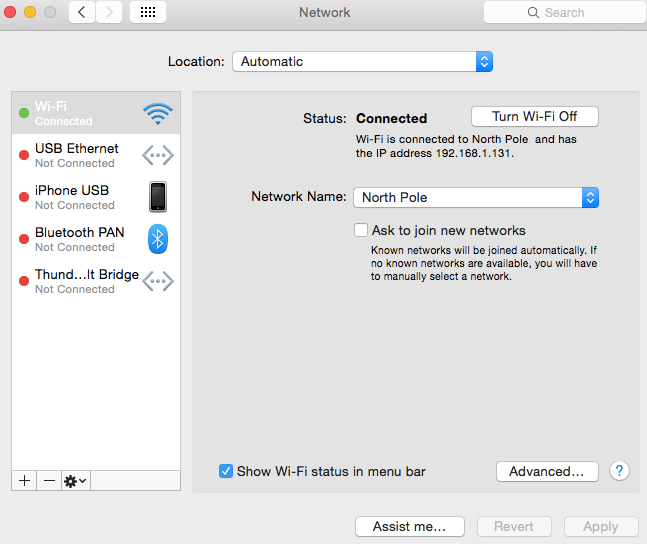
For example, on my computer I click on my little apple icon, then System Preferences, and then Networking, and I get this screen.  You can see in the Status are it tells me that my IP address is 192.168.1.131.

Finding my IP address output

Screen Shot 2016-04-05 at 10.52.14 AM

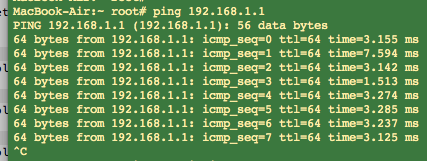
The trick to finding your router’s IP address is to replace the last number of any IP address on your network with a 1.  So in my case, I start with my IP address of 192.168.1.131, and I swap the 131 with 1.  I then ping using 192.168.1.1 as my argument, by typing in “ping 192.168.1.1”. A  ping to my router looks like this:

Router Ping  Output

Screen Shot 2016-04-05 at 10.56.30 AM

In the case above I was able to ping my local router and get a response. So what does this tell me?  If I can ping my local wireless router but I can’t ping Yahoo or any other public site, most likely the problem is with my Internet Provider.  To rule out problems with your wireless router or cables, I recommend that you re-boot your wireless router and check the cables coming into it as a next step.

In one case of failure, I actually saw a tree limb on the cable coming from the utility pole to the house. When I called my Internet Provider, I was able to relay this information, which saved a good bit of time in resolving issue.


Tip  #4: Look for IP loops

Last week I was getting an error message when I powered up my laptop, saying that some other device had my IP address, and I determined that I was unable to attach to the wireless router. WHAT a strange message!  Fortunately, with my scan tool I can see all the other devices on my network. And although I do not know exactly how I got into this situation, I was quickly able to find the device with the duplicate IP address and powercycle it. This resolved the problem in this case.


Tip #5: Look for Rogue Devices

If you never give out the security code to your wireless router, you should not have any unwanted visitors on your network.  To be certain, I again turn to the scan tool.  From my scan output, in the image above (titled “Network Scan Output” near the top of this post), you can see that there are about 15 devices attached to my network. I can account for all of them so for now I have no intruders.


Tip #6: Maybe it is just Mischief

There was a time when I left my wireless router wide open as I live in a fairly rural neighborhood and was just being complacent. I was surprised to see that one of my neighbors was on my access point, but which one?

I did some profiling.  Neighbor to my west is a judge with his own network, probably not him.  Across the street, a retired librarian, so probably not her.  That left the Neighbor to my Southwest, kitty corner, a house with all kinds of extended family coming and going, and no network router of their own, at least that I could detect. I had my suspect. And I could also assume they never suspected I was aware of them.

The proper thing to do would have been to block them and lock my wireless router. But since I wanted to have a little fun, I plugged in my bandwidth controller and set their bandwidth down to a fraction of a Megabit.  This had the effect of making their connection painfully dreadfully slow, almost unusable but with a ray of hope.  After a week, he went away and then I completely blocked him (just in case he decided to come back!).


Tip #7: Advanced Analysis with a Bandwidth Shaper/Sniffer

If the Ping tool and the Scan tool don’t shed any light on an issue, the next step is to use a more advanced Packet Sniffer. Usually this requires a separate piece of equipment that you insert into your network between your router and network users. I use my NetEqualizer because I have several of them laying around the house.

Often times the problem with your network is some rogue application consuming all of the resources. This can be in the form of consuming total bandwidth, or it could also be seen as overwhelming your wireless router with packets (there are many viruses designed to do just this).

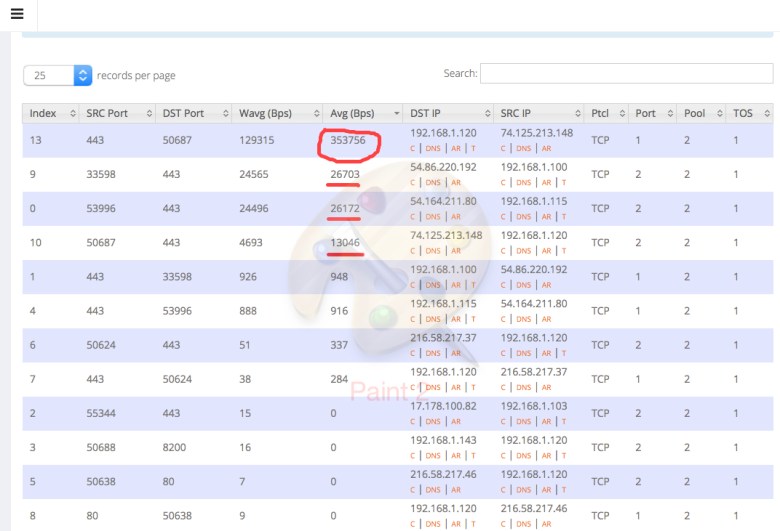
The image below is from a live snapshot depicting bandwidth utilization on a business network. Screen Shot 2016-01-27 at 12.26.49 PM

That top number, circled in red, is a YouTube video, and it is consuming about 3 megabits of bandwidth. Directly underneath that are a couple of cloud service applications from Amazon, and they are consuming 1/10 of what the YouTube video demolishes. On some lower cost Internet links one YouTube can make the service unusable to other applications.

With my sniffer I can also see total packets consumed by a device, which can be a problem on many networks if somebody opens an email with a virus. Without a sniffer it is very hard to track down the culprit.

I hope these tips help you to troubleshoot your network.  Please let us know if you have any questions or tips that you would like to contribute.

The Real Story Behind Your Internet Speed


ixp

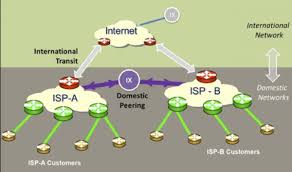
When your ISP  claims the Internet Speed to your home  is 100 megabits, they are most likely referring to the speed of the link between your home and their Network Operations center ( depicted by the Green lines in the diagram above) . Typically you do not share this link anybody else , hence you truly do have a dedicated 100 megabit link as per their claims.  The caveat is this speed can only be reliably attained  when you are accessing data from their Network Operations Center or from another user also hosted by your ISP .


Now, notice the little Purple circle called (IX) in the diagram. This is called an Internet exchange point. It is a choke point where ISPs exchange data to and from each each other. For example, if you are accessing a Web site hosted in France , most likely you will go through one or more IX points to get to your data.  Unless you are in France   of course , but our assumption is that you are not in France .

Your ISP hates it when you go through their exchange point to access a remote server for a couple of reasons.


  1. They have to pay money if they originate more data, from their network than the other ISPs using the exchange point.
  2. Exchange points are bottle necks with limited capacity, and if too many users go through it at the same time, their speeds will degrade. For example, if you try to download a big file from the server in France while other users from your ISP are going out to other countries, the speed of your download cannot be guaranteed.  And most likely will not be any where near your 100 megabit promise during peak usage hours.

So why should you care about Internet Exchange Points and how does that impact your Internet speed ?

The answer is it depends on how you use the Internet.

ISPs have gotten very smart , and keep copies of most content local in their NOC or within their Network.The average consumer is not likely to suffer degradation if they stick to commonly used content.  Netflix is a good example. There is no one big Netflix server in Cyber space, there are  in fact, many copies of Netflix servers , and one or more are located at your local ISP.  So if you use the Internet to watch popular content from Netflix, then you will likely get your advertised  Internet speed.

If you are an old timer like me, you might want to explore avant-garde content not available from Netflix, you will likely run into some issues with streaming video. For me with my ISP it is hit or miss. During their off peak hours I usually have no trouble, but many times I am unable to get reliable video from distant servers during peak hours.

The next time that you get a promotional advertisement from an ISP touting their service, ask the sales rep about the throughput you will get going through their exchange server on your way to France and see what they say :)

References IXP toolkit.org

Network Redundancy Anxiety Needs a Re-direct


When vandals sliced a fiber-optic cable in the Arizona desert last month, they did more than time-warp thousands of people back to an era before computers, credit cards or even phones. They exposed a glaring vulnerability in the U.S. Internet infrastructure: no backup systems in many places.

A few years ago I wrote an article about the top five causes of disruption of internet service.  Our number two cause on our list at the time was

2) Failed Link to Provider

And our number one cause was congestion.

1) Congestion

A few things have changed since 2010,  first off Congestion is on the decline, and although still a concern it is less of a problem now that bandwidth prices have fallen and most businesses have larger circuits.

In our opinion, based on our experience, failed links from your provider are now  the number one threat as pointed out in this Huffington Post Article .  (The first paragraph of this  post is an excerpt from that article)   Not only are provider outages common, they can also take days to remedy in some cases.

As a network equipment OEM, the biggest concern with respect to failure that we hear of our customers are the components in their Network.  Routers, Firewalls, Switches , Bandwidth shapers, customers want redundancy built into these devices. That’s not to say these devices are flawless , but in general if they are up and running in your utility closet, they rarely spontaneously fail.

On the other hand…

The link into your building and everything upstream relies on   several, to perhaps thousands of miles of buried cable , usually buried along a road right of ways. These cables can be violated by  any idiot with a back ho, or a lightning strike on a nearby power pole.

My Business class internet is up most of the time but it does go out for a few hours at least twice a year. I have alternatives so it is a minor hassle to switch over.

Moral of the story: The next time you ask  about reliability on an equipment component in your network.  I suggest you also  ask the same question of your upstream provider.

Encryption is Not Rocket Science


The recent Apple iPhone versus the FBI case being tried in the court of public opinion is an interesting example of the fact that encryption, and the use of encryption, can be created by any individual or any business to protect their data.    All those spy movies where computers easily crack password codes are just plain fantasy.  A well-engineered encrypted password cannot be broken. Unless, of course, the person that created the encryption is forced to put in a back door for the FBI.

The point is, if I really wanted to encrypt something from all entities, I would not rely on a commercial encryption version provided by Apple or my browser, because, as we have seen, the FBI will use whatever muscle they have to make sure that they can get in.

When you are done with the the encryption exercise  below, you can go ahead and tattoo your bank password on your face without a worry that anybody would ever figure it out.

Let’s start with a typical password that you  might use for a bank account “alfred!1”

First we’ll take the alphanumeric value of each letter such that a=01, l=12, f=06, r=18, e=05 d=04. And for the 1 we can use first letter of the alphabet so that 1=A, 2=B etc. So you could just make your password 011206180504!A, which is the numeric representation of alfred!1 (note I just left the “!” alone)

Now lets put some meaningless garbage on the front of the password. Two meaningless letters, such as CD.

Now lets add 2 to the original numbers in the password, so now we get

CD031408200706!A

Now take the day of the month you were born in and add it to the first number. 03+21 = 24, I was born June 21

So now we have CF241408200706!A

Each time you apply a step to the password encryption the more difficult cracking it becomes.  I did not take this one far enough to make it impregnable to a sophisticated hacker,  but hopefully you see the point. Just keep applying  rules to your password changing it at each step. The more steps you apply, the more mathematically safe your password encryption becomes.

The advantage of creating your own encryption scheme is that all you need to do is remember how to unwind these steps to recover your password, you do not need to remember your actual password, so any time the bank forces you to change your password go ahead and change it, and write it down on your hand, or face, or all over your refrigerator. As long as you remember your encoding method, you can keep your passwords in plain site.

Believe it or not I actually write my encrypted pin codes on my ATM cards!

The 1/4 Million DDoS Extortion


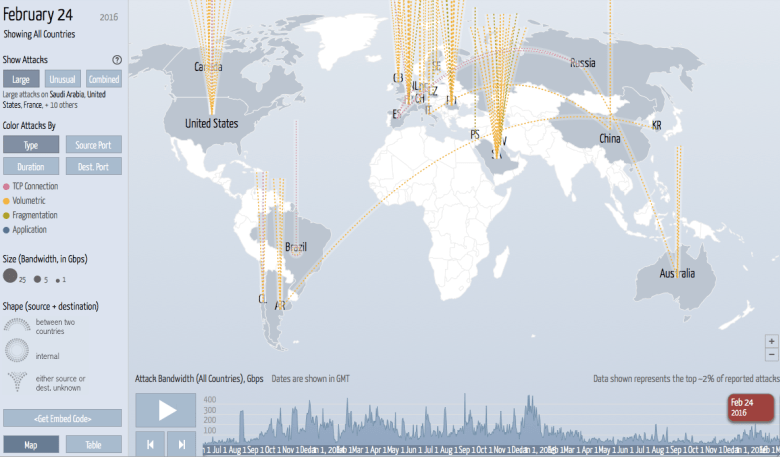
In Christian Sager’s June 2014 article “Why do people perform DDoS attacks“, he does an excellent job in outlining the possible motivations for DDoS attackers. I especially like the DDoS attack map site he references. Here is a snapshot from today’s attacks
DDoS attacks around the world

Christian covers a range of excellent points behind DDoS attacks, and yes he does address direct monitory extortion in the following excerpt.

Extortion:
Feedly’s claim that their DDoS attack was the result of extortionists isn’t that unbelievable. There have been several cases where a DDoS is followed by a ransom note. Once the site is down, the attackers demand money in exchange for stopping their attacks. Some even make the threat before the attack. In both cases their rate of success is usually low.

A DDoS attack with a ransom note is a bit crude when compared to the much more insidious indirect extortion going in the world of DDoS attacks.  One half Million Dollars is the base price for a firewall capable of mitigating a DDoS attack on a 10 gig network  (with limited success at that).  Vendors are selling thousands of them  year.  Let me state, I do not have evidence of any link between the sale of a Firewall product  to a deliberate DDoS attack, but I wonder why the DDoS attacks are so widespread and cannot help but to speculate. With equipment sales in infrastructure struggling in a flat IT infrastructure economy. The prevalence of wide spread DDoS attacks is picking up.

How to Make Your Own Speed Test Tool


Most speed test sites measure the download speed of a large file from a server to your computer. There are two potential problems with using this metric.

  1. ISPs can design their networks so these tests show best case results
  2. Humans are much more sensitive to the load time of interactive sites.

A better test of your perceived speed is how long it takes to load up a new web page.


If you have a MAC/ Linux server in your house (or windows with Perl installed)  you can use this simple tool to measure and chart  the time it takes to load a random Web page.

The code below is a Perl script which samples the CNN home page every 5 seconds and records the time it takes to load. The data is stored away in a file called /tmp/xlog.

#! /usr/bin/perl -w
$julian=`date +\”%s\”`;
print $julian;
$verbose=0;
open ($LOGF , ‘>’, “/tmp/xlog”);
for ($i=0; $i < 60 ; $i=$i+1)
{
sleep 5;
$julian=`date +\”%s\”`;
print $julian;
system(“{ time -p curl -o output.txt http://www.cnn.com 2>/dev/null; } 2> x”);
system ( “cat x | grep real > x2″);
$line= `cat x2`;
chomp($line);
@specials=split(” “,$line);
print “$specials[0] $specials[1] “;
print $LOGF “$specials[1] , $julian”;
}


I then took the raw data from my file and charted it using google docs.

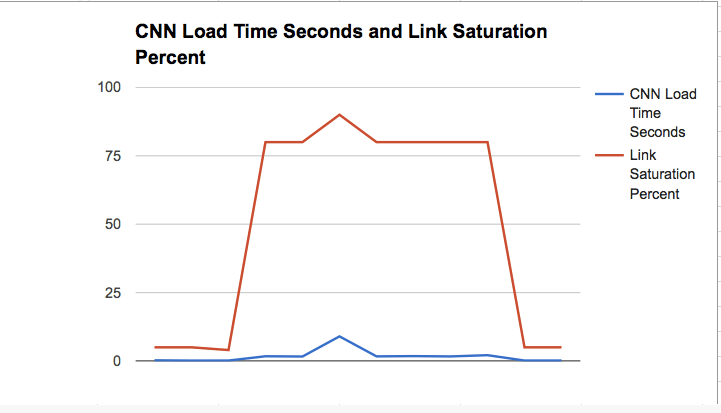
Note: I had to use another tool to get the link saturation , and match that up in the chart separately,  but even if you don’t have your raw link saturation metrics available, you can see the actual load time it takes to bring up the CNN page using the data generated by the script below.

Notice, my load time was pretty quick at first, but then I started a big download from Knoppix and with my link saturated you can see this severely degraded the CNN load time , peaking out at 9 seconds.


chart

Hacker Sting Operation


I was just reading an article about a cyber security company that advocates hacker containment. The basic premise of the article is that hackers are going to get into your system and you can’t block them.  At some point they give specific advice that once a hacker is beyond your firewall,  you should lead them around a bit and limit the damage.  But, to be completely honest, I did not read the article far enough to learn exactly what they were proposing as a solution.  Perhaps they are right, or perhaps they have a few screws loose? The point is, their article sparked a novel idea. Why not sting the hackers?  I suspect US counter intelligence is doing this already, but there is no reason why it can’t be done at a corporate level.

Let’s assume they are correct and you can’t block hackers from getting in.  Instead of playing defense, why not play a little offense? Give the hackers a money pack with an exploding ink bomb.

What would this ink stained cash look like in cyber space?

How about a data base of fake financial records, that you carefully protect, but leave a few security holes. Then when you see anybody accessing these accounts, you go after them and prosecute the perpetrators when they try to use the accounts. Suck them into a face-to-face meeting to pick up gold bullion and arrest them, just like with any police sting. This might not stop the hacker, but it would have the effect of making their wares useless on the open market. Think about the drug dealer who rips off his customers, eventually somebody rats them out? Or kills them?

The idea would be instead of spending billions of dollars on security, spend a billion or two on laying traps for hackers that will help expose them and their customers.  If you hide enough ink bombs in your records, it might turn the tables a bit!

NetEqualizer News: February 2016


We hope you enjoy this month’s NetEqualizer Newsletter. Highlights include discussions on Cloud Computing, the new VM release, and updates on Software Release 8.4.

February 2016
NetEqualizer-VM is Ready, QoS for your Cloud!
Greetings! Enjoy another issue of NetEqualizer News.

February is off to a snowy start in Colorado this year, with a major snowstorm on February 1st dumping 16+ inches of snow in Boulder! While we were snowed in, I had time to reflect and think about where bandwidth shaping is headed, and how we are well-positioned for the industry transition to Cloud Computing. In this month’s newsletter you can read how the NetEqualizer is “Cloud Ready”.0fad184f-5ea1-44c3-ad71-1093fd99f808

We are now ready with our first VM release (NetEqualizer-VM); you can read all about it below. And finally, we share more news about our 8.4 Release – Enhanced Pools & Other GUI Features.
twitter

And remember we are now on Twitter! You can now follow us @NetEqualizer.

We love it when we hear back from you – so if you have a story you would like to share with us of how we have helped you, let us know. Email me directly at art@apconnections.net. I would love to hear from you!

– Art Reisman (CTO)

NetEqualizer-VM is Ready!
NetEqualizer-VM Release Ready for Networks <= 100 Mbps
970ca704-540e-45c1-8c3e-78cb17114e61
We are excited to announce that our VM release is now ready! If you are already running virtual machines in your data center, this may be a good fit for you.

The first release is certified for VM systems for up to 100 megabits of throughput.

Base pricing will run at $3,500 USD per year. However, for a limited time, we are running a special pre-order price of $2,500 USD per year.

Please note: The first year is due prior to delivery of the software. We offer a 30 day trial with a $500 USD non-refundable support charge.

Your VM server will need to meet a minimum specification to run the NetEqualizer shaping solution. We have detailed specifications for any VM system – contact us for details!
contact_us_box-1

Release 8.4 Update
Enhanced Pools + GUI Redesign

In previous months’ newsletters we talked about changes coming to the regular NetEqualizer GUI. Over the next couple of months, we’ll highlight those changes here.

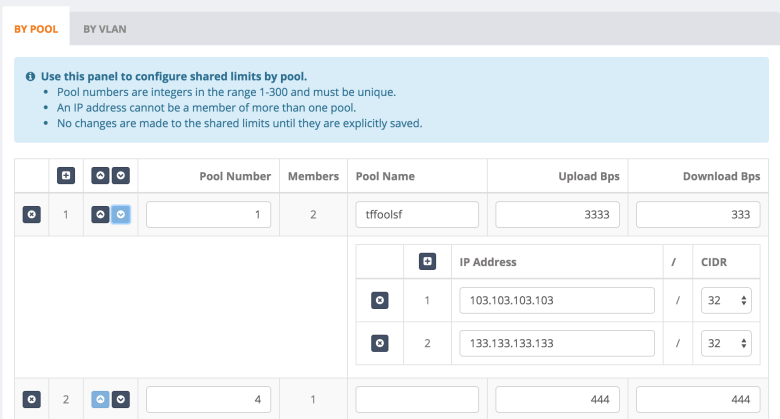
One of the changes we are very excited about is the ability to manage Pools on the fly, and also the ability to name them! See the screenshot below:

mpxGG3D

One of the best parts of this screen is that you can manage all Pools and all Pool Members at once. For example, see Pool 1 expanded to show the two Pool Members. You can also change the limits for the Pool, add new Pools, and delete Pools that you no longer need.

We are also enhancing the new user interface with four primary menu options:

406caab4-d245-4bda-bb82-4770594bf969

This will help guide first-time users through the process of using NetEqualizer, and will also help separate the functionality out into to main usage categories.

Check back next month for an update on more exciting changes planned for 8.4!

Our time frame for General Acceptance of this release is April/May of 2016.

As with all software releases, the 8.4 Release will be free to all customers with valid NetEqualizer Software and Support (NSS).

contact_us_box-1

Next Generation Bandwidth Control
NetEqualizer is Cloud Ready

We received a call today from one of the Largest Tier 1 providers in the world. The salesperson on the other end was lamenting about his inability to sell cloud services to his customers. His service offerings were hot, but the customers’ Internet connections were not. Until his customers resolve their congestion problems, they were in a holding pattern for new cloud services.

As a brief aside, here is a list of what a Next Generation Bandwidth Controller can do:
1. Next Generation Bandwidth Controllers must be able to mitigate traffic flows originating from the Internet such that important Cloud Applications get priority.
2. Next Generation Bandwidth Controllers must NOT rely on Layer 7 DPI technology to identify traffic (too much encryption and tunneling today for this to be viable).
3. Next Generation Bandwidth Controllers must hit a price range of $5k to $10k USD for medium to large businesses.
4. Next Generation Bandwidth Controllers must not require babysitting and adjustments from the IT staff to remain effective.
5. Next Generation Bandwidth Controller should adopt a Heuristics-based decision model (like the one used in the NetEqualizer).

As for those businesses mentioned by the sales representative, when they moved to the cloud, many of them had run into bottlenecks. The bottlenecks were due to their iOS updates and recreational “crap” killing the cloud application traffic on their shared Internet trunk.

Their original assumption was they could use the QoS on their routers to mitigate traffic. After all, that worked great when all they had between them and their remote business logic was a nailed-up MPLS network. Because it was a private corporate link, they had QoS devices on both ends of the link and no problems with recreational congestion.

Moving to the Cloud was a wake up call! Think about it, when you go to the cloud you only control one end of the link. This means that your router-based QoS is no longer effective, and incoming traffic will crush you if you do not do something different.BT_logo

The happy ending is that we were able to help our friend at BT telecom, by mitigating his customers’ bottlenecks. Contact us if you are interested in more details.

contact_us_box-1

Best Of Blog

Capacity Planning for Cloud Applications
By Art Reisman – CTO – APconnections

The main factors to consider when capacity planning your Internet Link for cloud applications are:

1) How much bandwidth do your cloud applications actually need?

Typical cloud applications require about 1/2 of a megabit or less. There are exceptions to this rule, but for the most part a good cloud application design does not involve large transfers of data. QuickBooks, Salesforce, Gmail, and just about any cloud-based data base will be under the 1/2 megabit guideline. The chart below really brings to light the difference between your typical, interactive Cloud Application and the types of applications that will really eat up your data link.

Photo Of The Month
grasshopper
Grasshopper
This closeup of a local grasshopper was taken by a staff member while in Kansas, a state in the central United States. We hope this picture doesn’t bug you.